

Architecture
The design goals behind Sahi, and how its architecture meets them.
User Goals
Section titled “User Goals”Testing has two parts: the exploratory work that needs a tester’s judgment, and the repetitive checking and rechecking of what already works. Sahi automates the repetitive part, so testers spend their time where judgment matters. That sets three goals:
- Testers can automate without being developers. Building and maintaining a test shouldn’t need programming skills. Code should be an option for the cases that need it, not a requirement.
- Tests describe the business flow, not the plumbing. A test should hold only the steps and checks that matter to the business. Waiting for pages, handling frames and popups, and finding elements should be the tool’s job.
- Running and reporting at scale are part of the tool. Running large suites, in parallel and across machines, and reporting the results shouldn’t need a separate framework built around the tool.
Technical Goals
Section titled “Technical Goals”Handling New Browsers and Operating Systems
Section titled “Handling New Browsers and Operating Systems”Testing web applications on browsers can be painful. There are a multitude of browsers on different operating systems and each one has its own quirks. The tool should take care of these differences. Browsers are also available on mobile devices, but mobile devices may not be able to install and run full testing tools.
So the tool should:
- Work the same way on any browser and operating system
- Work on mobile browsers without installing anything on the device
- Support new browsers and new browser versions without changes to tests, and with minimal changes to the tool
Object Identification
Section titled “Object Identification”Existing methodologies of using IDs, XPaths and CSS Selectors have proven to be woefully brittle and complex. When a test breaks, the first suspect is normally the test and how it identifies elements rather than the actual application. This adds a lot of waste into the testing cycle.
So the tool should:
- Identify elements in an easy way, and record them automatically as the user works with the application
- Avoid libraries like jQuery, which the application under test may also use and conflict with
- Use identifiers that relate to what the user sees on screen
- Use identifiers that work across browsers
Event Simulation
Section titled “Event Simulation”- Event simulation should simulate the end user actions correctly across browsers.
- Should not need browser to be in focus, to allow parallel test runs and reduce brittleness of tests
- Should not force users to do implicit actions like scrolling into view.
Scripting
Section titled “Scripting”Most tests shouldn’t need code. When a test does need custom logic, the scripting language should be one the team already knows.
- JavaScript is common to all web projects no matter what the back end technology may be. Using JavaScript as the scripting language makes sure that expertise is always available in a web team.
- Reporting should be taken care of automatically
- Scripting should allow easy reuse of existing libraries to do non-browser tasks
- Tests should be version-controllable and easy to compare
- Tests should break minimally when user interface changes
- Suites should allow being triggered from build and Continuous Integration systems
Architecture
Section titled “Architecture”Sahi uses a proxy to inject JavaScript into web pages.
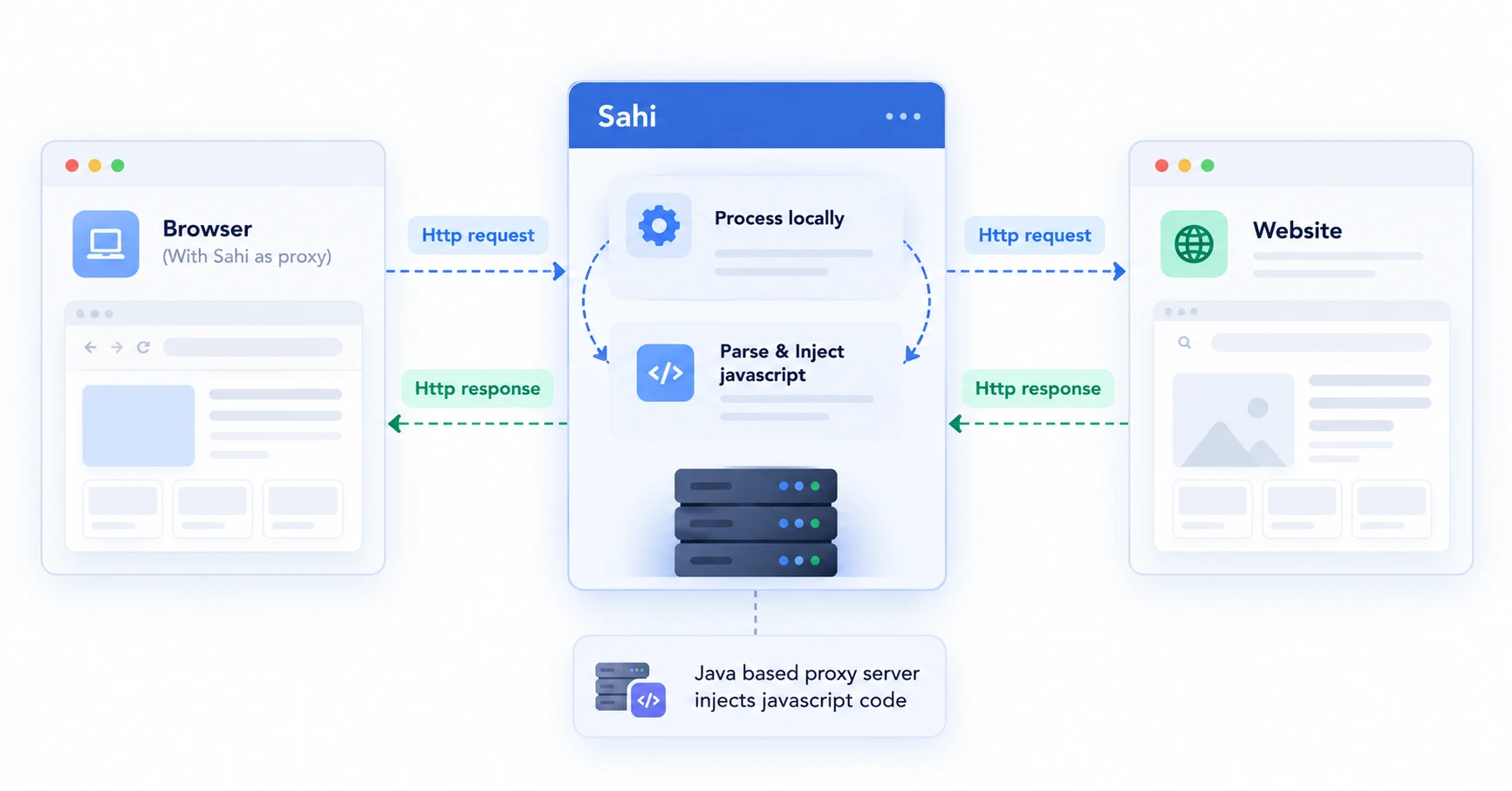
The injected JavaScript
- adds event handlers for recording
- adds Sahi’s built-in functions for event simulation
- mocks some window dialogs like alert, prompt, confirm, print so that test runs aren’t interrupted