

Sahi Pro Desktop Engine
Sahi Pro Desktop Engine adds automation of Windows desktop and Java applications to Sahi Pro.
Enterprise business processes often run through Windows desktop and Java applications as well as the web. Desktop Engine automates them with the same tests, suites and reports you use for the web.
Features
Section titled “Features”- Automation of Windows desktop applications: Win32, WPF, WinForms, .NET, Silverlight, XBAP, Universal Windows Platform (UWP).
- Automation of Java applications (Swing, AWT), Java applets, Java Web Start applications, Oracle Forms and applets, on any operating system.
- Use web and desktop applications in the same test
- Run multiple tests in parallel
- Distribute the tests in a suite across multiple machines
License
Section titled “License”Desktop Engine needs its own license, separate from Sahi Pro. For a 14-day free trial, book a demo and we’ll set up your trial, or email sales@sahipro.com.
Prerequisites
Section titled “Prerequisites”-
Java 1.8 or above is needed for running Sahi.
-
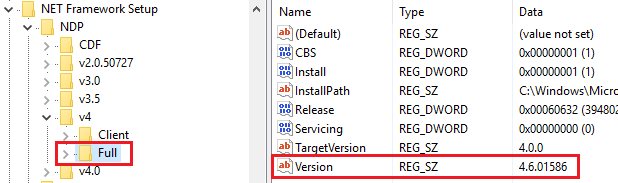
Microsoft .NET framework v4.5+ required for Windows Desktop Automation. To check the installed version of Microsoft .NET framework:
- On the Start menu, choose Run.
- In the Open box, enter
regedit.exe - In the Registry Editor, open the following subkey:
HKEY_LOCAL_MACHINE\SOFTWARE\Microsoft\NET Framework Setup\NDP\v4\Full
Quick Start
Section titled “Quick Start”- Automating Windows Desktop Applications
- Automating Java GUI Applications
- Automating Java Web Start Applications
- Automating Java Applets
Sahi Pro Desktop Engine Runner
Section titled “Sahi Pro Desktop Engine Runner”Sahi Pro Desktop Engine can also be installed over Sahi Pro Runner, which runs tests but doesn’t author them.
Version Information
Section titled “Version Information”Sahi Pro Desktop Engine was introduced in Sahi Pro 7.0.0.