

Sahi License Hub
Sahi License Hub is where your organization views its Sahi Pro product keys, manages leases and MAC addresses, and controls who can get a license.
Every organization that buys Sahi Pro gets a Sahi License Hub login, where admins see all their product keys and share them with the team. If you haven’t received yours, email sales@sahipro.com.
Anyone who installs Sahi Pro enters a product key the first time they start it. They get the key from their admin, who shares it from License Hub. Sahi Pro then checks the key with License Hub: a user license is matched to the machine’s MAC address, and a concurrent license takes one of the available leases.
Product keys can be of two types: User or Concurrent.
- User license: tied to one machine, with a unique key for each user. It can’t run Sahi Pro Runner.
- Concurrent license: not tied to a machine, but only a fixed number of people can use it at the same time. A team usually shares one key, and each concurrent license includes two free Sahi Pro Runner licenses.
Manage Product Keys
Section titled “Manage Product Keys”When logged into the License Hub, the admin can see
- All product keys (future, current and expired keys)
- Leases against each product key
- Usage report for each product key
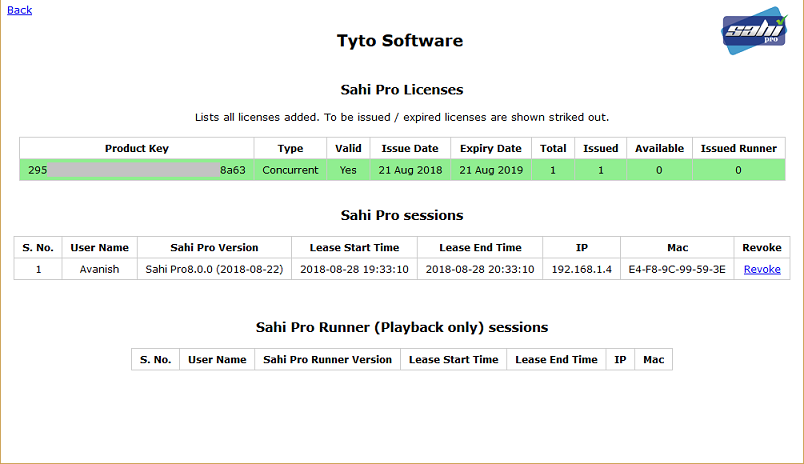
For concurrent licenses, the admin can see all leases and revoke any lease if needed (in case any machine has crashed).
For user licenses, the admin can bind it to another MAC address if the end user’s machine has changed.
Access Sahi License Hub Web Interface
Section titled “Access Sahi License Hub Web Interface”-
Open Sahi License Hub.
You will need a registered email and password to sign in to Sahi License Hub. If you do not have any registered email or password yet, you can contact us at sales@sahipro.com for any query related to Sahi License Hub.
-
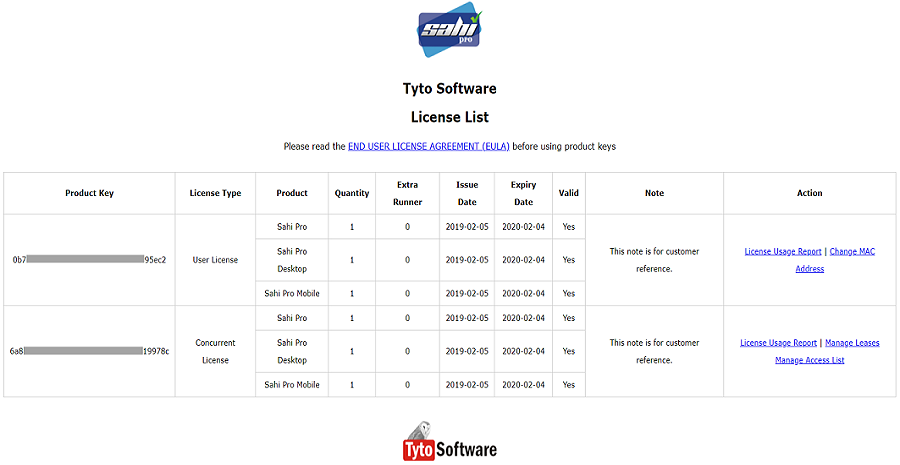
After a successful login user will get a list of licenses with all its details.
-
A user can perform the following actions: Change MAC Address, Manage Leases, License Usage Report or Manage Access List.
Change MAC Address
Section titled “Change MAC Address”For User Licenses, a user’s registered MAC address can be changed.
To check the system’s MAC address from the command line:
- Open a command prompt and cd to
Sahi/userdata/bin(or click on the “Bin” link on the Sahi Dashboard). - Run
license_util.batorlicense_util.shto see the MAC address.
Now you can use this MAC address in Sahi License Hub.
Manage Leases
Section titled “Manage Leases”This link will bring up a page that lists all the Product Keys.
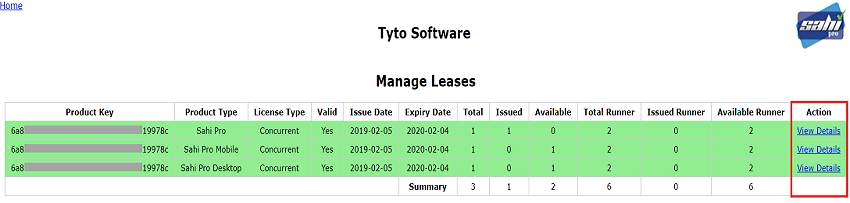
To view Lease details, click on View Details under Action column.
View License Usage Reports
Section titled “View License Usage Reports”This shows the Sahi Pro License Usage Reports in graphical and tabular format.
Graphical Representation
Section titled “Graphical Representation”-
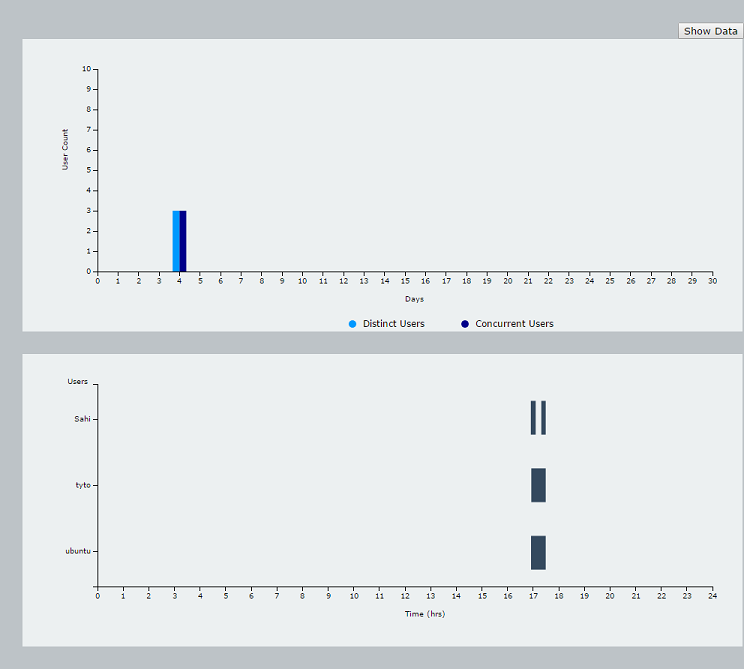
The first graph shows the monthly usage of licenses as per the selected month. Month can be selected from Date Picker or clicking on the month shown in the left panel. By default, it displays reports for the current date.
-
DistinctandConcurrentUsers:Suppose users A & B worked in the morning and users C, D, & E worked in the afternoon. So total distinct users are 5. But maximum of 3 users have concurrently used licenses, so total concurrent users are 3. This will help you understand your usage pattern and plan how many licenses to buy.
Light Blue colored bar: Displays distinct users count. Dark Blue colored bar: Displays concurrent users count.
-
The second graph shows the daily usage of license data as per the selected date. Date can be selected from Date Picker or clicking on the Light/Dark blue colored bar shown in the first graph.
Show Data
Section titled “Show Data”-
This shows the Sahi Pro Usage and Sahi Pro License Denied List in tabular format.
-
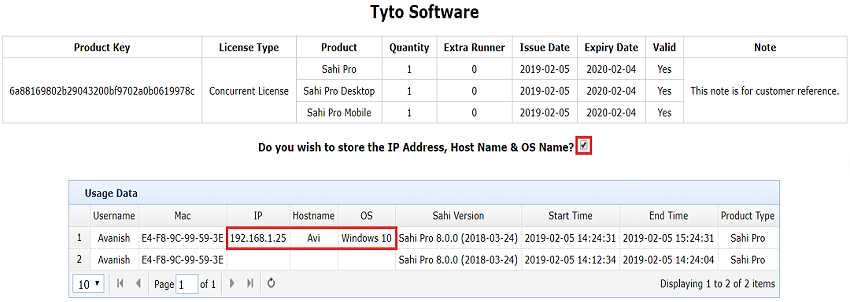
Sahi Pro Usage List: This will show the list of Sahi Pro users who got a license from Sahi License Hub successfully.
-
Sahi Pro License Denied List: This will show the list of Sahi Pro users who were unable to get a license from Sahi License Hub.
-
The image below shows the list of Sahi Pro users who got a license from Sahi License Hub successfully.
-
Possible errors while getting a license from Sahi License Hub:
4001 - Invalid product key.4002 - User is not allowed to access product key.4003 - Issued product key will start from future dates.4004 - Product Key Expired.4005 - Product key is not issued for all the Sahi products.4006 - Please use product key from registered mac address.4008 - Could not obtain lease. All leases are issued.4009 - User license can not use Sahi Pro Runner.4010 - Time difference between the License Hub and the System is more than the allowed time difference. -
Sahi Pro Usage List and Sahi Pro License Denied List can be downloaded in CSV format by clicking on
Download CSVlink.
Manage Access List
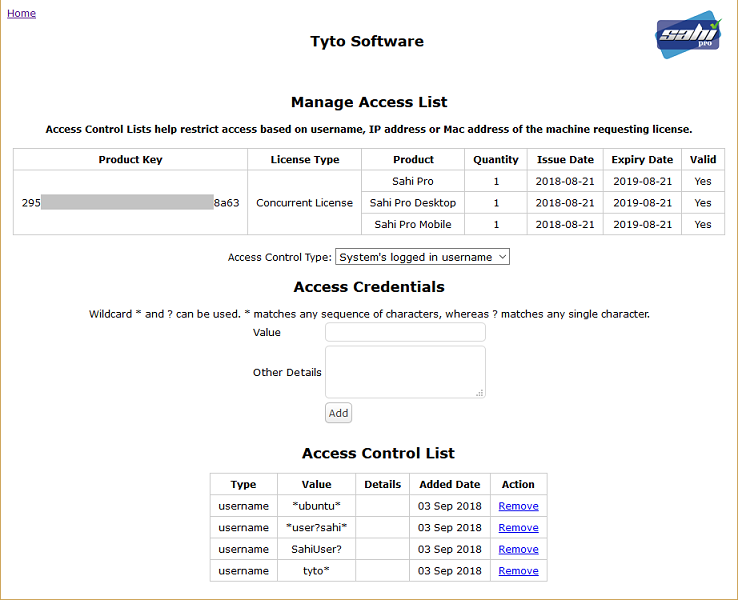
Section titled “Manage Access List”Access Control Lists help restrict access based on username, IP address or Mac address of the machine requesting license.
- Sahi Pro users who are added in the
Access Control Listcan only access the Sahi License Hub and get a license. - Adding Sahi Pro users to access list:
-
Set Access Type: Select either
noneorSystem's logged in usernameorIP AddressorMAC Address.none: No access type is set. Everyone will be allowed to get a license.System's logged in username: Username of the logged in system where Sahi Pro is installed.IP Address: IP Address of the logged in system where Sahi Pro is installed.MAC Address: MAC Address of the logged in system where Sahi Pro is installed.
-
Access Credentials: Set the value based on the Access Type selected above (Example:
System's logged in username:sahi,IP Address:192.168.1.1,MAC Address:00-0C-29-CC-11-10)NOTE: Access Credentials value can be a regex pattern also.
Wildcard * and ? can be used. * matches any sequence of characters, whereas ? matches any single character.
Example 1: If the Access Type is
IP Addressand Access Value is192.168.1.*Then all the Sahi Pro users whoseIP Addressis from192.168.1.0to192.168.1.255can access Sahi License Hub and get the license.Example 2: If the Access Type is
IP Addressand Access Value is192.168.1.?Then all the Sahi Pro users whoseIP Addressis from192.168.1.0to192.168.1.9can access Sahi License Hub and get the license. -
Access Control List: Lists all the added Sahi Pro users based on the selected Access type.
-
Remove: Click to remove the access for that particular Sahi Pro user.
Version Information
Section titled “Version Information”Sahi License Hub was introduced in Sahi Pro 8.0.0. Sahi Pro 8.0.0 and later versions work only with licenses from Sahi License Hub.