

Screenshot Issues in Mac OS
Incorrect screen shot captured in Mac operating system
Section titled “Incorrect screen shot captured in Mac operating system”Symptom: Screen shot captured by Sahi shows the Mac desktop instead of the application screen.
Cause: Sahi uses Java runtime for capturing the screen shot. If Java runtime does not have access to screen recording on Mac, Sahi will be unable to capture correct screen shot.
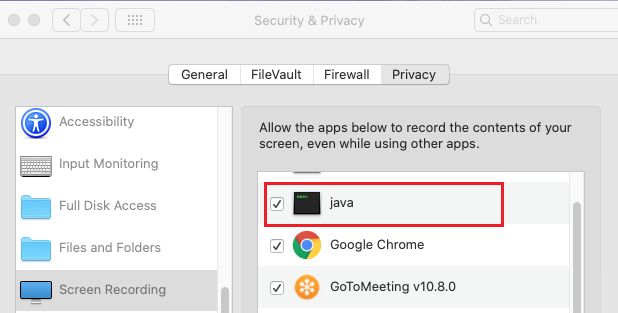
Resolution: Allow Java runtime to record your screen as follows:
- On your Mac, choose Apple menu > System Preferences, click Security & Privacy, then click Privacy.
- Select Screen Recording.
- Select the tickbox next to Java to allow it to record your screen.
Incorrect screen shot captured in Firefox browser on Mac operating system
Section titled “Incorrect screen shot captured in Firefox browser on Mac operating system”Symptom: In Firefox browser, screen shot captured by Sahi contains partial part of Mac desktop instead of the application screen.
Resolution: Perform following steps to configure Firefox profile :
- Append following line to
<Sahi>/config/ff_profile_template/pref.jsfile:
user_pref("gfx.color_management.mode", 0); - Close Sahi.
- Delete
<Sahi>/userdata/browser/ff/profilefolder. - Start Sahi.