

Issues in Safari browser
Script not executing on Safari browser
Section titled “Script not executing on Safari browser”Symptom: When script execution is configured for Safari browser, the script executes on another browser (e.g Chrome, Firefox, etc.).
Resolution: Perform following steps:
- Launch Safari browser.
- Click on
Safariat top menu bar. - Go to
Preferences -> General. - Click on
Set Default...next toSafari is not your default web browser.
Elements not getting identified on Safari browser
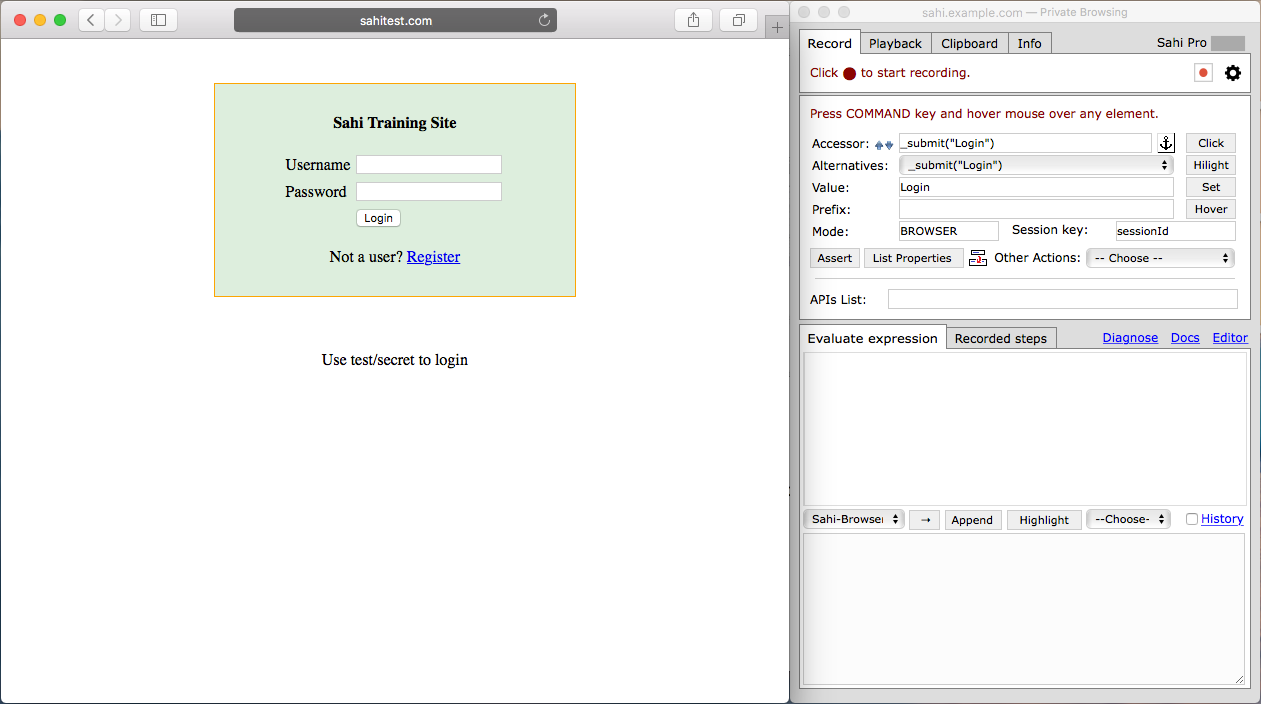
Section titled “Elements not getting identified on Safari browser”For identifying elements on the Safari browser, Sahi needs the browser window to be in focus while hovering over the element to be identified. Suggested way of doing this would be my minimizing the browser window and placing the window and the controller side by side as shown below. Now click on the browser window, before trying to identify an element.
Test Runs Fail on Safari Browser
Section titled “Test Runs Fail on Safari Browser”Symptom: Test runs fail on Safari browser after 90 seconds.
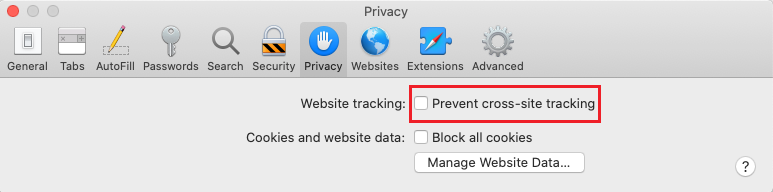
Resolution: Enable cross-site cookie access as follows :
- Launch Safari browser.
- Click on Safari at top menu bar.
- Go to Preferences -> Privacy.
- Untick ‘Prevent cross-site tracking’ next to Website tracking.
Extra tabs except Start URL open in Safari browser
Section titled “Extra tabs except Start URL open in Safari browser”Symptom: When a script run starts, Safari browser launches with extra tabs which are opened in previous run of script .
Resolution: Perform following steps to configure Safari preferences:
- Close Sahi.
- Quit Safari.
- Open Terminal.
- Run following command in Terminal:
defaults write com.apple.safari ApplePersistenceIgnoreState YES - Start Sahi.