

Issues in Microsoft Edge versions 44.19041 and below
Sahi Pro console Edge ‘PIDs not available’
Section titled “Sahi Pro console Edge ‘PIDs not available’”Symptom: When launching Edge browser from the dashboard, we get an error in Sahi Pro console stating PIDs not available yet. Waiting for 1 sec
and consequently, proxy gets reverted.
Cause:
-
- This is due to an update in Microsoft Edge. With this feature, Microsoft Edge will be pre-launched each time it is closed.
This feature has been introduced since Windows 10 build 17713.
- This is due to an update in Microsoft Edge. With this feature, Microsoft Edge will be pre-launched each time it is closed.
Resolution: This feature of Microsoft Edge needs to be disabled to fix this issue.
There are two ways to do it.
-
For Windows 10 Pro and Enterprise editions :
-
Open Local Group Policy Editor.
- Start by clicking on the Windows start bar (bottom-left corner) or press the Windows key.
- Then, type Local Group Policy to make use of the search function. Next, click on Edit group policy.
-
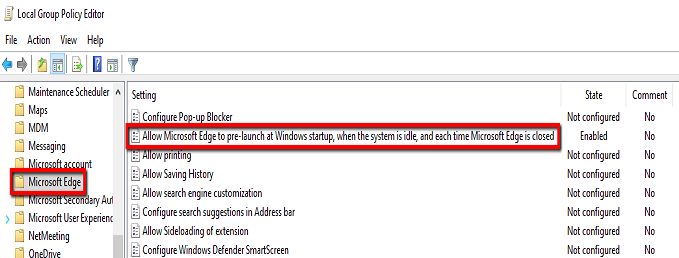
In the left pane of Local Group Policy Editor, navigate to the location
Computer Configuration\Administrative Templates\Windows Components\Microsoft Edge. -
In the right pane of Microsoft Edge in Local Group Policy Editor, double click on the Allow Microsoft Edge to pre-launch at Windows startup, when the system is idle, and each time Microsoft Edge is closed policy to edit it.
-
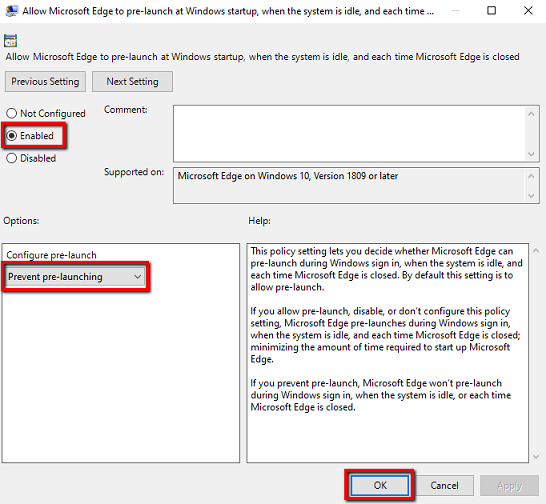
Select radio button for Enabled, and configure pre-launch setting by selecting dropdown value Prevent pre-launching . Click on ‘OK’ button.
-
Restart your system.
-
-
For Windows 10 Home or other Windows 10 editions which do not have local group policy editor:
-
Launch Registry Editor.
- Start by clicking on the Windows start bar (bottom-left corner) or press the Windows key.
- Then, type Registry Editor to make use of the search function. Next, click on Registry Editor.
-
Navigate to
HKEY_LOCAL_MACHINE\SOFTWARE\Policies\Microsoft\MicrosoftEdge\Main. If such a key does not exist, it needs to be created.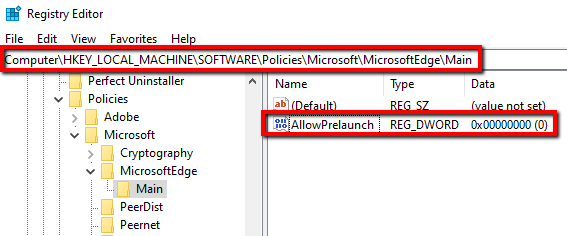
-
Right click on Main and select
New > Dword (32-bit) Value. Name itAllowPrelaunchand ensure the value is set to 0 (it is the default value). -
Restart your system.
-