

Alignment Functions
Alignment functions can be used for checking alignment of one element with respect to the other. With which one can check alignment of different elements on different screen sizes i.e. to check responsiveness. A sample test page is added at Sahi_Pro\htdocs\demo\alignmentTestPage.htm and a sample test script is added at Sahi_Pro\userdata\scripts\demo\testAlignmentAPIs.sah to give a better understanding of these APIs.
_areHorizontallyAligned
Section titled “_areHorizontallyAligned”- Since
- Sahi Pro 6.3.0
- Desktop Engine 8.0.0
Modes BrowserWindowsJava
_areHorizontallyAligned($leftElement, $rightElement[, $position[, $gap[, $offset]]])Arguments
| Name | Type | Description |
|---|---|---|
$leftElement | HTML DOM element | Left element to be checked. |
$rightElement | HTML DOM element | Right element to be checked. |
$position | stringoptional | Position to be checked. By default position = "middle". Value of position can be either "top" or "bottom" or "both" or "middle". |
$gap | ar_i|ioptional | Gap between right edge of left element and left edge of right element. If gap is an integer, it will take the exact value. And if gap is an array, Eg. gap = [10, 40], implies gap can range from 10 to 40. To force sahi to check for the gap between the two elements, use the gap. If nothing provided it wouldn't consider gap. |
$offset | ar_i|ioptional | Offset above and below within which to look for elements boundary for given position. If offset is an integer, both above and below offsets are set to this offset. rightElement may be slightly above or below leftElement. Sahi normally matches only elements whose bases match. To force it to look a little above or below while looking to the right, use the offset. |
Returns
boolean | true if two elements are horizontally aligned, else false. |
_areHorizontallyAligned checks whether two elements are horizontally aligned or not.
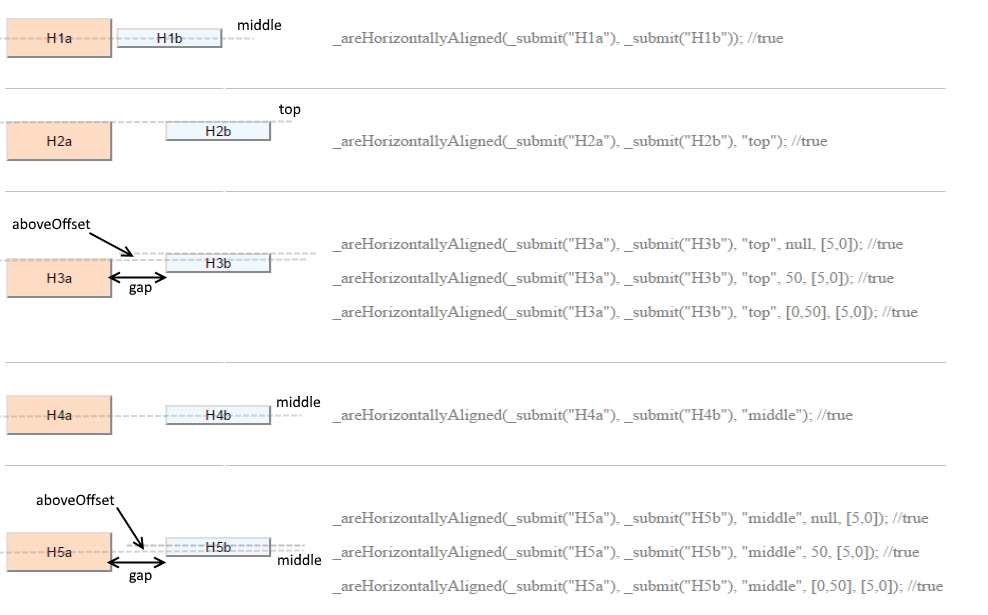
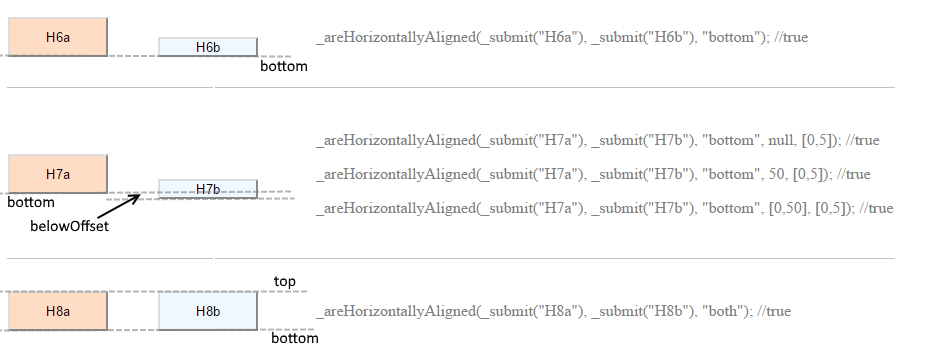
_areHorizontallyAligned(_div("item1"), _div("item2")) //by default middle position will be checked_areHorizontallyAligned(_div("item1"), _div("item2"), "top")_areHorizontallyAligned(_div("item1"), _div("item2"), "top", 20) //gap is exact 20._areHorizontallyAligned(_div("item1"), _div("item2"), "top", [0, 20]) //gap is only positive i.e. no overlapping is allowed_areHorizontallyAligned(_div("item1"), _div("item2"), "top", [0, 20], 10) //gap is only positive i.e. no overlapping is allowed and offset for the top edge is 10_areVerticallyAligned
Section titled “_areVerticallyAligned”- Since
- Sahi Pro 6.3.0
- Desktop Engine 8.0.0
Modes BrowserWindowsJava
_areVerticallyAligned($topElement, $bottomElement[, $position[, $gap[, $offset]]])Arguments
| Name | Type | Description |
|---|---|---|
$topElement | HTML DOM element | Top element to be checked. |
$bottomElement | HTML DOM element | Bottom element to be checked. |
$position | stringoptional | Position to be checked. By default position = "center". Value of position can be either "left" or "right" or "both" or "center". |
$gap | ar_i|ioptional | Gap between bottom edge of top element and top edge of bottom element. If gap is an integer, it will take the exact value. And if gap is an array, Eg. gap = [0, 40], implies gap can range from 0 to 40. To force sahi to check for the gap between the two elements, use the gap. If nothing provided it wouldn't consider gap. |
$offset | ar_i|ioptional | Offset left and right within which to look for elements boundary for given position. If offset is an integer, both left and right offsets are set to this offset. topElement may be slightly left or right to the bottomElement. |
Returns
boolean | true if two elements are vertically aligned, else false. |
_areVerticallyAligned checks whether two elements are vertically aligned or not. Returns true if two elements are vertically aligned, else false.
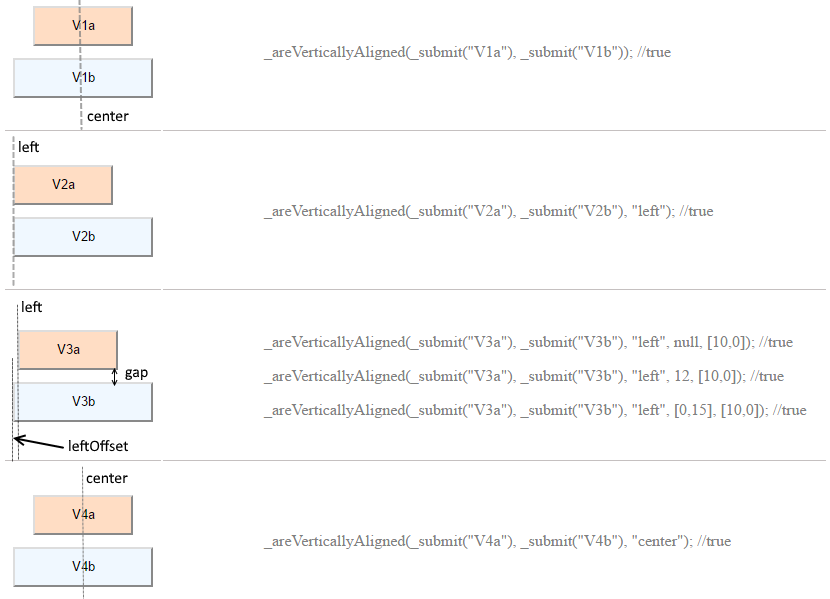
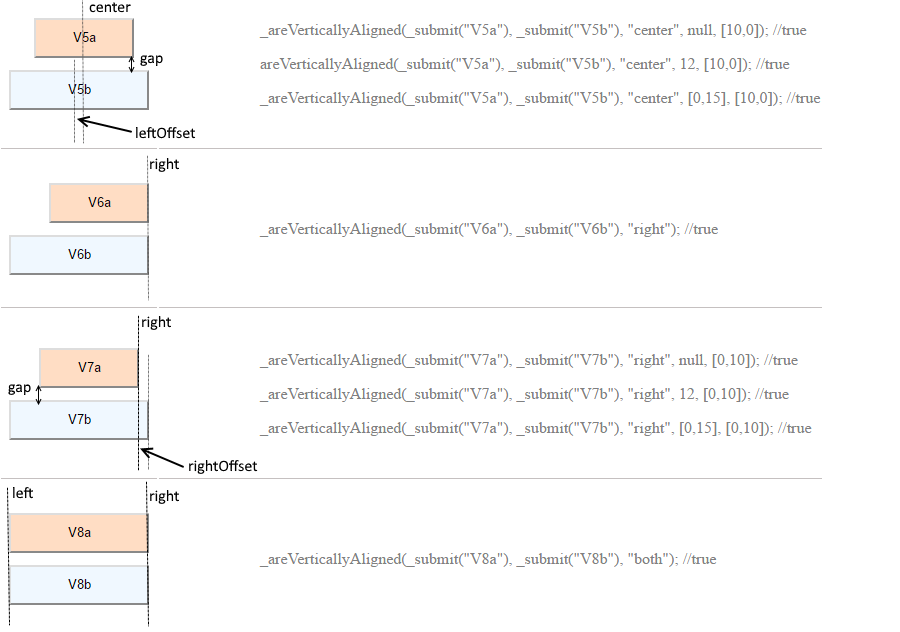
Example
_areVerticallyAligned(_div("item1"), _div("item2")) //by default center position will be checked_areVerticallyAligned(_div("item1"), _div("item2"), "left")_areVerticallyAligned(_div("item1"), _div("item2"), "left", 20) //gap can take the values between [-20, 20]_areVerticallyAligned(_div("item1"), _div("item2"), "left", [0, 20]) //gap is only positive i.e. no overlapping is allowed_isCentered
Section titled “_isCentered”- Since
- Sahi Pro 6.3.0
- Desktop Engine 8.0.0
Modes BrowserWindowsJava
_isCentered($element, $containerElement, $alignment[, $offset])Arguments
| Name | Type | Description |
|---|---|---|
$element | HTML DOM element | Inner element to be checked. |
$containerElement | HTML DOM element | Container element to be checked. |
$alignment | string | Can be "vertical" or "horizontal". |
$offset | ar_i|ioptional | Offset left and right within which to look for elements boundary for given position. If offset is an integer, both left and right offsets are set to this offset. topElement may be slightly left or right to the bottomElement. |
Returns
boolean | true if inner element is vertically or horizontally centered to the container element, else false |
_isCentered checks whether inner element is vertically or horizontally centered to the container element.
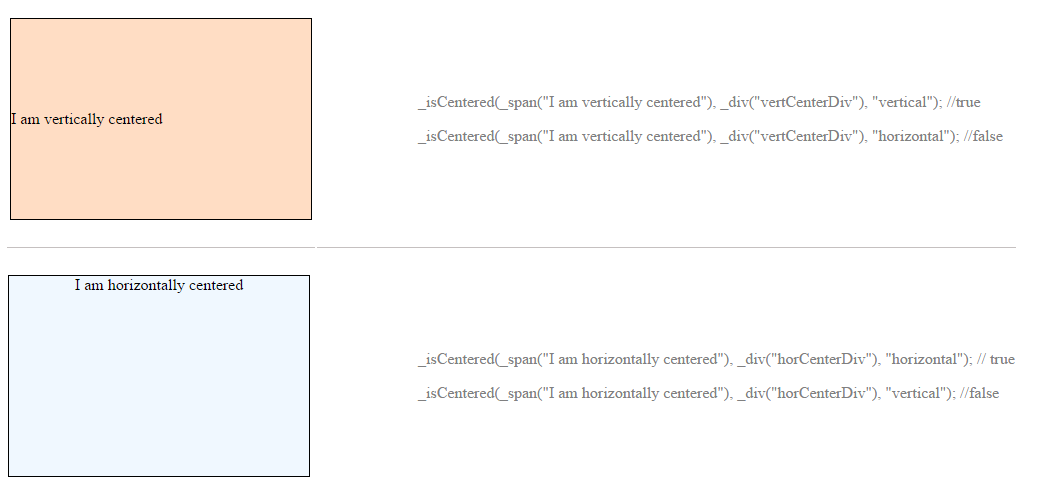
Example
_isCentered(_div("item1"), _div("item2"), "vertical")_isCentered(_div("item1"), _div("item2"), "horizontal")_isCentered(_div("item1"), _div("item2"), "horizontal", 1)_isVisiblyInside
Section titled “_isVisiblyInside”- Since
- Sahi Pro 6.3.0
- Desktop Engine 8.0.0
Modes BrowserWindowsJava
_isVisiblyInside($element1, $element2)Arguments
| Name | Type | Description |
|---|---|---|
$element1 | HTML DOM element | First element to be checked. |
$element2 | HTML DOM element | Second element to be checked. |
Returns
boolean | true if element1 is visibly completely inside element2, else false |
_isVisiblyInside checks whether element1 is completely contained inside element2.
// Example_isVisiblyInside(_div("item1"), _div("item2")) //implies _div("item1") is inside _div("item2")_isVisiblyOutside
Section titled “_isVisiblyOutside”- Since
- Sahi Pro 6.3.0
- Desktop Engine 8.0.0
Modes BrowserWindowsJava
_isVisiblyOutside($element1, $element2)Arguments
| Name | Type | Description |
|---|---|---|
$element1 | HTML DOM element | First element to be checked. |
$element2 | HTML DOM element | Second element to be checked. |
Returns
boolean | true if element1 is visibly completely outside element2, else false |
_isVisiblyOutside checks whether element1 is completely outside element2 i.e one is not contained within other.
// Example_isVisiblyOutside(_div("item1"), _div("item2")) //implies _div("item1") is outside _div("item2")_isVisiblyOn
Section titled “_isVisiblyOn”- Since
- Sahi Pro 6.3.0
- Desktop Engine 8.0.0
Modes BrowserWindowsJava
_isVisiblyOn($element1, $element2[, $topSpace[, $rightSpace[, $bottomSpace[, $leftSpace]]]])Arguments
| Name | Type | Description |
|---|---|---|
$element1 | HTML DOM element | First element to be checked. |
$element2 | HTML DOM element | Second element to be checked. Base Element. |
$topSpace | ar_i|ioptional | Space between top edges of the two elements. If topSpace is an integer, it will take the exact value. And if topSpace = [-20, 0], implies top edge of element2 lies above top edge of element1. To force sahi to check for the topSpace between the two elements, use the topSpace. If nothing provided it wouldn't consider topSpace. |
$rightSpace | ar_i|ioptional | Space between right edges of the two elements. If rightSpace is an integer, it will take the exact value. And if rightSpace = [0, 20], implies right edge of element2 lies to the right side of right edge of element1. To force sahi to check for the rightSpace between the two elements, use the rightSpace. If nothing provided it wouldn't consider rightSpace. |
$bottomSpace | ar_i|ioptional | Space between bottom edges of the two elements. If bottomSpace is an integer, it will take the exact value. And if bottomSpace = [0, 20], implies bottom edge of element2 lies below bottom edge of element1. To force sahi to check for the bottomSpace between the two elements, use the bottomSpace. If nothing provided it wouldn't consider bottomSpace. |
$leftSpace | ar_i|ioptional | Space between left edges of the two elements. If leftSpace is an integer, it will take the exact value. And if leftSpace = [0, 20], implies top edge of element2 lies to the right side of left edge of element1. To force sahi to check for the leftSpace between the two elements, use the leftSpace. If nothing provided it wouldn't consider leftSpace. |
Returns
boolean | true if element1 is visibly placed on element2, else false |
_isVisiblyOn checks whether element1 is placed on top of element2. element1 may extend beyond element2 boundaries.
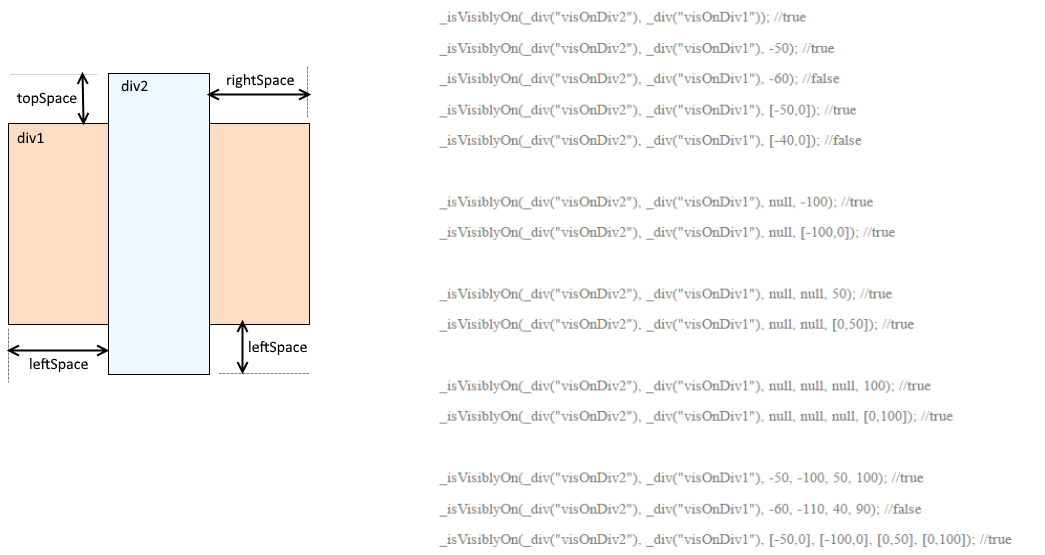
Example
_isVisiblyOn(_div("item1"), _div("item2"), [0,25]); //implies _div("item1") is placed on _div("item2") where top edge of div("item1") can be upto// 25 units below div("item2") top edge_fitsWidth
Section titled “_fitsWidth”- Since
- Sahi Pro 6.3.0
- Desktop Engine 8.0.0
Modes BrowserWindowsJava
_fitsWidth($element1, $element2[, $leftSpace[, $rightSpace]])Arguments
| Name | Type | Description |
|---|---|---|
$element1 | HTML DOM element | First element to be checked. |
$element2 | HTML DOM element | Second element to be checked. Base Element. |
$leftSpace | ar_i|ioptional | Space between left edges of the two elements. If leftSpace is an integer, it will take the exact value. And if leftSpace = [0, 20], implies top edge of element2 lies to the right side of left edge of element1. If nothing provided leftSpace will be considered as 0. |
$rightSpace | ar_i|ioptional | Space between right edges of the two elements. If rightSpace is an integer, it will take the exact value. And if rightSpace = [0, 20], implies right edge of element2 lies to the right side of right edge of element1. If nothing provided rightSpace will be considered as 0. |
Returns
boolean | true if element1 fits within width of element2, else false |
_fitsWidth checks whether element1 fits within the width of element2.
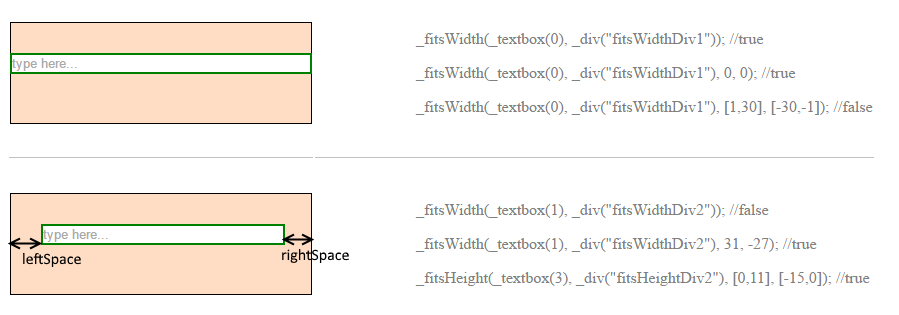
Example
_fitsWidth(_div("item1"), _div("item2"), [0,25], [-25,0]); //implies _div("item1") is on _div("item2") where left edge of div("item1") can be//upto 25 units right to div("item2") left edge and right edge of div("item1") can be upto 25 units left to div("item2") right edge_fitsHeight
Section titled “_fitsHeight”- Since
- Sahi Pro 6.3.0
- Desktop Engine 8.0.0
Modes BrowserWindowsJava
_fitsHeight($element1, $element2[, $topSpace[, $bottomSpace]])Arguments
| Name | Type | Description |
|---|---|---|
$element1 | HTML DOM element | First element to be checked. |
$element2 | HTML DOM element | Second element to be checked. Base Element. |
$topSpace | ar_i|ioptional | Space between top edges of the two elements. If topSpace is an integer, it will take the exact value. And if topSpace = [-20, 0], implies top edge of element2 lies above top edge of element1. If nothing provided topSpace will be considered as 0. |
$bottomSpace | ar_i|ioptional | Space between bottom edges of the two elements. If bottomSpace is an integer, it will take the exact value. And if bottomSpace = [0, 20], implies bottom edge of element2 lies below bottom edge of element1. If nothing provided bottomSpace will be considered as 0. |
Returns
boolean | true if element1 fits within height of element2, else false |
_fitsHeight checks whether element1 fits within the height of element2.
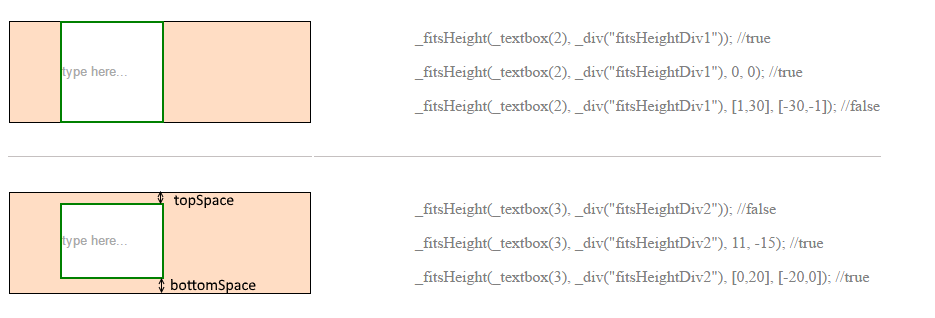
Example
_fitsHeight(_div("item1"), _div("item2"), [0,25], [-25,0]); //implies _div("item1") is on _div("item2") where top edge of div("item1") can be//upto 25 units below div("item2") top edge and bottom edge of div("item1") can be upto 25 units above div("item2") bottom edge