

Layout Verification Functions
The following functions are used for testing the layout of a webpage. It is useful to test responsive design.
_getLayout
Section titled “_getLayout”- Since
- Sahi Pro 8.0.0
Modes Browser
_getLayout([$elementAPIs[, $elements]])Arguments
| Name | Type | Description |
|---|---|---|
$elementAPIs | arrayoptional | element functions which user wants to ignore in layout. |
$elements | arrayoptional | provide elements to take page layout of sections covered by these elements. |
Returns
string | Represents page layout. |
Returns string representing page layout. User can provide the element functions as a first argument which he wants to ignore in layout. It needs to be used with _writeFile followed by _readLayoutFile and _verifyLayout.
// Example:var $all = _getLayout(); //returns string representing page layout_writeFile($all, "D:/getLayout.txt", true); //writes returned string to text filevar $temp = _readLayoutFile("D:/getLayout.txt");//read the layout text file and return a 2 dimensional array of elements_verifyLayout($temp,9); //verifying the page layout and layout from _getLayout
var $data = _getLayout(["_heading2", "_div", "_row", "_cell"]); //ignoring (_heading2,_div, _row and _cell) from page_writeFile($data, "D:/getLayout.txt", true); //writes returned string to text filevar $temp = _readLayoutFile("D:/getLayout.txt");//read the layout text file and return a 2 dimensional array of elements_verifyLayout($temp,9); //verifying the page layout and layout from _getLayout
var $all = _getLayout(null, [_div("section"), _div("new-section")]); //returns string representing page layout of sections covered by _div("section") and _div("new-section")] elements.var $all = _getLayout([_span], [_div("section"), _div("new-section")]); //returns string representing page layout of sections covered by _div("section") and _div("new-section")] elements ignoring _span apis._readLayoutFile
Section titled “_readLayoutFile”- Since
- Sahi Pro 5.0.0
Modes Browser
_readLayoutFile($filePath)Arguments
| Name | Type | Description |
|---|---|---|
$filePath | string | Text file path. |
Returns
two dimensional array of element stubs | Two dimensional array of elements |
Reads the layout text file and returns a 2 dimensional array of elements. The layout file is a simple way of defining layout in a text file.
Elements on a line are treated as horizontally aligned. Elements higher up in the layout file are vertically above elements defined on a lower line.
// For example, in_cell("Python Cookbook"),_cell("7"),_cell("Rs. 350"),_textbox("q[2]")_button("Add"),_button("Clear"),_button("Logout")_cell("Python Cookbook") is to the left of _cell("Rs. 350") and _button("Add") is vertically below _cell("Python Cookbook") (not necessarily within _cell("Python Cookbook")’s boundaries though) and _button("Clear") is to the right of _button("Add")
This can be used to verify the layout of the following page:
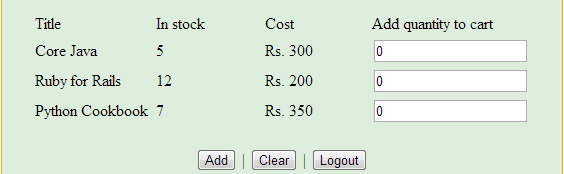
//Read the layout text file and store it in the variablevar $data = _readLayoutFile("page_layout.txt");_verifyLayout
Section titled “_verifyLayout”- Since
- Sahi Pro 5.0.0
Modes Browser
_verifyLayout($data, $threshold)Arguments
| Name | Type | Description |
|---|---|---|
$data | two dimensional array of element stubs | Elements in same row are considered horizontal. Elements in subsequent rows are vertically below elements in previous row. |
$threshold | integer | If the vertical distance between the top left of 2 elements is within threshold number of pixels, they are considered to be horizontally aligned. |
Returns
boolean | true if the page layout is valid, else throws error |
Validates the page layout based on $data.
// Example: var $data = _readLayoutFile("page_layout.txt");_verifyLayout($data, 10);Layout verification example
Section titled “Layout verification example”Following is an example of a sample webpage and the sample page_layout.txt
page_layout.txt
_cell("Title"),_cell("In stock"),_cell("Cost"),_cell("Add quantity to cart")_cell("Core Java"),_cell("5"),_cell("Rs. 300"),_textbox("q")_cell("Ruby for Rails"),_cell("12"),_cell("Rs. 200"),_textbox("q[1]")_cell("Python Cookbook"),_cell("7"),_cell("Rs. 350"),_textbox("q[2]")_button("Add"),_button("Clear"),_button("Logout")verify_layout.sah
_navigateTo("http://sahi.co.in/demo/training/books.htm");var $data = _readLayoutFile("page_layout.txt");_verifyLayout($data, 10);