

JavaScript Dialogs
Browser modal dialogs can be troublesome for automation testers. Since it is a modal, the browser does not proceed with automation unless someone acts upon these dialogs. Sahi is built for parallel suite runs where browsers need not be in focus. Sahi has specific mechanisms to deal with modal dialogs.
Sahi handles these dialogs by mocking them out. You will not see a dialog box when you run via Sahi. However you will be able to control the user interaction with these dialogs with specific Sahi functions.
An alert box looks like this:
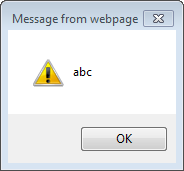
There are 3 functions used with alerts.
_lastAlert
Section titled “_lastAlert”- Since
- Sahi Pro 3.5
Modes Browser
_lastAlert([$allalerts])Arguments
| Name | Type | Description |
|---|---|---|
$allalerts | booleanoptional | If true, returns array of all alert messages. |
Returns
string | last alert message if $allalerts is false |
array of strings | an array of all alert messages in the browser if $allalerts is true |
//return array of all alerts in the browser.var $allAlerts = _lastAlert(true);//return only last alert.var $lastAlert= _lastAlert();_expectAlert
Section titled “_expectAlert”- Since
- Sahi Pro 7.5.0
Modes Browser
_expectAlert($message[, $persist])Arguments
| Name | Type | Description |
|---|---|---|
$message | string | message to expect in dialog. This can also be a regular expression |
$persist | booleanoptional | if true, will accept a single _expectAlert statement for all alerts coming after the statement. If false, will accept only the next alert box to work with the _expectAlert statement. Default is false. |
Returns
null |
_expectAlert tells Sahi to react with OK for a dialog with given message.
//If Alert word expect in dialog then Sahi react with OK._expectAlert("/abc/",true); //Accept all alerts with "abc" message._expectAlert("/abc/"); //Accept only the next alert with "abc" message._clearLastAlert
Section titled “_clearLastAlert”- Since
- Sahi Pro 3.5
Modes Browser
_clearLastAlert()Arguments
| Name | Type | Description |
|---|---|---|
None |
Returns
null |
Removes the last alert from session so that further occurrence of alerts can be checked
Alert Example
Section titled “Alert Example”_expectAlert("/abc/", false); // Tell Sahi to press OK for dialog with message containing "abc"_click(_button("Click Me")); // trigger the alert_assertEqual("abc", _lastAlert()); // verify the alert messageConfirm
Section titled “Confirm”A confirm dialog looks like this:
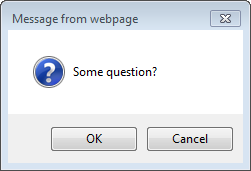
In a confirm dialog the user can either press OK or Cancel. Sahi by default clicks OK on the dialog. Sahi can also be told to press Cancel.
_lastConfirm
Section titled “_lastConfirm”- Since
- Sahi Pro 3.5
Modes Browser
_lastConfirm([$allconfirms])Arguments
| Name | Type | Description |
|---|---|---|
$allconfirms | booleanoptional | If true, returns array of all confirm dialog messages. |
Returns
string | last confirm message if $allconfirms is false |
array of strings | an array of all confirm messages in the browser if $allconfirms is true |
//return array of all Confirms in the browser.var $allConfirms = _lastConfirm(true);//return only last Confirm.var $lastConfirm= _lastConfirm();_expectConfirm
Section titled “_expectConfirm”- Since
- Sahi Pro 3.5
Modes Browser
_expectConfirm($message, $value[, $persist])Arguments
| Name | Type | Description |
|---|---|---|
$message | string | message to expect in dialog. This can also be a regular expression |
$value | boolean | if true will press OK when a confirm dialog with given message appears. If false, will click on Cancel. |
$persist | booleanoptional | if true, will accept a single _expectConfirm statement for all confirms coming after the statement. If false, will accept only the next confirm box to work with the _expectConfirm statement. Default is false. |
Returns
null |
_expectConfirm tells Sahi to react with OK or Cancel for a dialog with given message.
_clearLastConfirm
Section titled “_clearLastConfirm”- Since
- Sahi Pro 3.5
Modes Browser
_clearLastConfirm()Arguments
| Name | Type | Description |
|---|---|---|
None |
Returns
null |
Removes the last confirm from session so that further occurrence of confirms can be checked
Confirm Example
Section titled “Confirm Example”// To click Cancel, use_expectConfirm("/question/", false); // Tell Sahi to press Cancel for dialog with message containing "question"_click(_button("Click For Confirm")); // Invoke the dialog// Sahi would click cancel on it now_assertEqual("Some question?", _lastConfirm()); // verify the actual confirm messagePrompt
Section titled “Prompt”A prompt box looks like this:
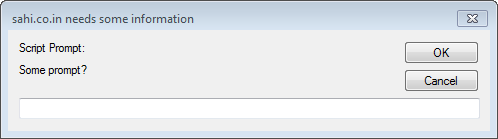
A prompt dialog is not very commonly used. Sahi by default behaves as if OK was pressed without entering any text. Sahi can be forced to enter text by setting an expectation via _expectPrompt function. The message on the prompt box can be obtained later by _lastPrompt() function.
_lastPrompt
Section titled “_lastPrompt”- Since
- Sahi Pro 3.5
Modes Browser
_lastPrompt([$allprompts])Arguments
| Name | Type | Description |
|---|---|---|
$allprompts | booleanoptional | If true, returns array of all prompt messages. |
Returns
string | last prompt message if $allprompts is false |
array of strings | an array of all prompt messages in the browser if $allprompts is true |
//return array of all Prompts in the browser.var $allPrompts = _lastPrompt(true);//return only last Prompt.var $lastPrompt= _lastPrompt();_expectPrompt
Section titled “_expectPrompt”- Since
- Sahi Pro 3.5
Modes Browser
_expectPrompt($promptMessage, $response[, $persist])Arguments
| Name | Type | Description |
|---|---|---|
$promptMessage | string | message to expect in dialog. This can also be a regular expression |
$response | string | Response to enter into the prompt. null to behave as if Cancel was pressed. |
$persist | booleanoptional | if true, will accept a single _expectPrompt statement for all prompts coming after the statement. If false, will accept only the next prompt box to work with the _expectPrompt statement. Default is false. Added in 7.5.0 |
Returns
null |
_expectPrompt tells Sahi to respond with given response for a prompt dialog with given promptMessage.
_clearLastPrompt
Section titled “_clearLastPrompt”- Since
- Sahi Pro 3.5
Modes Browser
_clearLastPrompt()Arguments
| Name | Type | Description |
|---|---|---|
None |
Returns
null |
Removes the last prompt from session so that further occurrence of prompts can be checked
Prompt Example
Section titled “Prompt Example”_expectPrompt("/Some prom/", "abc"); // set expectation_click(_button("Click For Prompt")); // click for prompt// abc would be entered by Sahi in the prompt box._assertEqual(_lastPrompt(), "Some prompt?"); // verify the full prompt dialog messagePrint dialog
Section titled “Print dialog”Calling the print dilaog during functional test automation is not of much use. However, we can verify if window.print() was called using the following functions
_printCalled
Section titled “_printCalled”- Since
- Sahi Pro 3.5
Modes Browser
_printCalled()Arguments
| Name | Type | Description |
|---|---|---|
None |
Returns
boolean | true if window.print() was called, else false |
_expectPrint
Section titled “_expectPrint”- Since
- Sahi Pro 7.5.0
Modes Browser
_expectPrint([$persist])Arguments
| Name | Type | Description |
|---|---|---|
$persist | booleanoptional | if true, will accept a single _expectPrint statement for all prints coming after the statement. If false, will accept only the next print box to work with the _expectPrint statement. Default is false. |
Returns
null |
_expectPrint tells Sahi to react with CANCEL for a print dialog.
_clearPrintCalled
Section titled “_clearPrintCalled”- Since
- Sahi Pro 3.5
Modes Browser
_clearPrintCalled()Arguments
| Name | Type | Description |
|---|---|---|
None |
Returns
null |
Resets _printCalled to false, so that _printCalled can be checked once more in the script.