

Skip to content
Get Free Trial

Oracle Applet Accessor Functions

Since
Desktop Engine 7.0.0
Note

You may use either _button or _jvOrVButton

API

_button(identifier [, relation1 [, relation2 ...]])

Identifiers

Label, Name, Index

Valid Accessors and alternatives: (Assume this is the 6th button in the UI)

//Label
_button("elementLabel")
//Name
_button("button_name")
//Index
_button(5)
//multiple attributes as JSON
_button({name: "button_name", sahiIndex: 1})
//multiple attributes as JSON including regular expression
_button({name: "/button .*name/", sahiIndex: 1})
Relations

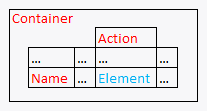
Relational functions _in, _near, _leftOf, _rightOf, _under, _above can be used.
// with _in
_button("elementLabel", _in(_jvOrFormsTabPanel("Container")))
// index with 2 relational APIs, _rightOf and _under
_button(0, _rightOf(_jvOrButton("Name")), _under(_jvOrVTextField("Action")))
// with regular expression and relations
_button("/elname/", _rightOf(_jvOrButton("Name")), _under(_jvOrVTextField("Action")))
Value

Label (this is the default attribute used in assertions etc.)

Actions

Default event recorded is _click

Example usage:

_click(_button("elementLabel"));
_click(_button("/Name/[1]", _rightOf(_jvOrButton("Name"))));
Assertions

Example assertions:

// Check if element exists
_assertExists(_button("button_id"));
// Check if element is visible
_assert(_isVisible(_button("button_id")));
Since
Desktop Engine 9.0.0
API

_jvOrTabBar(identifier [, relation1 [, relation2 ...]])

Identifiers

Label, Name, Index

Valid Accessors and alternatives: (Assume this is the 6th jvOrTabBar in the UI)

//Label
_jvOrTabBar("elementLabel")
//Name
_jvOrTabBar("TabBar_name")
//Index
_jvOrTabBar(5)
//multiple attributes as JSON
_jvOrTabBar({name: "TabBar_name", sahiIndex: 1})
//multiple attributes as JSON including regular expression
_jvOrTabBar({name: "/TabBar .*name/", sahiIndex: 1})
Relations

Relational functions _in, _near, _leftOf, _rightOf, _under, _above can be used.

// with _in
_jvOrTabBar("elementLabel", _in(_jvOrFormsTabPanel("Container")))
// index with 2 relational APIs, _rightOf and _under
_jvOrTabBar(0, _rightOf(_jvOrButton("Name")), _under(_jvOrVTextField("Action")))
// with regular expression and relations
_jvOrTabBar("/elname/", _rightOf(_jvOrButton("Name")), _under(_jvOrVTextField("Action")))
Value

Label (this is the default attribute used in assertions etc.)

Actions

Default event recorded is _setSelected

Example usage:

_setSelected(_jvOrTabBar("elementLabel"), "elementLabel");
_setSelected(_jvOrTabBar("/Name/[1]", _rightOf(_jvOrButton("Name"))), "elementLabel");
Assertions

Example assertions:

// Check if element exists
_assertExists(_jvOrTabBar("TabBar_id"));
// Check if element is visible
_assert(_isVisible(_jvOrTabBar("TabBar_id")));
Since
Desktop Engine 7.0.0
Note

You may use either _label or _jvOrLWLabel

API

_label(identifier [, relation1 [, relation2 ...]])

Identifiers

Name, Text, Index

Valid Accessors and alternatives: (Assume this is the 6th label in the UI)

//Name
_label("label_name")
//Text
_label("elementText")
//Index
_label(5)
//multiple attributes as JSON
_label({name: "label_name", sahiIndex: 1})
//multiple attributes as JSON including regular expression
_label({name: "/label .*name/", sahiIndex: 1})
Relations

Relational functions _in, _near, _leftOf, _rightOf, _under, _above can be used.

// with _in
_label("label_name", _in(_jvOrFormsTabPanel("Container")))
// index with 2 relational APIs, _rightOf and _under
_label(0, _rightOf(_jvOrButton("Name")), _under(_jvOrVTextField("Action")))
// with regular expression and relations
_label("/elname/", _rightOf(_jvOrButton("Name")), _under(_jvOrVTextField("Action")))
Value

Text (this is the default attribute used in assertions etc.)

Actions

Default event recorded is _setValue

Example usage:

_setValue(_label("label_name"), "elementText");
_setValue(_label("/Name/[1]", _rightOf(_jvOrButton("Name"))), "elementText");
Assertions

Example assertions:

// Check if element exists
_assertExists(_label("label_id"));
// Check if element is visible
_assert(_isVisible(_label("label_id")));
Since
Desktop Engine 7.0.0
Note

You may use either _label or _jvOrMultiLineLabel

API

_label(identifier [, relation1 [, relation2 ...]])

Identifiers

Name, Text, Index

Valid Accessors and alternatives: (Assume this is the 6th label in the UI)

//Name
_label("label_name")
//Text
_label("elementText")
//Index
_label(5)
//multiple attributes as JSON
_label({name: "label_name", sahiIndex: 1})
//multiple attributes as JSON including regular expression
_label({name: "/label .*name/", sahiIndex: 1})
Relations

Relational functions _in, _near, _leftOf, _rightOf, _under, _above can be used.

// with _in
_label("label_name", _in(_jvOrFormsTabPanel("Container")))
// index with 2 relational APIs, _rightOf and _under
_label(0, _rightOf(_jvOrButton("Name")), _under(_jvOrVTextField("Action")))
// with regular expression and relations
_label("/elname/", _rightOf(_jvOrButton("Name")), _under(_jvOrVTextField("Action")))
Value

Text (this is the default attribute used in assertions etc.)

Actions

Default event recorded is _setValue

Example usage:

_setValue(_label("label_name"), "elementText");
_setValue(_label("/Name/[1]", _rightOf(_jvOrButton("Name"))), "elementText");
Assertions

Example assertions:

// Check if element exists
_assertExists(_label("label_id"));
// Check if element is visible
_assert(_isVisible(_label("label_id")));
Since
Desktop Engine 7.0.0
Note

You may use either _textbox or _jvOrVTextField

API

_textbox(identifier [, relation1 [, relation2 ...]])

Identifiers

Name, Text, Index

Valid Accessors and alternatives: (Assume this is the 6th textbox in the UI)

//Name
_textbox("textbox_name")
//Text
_textbox("elementText")
//Index
_textbox(5)
//multiple attributes as JSON
_textbox({name: "textbox_name", sahiIndex: 1})
//multiple attributes as JSON including regular expression
_textbox({name: "/textbox .*name/", sahiIndex: 1})
Relations

Relational functions _in, _near, _leftOf, _rightOf, _under, _above can be used.

// with _in
_textbox("textbox_name", _in(_jvOrFormsTabPanel("Container")))
// index with 2 relational APIs, _rightOf and _under
_textbox(0, _rightOf(_jvOrButton("Name")), _under(_jvOrVTextField("Action")))
// with regular expression and relations
_textbox("/elname/", _rightOf(_jvOrButton("Name")), _under(_jvOrVTextField("Action")))
Value

Text (this is the default attribute used in assertions etc.)

Actions

Default event recorded is _setValue

Example usage:

_setValue(_textbox("textbox_name"), "elementText");
_setValue(_textbox("/Name/[1]", _rightOf(_jvOrButton("Name"))), "elementText");
Assertions

Example assertions:

// Check if element exists
_assertExists(_textbox("textbox_id"));
// Check if element is visible
_assert(_isVisible(_textbox("textbox_id")));
Since
Desktop Engine 7.0.0
Note

You may use either _textarea or _jvOrFLWTextArea

API

_textarea(identifier [, relation1 [, relation2 ...]])

Identifiers

Name, Index

Valid Accessors and alternatives: (Assume this is the 6th textarea in the UI)

//Name
_textarea("textarea_name")
//Index
_textarea(5)
//multiple attributes as JSON
_textarea({name: "textarea_name", sahiIndex: 1})
//multiple attributes as JSON including regular expression
_textarea({name: "/textarea .*name/", sahiIndex: 1})
Relations

Relational functions _in, _near, _leftOf, _rightOf, _under, _above can be used.

// with _in
_textarea("textarea_name", _in(_jvOrFormsTabPanel("Container")))
// index with 2 relational APIs, _rightOf and _under
_textarea(0, _rightOf(_jvOrButton("Name")), _under(_jvOrVTextField("Action")))
// with regular expression and relations
_textarea("/elname/", _rightOf(_jvOrButton("Name")), _under(_jvOrVTextField("Action")))
Value

Text (this is the default attribute used in assertions etc.)

Actions

Default event recorded is _setValue

Example usage:

_setValue(_textarea("textarea_name"), "elementText");
_setValue(_textarea("/Name/[1]", _rightOf(_jvOrButton("Name"))), "elementText");
Assertions

Example assertions:

// Check if element exists
_assertExists(_textarea("textarea_id"));
// Check if element is visible
_assert(_isVisible(_textarea("textarea_id")));
Since
Desktop Engine 7.0.0
Note

You may use either _checkbox or _jvOrExtendedCheckbox

API

_checkbox(identifier [, relation1 [, relation2 ...]])

Identifiers

Name, Label, Index

Valid Accessors and alternatives: (Assume this is the 6th checkbox in the UI)

//Name
_checkbox("checkbox_name")
//Label
_checkbox("elementLabel")
//Index
_checkbox(5)
//multiple attributes as JSON
_checkbox({name: "checkbox_name", sahiIndex: 1})
//multiple attributes as JSON including regular expression
_checkbox({name: "/checkbox .*name/", sahiIndex: 1})
Relations

Relational functions _in, _near, _leftOf, _rightOf, _under, _above can be used.

// with _in
_checkbox("checkbox_name", _in(_jvOrFormsTabPanel("Container")))
// index with 2 relational APIs, _rightOf and _under
_checkbox(0, _rightOf(_jvOrButton("Name")), _under(_jvOrVTextField("Action")))
// with regular expression and relations
_checkbox("/elname/", _rightOf(_jvOrButton("Name")), _under(_jvOrVTextField("Action")))
Value

State (this is the default attribute used in assertions etc.)

Actions

Default event recorded is _click

Example usage:

_click(_checkbox("checkbox_name"));
_click(_checkbox("/Name/[1]", _rightOf(_jvOrButton("Name"))));
// Check irrespective of whether it was checked or unchecked
_check(_checkbox("checkbox_name"));
// Uncheck irrespective of whether it was checked or unchecked
_uncheck(_checkbox("checkbox_name"));
Assertions

Example assertions:

// Check if element exists
_assertExists(_checkbox("checkbox_id"));
// Check if element is visible
_assert(_isVisible(_checkbox("checkbox_id")));
Since
Desktop Engine 7.0.0
Note

You may use either _button or _jvOrButton

API

_button(identifier [, relation1 [, relation2 ...]])

Identifiers

Label, Name, Index

Valid Accessors and alternatives: (Assume this is the 6th button in the UI)

//Label
_button("elementLabel")
//Name
_button("button_name")
//Index
_button(5)
//multiple attributes as JSON
_button({name: "button_name", sahiIndex: 1})
//multiple attributes as JSON including regular expression
_button({name: "/button .*name/", sahiIndex: 1})
Relations

Relational functions _in, _near, _leftOf, _rightOf, _under, _above can be used.

// with _in
_button("elementLabel", _in(_jvOrFormsTabPanel("Container")))
// index with 2 relational APIs, _rightOf and _under
_button(0, _rightOf(_jvOrButton("Name")), _under(_jvOrVTextField("Action")))
// with regular expression and relations
_button("/elname/", _rightOf(_jvOrButton("Name")), _under(_jvOrVTextField("Action")))
Value

Label (this is the default attribute used in assertions etc.)

Actions

Default event recorded is _click

Example usage:

_click(_button("elementLabel"));
_click(_button("/Name/[1]", _rightOf(_jvOrButton("Name"))));
Assertions

Example assertions:

// Check if element exists
_assertExists(_button("button_id"));
// Check if element is visible
_assert(_isVisible(_button("button_id")));
Since
Desktop Engine 7.0.0
API

_jvOrLWScrollbar(identifier [, relation1 [, relation2 ...]])

Identifiers

Name, Index

Valid Accessors and alternatives: (Assume this is the 6th jvOrLWScrollbar in the UI)

//Name
_jvOrLWScrollbar("LWScrollbar_name")
//Index
_jvOrLWScrollbar(5)
//multiple attributes as JSON
_jvOrLWScrollbar({ToolTipText: "LWScrollbar_ToolTipText", sahiIndex: 1})
//multiple attributes as JSON including regular expression
_jvOrLWScrollbar({ToolTipText: "/LWScrollbar .*ToolTipText/", sahiIndex: 1})
Relations

Relational functions _in, _near, _leftOf, _rightOf, _under, _above can be used.

// with _in
_jvOrLWScrollbar("LWScrollbar_name", _in(_jvOrFormsTabPanel("Container")))
// index with 2 relational APIs, _rightOf and _under
_jvOrLWScrollbar(0, _rightOf(_jvOrButton("Name")), _under(_jvOrVTextField("Action")))
// with regular expression and relations
_jvOrLWScrollbar("/elname/", _rightOf(_jvOrButton("Name")), _under(_jvOrVTextField("Action")))
Value

Value (this is the default attribute used in assertions etc.)

Actions

Default event recorded is _setValue

Example usage:

_setValue(_jvOrLWScrollbar("LWScrollbar_name"), "apple");
_setValue(_jvOrLWScrollbar("/Name/[1]", _rightOf(_jvOrButton("Name"))), "apple");
Assertions

Example assertions:

// Check if element exists
_assertExists(_jvOrLWScrollbar("LWScrollbar_id"));
// Check if element is visible
_assert(_isVisible(_jvOrLWScrollbar("LWScrollbar_id")));
Since
Desktop Engine 7.0.0
API

_jvOrFormsTabPanel(identifier [, relation1 [, relation2 ...]])

Identifiers

Name, Index

Valid Accessors and alternatives: (Assume this is the 6th jvOrFormsTabPanel in the UI)

//Name
_jvOrFormsTabPanel("FormsTabPanel_name")
//Index
_jvOrFormsTabPanel(5)
//multiple attributes as JSON
_jvOrFormsTabPanel({name: "FormsTabPanel_name", sahiIndex: 1})
//multiple attributes as JSON including regular expression
_jvOrFormsTabPanel({name: "/FormsTabPanel .*name/", sahiIndex: 1})
Relations

Relational functions _in, _near, _leftOf, _rightOf, _under, _above can be used.

// with _in
_jvOrFormsTabPanel("FormsTabPanel_name", _in(_jvOrFormsTabPanel("Container")))
// index with 2 relational APIs, _rightOf and _under
_jvOrFormsTabPanel(0, _rightOf(_jvOrButton("Name")), _under(_jvOrVTextField("Action")))
// with regular expression and relations
_jvOrFormsTabPanel("/elname/", _rightOf(_jvOrButton("Name")), _under(_jvOrVTextField("Action")))
Value

(this is the default attribute used in assertions etc.)

Actions

Default event recorded is _setSelected

Example usage:

_setSelected(_jvOrFormsTabPanel("FormsTabPanel_name"), null);
_setSelected(_jvOrFormsTabPanel("/Name/[1]", _rightOf(_jvOrButton("Name"))), null);
Assertions

Example assertions:

// Check if element exists
_assertExists(_jvOrFormsTabPanel("FormsTabPanel_id"));
// Check if element is visible
_assert(_isVisible(_jvOrFormsTabPanel("FormsTabPanel_id")));
Since
Desktop Engine 7.0.0
Note

You may use either _checkbox or _jvOrLWCheckbox

API

_checkbox(identifier [, relation1 [, relation2 ...]])

Identifiers

Name, Label, Index

Valid Accessors and alternatives: (Assume this is the 6th checkbox in the UI)

//Name
_checkbox("checkbox_name")
//Label
_checkbox("elementLabel")
//Index
_checkbox(5)
//multiple attributes as JSON
_checkbox({name: "checkbox_name", sahiIndex: 1})
//multiple attributes as JSON including regular expression
_checkbox({name: "/checkbox .*name/", sahiIndex: 1})
Relations

Relational functions _in, _near, _leftOf, _rightOf, _under, _above can be used.

// with _in
_checkbox("checkbox_name", _in(_jvOrFormsTabPanel("Container")))
// index with 2 relational APIs, _rightOf and _under
_checkbox(0, _rightOf(_jvOrButton("Name")), _under(_jvOrVTextField("Action")))
// with regular expression and relations
_checkbox("/elname/", _rightOf(_jvOrButton("Name")), _under(_jvOrVTextField("Action")))
Value

State (this is the default attribute used in assertions etc.)

Actions

Default event recorded is _click

Example usage:

_click(_checkbox("checkbox_name"));
_click(_checkbox("/Name/[1]", _rightOf(_jvOrButton("Name"))));
// Check irrespective of whether it was checked or unchecked
_check(_checkbox("checkbox_name"));
// Uncheck irrespective of whether it was checked or unchecked
_uncheck(_checkbox("checkbox_name"));
Assertions

Example assertions:

// Check if element exists
_assertExists(_checkbox("checkbox_id"));
// Check if element is visible
_assert(_isVisible(_checkbox("checkbox_id")));
Since
Desktop Engine 7.0.0
API

_jvOrVPopList(identifier [, relation1 [, relation2 ...]])

Identifiers

Name, Index

Valid Accessors and alternatives: (Assume this is the 6th jvOrVPopList in the UI)

//Name
_jvOrVPopList("VPopList_name")
//Index
_jvOrVPopList(5)
//multiple attributes as JSON
_jvOrVPopList({name: "VPopList_name", sahiIndex: 1})
//multiple attributes as JSON including regular expression
_jvOrVPopList({name: "/VPopList .*name/", sahiIndex: 1})
Relations

Relational functions _in, _near, _leftOf, _rightOf, _under, _above can be used.

// with _in
_jvOrVPopList("VPopList_name", _in(_jvOrFormsTabPanel("Container")))
// index with 2 relational APIs, _rightOf and _under
_jvOrVPopList(0, _rightOf(_jvOrButton("Name")), _under(_jvOrVTextField("Action")))
// with regular expression and relations
_jvOrVPopList("/elname/", _rightOf(_jvOrButton("Name")), _under(_jvOrVTextField("Action")))
Value

SelectedItem (this is the default attribute used in assertions etc.)

Actions

Default event recorded is _setSelected

Example usage:

_setSelected(_jvOrVPopList("VPopList_name"), null);
_setSelected(_jvOrVPopList("/Name/[1]", _rightOf(_jvOrButton("Name"))), null);
Assertions

Example assertions:

// Check if element exists
_assertExists(_jvOrVPopList("VPopList_id"));
// Check if element is visible
_assert(_isVisible(_jvOrVPopList("VPopList_id")));
Since
Desktop Engine 7.0.0
API

_jvOrToolBar(identifier [, relation1 [, relation2 ...]])

Identifiers

Name, Index

Valid Accessors and alternatives: (Assume this is the 6th jvOrToolBar in the UI)

//Name
_jvOrToolBar("ToolBar_name")
//Index
_jvOrToolBar(5)
//multiple attributes as JSON
_jvOrToolBar({name: "ToolBar_name", sahiIndex: 1})
//multiple attributes as JSON including regular expression
_jvOrToolBar({name: "/ToolBar .*name/", sahiIndex: 1})
Relations

Relational functions _in, _near, _leftOf, _rightOf, _under, _above can be used.

// with _in
_jvOrToolBar("ToolBar_name", _in(_jvOrFormsTabPanel("Container")))
// index with 2 relational APIs, _rightOf and _under
_jvOrToolBar(0, _rightOf(_jvOrButton("Name")), _under(_jvOrVTextField("Action")))
// with regular expression and relations
_jvOrToolBar("/elname/", _rightOf(_jvOrButton("Name")), _under(_jvOrVTextField("Action")))
Value

(this is the default attribute used in assertions etc.)

Actions

Default event recorded is _setSelected

Example usage:

_setSelected(_jvOrToolBar("ToolBar_name"), null);
_setSelected(_jvOrToolBar("/Name/[1]", _rightOf(_jvOrButton("Name"))), null);
Assertions

Example assertions:

// Check if element exists
_assertExists(_jvOrToolBar("ToolBar_id"));
// Check if element is visible
_assert(_isVisible(_jvOrToolBar("ToolBar_id")));
Since
Desktop Engine 7.0.0
API

_jvOrLWMenuSeparator(identifier [, relation1 [, relation2 ...]])

Identifiers

Name, Index

Valid Accessors and alternatives: (Assume this is the 6th jvOrLWMenuSeparator in the UI)

//Name
_jvOrLWMenuSeparator("LWMenuSeparator_name")
//Index
_jvOrLWMenuSeparator(5)
//multiple attributes as JSON
_jvOrLWMenuSeparator({name: "LWMenuSeparator_name", sahiIndex: 1})
//multiple attributes as JSON including regular expression
_jvOrLWMenuSeparator({name: "/LWMenuSeparator .*name/", sahiIndex: 1})
Relations

Relational functions _in, _near, _leftOf, _rightOf, _under, _above can be used.

// with _in
_jvOrLWMenuSeparator("LWMenuSeparator_name", _in(_jvOrFormsTabPanel("Container")))
// index with 2 relational APIs, _rightOf and _under
_jvOrLWMenuSeparator(0, _rightOf(_jvOrButton("Name")), _under(_jvOrVTextField("Action")))
// with regular expression and relations
_jvOrLWMenuSeparator("/elname/", _rightOf(_jvOrButton("Name")), _under(_jvOrVTextField("Action")))
Value

(this is the default attribute used in assertions etc.)

Actions

Default event recorded is _click

Example usage:

_click(_jvOrLWMenuSeparator("LWMenuSeparator_name"));
_click(_jvOrLWMenuSeparator("/Name/[1]", _rightOf(_jvOrButton("Name"))));
Assertions

Example assertions:

// Check if element exists
_assertExists(_jvOrLWMenuSeparator("LWMenuSeparator_id"));
// Check if element is visible
_assert(_isVisible(_jvOrLWMenuSeparator("LWMenuSeparator_id")));
Since
Desktop Engine 7.0.0
API

_jvOrLWMenuItem(identifier [, relation1 [, relation2 ...]])

Identifiers

Name, Label, Index

Valid Accessors and alternatives: (Assume this is the 6th jvOrLWMenuItem in the UI)

//Name
_jvOrLWMenuItem("LWMenuItem_name")
//Label
_jvOrLWMenuItem("elementLabel")
//Index
_jvOrLWMenuItem(5)
//multiple attributes as JSON
_jvOrLWMenuItem({name: "LWMenuItem_name", sahiIndex: 1})
//multiple attributes as JSON including regular expression
_jvOrLWMenuItem({name: "/LWMenuItem .*name/", sahiIndex: 1})
Relations

Relational functions _in, _near, _leftOf, _rightOf, _under, _above can be used.

// with _in
_jvOrLWMenuItem("LWMenuItem_name", _in(_jvOrFormsTabPanel("Container")))
// index with 2 relational APIs, _rightOf and _under
_jvOrLWMenuItem(0, _rightOf(_jvOrButton("Name")), _under(_jvOrVTextField("Action")))
// with regular expression and relations
_jvOrLWMenuItem("/elname/", _rightOf(_jvOrButton("Name")), _under(_jvOrVTextField("Action")))
Value

Label (this is the default attribute used in assertions etc.)

Actions

Default event recorded is _click

Example usage:

_click(_jvOrLWMenuItem("LWMenuItem_name"));
_click(_jvOrLWMenuItem("/Name/[1]", _rightOf(_jvOrButton("Name"))));
Assertions

Example assertions:

// Check if element exists
_assertExists(_jvOrLWMenuItem("LWMenuItem_id"));
// Check if element is visible
_assert(_isVisible(_jvOrLWMenuItem("LWMenuItem_id")));
Since
Desktop Engine 7.0.0
API

_jvOrLWMenuBar(identifier [, relation1 [, relation2 ...]])

Identifiers

Name, Index

Valid Accessors and alternatives: (Assume this is the 6th jvOrLWMenuBar in the UI)

//Name
_jvOrLWMenuBar("LWMenuBar_name")
//Index
_jvOrLWMenuBar(5)
//multiple attributes as JSON
_jvOrLWMenuBar({name: "LWMenuBar_name", sahiIndex: 1})
//multiple attributes as JSON including regular expression
_jvOrLWMenuBar({name: "/LWMenuBar .*name/", sahiIndex: 1})
Relations

Relational functions _in, _near, _leftOf, _rightOf, _under, _above can be used.

// with _in
_jvOrLWMenuBar("LWMenuBar_name", _in(_jvOrFormsTabPanel("Container")))
// index with 2 relational APIs, _rightOf and _under
_jvOrLWMenuBar(0, _rightOf(_jvOrButton("Name")), _under(_jvOrVTextField("Action")))
// with regular expression and relations
_jvOrLWMenuBar("/elname/", _rightOf(_jvOrButton("Name")), _under(_jvOrVTextField("Action")))
Value

(this is the default attribute used in assertions etc.)

Actions

Default event recorded is _setSelected

Example usage:

_setSelected(_jvOrLWMenuBar("LWMenuBar_name"), null);
_setSelected(_jvOrLWMenuBar("/Name/[1]", _rightOf(_jvOrButton("Name"))), null);
Assertions

Example assertions:

// Check if element exists
_assertExists(_jvOrLWMenuBar("LWMenuBar_id"));
// Check if element is visible
_assert(_isVisible(_jvOrLWMenuBar("LWMenuBar_id")));
Since
Desktop Engine 7.0.0
API

_jvOrDrawnPanel(identifier [, relation1 [, relation2 ...]])

Identifiers

Name, Index

Valid Accessors and alternatives: (Assume this is the 6th jvOrDrawnPanel in the UI)

//Name
_jvOrDrawnPanel("DrawnPanel_name")
//Index
_jvOrDrawnPanel(5)
//multiple attributes as JSON
_jvOrDrawnPanel({name: "DrawnPanel_name", sahiIndex: 1})
//multiple attributes as JSON including regular expression
_jvOrDrawnPanel({name: "/DrawnPanel .*name/", sahiIndex: 1})
Relations

Relational functions _in, _near, _leftOf, _rightOf, _under, _above can be used.

// with _in
_jvOrDrawnPanel("DrawnPanel_name", _in(_jvOrFormsTabPanel("Container")))
// index with 2 relational APIs, _rightOf and _under
_jvOrDrawnPanel(0, _rightOf(_jvOrButton("Name")), _under(_jvOrVTextField("Action")))
// with regular expression and relations
_jvOrDrawnPanel("/elname/", _rightOf(_jvOrButton("Name")), _under(_jvOrVTextField("Action")))
Value

(this is the default attribute used in assertions etc.)

Actions

Default event recorded is _setSelected

Example usage:

_setSelected(_jvOrDrawnPanel("DrawnPanel_name"), null);
_setSelected(_jvOrDrawnPanel("/Name/[1]", _rightOf(_jvOrButton("Name"))), null);
Assertions

Example assertions:

// Check if element exists
_assertExists(_jvOrDrawnPanel("DrawnPanel_id"));
// Check if element is visible
_assert(_isVisible(_jvOrDrawnPanel("DrawnPanel_id")));
Since
Desktop Engine 7.0.0
Note

You may use either _textbox or _jvOrFormattedTextField

API

_textbox(identifier [, relation1 [, relation2 ...]])

Identifiers

Name, Index

Valid Accessors and alternatives: (Assume this is the 6th textbox in the UI)

//Name
_textbox("textbox_name")
//Index
_textbox(5)
//multiple attributes as JSON
_textbox({name: "textbox_name", sahiIndex: 1})
//multiple attributes as JSON including regular expression
_textbox({name: "/textbox .*name/", sahiIndex: 1})
Relations

Relational functions _in, _near, _leftOf, _rightOf, _under, _above can be used.

// with _in
_textbox("textbox_name", _in(_jvOrFormsTabPanel("Container")))
// index with 2 relational APIs, _rightOf and _under
_textbox(0, _rightOf(_jvOrButton("Name")), _under(_jvOrVTextField("Action")))
// with regular expression and relations
_textbox("/elname/", _rightOf(_jvOrButton("Name")), _under(_jvOrVTextField("Action")))
Value

Text (this is the default attribute used in assertions etc.)

Actions

Default event recorded is _setValue

Example usage:

_setValue(_textbox("textbox_name"), "elementText");
_setValue(_textbox("/Name/[1]", _rightOf(_jvOrButton("Name"))), "elementText");
Assertions

Example assertions:

// Check if element exists
_assertExists(_textbox("textbox_id"));
// Check if element is visible
_assert(_isVisible(_textbox("textbox_id")));
Since
Desktop Engine 7.0.0
Note

You may use either _button or _jvOrFormButton

API

_button(identifier [, relation1 [, relation2 ...]])

Identifiers

Label, Name, Index

Valid Accessors and alternatives: (Assume this is the 6th button in the UI)

//Label
_button("elementLabel")
//Name
_button("button_name")
//Index
_button(5)
//multiple attributes as JSON
_button({name: "button_name", sahiIndex: 1})
//multiple attributes as JSON including regular expression
_button({name: "/button .*name/", sahiIndex: 1})
Relations

Relational functions _in, _near, _leftOf, _rightOf, _under, _above can be used.

// with _in
_button("elementLabel", _in(_jvOrFormsTabPanel("Container")))
// index with 2 relational APIs, _rightOf and _under
_button(0, _rightOf(_jvOrButton("Name")), _under(_jvOrVTextField("Action")))
// with regular expression and relations
_button("/elname/", _rightOf(_jvOrButton("Name")), _under(_jvOrVTextField("Action")))
Value

Label (this is the default attribute used in assertions etc.)

Actions

Default event recorded is _click

Example usage:

_click(_button("elementLabel"));
_click(_button("/Name/[1]", _rightOf(_jvOrButton("Name"))));
Assertions

Example assertions:

// Check if element exists
_assertExists(_button("button_id"));
// Check if element is visible
_assert(_isVisible(_button("button_id")));
Since
Desktop Engine 7.0.0
API

_jvOrTitleBar(identifier [, relation1 [, relation2 ...]])

Identifiers

Name, Text, Index

Valid Accessors and alternatives: (Assume this is the 6th jvOrTitleBar in the UI)

//Name
_jvOrTitleBar("TitleBar_name")
//Text
_jvOrTitleBar("elementText")
//Index
_jvOrTitleBar(5)
//multiple attributes as JSON
_jvOrTitleBar({name: "TitleBar_name", sahiIndex: 1})
//multiple attributes as JSON including regular expression
_jvOrTitleBar({name: "/TitleBar .*name/", sahiIndex: 1})
Relations

Relational functions _in, _near, _leftOf, _rightOf, _under, _above can be used.

// with _in
_jvOrTitleBar("TitleBar_name", _in(_jvOrFormsTabPanel("Container")))
// index with 2 relational APIs, _rightOf and _under
_jvOrTitleBar(0, _rightOf(_jvOrButton("Name")), _under(_jvOrVTextField("Action")))
// with regular expression and relations
_jvOrTitleBar("/elname/", _rightOf(_jvOrButton("Name")), _under(_jvOrVTextField("Action")))
Value

Value (this is the default attribute used in assertions etc.)

Actions

Default event recorded is _setValue

Example usage:

_setValue(_jvOrTitleBar("TitleBar_name"), "apple");
_setValue(_jvOrTitleBar("/Name/[1]", _rightOf(_jvOrButton("Name"))), "apple");
Assertions

Example assertions:

// Check if element exists
_assertExists(_jvOrTitleBar("TitleBar_id"));
// Check if element is visible
_assert(_isVisible(_jvOrTitleBar("TitleBar_id")));
Since
Desktop Engine 7.0.0
API

_jvOrEwtContainer(identifier [, relation1 [, relation2 ...]])

Identifiers

Name, Index

Valid Accessors and alternatives: (Assume this is the 6th jvOrEwtContainer in the UI)

//Name
_jvOrEwtContainer("EwtContainer_name")
//Index
_jvOrEwtContainer(5)
//multiple attributes as JSON
_jvOrEwtContainer({name: "EwtContainer_name", sahiIndex: 1})
//multiple attributes as JSON including regular expression
_jvOrEwtContainer({name: "/EwtContainer .*name/", sahiIndex: 1})
Relations

Relational functions _in, _near, _leftOf, _rightOf, _under, _above can be used.

// with _in
_jvOrEwtContainer("EwtContainer_name", _in(_jvOrFormsTabPanel("Container")))
// index with 2 relational APIs, _rightOf and _under
_jvOrEwtContainer(0, _rightOf(_jvOrButton("Name")), _under(_jvOrVTextField("Action")))
// with regular expression and relations
_jvOrEwtContainer("/elname/", _rightOf(_jvOrButton("Name")), _under(_jvOrVTextField("Action")))
Value

(this is the default attribute used in assertions etc.)

Actions

Default event recorded is _setSelected

Example usage:

_setSelected(_jvOrEwtContainer("EwtContainer_name"), null);
_setSelected(_jvOrEwtContainer("/Name/[1]", _rightOf(_jvOrButton("Name"))), null);
Assertions

Example assertions:

// Check if element exists
_assertExists(_jvOrEwtContainer("EwtContainer_id"));
// Check if element is visible
_assert(_isVisible(_jvOrEwtContainer("EwtContainer_id")));
Since
Desktop Engine 7.0.0
API

_jvOrFWindow(identifier [, relation1 [, relation2 ...]])

Identifiers

Name, Index

Valid Accessors and alternatives: (Assume this is the 6th jvOrFWindow in the UI)

//Name
_jvOrFWindow("FWindow_name")
//Index
_jvOrFWindow(5)
//multiple attributes as JSON
_jvOrFWindow({name: "FWindow_name", sahiIndex: 1})
//multiple attributes as JSON including regular expression
_jvOrFWindow({name: "/FWindow .*name/", sahiIndex: 1})
Relations

Relational functions _in, _near, _leftOf, _rightOf, _under, _above can be used.

// with _in
_jvOrFWindow("FWindow_name", _in(_jvOrFormsTabPanel("Container")))
// index with 2 relational APIs, _rightOf and _under
_jvOrFWindow(0, _rightOf(_jvOrButton("Name")), _under(_jvOrVTextField("Action")))
// with regular expression and relations
_jvOrFWindow("/elname/", _rightOf(_jvOrButton("Name")), _under(_jvOrVTextField("Action")))
Value

(this is the default attribute used in assertions etc.)

Actions

Default event recorded is _setSelected

Example usage:

_setSelected(_jvOrFWindow("FWindow_name"), null);
_setSelected(_jvOrFWindow("/Name/[1]", _rightOf(_jvOrButton("Name"))), null);
Assertions

Example assertions:

// Check if element exists
_assertExists(_jvOrFWindow("FWindow_id"));
// Check if element is visible
_assert(_isVisible(_jvOrFWindow("FWindow_id")));
Since
Desktop Engine 7.0.0
API

_jvOrButtonBar(identifier [, relation1 [, relation2 ...]])

Identifiers

Name, Index

Valid Accessors and alternatives: (Assume this is the 6th jvOrButtonBar in the UI)

//Name
_jvOrButtonBar("ButtonBar_name")
//Index
_jvOrButtonBar(5)
//multiple attributes as JSON
_jvOrButtonBar({name: "ButtonBar_name", sahiIndex: 1})
//multiple attributes as JSON including regular expression
_jvOrButtonBar({name: "/ButtonBar .*name/", sahiIndex: 1})
Relations

Relational functions _in, _near, _leftOf, _rightOf, _under, _above can be used.

// with _in
_jvOrButtonBar("ButtonBar_name", _in(_jvOrFormsTabPanel("Container")))
// index with 2 relational APIs, _rightOf and _under
_jvOrButtonBar(0, _rightOf(_jvOrButton("Name")), _under(_jvOrVTextField("Action")))
// with regular expression and relations
_jvOrButtonBar("/elname/", _rightOf(_jvOrButton("Name")), _under(_jvOrVTextField("Action")))
Value

(this is the default attribute used in assertions etc.)

Actions

Default event recorded is _setSelected

Example usage:

_setSelected(_jvOrButtonBar("ButtonBar_name"), null);
_setSelected(_jvOrButtonBar("/Name/[1]", _rightOf(_jvOrButton("Name"))), null);
Assertions

Example assertions:

// Check if element exists
_assertExists(_jvOrButtonBar("ButtonBar_id"));
// Check if element is visible
_assert(_isVisible(_jvOrButtonBar("ButtonBar_id")));
Since
Desktop Engine 7.0.0
API

_jvOrPushButton(identifier [, relation1 [, relation2 ...]])

Identifiers

Label, Name, Index

Valid Accessors and alternatives: (Assume this is the 6th jvOrPushButton in the UI)

//Label
_jvOrPushButton("elementLabel")
//Name
_jvOrPushButton("PushButton_name")
//Index
_jvOrPushButton(5)
//multiple attributes as JSON
_jvOrPushButton({name: "PushButton_name", sahiIndex: 1})
//multiple attributes as JSON including regular expression
_jvOrPushButton({name: "/PushButton .*name/", sahiIndex: 1})
Relations

Relational functions _in, _near, _leftOf, _rightOf, _under, _above can be used.

// with _in
_jvOrPushButton("elementLabel", _in(_jvOrFormsTabPanel("Container")))
// index with 2 relational APIs, _rightOf and _under
_jvOrPushButton(0, _rightOf(_jvOrButton("Name")), _under(_jvOrVTextField("Action")))
// with regular expression and relations
_jvOrPushButton("/elname/", _rightOf(_jvOrButton("Name")), _under(_jvOrVTextField("Action")))
Value

Label (this is the default attribute used in assertions etc.)

Actions

Default event recorded is _click

Example usage:

_click(_jvOrPushButton("elementLabel"));
_click(_jvOrPushButton("/Name/[1]", _rightOf(_jvOrButton("Name"))));
Assertions

Example assertions:

// Check if element exists
_assertExists(_jvOrPushButton("PushButton_id"));
// Check if element is visible
_assert(_isVisible(_jvOrPushButton("PushButton_id")));
Since
Desktop Engine 7.0.0
Note

You may use either _textbox or _jvOrLWTextField

API

_textbox(identifier [, relation1 [, relation2 ...]])

Identifiers

Name, Index

Valid Accessors and alternatives: (Assume this is the 6th textbox in the UI)

//Name
_textbox("textbox_name")
//Index
_textbox(5)
//multiple attributes as JSON
_textbox({name: "textbox_name", sahiIndex: 1})
//multiple attributes as JSON including regular expression
_textbox({name: "/textbox .*name/", sahiIndex: 1})
Relations

Relational functions _in, _near, _leftOf, _rightOf, _under, _above can be used.

// with _in
_textbox("textbox_name", _in(_jvOrFormsTabPanel("Container")))
// index with 2 relational APIs, _rightOf and _under
_textbox(0, _rightOf(_jvOrButton("Name")), _under(_jvOrVTextField("Action")))
// with regular expression and relations
_textbox("/elname/", _rightOf(_jvOrButton("Name")), _under(_jvOrVTextField("Action")))
Value

Text (this is the default attribute used in assertions etc.)

Actions

Default event recorded is _setValue

Example usage:

_setValue(_textbox("textbox_name"), "elementText");
_setValue(_textbox("/Name/[1]", _rightOf(_jvOrButton("Name"))), "elementText");
Assertions

Example assertions:

// Check if element exists
_assertExists(_textbox("textbox_id"));
// Check if element is visible
_assert(_isVisible(_textbox("textbox_id")));
Since
Desktop Engine 7.0.0
API

_jvOrVTList(identifier [, relation1 [, relation2 ...]])

Identifiers

Name, Index

Valid Accessors and alternatives: (Assume this is the 6th jvOrVTList in the UI)

//Name
_jvOrVTList("VTList_name")
//Index
_jvOrVTList(5)
//multiple attributes as JSON
_jvOrVTList({name: "VTList_name", sahiIndex: 1})
//multiple attributes as JSON including regular expression
_jvOrVTList({name: "/VTList .*name/", sahiIndex: 1})
Relations

Relational functions _in, _near, _leftOf, _rightOf, _under, _above can be used.

// with _in
_jvOrVTList("VTList_name", _in(_jvOrFormsTabPanel("Container")))
// index with 2 relational APIs, _rightOf and _under
_jvOrVTList(0, _rightOf(_jvOrButton("Name")), _under(_jvOrVTextField("Action")))
// with regular expression and relations
_jvOrVTList("/elname/", _rightOf(_jvOrButton("Name")), _under(_jvOrVTextField("Action")))
Value

Label (this is the default attribute used in assertions etc.)

Actions

Default event recorded is _setSelected

Example usage:

_setSelected(_jvOrVTList("VTList_name"), "elementLabel");
_setSelected(_jvOrVTList("/Name/[1]", _rightOf(_jvOrButton("Name"))), "elementLabel");
Assertions

Example assertions:

// Check if element exists
_assertExists(_jvOrVTList("VTList_id"));
// Check if element is visible
_assert(_isVisible(_jvOrVTList("VTList_id")));
Since
Desktop Engine 7.0.0
API

_jvOrListView(identifier [, relation1 [, relation2 ...]])

Identifiers

Index

Valid Accessors and alternatives: (Assume this is the 6th jvOrListView in the UI)

//Index
_jvOrListView(5)
//multiple attributes as JSON
_jvOrListView({name: "ListView_name", sahiIndex: 1})
//multiple attributes as JSON including regular expression
_jvOrListView({name: "/ListView .*name/", sahiIndex: 1})
Relations

Relational functions _in, _near, _leftOf, _rightOf, _under, _above can be used.

// with _in
_jvOrListView(5, _in(_jvOrFormsTabPanel("Container")))
// index with 2 relational APIs, _rightOf and _under
_jvOrListView(0, _rightOf(_jvOrButton("Name")), _under(_jvOrVTextField("Action")))
// with regular expression and relations
_jvOrListView("/elname/", _rightOf(_jvOrButton("Name")), _under(_jvOrVTextField("Action")))
Value

(this is the default attribute used in assertions etc.)

Actions

Default event recorded is _setSelected

Example usage:

_setSelected(_jvOrListView(5), null);
_setSelected(_jvOrListView("/Name/[1]", _rightOf(_jvOrButton("Name"))), null);
Assertions

Example assertions:

// Check if element exists
_assertExists(_jvOrListView("ListView_id"));
// Check if element is visible
_assert(_isVisible(_jvOrListView("ListView_id")));
Since
Desktop Engine 7.0.0
API

_jvOrExtendedFrame(identifier [, relation1 [, relation2 ...]])

Identifiers

Name, Index

Valid Accessors and alternatives: (Assume this is the 6th jvOrExtendedFrame in the UI)

//Name
_jvOrExtendedFrame("ExtendedFrame_name")
//Index
_jvOrExtendedFrame(5)
//multiple attributes as JSON
_jvOrExtendedFrame({name: "ExtendedFrame_name", sahiIndex: 1})
//multiple attributes as JSON including regular expression
_jvOrExtendedFrame({name: "/ExtendedFrame .*name/", sahiIndex: 1})
Relations

Relational functions _in, _near, _leftOf, _rightOf, _under, _above can be used.

// with _in
_jvOrExtendedFrame("ExtendedFrame_name", _in(_jvOrFormsTabPanel("Container")))
// index with 2 relational APIs, _rightOf and _under
_jvOrExtendedFrame(0, _rightOf(_jvOrButton("Name")), _under(_jvOrVTextField("Action")))
// with regular expression and relations
_jvOrExtendedFrame("/elname/", _rightOf(_jvOrButton("Name")), _under(_jvOrVTextField("Action")))
Value

(this is the default attribute used in assertions etc.)

Actions

Default event recorded is _setSelected

Example usage:

_setSelected(_jvOrExtendedFrame("ExtendedFrame_name"), null);
_setSelected(_jvOrExtendedFrame("/Name/[1]", _rightOf(_jvOrButton("Name"))), null);
Assertions

Example assertions:

// Check if element exists
_assertExists(_jvOrExtendedFrame("ExtendedFrame_id"));
// Check if element is visible
_assert(_isVisible(_jvOrExtendedFrame("ExtendedFrame_id")));
Since
Desktop Engine 7.0.0
API

_jvOrLWContainer(identifier [, relation1 [, relation2 ...]])

Identifiers

Name, Index

Valid Accessors and alternatives: (Assume this is the 6th jvOrLWContainer in the UI)

//Name
_jvOrLWContainer("LWContainer_name")
//Index
_jvOrLWContainer(5)
//multiple attributes as JSON
_jvOrLWContainer({name: "LWContainer_name", sahiIndex: 1})
//multiple attributes as JSON including regular expression
_jvOrLWContainer({name: "/LWContainer .*name/", sahiIndex: 1})
Relations

Relational functions _in, _near, _leftOf, _rightOf, _under, _above can be used.

// with _in
_jvOrLWContainer("LWContainer_name", _in(_jvOrFormsTabPanel("Container")))
// index with 2 relational APIs, _rightOf and _under
_jvOrLWContainer(0, _rightOf(_jvOrButton("Name")), _under(_jvOrVTextField("Action")))
// with regular expression and relations
_jvOrLWContainer("/elname/", _rightOf(_jvOrButton("Name")), _under(_jvOrVTextField("Action")))
Value

getName() (this is the default attribute used in assertions etc.)

Actions

Default event recorded is _setSelected

Example usage:

_setSelected(_jvOrLWContainer("LWContainer_name"), null);
_setSelected(_jvOrLWContainer("/Name/[1]", _rightOf(_jvOrButton("Name"))), null);
Assertions

Example assertions:

// Check if element exists
_assertExists(_jvOrLWContainer("LWContainer_id"));
// Check if element is visible
_assert(_isVisible(_jvOrLWContainer("LWContainer_id")));
Since
Desktop Engine 7.0.0
API

_jvOrFormDesktopContainer(identifier [, relation1 [, relation2 ...]])

Identifiers

Name, Index

Valid Accessors and alternatives: (Assume this is the 6th jvOrFormDesktopContainer in the UI)

//Name
_jvOrFormDesktopContainer("FormDesktopContainer_name")
//Index
_jvOrFormDesktopContainer(5)
//multiple attributes as JSON
_jvOrFormDesktopContainer({name: "FormDesktopContainer_name", sahiIndex: 1})
//multiple attributes as JSON including regular expression
_jvOrFormDesktopContainer({name: "/FormDesktopContainer .*name/", sahiIndex: 1})
Relations

Relational functions _in, _near, _leftOf, _rightOf, _under, _above can be used.

// with _in
_jvOrFormDesktopContainer("FormDesktopContainer_name", _in(_jvOrFormsTabPanel("Container")))
// index with 2 relational APIs, _rightOf and _under
_jvOrFormDesktopContainer(0, _rightOf(_jvOrButton("Name")), _under(_jvOrVTextField("Action")))
// with regular expression and relations
_jvOrFormDesktopContainer("/elname/", _rightOf(_jvOrButton("Name")), _under(_jvOrVTextField("Action")))
Value

(this is the default attribute used in assertions etc.)

Actions

Default event recorded is _setSelected

Example usage:

_setSelected(_jvOrFormDesktopContainer("FormDesktopContainer_name"), null);
_setSelected(_jvOrFormDesktopContainer("/Name/[1]", _rightOf(_jvOrButton("Name"))), null);
Assertions

Example assertions:

// Check if element exists
_assertExists(_jvOrFormDesktopContainer("FormDesktopContainer_id"));
// Check if element is visible
_assert(_isVisible(_jvOrFormDesktopContainer("FormDesktopContainer_id")));
Since
Desktop Engine 7.0.0
API

_jvOrImageCanvas(identifier [, relation1 [, relation2 ...]])

Identifiers

Name, Index

Valid Accessors and alternatives: (Assume this is the 6th jvOrImageCanvas in the UI)

//Name
_jvOrImageCanvas("ImageCanvas_name")
//Index
_jvOrImageCanvas(5)
//multiple attributes as JSON
_jvOrImageCanvas({name: "ImageCanvas_name", sahiIndex: 1})
//multiple attributes as JSON including regular expression
_jvOrImageCanvas({name: "/ImageCanvas .*name/", sahiIndex: 1})
Relations

Relational functions _in, _near, _leftOf, _rightOf, _under, _above can be used.

// with _in
_jvOrImageCanvas("ImageCanvas_name", _in(_jvOrFormsTabPanel("Container")))
// index with 2 relational APIs, _rightOf and _under
_jvOrImageCanvas(0, _rightOf(_jvOrButton("Name")), _under(_jvOrVTextField("Action")))
// with regular expression and relations
_jvOrImageCanvas("/elname/", _rightOf(_jvOrButton("Name")), _under(_jvOrVTextField("Action")))
Value

(this is the default attribute used in assertions etc.)

Actions

Default event recorded is _setSelected

Example usage:

_setSelected(_jvOrImageCanvas("ImageCanvas_name"), null);
_setSelected(_jvOrImageCanvas("/Name/[1]", _rightOf(_jvOrButton("Name"))), null);
Assertions

Example assertions:

// Check if element exists
_assertExists(_jvOrImageCanvas("ImageCanvas_id"));
// Check if element is visible
_assert(_isVisible(_jvOrImageCanvas("ImageCanvas_id")));
Since
Desktop Engine 7.0.0
API

_jvOrEwtLWScrollbar(identifier [, relation1 [, relation2 ...]])

Identifiers

Name, Index

Valid Accessors and alternatives: (Assume this is the 6th jvOrEwtLWScrollbar in the UI)

//Name
_jvOrEwtLWScrollbar("EwtLWScrollbar_name")
//Index
_jvOrEwtLWScrollbar(5)
//multiple attributes as JSON
_jvOrEwtLWScrollbar({ToolTipText: "EwtLWScrollbar_ToolTipText", sahiIndex: 1})
//multiple attributes as JSON including regular expression
_jvOrEwtLWScrollbar({ToolTipText: "/EwtLWScrollbar .*ToolTipText/", sahiIndex: 1})
Relations

Relational functions _in, _near, _leftOf, _rightOf, _under, _above can be used.

// with _in
_jvOrEwtLWScrollbar("EwtLWScrollbar_name", _in(_jvOrFormsTabPanel("Container")))
// index with 2 relational APIs, _rightOf and _under
_jvOrEwtLWScrollbar(0, _rightOf(_jvOrButton("Name")), _under(_jvOrVTextField("Action")))
// with regular expression and relations
_jvOrEwtLWScrollbar("/elname/", _rightOf(_jvOrButton("Name")), _under(_jvOrVTextField("Action")))
Value

Value (this is the default attribute used in assertions etc.)

Actions

Default event recorded is _setValue

Example usage:

_setValue(_jvOrEwtLWScrollbar("EwtLWScrollbar_name"), "apple");
_setValue(_jvOrEwtLWScrollbar("/Name/[1]", _rightOf(_jvOrButton("Name"))), "apple");
Assertions

Example assertions:

// Check if element exists
_assertExists(_jvOrEwtLWScrollbar("EwtLWScrollbar_id"));
// Check if element is visible
_assert(_isVisible(_jvOrEwtLWScrollbar("EwtLWScrollbar_id")));
Since
Desktop Engine 7.0.0
API

_jvOrLWDataSourceList(identifier [, relation1 [, relation2 ...]])

Identifiers

Label, Name, Index

Valid Accessors and alternatives: (Assume this is the 6th jvOrLWDataSourceList in the UI)

//Label
_jvOrLWDataSourceList("elementLabel")
//Name
_jvOrLWDataSourceList("LWDataSourceList_name")
//Index
_jvOrLWDataSourceList(5)
//multiple attributes as JSON
_jvOrLWDataSourceList({name: "LWDataSourceList_name", sahiIndex: 1})
//multiple attributes as JSON including regular expression
_jvOrLWDataSourceList({name: "/LWDataSourceList .*name/", sahiIndex: 1})
Relations

Relational functions _in, _near, _leftOf, _rightOf, _under, _above can be used.

// with _in
_jvOrLWDataSourceList("elementLabel", _in(_jvOrFormsTabPanel("Container")))
// index with 2 relational APIs, _rightOf and _under
_jvOrLWDataSourceList(0, _rightOf(_jvOrButton("Name")), _under(_jvOrVTextField("Action")))
// with regular expression and relations
_jvOrLWDataSourceList("/elname/", _rightOf(_jvOrButton("Name")), _under(_jvOrVTextField("Action")))
Value

Label (this is the default attribute used in assertions etc.)

Actions

Default event recorded is _click

Example usage:

_click(_jvOrLWDataSourceList("elementLabel"));
_click(_jvOrLWDataSourceList("/Name/[1]", _rightOf(_jvOrButton("Name"))));
Assertions

Example assertions:

// Check if element exists
_assertExists(_jvOrLWDataSourceList("LWDataSourceList_id"));
// Check if element is visible
_assert(_isVisible(_jvOrLWDataSourceList("LWDataSourceList_id")));
Since
Desktop Engine 7.0.0
API

_jvOrLWStatusBar(identifier [, relation1 [, relation2 ...]])

Identifiers

Label, Name, Index

Valid Accessors and alternatives: (Assume this is the 6th jvOrLWStatusBar in the UI)

//Label
_jvOrLWStatusBar("elementLabel")
//Name
_jvOrLWStatusBar("LWStatusBar_name")
//Index
_jvOrLWStatusBar(5)
//multiple attributes as JSON
_jvOrLWStatusBar({name: "LWStatusBar_name", sahiIndex: 1})
//multiple attributes as JSON including regular expression
_jvOrLWStatusBar({name: "/LWStatusBar .*name/", sahiIndex: 1})
Relations

Relational functions _in, _near, _leftOf, _rightOf, _under, _above can be used.

// with _in
_jvOrLWStatusBar("elementLabel", _in(_jvOrFormsTabPanel("Container")))
// index with 2 relational APIs, _rightOf and _under
_jvOrLWStatusBar(0, _rightOf(_jvOrButton("Name")), _under(_jvOrVTextField("Action")))
// with regular expression and relations
_jvOrLWStatusBar("/elname/", _rightOf(_jvOrButton("Name")), _under(_jvOrVTextField("Action")))
Value

(this is the default attribute used in assertions etc.)

Actions

Default event recorded is _click

Example usage:

_click(_jvOrLWStatusBar("elementLabel"));
_click(_jvOrLWStatusBar("/Name/[1]", _rightOf(_jvOrButton("Name"))));
Assertions

Example assertions:

// Check if element exists
_assertExists(_jvOrLWStatusBar("LWStatusBar_id"));
// Check if element is visible
_assert(_isVisible(_jvOrLWStatusBar("LWStatusBar_id")));