

Logging Functions
Logging functions allow adding additional information to test run reports.
- Since
- Sahi Pro 3.5
- Desktop Engine 7.0.0
- Mobile Engine 7.5.0
- SAP Engine 9.0.0
Modes BrowserWindowsJavaAndroidiOSSAP
_log($message[, $logType[, $imagePath]])Arguments
| Name | Type | Description |
|---|---|---|
$message | string | Message to log |
$logType | stringoptional | Specifies the type of log statement. FAILURE will mark the step as failed (in red) and also fail the script. The other modes display the step in different colors. Can be one of "INFO", "SUCCESS", "FAILURE", "CUSTOM", "CUSTOM1", "CUSTOM2", "CUSTOM3", "CUSTOM4", "CUSTOM5" Defaults to "INFO" |
$imagePath | stringoptional | Path to image file which will be logged along with the message. Relative paths will be resolved relative to current script. Introduced since Sahi Pro 6.0.0 |
Returns
null |
_log("Current user is " + $user); // Will log as plain text
_log("Current user is " + $user, "CUSTOM1"); // Will log in a different color
_log("Current user is " + $user, "INFO", "tiger.png"); // Will also add tiger.png in logs.
_logException
Section titled “_logException”- Since
- Sahi Pro 3.5
- Desktop Engine 7.0.0
- Mobile Engine 7.5.0
- SAP Engine 9.0.0
Modes BrowserWindowsJavaAndroidiOSSAP
_logException($exception)Arguments
| Name | Type | Description |
|---|---|---|
$exception | Exception | Exception passed to catch block |
Returns
null |
_logException is used within a catch block to log the Exception in test run reports. The logged line will be in plain text and the script status will not be affected by this.
try{ _click(_link("does not exist"));}catch($e){ _logException($e); // Logs the exception, but does not fail}_logExceptionAsFailure
Section titled “_logExceptionAsFailure”- Since
- Sahi Pro 3.5
- Desktop Engine 7.0.0
- Mobile Engine 7.5.0
- SAP Engine 9.0.0
Modes BrowserWindowsJavaAndroidiOSSAP
_logExceptionAsFailure($exception)Arguments
| Name | Type | Description |
|---|---|---|
$exception | Exception | Exception passed to catch block |
Returns
null |
_logExceptionAsFailure is used within a catch block to log the Exception in test run reports. The logged line will be in red and the script will be marked failed because of this.
try{ _click(_link("does not exist"));}catch($e){ _logExceptionAsFailure($e); // Logs the exception, and fails, // and in the logs, points to the original line as source of failure.}_logImage
Section titled “_logImage”- Since
- Sahi Pro 6.0.0
- Desktop Engine 7.5.0
- Mobile Engine 7.5.0
- SAP Engine 9.0.0
Modes BrowserWindowsJavaAndroidiOSSAP
_logImage($imagePath[, $message[, $logType]])Arguments
| Name | Type | Description |
|---|---|---|
$imagePath | string | Path to image file which will be logged along with the message. Relative paths will be resolved relative to current script. |
$message | stringoptional | Message to log |
$logType | stringoptional | Changes the color in which log statement is displayed. Can be one of "INFO", "SUCCESS", "FAILURE", "CUSTOM", "CUSTOM1", "CUSTOM2", "CUSTOM3", "CUSTOM4", "CUSTOM5" Defaults to "INFO" |
Returns
null |
_logImage("../tiger.png"); // Will add the image to logs
_logImage("C:/tiger.png", "This is a tiger"); // Will log image along with message
_logImage("C:/tiger.png", "This is a tiger in custom log message", "CUSTOM1");// Will log image with message in a different color
_logOutput
Section titled “_logOutput”- Since
- Sahi Pro 6.2.0
- Desktop Engine 7.5.0
- Mobile Engine 7.5.0
- SAP Engine 9.0.0
Modes BrowserWindowsJavaAndroidiOSSAP
_logOutput($message)Arguments
| Name | Type | Description |
|---|---|---|
$message | string | Message to log |
Returns
null |
_logOutput allows concatenating multiple output messages during a script execution, and display the concatenated string in the script and suite reports.
Sample Script:
_logOutput("Script started."); // Logging output: Script started._setValue(_textbox("user"), "test");_setValue(_password("password"), "secret");_click(_submit("Login"));_logOutput("Login passed."); // Logging output: Login passed._click(_button("Logout"));_logOutput("Script stopped."); // Logging output: Script stopped.For the above script, the following message will be displayed in script report:

_artifact
Section titled “_artifact”- Since
- Sahi Pro 6.2.0
- Desktop Engine 7.5.0
- Mobile Engine 7.5.0
- SAP Engine 9.0.0
Modes BrowserWindowsJavaAndroidiOSSAP
_artifact($artifactPath[, $label])Arguments
| Name | Type | Description |
|---|---|---|
$artifactPath | string | File path of the artifact files. If artifactPath is a relative path, it is evaluated relative to the script that includes it. Can be folder path. Wildcard * is also supported. |
$label | stringoptional | Label to add to the artifacts. If the label is not specified its default value will be artifactPath. |
Returns
null |
_artifact is used to save a file as part of the logs. For example, one may want to store a report from your application along with the script report. Each artifact is uniquely named and associated with a script report, so that multiple runs do not over write the same artifact file.
A link to the artifact will be visible on the script report. All artifacts in a suite can be downloaded as a zip from the suite report page.
_artifact("data.xls"); // Logging artifact: data.xls
_artifact("../myartifacts/*.txt", "all"); // Logging artifact: all
Masking logs
Section titled “Masking logs”_maskLogs
Section titled “_maskLogs”- Since
- Sahi Pro 4.5
- Desktop Engine 7.0.0
- Mobile Engine 7.5.0
- SAP Engine 9.0.0
Modes BrowserWindowsJavaAndroidiOSSAP
_maskLogs([$message])Arguments
| Name | Type | Description |
|---|---|---|
$message | stringoptional | Message to print when logging this mask statement |
Returns
null |
_maskLogs tells Sahi not to display further steps in the test run reports and in the Controller. This is used when sensitive information like password may be entered via script, but we do not want it stored/displayed anywhere Toggled by _unmaskLogs.
_unmaskLogs
Section titled “_unmaskLogs”- Since
- Sahi Pro 4.5
- Desktop Engine 7.0.0
- Mobile Engine 7.5.0
- SAP Engine 9.0.0
Modes BrowserWindowsJavaAndroidiOSSAP
_unmaskLogs([$message])Arguments
| Name | Type | Description |
|---|---|---|
$message | stringoptional | Message to print when logging this unmask statement |
Returns
null |
_unmaskLogs tells Sahi to start displaying steps in the test run reports and in the Controller. Used after _maskLogs.
Example of _maskLogs _unmaskLogs
Section titled “Example of _maskLogs _unmaskLogs”_setValue(_textbox("user"), "test");_maskLogs("Password Information start");_setValue(_password("password"), "secret");_unmaskLogs("Password Information end");_click(_submit("Login"));will show this in logs:
Test Run Reports
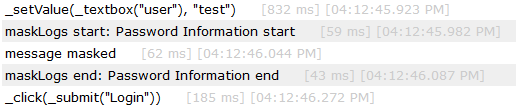
Controller
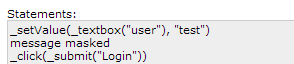
Disable/Enable INFO logging
Section titled “Disable/Enable INFO logging”_disableInfoLogging
Section titled “_disableInfoLogging”- Since
- Sahi Pro 4.5.2
- Desktop Engine 7.0.0
- Mobile Engine 7.5.0
- SAP Engine 9.0.0
Modes BrowserWindowsJavaAndroidiOSSAP
_disableInfoLogging()Arguments
| Name | Type | Description |
|---|---|---|
None |
Returns
null |
Disables logging of INFO (normal) steps in test run reports. Only SUCCESS, FAILURE and CUSTOM steps are logged.
_enableInfoLogging
Section titled “_enableInfoLogging”- Since
- Sahi Pro 4.5.2
- Desktop Engine 7.0.0
- Mobile Engine 7.5.0
- SAP Engine 9.0.0
Modes BrowserWindowsJavaAndroidiOSSAP
_enableInfoLogging()Arguments
| Name | Type | Description |
|---|---|---|
None |
Returns
null |
Enables logging of INFO (normal) steps in test run reports which was previously disabled using _disableInfoLogging.
Disable/Enable error logging
Section titled “Disable/Enable error logging”_disableDefaultErrorLogging
Section titled “_disableDefaultErrorLogging”- Since
- Sahi Pro 6.0.0
- Desktop Engine 7.0.0
- Mobile Engine 7.5.0
- SAP Engine 9.0.0
Modes BrowserWindowsJavaAndroidiOSSAP
_disableDefaultErrorLogging()Arguments
| Name | Type | Description |
|---|---|---|
None |
Returns
null |
Disables automatic logging of errors. Used in exception handling. See Corrective Action and Log the Exception Message Corrective Action, Log and then Fail.
_enableDefaultErrorLogging
Section titled “_enableDefaultErrorLogging”- Since
- Sahi Pro 6.0.0
- Desktop Engine 7.0.0
- Mobile Engine 7.5.0
- SAP Engine 9.0.0
Modes BrowserWindowsJavaAndroidiOSSAP
_enableDefaultErrorLogging()Arguments
| Name | Type | Description |
|---|---|---|
None |
Returns
null |
Enables automatic logging of errors.
Code Folding
Section titled “Code Folding”When a function is called in a Sahi script, the logs for that function call are automatically “folded” in the reports.
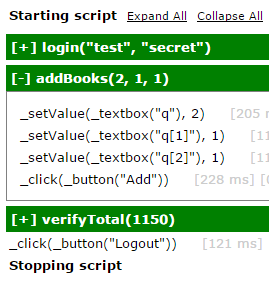
Disable Code Folding
Section titled “Disable Code Folding”Sometimes, for commonly called utility functions, one may choose not to log the code folded function. This can be done by adding
fnName.noLog = trueafter the function definition.
Example.
function getTimeStamp() { return (new Date()).toString();}getTimeStamp.noLog = true;Demarcating Test Cases
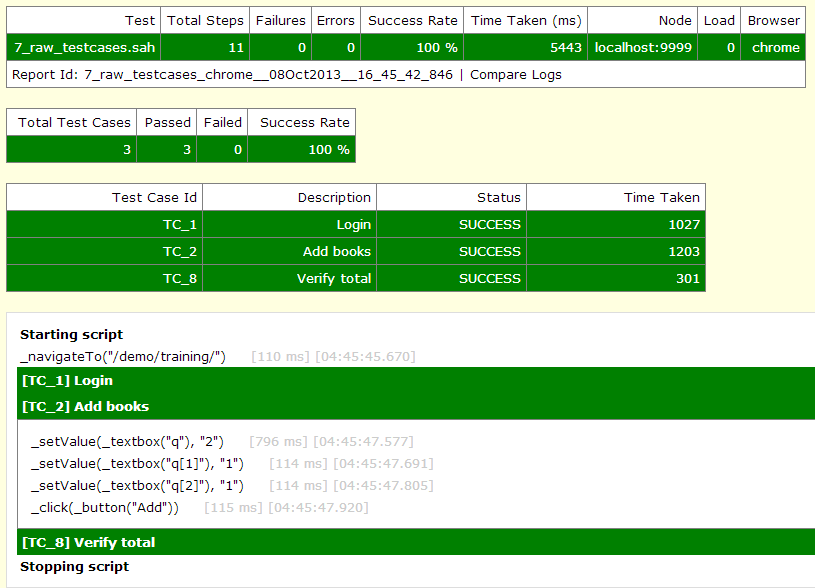
Section titled “Demarcating Test Cases”Sections of a script may need to be marked as separate testcases while viewing in logs. For example a single script can exercise login, verifyTotal and logout, and may be considered as 3 testcases in a single script.
_testcase (Deprecated)
Section titled “_testcase (Deprecated)”- Since
- Sahi Pro 4.0
- Desktop Engine 7.0.0
- Mobile Engine 7.5.0
- SAP Engine 9.0.0
Modes BrowserWindowsJavaAndroidiOSSAP
_testcase($testcaseId, $description)Arguments
| Name | Type | Description |
|---|---|---|
$testcaseId | string | Unique identifier for testcase. No square brackets should be present in the testcaseId. |
$description | string | Description to be shown in logs |
Returns
null |
Demarcates a testcase (a logical boundary of steps)
_navigateTo("/demo/training/");
var $t = _testcase("TC_1", "Login");$t.start();_setValue(_textbox("user"), "test");_setValue(_password("password"), "secret");_click(_submit("Login"));$t.end();
var $t2 = _testcase("TC_2", "Add books").start(); // can be in one line also_setValue(_textbox("q"), "2");_setValue(_textbox("q[1]"), "1");_setValue(_textbox("q[2]"), "1");_click(_button("Add"));$t2.end();
var $t3 = _testcase("TC_8", "Verify total");$t3.start();_assertExists(_textbox("total"));_assert(_isVisible(_textbox("total")));_assertEqual("1150", _textbox("total").value);$t3.end();
The logs of the above script will look like this:
Also refer to csv files as suites.
HAR Logging
Section titled “HAR Logging”HTTP request response information summaries can be captured during the test run. (HAR refers to HTTP ARchive format of storing request response information)
If enabled, a log step may look like this:
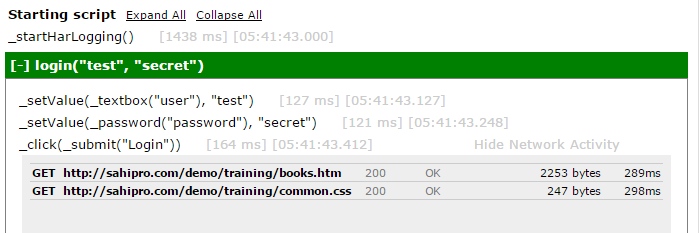
It can be enabled globally or locally.
Globally enable HAR Logging
Section titled “Globally enable HAR Logging”Add
har_logging.enabled=truein userdata.properties Restart Sahi for this to take effect.
Locally enable HAR Logging
Section titled “Locally enable HAR Logging”Locally enable or disable HAR logging inside a script using _startHarLogging() and _stopHarLogging() functions.
_startHarLogging
Section titled “_startHarLogging”- Since
- Sahi Pro 6.0.0
Modes Browser
_startHarLogging([$enableResponseContent])Arguments
| Name | Type | Description |
|---|---|---|
$enableResponseContent | booleanoptional | By default, response content will not be stored in HAR logs. Pass true to store response content. |
Returns
null |
Tells Sahi to start logging HTTP request/response information for all network calls in this script.
_stopHarLogging
Section titled “_stopHarLogging”- Since
- Sahi Pro 6.0.0
Modes Browser
_stopHarLogging()Arguments
| Name | Type | Description |
|---|---|---|
None |
Returns
null |
Tells Sahi to stop logging HTTP request/response information for all network calls in this script.
_getHarLogs
Section titled “_getHarLogs”- Since
- Sahi Pro 9.0.0
Modes Browser
_getHarLogs()Arguments
| Name | Type | Description |
|---|---|---|
None |
Returns
array of objects | An array of HAR logs |
It returns an array of HAR logs accumulated while executing the steps between _startHarLogging and _stopHarLogging. Every HAR log object has following attributes:
- requestMethod : returns the HTTP request method
- requestUrl : returns the requested url
- requestQueryString : returns an array of query parameters in the requested url
- requestHeaders : returns the request headers as an array
- requestData : returns the request body as an array
- responseStatus : returns the HTTP response status code
- responseStatusText : returns the HTTP response status message
- responseHeaders : returns the response headers as an array
- responseBodySize : returns the size of response body in bytes
- responseContent : returns the response body if argument
enableResponseContentpassed to_startHarLoggingfunction is true - time : returns the total duration from the start of the request to receiving the entire response
// Example 1 - Verify request to third party application_startHarLogging();_addToSession("https://www.google-analytics.com");_navigateTo("https://www.example.com/demo");_setValue(_textbox("Name"), "test");_click(_submit("Continue"));_stopHarLogging();var $harLogs = _getHarLogs();for (var $i=0; $i<$harLogs.length; $i++) {  var $harLog = $harLogs[$i];  _log( "Requested url : " + $harLog.requestUrl );  if( $harLog.requestUrl.indexOf("https://www.google-analytics.com/collect") != -1 ) {    _log( "HTTP request method : " + $harLog.requestMethod );    var $parameters = $harLog.requestQueryString;    for( var $j=0; $j < $parameters.length; $j++) {      _log( "Query parameter " + $j + " : name=" + $parameters[$j].name + ", value=" + $parameters[$j].value);    }
    _log( "Response status code : " + $harLog.responseStatus );    _log( "Response status message : " + $harLog.responseStatusText );    _log( "Size of response body in bytes : " + $harLog.responseBodySize );    _log( "Total duration : " + $harLog.time );    break;  }}
// Example 2 - Verify response content_navigateTo("https://www.example.com");_startHarLogging(true); // Enable reponse content in HAR logs_check(_checkbox("Order XYZ434"));_click(_submit("Approve")); // Approve Order XYZ434_wait(2000, _isVisible(_div("Success")));_stopHarLogging();var $harLogs = _getHarLogs();for (var $i=0; $i<$harLogs.length; $i++) {  var $harLog = $harLogs[$i];  if( $harLog.requestUrl.indexOf("https://www.example.com/approve") != -1 ) {    _log( "Response status code : " + $harLog.responseStatus );    _log( "Response status message : " + $harLog.responseStatusText );
    var $responseContent = $harLog.responseContent; // Server has sent a JSON containing the receipt number.    _log( "Receipt number : " +  JSON.parse($responseContent).receiptNo);    break;  }}