
Salesforce Accessor APIs

Form Input Elements

_lightningTextbox

Sahi Pro
11.2.1

API_lightningTextbox(identifier [, relation1 [, relation2 ...]])
TagTag: lightning-input of type: text
HTML
<lightning-input type="text"
 aria-label="descriptive label"
 name="lightningTextbox_name"
 id="lightningTextbox_id"
 class="shaded bigfont"
 value="apple" >
Identifiersaria-label, placeholder, name, id, css class, sahiLabel, index

Valid Accessors and alternatives: (Assume this is the 6th lightningTextbox in the UI and 2nd lightningTextbox with class "shaded bigfont")
//aria-label
_lightningTextbox("descriptive label")
//name
_lightningTextbox("lightningTextbox_name")
//id
_lightningTextbox("lightningTextbox_id")
//index
_lightningTextbox(5)
//css class with index
_lightningTextbox("shaded bigfont[1]")
//css class with regular expression and index
_lightningTextbox("/bigfont/[1]")
//multiple attributes as JSON
_lightningTextbox({className: "shaded bigfont", sahiIndex: 1})
//multiple attributes as JSON including regular expression
_lightningTextbox({className: "/shaded .*font/", sahiIndex: 1})
// Use sahiIndex for index, className for class and sahiText for visible text attributes.
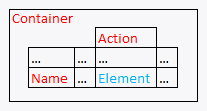
Relations Relational APIs _in, _near, _leftOf, _rightOf, _under, _above can be used. Relations Sample
// with _in
_lightningTextbox("descriptive label", _in(_div("Container")))

// index with 2 relational APIs, _rightOf and _under
_lightningTextbox(0, _rightOf(_span("Name")), _under(_cell("Action")))

// with regular expression and relations
_lightningTextbox("/bigfont/", _rightOf(_span("Name")), _under(_cell("Action")))
Valuevalue (this is the default attribute used in assertions etc.)
Actions Default event recorded is _setValue

Example usage:
_setValue(_lightningTextbox("descriptive label"), "apple");
_setValue(_lightningTextbox("/bigfont/[1]", _rightOf(_span("Name"))), "apple");
Assertions Example assertions:
// Check if element exists
_assertExists(_lightningTextbox("lightningTextbox_id"));
// Check if element is visible
_assert(_isVisible(_lightningTextbox("lightningTextbox_id")));
_assertEqual("apple", _getValue(_lightningTextbox("lightningTextbox_id")));

_lightningPISSearch

Sahi Pro
11.2.1

API_lightningPISSearch(identifier [, relation1 [, relation2 ...]])
TagTag: lightning-primitive-input-simple of type: search
HTML
<lightning-primitive-input-simple type="search"
 name="lightningPISSearch_name"
 id="lightningPISSearch_id"
 class="shaded bigfont"
 value="apple" >lightningPISSearch text</lightning-primitive-input-simple>
Identifiersplaceholder, visible text, name, id, css class, index

Valid Accessors and alternatives: (Assume this is the 6th lightningPISSearch in the UI and 2nd lightningPISSearch with class "shaded bigfont")
//visible text
_lightningPISSearch("lightningPISSearch text")
//visible text with regular expression
_lightningPISSearch("/PISSearch te/")
//visible text with regular expression
_lightningPISSearch("/lightning.*text/")
//name
_lightningPISSearch("lightningPISSearch_name")
//id
_lightningPISSearch("lightningPISSearch_id")
//index
_lightningPISSearch(5)
//css class with index
_lightningPISSearch("shaded bigfont[1]")
//css class with regular expression and index
_lightningPISSearch("/bigfont/[1]")
//multiple attributes as JSON
_lightningPISSearch({className: "shaded bigfont", sahiIndex: 1})
//multiple attributes as JSON including regular expression
_lightningPISSearch({className: "/shaded .*font/", sahiIndex: 1})
// Use sahiIndex for index, className for class and sahiText for visible text attributes.
Relations Relational APIs _in, _near, _leftOf, _rightOf, _under, _above can be used. Relations Sample
// with _in
_lightningPISSearch(, _in(_div("Container")))

// index with 2 relational APIs, _rightOf and _under
_lightningPISSearch(0, _rightOf(_span("Name")), _under(_cell("Action")))

// with regular expression and relations
_lightningPISSearch("/bigfont/", _rightOf(_span("Name")), _under(_cell("Action")))
Valuevalue (this is the default attribute used in assertions etc.)
Actions Default event recorded is _setValue

Example usage:
_setValue(_lightningPISSearch(), "apple");
_setValue(_lightningPISSearch("/bigfont/[1]", _rightOf(_span("Name"))), "apple");
Assertions Example assertions:
// Check if element exists
_assertExists(_lightningPISSearch("lightningPISSearch_id"));
// Check if element is visible
_assert(_isVisible(_lightningPISSearch("lightningPISSearch_id")));
_assertEqual("apple", _getValue(_lightningPISSearch("lightningPISSearch_id")));

Button Like Elements

_lightningButton

Sahi Pro
11.2.1

API_lightningButton(identifier [, relation1 [, relation2 ...]])
TagTag: lightning-button of type: null
HTML
<lightning-button type="null"
 title="elementTitle"
 label="elementLabel"
 name="lightningButton_name"
 id="lightningButton_id"
 class="shaded bigfont" >lightningButton text</lightning-button>
Identifiersvisible text, title, label, name, iconName, id, css class, index

Valid Accessors and alternatives: (Assume this is the 6th lightningButton in the UI and 2nd lightningButton with class "shaded bigfont")
//visible text
_lightningButton("lightningButton text")
//visible text with regular expression
_lightningButton("/ngButton te/")
//visible text with regular expression
_lightningButton("/lightni.*text/")
//title
_lightningButton("elementTitle")
//label
_lightningButton("elementLabel")
//name
_lightningButton("lightningButton_name")
//id
_lightningButton("lightningButton_id")
//index
_lightningButton(5)
//css class with index
_lightningButton("shaded bigfont[1]")
//css class with regular expression and index
_lightningButton("/bigfont/[1]")
//multiple attributes as JSON
_lightningButton({className: "shaded bigfont", sahiIndex: 1})
//multiple attributes as JSON including regular expression
_lightningButton({className: "/shaded .*font/", sahiIndex: 1})
// Use sahiIndex for index, className for class and sahiText for visible text attributes.
Relations Relational APIs _in, _near, _leftOf, _rightOf, _under, _above can be used. Relations Sample
// with _in
_lightningButton("lightningButton text", _in(_div("Container")))

// index with 2 relational APIs, _rightOf and _under
_lightningButton(0, _rightOf(_span("Name")), _under(_cell("Action")))

// with regular expression and relations
_lightningButton("/bigfont/", _rightOf(_span("Name")), _under(_cell("Action")))
Valuevisible text (this is the default attribute used in assertions etc.)
Actions Default event recorded is _click

Example usage:
_click(_lightningButton("lightningButton text"));
_click(_lightningButton("/bigfont/[1]", _rightOf(_span("Name"))));
Assertions Example assertions:
// Check if element exists
_assertExists(_lightningButton("lightningButton_id"));
// Check if element is visible
_assert(_isVisible(_lightningButton("lightningButton_id")));
_assertEqual("lightningButton text", _getText(_lightningButton("lightningButton_id")));

_lightningButton

Sahi Pro
11.2.1

API_lightningButton(identifier [, relation1 [, relation2 ...]])
TagTag: lightning-button of type: button
HTML
<lightning-button type="button"
 title="elementTitle"
 label="elementLabel"
 name="lightningButton_name"
 id="lightningButton_id"
 class="shaded bigfont" >lightningButton text</lightning-button>
Identifiersvisible text, title, label, name, iconName, id, css class, index

Valid Accessors and alternatives: (Assume this is the 6th lightningButton in the UI and 2nd lightningButton with class "shaded bigfont")
//visible text
_lightningButton("lightningButton text")
//visible text with regular expression
_lightningButton("/ngButton te/")
//visible text with regular expression
_lightningButton("/lightni.*text/")
//title
_lightningButton("elementTitle")
//label
_lightningButton("elementLabel")
//name
_lightningButton("lightningButton_name")
//id
_lightningButton("lightningButton_id")
//index
_lightningButton(5)
//css class with index
_lightningButton("shaded bigfont[1]")
//css class with regular expression and index
_lightningButton("/bigfont/[1]")
//multiple attributes as JSON
_lightningButton({className: "shaded bigfont", sahiIndex: 1})
//multiple attributes as JSON including regular expression
_lightningButton({className: "/shaded .*font/", sahiIndex: 1})
// Use sahiIndex for index, className for class and sahiText for visible text attributes.
Relations Relational APIs _in, _near, _leftOf, _rightOf, _under, _above can be used. Relations Sample
// with _in
_lightningButton("lightningButton text", _in(_div("Container")))

// index with 2 relational APIs, _rightOf and _under
_lightningButton(0, _rightOf(_span("Name")), _under(_cell("Action")))

// with regular expression and relations
_lightningButton("/bigfont/", _rightOf(_span("Name")), _under(_cell("Action")))
Valuevisible text (this is the default attribute used in assertions etc.)
Actions Default event recorded is _click

Example usage:
_click(_lightningButton("lightningButton text"));
_click(_lightningButton("/bigfont/[1]", _rightOf(_span("Name"))));
Assertions Example assertions:
// Check if element exists
_assertExists(_lightningButton("lightningButton_id"));
// Check if element is visible
_assert(_isVisible(_lightningButton("lightningButton_id")));
_assertEqual("lightningButton text", _getText(_lightningButton("lightningButton_id")));

_lightningToggle

Sahi Pro
11.2.1

API_lightningToggle(identifier [, relation1 [, relation2 ...]])
TagTag: lightning-input of type: toggle
HTML
<lightning-input type="toggle"
 title="elementTitle"
 label="elementLabel"
 name="lightningToggle_name"
 id="lightningToggle_id"
 class="shaded bigfont" >lightningToggle text</lightning-input>
Identifiersvisible text, title, label, name, id, css class, index

Valid Accessors and alternatives: (Assume this is the 6th lightningToggle in the UI and 2nd lightningToggle with class "shaded bigfont")
//visible text
_lightningToggle("lightningToggle text")
//visible text with regular expression
_lightningToggle("/ngToggle te/")
//visible text with regular expression
_lightningToggle("/lightni.*text/")
//title
_lightningToggle("elementTitle")
//label
_lightningToggle("elementLabel")
//name
_lightningToggle("lightningToggle_name")
//id
_lightningToggle("lightningToggle_id")
//index
_lightningToggle(5)
//css class with index
_lightningToggle("shaded bigfont[1]")
//css class with regular expression and index
_lightningToggle("/bigfont/[1]")
//multiple attributes as JSON
_lightningToggle({className: "shaded bigfont", sahiIndex: 1})
//multiple attributes as JSON including regular expression
_lightningToggle({className: "/shaded .*font/", sahiIndex: 1})
// Use sahiIndex for index, className for class and sahiText for visible text attributes.
Relations Relational APIs _in, _near, _leftOf, _rightOf, _under, _above can be used. Relations Sample
// with _in
_lightningToggle("lightningToggle text", _in(_div("Container")))

// index with 2 relational APIs, _rightOf and _under
_lightningToggle(0, _rightOf(_span("Name")), _under(_cell("Action")))

// with regular expression and relations
_lightningToggle("/bigfont/", _rightOf(_span("Name")), _under(_cell("Action")))
Valuevisible text (this is the default attribute used in assertions etc.)
Actions Default event recorded is _click

Example usage:
_click(_lightningToggle("lightningToggle text"));
_click(_lightningToggle("/bigfont/[1]", _rightOf(_span("Name"))));
Assertions Example assertions:
// Check if element exists
_assertExists(_lightningToggle("lightningToggle_id"));
// Check if element is visible
_assert(_isVisible(_lightningToggle("lightningToggle_id")));
_assertEqual("lightningToggle text", _getText(_lightningToggle("lightningToggle_id")));

_lightningPIToggle

Sahi Pro
11.2.1

API_lightningPIToggle(identifier [, relation1 [, relation2 ...]])
TagTag: lightning-primitive-input-toggle of type: null
HTML
<lightning-primitive-input-toggle type="null"
 title="elementTitle"
 label="elementLabel"
 name="lightningPIToggle_name"
 id="lightningPIToggle_id"
 class="shaded bigfont" >lightningPIToggle text</lightning-primitive-input-toggle>
Identifiersvisible text, title, label, name, id, css class, index

Valid Accessors and alternatives: (Assume this is the 6th lightningPIToggle in the UI and 2nd lightningPIToggle with class "shaded bigfont")
//visible text
_lightningPIToggle("lightningPIToggle text")
//visible text with regular expression
_lightningPIToggle("/gPIToggle te/")
//visible text with regular expression
_lightningPIToggle("/lightnin.*text/")
//title
_lightningPIToggle("elementTitle")
//label
_lightningPIToggle("elementLabel")
//name
_lightningPIToggle("lightningPIToggle_name")
//id
_lightningPIToggle("lightningPIToggle_id")
//index
_lightningPIToggle(5)
//css class with index
_lightningPIToggle("shaded bigfont[1]")
//css class with regular expression and index
_lightningPIToggle("/bigfont/[1]")
//multiple attributes as JSON
_lightningPIToggle({className: "shaded bigfont", sahiIndex: 1})
//multiple attributes as JSON including regular expression
_lightningPIToggle({className: "/shaded .*font/", sahiIndex: 1})
// Use sahiIndex for index, className for class and sahiText for visible text attributes.
Relations Relational APIs _in, _near, _leftOf, _rightOf, _under, _above can be used. Relations Sample
// with _in
_lightningPIToggle("lightningPIToggle text", _in(_div("Container")))

// index with 2 relational APIs, _rightOf and _under
_lightningPIToggle(0, _rightOf(_span("Name")), _under(_cell("Action")))

// with regular expression and relations
_lightningPIToggle("/bigfont/", _rightOf(_span("Name")), _under(_cell("Action")))
Valuevisible text (this is the default attribute used in assertions etc.)
Actions Default event recorded is _click

Example usage:
_click(_lightningPIToggle("lightningPIToggle text"));
_click(_lightningPIToggle("/bigfont/[1]", _rightOf(_span("Name"))));
Assertions Example assertions:
// Check if element exists
_assertExists(_lightningPIToggle("lightningPIToggle_id"));
// Check if element is visible
_assert(_isVisible(_lightningPIToggle("lightningPIToggle_id")));
_assertEqual("lightningPIToggle text", _getText(_lightningPIToggle("lightningPIToggle_id")));

_sfISegmentButton

Sahi Pro
11.2.1

API_sfISegmentButton(identifier [, relation1 [, relation2 ...]])
TagTag: ION-SEGMENT-BUTTON of type: button
HTML
<ION-SEGMENT-BUTTON type="button"
 id="sfISegmentButton_id"
 class="shaded bigfont" >sfISegmentButton text</ION-SEGMENT-BUTTON>
Identifiersvisible text, id, css class, index

Valid Accessors and alternatives: (Assume this is the 6th sfISegmentButton in the UI and 2nd sfISegmentButton with class "shaded bigfont")
//visible text
_sfISegmentButton("sfISegmentButton text")
//visible text with regular expression
_sfISegmentButton("/ntButton te/")
//visible text with regular expression
_sfISegmentButton("/sfISegme.*text/")
//id
_sfISegmentButton("sfISegmentButton_id")
//index
_sfISegmentButton(5)
//css class with index
_sfISegmentButton("shaded bigfont[1]")
//css class with regular expression and index
_sfISegmentButton("/bigfont/[1]")
//multiple attributes as JSON
_sfISegmentButton({className: "shaded bigfont", sahiIndex: 1})
//multiple attributes as JSON including regular expression
_sfISegmentButton({className: "/shaded .*font/", sahiIndex: 1})
// Use sahiIndex for index, className for class and sahiText for visible text attributes.
Relations Relational APIs _in, _near, _leftOf, _rightOf, _under, _above can be used. Relations Sample
// with _in
_sfISegmentButton("sfISegmentButton text", _in(_div("Container")))

// index with 2 relational APIs, _rightOf and _under
_sfISegmentButton(0, _rightOf(_span("Name")), _under(_cell("Action")))

// with regular expression and relations
_sfISegmentButton("/bigfont/", _rightOf(_span("Name")), _under(_cell("Action")))
Valuevisible text (this is the default attribute used in assertions etc.)
Actions Default event recorded is _click

Example usage:
_click(_sfISegmentButton("sfISegmentButton text"));
_click(_sfISegmentButton("/bigfont/[1]", _rightOf(_span("Name"))));
Assertions Example assertions:
// Check if element exists
_assertExists(_sfISegmentButton("sfISegmentButton_id"));
// Check if element is visible
_assert(_isVisible(_sfISegmentButton("sfISegmentButton_id")));
_assertEqual("sfISegmentButton text", _getText(_sfISegmentButton("sfISegmentButton_id")));

Other HTML Tags

_lightningButtonIcon

Sahi Pro
11.2.1

API_lightningButtonIcon(identifier [, relation1 [, relation2 ...]])
TagTag: lightning-button-icon
HTML
<lightning-button-icon
 title="elementTitle"
 id="lightningButtonIcon_id"
 name="lightningButtonIcon_name"
 class="shaded bigfont" >lightningButtonIcon text</lightning-button-icon>
Identifiersvisible text, title, id, name, iconName, css class, index

Valid Accessors and alternatives: (Assume this is the 6th lightningButtonIcon in the UI and 2nd lightningButtonIcon with class "shaded bigfont")
//visible text
_lightningButtonIcon("lightningButtonIcon text")
//visible text with regular expression
_lightningButtonIcon("/ButtonIcon te/")
//visible text with regular expression
_lightningButtonIcon("/lightning.*text/")
//title
_lightningButtonIcon("elementTitle")
//id
_lightningButtonIcon("lightningButtonIcon_id")
//name
_lightningButtonIcon("lightningButtonIcon_name")
//index
_lightningButtonIcon(5)
//css class with index
_lightningButtonIcon("shaded bigfont[1]")
//css class with regular expression and index
_lightningButtonIcon("/bigfont/[1]")
//multiple attributes as JSON
_lightningButtonIcon({className: "shaded bigfont", sahiIndex: 1})
//multiple attributes as JSON including regular expression
_lightningButtonIcon({className: "/shaded .*font/", sahiIndex: 1})
// Use sahiIndex for index, className for class and sahiText for visible text attributes.
Relations Relational APIs _in, _near, _leftOf, _rightOf, _under, _above can be used. Relations Sample
// with _in
_lightningButtonIcon("lightningButtonIcon text", _in(_div("Container")))

// index with 2 relational APIs, _rightOf and _under
_lightningButtonIcon(0, _rightOf(_span("Name")), _under(_cell("Action")))

// with regular expression and relations
_lightningButtonIcon("/bigfont/", _rightOf(_span("Name")), _under(_cell("Action")))
Valuevisible text (this is the default attribute used in assertions etc.)
Actions Default event recorded is _click

Example usage:
_click(_lightningButtonIcon("lightningButtonIcon text"));
_click(_lightningButtonIcon("/bigfont/[1]", _rightOf(_span("Name"))));
Assertions Example assertions:
// Check if element exists
_assertExists(_lightningButtonIcon("lightningButtonIcon_id"));
// Check if element is visible
_assert(_isVisible(_lightningButtonIcon("lightningButtonIcon_id")));
_assertEqual("lightningButtonIcon text", _getText(_lightningButtonIcon("lightningButtonIcon_id")));

_lightningIcon

Sahi Pro
11.2.1

API_lightningIcon(identifier [, relation1 [, relation2 ...]])
TagTag: lightning-icon
HTML
<lightning-icon
 title="elementTitle"
 id="lightningIcon_id"
 name="lightningIcon_name"
 class="shaded bigfont" >lightningIcon text</lightning-icon>
Identifiersvisible text, title, id, name, iconName, css class, index

Valid Accessors and alternatives: (Assume this is the 6th lightningIcon in the UI and 2nd lightningIcon with class "shaded bigfont")
//visible text
_lightningIcon("lightningIcon text")
//visible text with regular expression
_lightningIcon("/ingIcon te/")
//visible text with regular expression
_lightningIcon("/lightn.*text/")
//title
_lightningIcon("elementTitle")
//id
_lightningIcon("lightningIcon_id")
//name
_lightningIcon("lightningIcon_name")
//index
_lightningIcon(5)
//css class with index
_lightningIcon("shaded bigfont[1]")
//css class with regular expression and index
_lightningIcon("/bigfont/[1]")
//multiple attributes as JSON
_lightningIcon({className: "shaded bigfont", sahiIndex: 1})
//multiple attributes as JSON including regular expression
_lightningIcon({className: "/shaded .*font/", sahiIndex: 1})
// Use sahiIndex for index, className for class and sahiText for visible text attributes.
Relations Relational APIs _in, _near, _leftOf, _rightOf, _under, _above can be used. Relations Sample
// with _in
_lightningIcon("lightningIcon text", _in(_div("Container")))

// index with 2 relational APIs, _rightOf and _under
_lightningIcon(0, _rightOf(_span("Name")), _under(_cell("Action")))

// with regular expression and relations
_lightningIcon("/bigfont/", _rightOf(_span("Name")), _under(_cell("Action")))
Valuevisible text (this is the default attribute used in assertions etc.)
Actions Default event recorded is _click

Example usage:
_click(_lightningIcon("lightningIcon text"));
_click(_lightningIcon("/bigfont/[1]", _rightOf(_span("Name"))));
Assertions Example assertions:
// Check if element exists
_assertExists(_lightningIcon("lightningIcon_id"));
// Check if element is visible
_assert(_isVisible(_lightningIcon("lightningIcon_id")));
_assertEqual("lightningIcon text", _getText(_lightningIcon("lightningIcon_id")));

_lightningPIcon

Sahi Pro
11.2.1

API_lightningPIcon(identifier [, relation1 [, relation2 ...]])
TagTag: lightning-primitive-icon
HTML
<lightning-primitive-icon
 title="elementTitle"
 id="lightningPIcon_id"
 name="lightningPIcon_name"
 class="shaded bigfont" >lightningPIcon text</lightning-primitive-icon>
Identifiersvisible text, title, id, name, iconName, css class, index

Valid Accessors and alternatives: (Assume this is the 6th lightningPIcon in the UI and 2nd lightningPIcon with class "shaded bigfont")
//visible text
_lightningPIcon("lightningPIcon text")
//visible text with regular expression
_lightningPIcon("/ngPIcon te/")
//visible text with regular expression
_lightningPIcon("/lightni.*text/")
//title
_lightningPIcon("elementTitle")
//id
_lightningPIcon("lightningPIcon_id")
//name
_lightningPIcon("lightningPIcon_name")
//index
_lightningPIcon(5)
//css class with index
_lightningPIcon("shaded bigfont[1]")
//css class with regular expression and index
_lightningPIcon("/bigfont/[1]")
//multiple attributes as JSON
_lightningPIcon({className: "shaded bigfont", sahiIndex: 1})
//multiple attributes as JSON including regular expression
_lightningPIcon({className: "/shaded .*font/", sahiIndex: 1})
// Use sahiIndex for index, className for class and sahiText for visible text attributes.
Relations Relational APIs _in, _near, _leftOf, _rightOf, _under, _above can be used. Relations Sample
// with _in
_lightningPIcon("lightningPIcon text", _in(_div("Container")))

// index with 2 relational APIs, _rightOf and _under
_lightningPIcon(0, _rightOf(_span("Name")), _under(_cell("Action")))

// with regular expression and relations
_lightningPIcon("/bigfont/", _rightOf(_span("Name")), _under(_cell("Action")))
Valuevisible text (this is the default attribute used in assertions etc.)
Actions Default event recorded is _click

Example usage:
_click(_lightningPIcon("lightningPIcon text"));
_click(_lightningPIcon("/bigfont/[1]", _rightOf(_span("Name"))));
Assertions Example assertions:
// Check if element exists
_assertExists(_lightningPIcon("lightningPIcon_id"));
// Check if element is visible
_assert(_isVisible(_lightningPIcon("lightningPIcon_id")));
_assertEqual("lightningPIcon text", _getText(_lightningPIcon("lightningPIcon_id")));

_lightningSelect

Sahi Pro
11.2.1

API_lightningSelect(identifier [, relation1 [, relation2 ...]])
TagTag: lightning-select
HTML
<lightning-select
 name="lightningSelect_name"
 id="lightningSelect_id"
 class="shaded bigfont" >lightningSelect text</lightning-select>
Identifiersplaceholder, name, id, visible text, css class, index

Valid Accessors and alternatives: (Assume this is the 6th lightningSelect in the UI and 2nd lightningSelect with class "shaded bigfont")
//name
_lightningSelect("lightningSelect_name")
//id
_lightningSelect("lightningSelect_id")
//visible text
_lightningSelect("lightningSelect text")
//visible text with regular expression
_lightningSelect("/ngSelect te/")
//visible text with regular expression
_lightningSelect("/lightni.*text/")
//index
_lightningSelect(5)
//css class with index
_lightningSelect("shaded bigfont[1]")
//css class with regular expression and index
_lightningSelect("/bigfont/[1]")
//multiple attributes as JSON
_lightningSelect({className: "shaded bigfont", sahiIndex: 1})
//multiple attributes as JSON including regular expression
_lightningSelect({className: "/shaded .*font/", sahiIndex: 1})
// Use sahiIndex for index, className for class and sahiText for visible text attributes.
Relations Relational APIs _in, _near, _leftOf, _rightOf, _under, _above can be used. Relations Sample
// with _in
_lightningSelect(, _in(_div("Container")))

// index with 2 relational APIs, _rightOf and _under
_lightningSelect(0, _rightOf(_span("Name")), _under(_cell("Action")))

// with regular expression and relations
_lightningSelect("/bigfont/", _rightOf(_span("Name")), _under(_cell("Action")))
Valuevisible text (this is the default attribute used in assertions etc.)
Actions Default event recorded is _click

Example usage:
_click(_lightningSelect());
_click(_lightningSelect("/bigfont/[1]", _rightOf(_span("Name"))));
Assertions Example assertions:
// Check if element exists
_assertExists(_lightningSelect("lightningSelect_id"));
// Check if element is visible
_assert(_isVisible(_lightningSelect("lightningSelect_id")));
_assertEqual("lightningSelect text", _getText(_lightningSelect("lightningSelect_id")));

_lightningCombobox

Sahi Pro
11.2.1

API_lightningCombobox(identifier [, relation1 [, relation2 ...]])
TagTag: lightning-combobox
HTML
<lightning-combobox
 name="lightningCombobox_name"
 id="lightningCombobox_id"
 class="shaded bigfont" >lightningCombobox text</lightning-combobox>
Identifiersplaceholder, name, id, visible text, css class, index

Valid Accessors and alternatives: (Assume this is the 6th lightningCombobox in the UI and 2nd lightningCombobox with class "shaded bigfont")
//name
_lightningCombobox("lightningCombobox_name")
//id
_lightningCombobox("lightningCombobox_id")
//visible text
_lightningCombobox("lightningCombobox text")
//visible text with regular expression
_lightningCombobox("/gCombobox te/")
//visible text with regular expression
_lightningCombobox("/lightnin.*text/")
//index
_lightningCombobox(5)
//css class with index
_lightningCombobox("shaded bigfont[1]")
//css class with regular expression and index
_lightningCombobox("/bigfont/[1]")
//multiple attributes as JSON
_lightningCombobox({className: "shaded bigfont", sahiIndex: 1})
//multiple attributes as JSON including regular expression
_lightningCombobox({className: "/shaded .*font/", sahiIndex: 1})
// Use sahiIndex for index, className for class and sahiText for visible text attributes.
Relations Relational APIs _in, _near, _leftOf, _rightOf, _under, _above can be used. Relations Sample
// with _in
_lightningCombobox(, _in(_div("Container")))

// index with 2 relational APIs, _rightOf and _under
_lightningCombobox(0, _rightOf(_span("Name")), _under(_cell("Action")))

// with regular expression and relations
_lightningCombobox("/bigfont/", _rightOf(_span("Name")), _under(_cell("Action")))
Valuevisible text (this is the default attribute used in assertions etc.)
Actions Default event recorded is _click

Example usage:
_click(_lightningCombobox());
_click(_lightningCombobox("/bigfont/[1]", _rightOf(_span("Name"))));
Assertions Example assertions:
// Check if element exists
_assertExists(_lightningCombobox("lightningCombobox_id"));
// Check if element is visible
_assert(_isVisible(_lightningCombobox("lightningCombobox_id")));
_assertEqual("lightningCombobox text", _getText(_lightningCombobox("lightningCombobox_id")));

_lightningBComboboxItem

Sahi Pro
11.2.1

API_lightningBComboboxItem(identifier [, relation1 [, relation2 ...]])
TagTag: lightning-base-combobox-item
HTML
<lightning-base-combobox-item
 id="lightningBComboboxItem_id"
 class="shaded bigfont" >lightningBComboboxItem text</lightning-base-combobox-item>
Identifiersvisible text, id, css class, index

Valid Accessors and alternatives: (Assume this is the 6th lightningBComboboxItem in the UI and 2nd lightningBComboboxItem with class "shaded bigfont")
//visible text
_lightningBComboboxItem("lightningBComboboxItem text")
//visible text with regular expression
_lightningBComboboxItem("/omboboxItem te/")
//visible text with regular expression
_lightningBComboboxItem("/lightningBC.*text/")
//id
_lightningBComboboxItem("lightningBComboboxItem_id")
//index
_lightningBComboboxItem(5)
//css class with index
_lightningBComboboxItem("shaded bigfont[1]")
//css class with regular expression and index
_lightningBComboboxItem("/bigfont/[1]")
//multiple attributes as JSON
_lightningBComboboxItem({className: "shaded bigfont", sahiIndex: 1})
//multiple attributes as JSON including regular expression
_lightningBComboboxItem({className: "/shaded .*font/", sahiIndex: 1})
// Use sahiIndex for index, className for class and sahiText for visible text attributes.
Relations Relational APIs _in, _near, _leftOf, _rightOf, _under, _above can be used. Relations Sample
// with _in
_lightningBComboboxItem("lightningBComboboxItem text", _in(_div("Container")))

// index with 2 relational APIs, _rightOf and _under
_lightningBComboboxItem(0, _rightOf(_span("Name")), _under(_cell("Action")))

// with regular expression and relations
_lightningBComboboxItem("/bigfont/", _rightOf(_span("Name")), _under(_cell("Action")))
Valuevisible text (this is the default attribute used in assertions etc.)
Actions Default event recorded is _click

Example usage:
_click(_lightningBComboboxItem("lightningBComboboxItem text"));
_click(_lightningBComboboxItem("/bigfont/[1]", _rightOf(_span("Name"))));
Assertions Example assertions:
// Check if element exists
_assertExists(_lightningBComboboxItem("lightningBComboboxItem_id"));
// Check if element is visible
_assert(_isVisible(_lightningBComboboxItem("lightningBComboboxItem_id")));
_assertEqual("lightningBComboboxItem text", _getText(_lightningBComboboxItem("lightningBComboboxItem_id")));

_lightningFormattedText

Sahi Pro
11.2.1

API_lightningFormattedText(identifier [, relation1 [, relation2 ...]])
TagTag: lightning-formatted-text
HTML
<lightning-formatted-text
 title="elementTitle"
 id="lightningFormattedText_id"
 class="shaded bigfont" >lightningFormattedText text</lightning-formatted-text>
Identifiersvisible text, title, id, css class, index

Valid Accessors and alternatives: (Assume this is the 6th lightningFormattedText in the UI and 2nd lightningFormattedText with class "shaded bigfont")
//visible text
_lightningFormattedText("lightningFormattedText text")
//visible text with regular expression
_lightningFormattedText("/rmattedText te/")
//visible text with regular expression
_lightningFormattedText("/lightningFo.*text/")
//title
_lightningFormattedText("elementTitle")
//id
_lightningFormattedText("lightningFormattedText_id")
//index
_lightningFormattedText(5)
//css class with index
_lightningFormattedText("shaded bigfont[1]")
//css class with regular expression and index
_lightningFormattedText("/bigfont/[1]")
//multiple attributes as JSON
_lightningFormattedText({className: "shaded bigfont", sahiIndex: 1})
//multiple attributes as JSON including regular expression
_lightningFormattedText({className: "/shaded .*font/", sahiIndex: 1})
// Use sahiIndex for index, className for class and sahiText for visible text attributes.
Relations Relational APIs _in, _near, _leftOf, _rightOf, _under, _above can be used. Relations Sample
// with _in
_lightningFormattedText("lightningFormattedText text", _in(_div("Container")))

// index with 2 relational APIs, _rightOf and _under
_lightningFormattedText(0, _rightOf(_span("Name")), _under(_cell("Action")))

// with regular expression and relations
_lightningFormattedText("/bigfont/", _rightOf(_span("Name")), _under(_cell("Action")))
Valuevisible text (this is the default attribute used in assertions etc.)
Actions Default event recorded is _click

Example usage:
_click(_lightningFormattedText("lightningFormattedText text"));
_click(_lightningFormattedText("/bigfont/[1]", _rightOf(_span("Name"))));
Assertions Example assertions:
// Check if element exists
_assertExists(_lightningFormattedText("lightningFormattedText_id"));
// Check if element is visible
_assert(_isVisible(_lightningFormattedText("lightningFormattedText_id")));
_assertEqual("lightningFormattedText text", _getText(_lightningFormattedText("lightningFormattedText_id")));

_lightningBFormattedText

Sahi Pro
11.2.1

API_lightningBFormattedText(identifier [, relation1 [, relation2 ...]])
TagTag: lightning-base-formatted-text
HTML
<lightning-base-formatted-text
 id="lightningBFormattedText_id"
 value="apple"
 class="shaded bigfont" >lightningBFormattedText text</lightning-base-formatted-text>
Identifiersvisible text, id, value, css class, data-output-element-id, index

Valid Accessors and alternatives: (Assume this is the 6th lightningBFormattedText in the UI and 2nd lightningBFormattedText with class "shaded bigfont")
//visible text
_lightningBFormattedText("lightningBFormattedText text")
//visible text with regular expression
_lightningBFormattedText("/ormattedText te/")
//visible text with regular expression
_lightningBFormattedText("/lightningBF.*text/")
//id
_lightningBFormattedText("lightningBFormattedText_id")
//value
_lightningBFormattedText("apple")
//index
_lightningBFormattedText(5)
//css class with index
_lightningBFormattedText("shaded bigfont[1]")
//css class with regular expression and index
_lightningBFormattedText("/bigfont/[1]")
//multiple attributes as JSON
_lightningBFormattedText({className: "shaded bigfont", sahiIndex: 1})
//multiple attributes as JSON including regular expression
_lightningBFormattedText({className: "/shaded .*font/", sahiIndex: 1})
// Use sahiIndex for index, className for class and sahiText for visible text attributes.
Relations Relational APIs _in, _near, _leftOf, _rightOf, _under, _above can be used. Relations Sample
// with _in
_lightningBFormattedText("lightningBFormattedText text", _in(_div("Container")))

// index with 2 relational APIs, _rightOf and _under
_lightningBFormattedText(0, _rightOf(_span("Name")), _under(_cell("Action")))

// with regular expression and relations
_lightningBFormattedText("/bigfont/", _rightOf(_span("Name")), _under(_cell("Action")))
Valuevisible text (this is the default attribute used in assertions etc.)
Actions Default event recorded is _click

Example usage:
_click(_lightningBFormattedText("lightningBFormattedText text"));
_click(_lightningBFormattedText("/bigfont/[1]", _rightOf(_span("Name"))));
Assertions Example assertions:
// Check if element exists
_assertExists(_lightningBFormattedText("lightningBFormattedText_id"));
// Check if element is visible
_assert(_isVisible(_lightningBFormattedText("lightningBFormattedText_id")));
_assertEqual("lightningBFormattedText text", _getText(_lightningBFormattedText("lightningBFormattedText_id")));

_lightningPCFactory

Sahi Pro
11.2.1

API_lightningPCFactory(identifier [, relation1 [, relation2 ...]])
TagTag: lightning-primitive-cell-factory
HTML
<lightning-primitive-cell-factory
 id="lightningPCFactory_id"
 class="shaded bigfont" >lightningPCFactory text</lightning-primitive-cell-factory>
Identifiersvisible text, id, css class, index, data-output-element-id

Valid Accessors and alternatives: (Assume this is the 6th lightningPCFactory in the UI and 2nd lightningPCFactory with class "shaded bigfont")
//visible text
_lightningPCFactory("lightningPCFactory text")
//visible text with regular expression
_lightningPCFactory("/PCFactory te/")
//visible text with regular expression
_lightningPCFactory("/lightning.*text/")
//id
_lightningPCFactory("lightningPCFactory_id")
//index
_lightningPCFactory(5)
//css class with index
_lightningPCFactory("shaded bigfont[1]")
//css class with regular expression and index
_lightningPCFactory("/bigfont/[1]")
//multiple attributes as JSON
_lightningPCFactory({className: "shaded bigfont", sahiIndex: 1})
//multiple attributes as JSON including regular expression
_lightningPCFactory({className: "/shaded .*font/", sahiIndex: 1})
// Use sahiIndex for index, className for class and sahiText for visible text attributes.
Relations Relational APIs _in, _near, _leftOf, _rightOf, _under, _above can be used. Relations Sample
// with _in
_lightningPCFactory("lightningPCFactory text", _in(_div("Container")))

// index with 2 relational APIs, _rightOf and _under
_lightningPCFactory(0, _rightOf(_span("Name")), _under(_cell("Action")))

// with regular expression and relations
_lightningPCFactory("/bigfont/", _rightOf(_span("Name")), _under(_cell("Action")))
Valuevisible text (this is the default attribute used in assertions etc.)
Actions Default event recorded is _click

Example usage:
_click(_lightningPCFactory("lightningPCFactory text"));
_click(_lightningPCFactory("/bigfont/[1]", _rightOf(_span("Name"))));
Assertions Example assertions:
// Check if element exists
_assertExists(_lightningPCFactory("lightningPCFactory_id"));
// Check if element is visible
_assert(_isVisible(_lightningPCFactory("lightningPCFactory_id")));
_assertEqual("lightningPCFactory text", _getText(_lightningPCFactory("lightningPCFactory_id")));

_lightningPCustomCell

Sahi Pro
11.2.1

API_lightningPCustomCell(identifier [, relation1 [, relation2 ...]])
TagTag: lightning-primitive-custom-cell
HTML
<lightning-primitive-custom-cell
 id="lightningPCustomCell_id"
 class="shaded bigfont" >lightningPCustomCell text</lightning-primitive-custom-cell>
Identifiersvisible text, id, css class, index, data-output-element-id

Valid Accessors and alternatives: (Assume this is the 6th lightningPCustomCell in the UI and 2nd lightningPCustomCell with class "shaded bigfont")
//visible text
_lightningPCustomCell("lightningPCustomCell text")
//visible text with regular expression
_lightningPCustomCell("/CustomCell te/")
//visible text with regular expression
_lightningPCustomCell("/lightningP.*text/")
//id
_lightningPCustomCell("lightningPCustomCell_id")
//index
_lightningPCustomCell(5)
//css class with index
_lightningPCustomCell("shaded bigfont[1]")
//css class with regular expression and index
_lightningPCustomCell("/bigfont/[1]")
//multiple attributes as JSON
_lightningPCustomCell({className: "shaded bigfont", sahiIndex: 1})
//multiple attributes as JSON including regular expression
_lightningPCustomCell({className: "/shaded .*font/", sahiIndex: 1})
// Use sahiIndex for index, className for class and sahiText for visible text attributes.
Relations Relational APIs _in, _near, _leftOf, _rightOf, _under, _above can be used. Relations Sample
// with _in
_lightningPCustomCell("lightningPCustomCell text", _in(_div("Container")))

// index with 2 relational APIs, _rightOf and _under
_lightningPCustomCell(0, _rightOf(_span("Name")), _under(_cell("Action")))

// with regular expression and relations
_lightningPCustomCell("/bigfont/", _rightOf(_span("Name")), _under(_cell("Action")))
Valuevisible text (this is the default attribute used in assertions etc.)
Actions Default event recorded is _click

Example usage:
_click(_lightningPCustomCell("lightningPCustomCell text"));
_click(_lightningPCustomCell("/bigfont/[1]", _rightOf(_span("Name"))));
Assertions Example assertions:
// Check if element exists
_assertExists(_lightningPCustomCell("lightningPCustomCell_id"));
// Check if element is visible
_assert(_isVisible(_lightningPCustomCell("lightningPCustomCell_id")));
_assertEqual("lightningPCustomCell text", _getText(_lightningPCustomCell("lightningPCustomCell_id")));

_crmUtilIcon

Sahi Pro
11.2.1

API_crmUtilIcon(identifier [, relation1 [, relation2 ...]])
TagTag: crmutil-icon
HTML
<crmutil-icon
 id="crmUtilIcon_id"
 class="shaded bigfont" >crmUtilIcon text</crmutil-icon>
IdentifiersiconName, visible text, id, css class, index

Valid Accessors and alternatives: (Assume this is the 6th crmUtilIcon in the UI and 2nd crmUtilIcon with class "shaded bigfont")
//visible text
_crmUtilIcon("crmUtilIcon text")
//visible text with regular expression
_crmUtilIcon("/ilIcon te/")
//visible text with regular expression
_crmUtilIcon("/crmUt.*text/")
//id
_crmUtilIcon("crmUtilIcon_id")
//index
_crmUtilIcon(5)
//css class with index
_crmUtilIcon("shaded bigfont[1]")
//css class with regular expression and index
_crmUtilIcon("/bigfont/[1]")
//multiple attributes as JSON
_crmUtilIcon({className: "shaded bigfont", sahiIndex: 1})
//multiple attributes as JSON including regular expression
_crmUtilIcon({className: "/shaded .*font/", sahiIndex: 1})
// Use sahiIndex for index, className for class and sahiText for visible text attributes.
Relations Relational APIs _in, _near, _leftOf, _rightOf, _under, _above can be used. Relations Sample
// with _in
_crmUtilIcon(, _in(_div("Container")))

// index with 2 relational APIs, _rightOf and _under
_crmUtilIcon(0, _rightOf(_span("Name")), _under(_cell("Action")))

// with regular expression and relations
_crmUtilIcon("/bigfont/", _rightOf(_span("Name")), _under(_cell("Action")))
Valuevisible text (this is the default attribute used in assertions etc.)
Actions Default event recorded is _click

Example usage:
_click(_crmUtilIcon());
_click(_crmUtilIcon("/bigfont/[1]", _rightOf(_span("Name"))));
Assertions Example assertions:
// Check if element exists
_assertExists(_crmUtilIcon("crmUtilIcon_id"));
// Check if element is visible
_assert(_isVisible(_crmUtilIcon("crmUtilIcon_id")));
_assertEqual("crmUtilIcon text", _getText(_crmUtilIcon("crmUtilIcon_id")));

_sfLstFormattedText

Sahi Pro
11.2.1

API_sfLstFormattedText(identifier [, relation1 [, relation2 ...]])
TagTag: lst-formatted-text
HTML
<lst-formatted-text
 value="apple"
 id="sfLstFormattedText_id"
 class="shaded bigfont" >sfLstFormattedText text</lst-formatted-text>
Identifiersvalue, visible text, id, css class, index, data-output-element-id

Valid Accessors and alternatives: (Assume this is the 6th sfLstFormattedText in the UI and 2nd sfLstFormattedText with class "shaded bigfont")
//value
_sfLstFormattedText("apple")
//visible text
_sfLstFormattedText("sfLstFormattedText text")
//visible text with regular expression
_sfLstFormattedText("/attedText te/")
//visible text with regular expression
_sfLstFormattedText("/sfLstForm.*text/")
//id
_sfLstFormattedText("sfLstFormattedText_id")
//index
_sfLstFormattedText(5)
//css class with index
_sfLstFormattedText("shaded bigfont[1]")
//css class with regular expression and index
_sfLstFormattedText("/bigfont/[1]")
//multiple attributes as JSON
_sfLstFormattedText({className: "shaded bigfont", sahiIndex: 1})
//multiple attributes as JSON including regular expression
_sfLstFormattedText({className: "/shaded .*font/", sahiIndex: 1})
// Use sahiIndex for index, className for class and sahiText for visible text attributes.
Relations Relational APIs _in, _near, _leftOf, _rightOf, _under, _above can be used. Relations Sample
// with _in
_sfLstFormattedText("apple", _in(_div("Container")))

// index with 2 relational APIs, _rightOf and _under
_sfLstFormattedText(0, _rightOf(_span("Name")), _under(_cell("Action")))

// with regular expression and relations
_sfLstFormattedText("/bigfont/", _rightOf(_span("Name")), _under(_cell("Action")))
Valuevisible text (this is the default attribute used in assertions etc.)
Actions Default event recorded is _click

Example usage:
_click(_sfLstFormattedText("apple"));
_click(_sfLstFormattedText("/bigfont/[1]", _rightOf(_span("Name"))));
Assertions Example assertions:
// Check if element exists
_assertExists(_sfLstFormattedText("sfLstFormattedText_id"));
// Check if element is visible
_assert(_isVisible(_sfLstFormattedText("sfLstFormattedText_id")));
_assertEqual("sfLstFormattedText text", _getText(_sfLstFormattedText("sfLstFormattedText_id")));

_lightBasetext

Sahi Pro
11.2.1

API_lightBasetext (identifier [, relation1 [, relation2 ...]])
TagTag: LIGHTBASETEXT
HTML
<LIGHTBASETEXT
 id="lightBasetext _id"
 class="shaded bigfont"
 value="apple" >lightBasetext  text</LIGHTBASETEXT>
Identifiersvisible text, id, css class, index, value

Valid Accessors and alternatives: (Assume this is the 6th lightBasetext in the UI and 2nd lightBasetext with class "shaded bigfont")
//visible text
_lightBasetext ("lightBasetext  text")
//visible text with regular expression
_lightBasetext ("/setext  te/")
//visible text with regular expression
_lightBasetext ("/lightBa.*text/")
//id
_lightBasetext ("lightBasetext _id")
//index
_lightBasetext (5)
//value
_lightBasetext ("apple")
//css class with index
_lightBasetext ("shaded bigfont[1]")
//css class with regular expression and index
_lightBasetext ("/bigfont/[1]")
//multiple attributes as JSON
_lightBasetext ({className: "shaded bigfont", sahiIndex: 1})
//multiple attributes as JSON including regular expression
_lightBasetext ({className: "/shaded .*font/", sahiIndex: 1})
// Use sahiIndex for index, className for class and sahiText for visible text attributes.
Relations Relational APIs _in, _near, _leftOf, _rightOf, _under, _above can be used. Relations Sample
// with _in
_lightBasetext ("lightBasetext  text", _in(_div("Container")))

// index with 2 relational APIs, _rightOf and _under
_lightBasetext (0, _rightOf(_span("Name")), _under(_cell("Action")))

// with regular expression and relations
_lightBasetext ("/bigfont/", _rightOf(_span("Name")), _under(_cell("Action")))
Valuevisible text (this is the default attribute used in assertions etc.)
Actions Default event recorded is _click

Example usage:
_click(_lightBasetext ("lightBasetext  text"));
_click(_lightBasetext ("/bigfont/[1]", _rightOf(_span("Name"))));
Assertions Example assertions:
// Check if element exists
_assertExists(_lightBasetext ("lightBasetext _id"));
// Check if element is visible
_assert(_isVisible(_lightBasetext ("lightBasetext _id")));
_assertEqual("lightBasetext  text", _getText(_lightBasetext ("lightBasetext _id")));

_sfBBSError

Sahi Pro
11.2.1

API_sfBBSError(identifier [, relation1 [, relation2 ...]])
TagTag: bst:btn-sm-error
HTML
<bst:btn-sm-error
 name="sfBBSError_name"
 id="sfBBSError_id"
 class="shaded bigfont" >sfBBSError text</bst:btn-sm-error>
Identifiersname, visible text, id, css class, index

Valid Accessors and alternatives: (Assume this is the 6th sfBBSError in the UI and 2nd sfBBSError with class "shaded bigfont")
//name
_sfBBSError("sfBBSError_name")
//visible text
_sfBBSError("sfBBSError text")
//visible text with regular expression
_sfBBSError("/Error te/")
//visible text with regular expression
_sfBBSError("/sfBBS.*text/")
//id
_sfBBSError("sfBBSError_id")
//index
_sfBBSError(5)
//css class with index
_sfBBSError("shaded bigfont[1]")
//css class with regular expression and index
_sfBBSError("/bigfont/[1]")
//multiple attributes as JSON
_sfBBSError({className: "shaded bigfont", sahiIndex: 1})
//multiple attributes as JSON including regular expression
_sfBBSError({className: "/shaded .*font/", sahiIndex: 1})
// Use sahiIndex for index, className for class and sahiText for visible text attributes.
Relations Relational APIs _in, _near, _leftOf, _rightOf, _under, _above can be used. Relations Sample
// with _in
_sfBBSError("sfBBSError_name", _in(_div("Container")))

// index with 2 relational APIs, _rightOf and _under
_sfBBSError(0, _rightOf(_span("Name")), _under(_cell("Action")))

// with regular expression and relations
_sfBBSError("/bigfont/", _rightOf(_span("Name")), _under(_cell("Action")))
Valuevisible text (this is the default attribute used in assertions etc.)
Actions Default event recorded is _click

Example usage:
_click(_sfBBSError("sfBBSError_name"));
_click(_sfBBSError("/bigfont/[1]", _rightOf(_span("Name"))));
Assertions Example assertions:
// Check if element exists
_assertExists(_sfBBSError("sfBBSError_id"));
// Check if element is visible
_assert(_isVisible(_sfBBSError("sfBBSError_id")));
_assertEqual("sfBBSError text", _getText(_sfBBSError("sfBBSError_id")));

_sfBPIEIcon

Sahi Pro
11.2.1

API_sfBPIEIcon(identifier [, relation1 [, relation2 ...]])
TagTag: builder_platform_interaction-element-icon
HTML
<builder_platform_interaction-element-icon
 id="sfBPIEIcon_id"
 class="shaded bigfont" >sfBPIEIcon text</builder_platform_interaction-element-icon>
Identifiersvisible text, id, css class, index

Valid Accessors and alternatives: (Assume this is the 6th sfBPIEIcon in the UI and 2nd sfBPIEIcon with class "shaded bigfont")
//visible text
_sfBPIEIcon("sfBPIEIcon text")
//visible text with regular expression
_sfBPIEIcon("/EIcon te/")
//visible text with regular expression
_sfBPIEIcon("/sfBPI.*text/")
//id
_sfBPIEIcon("sfBPIEIcon_id")
//index
_sfBPIEIcon(5)
//css class with index
_sfBPIEIcon("shaded bigfont[1]")
//css class with regular expression and index
_sfBPIEIcon("/bigfont/[1]")
//multiple attributes as JSON
_sfBPIEIcon({className: "shaded bigfont", sahiIndex: 1})
//multiple attributes as JSON including regular expression
_sfBPIEIcon({className: "/shaded .*font/", sahiIndex: 1})
// Use sahiIndex for index, className for class and sahiText for visible text attributes.
Relations Relational APIs _in, _near, _leftOf, _rightOf, _under, _above can be used. Relations Sample
// with _in
_sfBPIEIcon("sfBPIEIcon text", _in(_div("Container")))

// index with 2 relational APIs, _rightOf and _under
_sfBPIEIcon(0, _rightOf(_span("Name")), _under(_cell("Action")))

// with regular expression and relations
_sfBPIEIcon("/bigfont/", _rightOf(_span("Name")), _under(_cell("Action")))
Valuevisible text (this is the default attribute used in assertions etc.)
Actions Default event recorded is _click

Example usage:
_click(_sfBPIEIcon("sfBPIEIcon text"));
_click(_sfBPIEIcon("/bigfont/[1]", _rightOf(_span("Name"))));
Assertions Example assertions:
// Check if element exists
_assertExists(_sfBPIEIcon("sfBPIEIcon_id"));
// Check if element is visible
_assert(_isVisible(_sfBPIEIcon("sfBPIEIcon_id")));
_assertEqual("sfBPIEIcon text", _getText(_sfBPIEIcon("sfBPIEIcon_id")));

_sfBPICombobox

Sahi Pro
11.2.1

API_sfBPICombobox(identifier [, relation1 [, relation2 ...]])
TagTag: builder_platform_interaction-combobox
HTML
<builder_platform_interaction-combobox
 id="sfBPICombobox_id"
 name="sfBPICombobox_name"
 class="shaded bigfont" >sfBPICombobox text</builder_platform_interaction-combobox>
Identifiersvisible text, id, name, css class, index

Valid Accessors and alternatives: (Assume this is the 6th sfBPICombobox in the UI and 2nd sfBPICombobox with class "shaded bigfont")
//visible text
_sfBPICombobox("sfBPICombobox text")
//visible text with regular expression
_sfBPICombobox("/ombobox te/")
//visible text with regular expression
_sfBPICombobox("/sfBPIC.*text/")
//id
_sfBPICombobox("sfBPICombobox_id")
//name
_sfBPICombobox("sfBPICombobox_name")
//index
_sfBPICombobox(5)
//css class with index
_sfBPICombobox("shaded bigfont[1]")
//css class with regular expression and index
_sfBPICombobox("/bigfont/[1]")
//multiple attributes as JSON
_sfBPICombobox({className: "shaded bigfont", sahiIndex: 1})
//multiple attributes as JSON including regular expression
_sfBPICombobox({className: "/shaded .*font/", sahiIndex: 1})
// Use sahiIndex for index, className for class and sahiText for visible text attributes.
Relations Relational APIs _in, _near, _leftOf, _rightOf, _under, _above can be used. Relations Sample
// with _in
_sfBPICombobox("sfBPICombobox text", _in(_div("Container")))

// index with 2 relational APIs, _rightOf and _under
_sfBPICombobox(0, _rightOf(_span("Name")), _under(_cell("Action")))

// with regular expression and relations
_sfBPICombobox("/bigfont/", _rightOf(_span("Name")), _under(_cell("Action")))
Valuevisible text (this is the default attribute used in assertions etc.)
Actions Default event recorded is _click

Example usage:
_click(_sfBPICombobox("sfBPICombobox text"));
_click(_sfBPICombobox("/bigfont/[1]", _rightOf(_span("Name"))));
Assertions Example assertions:
// Check if element exists
_assertExists(_sfBPICombobox("sfBPICombobox_id"));
// Check if element is visible
_assert(_isVisible(_sfBPICombobox("sfBPICombobox_id")));
_assertEqual("sfBPICombobox text", _getText(_sfBPICombobox("sfBPICombobox_id")));