

Assertions
Assertions compare runtime behaviour against expected behaviour. Assertions are used for "verification" or "checking" of functionality
Assertions are an integral part of Sahi scripts. A normal script would contain a series of actions followed by verification of functionality.
Assert
Section titled “Assert”Modes BrowserWindowsJavaAndroidiOSSAP
Assert will do nothing if the condition passed to it is true.
Assert will log failures to the playback logs if the condition evaluates to false.
Parameters
| Name | Type | Description |
|---|---|---|
$condition | boolean | condition to verify |
$message | stringoptional | message to log if condition fails |
Sahi Pro Classic API _assert
Assert True
Section titled “Assert True”Modes BrowserWindowsJavaAndroidiOSSAP
Same as _assert
Parameters
| Name | Type | Description |
|---|---|---|
$condition | boolean | condition to verify |
$message | stringoptional | message to log if condition fails |
Sahi Pro Classic API _assertTrue
Assert Not True
Section titled “Assert Not True”Modes BrowserWindowsJavaAndroidiOSSAP
Assert Not True will do nothing if the condition evaluates to false.
Assert Not True will log failures to the playback logs if the condition evaluates to true.
Parameters
| Name | Type | Description |
|---|---|---|
$condition | boolean | condition which is expected to evaluate to false |
$message | stringoptional | message to log if condition evaluates to true |
Sahi Pro Classic API _assertNotTrue
Assert False
Section titled “Assert False”Modes BrowserWindowsJavaAndroidiOSSAP
Assert False will do nothing if the condition evaluates to false.
Assert False will log failures to the playback logs if the condition evaluates to true.
Parameters
| Name | Type | Description |
|---|---|---|
$condition | boolean | condition which is expected to evaluate to false |
$message | stringoptional | message to log if condition evaluates to true |
Sahi Pro Classic API _assertFalse
Assert Null
Section titled “Assert Null”Modes BrowserWindowsJavaAndroidiOSSAP
Assert Null will do nothing if the value passed is null.
Assert Null will log failures to the playback logs if the value is not null.
Parameters
| Name | Type | Description |
|---|---|---|
$value | anything | Anything to be checked for null |
$message | stringoptional | message to log if value is not null |
Sahi Pro Classic API _assertNull
Assert Not Null
Section titled “Assert Not Null”Modes BrowserWindowsJavaAndroidiOSSAP
Assert Not Null will do nothing if the value passed is not null.
Assert Not Null will log failures to the playback logs if the value is null.
Parameters
| Name | Type | Description |
|---|---|---|
$value | anything | Anything to be checked for not null |
$message | stringoptional | message to log if value is null |
Sahi Pro Classic API _assertNotNull
Assert Exists
Section titled “Assert Exists”Modes BrowserWindowsJavaAndroidiOSSAP
Assert Exists will do nothing if the element exists.
Assert Exists will log failures to the playback logs if the element does not exist
Parameters
| Name | Type | Description |
|---|---|---|
$element | HTML DOM element | element to be checked for existence |
$message | stringoptional | message to log if element does not exist on page |
Sahi Pro Classic API _assertExists
Assert Visible
Section titled “Assert Visible”Modes BrowserWindowsJavaAndroidiOSSAP
Assert Visible will do nothing if the element is visible.
Assert Visible will log failures to the playback logs if the element is not visible
Parameters
| Name | Type | Description |
|---|---|---|
$element | HTML DOM element | element to be checked for visibility. |
$message | stringoptional | message to log if element is not visible. |
Sahi Pro Classic API _assertVisible
Assert Not Visible
Section titled “Assert Not Visible”Modes BrowserWindowsJavaAndroidiOSSAP
Assert Not Visible will do nothing if the element is not visible.
Assert Not Visible will log failures to the playback logs if the element is visible
Parameters
| Name | Type | Description |
|---|---|---|
$element | HTML DOM element | element to be checked for not visible. |
$message | stringoptional | message to log if element is visible. |
Sahi Pro Classic API _assertNotVisible
Assert Not Exists
Section titled “Assert Not Exists”Modes BrowserWindowsJavaAndroidiOSSAP
Assert Not Exists will do nothing if the element does not exist.
Assert Not Exists will log failures to the playback logs if the element exists
Parameters
| Name | Type | Description |
|---|---|---|
$element | HTML DOM element | element to be checked for non existence |
$message | stringoptional | message to log if element exists on page |
Sahi Pro Classic API _assertNotExists
Assert Equal
Section titled “Assert Equal”Modes BrowserWindowsJavaAndroidiOSSAP
Assert Equal will do nothing if the expected and actual values match.
Assert Equal will log failures to the playback logs if the expected and actual values are not equal
Parameters
| Name | Type | Description |
|---|---|---|
$expected | any | Expected value. This value can be any normal javascript data type or an array Regular expressions can also be used. (eg. "/del/") |
$actual | any | Actual value. This value can be any normal javascript data type or an array. It is mostly some attribute of a HTML DOM element. |
$message | stringoptional | Message to be written to logs if the expected and actual values are not equal |
Sahi Pro Classic API _assertEqual
Assert Not Equal
Section titled “Assert Not Equal”Modes BrowserWindowsJavaAndroidiOSSAP
Assert Not Equal will do nothing if the expected and actual values do not match.
Assert Not Equal will log failures to the playback logs if the expected and actual values are equal
Parameters
| Name | Type | Description |
|---|---|---|
$expected | any | Expected value. This value can be any normal javascript data type or an array Regular expressions can also be used. (eg. "/del/") |
$actual | any | Actual value. This value can be any normal javascript data type or an array. It is mostly some attribute of a HTML DOM element. |
$message | stringoptional | Message to be written to logs if the expected and actual values are equal |
Sahi Pro Classic API _assertNotEqual
Assert Contains Text
Section titled “Assert Contains Text”Modes BrowserWindowsJavaAndroidiOSSAP
Assert Contains Text will do nothing if the expected string/regex is part of the text content of given element.
Assert Contains Text will log failures to the playback logs if the expected string/regex is not part of the text content of given element
Parameters
| Name | Type | Description |
|---|---|---|
$expected | string | Expected string. Regular expressions can also be used. (eg. "/del/") |
$element | HTML DOM element | Element. We check if expected is a part of the text of this element. |
$message | stringoptional | Message to be written to logs if the expected string is not part of the text of given element |
Sahi Pro Classic API _assertContainsText
Assert Not Contains Text
Section titled “Assert Not Contains Text”Modes BrowserWindowsJavaAndroidiOSSAP
Assert Not Contains Text will do nothing if the expected string/regex is not part of the text content of given element.
Assert Not Contains Text will log failures to the playback logs if the expected string/regex is part of the text content of given element
Parameters
| Name | Type | Description |
|---|---|---|
$expected | string | Expected string. Regular expressions can also be used. (eg. "/del/") |
$element | HTML DOM element | Element. We check if expected is not a part of the text of this element. |
$message | stringoptional | Message to be written to logs if the expected string is part of the text of given element |
Sahi Pro Classic API _assertNotContainsText
Assert Equal Images
Section titled “Assert Equal Images”Modes BrowserWindowsJavaAndroidiOSSAP
Assert Equal Images compares two images. If the images are similar, assertion passes. If the images are dissimilar, the images and the failure messasge will be displayed in logs as failure.
Parameters
| Name | Type | Description |
|---|---|---|
$expectedImagePath | string | Expected image path. Relative paths will be resolved relative to current executing script. |
$actualImagePath | string | Actual image path. Relative paths will be resolved relative to current executing script. |
$differenceThreshold | floatoptional | If the difference between the two images is lesser than or equal to the differenceThreshold number, they are considered to be same. |
$displayOnSuccess | booleanoptional | When true, the expected image, actual image and the differential image will be embedded in the playback log, if the assertion succeeds. Default is false, which means only dissimilar images will be logged. Note that these images will always be embedded in case of assertion failure. |
$failureMessage | stringoptional | Message to be written to logs if the image comparison fails |
Sahi Pro Classic API _assertEqualImages
Assert Horizontally Aligned
Section titled “Assert Horizontally Aligned”Modes BrowserWindowsJava
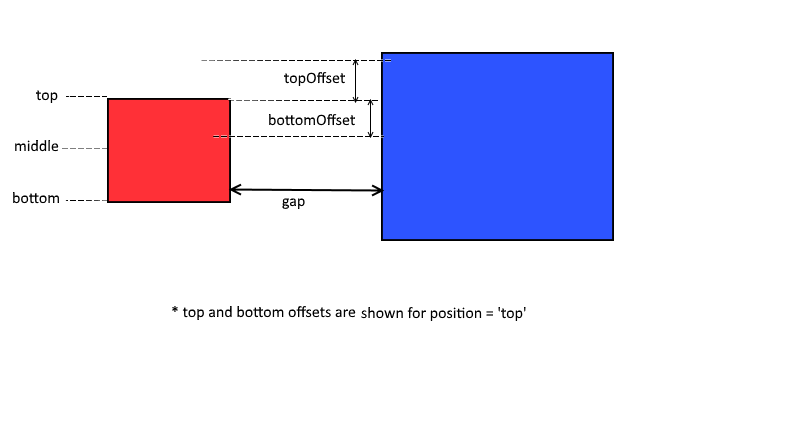
Assert Horizontally Aligned checks if two elements are horizontally aligned. If the elements are horizontally aligned, assertion passes. If the elements are not horizontally aligned, the failure messasge will be displayed in logs as failure.
Example
Parameters
| Name | Type | Description |
|---|---|---|
$leftElement | HTML DOM element | Left element to be asserted. |
$rightElement | HTML DOM element | Right element to be asserted. |
$position | stringoptional | Position to be checked. By default position = "middle". Value of position can be either "top" or "bottom" or "both" or "middle". |
$gap | integer array|integeroptional | Gap between right edge of left element and left edge of right element. If gap is an integer, it will take the exact value. And if gap is an array, Eg. gap = [10, 40], implies gap can range from 10 to 40. To force sahi to check for the gap between the two elements, use the gap. If nothing provided it wouldn't consider gap. |
$offset | integer array|integeroptional | Offset above and below within which to look for elements boundary for given position. If offset is an integer, both above and below offsets are set to this offset. rightElement may be slightly above or below leftElement. Sahi normally matches only elements whose bases match. To force it to look a little above or below while looking to the right, use the offset. |
$message | stringoptional | Message to be written to logs if the assertion fails |
Raw script
_assertHorizontallyAligned(_div("item1"), _div("item2")) //by default middle position will be checked_assertHorizontallyAligned(_div("item1"), _div("item2"), "top")_assertHorizontallyAligned(_div("item1"), _div("item2"), "top", 20) //gap can take the values between [-20, 20]_assertHorizontallyAligned(_div("item1"), _div("item2"), "top", [0, 20]) //gap is only positive i.e. no overlapping is allowed_assertHorizontallyAligned(_div("item1"), _div("item2"), "top", [0, 20], 10) //gap is only positive i.e. no overlapping is allowed and offset for the top edge is 10Sahi Pro Classic API _assertHorizontallyAligned
Assert Vertically Aligned
Section titled “Assert Vertically Aligned”Modes BrowserWindowsJava
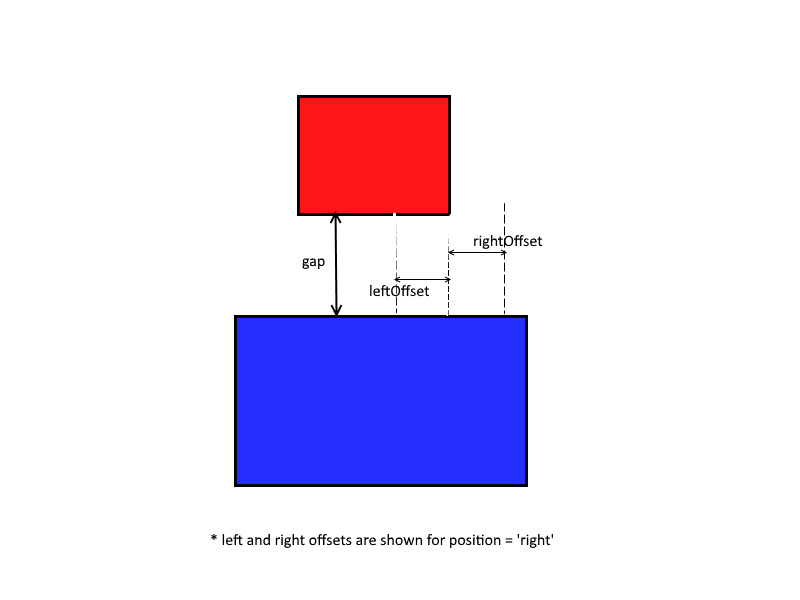
Assert Vertically Aligned checks if two elements are vertically aligned. If the elements are vertically aligned, assertion passes. If the elements are not vertically aligned, the failure messasge will be displayed in logs as failure.
Example
Parameters
| Name | Type | Description |
|---|---|---|
$topElement | HTML DOM element | Top element to be asserted. |
$bottomElement | HTML DOM element | Bottom element to be asserted. |
$position | stringoptional | Position to be checked. By default position = "center". Value of position can be either "left" or "right" or "both" or "center". |
$gap | integer array|integeroptional | Gap between bottom edge of top element and top edge of bottom element. If gap is an integer, it will take the exact value. And if gap is an array, Eg. gap = [0, 40], implies gap can range from 0 to 40. To force sahi to check for the gap between the two elements, use the gap. If nothing provided it wouldn't consider gap. |
$offset | integer array|integeroptional | Offset left and right within which to look for elements boundary for given position. If offset is an integer, both left and right offsets are set to this offset. topElement may be slightly left or right to the bottomElement. |
$message | stringoptional | Message to be written to logs if the assertion fails |
Raw script
_assertVerticallyAligned(_div("item1"), _div("item2")) //by default center position will be checked_assertVerticallyAligned(_div("item1"), _div("item2"), "left")_assertVerticallyAligned(_div("item1"), _div("item2"), "left", 20) //gap can take the values between [-20, 20]_assertVerticallyAligned(_div("item1"), _div("item2"), "left", [0, 20]) //gap is only positive i.e. no overlapping is allowedSahi Pro Classic API _assertVerticallyAligned
Assert Centered
Section titled “Assert Centered”Modes BrowserWindowsJava
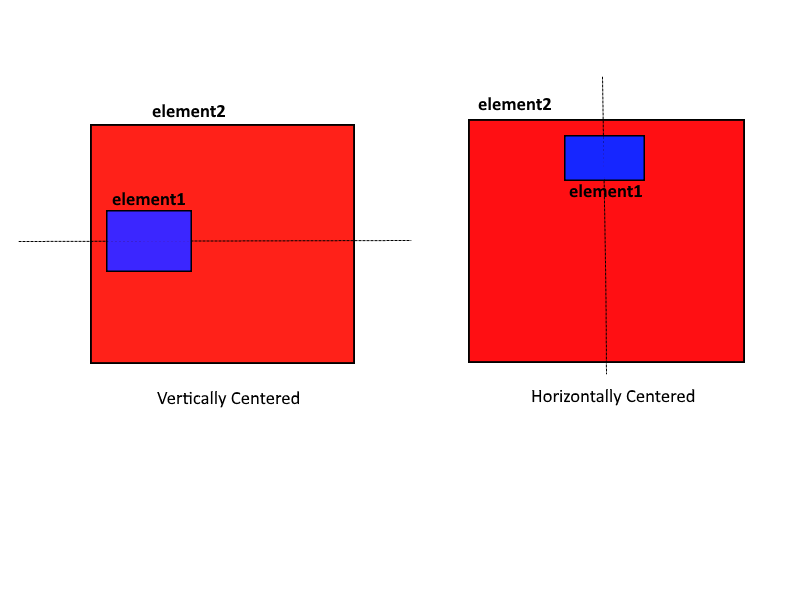
Assert Centered checks if inner element is vertically or horizontally centered to the container element. If the elements are vertically or horizontally aligned, assertion passes. If the elements are not vertically or horizontally aligned, the failure messasge will be displayed in logs as failure.
Example
Parameters
| Name | Type | Description |
|---|---|---|
$element | HTML DOM element | Inner element to be asserted. |
$containerElement | HTML DOM element | Container element to be asserted. |
$alignment | string | Can be "vertical" or "horizontal". |
$message | stringoptional | Message to be written to logs if the assertion fails |
Raw script
_assertCentered(_div("item1"), _div("item2"), "vertical")_assertCentered(_div("item1"), _div("item2"), "horizontal")Sahi Pro Classic API _assertCentered
Assert Visibly Inside
Section titled “Assert Visibly Inside”Modes BrowserWindowsJava
Assert Visibly Inside checks if element1 is visibly inside element2. If element1 is visibly inside element2, assertion passes. If element1 is not visibly inside element2, the failure messasge will be displayed in logs as failure.
Parameters
| Name | Type | Description |
|---|---|---|
$element1 | HTML DOM element | First element to be asserted. |
$element2 | HTML DOM element | Second element to be asserted. |
$message | stringoptional | Message to be written to logs if the assertion fails |
Sahi Pro Classic API _assertVisiblyInside
Assert Visibly Outside
Section titled “Assert Visibly Outside”Modes BrowserWindowsJava
Assert Visibly Outside checks if element1 is visibly outside element2 i.e one is not contained within other. If element1 is visibly outside element2, assertion passes. If element1 is not visibly outside element2, the failure messasge will be displayed in logs as failure.
Parameters
| Name | Type | Description |
|---|---|---|
$element1 | HTML DOM element | First element to be asserted. |
$element2 | HTML DOM element | Second element to be asserted. |
$message | stringoptional | Message to be written to logs if the assertion fails |
Sahi Pro Classic API _assertVisiblyOutside
Assert Visibly On
Section titled “Assert Visibly On”Modes BrowserWindowsJava
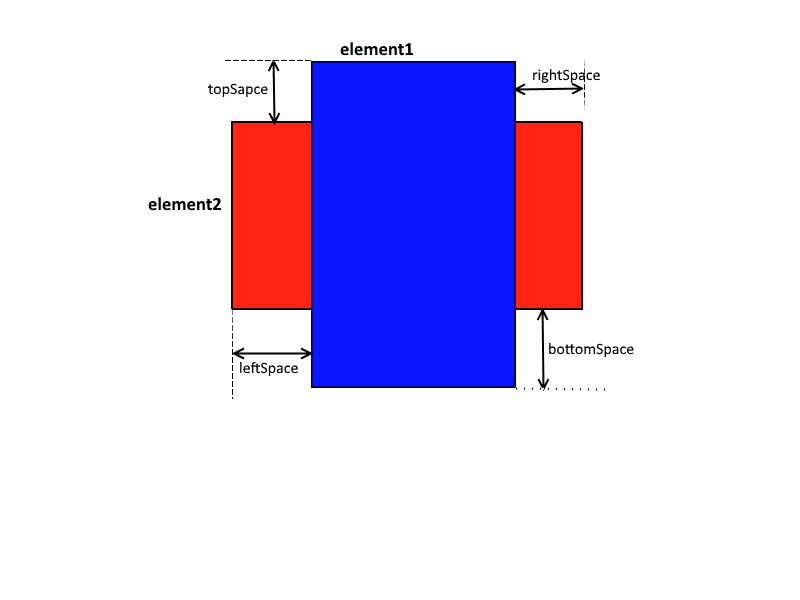
Assert Visibly On checks if element1 placed on element2. element1 may extend beyond element2 boundaries. If element1 is visibly placed on element2, assertion passes. If element1 is not visibly placed on element2, the failure messasge will be displayed in logs as failure.
Example
Parameters
| Name | Type | Description |
|---|---|---|
$element1 | HTML DOM element | First element to be asserted. |
$element2 | HTML DOM element | Second element to be asserted. Base Element. |
$topSpace | integer array|integeroptional | Space between top edges of the two elements. If topSpace is an integer, it will take the exact value. And if topSpace = [-20, 0], implies top edge of element2 lies above top edge of element1. To force sahi to check for the topSpace between the two elements, use the topSpace. If nothing provided it wouldn't consider topSpace. |
$rightSpace | integer array|integeroptional | Space between right edges of the two elements. If rightSpace is an integer, it will take the exact value. And if rightSpace = [0, 20], implies right edge of element2 lies to the right side of right edge of element1. To force sahi to check for the rightSpace between the two elements, use the rightSpace. If nothing provided it wouldn't consider rightSpace. |
$bottomSpace | integer array|integeroptional | Space between bottom edges of the two elements. If bottomSpace is an integer, it will take the exact value. And if bottomSpace = [0, 20], implies bottom edge of element2 lies below bottom edge of element1. To force sahi to check for the bottomSpace between the two elements, use the bottomSpace. If nothing provided it wouldn't consider bottomSpace. |
$leftSpace | integer array|integeroptional | Space between left edges of the two elements. If leftSpace is an integer, it will take the exact value. And if leftSpace = [0, 20], implies top edge of element2 lies to the right side of left edge of element1. To force sahi to check for the leftSpace between the two elements, use the leftSpace. If nothing provided it wouldn't consider leftSpace. |
$message | stringoptional | Message to be written to logs if the assertion fails |
Raw script
_assertVisiblyOn(_div("item1"), _div("item2"), [0,25]); //implies _div("item1") is placed on _div("item2") where top edge of div("item1") can be upto// 25 units below div("item2") top edgeSahi Pro Classic API _assertVisiblyOn
Assert Fits Width
Section titled “Assert Fits Width”Modes BrowserWindowsJava
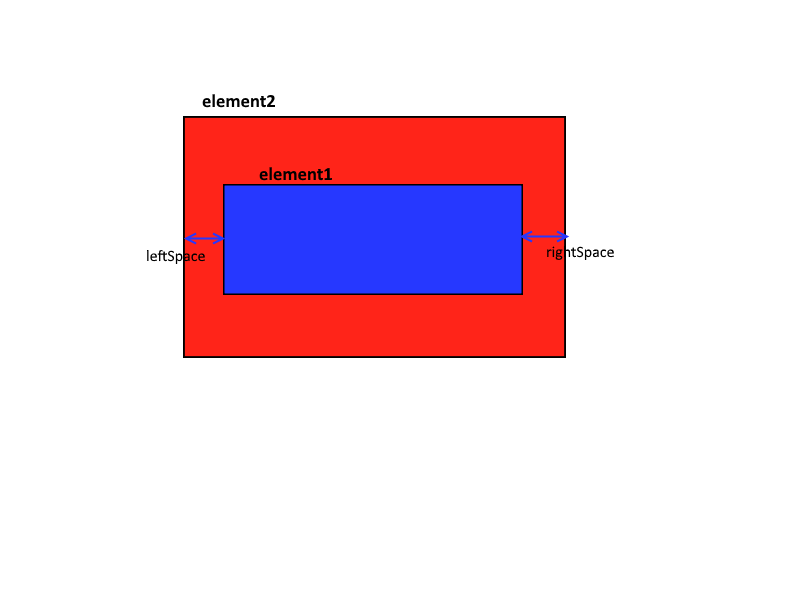
Assert Fits Width checks if element1 fits within the width of element2. If element1 fits within element2, assertion passes. If element1 does not fits within element2, the failure messasge will be displayed in logs as failure.
Example
Parameters
| Name | Type | Description |
|---|---|---|
$element1 | HTML DOM element | First element to be asserted. |
$element2 | HTML DOM element | Second element to be asserted. Base Element. |
$leftSpace | integer array|integeroptional | Space between left edges of the two elements. If leftSpace is an integer, it will take the exact value. And if leftSpace = [0, 20], implies top edge of element2 lies to the right side of left edge of element1. If nothing provided leftSpace will be considered as 0. |
$rightSpace | integer array|integeroptional | Space between right edges of the two elements. If rightSpace is an integer, it will take the exact value. And if rightSpace = [0, 20], implies right edge of element2 lies to the right side of right edge of element1. If nothing provided rightSpace will be considered as 0. |
$message | stringoptional | Message to be written to logs if the assertion fails |
Raw script
_assertFitsWidth(_div("item1"), _div("item2"), [0,25], [-25,0]); //implies _div("item1") is on _div("item2") where left edge of div("item1") can be//upto 25 units right to div("item2") left edge and right edge of div("item1") can be upto 25 units left to div("item2") right edgeSahi Pro Classic API _assertFitsWidth
Assert Fits Height
Section titled “Assert Fits Height”Modes BrowserWindowsJava
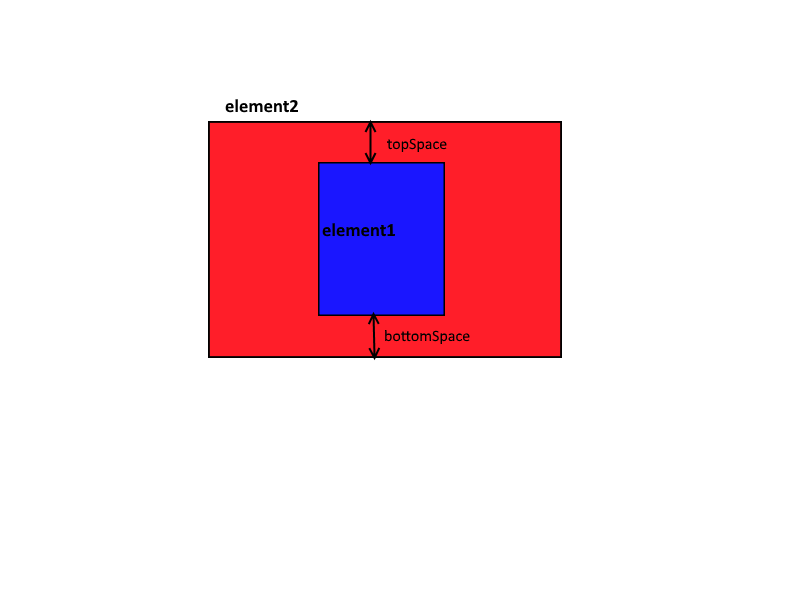
Assert Fits Height checks if element1 fits within the height of element2. If element1 fits within element2, assertion passes. If element1 does not fits within element2, the failure messasge will be displayed in logs as failure.
Example
Parameters
| Name | Type | Description |
|---|---|---|
$element1 | HTML DOM element | First element to be asserted. |
$element2 | HTML DOM element | Second element to be asserted. Base Element. |
$topSpace | integer array|integeroptional | Space between top edges of the two elements. If topSpace is an integer, it will take the exact value. And if topSpace = [-20, 0], implies top edge of element2 lies above top edge of element1. If nothing provided topSpace will be considered as 0. |
$bottomSpace | integer array|integeroptional | Space between bottom edges of the two elements. If bottomSpace is an integer, it will take the exact value. And if bottomSpace = [0, 20], implies bottom edge of element2 lies below bottom edge of element1. If nothing provided bottomSpace will be considered as 0. |
$message | stringoptional | Message to be written to logs if the assertion fails |
Raw script
_assertFitsHeight(_div("item1"), _div("item2"), [0,25], [-25,0]); //implies _div("item1") is on _div("item2") where top edge of div("item1") can be//upto 25 units below div("item2") top edge and bottom edge of div("item1") can be upto 25 units above div("item2") bottom edgeSahi Pro Classic API _assertFitsHeight