

Playback via Ant
This section describes playing back Sahi Flowcharts via Apache Ant.
Playback on a single machine
Section titled “Playback on a single machine”One can now use the Run Settings dialog to generate the ANT xml automatically. Refer Run Settings for details on the UI.
- Select appropriate settings for
Start Mode,BrowserandStart URL. - Click the
Create Ant Targetbutton
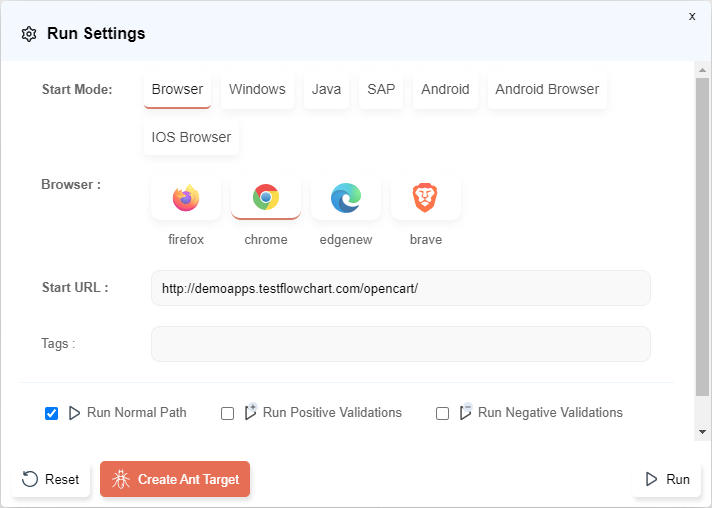
This will generate the contents of an ANT xml file. If you wish to add a Retry target as well, check the Add Retry Target checkbox on the Ant Target dialog.
Once the ANT xml content is generated, copy the content to an empty file and save the file as an xml, say demo.xml in your <SAHI_INSTALLATION_FOLDER>.
Command to execute the ANT target file:
ant -f demo.xmlDistributed playback via ANT
Section titled “Distributed playback via ANT”Distributed playback can be achieved through ANT targets as well.
These targets can be used from Jenkins to distribute the scripts on multiple machines. For more details please refer Jenkins Integration
The machine which distributes the scripts and manages the distributed run is reffered to as the Master. All logs are visible from the Master. The other machines are called Slaves. Any machine in the distributed environment can serve as the Master. The machine which launches the distributed run is referred to as the Initiator.
Distributed run on the same Master
Section titled “Distributed run on the same Master”In the Run Settings dialog,
- Under
Advanced Run Settings, chooseRun distributed (multiple machines)option. - Leave the
Use Different Mastercheckbox unchecked. - Click on
Create Ant Targetbutton.
Distributed run on a different Master
Section titled “Distributed run on a different Master”In the Run Settings dialog,
- Under
Advanced Run Settings, chooseRun distributed (multiple machines)option. - Check the
Use Different Mastercheckbox and choose the Master details. - Click on
Create Ant Targetbutton.
Refer Distributed Playback for details
Sample ANT xml
Section titled “Sample ANT xml”The above UIs for Parallel run/distributed run/different master would generate an ANT xml that looks like the following.
<?xml version="1.0" encoding="ISO-8859-1"?><!--/** * Copyright Tyto Software Pvt. Ltd. */--><project name="flowcharts" default="drundiffmasterchrome">    <taskdef name="sahid" classname="in.co.sahi.ant.DAntRunner" classpath="lib/ant-sahi.jar"/>    <taskdef name="sahisync" classname="in.co.sahi.ant.DAntSync" classpath="lib/ant-sahi.jar"/>  <taskdef name="sahipull" classname="in.co.sahi.ant.DAntPull" classpath="lib/ant-sahi.jar"/>  <taskdef name="sahidelete" classname="in.co.sahi.ant.DAntDelete" classpath="lib/ant-sahi.jar"/>
  <target name="set_timestamp">        <tstamp>            <format property="ts" pattern="yyyy_MM_dd__HH_mm_ss" locale="en, IN"/>        </tstamp>  </target>
  <target name="set_properties_common" depends="set_timestamp">      <property name="scriptDir" value="D:/SahiPro/userdata/scripts/"/>    <property name="masterhost" value="192.168.1.30"/>    <property name="masterport" value="9999"/>  </target>
  <target name="set_properties_chrome" depends="set_properties_common">    <property name="fcProjectId" value="1. Open Cart Basic"/>    <property name="fcFlowchartId" value="Shopping Cart"/>    <property name="fcPathId" value="0"/>    <property name="fcIsNormalRun" value="true"/>    <property name="fcIsNegativeValidationRun" value="false"/>    <property name="fcIsPositiveValidationRun" value="false"/>    <property name="fcRetryFailuresEnabled" value="false"/>    <property name="browser" value="chrome"/>    <property name="startWith" value="BROWSER"/>    <property name="sendemail" value="true"/>    <property name="emailtrigger" value="success,failure,user_aborted,aborted_timeout"/>    <property name="emailattachment" value="success,failure,user_aborted,aborted_timeout"/>    <property name="emailproperties" value="D:\SahiPro\userdata\config\email.properties"/>    <property name="sendemailperiodically" value="true"/>    <property name="sendemailperiodicallytime" value="undefined"/>    <property name="emailPasswordHidden" value="true"/>    <property name="baseURL" value="http://demoapps.testflowchart.com/opencart/"/>    <property name="failedSuiteName" value="Shopping Cart_failed_${browser}.flowcharts.dd.csv"/>    <property name="failedSuite" value="/${failedSuiteName}"/>    <property name="threads" value="5"/>    <property name="abortedRetryCount" value="0"/>    <property name="failureRetryCount" value="0"/>    <property name="isAvoidSkipping" value="false"/>    <property name="isSyncConfig" value="false"/>    <property name="autoThread" value="false"/>    <property name="showPeriodicSummary" value="true"/>    <property name="configPath" value=""/>    <property name="suiteTimeOut" value="0.0"/>    <property name="fcProjectScriptDir" value="$fcProjectScriptDir"/>  </target>
    <target name="drundiffmasterchrome" depends="set_properties_chrome, set_timestamp">      <sahid      fcProjectId="${fcProjectId}"      fcFlowchartId="${fcFlowchartId}"      fcIsNormalRun="${fcIsNormalRun}"      fcIsNegativeValidationRun="${fcIsNegativeValidationRun}"      fcIsPositiveValidationRun="${fcIsPositiveValidationRun}"      fcRetryFailuresEnabled="${fcRetryFailuresEnabled}"      sendemail="${sendemail}"      emailtrigger="${emailtrigger}"      emailattachment="${emailattachment}"      emailProperties="${emailproperties}"      sendEmailPeriodically="${sendemailperiodically}"      sendEmailPeriodicallyTime="${sendemailperiodicallytime}"      emailPasswordHidden="${emailPasswordHidden}"      baseurl="${baseURL}"      sahihost="${masterhost}"      sahiport="${masterport}"      failureproperty="sahi.failed.${browser}"      failedSuiteName="${failedSuiteName}"      haltonfailure="false"      browsertype="${browser}"      startWith="${startWith}"      scriptsPathMaster="temp/scripts/staging/${ts}_${browser}/"      scriptsPathInitiator="${scriptDir}"      threads="${threads}"      abortedRetryCount="${abortedRetryCount}"      failureRetryCount="${failureRetryCount}"      isAvoidSkipping="${isAvoidSkipping}"      autoThread="${autoThread}"      isSyncConfig="${isSyncConfig}"      showPeriodicSummary="${showPeriodicSummary}"      suiteTimeOut="${suiteTimeOut}"      isDifferentMaster="true"      fcProjectScriptDir="${fcProjectScriptDir}"      ignorePattern=".*(svn|copied).*"      tags="(user||admin)&&medium"      userDefinedId="IETestRun1">      <customfield key="extraParameters" value="filePath"/>      <!-- Scripts will be distributed across all the nodes. The nodes may or may not include the Master machine -->      <node host="localhost" port="9999"/>      <node host="192.168.1.29" port="9999"/>      <!-- Offline reports -->      <report type="xml" logdir="logs/temp/xml/${ts}"/>      <report type="html" logdir="logs/temp/html/${ts}"/>      </sahid>
      <!-- Delete suite from Master staging folder -->    <sahidelete host="${masterhost}"        port="${masterport}"        filePath="temp/scripts/staging/${ts}_${browser}" isSyncConfig="${isSyncConfig}" scriptDir="${scriptDir}">      </sahidelete>    <!-- Pull the logs from the Master onto the Initiator machine -->    <sahipull sourceHost="192.168.1.30" sourcePort="9999" originFolder="logs/temp/xml/${ts}" destFolder="logs/xml" ignorePattern=".*(svn|copied).*"/>    <sahipull sourceHost="192.168.1.30" sourcePort="9999" originFolder="logs/temp/html/${ts}" destFolder="D:\temp\html" ignorePattern=".*(svn|copied).*"/>    <antcall target="failsahichrome"/>    </target>
    <target name="failsahichrome" depends="set_properties_chrome" if="sahi.failed.${browser}">        <fail message="Flowcharts tests failed on browser ${browser}!"/>    </target>
</project>Attributes
Section titled “Attributes”Description of the Attributes in .xml files:
Section titled “Description of the Attributes in .xml files:”| Attribute | Description |
|---|---|
| scriptDir | Specifies the path to the scripts folder. Can be the absolute path or a path relative to the userdata folder |
| fcProjectId | This contains the name of the project intended to run. |
| fcFlowchartId | This contains the name of the particular flowchart we intended to run. |
| fcPathId | This contains specific path ID which we intend to run. |
| fcIsNormalRun | This contains state of the checkbox “Run Normal Path”. If checked, the path will run without any validation i.e; with default or data generator’s values. |
| fcIsNegativeValidationRun | This contains state of the checkbox “Run Negative Validations”. If checked, the path will run with negative validation values. |
| fcIsPositiveValidationRun | This contains state of the checkbox “Run Positive Validations”. If checked, the path will run with positive validation values. |
| fcIsRetryFailuresEnabled | This contains state of the checkbox “Add Retry Target”. The value needs to be“true” if the user needs to retry the failed path during first run attempt. If the checkbox for this property is checked, it adds an extra block of xml code. Ex: <target name="retryfailedchrome" depends="set_properties_chrome" if="sahi.failed.${browser}">...</target>] |
| browser | The browser on which the file plays back |
| baseUrl | Specifies the starting URL for all the scripts. |
| host | Hostname of the server where Sahi is running (Can be IP as well) |
| port | Port on which Sahi is running |
| threads | Number of simultaneous browser instances on which sahi tests will be run. |
| singlesession | Since this is a parallel run, it will be “false”. If “true”, runs all scripts in a single browser without closing it between scripts. |
| showPeriodicSummary | Takes “true” or “false”. If “true”, a periodic summary of script status is logged in the Ant Console. |
| sendemail | Takes “true” or “false”. If “true”, Sahi sends an email summarizing the playback. |
| emailtrigger | Takes “success” or “failure” or “success,failure”. Triggers email in case of SUCCESS, FAILURE and both cases respectively. |
| emailproperties | Path to the properties file that contains details about the mail viz. information about the sender, receiver, host, port, subject, content etc. Path can be the absolute path or relative to where this ant target is run from. |
| sendemailperiodically | Takes “true” or “false”. If “true”, Sahi will send emails periodically till the execution is complete. |
| sendemailperiodicallytime | Specifies the interval in minutes at which periodic emails are to be sent. |
| failedSuiteName | Name of the failed suite. It is of the form <suitename>_failed_<browser>.suite. |
| failedsuite | Relative path to the failed suite. It is relative to scriptDir. |
| tags | Tags should be specified only for dd.csv and .csv suites. Tags are specified so that it is easy to choose which scripts/testcases to run. eg. in the target above, all the scripts which have ‘medium’ tag and ‘admin’ or ‘user’ (or both) tag will be run. |
| userdefinedid | The unique id that the user can pass to differentiate a suite from others. This is an optional attribute. |
| report | Sahi can set offline logs to be generated in xml, html, junit, tm6 and excel types. The default type is html. Check the options required. This is an optional attribute. |
| fcProjectScriptDir | This contains the project directory. It is internally defined and user need not make any changes to it. |
| customfield | This contains the values present in External Variables field. This is an optional attribute.User can define multiple key-value pairs in the text-box provided(one pair each line). User then needs to copy the content of this text-box to a .propertiesfile and save it with a proper name. Now, the user needs to copy the path of this file into the value section of the .xml file’s customfield property. |
| node | Each node attribute specifies a machine on which the tests should run. Add as many node entries as there are machines to run. The nodes may or may not include the Master machine (localhost). If the Master machine is not included, scripts will not be run on the Master. There can be 1 or more nodes. This is an optional attribute. |
| masterhost | Hostname of the different Master server where Sahi is running (Can be IP as well) |
| masterport | Port on which Sahi is running |
| IsSyncConfig | Shows status of Sync Configuration checkbox. If checked, it will sync the connfigurations from master machine to other nodes/slave machines. |
| ConfigPath | Port on which Sahi is running |
Killing an Ongoing Execution
Section titled “Killing an Ongoing Execution”Stop All from the Run button’s dropdownn menu from the UI can be used to kill all ongoing executions.
This is now possible through an ANT target as well.
The ANT target gives the ability to kill a specific execution or all ongoing executions.
Copy the following content to an empty file and save the file as an xml, say killall.xml in your <SAHI_INSTALLATION_FOLDER>.
<?xml version="1.0" encoding="ISO-8859-1"?><!--/** * Copyright Tyto Software Pvt. Ltd. */--><project name="demo" default="kill">    <taskdef name="sahikill" classname="in.co.sahi.ant.DKillTask" classpath="lib/ant-sahi.jar"/>
  <target name="kill">    <sahikill      sahihost="localhost"      sahiport="9999">    </sahikill>    </target></project>
You can now run the default ANT target in the xml file as
ant -f killall.xmlNext: Playback via Gradle