

Skip to content
Sahi Pro Flowcharts is retired. These pages document the last release (v12) and are no longer updated. Go to the current documentation.Flowcharts is retired. Current docs
Get Free Trial
Sahi Pro Flowcharts is retired. These pages document the last release (v12) and are no longer updated. Go to the current documentation.

Browser Accessor APIs

Since
Sahi Pro 3.5
API

_password(identifier [, relation1 [, relation2 ...]])

Tag

Tag: INPUT of type: password

HTML
<INPUT type="password"
name="password_name"
id="password_id"
class="shaded bigfont"
value="apple" >
Identifiers

name, id, sahiLabel, css class, data-testid, index

Valid Accessors and alternatives: (Assume this is the 6th password in the UI and 2nd password with class "shaded bigfont")

//name
_password("password_name")
//id
_password("password_id")
//index
_password(5)
//css class with index
_password("shaded bigfont[1]")
//css class with regular expression and index
_password("/bigfont/[1]")
//multiple attributes as JSON
_password({className: "shaded bigfont", sahiIndex: 1})
//multiple attributes as JSON including regular expression
_password({className: "/shaded .*font/", sahiIndex: 1})
// Use sahiIndex for index, className for class and sahiText for visible text attributes.
Relations

Relational APIs _in, _near, _leftOf, _rightOf, _under, _above can be used.
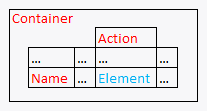
// with _in
_password("password_name", _in(_div("Container")))
// index with 2 relational APIs, _rightOf and _under
_password(0, _rightOf(_span("Name")), _under(_cell("Action")))
// with regular expression and relations
_password("/bigfont/", _rightOf(_span("Name")), _under(_cell("Action")))
Relations Sample
Value

value (this is the default attribute used in assertions etc.)

Actions

Default event recorded is _setValue

Example usage:

_setValue(_password("password_name"), "apple");
_setValue(_password("/bigfont/[1]", _rightOf(_span("Name"))), "apple");
Assertions

Example assertions:

// Check if element exists
_assertExists(_password("password_id"));
// Check if element is visible
_assert(_isVisible(_password("password_id")));
_assertEqual("apple", _getValue(_password("password_id")));
Since
Sahi Pro 11.0.0
API

_radioGroup(identifier [, relation1 [, relation2 ...]])

Tag

Tag: INPUT of type: radio

HTML
<INPUT type="radio"
id="radioGroup_id"
name="radioGroup_name"
value="apple"
class="shaded bigfont" >
Identifiers

id, name, value, sahiLabel, css class, data-testid, index

Valid Accessors and alternatives: (Assume this is the 6th radioGroup in the UI and 2nd radioGroup with class "shaded bigfont")

//id
_radioGroup("radioGroup_id")
//name
_radioGroup("radioGroup_name")
//value
_radioGroup("apple")
//index
_radioGroup(5)
//css class with index
_radioGroup("shaded bigfont[1]")
//css class with regular expression and index
_radioGroup("/bigfont/[1]")
//multiple attributes as JSON
_radioGroup({className: "shaded bigfont", sahiIndex: 1})
//multiple attributes as JSON including regular expression
_radioGroup({className: "/shaded .*font/", sahiIndex: 1})
// Use sahiIndex for index, className for class and sahiText for visible text attributes.
Relations

Relational APIs _in, _near, _leftOf, _rightOf, _under, _above can be used.

// with _in
_radioGroup("radioGroup_id", _in(_div("Container")))
// index with 2 relational APIs, _rightOf and _under
_radioGroup(0, _rightOf(_span("Name")), _under(_cell("Action")))
// with regular expression and relations
_radioGroup("/bigfont/", _rightOf(_span("Name")), _under(_cell("Action")))
Relations Sample
Value

_sahi.getSelectValueFn (this is the default attribute used in assertions etc.)

Actions

Default event recorded is _setSelected

Example usage:

_setSelected(_radioGroup("radioGroup_id"), null);
_setSelected(_radioGroup("/bigfont/[1]", _rightOf(_span("Name"))), null);
Assertions

Example assertions:

// Check if element exists
_assertExists(_radioGroup("radioGroup_id"));
// Check if element is visible
_assert(_isVisible(_radioGroup("radioGroup_id")));
Since
Sahi Pro 3.5
API

_textbox(identifier [, relation1 [, relation2 ...]])

Tag

Tag: INPUT of type: text

HTML
<INPUT type="text"
aria-label="descriptive label"
name="textbox_name"
id="textbox_id"
class="shaded bigfont"
value="apple" >
Identifiers

aria-label, name, id, sahiLabel, css class, data-testid, index

Valid Accessors and alternatives: (Assume this is the 6th textbox in the UI and 2nd textbox with class "shaded bigfont")

//aria-label
_textbox("descriptive label")
//name
_textbox("textbox_name")
//id
_textbox("textbox_id")
//index
_textbox(5)
//css class with index
_textbox("shaded bigfont[1]")
//css class with regular expression and index
_textbox("/bigfont/[1]")
//multiple attributes as JSON
_textbox({className: "shaded bigfont", sahiIndex: 1})
//multiple attributes as JSON including regular expression
_textbox({className: "/shaded .*font/", sahiIndex: 1})
// Use sahiIndex for index, className for class and sahiText for visible text attributes.
Relations

Relational APIs _in, _near, _leftOf, _rightOf, _under, _above can be used.

// with _in
_textbox("descriptive label", _in(_div("Container")))
// index with 2 relational APIs, _rightOf and _under
_textbox(0, _rightOf(_span("Name")), _under(_cell("Action")))
// with regular expression and relations
_textbox("/bigfont/", _rightOf(_span("Name")), _under(_cell("Action")))
Relations Sample
Value

value (this is the default attribute used in assertions etc.)

Actions

Default event recorded is _setValue

Example usage:

_setValue(_textbox("descriptive label"), "apple");
_setValue(_textbox("/bigfont/[1]", _rightOf(_span("Name"))), "apple");
Assertions

Example assertions:

// Check if element exists
_assertExists(_textbox("textbox_id"));
// Check if element is visible
_assert(_isVisible(_textbox("textbox_id")));
_assertEqual("apple", _getValue(_textbox("textbox_id")));
Since
Sahi Pro 3.5
API

_hidden(identifier [, relation1 [, relation2 ...]])

Tag

Tag: INPUT of type: hidden

HTML
<INPUT type="hidden"
name="hidden_name"
id="hidden_id"
class="shaded bigfont"
value="apple" >
Identifiers

name, id, css class, sahiLabel, data-testid, index

Valid Accessors and alternatives: (Assume this is the 6th hidden in the UI and 2nd hidden with class "shaded bigfont")

//name
_hidden("hidden_name")
//id
_hidden("hidden_id")
//index
_hidden(5)
//css class with index
_hidden("shaded bigfont[1]")
//css class with regular expression and index
_hidden("/bigfont/[1]")
//multiple attributes as JSON
_hidden({className: "shaded bigfont", sahiIndex: 1})
//multiple attributes as JSON including regular expression
_hidden({className: "/shaded .*font/", sahiIndex: 1})
// Use sahiIndex for index, className for class and sahiText for visible text attributes.
Relations

Relational APIs _in, _near, _leftOf, _rightOf, _under, _above can be used.

// with _in
_hidden("hidden_name", _in(_div("Container")))
// index with 2 relational APIs, _rightOf and _under
_hidden(0, _rightOf(_span("Name")), _under(_cell("Action")))
// with regular expression and relations
_hidden("/bigfont/", _rightOf(_span("Name")), _under(_cell("Action")))
Relations Sample
Value

value (this is the default attribute used in assertions etc.)

Actions

Default event recorded is _setValue

Example usage:

_setValue(_hidden("hidden_name"), "apple");
_setValue(_hidden("/bigfont/[1]", _rightOf(_span("Name"))), "apple");
Assertions

Example assertions:

// Check if element exists
_assertExists(_hidden("hidden_id"));
// Check if element is visible
_assert(_isVisible(_hidden("hidden_id")));
_assertEqual("apple", _getValue(_hidden("hidden_id")));
Since
Sahi Pro 3.5
API

_datebox(identifier [, relation1 [, relation2 ...]])

Tag

Tag: INPUT of type: date

HTML
<INPUT type="date"
name="datebox_name"
id="datebox_id"
class="shaded bigfont"
value="2012-12-18" >
Identifiers

name, id, sahiLabel, index, css class, data-testid

Valid Accessors and alternatives: (Assume this is the 6th datebox in the UI and 2nd datebox with class "shaded bigfont")

//name
_datebox("datebox_name")
//id
_datebox("datebox_id")
//index
_datebox(5)
//css class with index
_datebox("shaded bigfont[1]")
//css class with regular expression and index
_datebox("/bigfont/[1]")
//multiple attributes as JSON
_datebox({className: "shaded bigfont", sahiIndex: 1})
//multiple attributes as JSON including regular expression
_datebox({className: "/shaded .*font/", sahiIndex: 1})
// Use sahiIndex for index, className for class and sahiText for visible text attributes.
Relations

Relational APIs _in, _near, _leftOf, _rightOf, _under, _above can be used.

// with _in
_datebox("datebox_name", _in(_div("Container")))
// index with 2 relational APIs, _rightOf and _under
_datebox(0, _rightOf(_span("Name")), _under(_cell("Action")))
// with regular expression and relations
_datebox("/bigfont/", _rightOf(_span("Name")), _under(_cell("Action")))
Relations Sample
Value

value (this is the default attribute used in assertions etc.)

Actions

Default event recorded is _setValue

Example usage:

_setValue(_datebox("datebox_name"), "2012-12-18");
_setValue(_datebox("/bigfont/[1]", _rightOf(_span("Name"))), "2012-12-18");
Assertions

Example assertions:

// Check if element exists
_assertExists(_datebox("datebox_id"));
// Check if element is visible
_assert(_isVisible(_datebox("datebox_id")));
_assertEqual("2012-12-18", _getValue(_datebox("datebox_id")));
Since
Sahi Pro 3.5
API

_datetimebox(identifier [, relation1 [, relation2 ...]])

Tag

Tag: INPUT of type: datetime

HTML
<INPUT type="datetime"
name="datetimebox_name"
id="datetimebox_id"
class="shaded bigfont"
value="9/6/2011 14:06:48" >
Identifiers

name, id, sahiLabel, index, css class, data-testid

Valid Accessors and alternatives: (Assume this is the 6th datetimebox in the UI and 2nd datetimebox with class "shaded bigfont")

//name
_datetimebox("datetimebox_name")
//id
_datetimebox("datetimebox_id")
//index
_datetimebox(5)
//css class with index
_datetimebox("shaded bigfont[1]")
//css class with regular expression and index
_datetimebox("/bigfont/[1]")
//multiple attributes as JSON
_datetimebox({className: "shaded bigfont", sahiIndex: 1})
//multiple attributes as JSON including regular expression
_datetimebox({className: "/shaded .*font/", sahiIndex: 1})
// Use sahiIndex for index, className for class and sahiText for visible text attributes.
Relations

Relational APIs _in, _near, _leftOf, _rightOf, _under, _above can be used.

// with _in
_datetimebox("datetimebox_name", _in(_div("Container")))
// index with 2 relational APIs, _rightOf and _under
_datetimebox(0, _rightOf(_span("Name")), _under(_cell("Action")))
// with regular expression and relations
_datetimebox("/bigfont/", _rightOf(_span("Name")), _under(_cell("Action")))
Relations Sample
Value

value (this is the default attribute used in assertions etc.)

Actions

Default event recorded is _setValue

Example usage:

_setValue(_datetimebox("datetimebox_name"), "9/6/2011 14:06:48");
_setValue(_datetimebox("/bigfont/[1]", _rightOf(_span("Name"))), "9/6/2011 14:06:48");
Assertions

Example assertions:

// Check if element exists
_assertExists(_datetimebox("datetimebox_id"));
// Check if element is visible
_assert(_isVisible(_datetimebox("datetimebox_id")));
_assertEqual("9/6/2011 14:06:48", _getValue(_datetimebox("datetimebox_id")));
Since
Sahi Pro 3.5
API

_datetimelocalbox(identifier [, relation1 [, relation2 ...]])

Tag

Tag: INPUT of type: datetime-local

HTML
<INPUT type="datetime-local"
name="datetimelocalbox_name"
id="datetimelocalbox_id"
class="shaded bigfont"
value="1985-04-12T23:20:50.52" >
Identifiers

name, id, sahiLabel, index, css class, data-testid

Valid Accessors and alternatives: (Assume this is the 6th datetimelocalbox in the UI and 2nd datetimelocalbox with class "shaded bigfont")

//name
_datetimelocalbox("datetimelocalbox_name")
//id
_datetimelocalbox("datetimelocalbox_id")
//index
_datetimelocalbox(5)
//css class with index
_datetimelocalbox("shaded bigfont[1]")
//css class with regular expression and index
_datetimelocalbox("/bigfont/[1]")
//multiple attributes as JSON
_datetimelocalbox({className: "shaded bigfont", sahiIndex: 1})
//multiple attributes as JSON including regular expression
_datetimelocalbox({className: "/shaded .*font/", sahiIndex: 1})
// Use sahiIndex for index, className for class and sahiText for visible text attributes.
Relations

Relational APIs _in, _near, _leftOf, _rightOf, _under, _above can be used.

// with _in
_datetimelocalbox("datetimelocalbox_name", _in(_div("Container")))
// index with 2 relational APIs, _rightOf and _under
_datetimelocalbox(0, _rightOf(_span("Name")), _under(_cell("Action")))
// with regular expression and relations
_datetimelocalbox("/bigfont/", _rightOf(_span("Name")), _under(_cell("Action")))
Relations Sample
Value

value (this is the default attribute used in assertions etc.)

Actions

Default event recorded is _setValue

Example usage:

_setValue(_datetimelocalbox("datetimelocalbox_name"), "1985-04-12T23:20:50.52");
_setValue(_datetimelocalbox("/bigfont/[1]", _rightOf(_span("Name"))), "1985-04-12T23:20:50.52");
Assertions

Example assertions:

// Check if element exists
_assertExists(_datetimelocalbox("datetimelocalbox_id"));
// Check if element is visible
_assert(_isVisible(_datetimelocalbox("datetimelocalbox_id")));
_assertEqual("1985-04-12T23:20:50.52", _getValue(_datetimelocalbox("datetimelocalbox_id")));
Since
Sahi Pro 3.5
API

_emailbox(identifier [, relation1 [, relation2 ...]])

Tag

Tag: INPUT of type: email

HTML
<INPUT type="email"
name="emailbox_name"
id="emailbox_id"
class="shaded bigfont"
value="my_email@sahipro.com" >
Identifiers

name, id, sahiLabel, index, css class, data-testid

Valid Accessors and alternatives: (Assume this is the 6th emailbox in the UI and 2nd emailbox with class "shaded bigfont")

//name
_emailbox("emailbox_name")
//id
_emailbox("emailbox_id")
//index
_emailbox(5)
//css class with index
_emailbox("shaded bigfont[1]")
//css class with regular expression and index
_emailbox("/bigfont/[1]")
//multiple attributes as JSON
_emailbox({className: "shaded bigfont", sahiIndex: 1})
//multiple attributes as JSON including regular expression
_emailbox({className: "/shaded .*font/", sahiIndex: 1})
// Use sahiIndex for index, className for class and sahiText for visible text attributes.
Relations

Relational APIs _in, _near, _leftOf, _rightOf, _under, _above can be used.

// with _in
_emailbox("emailbox_name", _in(_div("Container")))
// index with 2 relational APIs, _rightOf and _under
_emailbox(0, _rightOf(_span("Name")), _under(_cell("Action")))
// with regular expression and relations
_emailbox("/bigfont/", _rightOf(_span("Name")), _under(_cell("Action")))
Relations Sample
Value

value (this is the default attribute used in assertions etc.)

Actions

Default event recorded is _setValue

Example usage:

_setValue(_emailbox("emailbox_name"), "my_email@sahipro.com");
_setValue(_emailbox("/bigfont/[1]", _rightOf(_span("Name"))), "my_email@sahipro.com");
Assertions

Example assertions:

// Check if element exists
_assertExists(_emailbox("emailbox_id"));
// Check if element is visible
_assert(_isVisible(_emailbox("emailbox_id")));
_assertEqual("my_email@sahipro.com", _getValue(_emailbox("emailbox_id")));
Since
Sahi Pro 3.5
API

_monthbox(identifier [, relation1 [, relation2 ...]])

Tag

Tag: INPUT of type: month

HTML
<INPUT type="month"
name="monthbox_name"
id="monthbox_id"
class="shaded bigfont"
value="1996-12" >
Identifiers

name, id, sahiLabel, index, css class, data-testid

Valid Accessors and alternatives: (Assume this is the 6th monthbox in the UI and 2nd monthbox with class "shaded bigfont")

//name
_monthbox("monthbox_name")
//id
_monthbox("monthbox_id")
//index
_monthbox(5)
//css class with index
_monthbox("shaded bigfont[1]")
//css class with regular expression and index
_monthbox("/bigfont/[1]")
//multiple attributes as JSON
_monthbox({className: "shaded bigfont", sahiIndex: 1})
//multiple attributes as JSON including regular expression
_monthbox({className: "/shaded .*font/", sahiIndex: 1})
// Use sahiIndex for index, className for class and sahiText for visible text attributes.
Relations

Relational APIs _in, _near, _leftOf, _rightOf, _under, _above can be used.

// with _in
_monthbox("monthbox_name", _in(_div("Container")))
// index with 2 relational APIs, _rightOf and _under
_monthbox(0, _rightOf(_span("Name")), _under(_cell("Action")))
// with regular expression and relations
_monthbox("/bigfont/", _rightOf(_span("Name")), _under(_cell("Action")))
Relations Sample
Value

value (this is the default attribute used in assertions etc.)

Actions

Default event recorded is _setValue

Example usage:

_setValue(_monthbox("monthbox_name"), "1996-12");
_setValue(_monthbox("/bigfont/[1]", _rightOf(_span("Name"))), "1996-12");
Assertions

Example assertions:

// Check if element exists
_assertExists(_monthbox("monthbox_id"));
// Check if element is visible
_assert(_isVisible(_monthbox("monthbox_id")));
_assertEqual("1996-12", _getValue(_monthbox("monthbox_id")));
Since
Sahi Pro 3.5
API

_numberbox(identifier [, relation1 [, relation2 ...]])

Tag

Tag: INPUT of type: number

HTML
<INPUT type="number"
name="numberbox_name"
id="numberbox_id"
class="shaded bigfont"
value="13579" >
Identifiers

name, id, sahiLabel, index, css class, data-testid

Valid Accessors and alternatives: (Assume this is the 6th numberbox in the UI and 2nd numberbox with class "shaded bigfont")

//name
_numberbox("numberbox_name")
//id
_numberbox("numberbox_id")
//index
_numberbox(5)
//css class with index
_numberbox("shaded bigfont[1]")
//css class with regular expression and index
_numberbox("/bigfont/[1]")
//multiple attributes as JSON
_numberbox({className: "shaded bigfont", sahiIndex: 1})
//multiple attributes as JSON including regular expression
_numberbox({className: "/shaded .*font/", sahiIndex: 1})
// Use sahiIndex for index, className for class and sahiText for visible text attributes.
Relations

Relational APIs _in, _near, _leftOf, _rightOf, _under, _above can be used.

// with _in
_numberbox("numberbox_name", _in(_div("Container")))
// index with 2 relational APIs, _rightOf and _under
_numberbox(0, _rightOf(_span("Name")), _under(_cell("Action")))
// with regular expression and relations
_numberbox("/bigfont/", _rightOf(_span("Name")), _under(_cell("Action")))
Relations Sample
Value

value (this is the default attribute used in assertions etc.)

Actions

Default event recorded is _setValue

Example usage:

_setValue(_numberbox("numberbox_name"), "13579");
_setValue(_numberbox("/bigfont/[1]", _rightOf(_span("Name"))), "13579");
Assertions

Example assertions:

// Check if element exists
_assertExists(_numberbox("numberbox_id"));
// Check if element is visible
_assert(_isVisible(_numberbox("numberbox_id")));
_assertEqual("13579", _getValue(_numberbox("numberbox_id")));
Since
Sahi Pro 3.5
API

_rangebox(identifier [, relation1 [, relation2 ...]])

Tag

Tag: INPUT of type: range

HTML
<INPUT type="range"
name="rangebox_name"
id="rangebox_id"
class="shaded bigfont"
value="5" >
Identifiers

name, id, sahiLabel, index, css class, data-testid

Valid Accessors and alternatives: (Assume this is the 6th rangebox in the UI and 2nd rangebox with class "shaded bigfont")

//name
_rangebox("rangebox_name")
//id
_rangebox("rangebox_id")
//index
_rangebox(5)
//css class with index
_rangebox("shaded bigfont[1]")
//css class with regular expression and index
_rangebox("/bigfont/[1]")
//multiple attributes as JSON
_rangebox({className: "shaded bigfont", sahiIndex: 1})
//multiple attributes as JSON including regular expression
_rangebox({className: "/shaded .*font/", sahiIndex: 1})
// Use sahiIndex for index, className for class and sahiText for visible text attributes.
Relations

Relational APIs _in, _near, _leftOf, _rightOf, _under, _above can be used.

// with _in
_rangebox("rangebox_name", _in(_div("Container")))
// index with 2 relational APIs, _rightOf and _under
_rangebox(0, _rightOf(_span("Name")), _under(_cell("Action")))
// with regular expression and relations
_rangebox("/bigfont/", _rightOf(_span("Name")), _under(_cell("Action")))
Relations Sample
Value

value (this is the default attribute used in assertions etc.)

Actions

Default event recorded is _setValue

Example usage:

_setValue(_rangebox("rangebox_name"), "5");
_setValue(_rangebox("/bigfont/[1]", _rightOf(_span("Name"))), "5");
Assertions

Example assertions:

// Check if element exists
_assertExists(_rangebox("rangebox_id"));
// Check if element is visible
_assert(_isVisible(_rangebox("rangebox_id")));
_assertEqual("5", _getValue(_rangebox("rangebox_id")));
Since
Sahi Pro 3.5.2
API

_searchbox(identifier [, relation1 [, relation2 ...]])

Tag

Tag: INPUT of type: search

HTML
<INPUT type="search"
name="searchbox_name"
id="searchbox_id"
class="shaded bigfont"
value="apple" >
Identifiers

name, id, sahiLabel, index, css class, data-testid

Valid Accessors and alternatives: (Assume this is the 6th searchbox in the UI and 2nd searchbox with class "shaded bigfont")

//name
_searchbox("searchbox_name")
//id
_searchbox("searchbox_id")
//index
_searchbox(5)
//css class with index
_searchbox("shaded bigfont[1]")
//css class with regular expression and index
_searchbox("/bigfont/[1]")
//multiple attributes as JSON
_searchbox({className: "shaded bigfont", sahiIndex: 1})
//multiple attributes as JSON including regular expression
_searchbox({className: "/shaded .*font/", sahiIndex: 1})
// Use sahiIndex for index, className for class and sahiText for visible text attributes.
Relations

Relational APIs _in, _near, _leftOf, _rightOf, _under, _above can be used.

// with _in
_searchbox("searchbox_name", _in(_div("Container")))
// index with 2 relational APIs, _rightOf and _under
_searchbox(0, _rightOf(_span("Name")), _under(_cell("Action")))
// with regular expression and relations
_searchbox("/bigfont/", _rightOf(_span("Name")), _under(_cell("Action")))
Relations Sample
Value

value (this is the default attribute used in assertions etc.)

Actions

Default event recorded is _setValue

Example usage:

_setValue(_searchbox("searchbox_name"), "apple");
_setValue(_searchbox("/bigfont/[1]", _rightOf(_span("Name"))), "apple");
Assertions

Example assertions:

// Check if element exists
_assertExists(_searchbox("searchbox_id"));
// Check if element is visible
_assert(_isVisible(_searchbox("searchbox_id")));
_assertEqual("apple", _getValue(_searchbox("searchbox_id")));
Since
Sahi Pro 4.2
API

_telephonebox(identifier [, relation1 [, relation2 ...]])

Tag

Tag: INPUT of type: tel

HTML
<INPUT type="tel"
name="telephonebox_name"
id="telephonebox_id"
class="shaded bigfont"
value="123-555-2000" >
Identifiers

name, id, sahiLabel, index, css class, data-testid

Valid Accessors and alternatives: (Assume this is the 6th telephonebox in the UI and 2nd telephonebox with class "shaded bigfont")

//name
_telephonebox("telephonebox_name")
//id
_telephonebox("telephonebox_id")
//index
_telephonebox(5)
//css class with index
_telephonebox("shaded bigfont[1]")
//css class with regular expression and index
_telephonebox("/bigfont/[1]")
//multiple attributes as JSON
_telephonebox({className: "shaded bigfont", sahiIndex: 1})
//multiple attributes as JSON including regular expression
_telephonebox({className: "/shaded .*font/", sahiIndex: 1})
// Use sahiIndex for index, className for class and sahiText for visible text attributes.
Relations

Relational APIs _in, _near, _leftOf, _rightOf, _under, _above can be used.

// with _in
_telephonebox("telephonebox_name", _in(_div("Container")))
// index with 2 relational APIs, _rightOf and _under
_telephonebox(0, _rightOf(_span("Name")), _under(_cell("Action")))
// with regular expression and relations
_telephonebox("/bigfont/", _rightOf(_span("Name")), _under(_cell("Action")))
Relations Sample
Value

value (this is the default attribute used in assertions etc.)

Actions

Default event recorded is _setValue

Example usage:

_setValue(_telephonebox("telephonebox_name"), "123-555-2000");
_setValue(_telephonebox("/bigfont/[1]", _rightOf(_span("Name"))), "123-555-2000");
Assertions

Example assertions:

// Check if element exists
_assertExists(_telephonebox("telephonebox_id"));
// Check if element is visible
_assert(_isVisible(_telephonebox("telephonebox_id")));
_assertEqual("123-555-2000", _getValue(_telephonebox("telephonebox_id")));
Since
Sahi Pro 3.5
API

_timebox(identifier [, relation1 [, relation2 ...]])

Tag

Tag: INPUT of type: time

HTML
<INPUT type="time"
name="timebox_name"
id="timebox_id"
class="shaded bigfont"
value="17:39:57" >
Identifiers

name, id, sahiLabel, index, css class, data-testid

Valid Accessors and alternatives: (Assume this is the 6th timebox in the UI and 2nd timebox with class "shaded bigfont")

//name
_timebox("timebox_name")
//id
_timebox("timebox_id")
//index
_timebox(5)
//css class with index
_timebox("shaded bigfont[1]")
//css class with regular expression and index
_timebox("/bigfont/[1]")
//multiple attributes as JSON
_timebox({className: "shaded bigfont", sahiIndex: 1})
//multiple attributes as JSON including regular expression
_timebox({className: "/shaded .*font/", sahiIndex: 1})
// Use sahiIndex for index, className for class and sahiText for visible text attributes.
Relations

Relational APIs _in, _near, _leftOf, _rightOf, _under, _above can be used.

// with _in
_timebox("timebox_name", _in(_div("Container")))
// index with 2 relational APIs, _rightOf and _under
_timebox(0, _rightOf(_span("Name")), _under(_cell("Action")))
// with regular expression and relations
_timebox("/bigfont/", _rightOf(_span("Name")), _under(_cell("Action")))
Relations Sample
Value

value (this is the default attribute used in assertions etc.)

Actions

Default event recorded is _setValue

Example usage:

_setValue(_timebox("timebox_name"), "17:39:57");
_setValue(_timebox("/bigfont/[1]", _rightOf(_span("Name"))), "17:39:57");
Assertions

Example assertions:

// Check if element exists
_assertExists(_timebox("timebox_id"));
// Check if element is visible
_assert(_isVisible(_timebox("timebox_id")));
_assertEqual("17:39:57", _getValue(_timebox("timebox_id")));
Since
Sahi Pro 3.5
API

_urlbox(identifier [, relation1 [, relation2 ...]])

Tag

Tag: INPUT of type: url

HTML
<INPUT type="url"
name="urlbox_name"
id="urlbox_id"
class="shaded bigfont"
value="http://www.example.com/blah.html" >
Identifiers

name, id, sahiLabel, index, css class, data-testid

Valid Accessors and alternatives: (Assume this is the 6th urlbox in the UI and 2nd urlbox with class "shaded bigfont")

//name
_urlbox("urlbox_name")
//id
_urlbox("urlbox_id")
//index
_urlbox(5)
//css class with index
_urlbox("shaded bigfont[1]")
//css class with regular expression and index
_urlbox("/bigfont/[1]")
//multiple attributes as JSON
_urlbox({className: "shaded bigfont", sahiIndex: 1})
//multiple attributes as JSON including regular expression
_urlbox({className: "/shaded .*font/", sahiIndex: 1})
// Use sahiIndex for index, className for class and sahiText for visible text attributes.
Relations

Relational APIs _in, _near, _leftOf, _rightOf, _under, _above can be used.

// with _in
_urlbox("urlbox_name", _in(_div("Container")))
// index with 2 relational APIs, _rightOf and _under
_urlbox(0, _rightOf(_span("Name")), _under(_cell("Action")))
// with regular expression and relations
_urlbox("/bigfont/", _rightOf(_span("Name")), _under(_cell("Action")))
Relations Sample
Value

value (this is the default attribute used in assertions etc.)

Actions

Default event recorded is _setValue

Example usage:

_setValue(_urlbox("urlbox_name"), "http://www.example.com/blah.html");
_setValue(_urlbox("/bigfont/[1]", _rightOf(_span("Name"))), "http://www.example.com/blah.html");
Assertions

Example assertions:

// Check if element exists
_assertExists(_urlbox("urlbox_id"));
// Check if element is visible
_assert(_isVisible(_urlbox("urlbox_id")));
_assertEqual("http://www.example.com/blah.html", _getValue(_urlbox("urlbox_id")));
Since
Sahi Pro 3.5
API

_weekbox(identifier [, relation1 [, relation2 ...]])

Tag

Tag: INPUT of type: week

HTML
<INPUT type="week"
name="weekbox_name"
id="weekbox_id"
class="shaded bigfont"
value="1996-W16" >
Identifiers

name, id, sahiLabel, index, css class, data-testid

Valid Accessors and alternatives: (Assume this is the 6th weekbox in the UI and 2nd weekbox with class "shaded bigfont")

//name
_weekbox("weekbox_name")
//id
_weekbox("weekbox_id")
//index
_weekbox(5)
//css class with index
_weekbox("shaded bigfont[1]")
//css class with regular expression and index
_weekbox("/bigfont/[1]")
//multiple attributes as JSON
_weekbox({className: "shaded bigfont", sahiIndex: 1})
//multiple attributes as JSON including regular expression
_weekbox({className: "/shaded .*font/", sahiIndex: 1})
// Use sahiIndex for index, className for class and sahiText for visible text attributes.
Relations

Relational APIs _in, _near, _leftOf, _rightOf, _under, _above can be used.

// with _in
_weekbox("weekbox_name", _in(_div("Container")))
// index with 2 relational APIs, _rightOf and _under
_weekbox(0, _rightOf(_span("Name")), _under(_cell("Action")))
// with regular expression and relations
_weekbox("/bigfont/", _rightOf(_span("Name")), _under(_cell("Action")))
Relations Sample
Value

value (this is the default attribute used in assertions etc.)

Actions

Default event recorded is _setValue

Example usage:

_setValue(_weekbox("weekbox_name"), "1996-W16");
_setValue(_weekbox("/bigfont/[1]", _rightOf(_span("Name"))), "1996-W16");
Assertions

Example assertions:

// Check if element exists
_assertExists(_weekbox("weekbox_id"));
// Check if element is visible
_assert(_isVisible(_weekbox("weekbox_id")));
_assertEqual("1996-W16", _getValue(_weekbox("weekbox_id")));
Since
Sahi Pro 3.5
API

_textarea(identifier [, relation1 [, relation2 ...]])

Tag

Tag: TEXTAREA

HTML
<TEXTAREA
name="textarea_name"
id="textarea_id"
class="shaded bigfont"
value="apple" >
Identifiers

name, id, sahiLabel, index, css class, data-testid

Valid Accessors and alternatives: (Assume this is the 6th textarea in the UI and 2nd textarea with class "shaded bigfont")

//name
_textarea("textarea_name")
//id
_textarea("textarea_id")
//index
_textarea(5)
//css class with index
_textarea("shaded bigfont[1]")
//css class with regular expression and index
_textarea("/bigfont/[1]")
//multiple attributes as JSON
_textarea({className: "shaded bigfont", sahiIndex: 1})
//multiple attributes as JSON including regular expression
_textarea({className: "/shaded .*font/", sahiIndex: 1})
// Use sahiIndex for index, className for class and sahiText for visible text attributes.
Relations

Relational APIs _in, _near, _leftOf, _rightOf, _under, _above can be used.

// with _in
_textarea("textarea_name", _in(_div("Container")))
// index with 2 relational APIs, _rightOf and _under
_textarea(0, _rightOf(_span("Name")), _under(_cell("Action")))
// with regular expression and relations
_textarea("/bigfont/", _rightOf(_span("Name")), _under(_cell("Action")))
Relations Sample
Value

value (this is the default attribute used in assertions etc.)

Actions

Default event recorded is _setValue

Example usage:

_setValue(_textarea("textarea_name"), "apple");
_setValue(_textarea("/bigfont/[1]", _rightOf(_span("Name"))), "apple");
Assertions

Example assertions:

// Check if element exists
_assertExists(_textarea("textarea_id"));
// Check if element is visible
_assert(_isVisible(_textarea("textarea_id")));
_assertEqual("apple", _getValue(_textarea("textarea_id")));
Since
Sahi Pro 3.5
API

_button(identifier [, relation1 [, relation2 ...]])

Tag

Tag: INPUT of type: button

HTML
<INPUT type="button"
value="apple"
name="button_name"
id="button_id"
title|alt="brief description"
class="shaded bigfont" >
Identifiers

newAttribute, value, name, id, title|alt, sahiLabel, index, css class, data-testid

Valid Accessors and alternatives: (Assume this is the 6th button in the UI and 2nd button with class "shaded bigfont")

//value
_button("apple")
//name
_button("button_name")
//id
_button("button_id")
//title|alt
_button("brief description")
//index
_button(5)
//css class with index
_button("shaded bigfont[1]")
//css class with regular expression and index
_button("/bigfont/[1]")
//multiple attributes as JSON
_button({className: "shaded bigfont", sahiIndex: 1})
//multiple attributes as JSON including regular expression
_button({className: "/shaded .*font/", sahiIndex: 1})
// Use sahiIndex for index, className for class and sahiText for visible text attributes.
Relations

Relational APIs _in, _near, _leftOf, _rightOf, _under, _above can be used.

// with _in
_button(, _in(_div("Container")))
// index with 2 relational APIs, _rightOf and _under
_button(0, _rightOf(_span("Name")), _under(_cell("Action")))
// with regular expression and relations
_button("/bigfont/", _rightOf(_span("Name")), _under(_cell("Action")))
Relations Sample
Value

value (this is the default attribute used in assertions etc.)

Actions

Default event recorded is _click

Example usage:

_click(_button());
_click(_button("/bigfont/[1]", _rightOf(_span("Name"))));
Assertions

Example assertions:

// Check if element exists
_assertExists(_button("button_id"));
// Check if element is visible
_assert(_isVisible(_button("button_id")));
_assertEqual("apple", _getValue(_button("button_id")));
Since
Sahi Pro 3.5
API

_button(identifier [, relation1 [, relation2 ...]])

Tag

Tag: BUTTON of type: button

HTML
<BUTTON type="button"
name="button_name"
id="button_id"
title|alt="brief description"
class="shaded bigfont" >button text</BUTTON>
Identifiers

visible text, name, id, title|alt, css class, data-testid, index

Valid Accessors and alternatives: (Assume this is the 6th button in the UI and 2nd button with class "shaded bigfont")

//visible text
_button("button text")
//visible text with regular expression
_button("/ton te/")
//visible text with regular expression
_button("/but.*text/")
//name
_button("button_name")
//id
_button("button_id")
//title|alt
_button("brief description")
//index
_button(5)
//css class with index
_button("shaded bigfont[1]")
//css class with regular expression and index
_button("/bigfont/[1]")
//multiple attributes as JSON
_button({className: "shaded bigfont", sahiIndex: 1})
//multiple attributes as JSON including regular expression
_button({className: "/shaded .*font/", sahiIndex: 1})
// Use sahiIndex for index, className for class and sahiText for visible text attributes.
Relations

Relational APIs _in, _near, _leftOf, _rightOf, _under, _above can be used.

// with _in
_button("button text", _in(_div("Container")))
// index with 2 relational APIs, _rightOf and _under
_button(0, _rightOf(_span("Name")), _under(_cell("Action")))
// with regular expression and relations
_button("/bigfont/", _rightOf(_span("Name")), _under(_cell("Action")))
Relations Sample
Value

visible text (this is the default attribute used in assertions etc.)

Actions

Default event recorded is _click

Example usage:

_click(_button("button text"));
_click(_button("/bigfont/[1]", _rightOf(_span("Name"))));
Assertions

Example assertions:

// Check if element exists
_assertExists(_button("button_id"));
// Check if element is visible
_assert(_isVisible(_button("button_id")));
_assertEqual("button text", _getText(_button("button_id")));
Since
Sahi Pro 3.5
API

_checkbox(identifier [, relation1 [, relation2 ...]])

Tag

Tag: INPUT of type: checkbox

HTML
<INPUT type="checkbox"
name="checkbox_name"
id="checkbox_id"
value="apple"
class="shaded bigfont" >
Identifiers

name, id, value, sahiLabel, css class, data-testid, index

Valid Accessors and alternatives: (Assume this is the 6th checkbox in the UI and 2nd checkbox with class "shaded bigfont")

//name
_checkbox("checkbox_name")
//id
_checkbox("checkbox_id")
//value
_checkbox("apple")
//index
_checkbox(5)
//css class with index
_checkbox("shaded bigfont[1]")
//css class with regular expression and index
_checkbox("/bigfont/[1]")
//multiple attributes as JSON
_checkbox({className: "shaded bigfont", sahiIndex: 1})
//multiple attributes as JSON including regular expression
_checkbox({className: "/shaded .*font/", sahiIndex: 1})
// Use sahiIndex for index, className for class and sahiText for visible text attributes.
Relations

Relational APIs _in, _near, _leftOf, _rightOf, _under, _above can be used.

// with _in
_checkbox("checkbox_name", _in(_div("Container")))
// index with 2 relational APIs, _rightOf and _under
_checkbox(0, _rightOf(_span("Name")), _under(_cell("Action")))
// with regular expression and relations
_checkbox("/bigfont/", _rightOf(_span("Name")), _under(_cell("Action")))
Relations Sample
Value

checked (this is the default attribute used in assertions etc.)

Actions

Default event recorded is _click

Example usage:

_click(_checkbox("checkbox_name"));
_click(_checkbox("/bigfont/[1]", _rightOf(_span("Name"))));
// Check irrespective of whether it was checked or unchecked
_check(_checkbox("checkbox_name"));
// Uncheck irrespective of whether it was checked or unchecked
_uncheck(_checkbox("checkbox_name"));
Assertions

Example assertions:

// Check if element exists
_assertExists(_checkbox("checkbox_id"));
// Check if element is visible
_assert(_isVisible(_checkbox("checkbox_id")));
_assertTrue(_getAttribute(_checkbox("checkbox_id") , "checked")); // checked
_assertFalse(_getAttribute(_checkbox("checkbox_id") , "checked")); // not checked
Since
Sahi Pro 3.5
API

_radio(identifier [, relation1 [, relation2 ...]])

Tag

Tag: INPUT of type: radio

HTML
<INPUT type="radio"
id="radio_id"
name="radio_name"
value="apple"
class="shaded bigfont" >
Identifiers

id, name, value, sahiLabel, css class, data-testid, index

Valid Accessors and alternatives: (Assume this is the 6th radio in the UI and 2nd radio with class "shaded bigfont")

//id
_radio("radio_id")
//name
_radio("radio_name")
//value
_radio("apple")
//index
_radio(5)
//css class with index
_radio("shaded bigfont[1]")
//css class with regular expression and index
_radio("/bigfont/[1]")
//multiple attributes as JSON
_radio({className: "shaded bigfont", sahiIndex: 1})
//multiple attributes as JSON including regular expression
_radio({className: "/shaded .*font/", sahiIndex: 1})
// Use sahiIndex for index, className for class and sahiText for visible text attributes.
Relations

Relational APIs _in, _near, _leftOf, _rightOf, _under, _above can be used.

// with _in
_radio("radio_id", _in(_div("Container")))
// index with 2 relational APIs, _rightOf and _under
_radio(0, _rightOf(_span("Name")), _under(_cell("Action")))
// with regular expression and relations
_radio("/bigfont/", _rightOf(_span("Name")), _under(_cell("Action")))
Relations Sample
Value

checked (this is the default attribute used in assertions etc.)

Actions

Default event recorded is _click

Example usage:

_click(_radio("radio_id"));
_click(_radio("/bigfont/[1]", _rightOf(_span("Name"))));
// Check irrespective of whether it was checked or unchecked
_check(_radio("radio_name"));
Assertions

Example assertions:

// Check if element exists
_assertExists(_radio("radio_id"));
// Check if element is visible
_assert(_isVisible(_radio("radio_id")));
_assertTrue(_getAttribute(_radio("radio_id") , "checked")); // checked
_assertFalse(_getAttribute(_radio("radio_id") , "checked")); // not checked
Since
Sahi Pro 3.5
API

_submit(identifier [, relation1 [, relation2 ...]])

Tag

Tag: INPUT of type: submit

HTML
<INPUT type="submit"
value="apple"
name="submit_name"
id="submit_id"
title|alt="brief description"
class="shaded bigfont" >
Identifiers

value, name, sahiLabel, id, title|alt, css class, data-testid, index

Valid Accessors and alternatives: (Assume this is the 6th submit in the UI and 2nd submit with class "shaded bigfont")

//value
_submit("apple")
//name
_submit("submit_name")
//id
_submit("submit_id")
//title|alt
_submit("brief description")
//index
_submit(5)
//css class with index
_submit("shaded bigfont[1]")
//css class with regular expression and index
_submit("/bigfont/[1]")
//multiple attributes as JSON
_submit({className: "shaded bigfont", sahiIndex: 1})
//multiple attributes as JSON including regular expression
_submit({className: "/shaded .*font/", sahiIndex: 1})
// Use sahiIndex for index, className for class and sahiText for visible text attributes.
Relations

Relational APIs _in, _near, _leftOf, _rightOf, _under, _above can be used.

// with _in
_submit("apple", _in(_div("Container")))
// index with 2 relational APIs, _rightOf and _under
_submit(0, _rightOf(_span("Name")), _under(_cell("Action")))
// with regular expression and relations
_submit("/bigfont/", _rightOf(_span("Name")), _under(_cell("Action")))
Relations Sample
Value

value (this is the default attribute used in assertions etc.)

Actions

Default event recorded is _click

Example usage:

_click(_submit("apple"));
_click(_submit("/bigfont/[1]", _rightOf(_span("Name"))));
Assertions

Example assertions:

// Check if element exists
_assertExists(_submit("submit_id"));
// Check if element is visible
_assert(_isVisible(_submit("submit_id")));
_assertEqual("apple", _getValue(_submit("submit_id")));
Since
Sahi Pro 3.5
API

_submit(identifier [, relation1 [, relation2 ...]])

Tag

Tag: BUTTON of type: submit

HTML
<BUTTON type="submit"
name="submit_name"
id="submit_id"
title|alt="brief description"
class="shaded bigfont" >submit text</BUTTON>
Identifiers

visible text, name, id, title|alt, css class, data-testid, index

Valid Accessors and alternatives: (Assume this is the 6th submit in the UI and 2nd submit with class "shaded bigfont")

//visible text
_submit("submit text")
//visible text with regular expression
_submit("/mit te/")
//visible text with regular expression
_submit("/sub.*text/")
//name
_submit("submit_name")
//id
_submit("submit_id")
//title|alt
_submit("brief description")
//index
_submit(5)
//css class with index
_submit("shaded bigfont[1]")
//css class with regular expression and index
_submit("/bigfont/[1]")
//multiple attributes as JSON
_submit({className: "shaded bigfont", sahiIndex: 1})
//multiple attributes as JSON including regular expression
_submit({className: "/shaded .*font/", sahiIndex: 1})
// Use sahiIndex for index, className for class and sahiText for visible text attributes.
Relations

Relational APIs _in, _near, _leftOf, _rightOf, _under, _above can be used.

// with _in
_submit("submit text", _in(_div("Container")))
// index with 2 relational APIs, _rightOf and _under
_submit(0, _rightOf(_span("Name")), _under(_cell("Action")))
// with regular expression and relations
_submit("/bigfont/", _rightOf(_span("Name")), _under(_cell("Action")))
Relations Sample
Value

visible text (this is the default attribute used in assertions etc.)

Actions

Default event recorded is _click

Example usage:

_click(_submit("submit text"));
_click(_submit("/bigfont/[1]", _rightOf(_span("Name"))));
Assertions

Example assertions:

// Check if element exists
_assertExists(_submit("submit_id"));
// Check if element is visible
_assert(_isVisible(_submit("submit_id")));
_assertEqual("submit text", _getText(_submit("submit_id")));
Since
Sahi Pro 3.5
API

_reset(identifier [, relation1 [, relation2 ...]])

Tag

Tag: INPUT of type: reset

HTML
<INPUT type="reset"
value="apple"
name="reset_name"
id="reset_id"
class="shaded bigfont" >
Identifiers

value, name, id, sahiLabel, css class, data-testid, index

Valid Accessors and alternatives: (Assume this is the 6th reset in the UI and 2nd reset with class "shaded bigfont")

//value
_reset("apple")
//name
_reset("reset_name")
//id
_reset("reset_id")
//index
_reset(5)
//css class with index
_reset("shaded bigfont[1]")
//css class with regular expression and index
_reset("/bigfont/[1]")
//multiple attributes as JSON
_reset({className: "shaded bigfont", sahiIndex: 1})
//multiple attributes as JSON including regular expression
_reset({className: "/shaded .*font/", sahiIndex: 1})
// Use sahiIndex for index, className for class and sahiText for visible text attributes.
Relations

Relational APIs _in, _near, _leftOf, _rightOf, _under, _above can be used.

// with _in
_reset("apple", _in(_div("Container")))
// index with 2 relational APIs, _rightOf and _under
_reset(0, _rightOf(_span("Name")), _under(_cell("Action")))
// with regular expression and relations
_reset("/bigfont/", _rightOf(_span("Name")), _under(_cell("Action")))
Relations Sample
Value

value (this is the default attribute used in assertions etc.)

Actions

Default event recorded is _click

Example usage:

_click(_reset("apple"));
_click(_reset("/bigfont/[1]", _rightOf(_span("Name"))));
Assertions

Example assertions:

// Check if element exists
_assertExists(_reset("reset_id"));
// Check if element is visible
_assert(_isVisible(_reset("reset_id")));
_assertEqual("apple", _getValue(_reset("reset_id")));
Since
Sahi Pro 3.5
API

_reset(identifier [, relation1 [, relation2 ...]])

Tag

Tag: BUTTON of type: reset

HTML
<BUTTON type="reset"
name="reset_name"
id="reset_id"
class="shaded bigfont" >reset text</BUTTON>
Identifiers

visible text, name, id, css class, data-testid, index

Valid Accessors and alternatives: (Assume this is the 6th reset in the UI and 2nd reset with class "shaded bigfont")

//visible text
_reset("reset text")
//visible text with regular expression
_reset("/set te/")
//visible text with regular expression
_reset("/re.*text/")
//name
_reset("reset_name")
//id
_reset("reset_id")
//index
_reset(5)
//css class with index
_reset("shaded bigfont[1]")
//css class with regular expression and index
_reset("/bigfont/[1]")
//multiple attributes as JSON
_reset({className: "shaded bigfont", sahiIndex: 1})
//multiple attributes as JSON including regular expression
_reset({className: "/shaded .*font/", sahiIndex: 1})
// Use sahiIndex for index, className for class and sahiText for visible text attributes.
Relations

Relational APIs _in, _near, _leftOf, _rightOf, _under, _above can be used.

// with _in
_reset("reset text", _in(_div("Container")))
// index with 2 relational APIs, _rightOf and _under
_reset(0, _rightOf(_span("Name")), _under(_cell("Action")))
// with regular expression and relations
_reset("/bigfont/", _rightOf(_span("Name")), _under(_cell("Action")))
Relations Sample
Value

visible text (this is the default attribute used in assertions etc.)

Actions

Default event recorded is _click

Example usage:

_click(_reset("reset text"));
_click(_reset("/bigfont/[1]", _rightOf(_span("Name"))));
Assertions

Example assertions:

// Check if element exists
_assertExists(_reset("reset_id"));
// Check if element is visible
_assert(_isVisible(_reset("reset_id")));
_assertEqual("reset text", _getText(_reset("reset_id")));
Since
Sahi Pro 3.5
API

_imageSubmitButton(identifier [, relation1 [, relation2 ...]])

Tag

Tag: INPUT of type: image

HTML
<INPUT type="image"
title|alt="brief description"
name="imageSubmitButton_name"
id="imageSubmitButton_id"
class="shaded bigfont" >
Identifiers

title|alt, name, id, sahiFileName, sahiLabel, index, css class, data-testid

Valid Accessors and alternatives: (Assume this is the 6th imageSubmitButton in the UI and 2nd imageSubmitButton with class "shaded bigfont")

//title|alt
_imageSubmitButton("brief description")
//name
_imageSubmitButton("imageSubmitButton_name")
//id
_imageSubmitButton("imageSubmitButton_id")
//index
_imageSubmitButton(5)
//css class with index
_imageSubmitButton("shaded bigfont[1]")
//css class with regular expression and index
_imageSubmitButton("/bigfont/[1]")
//multiple attributes as JSON
_imageSubmitButton({className: "shaded bigfont", sahiIndex: 1})
//multiple attributes as JSON including regular expression
_imageSubmitButton({className: "/shaded .*font/", sahiIndex: 1})
// Use sahiIndex for index, className for class and sahiText for visible text attributes.
Relations

Relational APIs _in, _near, _leftOf, _rightOf, _under, _above can be used.

// with _in
_imageSubmitButton("brief description", _in(_div("Container")))
// index with 2 relational APIs, _rightOf and _under
_imageSubmitButton(0, _rightOf(_span("Name")), _under(_cell("Action")))
// with regular expression and relations
_imageSubmitButton("/bigfont/", _rightOf(_span("Name")), _under(_cell("Action")))
Relations Sample
Value

(this is the default attribute used in assertions etc.)

Actions

Default event recorded is _click

Example usage:

_click(_imageSubmitButton("brief description"));
_click(_imageSubmitButton("/bigfont/[1]", _rightOf(_span("Name"))));
Assertions

Example assertions:

// Check if element exists
_assertExists(_imageSubmitButton("imageSubmitButton_id"));
// Check if element is visible
_assert(_isVisible(_imageSubmitButton("imageSubmitButton_id")));
Since
Sahi Pro 3.5
API

_select(identifier [, relation1 [, relation2 ...]])

Tag

Tag: SELECT

HTML
<SELECT
name="select_name"
id="select_id"
class="shaded bigfont" >
Identifiers

name, id, sahiLabel, index, css class, data-testid

Valid Accessors and alternatives: (Assume this is the 6th select in the UI and 2nd select with class "shaded bigfont")

//name
_select("select_name")
//id
_select("select_id")
//index
_select(5)
//css class with index
_select("shaded bigfont[1]")
//css class with regular expression and index
_select("/bigfont/[1]")
//multiple attributes as JSON
_select({className: "shaded bigfont", sahiIndex: 1})
//multiple attributes as JSON including regular expression
_select({className: "/shaded .*font/", sahiIndex: 1})
// Use sahiIndex for index, className for class and sahiText for visible text attributes.
Relations

Relational APIs _in, _near, _leftOf, _rightOf, _under, _above can be used.

// with _in
_select("select_name", _in(_div("Container")))
// index with 2 relational APIs, _rightOf and _under
_select(0, _rightOf(_span("Name")), _under(_cell("Action")))
// with regular expression and relations
_select("/bigfont/", _rightOf(_span("Name")), _under(_cell("Action")))
Relations Sample
Value

optionText (this is the default attribute used in assertions etc.)

Actions

Default event recorded is _setSelected

Example usage:

_setSelected(_select("select_name"), "option one");
_setSelected(_select("/bigfont/[1]", _rightOf(_span("Name"))), "option one");
// select by index
_setSelected(_select("select_name"), 3);
// multi select by index
_setSelected(_select("select_name"), 4, true);
// select another in multiselect
_setSelected(_select("select_name"), "another one", true);
// select multiple in multiselect
_setSelected(_select("select_name"), ["opt one", "opt two"]);
// select multiple by index in multiselect
_setSelected(_select("select_name"), [1,2]);
// select some more in multiselect
_setSelected(_select("select_name"), ["opt three", "opt four"], true);
Assertions

Example assertions:

// Check if element exists
_assertExists(_select("select_id"));
// Check if element is visible
_assert(_isVisible(_select("select_id")));
// single option
_assertEqual("option one", _getSelectedText(_select("select_id")));
// multiple options
_assertEqual("option one,option three", _getSelectedText(_select("select_id")));
Since
Sahi Pro 3.5
API

_option(identifier [, relation1 [, relation2 ...]])

Tag

Tag: OPTION

HTML
<OPTION
value="apple"
id="option_id" >option text</OPTION>
Identifiers

visible text, value, id, data-testid, index

Valid Accessors and alternatives: (Assume this is the 6th option in the UI and 2nd option with class "shaded bigfont")

//visible text
_option("option text")
//visible text with regular expression
_option("/ion te/")
//visible text with regular expression
_option("/opt.*text/")
//value
_option("apple")
//id
_option("option_id")
//index
_option(5)
//css class with index
_option("shaded bigfont[1]")
//css class with regular expression and index
_option("/bigfont/[1]")
//multiple attributes as JSON
_option({className: "shaded bigfont", sahiIndex: 1})
//multiple attributes as JSON including regular expression
_option({className: "/shaded .*font/", sahiIndex: 1})
// Use sahiIndex for index, className for class and sahiText for visible text attributes.
Relations

Relational APIs _in, _near, _leftOf, _rightOf, _under, _above can be used.

// with _in
_option("option text", _in(_div("Container")))
// index with 2 relational APIs, _rightOf and _under
_option(0, _rightOf(_span("Name")), _under(_cell("Action")))
// with regular expression and relations
_option("/bigfont/", _rightOf(_span("Name")), _under(_cell("Action")))
Relations Sample
Value

visible text (this is the default attribute used in assertions etc.)

Actions

Default event recorded is _

Example usage:

_(_option("option text"), "option text");
_(_option("/bigfont/[1]", _rightOf(_span("Name"))), "option text");
Assertions

Example assertions:

// Check if element exists
_assertExists(_option("option_id"));
// Check if element is visible
_assert(_isVisible(_option("option_id")));
_assertEqual("option text", _getText(_option("option_id")));
Since
Sahi Pro 3.5
API

_file(identifier [, relation1 [, relation2 ...]])

Tag

Tag: INPUT of type: file

HTML
<INPUT type="file"
name="file_name"
id="file_id"
class="shaded bigfont"
value="apple" >
Identifiers

name, id, sahiLabel, index, css class, data-testid

Valid Accessors and alternatives: (Assume this is the 6th file in the UI and 2nd file with class "shaded bigfont")

//name
_file("file_name")
//id
_file("file_id")
//index
_file(5)
//css class with index
_file("shaded bigfont[1]")
//css class with regular expression and index
_file("/bigfont/[1]")
//multiple attributes as JSON
_file({className: "shaded bigfont", sahiIndex: 1})
//multiple attributes as JSON including regular expression
_file({className: "/shaded .*font/", sahiIndex: 1})
// Use sahiIndex for index, className for class and sahiText for visible text attributes.
Relations

Relational APIs _in, _near, _leftOf, _rightOf, _under, _above can be used.

// with _in
_file("file_name", _in(_div("Container")))
// index with 2 relational APIs, _rightOf and _under
_file(0, _rightOf(_span("Name")), _under(_cell("Action")))
// with regular expression and relations
_file("/bigfont/", _rightOf(_span("Name")), _under(_cell("Action")))
Relations Sample
Value

value (this is the default attribute used in assertions etc.)

Actions

Default event recorded is _setFile

Example usage:

_setFile(_file("file_name"), "apple");
_setFile(_file("/bigfont/[1]", _rightOf(_span("Name"))), "apple");
Assertions

Example assertions:

// Check if element exists
_assertExists(_file("file_id"));
// Check if element is visible
_assert(_isVisible(_file("file_id")));
_assertEqual("apple", _getValue(_file("file_id")));
Since
Sahi Pro 3.5
API

_table(identifier [, relation1 [, relation2 ...]])

Tag

Tag: TABLE

HTML
<TABLE
id="table_id"
class="shaded bigfont" >
Identifiers

id, css class, data-testid, index

Valid Accessors and alternatives: (Assume this is the 6th table in the UI and 2nd table with class "shaded bigfont")

//id
_table("table_id")
//index
_table(5)
//css class with index
_table("shaded bigfont[1]")
//css class with regular expression and index
_table("/bigfont/[1]")
//multiple attributes as JSON
_table({className: "shaded bigfont", sahiIndex: 1})
//multiple attributes as JSON including regular expression
_table({className: "/shaded .*font/", sahiIndex: 1})
// Use sahiIndex for index, className for class and sahiText for visible text attributes.
Relations

Relational APIs _in, _near, _leftOf, _rightOf, _under, _above can be used.

// with _in
_table("table_id", _in(_div("Container")))
// index with 2 relational APIs, _rightOf and _under
_table(0, _rightOf(_span("Name")), _under(_cell("Action")))
// with regular expression and relations
_table("/bigfont/", _rightOf(_span("Name")), _under(_cell("Action")))
Relations Sample
Value

visible text (this is the default attribute used in assertions etc.)

Actions

Default event recorded is

Example usage:

_click(_table("table_id"));
_click(_table("/bigfont/[1]", _rightOf(_span("Name"))));
Assertions

Example assertions:

// Check if element exists
_assertExists(_table("table_id"));
// Check if element is visible
_assert(_isVisible(_table("table_id")));
_assertEqual("table text", _getText(_table("table_id")));
Since
Sahi Pro 3.5
API

_row(identifier [, relation1 [, relation2 ...]])

Tag

Tag: TR

HTML
<TR
id="row_id"
class="shaded bigfont" >row text</TR>
Identifiers

id, css class, visible text, data-testid, index

Valid Accessors and alternatives: (Assume this is the 6th row in the UI and 2nd row with class "shaded bigfont")

//id
_row("row_id")
//visible text
_row("row text")
//visible text with regular expression
_row("/ow te/")
//visible text with regular expression
_row("/r.*text/")
//index
_row(5)
//css class with index
_row("shaded bigfont[1]")
//css class with regular expression and index
_row("/bigfont/[1]")
//multiple attributes as JSON
_row({className: "shaded bigfont", sahiIndex: 1})
//multiple attributes as JSON including regular expression
_row({className: "/shaded .*font/", sahiIndex: 1})
// Use sahiIndex for index, className for class and sahiText for visible text attributes.
Relations

Relational APIs _in, _near, _leftOf, _rightOf, _under, _above can be used.

// with _in
_row("row_id", _in(_div("Container")))
// index with 2 relational APIs, _rightOf and _under
_row(0, _rightOf(_span("Name")), _under(_cell("Action")))
// with regular expression and relations
_row("/bigfont/", _rightOf(_span("Name")), _under(_cell("Action")))
Relations Sample
Value

visible text (this is the default attribute used in assertions etc.)

Actions

Default event recorded is _click

Example usage:

_click(_row("row_id"));
_click(_row("/bigfont/[1]", _rightOf(_span("Name"))));
Assertions

Example assertions:

// Check if element exists
_assertExists(_row("row_id"));
// Check if element is visible
_assert(_isVisible(_row("row_id")));
_assertEqual("row text", _getText(_row("row_id")));
Since
Sahi Pro 3.5
API

_cell(identifier [, relation1 [, relation2 ...]])

Tag

Tag: TD

HTML
<TD
id="cell_id"
class="shaded bigfont" >cell text</TD>
Identifiers

visible text, id, css class, index, data-testid

Valid Accessors and alternatives: (Assume this is the 6th cell in the UI and 2nd cell with class "shaded bigfont")

//visible text
_cell("cell text")
//visible text with regular expression
_cell("/ll te/")
//visible text with regular expression
_cell("/ce.*text/")
//id
_cell("cell_id")
//index
_cell(5)
//css class with index
_cell("shaded bigfont[1]")
//css class with regular expression and index
_cell("/bigfont/[1]")
//multiple attributes as JSON
_cell({className: "shaded bigfont", sahiIndex: 1})
//multiple attributes as JSON including regular expression
_cell({className: "/shaded .*font/", sahiIndex: 1})
// Use sahiIndex for index, className for class and sahiText for visible text attributes.
Relations

Relational APIs _in, _near, _leftOf, _rightOf, _under, _above can be used.

// with _in
_cell("cell text", _in(_div("Container")))
// index with 2 relational APIs, _rightOf and _under
_cell(0, _rightOf(_span("Name")), _under(_cell("Action")))
// with regular expression and relations
_cell("/bigfont/", _rightOf(_span("Name")), _under(_cell("Action")))
Relations Sample
Value

visible text (this is the default attribute used in assertions etc.)

Actions

Default event recorded is _click

Example usage:

_click(_cell("cell text"));
_click(_cell("/bigfont/[1]", _rightOf(_span("Name"))));
Assertions

Example assertions:

// Check if element exists
_assertExists(_cell("cell_id"));
// Check if element is visible
_assert(_isVisible(_cell("cell_id")));
_assertEqual("cell text", _getText(_cell("cell_id")));
Since
Sahi Pro 3.5
API

_tableHeader(identifier [, relation1 [, relation2 ...]])

Tag

Tag: TH

HTML
<TH
id="tableHeader_id"
class="shaded bigfont" >tableHeader text</TH>
Identifiers

visible text, id, css class, data-testid

Valid Accessors and alternatives: (Assume this is the 6th tableHeader in the UI and 2nd tableHeader with class "shaded bigfont")

//visible text
_tableHeader("tableHeader text")
//visible text with regular expression
_tableHeader("/Header te/")
//visible text with regular expression
_tableHeader("/table.*text/")
//id
_tableHeader("tableHeader_id")
//css class with index
_tableHeader("shaded bigfont[1]")
//css class with regular expression and index
_tableHeader("/bigfont/[1]")
//multiple attributes as JSON
_tableHeader({className: "shaded bigfont", sahiIndex: 1})
//multiple attributes as JSON including regular expression
_tableHeader({className: "/shaded .*font/", sahiIndex: 1})
// Use sahiIndex for index, className for class and sahiText for visible text attributes.
Relations

Relational APIs _in, _near, _leftOf, _rightOf, _under, _above can be used.

// with _in
_tableHeader("tableHeader text", _in(_div("Container")))
// index with 2 relational APIs, _rightOf and _under
_tableHeader(0, _rightOf(_span("Name")), _under(_cell("Action")))
// with regular expression and relations
_tableHeader("/bigfont/", _rightOf(_span("Name")), _under(_cell("Action")))
Relations Sample
Value

visible text (this is the default attribute used in assertions etc.)

Actions

Default event recorded is _click

Example usage:

_click(_tableHeader("tableHeader text"));
_click(_tableHeader("/bigfont/[1]", _rightOf(_span("Name"))));
Assertions

Example assertions:

// Check if element exists
_assertExists(_tableHeader("tableHeader_id"));
// Check if element is visible
_assert(_isVisible(_tableHeader("tableHeader_id")));
_assertEqual("tableHeader text", _getText(_tableHeader("tableHeader_id")));
Since
Sahi Pro 3.5
API

_link(identifier [, relation1 [, relation2 ...]])

Tag

Tag: A

HTML
<A
title|alt="brief description"
id="link_id"
href="http://a.example.com/"
class="shaded bigfont" >link text</A>
Identifiers

visible text, title|alt, id, index, href, css class, data-testid

Valid Accessors and alternatives: (Assume this is the 6th link in the UI and 2nd link with class "shaded bigfont")

//visible text
_link("link text")
//visible text with regular expression
_link("/nk te/")
//visible text with regular expression
_link("/li.*text/")
//title|alt
_link("brief description")
//id
_link("link_id")
//index
_link(5)
//href
_link("http://a.example.com/")
//css class with index
_link("shaded bigfont[1]")
//css class with regular expression and index
_link("/bigfont/[1]")
//multiple attributes as JSON
_link({className: "shaded bigfont", sahiIndex: 1})
//multiple attributes as JSON including regular expression
_link({className: "/shaded .*font/", sahiIndex: 1})
// Use sahiIndex for index, className for class and sahiText for visible text attributes.
Relations

Relational APIs _in, _near, _leftOf, _rightOf, _under, _above can be used.

// with _in
_link("link text", _in(_div("Container")))
// index with 2 relational APIs, _rightOf and _under
_link(0, _rightOf(_span("Name")), _under(_cell("Action")))
// with regular expression and relations
_link("/bigfont/", _rightOf(_span("Name")), _under(_cell("Action")))
Relations Sample
Value

visible text (this is the default attribute used in assertions etc.)

Actions

Default event recorded is _click

Example usage:

_click(_link("link text"));
_click(_link("/bigfont/[1]", _rightOf(_span("Name"))));
Assertions

Example assertions:

// Check if element exists
_assertExists(_link("link_id"));
// Check if element is visible
_assert(_isVisible(_link("link_id")));
_assertEqual("link text", _getText(_link("link_id")));
Since
Sahi Pro 3.5
API

_image(identifier [, relation1 [, relation2 ...]])

Tag

Tag: IMG

HTML
<IMG
title|alt="brief description"
id="image_id"
class="shaded bigfont" >
Identifiers

title|alt, id, sahiFileName, index, css class, data-testid

Valid Accessors and alternatives: (Assume this is the 6th image in the UI and 2nd image with class "shaded bigfont")

//title|alt
_image("brief description")
//id
_image("image_id")
//index
_image(5)
//css class with index
_image("shaded bigfont[1]")
//css class with regular expression and index
_image("/bigfont/[1]")
//multiple attributes as JSON
_image({className: "shaded bigfont", sahiIndex: 1})
//multiple attributes as JSON including regular expression
_image({className: "/shaded .*font/", sahiIndex: 1})
// Use sahiIndex for index, className for class and sahiText for visible text attributes.
Relations

Relational APIs _in, _near, _leftOf, _rightOf, _under, _above can be used.

// with _in
_image("brief description", _in(_div("Container")))
// index with 2 relational APIs, _rightOf and _under
_image(0, _rightOf(_span("Name")), _under(_cell("Action")))
// with regular expression and relations
_image("/bigfont/", _rightOf(_span("Name")), _under(_cell("Action")))
Relations Sample
Value

(this is the default attribute used in assertions etc.)

Actions

Default event recorded is _click

Example usage:

_click(_image("brief description"));
_click(_image("/bigfont/[1]", _rightOf(_span("Name"))));
Assertions

Example assertions:

// Check if element exists
_assertExists(_image("image_id"));
// Check if element is visible
_assert(_isVisible(_image("image_id")));
Since
Sahi Pro 3.5
API

_label(identifier [, relation1 [, relation2 ...]])

Tag

Tag: LABEL

HTML
<LABEL
id="label_id"
class="shaded bigfont" >label text</LABEL>
Identifiers

visible text, id, css class, data-testid, index

Valid Accessors and alternatives: (Assume this is the 6th label in the UI and 2nd label with class "shaded bigfont")

//visible text
_label("label text")
//visible text with regular expression
_label("/bel te/")
//visible text with regular expression
_label("/la.*text/")
//id
_label("label_id")
//index
_label(5)
//css class with index
_label("shaded bigfont[1]")
//css class with regular expression and index
_label("/bigfont/[1]")
//multiple attributes as JSON
_label({className: "shaded bigfont", sahiIndex: 1})
//multiple attributes as JSON including regular expression
_label({className: "/shaded .*font/", sahiIndex: 1})
// Use sahiIndex for index, className for class and sahiText for visible text attributes.
Relations

Relational APIs _in, _near, _leftOf, _rightOf, _under, _above can be used.

// with _in
_label("label text", _in(_div("Container")))
// index with 2 relational APIs, _rightOf and _under
_label(0, _rightOf(_span("Name")), _under(_cell("Action")))
// with regular expression and relations
_label("/bigfont/", _rightOf(_span("Name")), _under(_cell("Action")))
Relations Sample
Value

visible text (this is the default attribute used in assertions etc.)

Actions

Default event recorded is _click

Example usage:

_click(_label("label text"));
_click(_label("/bigfont/[1]", _rightOf(_span("Name"))));
Assertions

Example assertions:

// Check if element exists
_assertExists(_label("label_id"));
// Check if element is visible
_assert(_isVisible(_label("label_id")));
_assertEqual("label text", _getText(_label("label_id")));
Since
Sahi Pro 3.5
API

_listItem(identifier [, relation1 [, relation2 ...]])

Tag

Tag: LI

HTML
<LI
id="listItem_id"
class="shaded bigfont" >listItem text</LI>
Identifiers

visible text, id, css class, data-testid, index

Valid Accessors and alternatives: (Assume this is the 6th listItem in the UI and 2nd listItem with class "shaded bigfont")

//visible text
_listItem("listItem text")
//visible text with regular expression
_listItem("/Item te/")
//visible text with regular expression
_listItem("/list.*text/")
//id
_listItem("listItem_id")
//index
_listItem(5)
//css class with index
_listItem("shaded bigfont[1]")
//css class with regular expression and index
_listItem("/bigfont/[1]")
//multiple attributes as JSON
_listItem({className: "shaded bigfont", sahiIndex: 1})
//multiple attributes as JSON including regular expression
_listItem({className: "/shaded .*font/", sahiIndex: 1})
// Use sahiIndex for index, className for class and sahiText for visible text attributes.
Relations

Relational APIs _in, _near, _leftOf, _rightOf, _under, _above can be used.

// with _in
_listItem("listItem text", _in(_div("Container")))
// index with 2 relational APIs, _rightOf and _under
_listItem(0, _rightOf(_span("Name")), _under(_cell("Action")))
// with regular expression and relations
_listItem("/bigfont/", _rightOf(_span("Name")), _under(_cell("Action")))
Relations Sample
Value

visible text (this is the default attribute used in assertions etc.)

Actions

Default event recorded is _click

Example usage:

_click(_listItem("listItem text"));
_click(_listItem("/bigfont/[1]", _rightOf(_span("Name"))));
Assertions

Example assertions:

// Check if element exists
_assertExists(_listItem("listItem_id"));
// Check if element is visible
_assert(_isVisible(_listItem("listItem_id")));
_assertEqual("listItem text", _getText(_listItem("listItem_id")));
Since
Sahi Pro 3.5
API

_list(identifier [, relation1 [, relation2 ...]])

Tag

Tag: UL

HTML
<UL
id="list_id"
class="shaded bigfont" >
Identifiers

id, css class, data-testid, index

Valid Accessors and alternatives: (Assume this is the 6th list in the UI and 2nd list with class "shaded bigfont")

//id
_list("list_id")
//index
_list(5)
//css class with index
_list("shaded bigfont[1]")
//css class with regular expression and index
_list("/bigfont/[1]")
//multiple attributes as JSON
_list({className: "shaded bigfont", sahiIndex: 1})
//multiple attributes as JSON including regular expression
_list({className: "/shaded .*font/", sahiIndex: 1})
// Use sahiIndex for index, className for class and sahiText for visible text attributes.
Relations

Relational APIs _in, _near, _leftOf, _rightOf, _under, _above can be used.

// with _in
_list("list_id", _in(_div("Container")))
// index with 2 relational APIs, _rightOf and _under
_list(0, _rightOf(_span("Name")), _under(_cell("Action")))
// with regular expression and relations
_list("/bigfont/", _rightOf(_span("Name")), _under(_cell("Action")))
Relations Sample
Value

visible text (this is the default attribute used in assertions etc.)

Actions

Default event recorded is _click

Example usage:

_click(_list("list_id"));
_click(_list("/bigfont/[1]", _rightOf(_span("Name"))));
Assertions

Example assertions:

// Check if element exists
_assertExists(_list("list_id"));
// Check if element is visible
_assert(_isVisible(_list("list_id")));
_assertEqual("list text", _getText(_list("list_id")));
Since
Sahi Pro 3.5
API

_list(identifier [, relation1 [, relation2 ...]])

Tag

Tag: OL

HTML
<OL
id="list_id"
class="shaded bigfont" >
Identifiers

id, css class, data-testid, index

Valid Accessors and alternatives: (Assume this is the 6th list in the UI and 2nd list with class "shaded bigfont")

//id
_list("list_id")
//index
_list(5)
//css class with index
_list("shaded bigfont[1]")
//css class with regular expression and index
_list("/bigfont/[1]")
//multiple attributes as JSON
_list({className: "shaded bigfont", sahiIndex: 1})
//multiple attributes as JSON including regular expression
_list({className: "/shaded .*font/", sahiIndex: 1})
// Use sahiIndex for index, className for class and sahiText for visible text attributes.
Relations

Relational APIs _in, _near, _leftOf, _rightOf, _under, _above can be used.

// with _in
_list("list_id", _in(_div("Container")))
// index with 2 relational APIs, _rightOf and _under
_list(0, _rightOf(_span("Name")), _under(_cell("Action")))
// with regular expression and relations
_list("/bigfont/", _rightOf(_span("Name")), _under(_cell("Action")))
Relations Sample
Value

visible text (this is the default attribute used in assertions etc.)

Actions

Default event recorded is _click

Example usage:

_click(_list("list_id"));
_click(_list("/bigfont/[1]", _rightOf(_span("Name"))));
Assertions

Example assertions:

// Check if element exists
_assertExists(_list("list_id"));
// Check if element is visible
_assert(_isVisible(_list("list_id")));
_assertEqual("list text", _getText(_list("list_id")));
Since
Sahi Pro 3.5
API

_div(identifier [, relation1 [, relation2 ...]])

Tag

Tag: DIV

HTML
<DIV
id="div_id"
aria-label="descriptive label"
class="shaded bigfont" >div text</DIV>
Identifiers

visible text, id, aria-label, css class, data-testid, index

Valid Accessors and alternatives: (Assume this is the 6th div in the UI and 2nd div with class "shaded bigfont")

//visible text
_div("div text")
//visible text with regular expression
_div("/iv te/")
//visible text with regular expression
_div("/d.*text/")
//id
_div("div_id")
//aria-label
_div("descriptive label")
//index
_div(5)
//css class with index
_div("shaded bigfont[1]")
//css class with regular expression and index
_div("/bigfont/[1]")
//multiple attributes as JSON
_div({className: "shaded bigfont", sahiIndex: 1})
//multiple attributes as JSON including regular expression
_div({className: "/shaded .*font/", sahiIndex: 1})
// Use sahiIndex for index, className for class and sahiText for visible text attributes.
Relations

Relational APIs _in, _near, _leftOf, _rightOf, _under, _above can be used.

// with _in
_div("div text", _in(_div("Container")))
// index with 2 relational APIs, _rightOf and _under
_div(0, _rightOf(_span("Name")), _under(_cell("Action")))
// with regular expression and relations
_div("/bigfont/", _rightOf(_span("Name")), _under(_cell("Action")))
Relations Sample
Value

visible text (this is the default attribute used in assertions etc.)

Actions

Default event recorded is _click

Example usage:

_click(_div("div text"));
_click(_div("/bigfont/[1]", _rightOf(_span("Name"))));
Assertions

Example assertions:

// Check if element exists
_assertExists(_div("div_id"));
// Check if element is visible
_assert(_isVisible(_div("div_id")));
_assertEqual("div text", _getText(_div("div_id")));
Since
Sahi Pro 3.5
API

_span(identifier [, relation1 [, relation2 ...]])

Tag

Tag: SPAN

HTML
<SPAN
id="span_id"
class="shaded bigfont" >span text</SPAN>
Identifiers

visible text, id, css class, data-testid, index

Valid Accessors and alternatives: (Assume this is the 6th span in the UI and 2nd span with class "shaded bigfont")

//visible text
_span("span text")
//visible text with regular expression
_span("/an te/")
//visible text with regular expression
_span("/sp.*text/")
//id
_span("span_id")
//index
_span(5)
//css class with index
_span("shaded bigfont[1]")
//css class with regular expression and index
_span("/bigfont/[1]")
//multiple attributes as JSON
_span({className: "shaded bigfont", sahiIndex: 1})
//multiple attributes as JSON including regular expression
_span({className: "/shaded .*font/", sahiIndex: 1})
// Use sahiIndex for index, className for class and sahiText for visible text attributes.
Relations

Relational APIs _in, _near, _leftOf, _rightOf, _under, _above can be used.

// with _in
_span("span text", _in(_div("Container")))
// index with 2 relational APIs, _rightOf and _under
_span(0, _rightOf(_span("Name")), _under(_cell("Action")))
// with regular expression and relations
_span("/bigfont/", _rightOf(_span("Name")), _under(_cell("Action")))
Relations Sample
Value

visible text (this is the default attribute used in assertions etc.)

Actions

Default event recorded is _click

Example usage:

_click(_span("span text"));
_click(_span("/bigfont/[1]", _rightOf(_span("Name"))));
Assertions

Example assertions:

// Check if element exists
_assertExists(_span("span_id"));
// Check if element is visible
_assert(_isVisible(_span("span_id")));
_assertEqual("span text", _getText(_span("span_id")));
Since
Sahi Pro 5.1.0
API

_fieldset(identifier [, relation1 [, relation2 ...]])

Tag

Tag: FIELDSET

HTML
<FIELDSET
name="fieldset_name"
id="fieldset_id"
class="shaded bigfont" >
Identifiers

name, id, css class, sahiLegendText, data-testid, index, disabled

Valid Accessors and alternatives: (Assume this is the 6th fieldset in the UI and 2nd fieldset with class "shaded bigfont")

//name
_fieldset("fieldset_name")
//id
_fieldset("fieldset_id")
//index
_fieldset(5)
//css class with index
_fieldset("shaded bigfont[1]")
//css class with regular expression and index
_fieldset("/bigfont/[1]")
//multiple attributes as JSON
_fieldset({className: "shaded bigfont", sahiIndex: 1})
//multiple attributes as JSON including regular expression
_fieldset({className: "/shaded .*font/", sahiIndex: 1})
// Use sahiIndex for index, className for class and sahiText for visible text attributes.
Relations

Relational APIs _in, _near, _leftOf, _rightOf, _under, _above can be used.

// with _in
_fieldset("fieldset_name", _in(_div("Container")))
// index with 2 relational APIs, _rightOf and _under
_fieldset(0, _rightOf(_span("Name")), _under(_cell("Action")))
// with regular expression and relations
_fieldset("/bigfont/", _rightOf(_span("Name")), _under(_cell("Action")))
Relations Sample
Value

visible text (this is the default attribute used in assertions etc.)

Actions

Default event recorded is _

Example usage:

_(_fieldset("fieldset_name"), "fieldset text");
_(_fieldset("/bigfont/[1]", _rightOf(_span("Name"))), "fieldset text");
Assertions

Example assertions:

// Check if element exists
_assertExists(_fieldset("fieldset_id"));
// Check if element is visible
_assert(_isVisible(_fieldset("fieldset_id")));
_assertEqual("fieldset text", _getText(_fieldset("fieldset_id")));
Since
Sahi Pro 9.2.0
API

_datalist(identifier [, relation1 [, relation2 ...]])

Tag

Tag: DATALIST

HTML
<DATALIST
name="datalist_name"
id="datalist_id"
class="shaded bigfont" >
Identifiers

name, id, index, css class, data-testid

Valid Accessors and alternatives: (Assume this is the 6th datalist in the UI and 2nd datalist with class "shaded bigfont")

//name
_datalist("datalist_name")
//id
_datalist("datalist_id")
//index
_datalist(5)
//css class with index
_datalist("shaded bigfont[1]")
//css class with regular expression and index
_datalist("/bigfont/[1]")
//multiple attributes as JSON
_datalist({className: "shaded bigfont", sahiIndex: 1})
//multiple attributes as JSON including regular expression
_datalist({className: "/shaded .*font/", sahiIndex: 1})
// Use sahiIndex for index, className for class and sahiText for visible text attributes.
Relations

Relational APIs _in, _near, _leftOf, _rightOf, _under, _above can be used.

// with _in
_datalist("datalist_name", _in(_div("Container")))
// index with 2 relational APIs, _rightOf and _under
_datalist(0, _rightOf(_span("Name")), _under(_cell("Action")))
// with regular expression and relations
_datalist("/bigfont/", _rightOf(_span("Name")), _under(_cell("Action")))
Relations Sample
Value

visible text (this is the default attribute used in assertions etc.)

Actions

Default event recorded is _setValueFromList

Example usage:

_setValueFromList(_datalist("datalist_name"), "datalist text");
_setValueFromList(_datalist("/bigfont/[1]", _rightOf(_span("Name"))), "datalist text");
Assertions

Example assertions:

// Check if element exists
_assertExists(_datalist("datalist_id"));
// Check if element is visible
_assert(_isVisible(_datalist("datalist_id")));
_assertEqual("datalist text", _getText(_datalist("datalist_id")));
Since
Sahi Pro 3.5
API

_heading1(identifier [, relation1 [, relation2 ...]])

Tag

Tag: H1

HTML
<H1
id="heading1_id"
class="shaded bigfont" >heading1 text</H1>
Identifiers

visible text, id, css class, data-testid, index

Valid Accessors and alternatives: (Assume this is the 6th heading1 in the UI and 2nd heading1 with class "shaded bigfont")

//visible text
_heading1("heading1 text")
//visible text with regular expression
_heading1("/ing1 te/")
//visible text with regular expression
_heading1("/head.*text/")
//id
_heading1("heading1_id")
//index
_heading1(5)
//css class with index
_heading1("shaded bigfont[1]")
//css class with regular expression and index
_heading1("/bigfont/[1]")
//multiple attributes as JSON
_heading1({className: "shaded bigfont", sahiIndex: 1})
//multiple attributes as JSON including regular expression
_heading1({className: "/shaded .*font/", sahiIndex: 1})
// Use sahiIndex for index, className for class and sahiText for visible text attributes.
Relations

Relational APIs _in, _near, _leftOf, _rightOf, _under, _above can be used.

// with _in
_heading1("heading1 text", _in(_div("Container")))
// index with 2 relational APIs, _rightOf and _under
_heading1(0, _rightOf(_span("Name")), _under(_cell("Action")))
// with regular expression and relations
_heading1("/bigfont/", _rightOf(_span("Name")), _under(_cell("Action")))
Relations Sample
Value

visible text (this is the default attribute used in assertions etc.)

Actions

Default event recorded is _click

Example usage:

_click(_heading1("heading1 text"));
_click(_heading1("/bigfont/[1]", _rightOf(_span("Name"))));
Assertions

Example assertions:

// Check if element exists
_assertExists(_heading1("heading1_id"));
// Check if element is visible
_assert(_isVisible(_heading1("heading1_id")));
_assertEqual("heading1 text", _getText(_heading1("heading1_id")));
Since
Sahi Pro 3.5
API

_heading2(identifier [, relation1 [, relation2 ...]])

Tag

Tag: H2

HTML
<H2
id="heading2_id"
class="shaded bigfont" >heading2 text</H2>
Identifiers

visible text, id, css class, data-testid, index

Valid Accessors and alternatives: (Assume this is the 6th heading2 in the UI and 2nd heading2 with class "shaded bigfont")

//visible text
_heading2("heading2 text")
//visible text with regular expression
_heading2("/ing2 te/")
//visible text with regular expression
_heading2("/head.*text/")
//id
_heading2("heading2_id")
//index
_heading2(5)
//css class with index
_heading2("shaded bigfont[1]")
//css class with regular expression and index
_heading2("/bigfont/[1]")
//multiple attributes as JSON
_heading2({className: "shaded bigfont", sahiIndex: 1})
//multiple attributes as JSON including regular expression
_heading2({className: "/shaded .*font/", sahiIndex: 1})
// Use sahiIndex for index, className for class and sahiText for visible text attributes.
Relations

Relational APIs _in, _near, _leftOf, _rightOf, _under, _above can be used.

// with _in
_heading2("heading2 text", _in(_div("Container")))
// index with 2 relational APIs, _rightOf and _under
_heading2(0, _rightOf(_span("Name")), _under(_cell("Action")))
// with regular expression and relations
_heading2("/bigfont/", _rightOf(_span("Name")), _under(_cell("Action")))
Relations Sample
Value

visible text (this is the default attribute used in assertions etc.)

Actions

Default event recorded is _click

Example usage:

_click(_heading2("heading2 text"));
_click(_heading2("/bigfont/[1]", _rightOf(_span("Name"))));
Assertions

Example assertions:

// Check if element exists
_assertExists(_heading2("heading2_id"));
// Check if element is visible
_assert(_isVisible(_heading2("heading2_id")));
_assertEqual("heading2 text", _getText(_heading2("heading2_id")));
Since
Sahi Pro 3.5
API

_heading3(identifier [, relation1 [, relation2 ...]])

Tag

Tag: H3

HTML
<H3
id="heading3_id"
class="shaded bigfont" >heading3 text</H3>
Identifiers

visible text, id, css class, data-testid, index

Valid Accessors and alternatives: (Assume this is the 6th heading3 in the UI and 2nd heading3 with class "shaded bigfont")

//visible text
_heading3("heading3 text")
//visible text with regular expression
_heading3("/ing3 te/")
//visible text with regular expression
_heading3("/head.*text/")
//id
_heading3("heading3_id")
//index
_heading3(5)
//css class with index
_heading3("shaded bigfont[1]")
//css class with regular expression and index
_heading3("/bigfont/[1]")
//multiple attributes as JSON
_heading3({className: "shaded bigfont", sahiIndex: 1})
//multiple attributes as JSON including regular expression
_heading3({className: "/shaded .*font/", sahiIndex: 1})
// Use sahiIndex for index, className for class and sahiText for visible text attributes.
Relations

Relational APIs _in, _near, _leftOf, _rightOf, _under, _above can be used.

// with _in
_heading3("heading3 text", _in(_div("Container")))
// index with 2 relational APIs, _rightOf and _under
_heading3(0, _rightOf(_span("Name")), _under(_cell("Action")))
// with regular expression and relations
_heading3("/bigfont/", _rightOf(_span("Name")), _under(_cell("Action")))
Relations Sample
Value

visible text (this is the default attribute used in assertions etc.)

Actions

Default event recorded is _click

Example usage:

_click(_heading3("heading3 text"));
_click(_heading3("/bigfont/[1]", _rightOf(_span("Name"))));
Assertions

Example assertions:

// Check if element exists
_assertExists(_heading3("heading3_id"));
// Check if element is visible
_assert(_isVisible(_heading3("heading3_id")));
_assertEqual("heading3 text", _getText(_heading3("heading3_id")));
Since
Sahi Pro 3.5
API

_heading4(identifier [, relation1 [, relation2 ...]])

Tag

Tag: H4

HTML
<H4
id="heading4_id"
class="shaded bigfont" >heading4 text</H4>
Identifiers

visible text, id, css class, data-testid, index

Valid Accessors and alternatives: (Assume this is the 6th heading4 in the UI and 2nd heading4 with class "shaded bigfont")

//visible text
_heading4("heading4 text")
//visible text with regular expression
_heading4("/ing4 te/")
//visible text with regular expression
_heading4("/head.*text/")
//id
_heading4("heading4_id")
//index
_heading4(5)
//css class with index
_heading4("shaded bigfont[1]")
//css class with regular expression and index
_heading4("/bigfont/[1]")
//multiple attributes as JSON
_heading4({className: "shaded bigfont", sahiIndex: 1})
//multiple attributes as JSON including regular expression
_heading4({className: "/shaded .*font/", sahiIndex: 1})
// Use sahiIndex for index, className for class and sahiText for visible text attributes.
Relations

Relational APIs _in, _near, _leftOf, _rightOf, _under, _above can be used.

// with _in
_heading4("heading4 text", _in(_div("Container")))
// index with 2 relational APIs, _rightOf and _under
_heading4(0, _rightOf(_span("Name")), _under(_cell("Action")))
// with regular expression and relations
_heading4("/bigfont/", _rightOf(_span("Name")), _under(_cell("Action")))
Relations Sample
Value

visible text (this is the default attribute used in assertions etc.)

Actions

Default event recorded is _click

Example usage:

_click(_heading4("heading4 text"));
_click(_heading4("/bigfont/[1]", _rightOf(_span("Name"))));
Assertions

Example assertions:

// Check if element exists
_assertExists(_heading4("heading4_id"));
// Check if element is visible
_assert(_isVisible(_heading4("heading4_id")));
_assertEqual("heading4 text", _getText(_heading4("heading4_id")));
Since
Sahi Pro 3.5
API

_heading5(identifier [, relation1 [, relation2 ...]])

Tag

Tag: H5

HTML
<H5
id="heading5_id"
class="shaded bigfont" >heading5 text</H5>
Identifiers

visible text, id, css class, data-testid, index

Valid Accessors and alternatives: (Assume this is the 6th heading5 in the UI and 2nd heading5 with class "shaded bigfont")

//visible text
_heading5("heading5 text")
//visible text with regular expression
_heading5("/ing5 te/")
//visible text with regular expression
_heading5("/head.*text/")
//id
_heading5("heading5_id")
//index
_heading5(5)
//css class with index
_heading5("shaded bigfont[1]")
//css class with regular expression and index
_heading5("/bigfont/[1]")
//multiple attributes as JSON
_heading5({className: "shaded bigfont", sahiIndex: 1})
//multiple attributes as JSON including regular expression
_heading5({className: "/shaded .*font/", sahiIndex: 1})
// Use sahiIndex for index, className for class and sahiText for visible text attributes.
Relations

Relational APIs _in, _near, _leftOf, _rightOf, _under, _above can be used.

// with _in
_heading5("heading5 text", _in(_div("Container")))
// index with 2 relational APIs, _rightOf and _under
_heading5(0, _rightOf(_span("Name")), _under(_cell("Action")))
// with regular expression and relations
_heading5("/bigfont/", _rightOf(_span("Name")), _under(_cell("Action")))
Relations Sample
Value

visible text (this is the default attribute used in assertions etc.)

Actions

Default event recorded is _click

Example usage:

_click(_heading5("heading5 text"));
_click(_heading5("/bigfont/[1]", _rightOf(_span("Name"))));
Assertions

Example assertions:

// Check if element exists
_assertExists(_heading5("heading5_id"));
// Check if element is visible
_assert(_isVisible(_heading5("heading5_id")));
_assertEqual("heading5 text", _getText(_heading5("heading5_id")));
Since
Sahi Pro 3.5
API

_heading6(identifier [, relation1 [, relation2 ...]])

Tag

Tag: H6

HTML
<H6
id="heading6_id"
class="shaded bigfont" >heading6 text</H6>
Identifiers

visible text, id, css class, data-testid, index

Valid Accessors and alternatives: (Assume this is the 6th heading6 in the UI and 2nd heading6 with class "shaded bigfont")

//visible text
_heading6("heading6 text")
//visible text with regular expression
_heading6("/ing6 te/")
//visible text with regular expression
_heading6("/head.*text/")
//id
_heading6("heading6_id")
//index
_heading6(5)
//css class with index
_heading6("shaded bigfont[1]")
//css class with regular expression and index
_heading6("/bigfont/[1]")
//multiple attributes as JSON
_heading6({className: "shaded bigfont", sahiIndex: 1})
//multiple attributes as JSON including regular expression
_heading6({className: "/shaded .*font/", sahiIndex: 1})
// Use sahiIndex for index, className for class and sahiText for visible text attributes.
Relations

Relational APIs _in, _near, _leftOf, _rightOf, _under, _above can be used.

// with _in
_heading6("heading6 text", _in(_div("Container")))
// index with 2 relational APIs, _rightOf and _under
_heading6(0, _rightOf(_span("Name")), _under(_cell("Action")))
// with regular expression and relations
_heading6("/bigfont/", _rightOf(_span("Name")), _under(_cell("Action")))
Relations Sample
Value

visible text (this is the default attribute used in assertions etc.)

Actions

Default event recorded is _click

Example usage:

_click(_heading6("heading6 text"));
_click(_heading6("/bigfont/[1]", _rightOf(_span("Name"))));
Assertions

Example assertions:

// Check if element exists
_assertExists(_heading6("heading6_id"));
// Check if element is visible
_assert(_isVisible(_heading6("heading6_id")));
_assertEqual("heading6 text", _getText(_heading6("heading6_id")));
Since
Sahi Pro 3.5
API

_area(identifier [, relation1 [, relation2 ...]])

Tag

Tag: AREA

HTML
<AREA
id="area_id"
title|alt="brief description"
href="http://a.example.com/"
class="shaded bigfont" >
Identifiers

id, title|alt, href, shape, css class, data-testid, index

Valid Accessors and alternatives: (Assume this is the 6th area in the UI and 2nd area with class "shaded bigfont")

//id
_area("area_id")
//title|alt
_area("brief description")
//href
_area("http://a.example.com/")
//index
_area(5)
//css class with index
_area("shaded bigfont[1]")
//css class with regular expression and index
_area("/bigfont/[1]")
//multiple attributes as JSON
_area({className: "shaded bigfont", sahiIndex: 1})
//multiple attributes as JSON including regular expression
_area({className: "/shaded .*font/", sahiIndex: 1})
// Use sahiIndex for index, className for class and sahiText for visible text attributes.
Relations

Relational APIs _in, _near, _leftOf, _rightOf, _under, _above can be used.

// with _in
_area("area_id", _in(_div("Container")))
// index with 2 relational APIs, _rightOf and _under
_area(0, _rightOf(_span("Name")), _under(_cell("Action")))
// with regular expression and relations
_area("/bigfont/", _rightOf(_span("Name")), _under(_cell("Action")))
Relations Sample
Value

(this is the default attribute used in assertions etc.)

Actions

Default event recorded is _click

Example usage:

_click(_area("area_id"));
_click(_area("/bigfont/[1]", _rightOf(_span("Name"))));
Assertions

Example assertions:

// Check if element exists
_assertExists(_area("area_id"));
// Check if element is visible
_assert(_isVisible(_area("area_id")));
Since
Sahi Pro 3.5
API

_map(identifier [, relation1 [, relation2 ...]])

Tag

Tag: MAP

HTML
<MAP
name="map_name"
id="map_id"
title="elementTitle"
class="shaded bigfont" >
Identifiers

name, id, title, css class, data-testid, index

Valid Accessors and alternatives: (Assume this is the 6th map in the UI and 2nd map with class "shaded bigfont")

//name
_map("map_name")
//id
_map("map_id")
//title
_map("elementTitle")
//index
_map(5)
//css class with index
_map("shaded bigfont[1]")
//css class with regular expression and index
_map("/bigfont/[1]")
//multiple attributes as JSON
_map({className: "shaded bigfont", sahiIndex: 1})
//multiple attributes as JSON including regular expression
_map({className: "/shaded .*font/", sahiIndex: 1})
// Use sahiIndex for index, className for class and sahiText for visible text attributes.
Relations

Relational APIs _in, _near, _leftOf, _rightOf, _under, _above can be used.

// with _in
_map("map_name", _in(_div("Container")))
// index with 2 relational APIs, _rightOf and _under
_map(0, _rightOf(_span("Name")), _under(_cell("Action")))
// with regular expression and relations
_map("/bigfont/", _rightOf(_span("Name")), _under(_cell("Action")))
Relations Sample
Value

(this is the default attribute used in assertions etc.)

Actions

Default event recorded is _click

Example usage:

_click(_map("map_name"));
_click(_map("/bigfont/[1]", _rightOf(_span("Name"))));
Assertions

Example assertions:

// Check if element exists
_assertExists(_map("map_id"));
// Check if element is visible
_assert(_isVisible(_map("map_id")));
Since
Sahi Pro 4.3
API

_paragraph(identifier [, relation1 [, relation2 ...]])

Tag

Tag: P

HTML
<P
id="paragraph_id"
class="shaded bigfont" >paragraph text</P>
Identifiers

id, css class, visible text, data-testid, index

Valid Accessors and alternatives: (Assume this is the 6th paragraph in the UI and 2nd paragraph with class "shaded bigfont")

//id
_paragraph("paragraph_id")
//visible text
_paragraph("paragraph text")
//visible text with regular expression
_paragraph("/graph te/")
//visible text with regular expression
_paragraph("/para.*text/")
//index
_paragraph(5)
//css class with index
_paragraph("shaded bigfont[1]")
//css class with regular expression and index
_paragraph("/bigfont/[1]")
//multiple attributes as JSON
_paragraph({className: "shaded bigfont", sahiIndex: 1})
//multiple attributes as JSON including regular expression
_paragraph({className: "/shaded .*font/", sahiIndex: 1})
// Use sahiIndex for index, className for class and sahiText for visible text attributes.
Relations

Relational APIs _in, _near, _leftOf, _rightOf, _under, _above can be used.

// with _in
_paragraph("paragraph_id", _in(_div("Container")))
// index with 2 relational APIs, _rightOf and _under
_paragraph(0, _rightOf(_span("Name")), _under(_cell("Action")))
// with regular expression and relations
_paragraph("/bigfont/", _rightOf(_span("Name")), _under(_cell("Action")))
Relations Sample
Value

visible text (this is the default attribute used in assertions etc.)

Actions

Default event recorded is _click

Example usage:

_click(_paragraph("paragraph_id"));
_click(_paragraph("/bigfont/[1]", _rightOf(_span("Name"))));
Assertions

Example assertions:

// Check if element exists
_assertExists(_paragraph("paragraph_id"));
// Check if element is visible
_assert(_isVisible(_paragraph("paragraph_id")));
_assertEqual("paragraph text", _getText(_paragraph("paragraph_id")));
Since
Sahi Pro 3.5
API

_italic(identifier [, relation1 [, relation2 ...]])

Tag

Tag: I

HTML
<I
id="italic_id"
class="shaded bigfont" >italic text</I>
Identifiers

visible text, id, css class, data-testid, index

Valid Accessors and alternatives: (Assume this is the 6th italic in the UI and 2nd italic with class "shaded bigfont")

//visible text
_italic("italic text")
//visible text with regular expression
_italic("/lic te/")
//visible text with regular expression
_italic("/ita.*text/")
//id
_italic("italic_id")
//index
_italic(5)
//css class with index
_italic("shaded bigfont[1]")
//css class with regular expression and index
_italic("/bigfont/[1]")
//multiple attributes as JSON
_italic({className: "shaded bigfont", sahiIndex: 1})
//multiple attributes as JSON including regular expression
_italic({className: "/shaded .*font/", sahiIndex: 1})
// Use sahiIndex for index, className for class and sahiText for visible text attributes.
Relations

Relational APIs _in, _near, _leftOf, _rightOf, _under, _above can be used.

// with _in
_italic("italic text", _in(_div("Container")))
// index with 2 relational APIs, _rightOf and _under
_italic(0, _rightOf(_span("Name")), _under(_cell("Action")))
// with regular expression and relations
_italic("/bigfont/", _rightOf(_span("Name")), _under(_cell("Action")))
Relations Sample
Value

visible text (this is the default attribute used in assertions etc.)

Actions

Default event recorded is _click

Example usage:

_click(_italic("italic text"));
_click(_italic("/bigfont/[1]", _rightOf(_span("Name"))));
Assertions

Example assertions:

// Check if element exists
_assertExists(_italic("italic_id"));
// Check if element is visible
_assert(_isVisible(_italic("italic_id")));
_assertEqual("italic text", _getText(_italic("italic_id")));
Since
Sahi Pro 3.5
API

_emphasis(identifier [, relation1 [, relation2 ...]])

Tag

Tag: EM

HTML
<EM
id="emphasis_id"
class="shaded bigfont" >emphasis text</EM>
Identifiers

visible text, id, css class, data-testid, index

Valid Accessors and alternatives: (Assume this is the 6th emphasis in the UI and 2nd emphasis with class "shaded bigfont")

//visible text
_emphasis("emphasis text")
//visible text with regular expression
_emphasis("/asis te/")
//visible text with regular expression
_emphasis("/emph.*text/")
//id
_emphasis("emphasis_id")
//index
_emphasis(5)
//css class with index
_emphasis("shaded bigfont[1]")
//css class with regular expression and index
_emphasis("/bigfont/[1]")
//multiple attributes as JSON
_emphasis({className: "shaded bigfont", sahiIndex: 1})
//multiple attributes as JSON including regular expression
_emphasis({className: "/shaded .*font/", sahiIndex: 1})
// Use sahiIndex for index, className for class and sahiText for visible text attributes.
Relations

Relational APIs _in, _near, _leftOf, _rightOf, _under, _above can be used.

// with _in
_emphasis("emphasis text", _in(_div("Container")))
// index with 2 relational APIs, _rightOf and _under
_emphasis(0, _rightOf(_span("Name")), _under(_cell("Action")))
// with regular expression and relations
_emphasis("/bigfont/", _rightOf(_span("Name")), _under(_cell("Action")))
Relations Sample
Value

visible text (this is the default attribute used in assertions etc.)

Actions

Default event recorded is _click

Example usage:

_click(_emphasis("emphasis text"));
_click(_emphasis("/bigfont/[1]", _rightOf(_span("Name"))));
Assertions

Example assertions:

// Check if element exists
_assertExists(_emphasis("emphasis_id"));
// Check if element is visible
_assert(_isVisible(_emphasis("emphasis_id")));
_assertEqual("emphasis text", _getText(_emphasis("emphasis_id")));
Since
Sahi Pro 3.5
API

_bold(identifier [, relation1 [, relation2 ...]])

Tag

Tag: B

HTML
<B
id="bold_id"
class="shaded bigfont" >bold text</B>
Identifiers

visible text, id, css class, data-testid, index

Valid Accessors and alternatives: (Assume this is the 6th bold in the UI and 2nd bold with class "shaded bigfont")

//visible text
_bold("bold text")
//visible text with regular expression
_bold("/ld te/")
//visible text with regular expression
_bold("/bo.*text/")
//id
_bold("bold_id")
//index
_bold(5)
//css class with index
_bold("shaded bigfont[1]")
//css class with regular expression and index
_bold("/bigfont/[1]")
//multiple attributes as JSON
_bold({className: "shaded bigfont", sahiIndex: 1})
//multiple attributes as JSON including regular expression
_bold({className: "/shaded .*font/", sahiIndex: 1})
// Use sahiIndex for index, className for class and sahiText for visible text attributes.
Relations

Relational APIs _in, _near, _leftOf, _rightOf, _under, _above can be used.

// with _in
_bold("bold text", _in(_div("Container")))
// index with 2 relational APIs, _rightOf and _under
_bold(0, _rightOf(_span("Name")), _under(_cell("Action")))
// with regular expression and relations
_bold("/bigfont/", _rightOf(_span("Name")), _under(_cell("Action")))
Relations Sample
Value

visible text (this is the default attribute used in assertions etc.)

Actions

Default event recorded is _click

Example usage:

_click(_bold("bold text"));
_click(_bold("/bigfont/[1]", _rightOf(_span("Name"))));
Assertions

Example assertions:

// Check if element exists
_assertExists(_bold("bold_id"));
// Check if element is visible
_assert(_isVisible(_bold("bold_id")));
_assertEqual("bold text", _getText(_bold("bold_id")));
Since
Sahi Pro 3.5
API

_strong(identifier [, relation1 [, relation2 ...]])

Tag

Tag: STRONG

HTML
<STRONG
id="strong_id"
class="shaded bigfont" >strong text</STRONG>
Identifiers

visible text, id, css class, data-testid, index

Valid Accessors and alternatives: (Assume this is the 6th strong in the UI and 2nd strong with class "shaded bigfont")

//visible text
_strong("strong text")
//visible text with regular expression
_strong("/ong te/")
//visible text with regular expression
_strong("/str.*text/")
//id
_strong("strong_id")
//index
_strong(5)
//css class with index
_strong("shaded bigfont[1]")
//css class with regular expression and index
_strong("/bigfont/[1]")
//multiple attributes as JSON
_strong({className: "shaded bigfont", sahiIndex: 1})
//multiple attributes as JSON including regular expression
_strong({className: "/shaded .*font/", sahiIndex: 1})
// Use sahiIndex for index, className for class and sahiText for visible text attributes.
Relations

Relational APIs _in, _near, _leftOf, _rightOf, _under, _above can be used.

// with _in
_strong("strong text", _in(_div("Container")))
// index with 2 relational APIs, _rightOf and _under
_strong(0, _rightOf(_span("Name")), _under(_cell("Action")))
// with regular expression and relations
_strong("/bigfont/", _rightOf(_span("Name")), _under(_cell("Action")))
Relations Sample
Value

visible text (this is the default attribute used in assertions etc.)

Actions

Default event recorded is _click

Example usage:

_click(_strong("strong text"));
_click(_strong("/bigfont/[1]", _rightOf(_span("Name"))));
Assertions

Example assertions:

// Check if element exists
_assertExists(_strong("strong_id"));
// Check if element is visible
_assert(_isVisible(_strong("strong_id")));
_assertEqual("strong text", _getText(_strong("strong_id")));
Since
Sahi Pro 3.5
API

_preformatted(identifier [, relation1 [, relation2 ...]])

Tag

Tag: PRE

HTML
<PRE
id="preformatted_id"
class="shaded bigfont" >preformatted text</PRE>
Identifiers

visible text, id, css class, data-testid, index

Valid Accessors and alternatives: (Assume this is the 6th preformatted in the UI and 2nd preformatted with class "shaded bigfont")

//visible text
_preformatted("preformatted text")
//visible text with regular expression
_preformatted("/matted te/")
//visible text with regular expression
_preformatted("/prefor.*text/")
//id
_preformatted("preformatted_id")
//index
_preformatted(5)
//css class with index
_preformatted("shaded bigfont[1]")
//css class with regular expression and index
_preformatted("/bigfont/[1]")
//multiple attributes as JSON
_preformatted({className: "shaded bigfont", sahiIndex: 1})
//multiple attributes as JSON including regular expression
_preformatted({className: "/shaded .*font/", sahiIndex: 1})
// Use sahiIndex for index, className for class and sahiText for visible text attributes.
Relations

Relational APIs _in, _near, _leftOf, _rightOf, _under, _above can be used.

// with _in
_preformatted("preformatted text", _in(_div("Container")))
// index with 2 relational APIs, _rightOf and _under
_preformatted(0, _rightOf(_span("Name")), _under(_cell("Action")))
// with regular expression and relations
_preformatted("/bigfont/", _rightOf(_span("Name")), _under(_cell("Action")))
Relations Sample
Value

visible text (this is the default attribute used in assertions etc.)

Actions

Default event recorded is _click

Example usage:

_click(_preformatted("preformatted text"));
_click(_preformatted("/bigfont/[1]", _rightOf(_span("Name"))));
Assertions

Example assertions:

// Check if element exists
_assertExists(_preformatted("preformatted_id"));
// Check if element is visible
_assert(_isVisible(_preformatted("preformatted_id")));
_assertEqual("preformatted text", _getText(_preformatted("preformatted_id")));
Since
Sahi Pro 3.5
API

_code(identifier [, relation1 [, relation2 ...]])

Tag

Tag: CODE

HTML
<CODE
id="code_id"
class="shaded bigfont" >code text</CODE>
Identifiers

visible text, id, css class, data-testid, index

Valid Accessors and alternatives: (Assume this is the 6th code in the UI and 2nd code with class "shaded bigfont")

//visible text
_code("code text")
//visible text with regular expression
_code("/de te/")
//visible text with regular expression
_code("/co.*text/")
//id
_code("code_id")
//index
_code(5)
//css class with index
_code("shaded bigfont[1]")
//css class with regular expression and index
_code("/bigfont/[1]")
//multiple attributes as JSON
_code({className: "shaded bigfont", sahiIndex: 1})
//multiple attributes as JSON including regular expression
_code({className: "/shaded .*font/", sahiIndex: 1})
// Use sahiIndex for index, className for class and sahiText for visible text attributes.
Relations

Relational APIs _in, _near, _leftOf, _rightOf, _under, _above can be used.

// with _in
_code("code text", _in(_div("Container")))
// index with 2 relational APIs, _rightOf and _under
_code(0, _rightOf(_span("Name")), _under(_cell("Action")))
// with regular expression and relations
_code("/bigfont/", _rightOf(_span("Name")), _under(_cell("Action")))
Relations Sample
Value

visible text (this is the default attribute used in assertions etc.)

Actions

Default event recorded is _click

Example usage:

_click(_code("code text"));
_click(_code("/bigfont/[1]", _rightOf(_span("Name"))));
Assertions

Example assertions:

// Check if element exists
_assertExists(_code("code_id"));
// Check if element is visible
_assert(_isVisible(_code("code_id")));
_assertEqual("code text", _getText(_code("code_id")));
Since
Sahi Pro 3.5
API

_blockquote(identifier [, relation1 [, relation2 ...]])

Tag

Tag: BLOCKQUOTE

HTML
<BLOCKQUOTE
id="blockquote_id"
class="shaded bigfont" >blockquote text</BLOCKQUOTE>
Identifiers

visible text, id, css class, data-testid, index

Valid Accessors and alternatives: (Assume this is the 6th blockquote in the UI and 2nd blockquote with class "shaded bigfont")

//visible text
_blockquote("blockquote text")
//visible text with regular expression
_blockquote("/quote te/")
//visible text with regular expression
_blockquote("/block.*text/")
//id
_blockquote("blockquote_id")
//index
_blockquote(5)
//css class with index
_blockquote("shaded bigfont[1]")
//css class with regular expression and index
_blockquote("/bigfont/[1]")
//multiple attributes as JSON
_blockquote({className: "shaded bigfont", sahiIndex: 1})
//multiple attributes as JSON including regular expression
_blockquote({className: "/shaded .*font/", sahiIndex: 1})
// Use sahiIndex for index, className for class and sahiText for visible text attributes.
Relations

Relational APIs _in, _near, _leftOf, _rightOf, _under, _above can be used.

// with _in
_blockquote("blockquote text", _in(_div("Container")))
// index with 2 relational APIs, _rightOf and _under
_blockquote(0, _rightOf(_span("Name")), _under(_cell("Action")))
// with regular expression and relations
_blockquote("/bigfont/", _rightOf(_span("Name")), _under(_cell("Action")))
Relations Sample
Value

visible text (this is the default attribute used in assertions etc.)

Actions

Default event recorded is _click

Example usage:

_click(_blockquote("blockquote text"));
_click(_blockquote("/bigfont/[1]", _rightOf(_span("Name"))));
Assertions

Example assertions:

// Check if element exists
_assertExists(_blockquote("blockquote_id"));
// Check if element is visible
_assert(_isVisible(_blockquote("blockquote_id")));
_assertEqual("blockquote text", _getText(_blockquote("blockquote_id")));
Since
Sahi Pro 3.6
API

_canvas(identifier [, relation1 [, relation2 ...]])

Tag

Tag: CANVAS

HTML
<CANVAS
id="canvas_id"
class="shaded bigfont" >canvas text</CANVAS>
Identifiers

visible text, id, css class, data-testid, index

Valid Accessors and alternatives: (Assume this is the 6th canvas in the UI and 2nd canvas with class "shaded bigfont")

//visible text
_canvas("canvas text")
//visible text with regular expression
_canvas("/vas te/")
//visible text with regular expression
_canvas("/can.*text/")
//id
_canvas("canvas_id")
//index
_canvas(5)
//css class with index
_canvas("shaded bigfont[1]")
//css class with regular expression and index
_canvas("/bigfont/[1]")
//multiple attributes as JSON
_canvas({className: "shaded bigfont", sahiIndex: 1})
//multiple attributes as JSON including regular expression
_canvas({className: "/shaded .*font/", sahiIndex: 1})
// Use sahiIndex for index, className for class and sahiText for visible text attributes.
Relations

Relational APIs _in, _near, _leftOf, _rightOf, _under, _above can be used.

// with _in
_canvas("canvas text", _in(_div("Container")))
// index with 2 relational APIs, _rightOf and _under
_canvas(0, _rightOf(_span("Name")), _under(_cell("Action")))
// with regular expression and relations
_canvas("/bigfont/", _rightOf(_span("Name")), _under(_cell("Action")))
Relations Sample
Value

visible text (this is the default attribute used in assertions etc.)

Actions

Default event recorded is _click

Example usage:

_click(_canvas("canvas text"));
_click(_canvas("/bigfont/[1]", _rightOf(_span("Name"))));
Assertions

Example assertions:

// Check if element exists
_assertExists(_canvas("canvas_id"));
// Check if element is visible
_assert(_isVisible(_canvas("canvas_id")));
_assertEqual("canvas text", _getText(_canvas("canvas_id")));
Since
Sahi Pro 3.6.2
API

_abbr(identifier [, relation1 [, relation2 ...]])

Tag

Tag: ABBR

HTML
<ABBR
title="elementTitle"
id="abbr_id"
class="shaded bigfont" >abbr text</ABBR>
Identifiers

visible text, title, id, css class, data-testid, index

Valid Accessors and alternatives: (Assume this is the 6th abbr in the UI and 2nd abbr with class "shaded bigfont")

//visible text
_abbr("abbr text")
//visible text with regular expression
_abbr("/br te/")
//visible text with regular expression
_abbr("/ab.*text/")
//title
_abbr("elementTitle")
//id
_abbr("abbr_id")
//index
_abbr(5)
//css class with index
_abbr("shaded bigfont[1]")
//css class with regular expression and index
_abbr("/bigfont/[1]")
//multiple attributes as JSON
_abbr({className: "shaded bigfont", sahiIndex: 1})
//multiple attributes as JSON including regular expression
_abbr({className: "/shaded .*font/", sahiIndex: 1})
// Use sahiIndex for index, className for class and sahiText for visible text attributes.
Relations

Relational APIs _in, _near, _leftOf, _rightOf, _under, _above can be used.

// with _in
_abbr("abbr text", _in(_div("Container")))
// index with 2 relational APIs, _rightOf and _under
_abbr(0, _rightOf(_span("Name")), _under(_cell("Action")))
// with regular expression and relations
_abbr("/bigfont/", _rightOf(_span("Name")), _under(_cell("Action")))
Relations Sample
Value

visible text (this is the default attribute used in assertions etc.)

Actions

Default event recorded is _click

Example usage:

_click(_abbr("abbr text"));
_click(_abbr("/bigfont/[1]", _rightOf(_span("Name"))));
Assertions

Example assertions:

// Check if element exists
_assertExists(_abbr("abbr_id"));
// Check if element is visible
_assert(_isVisible(_abbr("abbr_id")));
_assertEqual("abbr text", _getText(_abbr("abbr_id")));
Since
Sahi Pro 5.0.5
API

_hr(identifier [, relation1 [, relation2 ...]])

Tag

Tag: HR

HTML
<HR
id="hr_id"
class="shaded bigfont" >
Identifiers

id, css class, data-testid, index

Valid Accessors and alternatives: (Assume this is the 6th hr in the UI and 2nd hr with class "shaded bigfont")

//id
_hr("hr_id")
//index
_hr(5)
//css class with index
_hr("shaded bigfont[1]")
//css class with regular expression and index
_hr("/bigfont/[1]")
//multiple attributes as JSON
_hr({className: "shaded bigfont", sahiIndex: 1})
//multiple attributes as JSON including regular expression
_hr({className: "/shaded .*font/", sahiIndex: 1})
// Use sahiIndex for index, className for class and sahiText for visible text attributes.
Relations

Relational APIs _in, _near, _leftOf, _rightOf, _under, _above can be used.

// with _in
_hr("hr_id", _in(_div("Container")))
// index with 2 relational APIs, _rightOf and _under
_hr(0, _rightOf(_span("Name")), _under(_cell("Action")))
// with regular expression and relations
_hr("/bigfont/", _rightOf(_span("Name")), _under(_cell("Action")))
Relations Sample
Value

(this is the default attribute used in assertions etc.)

Actions

Default event recorded is _click

Example usage:

_click(_hr("hr_id"));
_click(_hr("/bigfont/[1]", _rightOf(_span("Name"))));
Assertions

Example assertions:

// Check if element exists
_assertExists(_hr("hr_id"));
// Check if element is visible
_assert(_isVisible(_hr("hr_id")));
Since
Sahi Pro 3.5
API

_iframe(identifier [, relation1 [, relation2 ...]])

Tag

Tag: IFRAME

HTML
<IFRAME
id="iframe_id"
name="iframe_name"
class="shaded bigfont" >
Identifiers

id, name, css class, data-testid, index

Valid Accessors and alternatives: (Assume this is the 6th iframe in the UI and 2nd iframe with class "shaded bigfont")

//id
_iframe("iframe_id")
//name
_iframe("iframe_name")
//index
_iframe(5)
//css class with index
_iframe("shaded bigfont[1]")
//css class with regular expression and index
_iframe("/bigfont/[1]")
//multiple attributes as JSON
_iframe({className: "shaded bigfont", sahiIndex: 1})
//multiple attributes as JSON including regular expression
_iframe({className: "/shaded .*font/", sahiIndex: 1})
// Use sahiIndex for index, className for class and sahiText for visible text attributes.
Relations

Relational APIs _in, _near, _leftOf, _rightOf, _under, _above can be used.

// with _in
_iframe("iframe_id", _in(_div("Container")))
// index with 2 relational APIs, _rightOf and _under
_iframe(0, _rightOf(_span("Name")), _under(_cell("Action")))
// with regular expression and relations
_iframe("/bigfont/", _rightOf(_span("Name")), _under(_cell("Action")))
Relations Sample
Value

(this is the default attribute used in assertions etc.)

Actions

Default event recorded is _

Example usage:

_(_iframe("iframe_id"), null);
_(_iframe("/bigfont/[1]", _rightOf(_span("Name"))), null);
Assertions

Example assertions:

// Check if element exists
_assertExists(_iframe("iframe_id"));
// Check if element is visible
_assert(_isVisible(_iframe("iframe_id")));
Since
Sahi Pro 3.5
API

_frame(identifier [, relation1 [, relation2 ...]])

Tag

Tag: FRAME

HTML
<FRAME
id="frame_id"
name="frame_name"
class="shaded bigfont" >
Identifiers

id, name, css class, data-testid, index

Valid Accessors and alternatives: (Assume this is the 6th frame in the UI and 2nd frame with class "shaded bigfont")

//id
_frame("frame_id")
//name
_frame("frame_name")
//index
_frame(5)
//css class with index
_frame("shaded bigfont[1]")
//css class with regular expression and index
_frame("/bigfont/[1]")
//multiple attributes as JSON
_frame({className: "shaded bigfont", sahiIndex: 1})
//multiple attributes as JSON including regular expression
_frame({className: "/shaded .*font/", sahiIndex: 1})
// Use sahiIndex for index, className for class and sahiText for visible text attributes.
Relations

Relational APIs _in, _near, _leftOf, _rightOf, _under, _above can be used.

// with _in
_frame("frame_id", _in(_div("Container")))
// index with 2 relational APIs, _rightOf and _under
_frame(0, _rightOf(_span("Name")), _under(_cell("Action")))
// with regular expression and relations
_frame("/bigfont/", _rightOf(_span("Name")), _under(_cell("Action")))
Relations Sample
Value

(this is the default attribute used in assertions etc.)

Actions

Default event recorded is _

Example usage:

_(_frame("frame_id"), null);
_(_frame("/bigfont/[1]", _rightOf(_span("Name"))), null);
Assertions

Example assertions:

// Check if element exists
_assertExists(_frame("frame_id"));
// Check if element is visible
_assert(_isVisible(_frame("frame_id")));
Since
Sahi Pro 5.0.5
API

_object(identifier [, relation1 [, relation2 ...]])

Tag

Tag: OBJECT

HTML
<OBJECT
id="object_id"
name="object_name" >
Identifiers

id, name, data, _sahi.ofn1, _sahi.ofn2

Valid Accessors and alternatives: (Assume this is the 6th object in the UI and 2nd object with class "shaded bigfont")

//id
_object("object_id")
//name
_object("object_name")
//css class with index
_object("shaded bigfont[1]")
//css class with regular expression and index
_object("/bigfont/[1]")
//multiple attributes as JSON
_object({className: "shaded bigfont", sahiIndex: 1})
//multiple attributes as JSON including regular expression
_object({className: "/shaded .*font/", sahiIndex: 1})
// Use sahiIndex for index, className for class and sahiText for visible text attributes.
Relations

Relational APIs _in, _near, _leftOf, _rightOf, _under, _above can be used.

// with _in
_object("object_id", _in(_div("Container")))
// index with 2 relational APIs, _rightOf and _under
_object(0, _rightOf(_span("Name")), _under(_cell("Action")))
// with regular expression and relations
_object("/bigfont/", _rightOf(_span("Name")), _under(_cell("Action")))
Relations Sample
Value

(this is the default attribute used in assertions etc.)

Actions

Default event recorded is _

Example usage:

_(_object("object_id"), null);
_(_object("/bigfont/[1]", _rightOf(_span("Name"))), null);
Assertions

Example assertions:

// Check if element exists
_assertExists(_object("object_id"));
// Check if element is visible
_assert(_isVisible(_object("object_id")));
Since
Sahi Pro 5.0.8
API

_embed(identifier [, relation1 [, relation2 ...]])

Tag

Tag: EMBED

HTML
<EMBED
name="embed_name"
id="embed_id" >
Identifiers

name, id, _sahi.ofn1, _sahi.ofn2

Valid Accessors and alternatives: (Assume this is the 6th embed in the UI and 2nd embed with class "shaded bigfont")

//name
_embed("embed_name")
//id
_embed("embed_id")
//css class with index
_embed("shaded bigfont[1]")
//css class with regular expression and index
_embed("/bigfont/[1]")
//multiple attributes as JSON
_embed({className: "shaded bigfont", sahiIndex: 1})
//multiple attributes as JSON including regular expression
_embed({className: "/shaded .*font/", sahiIndex: 1})
// Use sahiIndex for index, className for class and sahiText for visible text attributes.
Relations

Relational APIs _in, _near, _leftOf, _rightOf, _under, _above can be used.

// with _in
_embed("embed_name", _in(_div("Container")))
// index with 2 relational APIs, _rightOf and _under
_embed(0, _rightOf(_span("Name")), _under(_cell("Action")))
// with regular expression and relations
_embed("/bigfont/", _rightOf(_span("Name")), _under(_cell("Action")))
Relations Sample
Value

(this is the default attribute used in assertions etc.)

Actions

Default event recorded is _

Example usage:

_(_embed("embed_name"), null);
_(_embed("/bigfont/[1]", _rightOf(_span("Name"))), null);
Assertions

Example assertions:

// Check if element exists
_assertExists(_embed("embed_id"));
// Check if element is visible
_assert(_isVisible(_embed("embed_id")));
Since
Sahi Pro 4.2
API

_dList(identifier [, relation1 [, relation2 ...]])

Tag

Tag: DL

HTML
<DL
id="dList_id"
class="shaded bigfont" >dList text</DL>
Identifiers

visible text, id, css class, data-testid, index

Valid Accessors and alternatives: (Assume this is the 6th dList in the UI and 2nd dList with class "shaded bigfont")

//visible text
_dList("dList text")
//visible text with regular expression
_dList("/ist te/")
//visible text with regular expression
_dList("/dL.*text/")
//id
_dList("dList_id")
//index
_dList(5)
//css class with index
_dList("shaded bigfont[1]")
//css class with regular expression and index
_dList("/bigfont/[1]")
//multiple attributes as JSON
_dList({className: "shaded bigfont", sahiIndex: 1})
//multiple attributes as JSON including regular expression
_dList({className: "/shaded .*font/", sahiIndex: 1})
// Use sahiIndex for index, className for class and sahiText for visible text attributes.
Relations

Relational APIs _in, _near, _leftOf, _rightOf, _under, _above can be used.

// with _in
_dList("dList text", _in(_div("Container")))
// index with 2 relational APIs, _rightOf and _under
_dList(0, _rightOf(_span("Name")), _under(_cell("Action")))
// with regular expression and relations
_dList("/bigfont/", _rightOf(_span("Name")), _under(_cell("Action")))
Relations Sample
Value

visible text (this is the default attribute used in assertions etc.)

Actions

Default event recorded is _click

Example usage:

_click(_dList("dList text"));
_click(_dList("/bigfont/[1]", _rightOf(_span("Name"))));
Assertions

Example assertions:

// Check if element exists
_assertExists(_dList("dList_id"));
// Check if element is visible
_assert(_isVisible(_dList("dList_id")));
_assertEqual("dList text", _getText(_dList("dList_id")));
Since
Sahi Pro 4.2
API

_dTerm(identifier [, relation1 [, relation2 ...]])

Tag

Tag: DT

HTML
<DT
id="dTerm_id"
class="shaded bigfont" >dTerm text</DT>
Identifiers

visible text, id, css class, data-testid, index

Valid Accessors and alternatives: (Assume this is the 6th dTerm in the UI and 2nd dTerm with class "shaded bigfont")

//visible text
_dTerm("dTerm text")
//visible text with regular expression
_dTerm("/erm te/")
//visible text with regular expression
_dTerm("/dT.*text/")
//id
_dTerm("dTerm_id")
//index
_dTerm(5)
//css class with index
_dTerm("shaded bigfont[1]")
//css class with regular expression and index
_dTerm("/bigfont/[1]")
//multiple attributes as JSON
_dTerm({className: "shaded bigfont", sahiIndex: 1})
//multiple attributes as JSON including regular expression
_dTerm({className: "/shaded .*font/", sahiIndex: 1})
// Use sahiIndex for index, className for class and sahiText for visible text attributes.
Relations

Relational APIs _in, _near, _leftOf, _rightOf, _under, _above can be used.

// with _in
_dTerm("dTerm text", _in(_div("Container")))
// index with 2 relational APIs, _rightOf and _under
_dTerm(0, _rightOf(_span("Name")), _under(_cell("Action")))
// with regular expression and relations
_dTerm("/bigfont/", _rightOf(_span("Name")), _under(_cell("Action")))
Relations Sample
Value

visible text (this is the default attribute used in assertions etc.)

Actions

Default event recorded is _click

Example usage:

_click(_dTerm("dTerm text"));
_click(_dTerm("/bigfont/[1]", _rightOf(_span("Name"))));
Assertions

Example assertions:

// Check if element exists
_assertExists(_dTerm("dTerm_id"));
// Check if element is visible
_assert(_isVisible(_dTerm("dTerm_id")));
_assertEqual("dTerm text", _getText(_dTerm("dTerm_id")));
Since
Sahi Pro 4.2
API

_dDesc(identifier [, relation1 [, relation2 ...]])

Tag

Tag: DD

HTML
<DD
id="dDesc_id"
class="shaded bigfont" >dDesc text</DD>
Identifiers

visible text, id, css class, data-testid, index

Valid Accessors and alternatives: (Assume this is the 6th dDesc in the UI and 2nd dDesc with class "shaded bigfont")

//visible text
_dDesc("dDesc text")
//visible text with regular expression
_dDesc("/esc te/")
//visible text with regular expression
_dDesc("/dD.*text/")
//id
_dDesc("dDesc_id")
//index
_dDesc(5)
//css class with index
_dDesc("shaded bigfont[1]")
//css class with regular expression and index
_dDesc("/bigfont/[1]")
//multiple attributes as JSON
_dDesc({className: "shaded bigfont", sahiIndex: 1})
//multiple attributes as JSON including regular expression
_dDesc({className: "/shaded .*font/", sahiIndex: 1})
// Use sahiIndex for index, className for class and sahiText for visible text attributes.
Relations

Relational APIs _in, _near, _leftOf, _rightOf, _under, _above can be used.

// with _in
_dDesc("dDesc text", _in(_div("Container")))
// index with 2 relational APIs, _rightOf and _under
_dDesc(0, _rightOf(_span("Name")), _under(_cell("Action")))
// with regular expression and relations
_dDesc("/bigfont/", _rightOf(_span("Name")), _under(_cell("Action")))
Relations Sample
Value

visible text (this is the default attribute used in assertions etc.)

Actions

Default event recorded is _click

Example usage:

_click(_dDesc("dDesc text"));
_click(_dDesc("/bigfont/[1]", _rightOf(_span("Name"))));
Assertions

Example assertions:

// Check if element exists
_assertExists(_dDesc("dDesc_id"));
// Check if element is visible
_assert(_isVisible(_dDesc("dDesc_id")));
_assertEqual("dDesc text", _getText(_dDesc("dDesc_id")));
Since
Sahi Pro 5.1.0
API

_font(identifier [, relation1 [, relation2 ...]])

Tag

Tag: FONT

HTML
<FONT >font text</FONT>
Identifiers

visible text, color, face, size, data-testid

Valid Accessors and alternatives: (Assume this is the 6th font in the UI and 2nd font with class "shaded bigfont")

//visible text
_font("font text")
//visible text with regular expression
_font("/nt te/")
//visible text with regular expression
_font("/fo.*text/")
//css class with index
_font("shaded bigfont[1]")
//css class with regular expression and index
_font("/bigfont/[1]")
//multiple attributes as JSON
_font({className: "shaded bigfont", sahiIndex: 1})
//multiple attributes as JSON including regular expression
_font({className: "/shaded .*font/", sahiIndex: 1})
// Use sahiIndex for index, className for class and sahiText for visible text attributes.
Relations

Relational APIs _in, _near, _leftOf, _rightOf, _under, _above can be used.

// with _in
_font("font text", _in(_div("Container")))
// index with 2 relational APIs, _rightOf and _under
_font(0, _rightOf(_span("Name")), _under(_cell("Action")))
// with regular expression and relations
_font("/bigfont/", _rightOf(_span("Name")), _under(_cell("Action")))
Relations Sample
Value

(this is the default attribute used in assertions etc.)

Actions

Default event recorded is _none

Example usage:

_none(_font("font text"), null);
_none(_font("/bigfont/[1]", _rightOf(_span("Name"))), null);
Assertions

Example assertions:

// Check if element exists
_assertExists(_font("font_id"));
// Check if element is visible
_assert(_isVisible(_font("font_id")));
Since
Sahi Pro 5.0
API

_svg_rect(identifier [, relation1 [, relation2 ...]])

Tag

Tag: RECT

HTML
<RECT
id="svg_rect_id"
class="shaded bigfont" >svg_rect text</RECT>
Identifiers

visible text, id, css class, data-testid, index

Valid Accessors and alternatives: (Assume this is the 6th svg_rect in the UI and 2nd svg_rect with class "shaded bigfont")

//visible text
_svg_rect("svg_rect text")
//visible text with regular expression
_svg_rect("/rect te/")
//visible text with regular expression
_svg_rect("/svg_.*text/")
//id
_svg_rect("svg_rect_id")
//index
_svg_rect(5)
//css class with index
_svg_rect("shaded bigfont[1]")
//css class with regular expression and index
_svg_rect("/bigfont/[1]")
//multiple attributes as JSON
_svg_rect({className: "shaded bigfont", sahiIndex: 1})
//multiple attributes as JSON including regular expression
_svg_rect({className: "/shaded .*font/", sahiIndex: 1})
// Use sahiIndex for index, className for class and sahiText for visible text attributes.
Relations

Relational APIs _in, _near, _leftOf, _rightOf, _under, _above can be used.

// with _in
_svg_rect("svg_rect text", _in(_div("Container")))
// index with 2 relational APIs, _rightOf and _under
_svg_rect(0, _rightOf(_span("Name")), _under(_cell("Action")))
// with regular expression and relations
_svg_rect("/bigfont/", _rightOf(_span("Name")), _under(_cell("Action")))
Relations Sample
Value

visible text (this is the default attribute used in assertions etc.)

Actions

Default event recorded is _click

Example usage:

_click(_svg_rect("svg_rect text"));
_click(_svg_rect("/bigfont/[1]", _rightOf(_span("Name"))));
Assertions

Example assertions:

// Check if element exists
_assertExists(_svg_rect("svg_rect_id"));
// Check if element is visible
_assert(_isVisible(_svg_rect("svg_rect_id")));
_assertEqual("svg_rect text", _getText(_svg_rect("svg_rect_id")));
Since
Sahi Pro 5.0
API

_svg_tspan(identifier [, relation1 [, relation2 ...]])

Tag

Tag: TSPAN

HTML
<TSPAN
id="svg_tspan_id"
class="shaded bigfont" >svg_tspan text</TSPAN>
Identifiers

visible text, id, css class, data-testid, index

Valid Accessors and alternatives: (Assume this is the 6th svg_tspan in the UI and 2nd svg_tspan with class "shaded bigfont")

//visible text
_svg_tspan("svg_tspan text")
//visible text with regular expression
_svg_tspan("/tspan te/")
//visible text with regular expression
_svg_tspan("/svg_.*text/")
//id
_svg_tspan("svg_tspan_id")
//index
_svg_tspan(5)
//css class with index
_svg_tspan("shaded bigfont[1]")
//css class with regular expression and index
_svg_tspan("/bigfont/[1]")
//multiple attributes as JSON
_svg_tspan({className: "shaded bigfont", sahiIndex: 1})
//multiple attributes as JSON including regular expression
_svg_tspan({className: "/shaded .*font/", sahiIndex: 1})
// Use sahiIndex for index, className for class and sahiText for visible text attributes.
Relations

Relational APIs _in, _near, _leftOf, _rightOf, _under, _above can be used.

// with _in
_svg_tspan("svg_tspan text", _in(_div("Container")))
// index with 2 relational APIs, _rightOf and _under
_svg_tspan(0, _rightOf(_span("Name")), _under(_cell("Action")))
// with regular expression and relations
_svg_tspan("/bigfont/", _rightOf(_span("Name")), _under(_cell("Action")))
Relations Sample
Value

visible text (this is the default attribute used in assertions etc.)

Actions

Default event recorded is _click

Example usage:

_click(_svg_tspan("svg_tspan text"));
_click(_svg_tspan("/bigfont/[1]", _rightOf(_span("Name"))));
Assertions

Example assertions:

// Check if element exists
_assertExists(_svg_tspan("svg_tspan_id"));
// Check if element is visible
_assert(_isVisible(_svg_tspan("svg_tspan_id")));
_assertEqual("svg_tspan text", _getText(_svg_tspan("svg_tspan_id")));
Since
Sahi Pro 5.0
API

_svg_circle(identifier [, relation1 [, relation2 ...]])

Tag

Tag: CIRCLE

HTML
<CIRCLE
id="svg_circle_id"
class="shaded bigfont" >svg_circle text</CIRCLE>
Identifiers

visible text, id, css class, data-testid, index

Valid Accessors and alternatives: (Assume this is the 6th svg_circle in the UI and 2nd svg_circle with class "shaded bigfont")

//visible text
_svg_circle("svg_circle text")
//visible text with regular expression
_svg_circle("/ircle te/")
//visible text with regular expression
_svg_circle("/svg_c.*text/")
//id
_svg_circle("svg_circle_id")
//index
_svg_circle(5)
//css class with index
_svg_circle("shaded bigfont[1]")
//css class with regular expression and index
_svg_circle("/bigfont/[1]")
//multiple attributes as JSON
_svg_circle({className: "shaded bigfont", sahiIndex: 1})
//multiple attributes as JSON including regular expression
_svg_circle({className: "/shaded .*font/", sahiIndex: 1})
// Use sahiIndex for index, className for class and sahiText for visible text attributes.
Relations

Relational APIs _in, _near, _leftOf, _rightOf, _under, _above can be used.

// with _in
_svg_circle("svg_circle text", _in(_div("Container")))
// index with 2 relational APIs, _rightOf and _under
_svg_circle(0, _rightOf(_span("Name")), _under(_cell("Action")))
// with regular expression and relations
_svg_circle("/bigfont/", _rightOf(_span("Name")), _under(_cell("Action")))
Relations Sample
Value

visible text (this is the default attribute used in assertions etc.)

Actions

Default event recorded is _click

Example usage:

_click(_svg_circle("svg_circle text"));
_click(_svg_circle("/bigfont/[1]", _rightOf(_span("Name"))));
Assertions

Example assertions:

// Check if element exists
_assertExists(_svg_circle("svg_circle_id"));
// Check if element is visible
_assert(_isVisible(_svg_circle("svg_circle_id")));
_assertEqual("svg_circle text", _getText(_svg_circle("svg_circle_id")));
Since
Sahi Pro 5.0
API

_svg_ellipse(identifier [, relation1 [, relation2 ...]])

Tag

Tag: ELLIPSE

HTML
<ELLIPSE
id="svg_ellipse_id"
class="shaded bigfont" >svg_ellipse text</ELLIPSE>
Identifiers

visible text, id, css class, data-testid, index

Valid Accessors and alternatives: (Assume this is the 6th svg_ellipse in the UI and 2nd svg_ellipse with class "shaded bigfont")

//visible text
_svg_ellipse("svg_ellipse text")
//visible text with regular expression
_svg_ellipse("/llipse te/")
//visible text with regular expression
_svg_ellipse("/svg_e.*text/")
//id
_svg_ellipse("svg_ellipse_id")
//index
_svg_ellipse(5)
//css class with index
_svg_ellipse("shaded bigfont[1]")
//css class with regular expression and index
_svg_ellipse("/bigfont/[1]")
//multiple attributes as JSON
_svg_ellipse({className: "shaded bigfont", sahiIndex: 1})
//multiple attributes as JSON including regular expression
_svg_ellipse({className: "/shaded .*font/", sahiIndex: 1})
// Use sahiIndex for index, className for class and sahiText for visible text attributes.
Relations

Relational APIs _in, _near, _leftOf, _rightOf, _under, _above can be used.

// with _in
_svg_ellipse("svg_ellipse text", _in(_div("Container")))
// index with 2 relational APIs, _rightOf and _under
_svg_ellipse(0, _rightOf(_span("Name")), _under(_cell("Action")))
// with regular expression and relations
_svg_ellipse("/bigfont/", _rightOf(_span("Name")), _under(_cell("Action")))
Relations Sample
Value

visible text (this is the default attribute used in assertions etc.)

Actions

Default event recorded is _click

Example usage:

_click(_svg_ellipse("svg_ellipse text"));
_click(_svg_ellipse("/bigfont/[1]", _rightOf(_span("Name"))));
Assertions

Example assertions:

// Check if element exists
_assertExists(_svg_ellipse("svg_ellipse_id"));
// Check if element is visible
_assert(_isVisible(_svg_ellipse("svg_ellipse_id")));
_assertEqual("svg_ellipse text", _getText(_svg_ellipse("svg_ellipse_id")));
Since
Sahi Pro 5.0
API

_svg_line(identifier [, relation1 [, relation2 ...]])

Tag

Tag: LINE

HTML
<LINE
id="svg_line_id"
class="shaded bigfont" >svg_line text</LINE>
Identifiers

visible text, id, css class, data-testid, index

Valid Accessors and alternatives: (Assume this is the 6th svg_line in the UI and 2nd svg_line with class "shaded bigfont")

//visible text
_svg_line("svg_line text")
//visible text with regular expression
_svg_line("/line te/")
//visible text with regular expression
_svg_line("/svg_.*text/")
//id
_svg_line("svg_line_id")
//index
_svg_line(5)
//css class with index
_svg_line("shaded bigfont[1]")
//css class with regular expression and index
_svg_line("/bigfont/[1]")
//multiple attributes as JSON
_svg_line({className: "shaded bigfont", sahiIndex: 1})
//multiple attributes as JSON including regular expression
_svg_line({className: "/shaded .*font/", sahiIndex: 1})
// Use sahiIndex for index, className for class and sahiText for visible text attributes.
Relations

Relational APIs _in, _near, _leftOf, _rightOf, _under, _above can be used.

// with _in
_svg_line("svg_line text", _in(_div("Container")))
// index with 2 relational APIs, _rightOf and _under
_svg_line(0, _rightOf(_span("Name")), _under(_cell("Action")))
// with regular expression and relations
_svg_line("/bigfont/", _rightOf(_span("Name")), _under(_cell("Action")))
Relations Sample
Value

visible text (this is the default attribute used in assertions etc.)

Actions

Default event recorded is _click

Example usage:

_click(_svg_line("svg_line text"));
_click(_svg_line("/bigfont/[1]", _rightOf(_span("Name"))));
Assertions

Example assertions:

// Check if element exists
_assertExists(_svg_line("svg_line_id"));
// Check if element is visible
_assert(_isVisible(_svg_line("svg_line_id")));
_assertEqual("svg_line text", _getText(_svg_line("svg_line_id")));
Since
Sahi Pro 5.0
API

_svg_polygon(identifier [, relation1 [, relation2 ...]])

Tag

Tag: POLYGON

HTML
<POLYGON
id="svg_polygon_id"
class="shaded bigfont" >svg_polygon text</POLYGON>
Identifiers

visible text, id, css class, data-testid, index

Valid Accessors and alternatives: (Assume this is the 6th svg_polygon in the UI and 2nd svg_polygon with class "shaded bigfont")

//visible text
_svg_polygon("svg_polygon text")
//visible text with regular expression
_svg_polygon("/olygon te/")
//visible text with regular expression
_svg_polygon("/svg_p.*text/")
//id
_svg_polygon("svg_polygon_id")
//index
_svg_polygon(5)
//css class with index
_svg_polygon("shaded bigfont[1]")
//css class with regular expression and index
_svg_polygon("/bigfont/[1]")
//multiple attributes as JSON
_svg_polygon({className: "shaded bigfont", sahiIndex: 1})
//multiple attributes as JSON including regular expression
_svg_polygon({className: "/shaded .*font/", sahiIndex: 1})
// Use sahiIndex for index, className for class and sahiText for visible text attributes.
Relations

Relational APIs _in, _near, _leftOf, _rightOf, _under, _above can be used.

// with _in
_svg_polygon("svg_polygon text", _in(_div("Container")))
// index with 2 relational APIs, _rightOf and _under
_svg_polygon(0, _rightOf(_span("Name")), _under(_cell("Action")))
// with regular expression and relations
_svg_polygon("/bigfont/", _rightOf(_span("Name")), _under(_cell("Action")))
Relations Sample
Value

visible text (this is the default attribute used in assertions etc.)

Actions

Default event recorded is _click

Example usage:

_click(_svg_polygon("svg_polygon text"));
_click(_svg_polygon("/bigfont/[1]", _rightOf(_span("Name"))));
Assertions

Example assertions:

// Check if element exists
_assertExists(_svg_polygon("svg_polygon_id"));
// Check if element is visible
_assert(_isVisible(_svg_polygon("svg_polygon_id")));
_assertEqual("svg_polygon text", _getText(_svg_polygon("svg_polygon_id")));
Since
Sahi Pro 5.0
API

_svg_polyline(identifier [, relation1 [, relation2 ...]])

Tag

Tag: POLYLINE

HTML
<POLYLINE
id="svg_polyline_id"
class="shaded bigfont" >svg_polyline text</POLYLINE>
Identifiers

visible text, id, css class, data-testid, index

Valid Accessors and alternatives: (Assume this is the 6th svg_polyline in the UI and 2nd svg_polyline with class "shaded bigfont")

//visible text
_svg_polyline("svg_polyline text")
//visible text with regular expression
_svg_polyline("/lyline te/")
//visible text with regular expression
_svg_polyline("/svg_po.*text/")
//id
_svg_polyline("svg_polyline_id")
//index
_svg_polyline(5)
//css class with index
_svg_polyline("shaded bigfont[1]")
//css class with regular expression and index
_svg_polyline("/bigfont/[1]")
//multiple attributes as JSON
_svg_polyline({className: "shaded bigfont", sahiIndex: 1})
//multiple attributes as JSON including regular expression
_svg_polyline({className: "/shaded .*font/", sahiIndex: 1})
// Use sahiIndex for index, className for class and sahiText for visible text attributes.
Relations

Relational APIs _in, _near, _leftOf, _rightOf, _under, _above can be used.

// with _in
_svg_polyline("svg_polyline text", _in(_div("Container")))
// index with 2 relational APIs, _rightOf and _under
_svg_polyline(0, _rightOf(_span("Name")), _under(_cell("Action")))
// with regular expression and relations
_svg_polyline("/bigfont/", _rightOf(_span("Name")), _under(_cell("Action")))
Relations Sample
Value

visible text (this is the default attribute used in assertions etc.)

Actions

Default event recorded is _click

Example usage:

_click(_svg_polyline("svg_polyline text"));
_click(_svg_polyline("/bigfont/[1]", _rightOf(_span("Name"))));
Assertions

Example assertions:

// Check if element exists
_assertExists(_svg_polyline("svg_polyline_id"));
// Check if element is visible
_assert(_isVisible(_svg_polyline("svg_polyline_id")));
_assertEqual("svg_polyline text", _getText(_svg_polyline("svg_polyline_id")));
Since
Sahi Pro 5.0
API

_svg_path(identifier [, relation1 [, relation2 ...]])

Tag

Tag: PATH

HTML
<PATH
id="svg_path_id"
class="shaded bigfont" >svg_path text</PATH>
Identifiers

visible text, id, css class, data-testid, index

Valid Accessors and alternatives: (Assume this is the 6th svg_path in the UI and 2nd svg_path with class "shaded bigfont")

//visible text
_svg_path("svg_path text")
//visible text with regular expression
_svg_path("/path te/")
//visible text with regular expression
_svg_path("/svg_.*text/")
//id
_svg_path("svg_path_id")
//index
_svg_path(5)
//css class with index
_svg_path("shaded bigfont[1]")
//css class with regular expression and index
_svg_path("/bigfont/[1]")
//multiple attributes as JSON
_svg_path({className: "shaded bigfont", sahiIndex: 1})
//multiple attributes as JSON including regular expression
_svg_path({className: "/shaded .*font/", sahiIndex: 1})
// Use sahiIndex for index, className for class and sahiText for visible text attributes.
Relations

Relational APIs _in, _near, _leftOf, _rightOf, _under, _above can be used.

// with _in
_svg_path("svg_path text", _in(_div("Container")))
// index with 2 relational APIs, _rightOf and _under
_svg_path(0, _rightOf(_span("Name")), _under(_cell("Action")))
// with regular expression and relations
_svg_path("/bigfont/", _rightOf(_span("Name")), _under(_cell("Action")))
Relations Sample
Value

visible text (this is the default attribute used in assertions etc.)

Actions

Default event recorded is _click

Example usage:

_click(_svg_path("svg_path text"));
_click(_svg_path("/bigfont/[1]", _rightOf(_span("Name"))));
Assertions

Example assertions:

// Check if element exists
_assertExists(_svg_path("svg_path_id"));
// Check if element is visible
_assert(_isVisible(_svg_path("svg_path_id")));
_assertEqual("svg_path text", _getText(_svg_path("svg_path_id")));
Since
Sahi Pro 5.0
API

_svg_text(identifier [, relation1 [, relation2 ...]])

Tag

Tag: TEXT

HTML
<TEXT
id="svg_text_id"
class="shaded bigfont" >svg_text text</TEXT>
Identifiers

visible text, id, css class, data-testid, index

Valid Accessors and alternatives: (Assume this is the 6th svg_text in the UI and 2nd svg_text with class "shaded bigfont")

//visible text
_svg_text("svg_text text")
//visible text with regular expression
_svg_text("/text te/")
//visible text with regular expression
_svg_text("/svg_.*text/")
//id
_svg_text("svg_text_id")
//index
_svg_text(5)
//css class with index
_svg_text("shaded bigfont[1]")
//css class with regular expression and index
_svg_text("/bigfont/[1]")
//multiple attributes as JSON
_svg_text({className: "shaded bigfont", sahiIndex: 1})
//multiple attributes as JSON including regular expression
_svg_text({className: "/shaded .*font/", sahiIndex: 1})
// Use sahiIndex for index, className for class and sahiText for visible text attributes.
Relations

Relational APIs _in, _near, _leftOf, _rightOf, _under, _above can be used.

// with _in
_svg_text("svg_text text", _in(_div("Container")))
// index with 2 relational APIs, _rightOf and _under
_svg_text(0, _rightOf(_span("Name")), _under(_cell("Action")))
// with regular expression and relations
_svg_text("/bigfont/", _rightOf(_span("Name")), _under(_cell("Action")))
Relations Sample
Value

visible text (this is the default attribute used in assertions etc.)

Actions

Default event recorded is _click

Example usage:

_click(_svg_text("svg_text text"));
_click(_svg_text("/bigfont/[1]", _rightOf(_span("Name"))));
Assertions

Example assertions:

// Check if element exists
_assertExists(_svg_text("svg_text_id"));
// Check if element is visible
_assert(_isVisible(_svg_text("svg_text_id")));
_assertEqual("svg_text text", _getText(_svg_text("svg_text_id")));
Since
Sahi Pro 6.1.0
API

_article(identifier [, relation1 [, relation2 ...]])

Tag

Tag: ARTICLE

HTML
<ARTICLE
id="article_id"
class="shaded bigfont" >article text</ARTICLE>
Identifiers

visible text, id, css class, data-testid, index

Valid Accessors and alternatives: (Assume this is the 6th article in the UI and 2nd article with class "shaded bigfont")

//visible text
_article("article text")
//visible text with regular expression
_article("/icle te/")
//visible text with regular expression
_article("/art.*text/")
//id
_article("article_id")
//index
_article(5)
//css class with index
_article("shaded bigfont[1]")
//css class with regular expression and index
_article("/bigfont/[1]")
//multiple attributes as JSON
_article({className: "shaded bigfont", sahiIndex: 1})
//multiple attributes as JSON including regular expression
_article({className: "/shaded .*font/", sahiIndex: 1})
// Use sahiIndex for index, className for class and sahiText for visible text attributes.
Relations

Relational APIs _in, _near, _leftOf, _rightOf, _under, _above can be used.

// with _in
_article("article text", _in(_div("Container")))
// index with 2 relational APIs, _rightOf and _under
_article(0, _rightOf(_span("Name")), _under(_cell("Action")))
// with regular expression and relations
_article("/bigfont/", _rightOf(_span("Name")), _under(_cell("Action")))
Relations Sample
Value

visible text (this is the default attribute used in assertions etc.)

Actions

Default event recorded is _click

Example usage:

_click(_article("article text"));
_click(_article("/bigfont/[1]", _rightOf(_span("Name"))));
Assertions

Example assertions:

// Check if element exists
_assertExists(_article("article_id"));
// Check if element is visible
_assert(_isVisible(_article("article_id")));
_assertEqual("article text", _getText(_article("article_id")));
Since
Sahi Pro 6.1.0
API

_aside(identifier [, relation1 [, relation2 ...]])

Tag

Tag: ASIDE

HTML
<ASIDE
id="aside_id"
class="shaded bigfont" >aside text</ASIDE>
Identifiers

visible text, id, css class, data-testid, index

Valid Accessors and alternatives: (Assume this is the 6th aside in the UI and 2nd aside with class "shaded bigfont")

//visible text
_aside("aside text")
//visible text with regular expression
_aside("/ide te/")
//visible text with regular expression
_aside("/as.*text/")
//id
_aside("aside_id")
//index
_aside(5)
//css class with index
_aside("shaded bigfont[1]")
//css class with regular expression and index
_aside("/bigfont/[1]")
//multiple attributes as JSON
_aside({className: "shaded bigfont", sahiIndex: 1})
//multiple attributes as JSON including regular expression
_aside({className: "/shaded .*font/", sahiIndex: 1})
// Use sahiIndex for index, className for class and sahiText for visible text attributes.
Relations

Relational APIs _in, _near, _leftOf, _rightOf, _under, _above can be used.

// with _in
_aside("aside text", _in(_div("Container")))
// index with 2 relational APIs, _rightOf and _under
_aside(0, _rightOf(_span("Name")), _under(_cell("Action")))
// with regular expression and relations
_aside("/bigfont/", _rightOf(_span("Name")), _under(_cell("Action")))
Relations Sample
Value

visible text (this is the default attribute used in assertions etc.)

Actions

Default event recorded is _click

Example usage:

_click(_aside("aside text"));
_click(_aside("/bigfont/[1]", _rightOf(_span("Name"))));
Assertions

Example assertions:

// Check if element exists
_assertExists(_aside("aside_id"));
// Check if element is visible
_assert(_isVisible(_aside("aside_id")));
_assertEqual("aside text", _getText(_aside("aside_id")));
Since
Sahi Pro 6.1.0
API

_details(identifier [, relation1 [, relation2 ...]])

Tag

Tag: DETAILS

HTML
<DETAILS
id="details_id"
class="shaded bigfont" >details text</DETAILS>
Identifiers

visible text, id, css class, data-testid, index

Valid Accessors and alternatives: (Assume this is the 6th details in the UI and 2nd details with class "shaded bigfont")

//visible text
_details("details text")
//visible text with regular expression
_details("/ails te/")
//visible text with regular expression
_details("/det.*text/")
//id
_details("details_id")
//index
_details(5)
//css class with index
_details("shaded bigfont[1]")
//css class with regular expression and index
_details("/bigfont/[1]")
//multiple attributes as JSON
_details({className: "shaded bigfont", sahiIndex: 1})
//multiple attributes as JSON including regular expression
_details({className: "/shaded .*font/", sahiIndex: 1})
// Use sahiIndex for index, className for class and sahiText for visible text attributes.
Relations

Relational APIs _in, _near, _leftOf, _rightOf, _under, _above can be used.

// with _in
_details("details text", _in(_div("Container")))
// index with 2 relational APIs, _rightOf and _under
_details(0, _rightOf(_span("Name")), _under(_cell("Action")))
// with regular expression and relations
_details("/bigfont/", _rightOf(_span("Name")), _under(_cell("Action")))
Relations Sample
Value

visible text (this is the default attribute used in assertions etc.)

Actions

Default event recorded is _click

Example usage:

_click(_details("details text"));
_click(_details("/bigfont/[1]", _rightOf(_span("Name"))));
Assertions

Example assertions:

// Check if element exists
_assertExists(_details("details_id"));
// Check if element is visible
_assert(_isVisible(_details("details_id")));
_assertEqual("details text", _getText(_details("details_id")));
Since
Sahi Pro 6.1.0
API

_figcaption(identifier [, relation1 [, relation2 ...]])

Tag

Tag: FIGCAPTION

HTML
<FIGCAPTION
id="figcaption_id"
class="shaded bigfont" >figcaption text</FIGCAPTION>
Identifiers

visible text, id, css class, data-testid, index

Valid Accessors and alternatives: (Assume this is the 6th figcaption in the UI and 2nd figcaption with class "shaded bigfont")

//visible text
_figcaption("figcaption text")
//visible text with regular expression
_figcaption("/ption te/")
//visible text with regular expression
_figcaption("/figca.*text/")
//id
_figcaption("figcaption_id")
//index
_figcaption(5)
//css class with index
_figcaption("shaded bigfont[1]")
//css class with regular expression and index
_figcaption("/bigfont/[1]")
//multiple attributes as JSON
_figcaption({className: "shaded bigfont", sahiIndex: 1})
//multiple attributes as JSON including regular expression
_figcaption({className: "/shaded .*font/", sahiIndex: 1})
// Use sahiIndex for index, className for class and sahiText for visible text attributes.
Relations

Relational APIs _in, _near, _leftOf, _rightOf, _under, _above can be used.

// with _in
_figcaption("figcaption text", _in(_div("Container")))
// index with 2 relational APIs, _rightOf and _under
_figcaption(0, _rightOf(_span("Name")), _under(_cell("Action")))
// with regular expression and relations
_figcaption("/bigfont/", _rightOf(_span("Name")), _under(_cell("Action")))
Relations Sample
Value

visible text (this is the default attribute used in assertions etc.)

Actions

Default event recorded is _click

Example usage:

_click(_figcaption("figcaption text"));
_click(_figcaption("/bigfont/[1]", _rightOf(_span("Name"))));
Assertions

Example assertions:

// Check if element exists
_assertExists(_figcaption("figcaption_id"));
// Check if element is visible
_assert(_isVisible(_figcaption("figcaption_id")));
_assertEqual("figcaption text", _getText(_figcaption("figcaption_id")));
Since
Sahi Pro 6.1.0
API

_figure(identifier [, relation1 [, relation2 ...]])

Tag

Tag: FIGURE

HTML
<FIGURE
id="figure_id"
class="shaded bigfont" >figure text</FIGURE>
Identifiers

visible text, id, css class, data-testid, index

Valid Accessors and alternatives: (Assume this is the 6th figure in the UI and 2nd figure with class "shaded bigfont")

//visible text
_figure("figure text")
//visible text with regular expression
_figure("/ure te/")
//visible text with regular expression
_figure("/fig.*text/")
//id
_figure("figure_id")
//index
_figure(5)
//css class with index
_figure("shaded bigfont[1]")
//css class with regular expression and index
_figure("/bigfont/[1]")
//multiple attributes as JSON
_figure({className: "shaded bigfont", sahiIndex: 1})
//multiple attributes as JSON including regular expression
_figure({className: "/shaded .*font/", sahiIndex: 1})
// Use sahiIndex for index, className for class and sahiText for visible text attributes.
Relations

Relational APIs _in, _near, _leftOf, _rightOf, _under, _above can be used.

// with _in
_figure("figure text", _in(_div("Container")))
// index with 2 relational APIs, _rightOf and _under
_figure(0, _rightOf(_span("Name")), _under(_cell("Action")))
// with regular expression and relations
_figure("/bigfont/", _rightOf(_span("Name")), _under(_cell("Action")))
Relations Sample
Value

visible text (this is the default attribute used in assertions etc.)

Actions

Default event recorded is _click

Example usage:

_click(_figure("figure text"));
_click(_figure("/bigfont/[1]", _rightOf(_span("Name"))));
Assertions

Example assertions:

// Check if element exists
_assertExists(_figure("figure_id"));
// Check if element is visible
_assert(_isVisible(_figure("figure_id")));
_assertEqual("figure text", _getText(_figure("figure_id")));
Since
Sahi Pro 6.1.0
API

_footer(identifier [, relation1 [, relation2 ...]])

Tag

Tag: FOOTER

HTML
<FOOTER
id="footer_id"
class="shaded bigfont" >footer text</FOOTER>
Identifiers

visible text, id, css class, data-testid, index

Valid Accessors and alternatives: (Assume this is the 6th footer in the UI and 2nd footer with class "shaded bigfont")

//visible text
_footer("footer text")
//visible text with regular expression
_footer("/ter te/")
//visible text with regular expression
_footer("/foo.*text/")
//id
_footer("footer_id")
//index
_footer(5)
//css class with index
_footer("shaded bigfont[1]")
//css class with regular expression and index
_footer("/bigfont/[1]")
//multiple attributes as JSON
_footer({className: "shaded bigfont", sahiIndex: 1})
//multiple attributes as JSON including regular expression
_footer({className: "/shaded .*font/", sahiIndex: 1})
// Use sahiIndex for index, className for class and sahiText for visible text attributes.
Relations

Relational APIs _in, _near, _leftOf, _rightOf, _under, _above can be used.

// with _in
_footer("footer text", _in(_div("Container")))
// index with 2 relational APIs, _rightOf and _under
_footer(0, _rightOf(_span("Name")), _under(_cell("Action")))
// with regular expression and relations
_footer("/bigfont/", _rightOf(_span("Name")), _under(_cell("Action")))
Relations Sample
Value

visible text (this is the default attribute used in assertions etc.)

Actions

Default event recorded is _click

Example usage:

_click(_footer("footer text"));
_click(_footer("/bigfont/[1]", _rightOf(_span("Name"))));
Assertions

Example assertions:

// Check if element exists
_assertExists(_footer("footer_id"));
// Check if element is visible
_assert(_isVisible(_footer("footer_id")));
_assertEqual("footer text", _getText(_footer("footer_id")));
Since
Sahi Pro 6.1.0
API

_header(identifier [, relation1 [, relation2 ...]])

Tag

Tag: HEADER

HTML
<HEADER
id="header_id"
class="shaded bigfont" >header text</HEADER>
Identifiers

visible text, id, css class, data-testid, index

Valid Accessors and alternatives: (Assume this is the 6th header in the UI and 2nd header with class "shaded bigfont")

//visible text
_header("header text")
//visible text with regular expression
_header("/der te/")
//visible text with regular expression
_header("/hea.*text/")
//id
_header("header_id")
//index
_header(5)
//css class with index
_header("shaded bigfont[1]")
//css class with regular expression and index
_header("/bigfont/[1]")
//multiple attributes as JSON
_header({className: "shaded bigfont", sahiIndex: 1})
//multiple attributes as JSON including regular expression
_header({className: "/shaded .*font/", sahiIndex: 1})
// Use sahiIndex for index, className for class and sahiText for visible text attributes.
Relations

Relational APIs _in, _near, _leftOf, _rightOf, _under, _above can be used.

// with _in
_header("header text", _in(_div("Container")))
// index with 2 relational APIs, _rightOf and _under
_header(0, _rightOf(_span("Name")), _under(_cell("Action")))
// with regular expression and relations
_header("/bigfont/", _rightOf(_span("Name")), _under(_cell("Action")))
Relations Sample
Value

visible text (this is the default attribute used in assertions etc.)

Actions

Default event recorded is _click

Example usage:

_click(_header("header text"));
_click(_header("/bigfont/[1]", _rightOf(_span("Name"))));
Assertions

Example assertions:

// Check if element exists
_assertExists(_header("header_id"));
// Check if element is visible
_assert(_isVisible(_header("header_id")));
_assertEqual("header text", _getText(_header("header_id")));
Since
Sahi Pro 6.1.0
API

_main(identifier [, relation1 [, relation2 ...]])

Tag

Tag: MAIN

HTML
<MAIN
id="main_id"
class="shaded bigfont" >main text</MAIN>
Identifiers

visible text, id, css class, data-testid, index

Valid Accessors and alternatives: (Assume this is the 6th main in the UI and 2nd main with class "shaded bigfont")

//visible text
_main("main text")
//visible text with regular expression
_main("/in te/")
//visible text with regular expression
_main("/ma.*text/")
//id
_main("main_id")
//index
_main(5)
//css class with index
_main("shaded bigfont[1]")
//css class with regular expression and index
_main("/bigfont/[1]")
//multiple attributes as JSON
_main({className: "shaded bigfont", sahiIndex: 1})
//multiple attributes as JSON including regular expression
_main({className: "/shaded .*font/", sahiIndex: 1})
// Use sahiIndex for index, className for class and sahiText for visible text attributes.
Relations

Relational APIs _in, _near, _leftOf, _rightOf, _under, _above can be used.

// with _in
_main("main text", _in(_div("Container")))
// index with 2 relational APIs, _rightOf and _under
_main(0, _rightOf(_span("Name")), _under(_cell("Action")))
// with regular expression and relations
_main("/bigfont/", _rightOf(_span("Name")), _under(_cell("Action")))
Relations Sample
Value

visible text (this is the default attribute used in assertions etc.)

Actions

Default event recorded is _click

Example usage:

_click(_main("main text"));
_click(_main("/bigfont/[1]", _rightOf(_span("Name"))));
Assertions

Example assertions:

// Check if element exists
_assertExists(_main("main_id"));
// Check if element is visible
_assert(_isVisible(_main("main_id")));
_assertEqual("main text", _getText(_main("main_id")));
Since
Sahi Pro 6.1.0
API

_mark(identifier [, relation1 [, relation2 ...]])

Tag

Tag: MARK

HTML
<MARK
id="mark_id"
class="shaded bigfont" >mark text</MARK>
Identifiers

visible text, id, css class, data-testid, index

Valid Accessors and alternatives: (Assume this is the 6th mark in the UI and 2nd mark with class "shaded bigfont")

//visible text
_mark("mark text")
//visible text with regular expression
_mark("/rk te/")
//visible text with regular expression
_mark("/ma.*text/")
//id
_mark("mark_id")
//index
_mark(5)
//css class with index
_mark("shaded bigfont[1]")
//css class with regular expression and index
_mark("/bigfont/[1]")
//multiple attributes as JSON
_mark({className: "shaded bigfont", sahiIndex: 1})
//multiple attributes as JSON including regular expression
_mark({className: "/shaded .*font/", sahiIndex: 1})
// Use sahiIndex for index, className for class and sahiText for visible text attributes.
Relations

Relational APIs _in, _near, _leftOf, _rightOf, _under, _above can be used.

// with _in
_mark("mark text", _in(_div("Container")))
// index with 2 relational APIs, _rightOf and _under
_mark(0, _rightOf(_span("Name")), _under(_cell("Action")))
// with regular expression and relations
_mark("/bigfont/", _rightOf(_span("Name")), _under(_cell("Action")))
Relations Sample
Value

visible text (this is the default attribute used in assertions etc.)

Actions

Default event recorded is _click

Example usage:

_click(_mark("mark text"));
_click(_mark("/bigfont/[1]", _rightOf(_span("Name"))));
Assertions

Example assertions:

// Check if element exists
_assertExists(_mark("mark_id"));
// Check if element is visible
_assert(_isVisible(_mark("mark_id")));
_assertEqual("mark text", _getText(_mark("mark_id")));
Since
Sahi Pro 6.1.0
API

_nav(identifier [, relation1 [, relation2 ...]])

Tag

Tag: NAV

HTML
<NAV
id="nav_id"
class="shaded bigfont" >nav text</NAV>
Identifiers

visible text, id, css class, data-testid, index

Valid Accessors and alternatives: (Assume this is the 6th nav in the UI and 2nd nav with class "shaded bigfont")

//visible text
_nav("nav text")
//visible text with regular expression
_nav("/av te/")
//visible text with regular expression
_nav("/n.*text/")
//id
_nav("nav_id")
//index
_nav(5)
//css class with index
_nav("shaded bigfont[1]")
//css class with regular expression and index
_nav("/bigfont/[1]")
//multiple attributes as JSON
_nav({className: "shaded bigfont", sahiIndex: 1})
//multiple attributes as JSON including regular expression
_nav({className: "/shaded .*font/", sahiIndex: 1})
// Use sahiIndex for index, className for class and sahiText for visible text attributes.
Relations

Relational APIs _in, _near, _leftOf, _rightOf, _under, _above can be used.

// with _in
_nav("nav text", _in(_div("Container")))
// index with 2 relational APIs, _rightOf and _under
_nav(0, _rightOf(_span("Name")), _under(_cell("Action")))
// with regular expression and relations
_nav("/bigfont/", _rightOf(_span("Name")), _under(_cell("Action")))
Relations Sample
Value

visible text (this is the default attribute used in assertions etc.)

Actions

Default event recorded is _click

Example usage:

_click(_nav("nav text"));
_click(_nav("/bigfont/[1]", _rightOf(_span("Name"))));
Assertions

Example assertions:

// Check if element exists
_assertExists(_nav("nav_id"));
// Check if element is visible
_assert(_isVisible(_nav("nav_id")));
_assertEqual("nav text", _getText(_nav("nav_id")));
Since
Sahi Pro 6.1.0
API

_section(identifier [, relation1 [, relation2 ...]])

Tag

Tag: SECTION

HTML
<SECTION
id="section_id"
class="shaded bigfont" >section text</SECTION>
Identifiers

visible text, id, css class, data-testid, index

Valid Accessors and alternatives: (Assume this is the 6th section in the UI and 2nd section with class "shaded bigfont")

//visible text
_section("section text")
//visible text with regular expression
_section("/tion te/")
//visible text with regular expression
_section("/sec.*text/")
//id
_section("section_id")
//index
_section(5)
//css class with index
_section("shaded bigfont[1]")
//css class with regular expression and index
_section("/bigfont/[1]")
//multiple attributes as JSON
_section({className: "shaded bigfont", sahiIndex: 1})
//multiple attributes as JSON including regular expression
_section({className: "/shaded .*font/", sahiIndex: 1})
// Use sahiIndex for index, className for class and sahiText for visible text attributes.
Relations

Relational APIs _in, _near, _leftOf, _rightOf, _under, _above can be used.

// with _in
_section("section text", _in(_div("Container")))
// index with 2 relational APIs, _rightOf and _under
_section(0, _rightOf(_span("Name")), _under(_cell("Action")))
// with regular expression and relations
_section("/bigfont/", _rightOf(_span("Name")), _under(_cell("Action")))
Relations Sample
Value

visible text (this is the default attribute used in assertions etc.)

Actions

Default event recorded is _click

Example usage:

_click(_section("section text"));
_click(_section("/bigfont/[1]", _rightOf(_span("Name"))));
Assertions

Example assertions:

// Check if element exists
_assertExists(_section("section_id"));
// Check if element is visible
_assert(_isVisible(_section("section_id")));
_assertEqual("section text", _getText(_section("section_id")));
Since
Sahi Pro 6.1.0
API

_summary(identifier [, relation1 [, relation2 ...]])

Tag

Tag: SUMMARY

HTML
<SUMMARY
id="summary_id"
class="shaded bigfont" >summary text</SUMMARY>
Identifiers

visible text, id, css class, data-testid, index

Valid Accessors and alternatives: (Assume this is the 6th summary in the UI and 2nd summary with class "shaded bigfont")

//visible text
_summary("summary text")
//visible text with regular expression
_summary("/mary te/")
//visible text with regular expression
_summary("/sum.*text/")
//id
_summary("summary_id")
//index
_summary(5)
//css class with index
_summary("shaded bigfont[1]")
//css class with regular expression and index
_summary("/bigfont/[1]")
//multiple attributes as JSON
_summary({className: "shaded bigfont", sahiIndex: 1})
//multiple attributes as JSON including regular expression
_summary({className: "/shaded .*font/", sahiIndex: 1})
// Use sahiIndex for index, className for class and sahiText for visible text attributes.
Relations

Relational APIs _in, _near, _leftOf, _rightOf, _under, _above can be used.

// with _in
_summary("summary text", _in(_div("Container")))
// index with 2 relational APIs, _rightOf and _under
_summary(0, _rightOf(_span("Name")), _under(_cell("Action")))
// with regular expression and relations
_summary("/bigfont/", _rightOf(_span("Name")), _under(_cell("Action")))
Relations Sample
Value

visible text (this is the default attribute used in assertions etc.)

Actions

Default event recorded is _click

Example usage:

_click(_summary("summary text"));
_click(_summary("/bigfont/[1]", _rightOf(_span("Name"))));
Assertions

Example assertions:

// Check if element exists
_assertExists(_summary("summary_id"));
// Check if element is visible
_assert(_isVisible(_summary("summary_id")));
_assertEqual("summary text", _getText(_summary("summary_id")));
Since
Sahi Pro 6.1.0
API

_time(identifier [, relation1 [, relation2 ...]])

Tag

Tag: TIME

HTML
<TIME
id="time_id"
class="shaded bigfont" >time text</TIME>
Identifiers

visible text, datetime, id, css class, data-testid, index

Valid Accessors and alternatives: (Assume this is the 6th time in the UI and 2nd time with class "shaded bigfont")

//visible text
_time("time text")
//visible text with regular expression
_time("/me te/")
//visible text with regular expression
_time("/ti.*text/")
//id
_time("time_id")
//index
_time(5)
//css class with index
_time("shaded bigfont[1]")
//css class with regular expression and index
_time("/bigfont/[1]")
//multiple attributes as JSON
_time({className: "shaded bigfont", sahiIndex: 1})
//multiple attributes as JSON including regular expression
_time({className: "/shaded .*font/", sahiIndex: 1})
// Use sahiIndex for index, className for class and sahiText for visible text attributes.
Relations

Relational APIs _in, _near, _leftOf, _rightOf, _under, _above can be used.

// with _in
_time("time text", _in(_div("Container")))
// index with 2 relational APIs, _rightOf and _under
_time(0, _rightOf(_span("Name")), _under(_cell("Action")))
// with regular expression and relations
_time("/bigfont/", _rightOf(_span("Name")), _under(_cell("Action")))
Relations Sample
Value

datetime (this is the default attribute used in assertions etc.)

Actions

Default event recorded is _click

Example usage:

_click(_time("time text"));
_click(_time("/bigfont/[1]", _rightOf(_span("Name"))));
Assertions

Example assertions:

// Check if element exists
_assertExists(_time("time_id"));
// Check if element is visible
_assert(_isVisible(_time("time_id")));
API

_video(identifier [, relation1 [, relation2 ...]])

Tag

Tag: VIDEO

HTML
<VIDEO
id="video_id"
class="shaded bigfont" >
Identifiers

id, currentSrc, css class, data-testid, index

Valid Accessors and alternatives: (Assume this is the 6th video in the UI and 2nd video with class "shaded bigfont")

//id
_video("video_id")
//index
_video(5)
//css class with index
_video("shaded bigfont[1]")
//css class with regular expression and index
_video("/bigfont/[1]")
//multiple attributes as JSON
_video({className: "shaded bigfont", sahiIndex: 1})
//multiple attributes as JSON including regular expression
_video({className: "/shaded .*font/", sahiIndex: 1})
// Use sahiIndex for index, className for class and sahiText for visible text attributes.
Relations

Relational APIs _in, _near, _leftOf, _rightOf, _under, _above can be used.

// with _in
_video("video_id", _in(_div("Container")))
// index with 2 relational APIs, _rightOf and _under
_video(0, _rightOf(_span("Name")), _under(_cell("Action")))
// with regular expression and relations
_video("/bigfont/", _rightOf(_span("Name")), _under(_cell("Action")))
Relations Sample
Value

currentSrc (this is the default attribute used in assertions etc.)

Actions

Default event recorded is _click

Example usage:

_click(_video("video_id"));
_click(_video("/bigfont/[1]", _rightOf(_span("Name"))));
Assertions

Example assertions:

// Check if element exists
_assertExists(_video("video_id"));
// Check if element is visible
_assert(_isVisible(_video("video_id")));
Since
Sahi Pro 3.5
API

_spandiv(identifier [, relation1 [, relation2 ...]])

Tag

Tag: SPAN|DIV

HTML
<SPAN|DIV
id="spandiv_id"
class="shaded bigfont" >spandiv text</SPAN|DIV>
Identifiers

visible text, id, css class, data-testid, index

Valid Accessors and alternatives: (Assume this is the 6th spandiv in the UI and 2nd spandiv with class "shaded bigfont")

//visible text
_spandiv("spandiv text")
//visible text with regular expression
_spandiv("/ndiv te/")
//visible text with regular expression
_spandiv("/spa.*text/")
//id
_spandiv("spandiv_id")
//index
_spandiv(5)
//css class with index
_spandiv("shaded bigfont[1]")
//css class with regular expression and index
_spandiv("/bigfont/[1]")
//multiple attributes as JSON
_spandiv({className: "shaded bigfont", sahiIndex: 1})
//multiple attributes as JSON including regular expression
_spandiv({className: "/shaded .*font/", sahiIndex: 1})
// Use sahiIndex for index, className for class and sahiText for visible text attributes.
Relations

Relational APIs _in, _near, _leftOf, _rightOf, _under, _above can be used.

// with _in
_spandiv("spandiv text", _in(_div("Container")))
// index with 2 relational APIs, _rightOf and _under
_spandiv(0, _rightOf(_span("Name")), _under(_cell("Action")))
// with regular expression and relations
_spandiv("/bigfont/", _rightOf(_span("Name")), _under(_cell("Action")))
Relations Sample
Value

visible text (this is the default attribute used in assertions etc.)

Actions

Default event recorded is _click

Example usage:

_click(_spandiv("spandiv text"));
_click(_spandiv("/bigfont/[1]", _rightOf(_span("Name"))));
Assertions

Example assertions:

// Check if element exists
_assertExists(_spandiv("spandiv_id"));
// Check if element is visible
_assert(_isVisible(_spandiv("spandiv_id")));
_assertEqual("spandiv text", _getText(_spandiv("spandiv_id")));
Since
Sahi Pro 11.0.0
API

_fltPlaceholder(identifier [, relation1 [, relation2 ...]])

Tag

Tag: flt-semantics-placeholder

HTML
<flt-semantics-placeholder
aria-label="descriptive label"
name="fltPlaceholder_name"
id="fltPlaceholder_id"
class="shaded bigfont" >fltPlaceholder text</flt-semantics-placeholder>
Identifiers

aria-label, visible text, name, id, css class, index

Valid Accessors and alternatives: (Assume this is the 6th fltPlaceholder in the UI and 2nd fltPlaceholder with class "shaded bigfont")

//aria-label
_fltPlaceholder("descriptive label")
//visible text
_fltPlaceholder("fltPlaceholder text")
//visible text with regular expression
_fltPlaceholder("/eholder te/")
//visible text with regular expression
_fltPlaceholder("/fltPlac.*text/")
//name
_fltPlaceholder("fltPlaceholder_name")
//id
_fltPlaceholder("fltPlaceholder_id")
//index
_fltPlaceholder(5)
//css class with index
_fltPlaceholder("shaded bigfont[1]")
//css class with regular expression and index
_fltPlaceholder("/bigfont/[1]")
//multiple attributes as JSON
_fltPlaceholder({className: "shaded bigfont", sahiIndex: 1})
//multiple attributes as JSON including regular expression
_fltPlaceholder({className: "/shaded .*font/", sahiIndex: 1})
// Use sahiIndex for index, className for class and sahiText for visible text attributes.
Relations

Relational APIs _in, _near, _leftOf, _rightOf, _under, _above can be used.

// with _in
_fltPlaceholder("descriptive label", _in(_div("Container")))
// index with 2 relational APIs, _rightOf and _under
_fltPlaceholder(0, _rightOf(_span("Name")), _under(_cell("Action")))
// with regular expression and relations
_fltPlaceholder("/bigfont/", _rightOf(_span("Name")), _under(_cell("Action")))
Relations Sample
Value

visible text (this is the default attribute used in assertions etc.)

Actions

Default event recorded is _click

Example usage:

_click(_fltPlaceholder("descriptive label"));
_click(_fltPlaceholder("/bigfont/[1]", _rightOf(_span("Name"))));
Assertions

Example assertions:

// Check if element exists
_assertExists(_fltPlaceholder("fltPlaceholder_id"));
// Check if element is visible
_assert(_isVisible(_fltPlaceholder("fltPlaceholder_id")));
_assertEqual("fltPlaceholder text", _getText(_fltPlaceholder("fltPlaceholder_id")));
Since
Sahi Pro 11.0.0
API

_fltSemantics(identifier [, relation1 [, relation2 ...]])

Tag

Tag: flt-semantics

HTML
<flt-semantics
aria-label="descriptive label"
name="fltSemantics_name"
id="fltSemantics_id"
class="shaded bigfont" >fltSemantics text</flt-semantics>
Identifiers

aria-label, visible text, name, id, css class, index

Valid Accessors and alternatives: (Assume this is the 6th fltSemantics in the UI and 2nd fltSemantics with class "shaded bigfont")

//aria-label
_fltSemantics("descriptive label")
//visible text
_fltSemantics("fltSemantics text")
//visible text with regular expression
_fltSemantics("/antics te/")
//visible text with regular expression
_fltSemantics("/fltSem.*text/")
//name
_fltSemantics("fltSemantics_name")
//id
_fltSemantics("fltSemantics_id")
//index
_fltSemantics(5)
//css class with index
_fltSemantics("shaded bigfont[1]")
//css class with regular expression and index
_fltSemantics("/bigfont/[1]")
//multiple attributes as JSON
_fltSemantics({className: "shaded bigfont", sahiIndex: 1})
//multiple attributes as JSON including regular expression
_fltSemantics({className: "/shaded .*font/", sahiIndex: 1})
// Use sahiIndex for index, className for class and sahiText for visible text attributes.
Relations

Relational APIs _in, _near, _leftOf, _rightOf, _under, _above can be used.

// with _in
_fltSemantics("descriptive label", _in(_div("Container")))
// index with 2 relational APIs, _rightOf and _under
_fltSemantics(0, _rightOf(_span("Name")), _under(_cell("Action")))
// with regular expression and relations
_fltSemantics("/bigfont/", _rightOf(_span("Name")), _under(_cell("Action")))
Relations Sample
Value

aria-label (this is the default attribute used in assertions etc.)

Actions

Default event recorded is _click

Example usage:

_click(_fltSemantics("descriptive label"));
_click(_fltSemantics("/bigfont/[1]", _rightOf(_span("Name"))));
Assertions

Example assertions:

// Check if element exists
_assertExists(_fltSemantics("fltSemantics_id"));
// Check if element is visible
_assert(_isVisible(_fltSemantics("fltSemantics_id")));
API

_any(identifier [, relation1 [, relation2 ...]])

Tag

Tag: ANY

HTML
<ANY
id="any_id"
class="shaded bigfont"
name="any_name" >
Identifiers

id, css class, name, sahitext, data-testid, tabIndex, xpath, cssSelector, tagName

Valid Accessors and alternatives: (Assume this is the 6th any in the UI and 2nd any with class "shaded bigfont")

//id
_any("any_id")
//name
_any("any_name")
//css class with index
_any("shaded bigfont[1]")
//css class with regular expression and index
_any("/bigfont/[1]")
//multiple attributes as JSON
_any({className: "shaded bigfont", sahiIndex: 1})
//multiple attributes as JSON including regular expression
_any({className: "/shaded .*font/", sahiIndex: 1})
// Use sahiIndex for index, className for class and sahiText for visible text attributes.
Relations

Relational APIs _in, _near, _leftOf, _rightOf, _under, _above can be used.

// with _in
_any("any_id", _in(_div("Container")))
// index with 2 relational APIs, _rightOf and _under
_any(0, _rightOf(_span("Name")), _under(_cell("Action")))
// with regular expression and relations
_any("/bigfont/", _rightOf(_span("Name")), _under(_cell("Action")))
Relations Sample
Value

(this is the default attribute used in assertions etc.)

Actions

Default event recorded is

Example usage:

_click(_any("any_id"));
_click(_any("/bigfont/[1]", _rightOf(_span("Name"))));
Assertions

Example assertions:

// Check if element exists
_assertExists(_any("any_id"));
// Check if element is visible
_assert(_isVisible(_any("any_id")));