

Dynamic/Runtime Conditions
Dynamic Conditions can be used to detect the runtime state of the application UI and branch accordingly.
Sometimes an automation flow may need to react to something that appears on the screen.
- In test automation, a popup or feature may appear seemingly randomly or may appear only the first time or based on some cookie.
The popup may not be of significance to the test, but we need to go past it, to correctly test the flow. - In Process Automation, we do not have control over the application data. We NEED to react to the current state of the application.
Eg. Check if a new email has come and then process it.
Dynamic Condition
Section titled “Dynamic Condition”A Dynamic Condition node can be added by Node Click → Add Node → Dynamic Condition
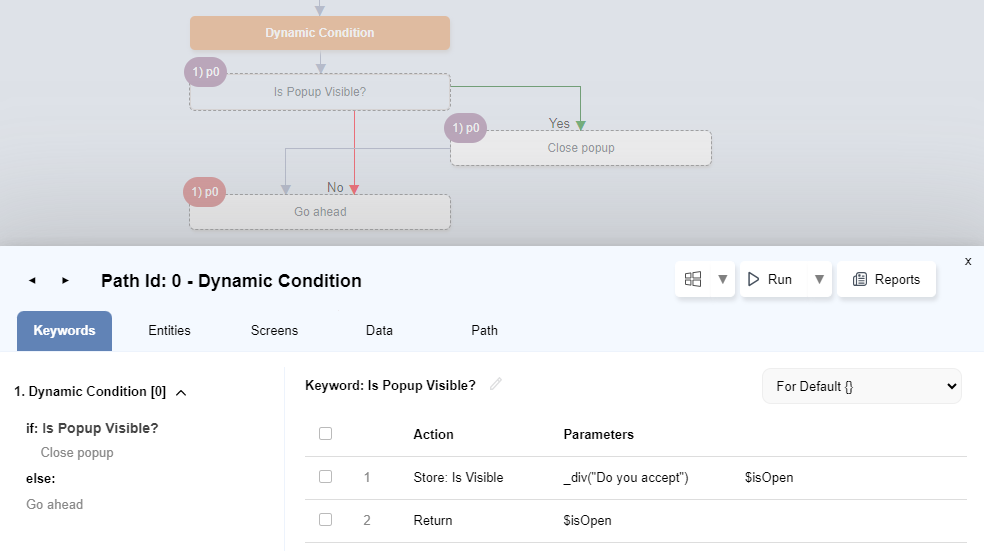
In the above example, we have created a dynamic condition with node text Is popup visible?.
This creates a keyword of the same name. In the implementation, we store the value of Is Visible and then return it.
At runtime, if the div is visible, Close popup will be called.