

Skip to content
Sahi Pro Flowcharts is retired. These pages document the last release (v12) and are no longer updated. Go to the current documentation.Flowcharts is retired. Current docs
Get Free Trial
Sahi Pro Flowcharts is retired. These pages document the last release (v12) and are no longer updated. Go to the current documentation.

Accessor APIs - Polymer Elements

Since
Sahi Pro 3.5
API

_div(identifier [, relation1 [, relation2 ...]])

Tag

Tag: DIV

HTML
<DIV
id="div_id"
class="shaded bigfont" >div text</DIV>
Identifiers

visible text, id, css class, data-testid, index

Valid Accessors and alternatives: (Assume this is the 6th div in the UI and 2nd div with class "shaded bigfont")

//visible text
_div("div text")
//visible text with regular expression
_div("/iv te/")
//visible text with regular expression
_div("/d.*text/")
//id
_div("div_id")
//index
_div(5)
//css class with index
_div("shaded bigfont[1]")
//css class with regular expression and index
_div("/bigfont/[1]")
//multiple attributes as JSON
_div({className: "shaded bigfont", sahiIndex: 1})
//multiple attributes as JSON including regular expression
_div({className: "/shaded .*font/", sahiIndex: 1})
// Use sahiIndex for index, className for class and sahiText for visible text attributes.
Relations

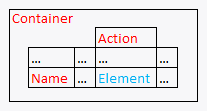
Relational APIs _in, _near, _leftOf, _rightOf, _under, _above can be used.
// with _in
_div("div text", _in(_div("Container")))
// index with 2 relational APIs, _rightOf and _under
_div(0, _rightOf(_span("Name")), _under(_cell("Action")))
// with regular expression and relations
_div("/bigfont/", _rightOf(_span("Name")), _under(_cell("Action")))
Relations Sample
Value

visible text (this is the default attribute used in assertions etc.)

Actions

Default event recorded is _click

Example usage:

_click(_div("div text"));
_click(_div("/bigfont/[1]", _rightOf(_span("Name"))));
Assertions

Example assertions:

// Check if element exists
_assertExists(_div("div_id"));
// Check if element is visible
_assert(_isVisible(_div("div_id")));
_assertEqual("div text", _getText(_div("div_id")));
Since
Sahi Pro 6.1.0
API

_coreIconButton(identifier [, relation1 [, relation2 ...]])

Tag

Tag: CORE-ICON-BUTTON

HTML
<CORE-ICON-BUTTON
aria-label="descriptive label"
id="coreIconButton_id"
class="shaded bigfont" >coreIconButton text</CORE-ICON-BUTTON>
Identifiers

aria-label, visible text, id, css class, index

Valid Accessors and alternatives: (Assume this is the 6th coreIconButton in the UI and 2nd coreIconButton with class "shaded bigfont")

//aria-label
_coreIconButton("descriptive label")
//visible text
_coreIconButton("coreIconButton text")
//visible text with regular expression
_coreIconButton("/nButton te/")
//visible text with regular expression
_coreIconButton("/coreIco.*text/")
//id
_coreIconButton("coreIconButton_id")
//index
_coreIconButton(5)
//css class with index
_coreIconButton("shaded bigfont[1]")
//css class with regular expression and index
_coreIconButton("/bigfont/[1]")
//multiple attributes as JSON
_coreIconButton({className: "shaded bigfont", sahiIndex: 1})
//multiple attributes as JSON including regular expression
_coreIconButton({className: "/shaded .*font/", sahiIndex: 1})
// Use sahiIndex for index, className for class and sahiText for visible text attributes.
Relations

Relational APIs _in, _near, _leftOf, _rightOf, _under, _above can be used.

// with _in
_coreIconButton("descriptive label", _in(_div("Container")))
// index with 2 relational APIs, _rightOf and _under
_coreIconButton(0, _rightOf(_span("Name")), _under(_cell("Action")))
// with regular expression and relations
_coreIconButton("/bigfont/", _rightOf(_span("Name")), _under(_cell("Action")))
Relations Sample
Value

visible text (this is the default attribute used in assertions etc.)

Actions

Default event recorded is _click

Example usage:

_click(_coreIconButton("descriptive label"));
_click(_coreIconButton("/bigfont/[1]", _rightOf(_span("Name"))));
Assertions

Example assertions:

// Check if element exists
_assertExists(_coreIconButton("coreIconButton_id"));
// Check if element is visible
_assert(_isVisible(_coreIconButton("coreIconButton_id")));
_assertEqual("coreIconButton text", _getText(_coreIconButton("coreIconButton_id")));
Since
Sahi Pro 6.1.0
API

_coreIcon(identifier [, relation1 [, relation2 ...]])

Tag

Tag: CORE-ICON

HTML
<CORE-ICON
aria-label="descriptive label"
id="coreIcon_id"
class="shaded bigfont" >coreIcon text</CORE-ICON>
Identifiers

aria-label, visible text, id, css class, index

Valid Accessors and alternatives: (Assume this is the 6th coreIcon in the UI and 2nd coreIcon with class "shaded bigfont")

//aria-label
_coreIcon("descriptive label")
//visible text
_coreIcon("coreIcon text")
//visible text with regular expression
_coreIcon("/Icon te/")
//visible text with regular expression
_coreIcon("/core.*text/")
//id
_coreIcon("coreIcon_id")
//index
_coreIcon(5)
//css class with index
_coreIcon("shaded bigfont[1]")
//css class with regular expression and index
_coreIcon("/bigfont/[1]")
//multiple attributes as JSON
_coreIcon({className: "shaded bigfont", sahiIndex: 1})
//multiple attributes as JSON including regular expression
_coreIcon({className: "/shaded .*font/", sahiIndex: 1})
// Use sahiIndex for index, className for class and sahiText for visible text attributes.
Relations

Relational APIs _in, _near, _leftOf, _rightOf, _under, _above can be used.

// with _in
_coreIcon("descriptive label", _in(_div("Container")))
// index with 2 relational APIs, _rightOf and _under
_coreIcon(0, _rightOf(_span("Name")), _under(_cell("Action")))
// with regular expression and relations
_coreIcon("/bigfont/", _rightOf(_span("Name")), _under(_cell("Action")))
Relations Sample
Value

visible text (this is the default attribute used in assertions etc.)

Actions

Default event recorded is _click

Example usage:

_click(_coreIcon("descriptive label"));
_click(_coreIcon("/bigfont/[1]", _rightOf(_span("Name"))));
Assertions

Example assertions:

// Check if element exists
_assertExists(_coreIcon("coreIcon_id"));
// Check if element is visible
_assert(_isVisible(_coreIcon("coreIcon_id")));
_assertEqual("coreIcon text", _getText(_coreIcon("coreIcon_id")));
Since
Sahi Pro 6.1.0
API

_coreAllayKeys(identifier [, relation1 [, relation2 ...]])

Tag

Tag: CORE-ALLY-KEYS

HTML
<CORE-ALLY-KEYS
aria-label="descriptive label"
id="coreAllayKeys_id"
class="shaded bigfont" >coreAllayKeys text</CORE-ALLY-KEYS>
Identifiers

aria-label, visible text, id, css class, index

Valid Accessors and alternatives: (Assume this is the 6th coreAllayKeys in the UI and 2nd coreAllayKeys with class "shaded bigfont")

//aria-label
_coreAllayKeys("descriptive label")
//visible text
_coreAllayKeys("coreAllayKeys text")
//visible text with regular expression
_coreAllayKeys("/layKeys te/")
//visible text with regular expression
_coreAllayKeys("/coreAl.*text/")
//id
_coreAllayKeys("coreAllayKeys_id")
//index
_coreAllayKeys(5)
//css class with index
_coreAllayKeys("shaded bigfont[1]")
//css class with regular expression and index
_coreAllayKeys("/bigfont/[1]")
//multiple attributes as JSON
_coreAllayKeys({className: "shaded bigfont", sahiIndex: 1})
//multiple attributes as JSON including regular expression
_coreAllayKeys({className: "/shaded .*font/", sahiIndex: 1})
// Use sahiIndex for index, className for class and sahiText for visible text attributes.
Relations

Relational APIs _in, _near, _leftOf, _rightOf, _under, _above can be used.

// with _in
_coreAllayKeys("descriptive label", _in(_div("Container")))
// index with 2 relational APIs, _rightOf and _under
_coreAllayKeys(0, _rightOf(_span("Name")), _under(_cell("Action")))
// with regular expression and relations
_coreAllayKeys("/bigfont/", _rightOf(_span("Name")), _under(_cell("Action")))
Relations Sample
Value

visible text (this is the default attribute used in assertions etc.)

Actions

Default event recorded is _click

Example usage:

_click(_coreAllayKeys("descriptive label"));
_click(_coreAllayKeys("/bigfont/[1]", _rightOf(_span("Name"))));
Assertions

Example assertions:

// Check if element exists
_assertExists(_coreAllayKeys("coreAllayKeys_id"));
// Check if element is visible
_assert(_isVisible(_coreAllayKeys("coreAllayKeys_id")));
_assertEqual("coreAllayKeys text", _getText(_coreAllayKeys("coreAllayKeys_id")));
Since
Sahi Pro 6.1.0
API

_coreStyle(identifier [, relation1 [, relation2 ...]])

Tag

Tag: CORE-STYLE

HTML
<CORE-STYLE
aria-label="descriptive label"
id="coreStyle_id"
class="shaded bigfont" >coreStyle text</CORE-STYLE>
Identifiers

aria-label, visible text, id, css class, index

Valid Accessors and alternatives: (Assume this is the 6th coreStyle in the UI and 2nd coreStyle with class "shaded bigfont")

//aria-label
_coreStyle("descriptive label")
//visible text
_coreStyle("coreStyle text")
//visible text with regular expression
_coreStyle("/Style te/")
//visible text with regular expression
_coreStyle("/core.*text/")
//id
_coreStyle("coreStyle_id")
//index
_coreStyle(5)
//css class with index
_coreStyle("shaded bigfont[1]")
//css class with regular expression and index
_coreStyle("/bigfont/[1]")
//multiple attributes as JSON
_coreStyle({className: "shaded bigfont", sahiIndex: 1})
//multiple attributes as JSON including regular expression
_coreStyle({className: "/shaded .*font/", sahiIndex: 1})
// Use sahiIndex for index, className for class and sahiText for visible text attributes.
Relations

Relational APIs _in, _near, _leftOf, _rightOf, _under, _above can be used.

// with _in
_coreStyle("descriptive label", _in(_div("Container")))
// index with 2 relational APIs, _rightOf and _under
_coreStyle(0, _rightOf(_span("Name")), _under(_cell("Action")))
// with regular expression and relations
_coreStyle("/bigfont/", _rightOf(_span("Name")), _under(_cell("Action")))
Relations Sample
Value

visible text (this is the default attribute used in assertions etc.)

Actions

Default event recorded is _click

Example usage:

_click(_coreStyle("descriptive label"));
_click(_coreStyle("/bigfont/[1]", _rightOf(_span("Name"))));
Assertions

Example assertions:

// Check if element exists
_assertExists(_coreStyle("coreStyle_id"));
// Check if element is visible
_assert(_isVisible(_coreStyle("coreStyle_id")));
_assertEqual("coreStyle text", _getText(_coreStyle("coreStyle_id")));
Since
Sahi Pro 6.1.0
API

_coreTransitionPages(identifier [, relation1 [, relation2 ...]])

Tag

Tag: CORE-TRANSITION-PAGES

HTML
<CORE-TRANSITION-PAGES
aria-label="descriptive label"
id="coreTransitionPages_id"
class="shaded bigfont" >coreTransitionPages text</CORE-TRANSITION-PAGES>
Identifiers

aria-label, visible text, id, css class, index

Valid Accessors and alternatives: (Assume this is the 6th coreTransitionPages in the UI and 2nd coreTransitionPages with class "shaded bigfont")

//aria-label
_coreTransitionPages("descriptive label")
//visible text
_coreTransitionPages("coreTransitionPages text")
//visible text with regular expression
_coreTransitionPages("/itionPages te/")
//visible text with regular expression
_coreTransitionPages("/coreTrans.*text/")
//id
_coreTransitionPages("coreTransitionPages_id")
//index
_coreTransitionPages(5)
//css class with index
_coreTransitionPages("shaded bigfont[1]")
//css class with regular expression and index
_coreTransitionPages("/bigfont/[1]")
//multiple attributes as JSON
_coreTransitionPages({className: "shaded bigfont", sahiIndex: 1})
//multiple attributes as JSON including regular expression
_coreTransitionPages({className: "/shaded .*font/", sahiIndex: 1})
// Use sahiIndex for index, className for class and sahiText for visible text attributes.
Relations

Relational APIs _in, _near, _leftOf, _rightOf, _under, _above can be used.

// with _in
_coreTransitionPages("descriptive label", _in(_div("Container")))
// index with 2 relational APIs, _rightOf and _under
_coreTransitionPages(0, _rightOf(_span("Name")), _under(_cell("Action")))
// with regular expression and relations
_coreTransitionPages("/bigfont/", _rightOf(_span("Name")), _under(_cell("Action")))
Relations Sample
Value

visible text (this is the default attribute used in assertions etc.)

Actions

Default event recorded is _click

Example usage:

_click(_coreTransitionPages("descriptive label"));
_click(_coreTransitionPages("/bigfont/[1]", _rightOf(_span("Name"))));
Assertions

Example assertions:

// Check if element exists
_assertExists(_coreTransitionPages("coreTransitionPages_id"));
// Check if element is visible
_assert(_isVisible(_coreTransitionPages("coreTransitionPages_id")));
_assertEqual("coreTransitionPages text", _getText(_coreTransitionPages("coreTransitionPages_id")));
Since
Sahi Pro 6.1.0
API

_coreAnimationGroup(identifier [, relation1 [, relation2 ...]])

Tag

Tag: CORE-ANIMATION-GROUP

HTML
<CORE-ANIMATION-GROUP
aria-label="descriptive label"
id="coreAnimationGroup_id"
class="shaded bigfont" >coreAnimationGroup text</CORE-ANIMATION-GROUP>
Identifiers

aria-label, visible text, id, css class, index

Valid Accessors and alternatives: (Assume this is the 6th coreAnimationGroup in the UI and 2nd coreAnimationGroup with class "shaded bigfont")

//aria-label
_coreAnimationGroup("descriptive label")
//visible text
_coreAnimationGroup("coreAnimationGroup text")
//visible text with regular expression
_coreAnimationGroup("/tionGroup te/")
//visible text with regular expression
_coreAnimationGroup("/coreAnima.*text/")
//id
_coreAnimationGroup("coreAnimationGroup_id")
//index
_coreAnimationGroup(5)
//css class with index
_coreAnimationGroup("shaded bigfont[1]")
//css class with regular expression and index
_coreAnimationGroup("/bigfont/[1]")
//multiple attributes as JSON
_coreAnimationGroup({className: "shaded bigfont", sahiIndex: 1})
//multiple attributes as JSON including regular expression
_coreAnimationGroup({className: "/shaded .*font/", sahiIndex: 1})
// Use sahiIndex for index, className for class and sahiText for visible text attributes.
Relations

Relational APIs _in, _near, _leftOf, _rightOf, _under, _above can be used.

// with _in
_coreAnimationGroup("descriptive label", _in(_div("Container")))
// index with 2 relational APIs, _rightOf and _under
_coreAnimationGroup(0, _rightOf(_span("Name")), _under(_cell("Action")))
// with regular expression and relations
_coreAnimationGroup("/bigfont/", _rightOf(_span("Name")), _under(_cell("Action")))
Relations Sample
Value

visible text (this is the default attribute used in assertions etc.)

Actions

Default event recorded is _click

Example usage:

_click(_coreAnimationGroup("descriptive label"));
_click(_coreAnimationGroup("/bigfont/[1]", _rightOf(_span("Name"))));
Assertions

Example assertions:

// Check if element exists
_assertExists(_coreAnimationGroup("coreAnimationGroup_id"));
// Check if element is visible
_assert(_isVisible(_coreAnimationGroup("coreAnimationGroup_id")));
_assertEqual("coreAnimationGroup text", _getText(_coreAnimationGroup("coreAnimationGroup_id")));
Since
Sahi Pro 6.1.0
API

_coreAnimation(identifier [, relation1 [, relation2 ...]])

Tag

Tag: CORE-ANIMATION

HTML
<CORE-ANIMATION
aria-label="descriptive label"
id="coreAnimation_id"
class="shaded bigfont" >coreAnimation text</CORE-ANIMATION>
Identifiers

aria-label, visible text, id, css class, index

Valid Accessors and alternatives: (Assume this is the 6th coreAnimation in the UI and 2nd coreAnimation with class "shaded bigfont")

//aria-label
_coreAnimation("descriptive label")
//visible text
_coreAnimation("coreAnimation text")
//visible text with regular expression
_coreAnimation("/imation te/")
//visible text with regular expression
_coreAnimation("/coreAn.*text/")
//id
_coreAnimation("coreAnimation_id")
//index
_coreAnimation(5)
//css class with index
_coreAnimation("shaded bigfont[1]")
//css class with regular expression and index
_coreAnimation("/bigfont/[1]")
//multiple attributes as JSON
_coreAnimation({className: "shaded bigfont", sahiIndex: 1})
//multiple attributes as JSON including regular expression
_coreAnimation({className: "/shaded .*font/", sahiIndex: 1})
// Use sahiIndex for index, className for class and sahiText for visible text attributes.
Relations

Relational APIs _in, _near, _leftOf, _rightOf, _under, _above can be used.

// with _in
_coreAnimation("descriptive label", _in(_div("Container")))
// index with 2 relational APIs, _rightOf and _under
_coreAnimation(0, _rightOf(_span("Name")), _under(_cell("Action")))
// with regular expression and relations
_coreAnimation("/bigfont/", _rightOf(_span("Name")), _under(_cell("Action")))
Relations Sample
Value

visible text (this is the default attribute used in assertions etc.)

Actions

Default event recorded is _click

Example usage:

_click(_coreAnimation("descriptive label"));
_click(_coreAnimation("/bigfont/[1]", _rightOf(_span("Name"))));
Assertions

Example assertions:

// Check if element exists
_assertExists(_coreAnimation("coreAnimation_id"));
// Check if element is visible
_assert(_isVisible(_coreAnimation("coreAnimation_id")));
_assertEqual("coreAnimation text", _getText(_coreAnimation("coreAnimation_id")));
Since
Sahi Pro 6.1.0
API

_coreAnimationKeyframe(identifier [, relation1 [, relation2 ...]])

Tag

Tag: CORE-ANIMATION-KEYFRAME

HTML
<CORE-ANIMATION-KEYFRAME
aria-label="descriptive label"
id="coreAnimationKeyframe_id"
class="shaded bigfont" >coreAnimationKeyframe text</CORE-ANIMATION-KEYFRAME>
Identifiers

aria-label, visible text, id, css class, index

Valid Accessors and alternatives: (Assume this is the 6th coreAnimationKeyframe in the UI and 2nd coreAnimationKeyframe with class "shaded bigfont")

//aria-label
_coreAnimationKeyframe("descriptive label")
//visible text
_coreAnimationKeyframe("coreAnimationKeyframe text")
//visible text with regular expression
_coreAnimationKeyframe("/ionKeyframe te/")
//visible text with regular expression
_coreAnimationKeyframe("/coreAnimat.*text/")
//id
_coreAnimationKeyframe("coreAnimationKeyframe_id")
//index
_coreAnimationKeyframe(5)
//css class with index
_coreAnimationKeyframe("shaded bigfont[1]")
//css class with regular expression and index
_coreAnimationKeyframe("/bigfont/[1]")
//multiple attributes as JSON
_coreAnimationKeyframe({className: "shaded bigfont", sahiIndex: 1})
//multiple attributes as JSON including regular expression
_coreAnimationKeyframe({className: "/shaded .*font/", sahiIndex: 1})
// Use sahiIndex for index, className for class and sahiText for visible text attributes.
Relations

Relational APIs _in, _near, _leftOf, _rightOf, _under, _above can be used.

// with _in
_coreAnimationKeyframe("descriptive label", _in(_div("Container")))
// index with 2 relational APIs, _rightOf and _under
_coreAnimationKeyframe(0, _rightOf(_span("Name")), _under(_cell("Action")))
// with regular expression and relations
_coreAnimationKeyframe("/bigfont/", _rightOf(_span("Name")), _under(_cell("Action")))
Relations Sample
Value

visible text (this is the default attribute used in assertions etc.)

Actions

Default event recorded is _click

Example usage:

_click(_coreAnimationKeyframe("descriptive label"));
_click(_coreAnimationKeyframe("/bigfont/[1]", _rightOf(_span("Name"))));
Assertions

Example assertions:

// Check if element exists
_assertExists(_coreAnimationKeyframe("coreAnimationKeyframe_id"));
// Check if element is visible
_assert(_isVisible(_coreAnimationKeyframe("coreAnimationKeyframe_id")));
_assertEqual("coreAnimationKeyframe text", _getText(_coreAnimationKeyframe("coreAnimationKeyframe_id")));
Since
Sahi Pro 6.1.0
API

_coreAnimationProp(identifier [, relation1 [, relation2 ...]])

Tag

Tag: CORE-ANIMATION-PROP

HTML
<CORE-ANIMATION-PROP
aria-label="descriptive label"
id="coreAnimationProp_id"
class="shaded bigfont" >coreAnimationProp text</CORE-ANIMATION-PROP>
Identifiers

aria-label, visible text, id, css class, index

Valid Accessors and alternatives: (Assume this is the 6th coreAnimationProp in the UI and 2nd coreAnimationProp with class "shaded bigfont")

//aria-label
_coreAnimationProp("descriptive label")
//visible text
_coreAnimationProp("coreAnimationProp text")
//visible text with regular expression
_coreAnimationProp("/ationProp te/")
//visible text with regular expression
_coreAnimationProp("/coreAnim.*text/")
//id
_coreAnimationProp("coreAnimationProp_id")
//index
_coreAnimationProp(5)
//css class with index
_coreAnimationProp("shaded bigfont[1]")
//css class with regular expression and index
_coreAnimationProp("/bigfont/[1]")
//multiple attributes as JSON
_coreAnimationProp({className: "shaded bigfont", sahiIndex: 1})
//multiple attributes as JSON including regular expression
_coreAnimationProp({className: "/shaded .*font/", sahiIndex: 1})
// Use sahiIndex for index, className for class and sahiText for visible text attributes.
Relations

Relational APIs _in, _near, _leftOf, _rightOf, _under, _above can be used.

// with _in
_coreAnimationProp("descriptive label", _in(_div("Container")))
// index with 2 relational APIs, _rightOf and _under
_coreAnimationProp(0, _rightOf(_span("Name")), _under(_cell("Action")))
// with regular expression and relations
_coreAnimationProp("/bigfont/", _rightOf(_span("Name")), _under(_cell("Action")))
Relations Sample
Value

visible text (this is the default attribute used in assertions etc.)

Actions

Default event recorded is _click

Example usage:

_click(_coreAnimationProp("descriptive label"));
_click(_coreAnimationProp("/bigfont/[1]", _rightOf(_span("Name"))));
Assertions

Example assertions:

// Check if element exists
_assertExists(_coreAnimationProp("coreAnimationProp_id"));
// Check if element is visible
_assert(_isVisible(_coreAnimationProp("coreAnimationProp_id")));
_assertEqual("coreAnimationProp text", _getText(_coreAnimationProp("coreAnimationProp_id")));
Since
Sahi Pro 6.1.0
API

_coreCollapse(identifier [, relation1 [, relation2 ...]])

Tag

Tag: CORE-COLLAPSE

HTML
<CORE-COLLAPSE
aria-label="descriptive label"
id="coreCollapse_id"
class="shaded bigfont" >coreCollapse text</CORE-COLLAPSE>
Identifiers

aria-label, visible text, id, css class, index

Valid Accessors and alternatives: (Assume this is the 6th coreCollapse in the UI and 2nd coreCollapse with class "shaded bigfont")

//aria-label
_coreCollapse("descriptive label")
//visible text
_coreCollapse("coreCollapse text")
//visible text with regular expression
_coreCollapse("/llapse te/")
//visible text with regular expression
_coreCollapse("/coreCo.*text/")
//id
_coreCollapse("coreCollapse_id")
//index
_coreCollapse(5)
//css class with index
_coreCollapse("shaded bigfont[1]")
//css class with regular expression and index
_coreCollapse("/bigfont/[1]")
//multiple attributes as JSON
_coreCollapse({className: "shaded bigfont", sahiIndex: 1})
//multiple attributes as JSON including regular expression
_coreCollapse({className: "/shaded .*font/", sahiIndex: 1})
// Use sahiIndex for index, className for class and sahiText for visible text attributes.
Relations

Relational APIs _in, _near, _leftOf, _rightOf, _under, _above can be used.

// with _in
_coreCollapse("descriptive label", _in(_div("Container")))
// index with 2 relational APIs, _rightOf and _under
_coreCollapse(0, _rightOf(_span("Name")), _under(_cell("Action")))
// with regular expression and relations
_coreCollapse("/bigfont/", _rightOf(_span("Name")), _under(_cell("Action")))
Relations Sample
Value

visible text (this is the default attribute used in assertions etc.)

Actions

Default event recorded is _click

Example usage:

_click(_coreCollapse("descriptive label"));
_click(_coreCollapse("/bigfont/[1]", _rightOf(_span("Name"))));
Assertions

Example assertions:

// Check if element exists
_assertExists(_coreCollapse("coreCollapse_id"));
// Check if element is visible
_assert(_isVisible(_coreCollapse("coreCollapse_id")));
_assertEqual("coreCollapse text", _getText(_coreCollapse("coreCollapse_id")));
Since
Sahi Pro 6.1.0
API

_coreDragDrop(identifier [, relation1 [, relation2 ...]])

Tag

Tag: CORE-DRAG-DROP

HTML
<CORE-DRAG-DROP
aria-label="descriptive label"
id="coreDragDrop_id"
class="shaded bigfont" >coreDragDrop text</CORE-DRAG-DROP>
Identifiers

aria-label, visible text, id, css class, index

Valid Accessors and alternatives: (Assume this is the 6th coreDragDrop in the UI and 2nd coreDragDrop with class "shaded bigfont")

//aria-label
_coreDragDrop("descriptive label")
//visible text
_coreDragDrop("coreDragDrop text")
//visible text with regular expression
_coreDragDrop("/agDrop te/")
//visible text with regular expression
_coreDragDrop("/coreDr.*text/")
//id
_coreDragDrop("coreDragDrop_id")
//index
_coreDragDrop(5)
//css class with index
_coreDragDrop("shaded bigfont[1]")
//css class with regular expression and index
_coreDragDrop("/bigfont/[1]")
//multiple attributes as JSON
_coreDragDrop({className: "shaded bigfont", sahiIndex: 1})
//multiple attributes as JSON including regular expression
_coreDragDrop({className: "/shaded .*font/", sahiIndex: 1})
// Use sahiIndex for index, className for class and sahiText for visible text attributes.
Relations

Relational APIs _in, _near, _leftOf, _rightOf, _under, _above can be used.

// with _in
_coreDragDrop("descriptive label", _in(_div("Container")))
// index with 2 relational APIs, _rightOf and _under
_coreDragDrop(0, _rightOf(_span("Name")), _under(_cell("Action")))
// with regular expression and relations
_coreDragDrop("/bigfont/", _rightOf(_span("Name")), _under(_cell("Action")))
Relations Sample
Value

visible text (this is the default attribute used in assertions etc.)

Actions

Default event recorded is _click

Example usage:

_click(_coreDragDrop("descriptive label"));
_click(_coreDragDrop("/bigfont/[1]", _rightOf(_span("Name"))));
Assertions

Example assertions:

// Check if element exists
_assertExists(_coreDragDrop("coreDragDrop_id"));
// Check if element is visible
_assert(_isVisible(_coreDragDrop("coreDragDrop_id")));
_assertEqual("coreDragDrop text", _getText(_coreDragDrop("coreDragDrop_id")));
Since
Sahi Pro 6.1.0
API

_coreDrawerPanel(identifier [, relation1 [, relation2 ...]])

Tag

Tag: CORE-DRAWER-PANEL

HTML
<CORE-DRAWER-PANEL
aria-label="descriptive label"
id="coreDrawerPanel_id"
class="shaded bigfont" >coreDrawerPanel text</CORE-DRAWER-PANEL>
Identifiers

aria-label, visible text, id, css class, index

Valid Accessors and alternatives: (Assume this is the 6th coreDrawerPanel in the UI and 2nd coreDrawerPanel with class "shaded bigfont")

//aria-label
_coreDrawerPanel("descriptive label")
//visible text
_coreDrawerPanel("coreDrawerPanel text")
//visible text with regular expression
_coreDrawerPanel("/werPanel te/")
//visible text with regular expression
_coreDrawerPanel("/coreDra.*text/")
//id
_coreDrawerPanel("coreDrawerPanel_id")
//index
_coreDrawerPanel(5)
//css class with index
_coreDrawerPanel("shaded bigfont[1]")
//css class with regular expression and index
_coreDrawerPanel("/bigfont/[1]")
//multiple attributes as JSON
_coreDrawerPanel({className: "shaded bigfont", sahiIndex: 1})
//multiple attributes as JSON including regular expression
_coreDrawerPanel({className: "/shaded .*font/", sahiIndex: 1})
// Use sahiIndex for index, className for class and sahiText for visible text attributes.
Relations

Relational APIs _in, _near, _leftOf, _rightOf, _under, _above can be used.

// with _in
_coreDrawerPanel("descriptive label", _in(_div("Container")))
// index with 2 relational APIs, _rightOf and _under
_coreDrawerPanel(0, _rightOf(_span("Name")), _under(_cell("Action")))
// with regular expression and relations
_coreDrawerPanel("/bigfont/", _rightOf(_span("Name")), _under(_cell("Action")))
Relations Sample
Value

visible text (this is the default attribute used in assertions etc.)

Actions

Default event recorded is _click

Example usage:

_click(_coreDrawerPanel("descriptive label"));
_click(_coreDrawerPanel("/bigfont/[1]", _rightOf(_span("Name"))));
Assertions

Example assertions:

// Check if element exists
_assertExists(_coreDrawerPanel("coreDrawerPanel_id"));
// Check if element is visible
_assert(_isVisible(_coreDrawerPanel("coreDrawerPanel_id")));
_assertEqual("coreDrawerPanel text", _getText(_coreDrawerPanel("coreDrawerPanel_id")));
Since
Sahi Pro 6.1.0
API

_coreDropdownBase(identifier [, relation1 [, relation2 ...]])

Tag

Tag: CORE-DROPDOWN-BASE

HTML
<CORE-DROPDOWN-BASE
aria-label="descriptive label"
id="coreDropdownBase_id"
class="shaded bigfont" >coreDropdownBase text</CORE-DROPDOWN-BASE>
Identifiers

aria-label, visible text, id, css class, index

Valid Accessors and alternatives: (Assume this is the 6th coreDropdownBase in the UI and 2nd coreDropdownBase with class "shaded bigfont")

//aria-label
_coreDropdownBase("descriptive label")
//visible text
_coreDropdownBase("coreDropdownBase text")
//visible text with regular expression
_coreDropdownBase("/downBase te/")
//visible text with regular expression
_coreDropdownBase("/coreDrop.*text/")
//id
_coreDropdownBase("coreDropdownBase_id")
//index
_coreDropdownBase(5)
//css class with index
_coreDropdownBase("shaded bigfont[1]")
//css class with regular expression and index
_coreDropdownBase("/bigfont/[1]")
//multiple attributes as JSON
_coreDropdownBase({className: "shaded bigfont", sahiIndex: 1})
//multiple attributes as JSON including regular expression
_coreDropdownBase({className: "/shaded .*font/", sahiIndex: 1})
// Use sahiIndex for index, className for class and sahiText for visible text attributes.
Relations

Relational APIs _in, _near, _leftOf, _rightOf, _under, _above can be used.

// with _in
_coreDropdownBase("descriptive label", _in(_div("Container")))
// index with 2 relational APIs, _rightOf and _under
_coreDropdownBase(0, _rightOf(_span("Name")), _under(_cell("Action")))
// with regular expression and relations
_coreDropdownBase("/bigfont/", _rightOf(_span("Name")), _under(_cell("Action")))
Relations Sample
Value

visible text (this is the default attribute used in assertions etc.)

Actions

Default event recorded is _click

Example usage:

_click(_coreDropdownBase("descriptive label"));
_click(_coreDropdownBase("/bigfont/[1]", _rightOf(_span("Name"))));
Assertions

Example assertions:

// Check if element exists
_assertExists(_coreDropdownBase("coreDropdownBase_id"));
// Check if element is visible
_assert(_isVisible(_coreDropdownBase("coreDropdownBase_id")));
_assertEqual("coreDropdownBase text", _getText(_coreDropdownBase("coreDropdownBase_id")));
Since
Sahi Pro 6.1.0
API

_coreDropdown(identifier [, relation1 [, relation2 ...]])

Tag

Tag: CORE-DROPDOWN

HTML
<CORE-DROPDOWN
aria-label="descriptive label"
id="coreDropdown_id"
class="shaded bigfont" >coreDropdown text</CORE-DROPDOWN>
Identifiers

aria-label, visible text, id, css class, index

Valid Accessors and alternatives: (Assume this is the 6th coreDropdown in the UI and 2nd coreDropdown with class "shaded bigfont")

//aria-label
_coreDropdown("descriptive label")
//visible text
_coreDropdown("coreDropdown text")
//visible text with regular expression
_coreDropdown("/opdown te/")
//visible text with regular expression
_coreDropdown("/coreDr.*text/")
//id
_coreDropdown("coreDropdown_id")
//index
_coreDropdown(5)
//css class with index
_coreDropdown("shaded bigfont[1]")
//css class with regular expression and index
_coreDropdown("/bigfont/[1]")
//multiple attributes as JSON
_coreDropdown({className: "shaded bigfont", sahiIndex: 1})
//multiple attributes as JSON including regular expression
_coreDropdown({className: "/shaded .*font/", sahiIndex: 1})
// Use sahiIndex for index, className for class and sahiText for visible text attributes.
Relations

Relational APIs _in, _near, _leftOf, _rightOf, _under, _above can be used.

// with _in
_coreDropdown("descriptive label", _in(_div("Container")))
// index with 2 relational APIs, _rightOf and _under
_coreDropdown(0, _rightOf(_span("Name")), _under(_cell("Action")))
// with regular expression and relations
_coreDropdown("/bigfont/", _rightOf(_span("Name")), _under(_cell("Action")))
Relations Sample
Value

visible text (this is the default attribute used in assertions etc.)

Actions

Default event recorded is _click

Example usage:

_click(_coreDropdown("descriptive label"));
_click(_coreDropdown("/bigfont/[1]", _rightOf(_span("Name"))));
Assertions

Example assertions:

// Check if element exists
_assertExists(_coreDropdown("coreDropdown_id"));
// Check if element is visible
_assert(_isVisible(_coreDropdown("coreDropdown_id")));
_assertEqual("coreDropdown text", _getText(_coreDropdown("coreDropdown_id")));
Since
Sahi Pro 6.1.0
API

_coreDropdownMenu(identifier [, relation1 [, relation2 ...]])

Tag

Tag: CORE-DROPDOWN-MENU

HTML
<CORE-DROPDOWN-MENU
aria-label="descriptive label"
id="coreDropdownMenu_id"
class="shaded bigfont" >coreDropdownMenu text</CORE-DROPDOWN-MENU>
Identifiers

aria-label, visible text, id, css class, index

Valid Accessors and alternatives: (Assume this is the 6th coreDropdownMenu in the UI and 2nd coreDropdownMenu with class "shaded bigfont")

//aria-label
_coreDropdownMenu("descriptive label")
//visible text
_coreDropdownMenu("coreDropdownMenu text")
//visible text with regular expression
_coreDropdownMenu("/downMenu te/")
//visible text with regular expression
_coreDropdownMenu("/coreDrop.*text/")
//id
_coreDropdownMenu("coreDropdownMenu_id")
//index
_coreDropdownMenu(5)
//css class with index
_coreDropdownMenu("shaded bigfont[1]")
//css class with regular expression and index
_coreDropdownMenu("/bigfont/[1]")
//multiple attributes as JSON
_coreDropdownMenu({className: "shaded bigfont", sahiIndex: 1})
//multiple attributes as JSON including regular expression
_coreDropdownMenu({className: "/shaded .*font/", sahiIndex: 1})
// Use sahiIndex for index, className for class and sahiText for visible text attributes.
Relations

Relational APIs _in, _near, _leftOf, _rightOf, _under, _above can be used.

// with _in
_coreDropdownMenu("descriptive label", _in(_div("Container")))
// index with 2 relational APIs, _rightOf and _under
_coreDropdownMenu(0, _rightOf(_span("Name")), _under(_cell("Action")))
// with regular expression and relations
_coreDropdownMenu("/bigfont/", _rightOf(_span("Name")), _under(_cell("Action")))
Relations Sample
Value

visible text (this is the default attribute used in assertions etc.)

Actions

Default event recorded is _click

Example usage:

_click(_coreDropdownMenu("descriptive label"));
_click(_coreDropdownMenu("/bigfont/[1]", _rightOf(_span("Name"))));
Assertions

Example assertions:

// Check if element exists
_assertExists(_coreDropdownMenu("coreDropdownMenu_id"));
// Check if element is visible
_assert(_isVisible(_coreDropdownMenu("coreDropdownMenu_id")));
_assertEqual("coreDropdownMenu text", _getText(_coreDropdownMenu("coreDropdownMenu_id")));
Since
Sahi Pro 6.1.0
API

_coreField(identifier [, relation1 [, relation2 ...]])

Tag

Tag: CORE-FIELD

HTML
<CORE-FIELD
aria-label="descriptive label"
id="coreField_id"
class="shaded bigfont" >coreField text</CORE-FIELD>
Identifiers

aria-label, visible text, id, css class, index

Valid Accessors and alternatives: (Assume this is the 6th coreField in the UI and 2nd coreField with class "shaded bigfont")

//aria-label
_coreField("descriptive label")
//visible text
_coreField("coreField text")
//visible text with regular expression
_coreField("/Field te/")
//visible text with regular expression
_coreField("/core.*text/")
//id
_coreField("coreField_id")
//index
_coreField(5)
//css class with index
_coreField("shaded bigfont[1]")
//css class with regular expression and index
_coreField("/bigfont/[1]")
//multiple attributes as JSON
_coreField({className: "shaded bigfont", sahiIndex: 1})
//multiple attributes as JSON including regular expression
_coreField({className: "/shaded .*font/", sahiIndex: 1})
// Use sahiIndex for index, className for class and sahiText for visible text attributes.
Relations

Relational APIs _in, _near, _leftOf, _rightOf, _under, _above can be used.

// with _in
_coreField("descriptive label", _in(_div("Container")))
// index with 2 relational APIs, _rightOf and _under
_coreField(0, _rightOf(_span("Name")), _under(_cell("Action")))
// with regular expression and relations
_coreField("/bigfont/", _rightOf(_span("Name")), _under(_cell("Action")))
Relations Sample
Value

visible text (this is the default attribute used in assertions etc.)

Actions

Default event recorded is _click

Example usage:

_click(_coreField("descriptive label"));
_click(_coreField("/bigfont/[1]", _rightOf(_span("Name"))));
Assertions

Example assertions:

// Check if element exists
_assertExists(_coreField("coreField_id"));
// Check if element is visible
_assert(_isVisible(_coreField("coreField_id")));
_assertEqual("coreField text", _getText(_coreField("coreField_id")));
Since
Sahi Pro 6.1.0
API

_coreHeaderPanel(identifier [, relation1 [, relation2 ...]])

Tag

Tag: CORE-HEADER-PANEL

HTML
<CORE-HEADER-PANEL
aria-label="descriptive label"
id="coreHeaderPanel_id"
class="shaded bigfont" >coreHeaderPanel text</CORE-HEADER-PANEL>
Identifiers

aria-label, visible text, id, css class, index

Valid Accessors and alternatives: (Assume this is the 6th coreHeaderPanel in the UI and 2nd coreHeaderPanel with class "shaded bigfont")

//aria-label
_coreHeaderPanel("descriptive label")
//visible text
_coreHeaderPanel("coreHeaderPanel text")
//visible text with regular expression
_coreHeaderPanel("/derPanel te/")
//visible text with regular expression
_coreHeaderPanel("/coreHea.*text/")
//id
_coreHeaderPanel("coreHeaderPanel_id")
//index
_coreHeaderPanel(5)
//css class with index
_coreHeaderPanel("shaded bigfont[1]")
//css class with regular expression and index
_coreHeaderPanel("/bigfont/[1]")
//multiple attributes as JSON
_coreHeaderPanel({className: "shaded bigfont", sahiIndex: 1})
//multiple attributes as JSON including regular expression
_coreHeaderPanel({className: "/shaded .*font/", sahiIndex: 1})
// Use sahiIndex for index, className for class and sahiText for visible text attributes.
Relations

Relational APIs _in, _near, _leftOf, _rightOf, _under, _above can be used.

// with _in
_coreHeaderPanel("descriptive label", _in(_div("Container")))
// index with 2 relational APIs, _rightOf and _under
_coreHeaderPanel(0, _rightOf(_span("Name")), _under(_cell("Action")))
// with regular expression and relations
_coreHeaderPanel("/bigfont/", _rightOf(_span("Name")), _under(_cell("Action")))
Relations Sample
Value

visible text (this is the default attribute used in assertions etc.)

Actions

Default event recorded is _click

Example usage:

_click(_coreHeaderPanel("descriptive label"));
_click(_coreHeaderPanel("/bigfont/[1]", _rightOf(_span("Name"))));
Assertions

Example assertions:

// Check if element exists
_assertExists(_coreHeaderPanel("coreHeaderPanel_id"));
// Check if element is visible
_assert(_isVisible(_coreHeaderPanel("coreHeaderPanel_id")));
_assertEqual("coreHeaderPanel text", _getText(_coreHeaderPanel("coreHeaderPanel_id")));
Since
Sahi Pro 6.1.0
API

_coreIconSet(identifier [, relation1 [, relation2 ...]])

Tag

Tag: CORE-ICONSET

HTML
<CORE-ICONSET
aria-label="descriptive label"
id="coreIconSet_id"
class="shaded bigfont" >coreIconSet text</CORE-ICONSET>
Identifiers

aria-label, visible text, id, css class, index

Valid Accessors and alternatives: (Assume this is the 6th coreIconSet in the UI and 2nd coreIconSet with class "shaded bigfont")

//aria-label
_coreIconSet("descriptive label")
//visible text
_coreIconSet("coreIconSet text")
//visible text with regular expression
_coreIconSet("/conSet te/")
//visible text with regular expression
_coreIconSet("/coreI.*text/")
//id
_coreIconSet("coreIconSet_id")
//index
_coreIconSet(5)
//css class with index
_coreIconSet("shaded bigfont[1]")
//css class with regular expression and index
_coreIconSet("/bigfont/[1]")
//multiple attributes as JSON
_coreIconSet({className: "shaded bigfont", sahiIndex: 1})
//multiple attributes as JSON including regular expression
_coreIconSet({className: "/shaded .*font/", sahiIndex: 1})
// Use sahiIndex for index, className for class and sahiText for visible text attributes.
Relations

Relational APIs _in, _near, _leftOf, _rightOf, _under, _above can be used.

// with _in
_coreIconSet("descriptive label", _in(_div("Container")))
// index with 2 relational APIs, _rightOf and _under
_coreIconSet(0, _rightOf(_span("Name")), _under(_cell("Action")))
// with regular expression and relations
_coreIconSet("/bigfont/", _rightOf(_span("Name")), _under(_cell("Action")))
Relations Sample
Value

visible text (this is the default attribute used in assertions etc.)

Actions

Default event recorded is _click

Example usage:

_click(_coreIconSet("descriptive label"));
_click(_coreIconSet("/bigfont/[1]", _rightOf(_span("Name"))));
Assertions

Example assertions:

// Check if element exists
_assertExists(_coreIconSet("coreIconSet_id"));
// Check if element is visible
_assert(_isVisible(_coreIconSet("coreIconSet_id")));
_assertEqual("coreIconSet text", _getText(_coreIconSet("coreIconSet_id")));
Since
Sahi Pro 6.1.0
API

_coreIconSetSvg(identifier [, relation1 [, relation2 ...]])

Tag

Tag: CORE-ICONSET-SVG

HTML
<CORE-ICONSET-SVG
aria-label="descriptive label"
id="coreIconSetSvg_id"
class="shaded bigfont" >coreIconSetSvg text</CORE-ICONSET-SVG>
Identifiers

aria-label, visible text, id, css class, index, icon

Valid Accessors and alternatives: (Assume this is the 6th coreIconSetSvg in the UI and 2nd coreIconSetSvg with class "shaded bigfont")

//aria-label
_coreIconSetSvg("descriptive label")
//visible text
_coreIconSetSvg("coreIconSetSvg text")
//visible text with regular expression
_coreIconSetSvg("/nSetSvg te/")
//visible text with regular expression
_coreIconSetSvg("/coreIco.*text/")
//id
_coreIconSetSvg("coreIconSetSvg_id")
//index
_coreIconSetSvg(5)
//css class with index
_coreIconSetSvg("shaded bigfont[1]")
//css class with regular expression and index
_coreIconSetSvg("/bigfont/[1]")
//multiple attributes as JSON
_coreIconSetSvg({className: "shaded bigfont", sahiIndex: 1})
//multiple attributes as JSON including regular expression
_coreIconSetSvg({className: "/shaded .*font/", sahiIndex: 1})
// Use sahiIndex for index, className for class and sahiText for visible text attributes.
Relations

Relational APIs _in, _near, _leftOf, _rightOf, _under, _above can be used.

// with _in
_coreIconSetSvg("descriptive label", _in(_div("Container")))
// index with 2 relational APIs, _rightOf and _under
_coreIconSetSvg(0, _rightOf(_span("Name")), _under(_cell("Action")))
// with regular expression and relations
_coreIconSetSvg("/bigfont/", _rightOf(_span("Name")), _under(_cell("Action")))
Relations Sample
Value

visible text (this is the default attribute used in assertions etc.)

Actions

Default event recorded is _click

Example usage:

_click(_coreIconSetSvg("descriptive label"));
_click(_coreIconSetSvg("/bigfont/[1]", _rightOf(_span("Name"))));
Assertions

Example assertions:

// Check if element exists
_assertExists(_coreIconSetSvg("coreIconSetSvg_id"));
// Check if element is visible
_assert(_isVisible(_coreIconSetSvg("coreIconSetSvg_id")));
_assertEqual("coreIconSetSvg text", _getText(_coreIconSetSvg("coreIconSetSvg_id")));
Since
Sahi Pro 6.1.0
API

_coreImage(identifier [, relation1 [, relation2 ...]])

Tag

Tag: CORE-IMAGE

HTML
<CORE-IMAGE
aria-label="descriptive label"
id="coreImage_id"
class="shaded bigfont" >coreImage text</CORE-IMAGE>
Identifiers

aria-label, visible text, id, css class, index

Valid Accessors and alternatives: (Assume this is the 6th coreImage in the UI and 2nd coreImage with class "shaded bigfont")

//aria-label
_coreImage("descriptive label")
//visible text
_coreImage("coreImage text")
//visible text with regular expression
_coreImage("/Image te/")
//visible text with regular expression
_coreImage("/core.*text/")
//id
_coreImage("coreImage_id")
//index
_coreImage(5)
//css class with index
_coreImage("shaded bigfont[1]")
//css class with regular expression and index
_coreImage("/bigfont/[1]")
//multiple attributes as JSON
_coreImage({className: "shaded bigfont", sahiIndex: 1})
//multiple attributes as JSON including regular expression
_coreImage({className: "/shaded .*font/", sahiIndex: 1})
// Use sahiIndex for index, className for class and sahiText for visible text attributes.
Relations

Relational APIs _in, _near, _leftOf, _rightOf, _under, _above can be used.

// with _in
_coreImage("descriptive label", _in(_div("Container")))
// index with 2 relational APIs, _rightOf and _under
_coreImage(0, _rightOf(_span("Name")), _under(_cell("Action")))
// with regular expression and relations
_coreImage("/bigfont/", _rightOf(_span("Name")), _under(_cell("Action")))
Relations Sample
Value

visible text (this is the default attribute used in assertions etc.)

Actions

Default event recorded is _click

Example usage:

_click(_coreImage("descriptive label"));
_click(_coreImage("/bigfont/[1]", _rightOf(_span("Name"))));
Assertions

Example assertions:

// Check if element exists
_assertExists(_coreImage("coreImage_id"));
// Check if element is visible
_assert(_isVisible(_coreImage("coreImage_id")));
_assertEqual("coreImage text", _getText(_coreImage("coreImage_id")));
Since
Sahi Pro 6.1.0
API

_coreItem(identifier [, relation1 [, relation2 ...]])

Tag

Tag: CORE-ITEM

HTML
<CORE-ITEM
aria-label="descriptive label"
id="coreItem_id"
class="shaded bigfont" >coreItem text</CORE-ITEM>
Identifiers

aria-label, visible text, id, css class, index

Valid Accessors and alternatives: (Assume this is the 6th coreItem in the UI and 2nd coreItem with class "shaded bigfont")

//aria-label
_coreItem("descriptive label")
//visible text
_coreItem("coreItem text")
//visible text with regular expression
_coreItem("/Item te/")
//visible text with regular expression
_coreItem("/core.*text/")
//id
_coreItem("coreItem_id")
//index
_coreItem(5)
//css class with index
_coreItem("shaded bigfont[1]")
//css class with regular expression and index
_coreItem("/bigfont/[1]")
//multiple attributes as JSON
_coreItem({className: "shaded bigfont", sahiIndex: 1})
//multiple attributes as JSON including regular expression
_coreItem({className: "/shaded .*font/", sahiIndex: 1})
// Use sahiIndex for index, className for class and sahiText for visible text attributes.
Relations

Relational APIs _in, _near, _leftOf, _rightOf, _under, _above can be used.

// with _in
_coreItem("descriptive label", _in(_div("Container")))
// index with 2 relational APIs, _rightOf and _under
_coreItem(0, _rightOf(_span("Name")), _under(_cell("Action")))
// with regular expression and relations
_coreItem("/bigfont/", _rightOf(_span("Name")), _under(_cell("Action")))
Relations Sample
Value

visible text (this is the default attribute used in assertions etc.)

Actions

Default event recorded is _click

Example usage:

_click(_coreItem("descriptive label"));
_click(_coreItem("/bigfont/[1]", _rightOf(_span("Name"))));
Assertions

Example assertions:

// Check if element exists
_assertExists(_coreItem("coreItem_id"));
// Check if element is visible
_assert(_isVisible(_coreItem("coreItem_id")));
_assertEqual("coreItem text", _getText(_coreItem("coreItem_id")));
Since
Sahi Pro 6.1.0
API

_coreLabel(identifier [, relation1 [, relation2 ...]])

Tag

Tag: CORE-LABEL

HTML
<CORE-LABEL
aria-label="descriptive label"
id="coreLabel_id"
class="shaded bigfont" >coreLabel text</CORE-LABEL>
Identifiers

aria-label, visible text, id, css class, index

Valid Accessors and alternatives: (Assume this is the 6th coreLabel in the UI and 2nd coreLabel with class "shaded bigfont")

//aria-label
_coreLabel("descriptive label")
//visible text
_coreLabel("coreLabel text")
//visible text with regular expression
_coreLabel("/Label te/")
//visible text with regular expression
_coreLabel("/core.*text/")
//id
_coreLabel("coreLabel_id")
//index
_coreLabel(5)
//css class with index
_coreLabel("shaded bigfont[1]")
//css class with regular expression and index
_coreLabel("/bigfont/[1]")
//multiple attributes as JSON
_coreLabel({className: "shaded bigfont", sahiIndex: 1})
//multiple attributes as JSON including regular expression
_coreLabel({className: "/shaded .*font/", sahiIndex: 1})
// Use sahiIndex for index, className for class and sahiText for visible text attributes.
Relations

Relational APIs _in, _near, _leftOf, _rightOf, _under, _above can be used.

// with _in
_coreLabel("descriptive label", _in(_div("Container")))
// index with 2 relational APIs, _rightOf and _under
_coreLabel(0, _rightOf(_span("Name")), _under(_cell("Action")))
// with regular expression and relations
_coreLabel("/bigfont/", _rightOf(_span("Name")), _under(_cell("Action")))
Relations Sample
Value

visible text (this is the default attribute used in assertions etc.)

Actions

Default event recorded is _click

Example usage:

_click(_coreLabel("descriptive label"));
_click(_coreLabel("/bigfont/[1]", _rightOf(_span("Name"))));
Assertions

Example assertions:

// Check if element exists
_assertExists(_coreLabel("coreLabel_id"));
// Check if element is visible
_assert(_isVisible(_coreLabel("coreLabel_id")));
_assertEqual("coreLabel text", _getText(_coreLabel("coreLabel_id")));
Since
Sahi Pro 6.1.0
API

_coreList(identifier [, relation1 [, relation2 ...]])

Tag

Tag: CORE-LIST

HTML
<CORE-LIST
aria-label="descriptive label"
id="coreList_id"
class="shaded bigfont" >coreList text</CORE-LIST>
Identifiers

aria-label, visible text, id, css class, index

Valid Accessors and alternatives: (Assume this is the 6th coreList in the UI and 2nd coreList with class "shaded bigfont")

//aria-label
_coreList("descriptive label")
//visible text
_coreList("coreList text")
//visible text with regular expression
_coreList("/List te/")
//visible text with regular expression
_coreList("/core.*text/")
//id
_coreList("coreList_id")
//index
_coreList(5)
//css class with index
_coreList("shaded bigfont[1]")
//css class with regular expression and index
_coreList("/bigfont/[1]")
//multiple attributes as JSON
_coreList({className: "shaded bigfont", sahiIndex: 1})
//multiple attributes as JSON including regular expression
_coreList({className: "/shaded .*font/", sahiIndex: 1})
// Use sahiIndex for index, className for class and sahiText for visible text attributes.
Relations

Relational APIs _in, _near, _leftOf, _rightOf, _under, _above can be used.

// with _in
_coreList("descriptive label", _in(_div("Container")))
// index with 2 relational APIs, _rightOf and _under
_coreList(0, _rightOf(_span("Name")), _under(_cell("Action")))
// with regular expression and relations
_coreList("/bigfont/", _rightOf(_span("Name")), _under(_cell("Action")))
Relations Sample
Value

visible text (this is the default attribute used in assertions etc.)

Actions

Default event recorded is _click

Example usage:

_click(_coreList("descriptive label"));
_click(_coreList("/bigfont/[1]", _rightOf(_span("Name"))));
Assertions

Example assertions:

// Check if element exists
_assertExists(_coreList("coreList_id"));
// Check if element is visible
_assert(_isVisible(_coreList("coreList_id")));
_assertEqual("coreList text", _getText(_coreList("coreList_id")));
Since
Sahi Pro 6.1.0
API

_coreLocalstorage(identifier [, relation1 [, relation2 ...]])

Tag

Tag: CORE-LOCALSTORAGE

HTML
<CORE-LOCALSTORAGE
aria-label="descriptive label"
id="coreLocalstorage_id"
class="shaded bigfont" >coreLocalstorage text</CORE-LOCALSTORAGE>
Identifiers

aria-label, visible text, id, css class, index

Valid Accessors and alternatives: (Assume this is the 6th coreLocalstorage in the UI and 2nd coreLocalstorage with class "shaded bigfont")

//aria-label
_coreLocalstorage("descriptive label")
//visible text
_coreLocalstorage("coreLocalstorage text")
//visible text with regular expression
_coreLocalstorage("/lstorage te/")
//visible text with regular expression
_coreLocalstorage("/coreLoca.*text/")
//id
_coreLocalstorage("coreLocalstorage_id")
//index
_coreLocalstorage(5)
//css class with index
_coreLocalstorage("shaded bigfont[1]")
//css class with regular expression and index
_coreLocalstorage("/bigfont/[1]")
//multiple attributes as JSON
_coreLocalstorage({className: "shaded bigfont", sahiIndex: 1})
//multiple attributes as JSON including regular expression
_coreLocalstorage({className: "/shaded .*font/", sahiIndex: 1})
// Use sahiIndex for index, className for class and sahiText for visible text attributes.
Relations

Relational APIs _in, _near, _leftOf, _rightOf, _under, _above can be used.

// with _in
_coreLocalstorage("descriptive label", _in(_div("Container")))
// index with 2 relational APIs, _rightOf and _under
_coreLocalstorage(0, _rightOf(_span("Name")), _under(_cell("Action")))
// with regular expression and relations
_coreLocalstorage("/bigfont/", _rightOf(_span("Name")), _under(_cell("Action")))
Relations Sample
Value

visible text (this is the default attribute used in assertions etc.)

Actions

Default event recorded is _click

Example usage:

_click(_coreLocalstorage("descriptive label"));
_click(_coreLocalstorage("/bigfont/[1]", _rightOf(_span("Name"))));
Assertions

Example assertions:

// Check if element exists
_assertExists(_coreLocalstorage("coreLocalstorage_id"));
// Check if element is visible
_assert(_isVisible(_coreLocalstorage("coreLocalstorage_id")));
_assertEqual("coreLocalstorage text", _getText(_coreLocalstorage("coreLocalstorage_id")));
Since
Sahi Pro 6.1.0
API

_coreMenu(identifier [, relation1 [, relation2 ...]])

Tag

Tag: CORE-MENU

HTML
<CORE-MENU
aria-label="descriptive label"
id="coreMenu_id"
class="shaded bigfont" >coreMenu text</CORE-MENU>
Identifiers

aria-label, visible text, id, css class, index

Valid Accessors and alternatives: (Assume this is the 6th coreMenu in the UI and 2nd coreMenu with class "shaded bigfont")

//aria-label
_coreMenu("descriptive label")
//visible text
_coreMenu("coreMenu text")
//visible text with regular expression
_coreMenu("/Menu te/")
//visible text with regular expression
_coreMenu("/core.*text/")
//id
_coreMenu("coreMenu_id")
//index
_coreMenu(5)
//css class with index
_coreMenu("shaded bigfont[1]")
//css class with regular expression and index
_coreMenu("/bigfont/[1]")
//multiple attributes as JSON
_coreMenu({className: "shaded bigfont", sahiIndex: 1})
//multiple attributes as JSON including regular expression
_coreMenu({className: "/shaded .*font/", sahiIndex: 1})
// Use sahiIndex for index, className for class and sahiText for visible text attributes.
Relations

Relational APIs _in, _near, _leftOf, _rightOf, _under, _above can be used.

// with _in
_coreMenu("descriptive label", _in(_div("Container")))
// index with 2 relational APIs, _rightOf and _under
_coreMenu(0, _rightOf(_span("Name")), _under(_cell("Action")))
// with regular expression and relations
_coreMenu("/bigfont/", _rightOf(_span("Name")), _under(_cell("Action")))
Relations Sample
Value

visible text (this is the default attribute used in assertions etc.)

Actions

Default event recorded is _click

Example usage:

_click(_coreMenu("descriptive label"));
_click(_coreMenu("/bigfont/[1]", _rightOf(_span("Name"))));
Assertions

Example assertions:

// Check if element exists
_assertExists(_coreMenu("coreMenu_id"));
// Check if element is visible
_assert(_isVisible(_coreMenu("coreMenu_id")));
_assertEqual("coreMenu text", _getText(_coreMenu("coreMenu_id")));
Since
Sahi Pro 6.1.0
API

_coreSubmenu(identifier [, relation1 [, relation2 ...]])

Tag

Tag: CORE-SUBMENU

HTML
<CORE-SUBMENU
aria-label="descriptive label"
id="coreSubmenu_id"
class="shaded bigfont"
label="elementLabel" >coreSubmenu text</CORE-SUBMENU>
Identifiers

aria-label, visible text, id, css class, label

Valid Accessors and alternatives: (Assume this is the 6th coreSubmenu in the UI and 2nd coreSubmenu with class "shaded bigfont")

//aria-label
_coreSubmenu("descriptive label")
//visible text
_coreSubmenu("coreSubmenu text")
//visible text with regular expression
_coreSubmenu("/ubmenu te/")
//visible text with regular expression
_coreSubmenu("/coreS.*text/")
//id
_coreSubmenu("coreSubmenu_id")
//label
_coreSubmenu("elementLabel")
//css class with index
_coreSubmenu("shaded bigfont[1]")
//css class with regular expression and index
_coreSubmenu("/bigfont/[1]")
//multiple attributes as JSON
_coreSubmenu({className: "shaded bigfont", sahiIndex: 1})
//multiple attributes as JSON including regular expression
_coreSubmenu({className: "/shaded .*font/", sahiIndex: 1})
// Use sahiIndex for index, className for class and sahiText for visible text attributes.
Relations

Relational APIs _in, _near, _leftOf, _rightOf, _under, _above can be used.

// with _in
_coreSubmenu("descriptive label", _in(_div("Container")))
// index with 2 relational APIs, _rightOf and _under
_coreSubmenu(0, _rightOf(_span("Name")), _under(_cell("Action")))
// with regular expression and relations
_coreSubmenu("/bigfont/", _rightOf(_span("Name")), _under(_cell("Action")))
Relations Sample
Value

visible text (this is the default attribute used in assertions etc.)

Actions

Default event recorded is _click

Example usage:

_click(_coreSubmenu("descriptive label"));
_click(_coreSubmenu("/bigfont/[1]", _rightOf(_span("Name"))));
Assertions

Example assertions:

// Check if element exists
_assertExists(_coreSubmenu("coreSubmenu_id"));
// Check if element is visible
_assert(_isVisible(_coreSubmenu("coreSubmenu_id")));
_assertEqual("coreSubmenu text", _getText(_coreSubmenu("coreSubmenu_id")));
Since
Sahi Pro 6.1.0
API

_coreMenuButton(identifier [, relation1 [, relation2 ...]])

Tag

Tag: CORE-MENU-BUTTON

HTML
<CORE-MENU-BUTTON
aria-label="descriptive label"
id="coreMenuButton_id"
class="shaded bigfont" >coreMenuButton text</CORE-MENU-BUTTON>
Identifiers

aria-label, visible text, id, css class, index

Valid Accessors and alternatives: (Assume this is the 6th coreMenuButton in the UI and 2nd coreMenuButton with class "shaded bigfont")

//aria-label
_coreMenuButton("descriptive label")
//visible text
_coreMenuButton("coreMenuButton text")
//visible text with regular expression
_coreMenuButton("/uButton te/")
//visible text with regular expression
_coreMenuButton("/coreMen.*text/")
//id
_coreMenuButton("coreMenuButton_id")
//index
_coreMenuButton(5)
//css class with index
_coreMenuButton("shaded bigfont[1]")
//css class with regular expression and index
_coreMenuButton("/bigfont/[1]")
//multiple attributes as JSON
_coreMenuButton({className: "shaded bigfont", sahiIndex: 1})
//multiple attributes as JSON including regular expression
_coreMenuButton({className: "/shaded .*font/", sahiIndex: 1})
// Use sahiIndex for index, className for class and sahiText for visible text attributes.
Relations

Relational APIs _in, _near, _leftOf, _rightOf, _under, _above can be used.

// with _in
_coreMenuButton("descriptive label", _in(_div("Container")))
// index with 2 relational APIs, _rightOf and _under
_coreMenuButton(0, _rightOf(_span("Name")), _under(_cell("Action")))
// with regular expression and relations
_coreMenuButton("/bigfont/", _rightOf(_span("Name")), _under(_cell("Action")))
Relations Sample
Value

visible text (this is the default attribute used in assertions etc.)

Actions

Default event recorded is _click

Example usage:

_click(_coreMenuButton("descriptive label"));
_click(_coreMenuButton("/bigfont/[1]", _rightOf(_span("Name"))));
Assertions

Example assertions:

// Check if element exists
_assertExists(_coreMenuButton("coreMenuButton_id"));
// Check if element is visible
_assert(_isVisible(_coreMenuButton("coreMenuButton_id")));
_assertEqual("coreMenuButton text", _getText(_coreMenuButton("coreMenuButton_id")));
Since
Sahi Pro 6.1.0
API

_coreOverlay(identifier [, relation1 [, relation2 ...]])

Tag

Tag: CORE-OVERLAY

HTML
<CORE-OVERLAY
aria-label="descriptive label"
id="coreOverlay_id"
class="shaded bigfont" >coreOverlay text</CORE-OVERLAY>
Identifiers

aria-label, visible text, id, css class, index

Valid Accessors and alternatives: (Assume this is the 6th coreOverlay in the UI and 2nd coreOverlay with class "shaded bigfont")

//aria-label
_coreOverlay("descriptive label")
//visible text
_coreOverlay("coreOverlay text")
//visible text with regular expression
_coreOverlay("/verlay te/")
//visible text with regular expression
_coreOverlay("/coreO.*text/")
//id
_coreOverlay("coreOverlay_id")
//index
_coreOverlay(5)
//css class with index
_coreOverlay("shaded bigfont[1]")
//css class with regular expression and index
_coreOverlay("/bigfont/[1]")
//multiple attributes as JSON
_coreOverlay({className: "shaded bigfont", sahiIndex: 1})
//multiple attributes as JSON including regular expression
_coreOverlay({className: "/shaded .*font/", sahiIndex: 1})
// Use sahiIndex for index, className for class and sahiText for visible text attributes.
Relations

Relational APIs _in, _near, _leftOf, _rightOf, _under, _above can be used.

// with _in
_coreOverlay("descriptive label", _in(_div("Container")))
// index with 2 relational APIs, _rightOf and _under
_coreOverlay(0, _rightOf(_span("Name")), _under(_cell("Action")))
// with regular expression and relations
_coreOverlay("/bigfont/", _rightOf(_span("Name")), _under(_cell("Action")))
Relations Sample
Value

visible text (this is the default attribute used in assertions etc.)

Actions

Default event recorded is _click

Example usage:

_click(_coreOverlay("descriptive label"));
_click(_coreOverlay("/bigfont/[1]", _rightOf(_span("Name"))));
Assertions

Example assertions:

// Check if element exists
_assertExists(_coreOverlay("coreOverlay_id"));
// Check if element is visible
_assert(_isVisible(_coreOverlay("coreOverlay_id")));
_assertEqual("coreOverlay text", _getText(_coreOverlay("coreOverlay_id")));
Since
Sahi Pro 6.1.0
API

_corePages(identifier [, relation1 [, relation2 ...]])

Tag

Tag: CORE-PAGES

HTML
<CORE-PAGES
aria-label="descriptive label"
id="corePages_id"
class="shaded bigfont"
value="apple" >corePages text</CORE-PAGES>
Identifiers

aria-label, visible text, id, css class, index, selected

Valid Accessors and alternatives: (Assume this is the 6th corePages in the UI and 2nd corePages with class "shaded bigfont")

//aria-label
_corePages("descriptive label")
//visible text
_corePages("corePages text")
//visible text with regular expression
_corePages("/Pages te/")
//visible text with regular expression
_corePages("/core.*text/")
//id
_corePages("corePages_id")
//index
_corePages(5)
//css class with index
_corePages("shaded bigfont[1]")
//css class with regular expression and index
_corePages("/bigfont/[1]")
//multiple attributes as JSON
_corePages({className: "shaded bigfont", sahiIndex: 1})
//multiple attributes as JSON including regular expression
_corePages({className: "/shaded .*font/", sahiIndex: 1})
// Use sahiIndex for index, className for class and sahiText for visible text attributes.
Relations

Relational APIs _in, _near, _leftOf, _rightOf, _under, _above can be used.

// with _in
_corePages("descriptive label", _in(_div("Container")))
// index with 2 relational APIs, _rightOf and _under
_corePages(0, _rightOf(_span("Name")), _under(_cell("Action")))
// with regular expression and relations
_corePages("/bigfont/", _rightOf(_span("Name")), _under(_cell("Action")))
Relations Sample
Value

value (this is the default attribute used in assertions etc.)

Actions

Default event recorded is _click

Example usage:

_click(_corePages("descriptive label"));
_click(_corePages("/bigfont/[1]", _rightOf(_span("Name"))));
Assertions

Example assertions:

// Check if element exists
_assertExists(_corePages("corePages_id"));
// Check if element is visible
_assert(_isVisible(_corePages("corePages_id")));
_assertEqual("apple", _getValue(_corePages("corePages_id")));
Since
Sahi Pro 6.1.0
API

_coreRange(identifier [, relation1 [, relation2 ...]])

Tag

Tag: CORE-RANGE

HTML
<CORE-RANGE
aria-label="descriptive label"
id="coreRange_id"
class="shaded bigfont" >coreRange text</CORE-RANGE>
Identifiers

aria-label, visible text, id, css class, index

Valid Accessors and alternatives: (Assume this is the 6th coreRange in the UI and 2nd coreRange with class "shaded bigfont")

//aria-label
_coreRange("descriptive label")
//visible text
_coreRange("coreRange text")
//visible text with regular expression
_coreRange("/Range te/")
//visible text with regular expression
_coreRange("/core.*text/")
//id
_coreRange("coreRange_id")
//index
_coreRange(5)
//css class with index
_coreRange("shaded bigfont[1]")
//css class with regular expression and index
_coreRange("/bigfont/[1]")
//multiple attributes as JSON
_coreRange({className: "shaded bigfont", sahiIndex: 1})
//multiple attributes as JSON including regular expression
_coreRange({className: "/shaded .*font/", sahiIndex: 1})
// Use sahiIndex for index, className for class and sahiText for visible text attributes.
Relations

Relational APIs _in, _near, _leftOf, _rightOf, _under, _above can be used.

// with _in
_coreRange("descriptive label", _in(_div("Container")))
// index with 2 relational APIs, _rightOf and _under
_coreRange(0, _rightOf(_span("Name")), _under(_cell("Action")))
// with regular expression and relations
_coreRange("/bigfont/", _rightOf(_span("Name")), _under(_cell("Action")))
Relations Sample
Value

visible text (this is the default attribute used in assertions etc.)

Actions

Default event recorded is _click

Example usage:

_click(_coreRange("descriptive label"));
_click(_coreRange("/bigfont/[1]", _rightOf(_span("Name"))));
Assertions

Example assertions:

// Check if element exists
_assertExists(_coreRange("coreRange_id"));
// Check if element is visible
_assert(_isVisible(_coreRange("coreRange_id")));
_assertEqual("coreRange text", _getText(_coreRange("coreRange_id")));
Since
Sahi Pro 6.1.0
API

_coreScaffold(identifier [, relation1 [, relation2 ...]])

Tag

Tag: CORE-SCAFFOLD

HTML
<CORE-SCAFFOLD
aria-label="descriptive label"
id="coreScaffold_id"
class="shaded bigfont" >coreScaffold text</CORE-SCAFFOLD>
Identifiers

aria-label, visible text, id, css class, index

Valid Accessors and alternatives: (Assume this is the 6th coreScaffold in the UI and 2nd coreScaffold with class "shaded bigfont")

//aria-label
_coreScaffold("descriptive label")
//visible text
_coreScaffold("coreScaffold text")
//visible text with regular expression
_coreScaffold("/affold te/")
//visible text with regular expression
_coreScaffold("/coreSc.*text/")
//id
_coreScaffold("coreScaffold_id")
//index
_coreScaffold(5)
//css class with index
_coreScaffold("shaded bigfont[1]")
//css class with regular expression and index
_coreScaffold("/bigfont/[1]")
//multiple attributes as JSON
_coreScaffold({className: "shaded bigfont", sahiIndex: 1})
//multiple attributes as JSON including regular expression
_coreScaffold({className: "/shaded .*font/", sahiIndex: 1})
// Use sahiIndex for index, className for class and sahiText for visible text attributes.
Relations

Relational APIs _in, _near, _leftOf, _rightOf, _under, _above can be used.

// with _in
_coreScaffold("descriptive label", _in(_div("Container")))
// index with 2 relational APIs, _rightOf and _under
_coreScaffold(0, _rightOf(_span("Name")), _under(_cell("Action")))
// with regular expression and relations
_coreScaffold("/bigfont/", _rightOf(_span("Name")), _under(_cell("Action")))
Relations Sample
Value

visible text (this is the default attribute used in assertions etc.)

Actions

Default event recorded is _click

Example usage:

_click(_coreScaffold("descriptive label"));
_click(_coreScaffold("/bigfont/[1]", _rightOf(_span("Name"))));
Assertions

Example assertions:

// Check if element exists
_assertExists(_coreScaffold("coreScaffold_id"));
// Check if element is visible
_assert(_isVisible(_coreScaffold("coreScaffold_id")));
_assertEqual("coreScaffold text", _getText(_coreScaffold("coreScaffold_id")));
Since
Sahi Pro 6.1.0
API

_coreScrollHeaderPanel(identifier [, relation1 [, relation2 ...]])

Tag

Tag: CORE-SCROLL-HEADER-PANEL

HTML
<CORE-SCROLL-HEADER-PANEL
aria-label="descriptive label"
id="coreScrollHeaderPanel_id"
class="shaded bigfont" >coreScrollHeaderPanel text</CORE-SCROLL-HEADER-PANEL>
Identifiers

aria-label, visible text, id, css class, index

Valid Accessors and alternatives: (Assume this is the 6th coreScrollHeaderPanel in the UI and 2nd coreScrollHeaderPanel with class "shaded bigfont")

//aria-label
_coreScrollHeaderPanel("descriptive label")
//visible text
_coreScrollHeaderPanel("coreScrollHeaderPanel text")
//visible text with regular expression
_coreScrollHeaderPanel("/HeaderPanel te/")
//visible text with regular expression
_coreScrollHeaderPanel("/coreScroll.*text/")
//id
_coreScrollHeaderPanel("coreScrollHeaderPanel_id")
//index
_coreScrollHeaderPanel(5)
//css class with index
_coreScrollHeaderPanel("shaded bigfont[1]")
//css class with regular expression and index
_coreScrollHeaderPanel("/bigfont/[1]")
//multiple attributes as JSON
_coreScrollHeaderPanel({className: "shaded bigfont", sahiIndex: 1})
//multiple attributes as JSON including regular expression
_coreScrollHeaderPanel({className: "/shaded .*font/", sahiIndex: 1})
// Use sahiIndex for index, className for class and sahiText for visible text attributes.
Relations

Relational APIs _in, _near, _leftOf, _rightOf, _under, _above can be used.

// with _in
_coreScrollHeaderPanel("descriptive label", _in(_div("Container")))
// index with 2 relational APIs, _rightOf and _under
_coreScrollHeaderPanel(0, _rightOf(_span("Name")), _under(_cell("Action")))
// with regular expression and relations
_coreScrollHeaderPanel("/bigfont/", _rightOf(_span("Name")), _under(_cell("Action")))
Relations Sample
Value

visible text (this is the default attribute used in assertions etc.)

Actions

Default event recorded is _click

Example usage:

_click(_coreScrollHeaderPanel("descriptive label"));
_click(_coreScrollHeaderPanel("/bigfont/[1]", _rightOf(_span("Name"))));
Assertions

Example assertions:

// Check if element exists
_assertExists(_coreScrollHeaderPanel("coreScrollHeaderPanel_id"));
// Check if element is visible
_assert(_isVisible(_coreScrollHeaderPanel("coreScrollHeaderPanel_id")));
_assertEqual("coreScrollHeaderPanel text", _getText(_coreScrollHeaderPanel("coreScrollHeaderPanel_id")));
Since
Sahi Pro 6.1.0
API

_coreScrollThreshold(identifier [, relation1 [, relation2 ...]])

Tag

Tag: CORE-SCROLL-THRESHOLD

HTML
<CORE-SCROLL-THRESHOLD
aria-label="descriptive label"
id="coreScrollThreshold_id"
class="shaded bigfont" >coreScrollThreshold text</CORE-SCROLL-THRESHOLD>
Identifiers

aria-label, visible text, id, css class, index

Valid Accessors and alternatives: (Assume this is the 6th coreScrollThreshold in the UI and 2nd coreScrollThreshold with class "shaded bigfont")

//aria-label
_coreScrollThreshold("descriptive label")
//visible text
_coreScrollThreshold("coreScrollThreshold text")
//visible text with regular expression
_coreScrollThreshold("/lThreshold te/")
//visible text with regular expression
_coreScrollThreshold("/coreScrol.*text/")
//id
_coreScrollThreshold("coreScrollThreshold_id")
//index
_coreScrollThreshold(5)
//css class with index
_coreScrollThreshold("shaded bigfont[1]")
//css class with regular expression and index
_coreScrollThreshold("/bigfont/[1]")
//multiple attributes as JSON
_coreScrollThreshold({className: "shaded bigfont", sahiIndex: 1})
//multiple attributes as JSON including regular expression
_coreScrollThreshold({className: "/shaded .*font/", sahiIndex: 1})
// Use sahiIndex for index, className for class and sahiText for visible text attributes.
Relations

Relational APIs _in, _near, _leftOf, _rightOf, _under, _above can be used.

// with _in
_coreScrollThreshold("descriptive label", _in(_div("Container")))
// index with 2 relational APIs, _rightOf and _under
_coreScrollThreshold(0, _rightOf(_span("Name")), _under(_cell("Action")))
// with regular expression and relations
_coreScrollThreshold("/bigfont/", _rightOf(_span("Name")), _under(_cell("Action")))
Relations Sample
Value

visible text (this is the default attribute used in assertions etc.)

Actions

Default event recorded is _click

Example usage:

_click(_coreScrollThreshold("descriptive label"));
_click(_coreScrollThreshold("/bigfont/[1]", _rightOf(_span("Name"))));
Assertions

Example assertions:

// Check if element exists
_assertExists(_coreScrollThreshold("coreScrollThreshold_id"));
// Check if element is visible
_assert(_isVisible(_coreScrollThreshold("coreScrollThreshold_id")));
_assertEqual("coreScrollThreshold text", _getText(_coreScrollThreshold("coreScrollThreshold_id")));
Since
Sahi Pro 6.1.0
API

_coreSelection(identifier [, relation1 [, relation2 ...]])

Tag

Tag: CORE-SELECTION

HTML
<CORE-SELECTION
aria-label="descriptive label"
id="coreSelection_id"
class="shaded bigfont" >coreSelection text</CORE-SELECTION>
Identifiers

aria-label, visible text, id, css class, index

Valid Accessors and alternatives: (Assume this is the 6th coreSelection in the UI and 2nd coreSelection with class "shaded bigfont")

//aria-label
_coreSelection("descriptive label")
//visible text
_coreSelection("coreSelection text")
//visible text with regular expression
_coreSelection("/lection te/")
//visible text with regular expression
_coreSelection("/coreSe.*text/")
//id
_coreSelection("coreSelection_id")
//index
_coreSelection(5)
//css class with index
_coreSelection("shaded bigfont[1]")
//css class with regular expression and index
_coreSelection("/bigfont/[1]")
//multiple attributes as JSON
_coreSelection({className: "shaded bigfont", sahiIndex: 1})
//multiple attributes as JSON including regular expression
_coreSelection({className: "/shaded .*font/", sahiIndex: 1})
// Use sahiIndex for index, className for class and sahiText for visible text attributes.
Relations

Relational APIs _in, _near, _leftOf, _rightOf, _under, _above can be used.

// with _in
_coreSelection("descriptive label", _in(_div("Container")))
// index with 2 relational APIs, _rightOf and _under
_coreSelection(0, _rightOf(_span("Name")), _under(_cell("Action")))
// with regular expression and relations
_coreSelection("/bigfont/", _rightOf(_span("Name")), _under(_cell("Action")))
Relations Sample
Value

visible text (this is the default attribute used in assertions etc.)

Actions

Default event recorded is _click

Example usage:

_click(_coreSelection("descriptive label"));
_click(_coreSelection("/bigfont/[1]", _rightOf(_span("Name"))));
Assertions

Example assertions:

// Check if element exists
_assertExists(_coreSelection("coreSelection_id"));
// Check if element is visible
_assert(_isVisible(_coreSelection("coreSelection_id")));
_assertEqual("coreSelection text", _getText(_coreSelection("coreSelection_id")));
Since
Sahi Pro 6.1.0
API

_coreSelector(identifier [, relation1 [, relation2 ...]])

Tag

Tag: CORE-SELECTOR

HTML
<CORE-SELECTOR
aria-label="descriptive label"
id="coreSelector_id"
class="shaded bigfont"
value="apple" >coreSelector text</CORE-SELECTOR>
Identifiers

aria-label, visible text, id, css class, index, selected

Valid Accessors and alternatives: (Assume this is the 6th coreSelector in the UI and 2nd coreSelector with class "shaded bigfont")

//aria-label
_coreSelector("descriptive label")
//visible text
_coreSelector("coreSelector text")
//visible text with regular expression
_coreSelector("/lector te/")
//visible text with regular expression
_coreSelector("/coreSe.*text/")
//id
_coreSelector("coreSelector_id")
//index
_coreSelector(5)
//css class with index
_coreSelector("shaded bigfont[1]")
//css class with regular expression and index
_coreSelector("/bigfont/[1]")
//multiple attributes as JSON
_coreSelector({className: "shaded bigfont", sahiIndex: 1})
//multiple attributes as JSON including regular expression
_coreSelector({className: "/shaded .*font/", sahiIndex: 1})
// Use sahiIndex for index, className for class and sahiText for visible text attributes.
Relations

Relational APIs _in, _near, _leftOf, _rightOf, _under, _above can be used.

// with _in
_coreSelector("descriptive label", _in(_div("Container")))
// index with 2 relational APIs, _rightOf and _under
_coreSelector(0, _rightOf(_span("Name")), _under(_cell("Action")))
// with regular expression and relations
_coreSelector("/bigfont/", _rightOf(_span("Name")), _under(_cell("Action")))
Relations Sample
Value

value (this is the default attribute used in assertions etc.)

Actions

Default event recorded is _click

Example usage:

_click(_coreSelector("descriptive label"));
_click(_coreSelector("/bigfont/[1]", _rightOf(_span("Name"))));
Assertions

Example assertions:

// Check if element exists
_assertExists(_coreSelector("coreSelector_id"));
// Check if element is visible
_assert(_isVisible(_coreSelector("coreSelector_id")));
_assertEqual("apple", _getValue(_coreSelector("coreSelector_id")));
Since
Sahi Pro 6.1.0
API

_coreSplitter(identifier [, relation1 [, relation2 ...]])

Tag

Tag: CORE-SPLITTER

HTML
<CORE-SPLITTER
aria-label="descriptive label"
id="coreSplitter_id"
class="shaded bigfont" >coreSplitter text</CORE-SPLITTER>
Identifiers

aria-label, visible text, id, css class, index

Valid Accessors and alternatives: (Assume this is the 6th coreSplitter in the UI and 2nd coreSplitter with class "shaded bigfont")

//aria-label
_coreSplitter("descriptive label")
//visible text
_coreSplitter("coreSplitter text")
//visible text with regular expression
_coreSplitter("/litter te/")
//visible text with regular expression
_coreSplitter("/coreSp.*text/")
//id
_coreSplitter("coreSplitter_id")
//index
_coreSplitter(5)
//css class with index
_coreSplitter("shaded bigfont[1]")
//css class with regular expression and index
_coreSplitter("/bigfont/[1]")
//multiple attributes as JSON
_coreSplitter({className: "shaded bigfont", sahiIndex: 1})
//multiple attributes as JSON including regular expression
_coreSplitter({className: "/shaded .*font/", sahiIndex: 1})
// Use sahiIndex for index, className for class and sahiText for visible text attributes.
Relations

Relational APIs _in, _near, _leftOf, _rightOf, _under, _above can be used.

// with _in
_coreSplitter("descriptive label", _in(_div("Container")))
// index with 2 relational APIs, _rightOf and _under
_coreSplitter(0, _rightOf(_span("Name")), _under(_cell("Action")))
// with regular expression and relations
_coreSplitter("/bigfont/", _rightOf(_span("Name")), _under(_cell("Action")))
Relations Sample
Value

visible text (this is the default attribute used in assertions etc.)

Actions

Default event recorded is _click

Example usage:

_click(_coreSplitter("descriptive label"));
_click(_coreSplitter("/bigfont/[1]", _rightOf(_span("Name"))));
Assertions

Example assertions:

// Check if element exists
_assertExists(_coreSplitter("coreSplitter_id"));
// Check if element is visible
_assert(_isVisible(_coreSplitter("coreSplitter_id")));
_assertEqual("coreSplitter text", _getText(_coreSplitter("coreSplitter_id")));
Since
Sahi Pro 6.1.0
API

_coreTooltip(identifier [, relation1 [, relation2 ...]])

Tag

Tag: CORE-TOOLTIP

HTML
<CORE-TOOLTIP
aria-label="descriptive label"
id="coreTooltip_id"
class="shaded bigfont" >coreTooltip text</CORE-TOOLTIP>
Identifiers

aria-label, visible text, id, css class, index

Valid Accessors and alternatives: (Assume this is the 6th coreTooltip in the UI and 2nd coreTooltip with class "shaded bigfont")

//aria-label
_coreTooltip("descriptive label")
//visible text
_coreTooltip("coreTooltip text")
//visible text with regular expression
_coreTooltip("/ooltip te/")
//visible text with regular expression
_coreTooltip("/coreT.*text/")
//id
_coreTooltip("coreTooltip_id")
//index
_coreTooltip(5)
//css class with index
_coreTooltip("shaded bigfont[1]")
//css class with regular expression and index
_coreTooltip("/bigfont/[1]")
//multiple attributes as JSON
_coreTooltip({className: "shaded bigfont", sahiIndex: 1})
//multiple attributes as JSON including regular expression
_coreTooltip({className: "/shaded .*font/", sahiIndex: 1})
// Use sahiIndex for index, className for class and sahiText for visible text attributes.
Relations

Relational APIs _in, _near, _leftOf, _rightOf, _under, _above can be used.

// with _in
_coreTooltip("descriptive label", _in(_div("Container")))
// index with 2 relational APIs, _rightOf and _under
_coreTooltip(0, _rightOf(_span("Name")), _under(_cell("Action")))
// with regular expression and relations
_coreTooltip("/bigfont/", _rightOf(_span("Name")), _under(_cell("Action")))
Relations Sample
Value

visible text (this is the default attribute used in assertions etc.)

Actions

Default event recorded is _click

Example usage:

_click(_coreTooltip("descriptive label"));
_click(_coreTooltip("/bigfont/[1]", _rightOf(_span("Name"))));
Assertions

Example assertions:

// Check if element exists
_assertExists(_coreTooltip("coreTooltip_id"));
// Check if element is visible
_assert(_isVisible(_coreTooltip("coreTooltip_id")));
_assertEqual("coreTooltip text", _getText(_coreTooltip("coreTooltip_id")));
Since
Sahi Pro 6.1.0
API

_paperButton(identifier [, relation1 [, relation2 ...]])

Tag

Tag: PAPER-BUTTON

HTML
<PAPER-BUTTON
aria-label="descriptive label"
id="paperButton_id"
class="shaded bigfont" >paperButton text</PAPER-BUTTON>
Identifiers

aria-label, visible text, id, css class, index

Valid Accessors and alternatives: (Assume this is the 6th paperButton in the UI and 2nd paperButton with class "shaded bigfont")

//aria-label
_paperButton("descriptive label")
//visible text
_paperButton("paperButton text")
//visible text with regular expression
_paperButton("/Button te/")
//visible text with regular expression
_paperButton("/paper.*text/")
//id
_paperButton("paperButton_id")
//index
_paperButton(5)
//css class with index
_paperButton("shaded bigfont[1]")
//css class with regular expression and index
_paperButton("/bigfont/[1]")
//multiple attributes as JSON
_paperButton({className: "shaded bigfont", sahiIndex: 1})
//multiple attributes as JSON including regular expression
_paperButton({className: "/shaded .*font/", sahiIndex: 1})
// Use sahiIndex for index, className for class and sahiText for visible text attributes.
Relations

Relational APIs _in, _near, _leftOf, _rightOf, _under, _above can be used.

// with _in
_paperButton("descriptive label", _in(_div("Container")))
// index with 2 relational APIs, _rightOf and _under
_paperButton(0, _rightOf(_span("Name")), _under(_cell("Action")))
// with regular expression and relations
_paperButton("/bigfont/", _rightOf(_span("Name")), _under(_cell("Action")))
Relations Sample
Value

visible text (this is the default attribute used in assertions etc.)

Actions

Default event recorded is _click

Example usage:

_click(_paperButton("descriptive label"));
_click(_paperButton("/bigfont/[1]", _rightOf(_span("Name"))));
Assertions

Example assertions:

// Check if element exists
_assertExists(_paperButton("paperButton_id"));
// Check if element is visible
_assert(_isVisible(_paperButton("paperButton_id")));
_assertEqual("paperButton text", _getText(_paperButton("paperButton_id")));
Since
Sahi Pro 6.1.0
API

_paperCheckbox(identifier [, relation1 [, relation2 ...]])

Tag

Tag: PAPER-CHECKBOX

HTML
<PAPER-CHECKBOX
aria-label="descriptive label"
id="paperCheckbox_id"
class="shaded bigfont" >paperCheckbox text</PAPER-CHECKBOX>
Identifiers

aria-label, visible text, id, css class, index

Valid Accessors and alternatives: (Assume this is the 6th paperCheckbox in the UI and 2nd paperCheckbox with class "shaded bigfont")

//aria-label
_paperCheckbox("descriptive label")
//visible text
_paperCheckbox("paperCheckbox text")
//visible text with regular expression
_paperCheckbox("/heckbox te/")
//visible text with regular expression
_paperCheckbox("/paperC.*text/")
//id
_paperCheckbox("paperCheckbox_id")
//index
_paperCheckbox(5)
//css class with index
_paperCheckbox("shaded bigfont[1]")
//css class with regular expression and index
_paperCheckbox("/bigfont/[1]")
//multiple attributes as JSON
_paperCheckbox({className: "shaded bigfont", sahiIndex: 1})
//multiple attributes as JSON including regular expression
_paperCheckbox({className: "/shaded .*font/", sahiIndex: 1})
// Use sahiIndex for index, className for class and sahiText for visible text attributes.
Relations

Relational APIs _in, _near, _leftOf, _rightOf, _under, _above can be used.

// with _in
_paperCheckbox("descriptive label", _in(_div("Container")))
// index with 2 relational APIs, _rightOf and _under
_paperCheckbox(0, _rightOf(_span("Name")), _under(_cell("Action")))
// with regular expression and relations
_paperCheckbox("/bigfont/", _rightOf(_span("Name")), _under(_cell("Action")))
Relations Sample
Value

visible text (this is the default attribute used in assertions etc.)

Actions

Default event recorded is _click

Example usage:

_click(_paperCheckbox("descriptive label"));
_click(_paperCheckbox("/bigfont/[1]", _rightOf(_span("Name"))));
Assertions

Example assertions:

// Check if element exists
_assertExists(_paperCheckbox("paperCheckbox_id"));
// Check if element is visible
_assert(_isVisible(_paperCheckbox("paperCheckbox_id")));
_assertEqual("paperCheckbox text", _getText(_paperCheckbox("paperCheckbox_id")));
Since
Sahi Pro 6.1.0
API

_paperActionDialog(identifier [, relation1 [, relation2 ...]])

Tag

Tag: PAPER-ACTION-DIALOG

HTML
<PAPER-ACTION-DIALOG
aria-label="descriptive label"
id="paperActionDialog_id"
class="shaded bigfont" >paperActionDialog text</PAPER-ACTION-DIALOG>
Identifiers

aria-label, visible text, id, css class, index

Valid Accessors and alternatives: (Assume this is the 6th paperActionDialog in the UI and 2nd paperActionDialog with class "shaded bigfont")

//aria-label
_paperActionDialog("descriptive label")
//visible text
_paperActionDialog("paperActionDialog text")
//visible text with regular expression
_paperActionDialog("/ionDialog te/")
//visible text with regular expression
_paperActionDialog("/paperAct.*text/")
//id
_paperActionDialog("paperActionDialog_id")
//index
_paperActionDialog(5)
//css class with index
_paperActionDialog("shaded bigfont[1]")
//css class with regular expression and index
_paperActionDialog("/bigfont/[1]")
//multiple attributes as JSON
_paperActionDialog({className: "shaded bigfont", sahiIndex: 1})
//multiple attributes as JSON including regular expression
_paperActionDialog({className: "/shaded .*font/", sahiIndex: 1})
// Use sahiIndex for index, className for class and sahiText for visible text attributes.
Relations

Relational APIs _in, _near, _leftOf, _rightOf, _under, _above can be used.

// with _in
_paperActionDialog("descriptive label", _in(_div("Container")))
// index with 2 relational APIs, _rightOf and _under
_paperActionDialog(0, _rightOf(_span("Name")), _under(_cell("Action")))
// with regular expression and relations
_paperActionDialog("/bigfont/", _rightOf(_span("Name")), _under(_cell("Action")))
Relations Sample
Value

visible text (this is the default attribute used in assertions etc.)

Actions

Default event recorded is _click

Example usage:

_click(_paperActionDialog("descriptive label"));
_click(_paperActionDialog("/bigfont/[1]", _rightOf(_span("Name"))));
Assertions

Example assertions:

// Check if element exists
_assertExists(_paperActionDialog("paperActionDialog_id"));
// Check if element is visible
_assert(_isVisible(_paperActionDialog("paperActionDialog_id")));
_assertEqual("paperActionDialog text", _getText(_paperActionDialog("paperActionDialog_id")));
Since
Sahi Pro 6.1.0
API

_paperDialogBase(identifier [, relation1 [, relation2 ...]])

Tag

Tag: PAPER-DIALOG-BASE

HTML
<PAPER-DIALOG-BASE
aria-label="descriptive label"
id="paperDialogBase_id"
class="shaded bigfont" >paperDialogBase text</PAPER-DIALOG-BASE>
Identifiers

aria-label, visible text, id, css class, index

Valid Accessors and alternatives: (Assume this is the 6th paperDialogBase in the UI and 2nd paperDialogBase with class "shaded bigfont")

//aria-label
_paperDialogBase("descriptive label")
//visible text
_paperDialogBase("paperDialogBase text")
//visible text with regular expression
_paperDialogBase("/alogBase te/")
//visible text with regular expression
_paperDialogBase("/paperDi.*text/")
//id
_paperDialogBase("paperDialogBase_id")
//index
_paperDialogBase(5)
//css class with index
_paperDialogBase("shaded bigfont[1]")
//css class with regular expression and index
_paperDialogBase("/bigfont/[1]")
//multiple attributes as JSON
_paperDialogBase({className: "shaded bigfont", sahiIndex: 1})
//multiple attributes as JSON including regular expression
_paperDialogBase({className: "/shaded .*font/", sahiIndex: 1})
// Use sahiIndex for index, className for class and sahiText for visible text attributes.
Relations

Relational APIs _in, _near, _leftOf, _rightOf, _under, _above can be used.

// with _in
_paperDialogBase("descriptive label", _in(_div("Container")))
// index with 2 relational APIs, _rightOf and _under
_paperDialogBase(0, _rightOf(_span("Name")), _under(_cell("Action")))
// with regular expression and relations
_paperDialogBase("/bigfont/", _rightOf(_span("Name")), _under(_cell("Action")))
Relations Sample
Value

visible text (this is the default attribute used in assertions etc.)

Actions

Default event recorded is _click

Example usage:

_click(_paperDialogBase("descriptive label"));
_click(_paperDialogBase("/bigfont/[1]", _rightOf(_span("Name"))));
Assertions

Example assertions:

// Check if element exists
_assertExists(_paperDialogBase("paperDialogBase_id"));
// Check if element is visible
_assert(_isVisible(_paperDialogBase("paperDialogBase_id")));
_assertEqual("paperDialogBase text", _getText(_paperDialogBase("paperDialogBase_id")));
Since
Sahi Pro 6.1.0
API

_paperDialog(identifier [, relation1 [, relation2 ...]])

Tag

Tag: PAPER-DIALOG

HTML
<PAPER-DIALOG
aria-label="descriptive label"
id="paperDialog_id"
class="shaded bigfont" >paperDialog text</PAPER-DIALOG>
Identifiers

aria-label, visible text, id, css class, index, heading

Valid Accessors and alternatives: (Assume this is the 6th paperDialog in the UI and 2nd paperDialog with class "shaded bigfont")

//aria-label
_paperDialog("descriptive label")
//visible text
_paperDialog("paperDialog text")
//visible text with regular expression
_paperDialog("/Dialog te/")
//visible text with regular expression
_paperDialog("/paper.*text/")
//id
_paperDialog("paperDialog_id")
//index
_paperDialog(5)
//css class with index
_paperDialog("shaded bigfont[1]")
//css class with regular expression and index
_paperDialog("/bigfont/[1]")
//multiple attributes as JSON
_paperDialog({className: "shaded bigfont", sahiIndex: 1})
//multiple attributes as JSON including regular expression
_paperDialog({className: "/shaded .*font/", sahiIndex: 1})
// Use sahiIndex for index, className for class and sahiText for visible text attributes.
Relations

Relational APIs _in, _near, _leftOf, _rightOf, _under, _above can be used.

// with _in
_paperDialog("descriptive label", _in(_div("Container")))
// index with 2 relational APIs, _rightOf and _under
_paperDialog(0, _rightOf(_span("Name")), _under(_cell("Action")))
// with regular expression and relations
_paperDialog("/bigfont/", _rightOf(_span("Name")), _under(_cell("Action")))
Relations Sample
Value

visible text (this is the default attribute used in assertions etc.)

Actions

Default event recorded is _click

Example usage:

_click(_paperDialog("descriptive label"));
_click(_paperDialog("/bigfont/[1]", _rightOf(_span("Name"))));
Assertions

Example assertions:

// Check if element exists
_assertExists(_paperDialog("paperDialog_id"));
// Check if element is visible
_assert(_isVisible(_paperDialog("paperDialog_id")));
_assertEqual("paperDialog text", _getText(_paperDialog("paperDialog_id")));
Since
Sahi Pro 6.1.0
API

_paperDropdown(identifier [, relation1 [, relation2 ...]])

Tag

Tag: PAPER-DROPDOWN

HTML
<PAPER-DROPDOWN
aria-label="descriptive label"
id="paperDropdown_id"
class="shaded bigfont"
value="apple" >paperDropdown text</PAPER-DROPDOWN>
Identifiers

aria-label, visible text, id, css class, index, selected

Valid Accessors and alternatives: (Assume this is the 6th paperDropdown in the UI and 2nd paperDropdown with class "shaded bigfont")

//aria-label
_paperDropdown("descriptive label")
//visible text
_paperDropdown("paperDropdown text")
//visible text with regular expression
_paperDropdown("/ropdown te/")
//visible text with regular expression
_paperDropdown("/paperD.*text/")
//id
_paperDropdown("paperDropdown_id")
//index
_paperDropdown(5)
//css class with index
_paperDropdown("shaded bigfont[1]")
//css class with regular expression and index
_paperDropdown("/bigfont/[1]")
//multiple attributes as JSON
_paperDropdown({className: "shaded bigfont", sahiIndex: 1})
//multiple attributes as JSON including regular expression
_paperDropdown({className: "/shaded .*font/", sahiIndex: 1})
// Use sahiIndex for index, className for class and sahiText for visible text attributes.
Relations

Relational APIs _in, _near, _leftOf, _rightOf, _under, _above can be used.

// with _in
_paperDropdown("descriptive label", _in(_div("Container")))
// index with 2 relational APIs, _rightOf and _under
_paperDropdown(0, _rightOf(_span("Name")), _under(_cell("Action")))
// with regular expression and relations
_paperDropdown("/bigfont/", _rightOf(_span("Name")), _under(_cell("Action")))
Relations Sample
Value

value (this is the default attribute used in assertions etc.)

Actions

Default event recorded is _click

Example usage:

_click(_paperDropdown("descriptive label"));
_click(_paperDropdown("/bigfont/[1]", _rightOf(_span("Name"))));
Assertions

Example assertions:

// Check if element exists
_assertExists(_paperDropdown("paperDropdown_id"));
// Check if element is visible
_assert(_isVisible(_paperDropdown("paperDropdown_id")));
_assertEqual("apple", _getValue(_paperDropdown("paperDropdown_id")));
Since
Sahi Pro 6.1.0
API

_paperDropdownMenu(identifier [, relation1 [, relation2 ...]])

Tag

Tag: PAPER-DROPDOWN-MENU

HTML
<PAPER-DROPDOWN-MENU
aria-label="descriptive label"
id="paperDropdownMenu_id"
class="shaded bigfont"
label="elementLabel" >paperDropdownMenu text</PAPER-DROPDOWN-MENU>
Identifiers

aria-label, visible text, id, css class, index, label

Valid Accessors and alternatives: (Assume this is the 6th paperDropdownMenu in the UI and 2nd paperDropdownMenu with class "shaded bigfont")

//aria-label
_paperDropdownMenu("descriptive label")
//visible text
_paperDropdownMenu("paperDropdownMenu text")
//visible text with regular expression
_paperDropdownMenu("/pdownMenu te/")
//visible text with regular expression
_paperDropdownMenu("/paperDro.*text/")
//id
_paperDropdownMenu("paperDropdownMenu_id")
//index
_paperDropdownMenu(5)
//label
_paperDropdownMenu("elementLabel")
//css class with index
_paperDropdownMenu("shaded bigfont[1]")
//css class with regular expression and index
_paperDropdownMenu("/bigfont/[1]")
//multiple attributes as JSON
_paperDropdownMenu({className: "shaded bigfont", sahiIndex: 1})
//multiple attributes as JSON including regular expression
_paperDropdownMenu({className: "/shaded .*font/", sahiIndex: 1})
// Use sahiIndex for index, className for class and sahiText for visible text attributes.
Relations

Relational APIs _in, _near, _leftOf, _rightOf, _under, _above can be used.

// with _in
_paperDropdownMenu("descriptive label", _in(_div("Container")))
// index with 2 relational APIs, _rightOf and _under
_paperDropdownMenu(0, _rightOf(_span("Name")), _under(_cell("Action")))
// with regular expression and relations
_paperDropdownMenu("/bigfont/", _rightOf(_span("Name")), _under(_cell("Action")))
Relations Sample
Value

visible text (this is the default attribute used in assertions etc.)

Actions

Default event recorded is _click

Example usage:

_click(_paperDropdownMenu("descriptive label"));
_click(_paperDropdownMenu("/bigfont/[1]", _rightOf(_span("Name"))));
Assertions

Example assertions:

// Check if element exists
_assertExists(_paperDropdownMenu("paperDropdownMenu_id"));
// Check if element is visible
_assert(_isVisible(_paperDropdownMenu("paperDropdownMenu_id")));
_assertEqual("paperDropdownMenu text", _getText(_paperDropdownMenu("paperDropdownMenu_id")));
Since
Sahi Pro 6.1.0
API

_paperIconButton(identifier [, relation1 [, relation2 ...]])

Tag

Tag: PAPER-ICON-BUTTON

HTML
<PAPER-ICON-BUTTON
aria-label="descriptive label"
id="paperIconButton_id"
class="shaded bigfont"
src="http://a.example.com/" >paperIconButton text</PAPER-ICON-BUTTON>
Identifiers

aria-label, visible text, id, css class, index, icon, src

Valid Accessors and alternatives: (Assume this is the 6th paperIconButton in the UI and 2nd paperIconButton with class "shaded bigfont")

//aria-label
_paperIconButton("descriptive label")
//visible text
_paperIconButton("paperIconButton text")
//visible text with regular expression
_paperIconButton("/onButton te/")
//visible text with regular expression
_paperIconButton("/paperIc.*text/")
//id
_paperIconButton("paperIconButton_id")
//index
_paperIconButton(5)
//src
_paperIconButton("http://a.example.com/")
//css class with index
_paperIconButton("shaded bigfont[1]")
//css class with regular expression and index
_paperIconButton("/bigfont/[1]")
//multiple attributes as JSON
_paperIconButton({className: "shaded bigfont", sahiIndex: 1})
//multiple attributes as JSON including regular expression
_paperIconButton({className: "/shaded .*font/", sahiIndex: 1})
// Use sahiIndex for index, className for class and sahiText for visible text attributes.
Relations

Relational APIs _in, _near, _leftOf, _rightOf, _under, _above can be used.

// with _in
_paperIconButton("descriptive label", _in(_div("Container")))
// index with 2 relational APIs, _rightOf and _under
_paperIconButton(0, _rightOf(_span("Name")), _under(_cell("Action")))
// with regular expression and relations
_paperIconButton("/bigfont/", _rightOf(_span("Name")), _under(_cell("Action")))
Relations Sample
Value

visible text (this is the default attribute used in assertions etc.)

Actions

Default event recorded is _click

Example usage:

_click(_paperIconButton("descriptive label"));
_click(_paperIconButton("/bigfont/[1]", _rightOf(_span("Name"))));
Assertions

Example assertions:

// Check if element exists
_assertExists(_paperIconButton("paperIconButton_id"));
// Check if element is visible
_assert(_isVisible(_paperIconButton("paperIconButton_id")));
_assertEqual("paperIconButton text", _getText(_paperIconButton("paperIconButton_id")));
Since
Sahi Pro 6.1.0
API

_paperAutogrowTextarea(identifier [, relation1 [, relation2 ...]])

Tag

Tag: PAPER-AUTOGROW-TEXTAREA

HTML
<PAPER-AUTOGROW-TEXTAREA
aria-label="descriptive label"
id="paperAutogrowTextarea_id"
class="shaded bigfont" >paperAutogrowTextarea text</PAPER-AUTOGROW-TEXTAREA>
Identifiers

aria-label, visible text, id, css class, index

Valid Accessors and alternatives: (Assume this is the 6th paperAutogrowTextarea in the UI and 2nd paperAutogrowTextarea with class "shaded bigfont")

//aria-label
_paperAutogrowTextarea("descriptive label")
//visible text
_paperAutogrowTextarea("paperAutogrowTextarea text")
//visible text with regular expression
_paperAutogrowTextarea("/rowTextarea te/")
//visible text with regular expression
_paperAutogrowTextarea("/paperAutog.*text/")
//id
_paperAutogrowTextarea("paperAutogrowTextarea_id")
//index
_paperAutogrowTextarea(5)
//css class with index
_paperAutogrowTextarea("shaded bigfont[1]")
//css class with regular expression and index
_paperAutogrowTextarea("/bigfont/[1]")
//multiple attributes as JSON
_paperAutogrowTextarea({className: "shaded bigfont", sahiIndex: 1})
//multiple attributes as JSON including regular expression
_paperAutogrowTextarea({className: "/shaded .*font/", sahiIndex: 1})
// Use sahiIndex for index, className for class and sahiText for visible text attributes.
Relations

Relational APIs _in, _near, _leftOf, _rightOf, _under, _above can be used.

// with _in
_paperAutogrowTextarea("descriptive label", _in(_div("Container")))
// index with 2 relational APIs, _rightOf and _under
_paperAutogrowTextarea(0, _rightOf(_span("Name")), _under(_cell("Action")))
// with regular expression and relations
_paperAutogrowTextarea("/bigfont/", _rightOf(_span("Name")), _under(_cell("Action")))
Relations Sample
Value

visible text (this is the default attribute used in assertions etc.)

Actions

Default event recorded is _click

Example usage:

_click(_paperAutogrowTextarea("descriptive label"));
_click(_paperAutogrowTextarea("/bigfont/[1]", _rightOf(_span("Name"))));
Assertions

Example assertions:

// Check if element exists
_assertExists(_paperAutogrowTextarea("paperAutogrowTextarea_id"));
// Check if element is visible
_assert(_isVisible(_paperAutogrowTextarea("paperAutogrowTextarea_id")));
_assertEqual("paperAutogrowTextarea text", _getText(_paperAutogrowTextarea("paperAutogrowTextarea_id")));
Since
Sahi Pro 6.1.0
API

_paperCharCounter(identifier [, relation1 [, relation2 ...]])

Tag

Tag: PAPER-CHAR-COUNTER

HTML
<PAPER-CHAR-COUNTER
aria-label="descriptive label"
id="paperCharCounter_id"
class="shaded bigfont" >paperCharCounter text</PAPER-CHAR-COUNTER>
Identifiers

aria-label, visible text, id, css class, index, target

Valid Accessors and alternatives: (Assume this is the 6th paperCharCounter in the UI and 2nd paperCharCounter with class "shaded bigfont")

//aria-label
_paperCharCounter("descriptive label")
//visible text
_paperCharCounter("paperCharCounter text")
//visible text with regular expression
_paperCharCounter("/rCounter te/")
//visible text with regular expression
_paperCharCounter("/paperCha.*text/")
//id
_paperCharCounter("paperCharCounter_id")
//index
_paperCharCounter(5)
//css class with index
_paperCharCounter("shaded bigfont[1]")
//css class with regular expression and index
_paperCharCounter("/bigfont/[1]")
//multiple attributes as JSON
_paperCharCounter({className: "shaded bigfont", sahiIndex: 1})
//multiple attributes as JSON including regular expression
_paperCharCounter({className: "/shaded .*font/", sahiIndex: 1})
// Use sahiIndex for index, className for class and sahiText for visible text attributes.
Relations

Relational APIs _in, _near, _leftOf, _rightOf, _under, _above can be used.

// with _in
_paperCharCounter("descriptive label", _in(_div("Container")))
// index with 2 relational APIs, _rightOf and _under
_paperCharCounter(0, _rightOf(_span("Name")), _under(_cell("Action")))
// with regular expression and relations
_paperCharCounter("/bigfont/", _rightOf(_span("Name")), _under(_cell("Action")))
Relations Sample
Value

visible text (this is the default attribute used in assertions etc.)

Actions

Default event recorded is _click

Example usage:

_click(_paperCharCounter("descriptive label"));
_click(_paperCharCounter("/bigfont/[1]", _rightOf(_span("Name"))));
Assertions

Example assertions:

// Check if element exists
_assertExists(_paperCharCounter("paperCharCounter_id"));
// Check if element is visible
_assert(_isVisible(_paperCharCounter("paperCharCounter_id")));
_assertEqual("paperCharCounter text", _getText(_paperCharCounter("paperCharCounter_id")));
Since
Sahi Pro 6.1.0
API

_paperInputDecorator(identifier [, relation1 [, relation2 ...]])

Tag

Tag: PAPER-INPUT-DECORATOR

HTML
<PAPER-INPUT-DECORATOR
aria-label="descriptive label"
id="paperInputDecorator_id"
class="shaded bigfont"
label="elementLabel"
value="apple" >paperInputDecorator text</PAPER-INPUT-DECORATOR>
Identifiers

aria-label, visible text, id, css class, index, label

Valid Accessors and alternatives: (Assume this is the 6th paperInputDecorator in the UI and 2nd paperInputDecorator with class "shaded bigfont")

//aria-label
_paperInputDecorator("descriptive label")
//visible text
_paperInputDecorator("paperInputDecorator text")
//visible text with regular expression
_paperInputDecorator("/tDecorator te/")
//visible text with regular expression
_paperInputDecorator("/paperInpu.*text/")
//id
_paperInputDecorator("paperInputDecorator_id")
//index
_paperInputDecorator(5)
//label
_paperInputDecorator("elementLabel")
//css class with index
_paperInputDecorator("shaded bigfont[1]")
//css class with regular expression and index
_paperInputDecorator("/bigfont/[1]")
//multiple attributes as JSON
_paperInputDecorator({className: "shaded bigfont", sahiIndex: 1})
//multiple attributes as JSON including regular expression
_paperInputDecorator({className: "/shaded .*font/", sahiIndex: 1})
// Use sahiIndex for index, className for class and sahiText for visible text attributes.
Relations

Relational APIs _in, _near, _leftOf, _rightOf, _under, _above can be used.

// with _in
_paperInputDecorator("descriptive label", _in(_div("Container")))
// index with 2 relational APIs, _rightOf and _under
_paperInputDecorator(0, _rightOf(_span("Name")), _under(_cell("Action")))
// with regular expression and relations
_paperInputDecorator("/bigfont/", _rightOf(_span("Name")), _under(_cell("Action")))
Relations Sample
Value

value (this is the default attribute used in assertions etc.)

Actions

Default event recorded is _click

Example usage:

_click(_paperInputDecorator("descriptive label"));
_click(_paperInputDecorator("/bigfont/[1]", _rightOf(_span("Name"))));
Assertions

Example assertions:

// Check if element exists
_assertExists(_paperInputDecorator("paperInputDecorator_id"));
// Check if element is visible
_assert(_isVisible(_paperInputDecorator("paperInputDecorator_id")));
_assertEqual("apple", _getValue(_paperInputDecorator("paperInputDecorator_id")));
Since
Sahi Pro 6.1.0
API

_paperInput(identifier [, relation1 [, relation2 ...]])

Tag

Tag: PAPER-INPUT

HTML
<PAPER-INPUT
aria-label="descriptive label"
id="paperInput_id"
class="shaded bigfont" >paperInput text</PAPER-INPUT>
Identifiers

aria-label, visible text, id, css class, index

Valid Accessors and alternatives: (Assume this is the 6th paperInput in the UI and 2nd paperInput with class "shaded bigfont")

//aria-label
_paperInput("descriptive label")
//visible text
_paperInput("paperInput text")
//visible text with regular expression
_paperInput("/Input te/")
//visible text with regular expression
_paperInput("/paper.*text/")
//id
_paperInput("paperInput_id")
//index
_paperInput(5)
//css class with index
_paperInput("shaded bigfont[1]")
//css class with regular expression and index
_paperInput("/bigfont/[1]")
//multiple attributes as JSON
_paperInput({className: "shaded bigfont", sahiIndex: 1})
//multiple attributes as JSON including regular expression
_paperInput({className: "/shaded .*font/", sahiIndex: 1})
// Use sahiIndex for index, className for class and sahiText for visible text attributes.
Relations

Relational APIs _in, _near, _leftOf, _rightOf, _under, _above can be used.

// with _in
_paperInput("descriptive label", _in(_div("Container")))
// index with 2 relational APIs, _rightOf and _under
_paperInput(0, _rightOf(_span("Name")), _under(_cell("Action")))
// with regular expression and relations
_paperInput("/bigfont/", _rightOf(_span("Name")), _under(_cell("Action")))
Relations Sample
Value

visible text (this is the default attribute used in assertions etc.)

Actions

Default event recorded is

Example usage:

_click(_paperInput("descriptive label"));
_click(_paperInput("/bigfont/[1]", _rightOf(_span("Name"))));
Assertions

Example assertions:

// Check if element exists
_assertExists(_paperInput("paperInput_id"));
// Check if element is visible
_assert(_isVisible(_paperInput("paperInput_id")));
_assertEqual("paperInput text", _getText(_paperInput("paperInput_id")));
Since
Sahi Pro 6.1.0
API

_paperItem(identifier [, relation1 [, relation2 ...]])

Tag

Tag: PAPER-ITEM

HTML
<PAPER-ITEM
aria-label="descriptive label"
id="paperItem_id"
class="shaded bigfont" >paperItem text</PAPER-ITEM>
Identifiers

aria-label, visible text, id, css class, index

Valid Accessors and alternatives: (Assume this is the 6th paperItem in the UI and 2nd paperItem with class "shaded bigfont")

//aria-label
_paperItem("descriptive label")
//visible text
_paperItem("paperItem text")
//visible text with regular expression
_paperItem("/rItem te/")
//visible text with regular expression
_paperItem("/pape.*text/")
//id
_paperItem("paperItem_id")
//index
_paperItem(5)
//css class with index
_paperItem("shaded bigfont[1]")
//css class with regular expression and index
_paperItem("/bigfont/[1]")
//multiple attributes as JSON
_paperItem({className: "shaded bigfont", sahiIndex: 1})
//multiple attributes as JSON including regular expression
_paperItem({className: "/shaded .*font/", sahiIndex: 1})
// Use sahiIndex for index, className for class and sahiText for visible text attributes.
Relations

Relational APIs _in, _near, _leftOf, _rightOf, _under, _above can be used.

// with _in
_paperItem("descriptive label", _in(_div("Container")))
// index with 2 relational APIs, _rightOf and _under
_paperItem(0, _rightOf(_span("Name")), _under(_cell("Action")))
// with regular expression and relations
_paperItem("/bigfont/", _rightOf(_span("Name")), _under(_cell("Action")))
Relations Sample
Value

visible text (this is the default attribute used in assertions etc.)

Actions

Default event recorded is _click

Example usage:

_click(_paperItem("descriptive label"));
_click(_paperItem("/bigfont/[1]", _rightOf(_span("Name"))));
Assertions

Example assertions:

// Check if element exists
_assertExists(_paperItem("paperItem_id"));
// Check if element is visible
_assert(_isVisible(_paperItem("paperItem_id")));
_assertEqual("paperItem text", _getText(_paperItem("paperItem_id")));
Since
Sahi Pro 6.1.0
API

_paperMenuButton(identifier [, relation1 [, relation2 ...]])

Tag

Tag: PAPER-MENU-BUTTON

HTML
<PAPER-MENU-BUTTON
aria-label="descriptive label"
id="paperMenuButton_id"
class="shaded bigfont" >paperMenuButton text</PAPER-MENU-BUTTON>
Identifiers

aria-label, visible text, id, css class, index

Valid Accessors and alternatives: (Assume this is the 6th paperMenuButton in the UI and 2nd paperMenuButton with class "shaded bigfont")

//aria-label
_paperMenuButton("descriptive label")
//visible text
_paperMenuButton("paperMenuButton text")
//visible text with regular expression
_paperMenuButton("/nuButton te/")
//visible text with regular expression
_paperMenuButton("/paperMe.*text/")
//id
_paperMenuButton("paperMenuButton_id")
//index
_paperMenuButton(5)
//css class with index
_paperMenuButton("shaded bigfont[1]")
//css class with regular expression and index
_paperMenuButton("/bigfont/[1]")
//multiple attributes as JSON
_paperMenuButton({className: "shaded bigfont", sahiIndex: 1})
//multiple attributes as JSON including regular expression
_paperMenuButton({className: "/shaded .*font/", sahiIndex: 1})
// Use sahiIndex for index, className for class and sahiText for visible text attributes.
Relations

Relational APIs _in, _near, _leftOf, _rightOf, _under, _above can be used.

// with _in
_paperMenuButton("descriptive label", _in(_div("Container")))
// index with 2 relational APIs, _rightOf and _under
_paperMenuButton(0, _rightOf(_span("Name")), _under(_cell("Action")))
// with regular expression and relations
_paperMenuButton("/bigfont/", _rightOf(_span("Name")), _under(_cell("Action")))
Relations Sample
Value

visible text (this is the default attribute used in assertions etc.)

Actions

Default event recorded is _click

Example usage:

_click(_paperMenuButton("descriptive label"));
_click(_paperMenuButton("/bigfont/[1]", _rightOf(_span("Name"))));
Assertions

Example assertions:

// Check if element exists
_assertExists(_paperMenuButton("paperMenuButton_id"));
// Check if element is visible
_assert(_isVisible(_paperMenuButton("paperMenuButton_id")));
_assertEqual("paperMenuButton text", _getText(_paperMenuButton("paperMenuButton_id")));
Since
Sahi Pro 6.1.0
API

_paperProgress(identifier [, relation1 [, relation2 ...]])

Tag

Tag: PAPER-PROGRESS

HTML
<PAPER-PROGRESS
aria-label="descriptive label"
id="paperProgress_id"
class="shaded bigfont"
value="apple" >paperProgress text</PAPER-PROGRESS>
Identifiers

aria-label, visible text, id, css class, index, value

Valid Accessors and alternatives: (Assume this is the 6th paperProgress in the UI and 2nd paperProgress with class "shaded bigfont")

//aria-label
_paperProgress("descriptive label")
//visible text
_paperProgress("paperProgress text")
//visible text with regular expression
_paperProgress("/rogress te/")
//visible text with regular expression
_paperProgress("/paperP.*text/")
//id
_paperProgress("paperProgress_id")
//index
_paperProgress(5)
//value
_paperProgress("apple")
//css class with index
_paperProgress("shaded bigfont[1]")
//css class with regular expression and index
_paperProgress("/bigfont/[1]")
//multiple attributes as JSON
_paperProgress({className: "shaded bigfont", sahiIndex: 1})
//multiple attributes as JSON including regular expression
_paperProgress({className: "/shaded .*font/", sahiIndex: 1})
// Use sahiIndex for index, className for class and sahiText for visible text attributes.
Relations

Relational APIs _in, _near, _leftOf, _rightOf, _under, _above can be used.

// with _in
_paperProgress("descriptive label", _in(_div("Container")))
// index with 2 relational APIs, _rightOf and _under
_paperProgress(0, _rightOf(_span("Name")), _under(_cell("Action")))
// with regular expression and relations
_paperProgress("/bigfont/", _rightOf(_span("Name")), _under(_cell("Action")))
Relations Sample
Value

visible text (this is the default attribute used in assertions etc.)

Actions

Default event recorded is _click

Example usage:

_click(_paperProgress("descriptive label"));
_click(_paperProgress("/bigfont/[1]", _rightOf(_span("Name"))));
Assertions

Example assertions:

// Check if element exists
_assertExists(_paperProgress("paperProgress_id"));
// Check if element is visible
_assert(_isVisible(_paperProgress("paperProgress_id")));
_assertEqual("paperProgress text", _getText(_paperProgress("paperProgress_id")));
Since
Sahi Pro 6.1.0
API

_paperRadioButton(identifier [, relation1 [, relation2 ...]])

Tag

Tag: PAPER-RADIO-BUTTON

HTML
<PAPER-RADIO-BUTTON
aria-label="descriptive label"
id="paperRadioButton_id"
class="shaded bigfont" >paperRadioButton text</PAPER-RADIO-BUTTON>
Identifiers

aria-label, visible text, id, css class, index

Valid Accessors and alternatives: (Assume this is the 6th paperRadioButton in the UI and 2nd paperRadioButton with class "shaded bigfont")

//aria-label
_paperRadioButton("descriptive label")
//visible text
_paperRadioButton("paperRadioButton text")
//visible text with regular expression
_paperRadioButton("/ioButton te/")
//visible text with regular expression
_paperRadioButton("/paperRad.*text/")
//id
_paperRadioButton("paperRadioButton_id")
//index
_paperRadioButton(5)
//css class with index
_paperRadioButton("shaded bigfont[1]")
//css class with regular expression and index
_paperRadioButton("/bigfont/[1]")
//multiple attributes as JSON
_paperRadioButton({className: "shaded bigfont", sahiIndex: 1})
//multiple attributes as JSON including regular expression
_paperRadioButton({className: "/shaded .*font/", sahiIndex: 1})
// Use sahiIndex for index, className for class and sahiText for visible text attributes.
Relations

Relational APIs _in, _near, _leftOf, _rightOf, _under, _above can be used.

// with _in
_paperRadioButton("descriptive label", _in(_div("Container")))
// index with 2 relational APIs, _rightOf and _under
_paperRadioButton(0, _rightOf(_span("Name")), _under(_cell("Action")))
// with regular expression and relations
_paperRadioButton("/bigfont/", _rightOf(_span("Name")), _under(_cell("Action")))
Relations Sample
Value

visible text (this is the default attribute used in assertions etc.)

Actions

Default event recorded is _click

Example usage:

_click(_paperRadioButton("descriptive label"));
_click(_paperRadioButton("/bigfont/[1]", _rightOf(_span("Name"))));
Assertions

Example assertions:

// Check if element exists
_assertExists(_paperRadioButton("paperRadioButton_id"));
// Check if element is visible
_assert(_isVisible(_paperRadioButton("paperRadioButton_id")));
_assertEqual("paperRadioButton text", _getText(_paperRadioButton("paperRadioButton_id")));
Since
Sahi Pro 6.1.0
API

_paperRadioGroup(identifier [, relation1 [, relation2 ...]])

Tag

Tag: PAPER-RADIO-GROUP

HTML
<PAPER-RADIO-GROUP
aria-label="descriptive label"
id="paperRadioGroup_id"
class="shaded bigfont"
value="apple" >paperRadioGroup text</PAPER-RADIO-GROUP>
Identifiers

aria-label, visible text, id, css class, index

Valid Accessors and alternatives: (Assume this is the 6th paperRadioGroup in the UI and 2nd paperRadioGroup with class "shaded bigfont")

//aria-label
_paperRadioGroup("descriptive label")
//visible text
_paperRadioGroup("paperRadioGroup text")
//visible text with regular expression
_paperRadioGroup("/dioGroup te/")
//visible text with regular expression
_paperRadioGroup("/paperRa.*text/")
//id
_paperRadioGroup("paperRadioGroup_id")
//index
_paperRadioGroup(5)
//css class with index
_paperRadioGroup("shaded bigfont[1]")
//css class with regular expression and index
_paperRadioGroup("/bigfont/[1]")
//multiple attributes as JSON
_paperRadioGroup({className: "shaded bigfont", sahiIndex: 1})
//multiple attributes as JSON including regular expression
_paperRadioGroup({className: "/shaded .*font/", sahiIndex: 1})
// Use sahiIndex for index, className for class and sahiText for visible text attributes.
Relations

Relational APIs _in, _near, _leftOf, _rightOf, _under, _above can be used.

// with _in
_paperRadioGroup("descriptive label", _in(_div("Container")))
// index with 2 relational APIs, _rightOf and _under
_paperRadioGroup(0, _rightOf(_span("Name")), _under(_cell("Action")))
// with regular expression and relations
_paperRadioGroup("/bigfont/", _rightOf(_span("Name")), _under(_cell("Action")))
Relations Sample
Value

value (this is the default attribute used in assertions etc.)

Actions

Default event recorded is _click

Example usage:

_click(_paperRadioGroup("descriptive label"));
_click(_paperRadioGroup("/bigfont/[1]", _rightOf(_span("Name"))));
Assertions

Example assertions:

// Check if element exists
_assertExists(_paperRadioGroup("paperRadioGroup_id"));
// Check if element is visible
_assert(_isVisible(_paperRadioGroup("paperRadioGroup_id")));
_assertEqual("apple", _getValue(_paperRadioGroup("paperRadioGroup_id")));
Since
Sahi Pro 6.1.0
API

_paperRipple(identifier [, relation1 [, relation2 ...]])

Tag

Tag: PAPER-RIPPLE

HTML
<PAPER-RIPPLE
aria-label="descriptive label"
id="paperRipple_id"
class="shaded bigfont" >paperRipple text</PAPER-RIPPLE>
Identifiers

aria-label, visible text, id, css class, index

Valid Accessors and alternatives: (Assume this is the 6th paperRipple in the UI and 2nd paperRipple with class "shaded bigfont")

//aria-label
_paperRipple("descriptive label")
//visible text
_paperRipple("paperRipple text")
//visible text with regular expression
_paperRipple("/Ripple te/")
//visible text with regular expression
_paperRipple("/paper.*text/")
//id
_paperRipple("paperRipple_id")
//index
_paperRipple(5)
//css class with index
_paperRipple("shaded bigfont[1]")
//css class with regular expression and index
_paperRipple("/bigfont/[1]")
//multiple attributes as JSON
_paperRipple({className: "shaded bigfont", sahiIndex: 1})
//multiple attributes as JSON including regular expression
_paperRipple({className: "/shaded .*font/", sahiIndex: 1})
// Use sahiIndex for index, className for class and sahiText for visible text attributes.
Relations

Relational APIs _in, _near, _leftOf, _rightOf, _under, _above can be used.

// with _in
_paperRipple("descriptive label", _in(_div("Container")))
// index with 2 relational APIs, _rightOf and _under
_paperRipple(0, _rightOf(_span("Name")), _under(_cell("Action")))
// with regular expression and relations
_paperRipple("/bigfont/", _rightOf(_span("Name")), _under(_cell("Action")))
Relations Sample
Value

visible text (this is the default attribute used in assertions etc.)

Actions

Default event recorded is

Example usage:

_click(_paperRipple("descriptive label"));
_click(_paperRipple("/bigfont/[1]", _rightOf(_span("Name"))));
Assertions

Example assertions:

// Check if element exists
_assertExists(_paperRipple("paperRipple_id"));
// Check if element is visible
_assert(_isVisible(_paperRipple("paperRipple_id")));
_assertEqual("paperRipple text", _getText(_paperRipple("paperRipple_id")));
Since
Sahi Pro 6.1.0
API

_paperShadow(identifier [, relation1 [, relation2 ...]])

Tag

Tag: PAPER-SHADOW

HTML
<PAPER-SHADOW
aria-label="descriptive label"
id="paperShadow_id"
class="shaded bigfont" >paperShadow text</PAPER-SHADOW>
Identifiers

aria-label, visible text, id, css class, index, z

Valid Accessors and alternatives: (Assume this is the 6th paperShadow in the UI and 2nd paperShadow with class "shaded bigfont")

//aria-label
_paperShadow("descriptive label")
//visible text
_paperShadow("paperShadow text")
//visible text with regular expression
_paperShadow("/Shadow te/")
//visible text with regular expression
_paperShadow("/paper.*text/")
//id
_paperShadow("paperShadow_id")
//index
_paperShadow(5)
//css class with index
_paperShadow("shaded bigfont[1]")
//css class with regular expression and index
_paperShadow("/bigfont/[1]")
//multiple attributes as JSON
_paperShadow({className: "shaded bigfont", sahiIndex: 1})
//multiple attributes as JSON including regular expression
_paperShadow({className: "/shaded .*font/", sahiIndex: 1})
// Use sahiIndex for index, className for class and sahiText for visible text attributes.
Relations

Relational APIs _in, _near, _leftOf, _rightOf, _under, _above can be used.

// with _in
_paperShadow("descriptive label", _in(_div("Container")))
// index with 2 relational APIs, _rightOf and _under
_paperShadow(0, _rightOf(_span("Name")), _under(_cell("Action")))
// with regular expression and relations
_paperShadow("/bigfont/", _rightOf(_span("Name")), _under(_cell("Action")))
Relations Sample
Value

visible text (this is the default attribute used in assertions etc.)

Actions

Default event recorded is _click

Example usage:

_click(_paperShadow("descriptive label"));
_click(_paperShadow("/bigfont/[1]", _rightOf(_span("Name"))));
Assertions

Example assertions:

// Check if element exists
_assertExists(_paperShadow("paperShadow_id"));
// Check if element is visible
_assert(_isVisible(_paperShadow("paperShadow_id")));
_assertEqual("paperShadow text", _getText(_paperShadow("paperShadow_id")));
Since
Sahi Pro 6.1.0
API

_paperSlider(identifier [, relation1 [, relation2 ...]])

Tag

Tag: PAPER-SLIDER

HTML
<PAPER-SLIDER
aria-label="descriptive label"
id="paperSlider_id"
class="shaded bigfont" >paperSlider text</PAPER-SLIDER>
Identifiers

aria-label, visible text, id, css class, index

Valid Accessors and alternatives: (Assume this is the 6th paperSlider in the UI and 2nd paperSlider with class "shaded bigfont")

//aria-label
_paperSlider("descriptive label")
//visible text
_paperSlider("paperSlider text")
//visible text with regular expression
_paperSlider("/Slider te/")
//visible text with regular expression
_paperSlider("/paper.*text/")
//id
_paperSlider("paperSlider_id")
//index
_paperSlider(5)
//css class with index
_paperSlider("shaded bigfont[1]")
//css class with regular expression and index
_paperSlider("/bigfont/[1]")
//multiple attributes as JSON
_paperSlider({className: "shaded bigfont", sahiIndex: 1})
//multiple attributes as JSON including regular expression
_paperSlider({className: "/shaded .*font/", sahiIndex: 1})
// Use sahiIndex for index, className for class and sahiText for visible text attributes.
Relations

Relational APIs _in, _near, _leftOf, _rightOf, _under, _above can be used.

// with _in
_paperSlider("descriptive label", _in(_div("Container")))
// index with 2 relational APIs, _rightOf and _under
_paperSlider(0, _rightOf(_span("Name")), _under(_cell("Action")))
// with regular expression and relations
_paperSlider("/bigfont/", _rightOf(_span("Name")), _under(_cell("Action")))
Relations Sample
Value

visible text (this is the default attribute used in assertions etc.)

Actions

Default event recorded is _click

Example usage:

_click(_paperSlider("descriptive label"));
_click(_paperSlider("/bigfont/[1]", _rightOf(_span("Name"))));
Assertions

Example assertions:

// Check if element exists
_assertExists(_paperSlider("paperSlider_id"));
// Check if element is visible
_assert(_isVisible(_paperSlider("paperSlider_id")));
_assertEqual("paperSlider text", _getText(_paperSlider("paperSlider_id")));
Since
Sahi Pro 6.1.0
API

_paperSpinner(identifier [, relation1 [, relation2 ...]])

Tag

Tag: PAPER-SPINNER

HTML
<PAPER-SPINNER
aria-label="descriptive label"
id="paperSpinner_id"
class="shaded bigfont" >paperSpinner text</PAPER-SPINNER>
Identifiers

aria-label, visible text, id, css class, index

Valid Accessors and alternatives: (Assume this is the 6th paperSpinner in the UI and 2nd paperSpinner with class "shaded bigfont")

//aria-label
_paperSpinner("descriptive label")
//visible text
_paperSpinner("paperSpinner text")
//visible text with regular expression
_paperSpinner("/pinner te/")
//visible text with regular expression
_paperSpinner("/paperS.*text/")
//id
_paperSpinner("paperSpinner_id")
//index
_paperSpinner(5)
//css class with index
_paperSpinner("shaded bigfont[1]")
//css class with regular expression and index
_paperSpinner("/bigfont/[1]")
//multiple attributes as JSON
_paperSpinner({className: "shaded bigfont", sahiIndex: 1})
//multiple attributes as JSON including regular expression
_paperSpinner({className: "/shaded .*font/", sahiIndex: 1})
// Use sahiIndex for index, className for class and sahiText for visible text attributes.
Relations

Relational APIs _in, _near, _leftOf, _rightOf, _under, _above can be used.

// with _in
_paperSpinner("descriptive label", _in(_div("Container")))
// index with 2 relational APIs, _rightOf and _under
_paperSpinner(0, _rightOf(_span("Name")), _under(_cell("Action")))
// with regular expression and relations
_paperSpinner("/bigfont/", _rightOf(_span("Name")), _under(_cell("Action")))
Relations Sample
Value

visible text (this is the default attribute used in assertions etc.)

Actions

Default event recorded is _click

Example usage:

_click(_paperSpinner("descriptive label"));
_click(_paperSpinner("/bigfont/[1]", _rightOf(_span("Name"))));
Assertions

Example assertions:

// Check if element exists
_assertExists(_paperSpinner("paperSpinner_id"));
// Check if element is visible
_assert(_isVisible(_paperSpinner("paperSpinner_id")));
_assertEqual("paperSpinner text", _getText(_paperSpinner("paperSpinner_id")));
Since
Sahi Pro 6.1.0
API

_paperTabs(identifier [, relation1 [, relation2 ...]])

Tag

Tag: PAPER-TABS

HTML
<PAPER-TABS
aria-label="descriptive label"
id="paperTabs_id"
class="shaded bigfont" >paperTabs text</PAPER-TABS>
Identifiers

aria-label, visible text, id, css class, index

Valid Accessors and alternatives: (Assume this is the 6th paperTabs in the UI and 2nd paperTabs with class "shaded bigfont")

//aria-label
_paperTabs("descriptive label")
//visible text
_paperTabs("paperTabs text")
//visible text with regular expression
_paperTabs("/rTabs te/")
//visible text with regular expression
_paperTabs("/pape.*text/")
//id
_paperTabs("paperTabs_id")
//index
_paperTabs(5)
//css class with index
_paperTabs("shaded bigfont[1]")
//css class with regular expression and index
_paperTabs("/bigfont/[1]")
//multiple attributes as JSON
_paperTabs({className: "shaded bigfont", sahiIndex: 1})
//multiple attributes as JSON including regular expression
_paperTabs({className: "/shaded .*font/", sahiIndex: 1})
// Use sahiIndex for index, className for class and sahiText for visible text attributes.
Relations

Relational APIs _in, _near, _leftOf, _rightOf, _under, _above can be used.

// with _in
_paperTabs("descriptive label", _in(_div("Container")))
// index with 2 relational APIs, _rightOf and _under
_paperTabs(0, _rightOf(_span("Name")), _under(_cell("Action")))
// with regular expression and relations
_paperTabs("/bigfont/", _rightOf(_span("Name")), _under(_cell("Action")))
Relations Sample
Value

visible text (this is the default attribute used in assertions etc.)

Actions

Default event recorded is _click

Example usage:

_click(_paperTabs("descriptive label"));
_click(_paperTabs("/bigfont/[1]", _rightOf(_span("Name"))));
Assertions

Example assertions:

// Check if element exists
_assertExists(_paperTabs("paperTabs_id"));
// Check if element is visible
_assert(_isVisible(_paperTabs("paperTabs_id")));
_assertEqual("paperTabs text", _getText(_paperTabs("paperTabs_id")));
Since
Sahi Pro 6.1.0
API

_paperTab(identifier [, relation1 [, relation2 ...]])

Tag

Tag: PAPER-TAB

HTML
<PAPER-TAB
aria-label="descriptive label"
id="paperTab_id"
class="shaded bigfont" >paperTab text</PAPER-TAB>
Identifiers

aria-label, visible text, id, css class, index

Valid Accessors and alternatives: (Assume this is the 6th paperTab in the UI and 2nd paperTab with class "shaded bigfont")

//aria-label
_paperTab("descriptive label")
//visible text
_paperTab("paperTab text")
//visible text with regular expression
_paperTab("/rTab te/")
//visible text with regular expression
_paperTab("/pape.*text/")
//id
_paperTab("paperTab_id")
//index
_paperTab(5)
//css class with index
_paperTab("shaded bigfont[1]")
//css class with regular expression and index
_paperTab("/bigfont/[1]")
//multiple attributes as JSON
_paperTab({className: "shaded bigfont", sahiIndex: 1})
//multiple attributes as JSON including regular expression
_paperTab({className: "/shaded .*font/", sahiIndex: 1})
// Use sahiIndex for index, className for class and sahiText for visible text attributes.
Relations

Relational APIs _in, _near, _leftOf, _rightOf, _under, _above can be used.

// with _in
_paperTab("descriptive label", _in(_div("Container")))
// index with 2 relational APIs, _rightOf and _under
_paperTab(0, _rightOf(_span("Name")), _under(_cell("Action")))
// with regular expression and relations
_paperTab("/bigfont/", _rightOf(_span("Name")), _under(_cell("Action")))
Relations Sample
Value

visible text (this is the default attribute used in assertions etc.)

Actions

Default event recorded is _click

Example usage:

_click(_paperTab("descriptive label"));
_click(_paperTab("/bigfont/[1]", _rightOf(_span("Name"))));
Assertions

Example assertions:

// Check if element exists
_assertExists(_paperTab("paperTab_id"));
// Check if element is visible
_assert(_isVisible(_paperTab("paperTab_id")));
_assertEqual("paperTab text", _getText(_paperTab("paperTab_id")));
Since
Sahi Pro 6.1.0
API

_paperToast(identifier [, relation1 [, relation2 ...]])

Tag

Tag: PAPER-TOAST

HTML
<PAPER-TOAST
aria-label="descriptive label"
id="paperToast_id"
class="shaded bigfont" >paperToast text</PAPER-TOAST>
Identifiers

aria-label, visible text, id, css class, index

Valid Accessors and alternatives: (Assume this is the 6th paperToast in the UI and 2nd paperToast with class "shaded bigfont")

//aria-label
_paperToast("descriptive label")
//visible text
_paperToast("paperToast text")
//visible text with regular expression
_paperToast("/Toast te/")
//visible text with regular expression
_paperToast("/paper.*text/")
//id
_paperToast("paperToast_id")
//index
_paperToast(5)
//css class with index
_paperToast("shaded bigfont[1]")
//css class with regular expression and index
_paperToast("/bigfont/[1]")
//multiple attributes as JSON
_paperToast({className: "shaded bigfont", sahiIndex: 1})
//multiple attributes as JSON including regular expression
_paperToast({className: "/shaded .*font/", sahiIndex: 1})
// Use sahiIndex for index, className for class and sahiText for visible text attributes.
Relations

Relational APIs _in, _near, _leftOf, _rightOf, _under, _above can be used.

// with _in
_paperToast("descriptive label", _in(_div("Container")))
// index with 2 relational APIs, _rightOf and _under
_paperToast(0, _rightOf(_span("Name")), _under(_cell("Action")))
// with regular expression and relations
_paperToast("/bigfont/", _rightOf(_span("Name")), _under(_cell("Action")))
Relations Sample
Value

visible text (this is the default attribute used in assertions etc.)

Actions

Default event recorded is _click

Example usage:

_click(_paperToast("descriptive label"));
_click(_paperToast("/bigfont/[1]", _rightOf(_span("Name"))));
Assertions

Example assertions:

// Check if element exists
_assertExists(_paperToast("paperToast_id"));
// Check if element is visible
_assert(_isVisible(_paperToast("paperToast_id")));
_assertEqual("paperToast text", _getText(_paperToast("paperToast_id")));
Since
Sahi Pro 6.1.0
API

_paperToggleButton(identifier [, relation1 [, relation2 ...]])

Tag

Tag: PAPER-TOGGLE-BUTTON

HTML
<PAPER-TOGGLE-BUTTON
aria-label="descriptive label"
id="paperToggleButton_id"
class="shaded bigfont"
value="apple" >paperToggleButton text</PAPER-TOGGLE-BUTTON>
Identifiers

aria-label, visible text, id, css class, index

Valid Accessors and alternatives: (Assume this is the 6th paperToggleButton in the UI and 2nd paperToggleButton with class "shaded bigfont")

//aria-label
_paperToggleButton("descriptive label")
//visible text
_paperToggleButton("paperToggleButton text")
//visible text with regular expression
_paperToggleButton("/gleButton te/")
//visible text with regular expression
_paperToggleButton("/paperTog.*text/")
//id
_paperToggleButton("paperToggleButton_id")
//index
_paperToggleButton(5)
//css class with index
_paperToggleButton("shaded bigfont[1]")
//css class with regular expression and index
_paperToggleButton("/bigfont/[1]")
//multiple attributes as JSON
_paperToggleButton({className: "shaded bigfont", sahiIndex: 1})
//multiple attributes as JSON including regular expression
_paperToggleButton({className: "/shaded .*font/", sahiIndex: 1})
// Use sahiIndex for index, className for class and sahiText for visible text attributes.
Relations

Relational APIs _in, _near, _leftOf, _rightOf, _under, _above can be used.

// with _in
_paperToggleButton("descriptive label", _in(_div("Container")))
// index with 2 relational APIs, _rightOf and _under
_paperToggleButton(0, _rightOf(_span("Name")), _under(_cell("Action")))
// with regular expression and relations
_paperToggleButton("/bigfont/", _rightOf(_span("Name")), _under(_cell("Action")))
Relations Sample
Value

value (this is the default attribute used in assertions etc.)

Actions

Default event recorded is _click

Example usage:

_click(_paperToggleButton("descriptive label"));
_click(_paperToggleButton("/bigfont/[1]", _rightOf(_span("Name"))));
Assertions

Example assertions:

// Check if element exists
_assertExists(_paperToggleButton("paperToggleButton_id"));
// Check if element is visible
_assert(_isVisible(_paperToggleButton("paperToggleButton_id")));
_assertEqual("apple", _getValue(_paperToggleButton("paperToggleButton_id")));
Since
Sahi Pro 6.1.0
API

_paperFab(identifier [, relation1 [, relation2 ...]])

Tag

Tag: PAPER-FAB

HTML
<PAPER-FAB
aria-label="descriptive label"
id="paperFab_id"
class="shaded bigfont"
value="apple" >paperFab text</PAPER-FAB>
Identifiers

aria-label, visible text, id, css class, index, icon

Valid Accessors and alternatives: (Assume this is the 6th paperFab in the UI and 2nd paperFab with class "shaded bigfont")

//aria-label
_paperFab("descriptive label")
//visible text
_paperFab("paperFab text")
//visible text with regular expression
_paperFab("/rFab te/")
//visible text with regular expression
_paperFab("/pape.*text/")
//id
_paperFab("paperFab_id")
//index
_paperFab(5)
//css class with index
_paperFab("shaded bigfont[1]")
//css class with regular expression and index
_paperFab("/bigfont/[1]")
//multiple attributes as JSON
_paperFab({className: "shaded bigfont", sahiIndex: 1})
//multiple attributes as JSON including regular expression
_paperFab({className: "/shaded .*font/", sahiIndex: 1})
// Use sahiIndex for index, className for class and sahiText for visible text attributes.
Relations

Relational APIs _in, _near, _leftOf, _rightOf, _under, _above can be used.

// with _in
_paperFab("descriptive label", _in(_div("Container")))
// index with 2 relational APIs, _rightOf and _under
_paperFab(0, _rightOf(_span("Name")), _under(_cell("Action")))
// with regular expression and relations
_paperFab("/bigfont/", _rightOf(_span("Name")), _under(_cell("Action")))
Relations Sample
Value

value (this is the default attribute used in assertions etc.)

Actions

Default event recorded is _click

Example usage:

_click(_paperFab("descriptive label"));
_click(_paperFab("/bigfont/[1]", _rightOf(_span("Name"))));
Assertions

Example assertions:

// Check if element exists
_assertExists(_paperFab("paperFab_id"));
// Check if element is visible
_assert(_isVisible(_paperFab("paperFab_id")));
_assertEqual("apple", _getValue(_paperFab("paperFab_id")));
Since
Sahi Pro 6.1.0
API

_selectInput(identifier [, relation1 [, relation2 ...]])

Tag

Tag: SELECT-INPUT

HTML
<SELECT-INPUT
aria-label="descriptive label"
id="selectInput_id"
class="shaded bigfont"
value="apple" >selectInput text</SELECT-INPUT>
Identifiers

aria-label, visible text, id, css class, index, icon

Valid Accessors and alternatives: (Assume this is the 6th selectInput in the UI and 2nd selectInput with class "shaded bigfont")

//aria-label
_selectInput("descriptive label")
//visible text
_selectInput("selectInput text")
//visible text with regular expression
_selectInput("/tInput te/")
//visible text with regular expression
_selectInput("/selec.*text/")
//id
_selectInput("selectInput_id")
//index
_selectInput(5)
//css class with index
_selectInput("shaded bigfont[1]")
//css class with regular expression and index
_selectInput("/bigfont/[1]")
//multiple attributes as JSON
_selectInput({className: "shaded bigfont", sahiIndex: 1})
//multiple attributes as JSON including regular expression
_selectInput({className: "/shaded .*font/", sahiIndex: 1})
// Use sahiIndex for index, className for class and sahiText for visible text attributes.
Relations

Relational APIs _in, _near, _leftOf, _rightOf, _under, _above can be used.

// with _in
_selectInput("descriptive label", _in(_div("Container")))
// index with 2 relational APIs, _rightOf and _under
_selectInput(0, _rightOf(_span("Name")), _under(_cell("Action")))
// with regular expression and relations
_selectInput("/bigfont/", _rightOf(_span("Name")), _under(_cell("Action")))
Relations Sample
Value

value (this is the default attribute used in assertions etc.)

Actions

Default event recorded is _click

Example usage:

_click(_selectInput("descriptive label"));
_click(_selectInput("/bigfont/[1]", _rightOf(_span("Name"))));
Assertions

Example assertions:

// Check if element exists
_assertExists(_selectInput("selectInput_id"));
// Check if element is visible
_assert(_isVisible(_selectInput("selectInput_id")));
_assertEqual("apple", _getValue(_selectInput("selectInput_id")));
Since
Sahi Pro 6.1.0
API

_selectInputItem(identifier [, relation1 [, relation2 ...]])

Tag

Tag: SELECT-INPUT-ITEM

HTML
<SELECT-INPUT-ITEM
aria-label="descriptive label"
id="selectInputItem_id"
class="shaded bigfont"
value="apple" >selectInputItem text</SELECT-INPUT-ITEM>
Identifiers

aria-label, visible text, id, css class, index, icon

Valid Accessors and alternatives: (Assume this is the 6th selectInputItem in the UI and 2nd selectInputItem with class "shaded bigfont")

//aria-label
_selectInputItem("descriptive label")
//visible text
_selectInputItem("selectInputItem text")
//visible text with regular expression
_selectInputItem("/nputItem te/")
//visible text with regular expression
_selectInputItem("/selectI.*text/")
//id
_selectInputItem("selectInputItem_id")
//index
_selectInputItem(5)
//css class with index
_selectInputItem("shaded bigfont[1]")
//css class with regular expression and index
_selectInputItem("/bigfont/[1]")
//multiple attributes as JSON
_selectInputItem({className: "shaded bigfont", sahiIndex: 1})
//multiple attributes as JSON including regular expression
_selectInputItem({className: "/shaded .*font/", sahiIndex: 1})
// Use sahiIndex for index, className for class and sahiText for visible text attributes.
Relations

Relational APIs _in, _near, _leftOf, _rightOf, _under, _above can be used.

// with _in
_selectInputItem("descriptive label", _in(_div("Container")))
// index with 2 relational APIs, _rightOf and _under
_selectInputItem(0, _rightOf(_span("Name")), _under(_cell("Action")))
// with regular expression and relations
_selectInputItem("/bigfont/", _rightOf(_span("Name")), _under(_cell("Action")))
Relations Sample
Value

value (this is the default attribute used in assertions etc.)

Actions

Default event recorded is _click

Example usage:

_click(_selectInputItem("descriptive label"));
_click(_selectInputItem("/bigfont/[1]", _rightOf(_span("Name"))));
Assertions

Example assertions:

// Check if element exists
_assertExists(_selectInputItem("selectInputItem_id"));
// Check if element is visible
_assert(_isVisible(_selectInputItem("selectInputItem_id")));
_assertEqual("apple", _getValue(_selectInputItem("selectInputItem_id")));