

Skip to content
Sahi Pro Flowcharts is retired. These pages document the last release (v12) and are no longer updated. Go to the current documentation.Flowcharts is retired. Current docs
Get Free Trial
Sahi Pro Flowcharts is retired. These pages document the last release (v12) and are no longer updated. Go to the current documentation.

Oracle Accessor APIs

Since
Desktop Engine 7.0.0
Note

You may use either _button or _jvOrVButton

API

_button(identifier [, relation1 [, relation2 ...]])

Identifiers

Label, Name, Index

Valid Accessors and alternatives: (Assume this is the 6th button in the UI)

//Label
_button("elementLabel")
//Name
_button("button_name")
//Index
_button(5)
//multiple attributes as JSON
_button({name: "button_name", sahiIndex: 1})
//multiple attributes as JSON including regular expression
_button({name: "/button .*name/", sahiIndex: 1})
Relations

Relational APIs _in, _near, _leftOf, _rightOf, _under, _above can be used.
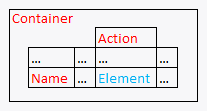
// with _in
_button("elementLabel", _in(_jvOrFormsTabPanel("Container")))
// index with 2 relational APIs, _rightOf and _under
_button(0, _rightOf(_jvOrButton("Name")), _under(_jvOrVTextField("Action")))
// with regular expression and relations
_button("/elname/", _rightOf(_jvOrButton("Name")), _under(_jvOrVTextField("Action")))
Value

Label (this is the default attribute used in assertions etc.)

Actions

Default event recorded is _click

Example usage:

_click(_button("elementLabel"));
_click(_button("/Name/[1]", _rightOf(_jvOrButton("Name"))));
Assertions

Example assertions:

// Check if element exists
_assertExists(_button("button_id"));
// Check if element is visible
_assert(_isVisible(_button("button_id")));
Since
Desktop Engine 9.0.0
API

_jvOrTabBar(identifier [, relation1 [, relation2 ...]])

Identifiers

Label, Name, Index

Valid Accessors and alternatives: (Assume this is the 6th jvOrTabBar in the UI)

//Label
_jvOrTabBar("elementLabel")
//Name
_jvOrTabBar("TabBar_name")
//Index
_jvOrTabBar(5)
//multiple attributes as JSON
_jvOrTabBar({name: "TabBar_name", sahiIndex: 1})
//multiple attributes as JSON including regular expression
_jvOrTabBar({name: "/TabBar .*name/", sahiIndex: 1})
Relations

Relational APIs _in, _near, _leftOf, _rightOf, _under, _above can be used.

// with _in
_jvOrTabBar("elementLabel", _in(_jvOrFormsTabPanel("Container")))
// index with 2 relational APIs, _rightOf and _under
_jvOrTabBar(0, _rightOf(_jvOrButton("Name")), _under(_jvOrVTextField("Action")))
// with regular expression and relations
_jvOrTabBar("/elname/", _rightOf(_jvOrButton("Name")), _under(_jvOrVTextField("Action")))
Value

Label (this is the default attribute used in assertions etc.)

Actions

Default event recorded is _setSelected

Example usage:

_setSelected(_jvOrTabBar("elementLabel"), "elementLabel");
_setSelected(_jvOrTabBar("/Name/[1]", _rightOf(_jvOrButton("Name"))), "elementLabel");
Assertions

Example assertions:

// Check if element exists
_assertExists(_jvOrTabBar("TabBar_id"));
// Check if element is visible
_assert(_isVisible(_jvOrTabBar("TabBar_id")));
Since
Desktop Engine 7.0.0
Note

You may use either _label or _jvOrLWLabel

API

_label(identifier [, relation1 [, relation2 ...]])

Identifiers

Name, Text, Index

Valid Accessors and alternatives: (Assume this is the 6th label in the UI)

//Name
_label("label_name")
//Text
_label("elementText")
//Index
_label(5)
//multiple attributes as JSON
_label({name: "label_name", sahiIndex: 1})
//multiple attributes as JSON including regular expression
_label({name: "/label .*name/", sahiIndex: 1})
Relations

Relational APIs _in, _near, _leftOf, _rightOf, _under, _above can be used.

// with _in
_label("label_name", _in(_jvOrFormsTabPanel("Container")))
// index with 2 relational APIs, _rightOf and _under
_label(0, _rightOf(_jvOrButton("Name")), _under(_jvOrVTextField("Action")))
// with regular expression and relations
_label("/elname/", _rightOf(_jvOrButton("Name")), _under(_jvOrVTextField("Action")))
Value

Text (this is the default attribute used in assertions etc.)

Actions

Default event recorded is _setValue

Example usage:

_setValue(_label("label_name"), "elementText");
_setValue(_label("/Name/[1]", _rightOf(_jvOrButton("Name"))), "elementText");
Assertions

Example assertions:

// Check if element exists
_assertExists(_label("label_id"));
// Check if element is visible
_assert(_isVisible(_label("label_id")));
Since
Desktop Engine 7.0.0
Note

You may use either _label or _jvOrMultiLineLabel

API

_label(identifier [, relation1 [, relation2 ...]])

Identifiers

Name, Text, Index

Valid Accessors and alternatives: (Assume this is the 6th label in the UI)

//Name
_label("label_name")
//Text
_label("elementText")
//Index
_label(5)
//multiple attributes as JSON
_label({name: "label_name", sahiIndex: 1})
//multiple attributes as JSON including regular expression
_label({name: "/label .*name/", sahiIndex: 1})
Relations

Relational APIs _in, _near, _leftOf, _rightOf, _under, _above can be used.

// with _in
_label("label_name", _in(_jvOrFormsTabPanel("Container")))
// index with 2 relational APIs, _rightOf and _under
_label(0, _rightOf(_jvOrButton("Name")), _under(_jvOrVTextField("Action")))
// with regular expression and relations
_label("/elname/", _rightOf(_jvOrButton("Name")), _under(_jvOrVTextField("Action")))
Value

Text (this is the default attribute used in assertions etc.)

Actions

Default event recorded is _setValue

Example usage:

_setValue(_label("label_name"), "elementText");
_setValue(_label("/Name/[1]", _rightOf(_jvOrButton("Name"))), "elementText");
Assertions

Example assertions:

// Check if element exists
_assertExists(_label("label_id"));
// Check if element is visible
_assert(_isVisible(_label("label_id")));
Since
Desktop Engine 7.0.0
Note

You may use either _textbox or _jvOrVTextField

API

_textbox(identifier [, relation1 [, relation2 ...]])

Identifiers

Name, Text, Index

Valid Accessors and alternatives: (Assume this is the 6th textbox in the UI)

//Name
_textbox("textbox_name")
//Text
_textbox("elementText")
//Index
_textbox(5)
//multiple attributes as JSON
_textbox({name: "textbox_name", sahiIndex: 1})
//multiple attributes as JSON including regular expression
_textbox({name: "/textbox .*name/", sahiIndex: 1})
Relations

Relational APIs _in, _near, _leftOf, _rightOf, _under, _above can be used.

// with _in
_textbox("textbox_name", _in(_jvOrFormsTabPanel("Container")))
// index with 2 relational APIs, _rightOf and _under
_textbox(0, _rightOf(_jvOrButton("Name")), _under(_jvOrVTextField("Action")))
// with regular expression and relations
_textbox("/elname/", _rightOf(_jvOrButton("Name")), _under(_jvOrVTextField("Action")))
Value

Text (this is the default attribute used in assertions etc.)

Actions

Default event recorded is _setValue

Example usage:

_setValue(_textbox("textbox_name"), "elementText");
_setValue(_textbox("/Name/[1]", _rightOf(_jvOrButton("Name"))), "elementText");
Assertions

Example assertions:

// Check if element exists
_assertExists(_textbox("textbox_id"));
// Check if element is visible
_assert(_isVisible(_textbox("textbox_id")));
Since
Desktop Engine 7.0.0
Note

You may use either _textarea or _jvOrFLWTextArea

API

_textarea(identifier [, relation1 [, relation2 ...]])

Identifiers

Name, Index

Valid Accessors and alternatives: (Assume this is the 6th textarea in the UI)

//Name
_textarea("textarea_name")
//Index
_textarea(5)
//multiple attributes as JSON
_textarea({name: "textarea_name", sahiIndex: 1})
//multiple attributes as JSON including regular expression
_textarea({name: "/textarea .*name/", sahiIndex: 1})
Relations

Relational APIs _in, _near, _leftOf, _rightOf, _under, _above can be used.

// with _in
_textarea("textarea_name", _in(_jvOrFormsTabPanel("Container")))
// index with 2 relational APIs, _rightOf and _under
_textarea(0, _rightOf(_jvOrButton("Name")), _under(_jvOrVTextField("Action")))
// with regular expression and relations
_textarea("/elname/", _rightOf(_jvOrButton("Name")), _under(_jvOrVTextField("Action")))
Value

Text (this is the default attribute used in assertions etc.)

Actions

Default event recorded is _setValue

Example usage:

_setValue(_textarea("textarea_name"), "elementText");
_setValue(_textarea("/Name/[1]", _rightOf(_jvOrButton("Name"))), "elementText");
Assertions

Example assertions:

// Check if element exists
_assertExists(_textarea("textarea_id"));
// Check if element is visible
_assert(_isVisible(_textarea("textarea_id")));
Since
Desktop Engine 7.0.0
Note

You may use either _checkbox or _jvOrExtendedCheckbox

API

_checkbox(identifier [, relation1 [, relation2 ...]])

Identifiers

Name, Label, Index

Valid Accessors and alternatives: (Assume this is the 6th checkbox in the UI)

//Name
_checkbox("checkbox_name")
//Label
_checkbox("elementLabel")
//Index
_checkbox(5)
//multiple attributes as JSON
_checkbox({name: "checkbox_name", sahiIndex: 1})
//multiple attributes as JSON including regular expression
_checkbox({name: "/checkbox .*name/", sahiIndex: 1})
Relations

Relational APIs _in, _near, _leftOf, _rightOf, _under, _above can be used.

// with _in
_checkbox("checkbox_name", _in(_jvOrFormsTabPanel("Container")))
// index with 2 relational APIs, _rightOf and _under
_checkbox(0, _rightOf(_jvOrButton("Name")), _under(_jvOrVTextField("Action")))
// with regular expression and relations
_checkbox("/elname/", _rightOf(_jvOrButton("Name")), _under(_jvOrVTextField("Action")))
Value

State (this is the default attribute used in assertions etc.)

Actions

Default event recorded is _click

Example usage:

_click(_checkbox("checkbox_name"));
_click(_checkbox("/Name/[1]", _rightOf(_jvOrButton("Name"))));
// Check irrespective of whether it was checked or unchecked
_check(_checkbox("checkbox_name"));
// Uncheck irrespective of whether it was checked or unchecked
_uncheck(_checkbox("checkbox_name"));
Assertions

Example assertions:

// Check if element exists
_assertExists(_checkbox("checkbox_id"));
// Check if element is visible
_assert(_isVisible(_checkbox("checkbox_id")));
Since
Desktop Engine 7.0.0
Note

You may use either _button or _jvOrButton

API

_button(identifier [, relation1 [, relation2 ...]])

Identifiers

Label, Name, Index

Valid Accessors and alternatives: (Assume this is the 6th button in the UI)

//Label
_button("elementLabel")
//Name
_button("button_name")
//Index
_button(5)
//multiple attributes as JSON
_button({name: "button_name", sahiIndex: 1})
//multiple attributes as JSON including regular expression
_button({name: "/button .*name/", sahiIndex: 1})
Relations

Relational APIs _in, _near, _leftOf, _rightOf, _under, _above can be used.

// with _in
_button("elementLabel", _in(_jvOrFormsTabPanel("Container")))
// index with 2 relational APIs, _rightOf and _under
_button(0, _rightOf(_jvOrButton("Name")), _under(_jvOrVTextField("Action")))
// with regular expression and relations
_button("/elname/", _rightOf(_jvOrButton("Name")), _under(_jvOrVTextField("Action")))
Value

Label (this is the default attribute used in assertions etc.)

Actions

Default event recorded is _click

Example usage:

_click(_button("elementLabel"));
_click(_button("/Name/[1]", _rightOf(_jvOrButton("Name"))));
Assertions

Example assertions:

// Check if element exists
_assertExists(_button("button_id"));
// Check if element is visible
_assert(_isVisible(_button("button_id")));
Since
Desktop Engine 7.0.0
API

_jvOrLWScrollbar(identifier [, relation1 [, relation2 ...]])

Identifiers

Name, Index

Valid Accessors and alternatives: (Assume this is the 6th jvOrLWScrollbar in the UI)

//Name
_jvOrLWScrollbar("LWScrollbar_name")
//Index
_jvOrLWScrollbar(5)
//multiple attributes as JSON
_jvOrLWScrollbar({ToolTipText: "LWScrollbar_ToolTipText", sahiIndex: 1})
//multiple attributes as JSON including regular expression
_jvOrLWScrollbar({ToolTipText: "/LWScrollbar .*ToolTipText/", sahiIndex: 1})
Relations

Relational APIs _in, _near, _leftOf, _rightOf, _under, _above can be used.

// with _in
_jvOrLWScrollbar("LWScrollbar_name", _in(_jvOrFormsTabPanel("Container")))
// index with 2 relational APIs, _rightOf and _under
_jvOrLWScrollbar(0, _rightOf(_jvOrButton("Name")), _under(_jvOrVTextField("Action")))
// with regular expression and relations
_jvOrLWScrollbar("/elname/", _rightOf(_jvOrButton("Name")), _under(_jvOrVTextField("Action")))
Value

Value (this is the default attribute used in assertions etc.)

Actions

Default event recorded is _setValue

Example usage:

_setValue(_jvOrLWScrollbar("LWScrollbar_name"), "apple");
_setValue(_jvOrLWScrollbar("/Name/[1]", _rightOf(_jvOrButton("Name"))), "apple");
Assertions

Example assertions:

// Check if element exists
_assertExists(_jvOrLWScrollbar("LWScrollbar_id"));
// Check if element is visible
_assert(_isVisible(_jvOrLWScrollbar("LWScrollbar_id")));
Since
Desktop Engine 7.0.0
API

_jvOrFormsTabPanel(identifier [, relation1 [, relation2 ...]])

Identifiers

Name, Index

Valid Accessors and alternatives: (Assume this is the 6th jvOrFormsTabPanel in the UI)

//Name
_jvOrFormsTabPanel("FormsTabPanel_name")
//Index
_jvOrFormsTabPanel(5)
//multiple attributes as JSON
_jvOrFormsTabPanel({name: "FormsTabPanel_name", sahiIndex: 1})
//multiple attributes as JSON including regular expression
_jvOrFormsTabPanel({name: "/FormsTabPanel .*name/", sahiIndex: 1})
Relations

Relational APIs _in, _near, _leftOf, _rightOf, _under, _above can be used.

// with _in
_jvOrFormsTabPanel("FormsTabPanel_name", _in(_jvOrFormsTabPanel("Container")))
// index with 2 relational APIs, _rightOf and _under
_jvOrFormsTabPanel(0, _rightOf(_jvOrButton("Name")), _under(_jvOrVTextField("Action")))
// with regular expression and relations
_jvOrFormsTabPanel("/elname/", _rightOf(_jvOrButton("Name")), _under(_jvOrVTextField("Action")))
Value

(this is the default attribute used in assertions etc.)

Actions

Default event recorded is _setSelected

Example usage:

_setSelected(_jvOrFormsTabPanel("FormsTabPanel_name"), null);
_setSelected(_jvOrFormsTabPanel("/Name/[1]", _rightOf(_jvOrButton("Name"))), null);
Assertions

Example assertions:

// Check if element exists
_assertExists(_jvOrFormsTabPanel("FormsTabPanel_id"));
// Check if element is visible
_assert(_isVisible(_jvOrFormsTabPanel("FormsTabPanel_id")));
Since
Desktop Engine 7.0.0
Note

You may use either _checkbox or _jvOrLWCheckbox

API

_checkbox(identifier [, relation1 [, relation2 ...]])

Identifiers

Name, Label, Index

Valid Accessors and alternatives: (Assume this is the 6th checkbox in the UI)

//Name
_checkbox("checkbox_name")
//Label
_checkbox("elementLabel")
//Index
_checkbox(5)
//multiple attributes as JSON
_checkbox({name: "checkbox_name", sahiIndex: 1})
//multiple attributes as JSON including regular expression
_checkbox({name: "/checkbox .*name/", sahiIndex: 1})
Relations

Relational APIs _in, _near, _leftOf, _rightOf, _under, _above can be used.

// with _in
_checkbox("checkbox_name", _in(_jvOrFormsTabPanel("Container")))
// index with 2 relational APIs, _rightOf and _under
_checkbox(0, _rightOf(_jvOrButton("Name")), _under(_jvOrVTextField("Action")))
// with regular expression and relations
_checkbox("/elname/", _rightOf(_jvOrButton("Name")), _under(_jvOrVTextField("Action")))
Value

State (this is the default attribute used in assertions etc.)

Actions

Default event recorded is _click

Example usage:

_click(_checkbox("checkbox_name"));
_click(_checkbox("/Name/[1]", _rightOf(_jvOrButton("Name"))));
// Check irrespective of whether it was checked or unchecked
_check(_checkbox("checkbox_name"));
// Uncheck irrespective of whether it was checked or unchecked
_uncheck(_checkbox("checkbox_name"));
Assertions

Example assertions:

// Check if element exists
_assertExists(_checkbox("checkbox_id"));
// Check if element is visible
_assert(_isVisible(_checkbox("checkbox_id")));
Since
Desktop Engine 7.0.0
API

_jvOrVPopList(identifier [, relation1 [, relation2 ...]])

Identifiers

Name, Index

Valid Accessors and alternatives: (Assume this is the 6th jvOrVPopList in the UI)

//Name
_jvOrVPopList("VPopList_name")
//Index
_jvOrVPopList(5)
//multiple attributes as JSON
_jvOrVPopList({name: "VPopList_name", sahiIndex: 1})
//multiple attributes as JSON including regular expression
_jvOrVPopList({name: "/VPopList .*name/", sahiIndex: 1})
Relations

Relational APIs _in, _near, _leftOf, _rightOf, _under, _above can be used.

// with _in
_jvOrVPopList("VPopList_name", _in(_jvOrFormsTabPanel("Container")))
// index with 2 relational APIs, _rightOf and _under
_jvOrVPopList(0, _rightOf(_jvOrButton("Name")), _under(_jvOrVTextField("Action")))
// with regular expression and relations
_jvOrVPopList("/elname/", _rightOf(_jvOrButton("Name")), _under(_jvOrVTextField("Action")))
Value

SelectedItem (this is the default attribute used in assertions etc.)

Actions

Default event recorded is _setSelected

Example usage:

_setSelected(_jvOrVPopList("VPopList_name"), null);
_setSelected(_jvOrVPopList("/Name/[1]", _rightOf(_jvOrButton("Name"))), null);
Assertions

Example assertions:

// Check if element exists
_assertExists(_jvOrVPopList("VPopList_id"));
// Check if element is visible
_assert(_isVisible(_jvOrVPopList("VPopList_id")));
Since
Desktop Engine 7.0.0
API

_jvOrToolBar(identifier [, relation1 [, relation2 ...]])

Identifiers

Name, Index

Valid Accessors and alternatives: (Assume this is the 6th jvOrToolBar in the UI)

//Name
_jvOrToolBar("ToolBar_name")
//Index
_jvOrToolBar(5)
//multiple attributes as JSON
_jvOrToolBar({name: "ToolBar_name", sahiIndex: 1})
//multiple attributes as JSON including regular expression
_jvOrToolBar({name: "/ToolBar .*name/", sahiIndex: 1})
Relations

Relational APIs _in, _near, _leftOf, _rightOf, _under, _above can be used.

// with _in
_jvOrToolBar("ToolBar_name", _in(_jvOrFormsTabPanel("Container")))
// index with 2 relational APIs, _rightOf and _under
_jvOrToolBar(0, _rightOf(_jvOrButton("Name")), _under(_jvOrVTextField("Action")))
// with regular expression and relations
_jvOrToolBar("/elname/", _rightOf(_jvOrButton("Name")), _under(_jvOrVTextField("Action")))
Value

(this is the default attribute used in assertions etc.)

Actions

Default event recorded is _setSelected

Example usage:

_setSelected(_jvOrToolBar("ToolBar_name"), null);
_setSelected(_jvOrToolBar("/Name/[1]", _rightOf(_jvOrButton("Name"))), null);
Assertions

Example assertions:

// Check if element exists
_assertExists(_jvOrToolBar("ToolBar_id"));
// Check if element is visible
_assert(_isVisible(_jvOrToolBar("ToolBar_id")));
Since
Desktop Engine 7.0.0
API

_jvOrLWMenuSeparator(identifier [, relation1 [, relation2 ...]])

Identifiers

Name, Index

Valid Accessors and alternatives: (Assume this is the 6th jvOrLWMenuSeparator in the UI)

//Name
_jvOrLWMenuSeparator("LWMenuSeparator_name")
//Index
_jvOrLWMenuSeparator(5)
//multiple attributes as JSON
_jvOrLWMenuSeparator({name: "LWMenuSeparator_name", sahiIndex: 1})
//multiple attributes as JSON including regular expression
_jvOrLWMenuSeparator({name: "/LWMenuSeparator .*name/", sahiIndex: 1})
Relations

Relational APIs _in, _near, _leftOf, _rightOf, _under, _above can be used.

// with _in
_jvOrLWMenuSeparator("LWMenuSeparator_name", _in(_jvOrFormsTabPanel("Container")))
// index with 2 relational APIs, _rightOf and _under
_jvOrLWMenuSeparator(0, _rightOf(_jvOrButton("Name")), _under(_jvOrVTextField("Action")))
// with regular expression and relations
_jvOrLWMenuSeparator("/elname/", _rightOf(_jvOrButton("Name")), _under(_jvOrVTextField("Action")))
Value

(this is the default attribute used in assertions etc.)

Actions

Default event recorded is _click

Example usage:

_click(_jvOrLWMenuSeparator("LWMenuSeparator_name"));
_click(_jvOrLWMenuSeparator("/Name/[1]", _rightOf(_jvOrButton("Name"))));
Assertions

Example assertions:

// Check if element exists
_assertExists(_jvOrLWMenuSeparator("LWMenuSeparator_id"));
// Check if element is visible
_assert(_isVisible(_jvOrLWMenuSeparator("LWMenuSeparator_id")));
Since
Desktop Engine 7.0.0
API

_jvOrLWMenuItem(identifier [, relation1 [, relation2 ...]])

Identifiers

Name, Label, Index

Valid Accessors and alternatives: (Assume this is the 6th jvOrLWMenuItem in the UI)

//Name
_jvOrLWMenuItem("LWMenuItem_name")
//Label
_jvOrLWMenuItem("elementLabel")
//Index
_jvOrLWMenuItem(5)
//multiple attributes as JSON
_jvOrLWMenuItem({name: "LWMenuItem_name", sahiIndex: 1})
//multiple attributes as JSON including regular expression
_jvOrLWMenuItem({name: "/LWMenuItem .*name/", sahiIndex: 1})
Relations

Relational APIs _in, _near, _leftOf, _rightOf, _under, _above can be used.

// with _in
_jvOrLWMenuItem("LWMenuItem_name", _in(_jvOrFormsTabPanel("Container")))
// index with 2 relational APIs, _rightOf and _under
_jvOrLWMenuItem(0, _rightOf(_jvOrButton("Name")), _under(_jvOrVTextField("Action")))
// with regular expression and relations
_jvOrLWMenuItem("/elname/", _rightOf(_jvOrButton("Name")), _under(_jvOrVTextField("Action")))
Value

Label (this is the default attribute used in assertions etc.)

Actions

Default event recorded is _click

Example usage:

_click(_jvOrLWMenuItem("LWMenuItem_name"));
_click(_jvOrLWMenuItem("/Name/[1]", _rightOf(_jvOrButton("Name"))));
Assertions

Example assertions:

// Check if element exists
_assertExists(_jvOrLWMenuItem("LWMenuItem_id"));
// Check if element is visible
_assert(_isVisible(_jvOrLWMenuItem("LWMenuItem_id")));
Since
Desktop Engine 7.0.0
API

_jvOrLWMenuBar(identifier [, relation1 [, relation2 ...]])

Identifiers

Name, Index

Valid Accessors and alternatives: (Assume this is the 6th jvOrLWMenuBar in the UI)

//Name
_jvOrLWMenuBar("LWMenuBar_name")
//Index
_jvOrLWMenuBar(5)
//multiple attributes as JSON
_jvOrLWMenuBar({name: "LWMenuBar_name", sahiIndex: 1})
//multiple attributes as JSON including regular expression
_jvOrLWMenuBar({name: "/LWMenuBar .*name/", sahiIndex: 1})
Relations

Relational APIs _in, _near, _leftOf, _rightOf, _under, _above can be used.

// with _in
_jvOrLWMenuBar("LWMenuBar_name", _in(_jvOrFormsTabPanel("Container")))
// index with 2 relational APIs, _rightOf and _under
_jvOrLWMenuBar(0, _rightOf(_jvOrButton("Name")), _under(_jvOrVTextField("Action")))
// with regular expression and relations
_jvOrLWMenuBar("/elname/", _rightOf(_jvOrButton("Name")), _under(_jvOrVTextField("Action")))
Value

(this is the default attribute used in assertions etc.)

Actions

Default event recorded is _setSelected

Example usage:

_setSelected(_jvOrLWMenuBar("LWMenuBar_name"), null);
_setSelected(_jvOrLWMenuBar("/Name/[1]", _rightOf(_jvOrButton("Name"))), null);
Assertions

Example assertions:

// Check if element exists
_assertExists(_jvOrLWMenuBar("LWMenuBar_id"));
// Check if element is visible
_assert(_isVisible(_jvOrLWMenuBar("LWMenuBar_id")));
Since
Desktop Engine 7.0.0
API

_jvOrDrawnPanel(identifier [, relation1 [, relation2 ...]])

Identifiers

Name, Index

Valid Accessors and alternatives: (Assume this is the 6th jvOrDrawnPanel in the UI)

//Name
_jvOrDrawnPanel("DrawnPanel_name")
//Index
_jvOrDrawnPanel(5)
//multiple attributes as JSON
_jvOrDrawnPanel({name: "DrawnPanel_name", sahiIndex: 1})
//multiple attributes as JSON including regular expression
_jvOrDrawnPanel({name: "/DrawnPanel .*name/", sahiIndex: 1})
Relations

Relational APIs _in, _near, _leftOf, _rightOf, _under, _above can be used.

// with _in
_jvOrDrawnPanel("DrawnPanel_name", _in(_jvOrFormsTabPanel("Container")))
// index with 2 relational APIs, _rightOf and _under
_jvOrDrawnPanel(0, _rightOf(_jvOrButton("Name")), _under(_jvOrVTextField("Action")))
// with regular expression and relations
_jvOrDrawnPanel("/elname/", _rightOf(_jvOrButton("Name")), _under(_jvOrVTextField("Action")))
Value

(this is the default attribute used in assertions etc.)

Actions

Default event recorded is _setSelected

Example usage:

_setSelected(_jvOrDrawnPanel("DrawnPanel_name"), null);
_setSelected(_jvOrDrawnPanel("/Name/[1]", _rightOf(_jvOrButton("Name"))), null);
Assertions

Example assertions:

// Check if element exists
_assertExists(_jvOrDrawnPanel("DrawnPanel_id"));
// Check if element is visible
_assert(_isVisible(_jvOrDrawnPanel("DrawnPanel_id")));
Since
Desktop Engine 7.0.0
Note

You may use either _textbox or _jvOrFormattedTextField

API

_textbox(identifier [, relation1 [, relation2 ...]])

Identifiers

Name, Index

Valid Accessors and alternatives: (Assume this is the 6th textbox in the UI)

//Name
_textbox("textbox_name")
//Index
_textbox(5)
//multiple attributes as JSON
_textbox({name: "textbox_name", sahiIndex: 1})
//multiple attributes as JSON including regular expression
_textbox({name: "/textbox .*name/", sahiIndex: 1})
Relations

Relational APIs _in, _near, _leftOf, _rightOf, _under, _above can be used.

// with _in
_textbox("textbox_name", _in(_jvOrFormsTabPanel("Container")))
// index with 2 relational APIs, _rightOf and _under
_textbox(0, _rightOf(_jvOrButton("Name")), _under(_jvOrVTextField("Action")))
// with regular expression and relations
_textbox("/elname/", _rightOf(_jvOrButton("Name")), _under(_jvOrVTextField("Action")))
Value

Text (this is the default attribute used in assertions etc.)

Actions

Default event recorded is _setValue

Example usage:

_setValue(_textbox("textbox_name"), "elementText");
_setValue(_textbox("/Name/[1]", _rightOf(_jvOrButton("Name"))), "elementText");
Assertions

Example assertions:

// Check if element exists
_assertExists(_textbox("textbox_id"));
// Check if element is visible
_assert(_isVisible(_textbox("textbox_id")));
Since
Desktop Engine 7.0.0
Note

You may use either _button or _jvOrFormButton

API

_button(identifier [, relation1 [, relation2 ...]])

Identifiers

Label, Name, Index

Valid Accessors and alternatives: (Assume this is the 6th button in the UI)

//Label
_button("elementLabel")
//Name
_button("button_name")
//Index
_button(5)
//multiple attributes as JSON
_button({name: "button_name", sahiIndex: 1})
//multiple attributes as JSON including regular expression
_button({name: "/button .*name/", sahiIndex: 1})
Relations

Relational APIs _in, _near, _leftOf, _rightOf, _under, _above can be used.

// with _in
_button("elementLabel", _in(_jvOrFormsTabPanel("Container")))
// index with 2 relational APIs, _rightOf and _under
_button(0, _rightOf(_jvOrButton("Name")), _under(_jvOrVTextField("Action")))
// with regular expression and relations
_button("/elname/", _rightOf(_jvOrButton("Name")), _under(_jvOrVTextField("Action")))
Value

Label (this is the default attribute used in assertions etc.)

Actions

Default event recorded is _click

Example usage:

_click(_button("elementLabel"));
_click(_button("/Name/[1]", _rightOf(_jvOrButton("Name"))));
Assertions

Example assertions:

// Check if element exists
_assertExists(_button("button_id"));
// Check if element is visible
_assert(_isVisible(_button("button_id")));
Since
Desktop Engine 7.0.0
API

_jvOrTitleBar(identifier [, relation1 [, relation2 ...]])

Identifiers

Name, Text, Index

Valid Accessors and alternatives: (Assume this is the 6th jvOrTitleBar in the UI)

//Name
_jvOrTitleBar("TitleBar_name")
//Text
_jvOrTitleBar("elementText")
//Index
_jvOrTitleBar(5)
//multiple attributes as JSON
_jvOrTitleBar({name: "TitleBar_name", sahiIndex: 1})
//multiple attributes as JSON including regular expression
_jvOrTitleBar({name: "/TitleBar .*name/", sahiIndex: 1})
Relations

Relational APIs _in, _near, _leftOf, _rightOf, _under, _above can be used.

// with _in
_jvOrTitleBar("TitleBar_name", _in(_jvOrFormsTabPanel("Container")))
// index with 2 relational APIs, _rightOf and _under
_jvOrTitleBar(0, _rightOf(_jvOrButton("Name")), _under(_jvOrVTextField("Action")))
// with regular expression and relations
_jvOrTitleBar("/elname/", _rightOf(_jvOrButton("Name")), _under(_jvOrVTextField("Action")))
Value

Value (this is the default attribute used in assertions etc.)

Actions

Default event recorded is _setValue

Example usage:

_setValue(_jvOrTitleBar("TitleBar_name"), "apple");
_setValue(_jvOrTitleBar("/Name/[1]", _rightOf(_jvOrButton("Name"))), "apple");
Assertions

Example assertions:

// Check if element exists
_assertExists(_jvOrTitleBar("TitleBar_id"));
// Check if element is visible
_assert(_isVisible(_jvOrTitleBar("TitleBar_id")));
Since
Desktop Engine 7.0.0
API

_jvOrEwtContainer(identifier [, relation1 [, relation2 ...]])

Identifiers

Name, Index

Valid Accessors and alternatives: (Assume this is the 6th jvOrEwtContainer in the UI)

//Name
_jvOrEwtContainer("EwtContainer_name")
//Index
_jvOrEwtContainer(5)
//multiple attributes as JSON
_jvOrEwtContainer({name: "EwtContainer_name", sahiIndex: 1})
//multiple attributes as JSON including regular expression
_jvOrEwtContainer({name: "/EwtContainer .*name/", sahiIndex: 1})
Relations

Relational APIs _in, _near, _leftOf, _rightOf, _under, _above can be used.

// with _in
_jvOrEwtContainer("EwtContainer_name", _in(_jvOrFormsTabPanel("Container")))
// index with 2 relational APIs, _rightOf and _under
_jvOrEwtContainer(0, _rightOf(_jvOrButton("Name")), _under(_jvOrVTextField("Action")))
// with regular expression and relations
_jvOrEwtContainer("/elname/", _rightOf(_jvOrButton("Name")), _under(_jvOrVTextField("Action")))
Value

(this is the default attribute used in assertions etc.)

Actions

Default event recorded is _setSelected

Example usage:

_setSelected(_jvOrEwtContainer("EwtContainer_name"), null);
_setSelected(_jvOrEwtContainer("/Name/[1]", _rightOf(_jvOrButton("Name"))), null);
Assertions

Example assertions:

// Check if element exists
_assertExists(_jvOrEwtContainer("EwtContainer_id"));
// Check if element is visible
_assert(_isVisible(_jvOrEwtContainer("EwtContainer_id")));
Since
Desktop Engine 7.0.0
API

_jvOrFWindow(identifier [, relation1 [, relation2 ...]])

Identifiers

Name, Index

Valid Accessors and alternatives: (Assume this is the 6th jvOrFWindow in the UI)

//Name
_jvOrFWindow("FWindow_name")
//Index
_jvOrFWindow(5)
//multiple attributes as JSON
_jvOrFWindow({name: "FWindow_name", sahiIndex: 1})
//multiple attributes as JSON including regular expression
_jvOrFWindow({name: "/FWindow .*name/", sahiIndex: 1})
Relations

Relational APIs _in, _near, _leftOf, _rightOf, _under, _above can be used.

// with _in
_jvOrFWindow("FWindow_name", _in(_jvOrFormsTabPanel("Container")))
// index with 2 relational APIs, _rightOf and _under
_jvOrFWindow(0, _rightOf(_jvOrButton("Name")), _under(_jvOrVTextField("Action")))
// with regular expression and relations
_jvOrFWindow("/elname/", _rightOf(_jvOrButton("Name")), _under(_jvOrVTextField("Action")))
Value

(this is the default attribute used in assertions etc.)

Actions

Default event recorded is _setSelected

Example usage:

_setSelected(_jvOrFWindow("FWindow_name"), null);
_setSelected(_jvOrFWindow("/Name/[1]", _rightOf(_jvOrButton("Name"))), null);
Assertions

Example assertions:

// Check if element exists
_assertExists(_jvOrFWindow("FWindow_id"));
// Check if element is visible
_assert(_isVisible(_jvOrFWindow("FWindow_id")));
Since
Desktop Engine 7.0.0
API

_jvOrButtonBar(identifier [, relation1 [, relation2 ...]])

Identifiers

Name, Index

Valid Accessors and alternatives: (Assume this is the 6th jvOrButtonBar in the UI)

//Name
_jvOrButtonBar("ButtonBar_name")
//Index
_jvOrButtonBar(5)
//multiple attributes as JSON
_jvOrButtonBar({name: "ButtonBar_name", sahiIndex: 1})
//multiple attributes as JSON including regular expression
_jvOrButtonBar({name: "/ButtonBar .*name/", sahiIndex: 1})
Relations

Relational APIs _in, _near, _leftOf, _rightOf, _under, _above can be used.

// with _in
_jvOrButtonBar("ButtonBar_name", _in(_jvOrFormsTabPanel("Container")))
// index with 2 relational APIs, _rightOf and _under
_jvOrButtonBar(0, _rightOf(_jvOrButton("Name")), _under(_jvOrVTextField("Action")))
// with regular expression and relations
_jvOrButtonBar("/elname/", _rightOf(_jvOrButton("Name")), _under(_jvOrVTextField("Action")))
Value

(this is the default attribute used in assertions etc.)

Actions

Default event recorded is _setSelected

Example usage:

_setSelected(_jvOrButtonBar("ButtonBar_name"), null);
_setSelected(_jvOrButtonBar("/Name/[1]", _rightOf(_jvOrButton("Name"))), null);
Assertions

Example assertions:

// Check if element exists
_assertExists(_jvOrButtonBar("ButtonBar_id"));
// Check if element is visible
_assert(_isVisible(_jvOrButtonBar("ButtonBar_id")));
Since
Desktop Engine 7.0.0
API

_jvOrPushButton(identifier [, relation1 [, relation2 ...]])

Identifiers

Label, Name, Index

Valid Accessors and alternatives: (Assume this is the 6th jvOrPushButton in the UI)

//Label
_jvOrPushButton("elementLabel")
//Name
_jvOrPushButton("PushButton_name")
//Index
_jvOrPushButton(5)
//multiple attributes as JSON
_jvOrPushButton({name: "PushButton_name", sahiIndex: 1})
//multiple attributes as JSON including regular expression
_jvOrPushButton({name: "/PushButton .*name/", sahiIndex: 1})
Relations

Relational APIs _in, _near, _leftOf, _rightOf, _under, _above can be used.

// with _in
_jvOrPushButton("elementLabel", _in(_jvOrFormsTabPanel("Container")))
// index with 2 relational APIs, _rightOf and _under
_jvOrPushButton(0, _rightOf(_jvOrButton("Name")), _under(_jvOrVTextField("Action")))
// with regular expression and relations
_jvOrPushButton("/elname/", _rightOf(_jvOrButton("Name")), _under(_jvOrVTextField("Action")))
Value

Label (this is the default attribute used in assertions etc.)

Actions

Default event recorded is _click

Example usage:

_click(_jvOrPushButton("elementLabel"));
_click(_jvOrPushButton("/Name/[1]", _rightOf(_jvOrButton("Name"))));
Assertions

Example assertions:

// Check if element exists
_assertExists(_jvOrPushButton("PushButton_id"));
// Check if element is visible
_assert(_isVisible(_jvOrPushButton("PushButton_id")));
Since
Desktop Engine 7.0.0
Note

You may use either _textbox or _jvOrLWTextField

API

_textbox(identifier [, relation1 [, relation2 ...]])

Identifiers

Name, Index

Valid Accessors and alternatives: (Assume this is the 6th textbox in the UI)

//Name
_textbox("textbox_name")
//Index
_textbox(5)
//multiple attributes as JSON
_textbox({name: "textbox_name", sahiIndex: 1})
//multiple attributes as JSON including regular expression
_textbox({name: "/textbox .*name/", sahiIndex: 1})
Relations

Relational APIs _in, _near, _leftOf, _rightOf, _under, _above can be used.

// with _in
_textbox("textbox_name", _in(_jvOrFormsTabPanel("Container")))
// index with 2 relational APIs, _rightOf and _under
_textbox(0, _rightOf(_jvOrButton("Name")), _under(_jvOrVTextField("Action")))
// with regular expression and relations
_textbox("/elname/", _rightOf(_jvOrButton("Name")), _under(_jvOrVTextField("Action")))
Value

Text (this is the default attribute used in assertions etc.)

Actions

Default event recorded is _setValue

Example usage:

_setValue(_textbox("textbox_name"), "elementText");
_setValue(_textbox("/Name/[1]", _rightOf(_jvOrButton("Name"))), "elementText");
Assertions

Example assertions:

// Check if element exists
_assertExists(_textbox("textbox_id"));
// Check if element is visible
_assert(_isVisible(_textbox("textbox_id")));
Since
Desktop Engine 7.0.0
API

_jvOrVTList(identifier [, relation1 [, relation2 ...]])

Identifiers

Name, Index

Valid Accessors and alternatives: (Assume this is the 6th jvOrVTList in the UI)

//Name
_jvOrVTList("VTList_name")
//Index
_jvOrVTList(5)
//multiple attributes as JSON
_jvOrVTList({name: "VTList_name", sahiIndex: 1})
//multiple attributes as JSON including regular expression
_jvOrVTList({name: "/VTList .*name/", sahiIndex: 1})
Relations

Relational APIs _in, _near, _leftOf, _rightOf, _under, _above can be used.

// with _in
_jvOrVTList("VTList_name", _in(_jvOrFormsTabPanel("Container")))
// index with 2 relational APIs, _rightOf and _under
_jvOrVTList(0, _rightOf(_jvOrButton("Name")), _under(_jvOrVTextField("Action")))
// with regular expression and relations
_jvOrVTList("/elname/", _rightOf(_jvOrButton("Name")), _under(_jvOrVTextField("Action")))
Value

Label (this is the default attribute used in assertions etc.)

Actions

Default event recorded is _setSelected

Example usage:

_setSelected(_jvOrVTList("VTList_name"), "elementLabel");
_setSelected(_jvOrVTList("/Name/[1]", _rightOf(_jvOrButton("Name"))), "elementLabel");
Assertions

Example assertions:

// Check if element exists
_assertExists(_jvOrVTList("VTList_id"));
// Check if element is visible
_assert(_isVisible(_jvOrVTList("VTList_id")));
Since
Desktop Engine 7.0.0
API

_jvOrListView(identifier [, relation1 [, relation2 ...]])

Identifiers

Index

Valid Accessors and alternatives: (Assume this is the 6th jvOrListView in the UI)

//Index
_jvOrListView(5)
//multiple attributes as JSON
_jvOrListView({name: "ListView_name", sahiIndex: 1})
//multiple attributes as JSON including regular expression
_jvOrListView({name: "/ListView .*name/", sahiIndex: 1})
Relations

Relational APIs _in, _near, _leftOf, _rightOf, _under, _above can be used.

// with _in
_jvOrListView(5, _in(_jvOrFormsTabPanel("Container")))
// index with 2 relational APIs, _rightOf and _under
_jvOrListView(0, _rightOf(_jvOrButton("Name")), _under(_jvOrVTextField("Action")))
// with regular expression and relations
_jvOrListView("/elname/", _rightOf(_jvOrButton("Name")), _under(_jvOrVTextField("Action")))
Value

(this is the default attribute used in assertions etc.)

Actions

Default event recorded is _setSelected

Example usage:

_setSelected(_jvOrListView(5), null);
_setSelected(_jvOrListView("/Name/[1]", _rightOf(_jvOrButton("Name"))), null);
Assertions

Example assertions:

// Check if element exists
_assertExists(_jvOrListView("ListView_id"));
// Check if element is visible
_assert(_isVisible(_jvOrListView("ListView_id")));
Since
Desktop Engine 7.0.0
API

_jvOrExtendedFrame(identifier [, relation1 [, relation2 ...]])

Identifiers

Name, Index

Valid Accessors and alternatives: (Assume this is the 6th jvOrExtendedFrame in the UI)

//Name
_jvOrExtendedFrame("ExtendedFrame_name")
//Index
_jvOrExtendedFrame(5)
//multiple attributes as JSON
_jvOrExtendedFrame({name: "ExtendedFrame_name", sahiIndex: 1})
//multiple attributes as JSON including regular expression
_jvOrExtendedFrame({name: "/ExtendedFrame .*name/", sahiIndex: 1})
Relations

Relational APIs _in, _near, _leftOf, _rightOf, _under, _above can be used.

// with _in
_jvOrExtendedFrame("ExtendedFrame_name", _in(_jvOrFormsTabPanel("Container")))
// index with 2 relational APIs, _rightOf and _under
_jvOrExtendedFrame(0, _rightOf(_jvOrButton("Name")), _under(_jvOrVTextField("Action")))
// with regular expression and relations
_jvOrExtendedFrame("/elname/", _rightOf(_jvOrButton("Name")), _under(_jvOrVTextField("Action")))
Value

(this is the default attribute used in assertions etc.)

Actions

Default event recorded is _setSelected

Example usage:

_setSelected(_jvOrExtendedFrame("ExtendedFrame_name"), null);
_setSelected(_jvOrExtendedFrame("/Name/[1]", _rightOf(_jvOrButton("Name"))), null);
Assertions

Example assertions:

// Check if element exists
_assertExists(_jvOrExtendedFrame("ExtendedFrame_id"));
// Check if element is visible
_assert(_isVisible(_jvOrExtendedFrame("ExtendedFrame_id")));
Since
Desktop Engine 7.0.0
API

_jvOrLWContainer(identifier [, relation1 [, relation2 ...]])

Identifiers

Name, Index

Valid Accessors and alternatives: (Assume this is the 6th jvOrLWContainer in the UI)

//Name
_jvOrLWContainer("LWContainer_name")
//Index
_jvOrLWContainer(5)
//multiple attributes as JSON
_jvOrLWContainer({name: "LWContainer_name", sahiIndex: 1})
//multiple attributes as JSON including regular expression
_jvOrLWContainer({name: "/LWContainer .*name/", sahiIndex: 1})
Relations

Relational APIs _in, _near, _leftOf, _rightOf, _under, _above can be used.

// with _in
_jvOrLWContainer("LWContainer_name", _in(_jvOrFormsTabPanel("Container")))
// index with 2 relational APIs, _rightOf and _under
_jvOrLWContainer(0, _rightOf(_jvOrButton("Name")), _under(_jvOrVTextField("Action")))
// with regular expression and relations
_jvOrLWContainer("/elname/", _rightOf(_jvOrButton("Name")), _under(_jvOrVTextField("Action")))
Value

getName() (this is the default attribute used in assertions etc.)

Actions

Default event recorded is _setSelected

Example usage:

_setSelected(_jvOrLWContainer("LWContainer_name"), null);
_setSelected(_jvOrLWContainer("/Name/[1]", _rightOf(_jvOrButton("Name"))), null);
Assertions

Example assertions:

// Check if element exists
_assertExists(_jvOrLWContainer("LWContainer_id"));
// Check if element is visible
_assert(_isVisible(_jvOrLWContainer("LWContainer_id")));
Since
Desktop Engine 7.0.0
API

_jvOrFormDesktopContainer(identifier [, relation1 [, relation2 ...]])

Identifiers

Name, Index

Valid Accessors and alternatives: (Assume this is the 6th jvOrFormDesktopContainer in the UI)

//Name
_jvOrFormDesktopContainer("FormDesktopContainer_name")
//Index
_jvOrFormDesktopContainer(5)
//multiple attributes as JSON
_jvOrFormDesktopContainer({name: "FormDesktopContainer_name", sahiIndex: 1})
//multiple attributes as JSON including regular expression
_jvOrFormDesktopContainer({name: "/FormDesktopContainer .*name/", sahiIndex: 1})
Relations

Relational APIs _in, _near, _leftOf, _rightOf, _under, _above can be used.

// with _in
_jvOrFormDesktopContainer("FormDesktopContainer_name", _in(_jvOrFormsTabPanel("Container")))
// index with 2 relational APIs, _rightOf and _under
_jvOrFormDesktopContainer(0, _rightOf(_jvOrButton("Name")), _under(_jvOrVTextField("Action")))
// with regular expression and relations
_jvOrFormDesktopContainer("/elname/", _rightOf(_jvOrButton("Name")), _under(_jvOrVTextField("Action")))
Value

(this is the default attribute used in assertions etc.)

Actions

Default event recorded is _setSelected

Example usage:

_setSelected(_jvOrFormDesktopContainer("FormDesktopContainer_name"), null);
_setSelected(_jvOrFormDesktopContainer("/Name/[1]", _rightOf(_jvOrButton("Name"))), null);
Assertions

Example assertions:

// Check if element exists
_assertExists(_jvOrFormDesktopContainer("FormDesktopContainer_id"));
// Check if element is visible
_assert(_isVisible(_jvOrFormDesktopContainer("FormDesktopContainer_id")));
Since
Desktop Engine 7.0.0
API

_jvOrImageCanvas(identifier [, relation1 [, relation2 ...]])

Identifiers

Name, Index

Valid Accessors and alternatives: (Assume this is the 6th jvOrImageCanvas in the UI)

//Name
_jvOrImageCanvas("ImageCanvas_name")
//Index
_jvOrImageCanvas(5)
//multiple attributes as JSON
_jvOrImageCanvas({name: "ImageCanvas_name", sahiIndex: 1})
//multiple attributes as JSON including regular expression
_jvOrImageCanvas({name: "/ImageCanvas .*name/", sahiIndex: 1})
Relations

Relational APIs _in, _near, _leftOf, _rightOf, _under, _above can be used.

// with _in
_jvOrImageCanvas("ImageCanvas_name", _in(_jvOrFormsTabPanel("Container")))
// index with 2 relational APIs, _rightOf and _under
_jvOrImageCanvas(0, _rightOf(_jvOrButton("Name")), _under(_jvOrVTextField("Action")))
// with regular expression and relations
_jvOrImageCanvas("/elname/", _rightOf(_jvOrButton("Name")), _under(_jvOrVTextField("Action")))
Value

(this is the default attribute used in assertions etc.)

Actions

Default event recorded is _setSelected

Example usage:

_setSelected(_jvOrImageCanvas("ImageCanvas_name"), null);
_setSelected(_jvOrImageCanvas("/Name/[1]", _rightOf(_jvOrButton("Name"))), null);
Assertions

Example assertions:

// Check if element exists
_assertExists(_jvOrImageCanvas("ImageCanvas_id"));
// Check if element is visible
_assert(_isVisible(_jvOrImageCanvas("ImageCanvas_id")));
Since
Desktop Engine 7.0.0
API

_jvOrEwtLWScrollbar(identifier [, relation1 [, relation2 ...]])

Identifiers

Name, Index

Valid Accessors and alternatives: (Assume this is the 6th jvOrEwtLWScrollbar in the UI)

//Name
_jvOrEwtLWScrollbar("EwtLWScrollbar_name")
//Index
_jvOrEwtLWScrollbar(5)
//multiple attributes as JSON
_jvOrEwtLWScrollbar({ToolTipText: "EwtLWScrollbar_ToolTipText", sahiIndex: 1})
//multiple attributes as JSON including regular expression
_jvOrEwtLWScrollbar({ToolTipText: "/EwtLWScrollbar .*ToolTipText/", sahiIndex: 1})
Relations

Relational APIs _in, _near, _leftOf, _rightOf, _under, _above can be used.

// with _in
_jvOrEwtLWScrollbar("EwtLWScrollbar_name", _in(_jvOrFormsTabPanel("Container")))
// index with 2 relational APIs, _rightOf and _under
_jvOrEwtLWScrollbar(0, _rightOf(_jvOrButton("Name")), _under(_jvOrVTextField("Action")))
// with regular expression and relations
_jvOrEwtLWScrollbar("/elname/", _rightOf(_jvOrButton("Name")), _under(_jvOrVTextField("Action")))
Value

Value (this is the default attribute used in assertions etc.)

Actions

Default event recorded is _setValue

Example usage:

_setValue(_jvOrEwtLWScrollbar("EwtLWScrollbar_name"), "apple");
_setValue(_jvOrEwtLWScrollbar("/Name/[1]", _rightOf(_jvOrButton("Name"))), "apple");
Assertions

Example assertions:

// Check if element exists
_assertExists(_jvOrEwtLWScrollbar("EwtLWScrollbar_id"));
// Check if element is visible
_assert(_isVisible(_jvOrEwtLWScrollbar("EwtLWScrollbar_id")));
Since
Desktop Engine 7.0.0
API

_jvOrLWDataSourceList(identifier [, relation1 [, relation2 ...]])

Identifiers

Label, Name, Index

Valid Accessors and alternatives: (Assume this is the 6th jvOrLWDataSourceList in the UI)

//Label
_jvOrLWDataSourceList("elementLabel")
//Name
_jvOrLWDataSourceList("LWDataSourceList_name")
//Index
_jvOrLWDataSourceList(5)
//multiple attributes as JSON
_jvOrLWDataSourceList({name: "LWDataSourceList_name", sahiIndex: 1})
//multiple attributes as JSON including regular expression
_jvOrLWDataSourceList({name: "/LWDataSourceList .*name/", sahiIndex: 1})
Relations

Relational APIs _in, _near, _leftOf, _rightOf, _under, _above can be used.

// with _in
_jvOrLWDataSourceList("elementLabel", _in(_jvOrFormsTabPanel("Container")))
// index with 2 relational APIs, _rightOf and _under
_jvOrLWDataSourceList(0, _rightOf(_jvOrButton("Name")), _under(_jvOrVTextField("Action")))
// with regular expression and relations
_jvOrLWDataSourceList("/elname/", _rightOf(_jvOrButton("Name")), _under(_jvOrVTextField("Action")))
Value

Label (this is the default attribute used in assertions etc.)

Actions

Default event recorded is _click

Example usage:

_click(_jvOrLWDataSourceList("elementLabel"));
_click(_jvOrLWDataSourceList("/Name/[1]", _rightOf(_jvOrButton("Name"))));
Assertions

Example assertions:

// Check if element exists
_assertExists(_jvOrLWDataSourceList("LWDataSourceList_id"));
// Check if element is visible
_assert(_isVisible(_jvOrLWDataSourceList("LWDataSourceList_id")));
Since
Desktop Engine 7.0.0
API

_jvOrLWStatusBar(identifier [, relation1 [, relation2 ...]])

Identifiers

Label, Name, Index

Valid Accessors and alternatives: (Assume this is the 6th jvOrLWStatusBar in the UI)

//Label
_jvOrLWStatusBar("elementLabel")
//Name
_jvOrLWStatusBar("LWStatusBar_name")
//Index
_jvOrLWStatusBar(5)
//multiple attributes as JSON
_jvOrLWStatusBar({name: "LWStatusBar_name", sahiIndex: 1})
//multiple attributes as JSON including regular expression
_jvOrLWStatusBar({name: "/LWStatusBar .*name/", sahiIndex: 1})
Relations

Relational APIs _in, _near, _leftOf, _rightOf, _under, _above can be used.

// with _in
_jvOrLWStatusBar("elementLabel", _in(_jvOrFormsTabPanel("Container")))
// index with 2 relational APIs, _rightOf and _under
_jvOrLWStatusBar(0, _rightOf(_jvOrButton("Name")), _under(_jvOrVTextField("Action")))
// with regular expression and relations
_jvOrLWStatusBar("/elname/", _rightOf(_jvOrButton("Name")), _under(_jvOrVTextField("Action")))
Value

(this is the default attribute used in assertions etc.)

Actions

Default event recorded is _click

Example usage:

_click(_jvOrLWStatusBar("elementLabel"));
_click(_jvOrLWStatusBar("/Name/[1]", _rightOf(_jvOrButton("Name"))));
Assertions

Example assertions:

// Check if element exists
_assertExists(_jvOrLWStatusBar("LWStatusBar_id"));
// Check if element is visible
_assert(_isVisible(_jvOrLWStatusBar("LWStatusBar_id")));