

Skip to content
Sahi Pro Flowcharts is retired. These pages document the last release (v12) and are no longer updated. Go to the current documentation.Flowcharts is retired. Current docs
Get Free Trial
Sahi Pro Flowcharts is retired. These pages document the last release (v12) and are no longer updated. Go to the current documentation.

Salesforce Accessor APIs

Since
Sahi Pro 11.2.1
API

_lightningTextbox(identifier [, relation1 [, relation2 ...]])

Tag

Tag: lightning-input of type: text

HTML
<lightning-input type="text"
aria-label="descriptive label"
name="lightningTextbox_name"
id="lightningTextbox_id"
class="shaded bigfont"
value="apple" >
Identifiers

aria-label, placeholder, name, id, css class, sahiLabel, index

Valid Accessors and alternatives: (Assume this is the 6th lightningTextbox in the UI and 2nd lightningTextbox with class "shaded bigfont")

//aria-label
_lightningTextbox("descriptive label")
//name
_lightningTextbox("lightningTextbox_name")
//id
_lightningTextbox("lightningTextbox_id")
//index
_lightningTextbox(5)
//css class with index
_lightningTextbox("shaded bigfont[1]")
//css class with regular expression and index
_lightningTextbox("/bigfont/[1]")
//multiple attributes as JSON
_lightningTextbox({className: "shaded bigfont", sahiIndex: 1})
//multiple attributes as JSON including regular expression
_lightningTextbox({className: "/shaded .*font/", sahiIndex: 1})
// Use sahiIndex for index, className for class and sahiText for visible text attributes.
Relations

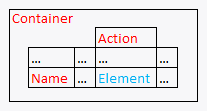
Relational APIs _in, _near, _leftOf, _rightOf, _under, _above can be used.
// with _in
_lightningTextbox("descriptive label", _in(_div("Container")))
// index with 2 relational APIs, _rightOf and _under
_lightningTextbox(0, _rightOf(_span("Name")), _under(_cell("Action")))
// with regular expression and relations
_lightningTextbox("/bigfont/", _rightOf(_span("Name")), _under(_cell("Action")))
Relations Sample
Value

value (this is the default attribute used in assertions etc.)

Actions

Default event recorded is _setValue

Example usage:

_setValue(_lightningTextbox("descriptive label"), "apple");
_setValue(_lightningTextbox("/bigfont/[1]", _rightOf(_span("Name"))), "apple");
Assertions

Example assertions:

// Check if element exists
_assertExists(_lightningTextbox("lightningTextbox_id"));
// Check if element is visible
_assert(_isVisible(_lightningTextbox("lightningTextbox_id")));
_assertEqual("apple", _getValue(_lightningTextbox("lightningTextbox_id")));
Since
Sahi Pro 11.2.1
API

_lightningPISSearch(identifier [, relation1 [, relation2 ...]])

Tag

Tag: lightning-primitive-input-simple of type: search

HTML
<lightning-primitive-input-simple type="search"
name="lightningPISSearch_name"
id="lightningPISSearch_id"
class="shaded bigfont"
value="apple" >lightningPISSearch text</lightning-primitive-input-simple>
Identifiers

placeholder, visible text, name, id, css class, index

Valid Accessors and alternatives: (Assume this is the 6th lightningPISSearch in the UI and 2nd lightningPISSearch with class "shaded bigfont")

//visible text
_lightningPISSearch("lightningPISSearch text")
//visible text with regular expression
_lightningPISSearch("/PISSearch te/")
//visible text with regular expression
_lightningPISSearch("/lightning.*text/")
//name
_lightningPISSearch("lightningPISSearch_name")
//id
_lightningPISSearch("lightningPISSearch_id")
//index
_lightningPISSearch(5)
//css class with index
_lightningPISSearch("shaded bigfont[1]")
//css class with regular expression and index
_lightningPISSearch("/bigfont/[1]")
//multiple attributes as JSON
_lightningPISSearch({className: "shaded bigfont", sahiIndex: 1})
//multiple attributes as JSON including regular expression
_lightningPISSearch({className: "/shaded .*font/", sahiIndex: 1})
// Use sahiIndex for index, className for class and sahiText for visible text attributes.
Relations

Relational APIs _in, _near, _leftOf, _rightOf, _under, _above can be used.

// with _in
_lightningPISSearch(, _in(_div("Container")))
// index with 2 relational APIs, _rightOf and _under
_lightningPISSearch(0, _rightOf(_span("Name")), _under(_cell("Action")))
// with regular expression and relations
_lightningPISSearch("/bigfont/", _rightOf(_span("Name")), _under(_cell("Action")))
Relations Sample
Value

value (this is the default attribute used in assertions etc.)

Actions

Default event recorded is _setValue

Example usage:

_setValue(_lightningPISSearch(), "apple");
_setValue(_lightningPISSearch("/bigfont/[1]", _rightOf(_span("Name"))), "apple");
Assertions

Example assertions:

// Check if element exists
_assertExists(_lightningPISSearch("lightningPISSearch_id"));
// Check if element is visible
_assert(_isVisible(_lightningPISSearch("lightningPISSearch_id")));
_assertEqual("apple", _getValue(_lightningPISSearch("lightningPISSearch_id")));
Since
Sahi Pro 11.2.1
API

_lightningButton(identifier [, relation1 [, relation2 ...]])

Tag

Tag: lightning-button of type: null

HTML
<lightning-button type="null"
title="elementTitle"
label="elementLabel"
name="lightningButton_name"
id="lightningButton_id"
class="shaded bigfont" >lightningButton text</lightning-button>
Identifiers

visible text, title, label, name, iconName, id, css class, index

Valid Accessors and alternatives: (Assume this is the 6th lightningButton in the UI and 2nd lightningButton with class "shaded bigfont")

//visible text
_lightningButton("lightningButton text")
//visible text with regular expression
_lightningButton("/ngButton te/")
//visible text with regular expression
_lightningButton("/lightni.*text/")
//title
_lightningButton("elementTitle")
//label
_lightningButton("elementLabel")
//name
_lightningButton("lightningButton_name")
//id
_lightningButton("lightningButton_id")
//index
_lightningButton(5)
//css class with index
_lightningButton("shaded bigfont[1]")
//css class with regular expression and index
_lightningButton("/bigfont/[1]")
//multiple attributes as JSON
_lightningButton({className: "shaded bigfont", sahiIndex: 1})
//multiple attributes as JSON including regular expression
_lightningButton({className: "/shaded .*font/", sahiIndex: 1})
// Use sahiIndex for index, className for class and sahiText for visible text attributes.
Relations

Relational APIs _in, _near, _leftOf, _rightOf, _under, _above can be used.

// with _in
_lightningButton("lightningButton text", _in(_div("Container")))
// index with 2 relational APIs, _rightOf and _under
_lightningButton(0, _rightOf(_span("Name")), _under(_cell("Action")))
// with regular expression and relations
_lightningButton("/bigfont/", _rightOf(_span("Name")), _under(_cell("Action")))
Relations Sample
Value

visible text (this is the default attribute used in assertions etc.)

Actions

Default event recorded is _click

Example usage:

_click(_lightningButton("lightningButton text"));
_click(_lightningButton("/bigfont/[1]", _rightOf(_span("Name"))));
Assertions

Example assertions:

// Check if element exists
_assertExists(_lightningButton("lightningButton_id"));
// Check if element is visible
_assert(_isVisible(_lightningButton("lightningButton_id")));
_assertEqual("lightningButton text", _getText(_lightningButton("lightningButton_id")));
Since
Sahi Pro 11.2.1
API

_lightningButton(identifier [, relation1 [, relation2 ...]])

Tag

Tag: lightning-button of type: button

HTML
<lightning-button type="button"
title="elementTitle"
label="elementLabel"
name="lightningButton_name"
id="lightningButton_id"
class="shaded bigfont" >lightningButton text</lightning-button>
Identifiers

visible text, title, label, name, iconName, id, css class, index

Valid Accessors and alternatives: (Assume this is the 6th lightningButton in the UI and 2nd lightningButton with class "shaded bigfont")

//visible text
_lightningButton("lightningButton text")
//visible text with regular expression
_lightningButton("/ngButton te/")
//visible text with regular expression
_lightningButton("/lightni.*text/")
//title
_lightningButton("elementTitle")
//label
_lightningButton("elementLabel")
//name
_lightningButton("lightningButton_name")
//id
_lightningButton("lightningButton_id")
//index
_lightningButton(5)
//css class with index
_lightningButton("shaded bigfont[1]")
//css class with regular expression and index
_lightningButton("/bigfont/[1]")
//multiple attributes as JSON
_lightningButton({className: "shaded bigfont", sahiIndex: 1})
//multiple attributes as JSON including regular expression
_lightningButton({className: "/shaded .*font/", sahiIndex: 1})
// Use sahiIndex for index, className for class and sahiText for visible text attributes.
Relations

Relational APIs _in, _near, _leftOf, _rightOf, _under, _above can be used.

// with _in
_lightningButton("lightningButton text", _in(_div("Container")))
// index with 2 relational APIs, _rightOf and _under
_lightningButton(0, _rightOf(_span("Name")), _under(_cell("Action")))
// with regular expression and relations
_lightningButton("/bigfont/", _rightOf(_span("Name")), _under(_cell("Action")))
Relations Sample
Value

visible text (this is the default attribute used in assertions etc.)

Actions

Default event recorded is _click

Example usage:

_click(_lightningButton("lightningButton text"));
_click(_lightningButton("/bigfont/[1]", _rightOf(_span("Name"))));
Assertions

Example assertions:

// Check if element exists
_assertExists(_lightningButton("lightningButton_id"));
// Check if element is visible
_assert(_isVisible(_lightningButton("lightningButton_id")));
_assertEqual("lightningButton text", _getText(_lightningButton("lightningButton_id")));
Since
Sahi Pro 11.2.1
API

_lightningToggle(identifier [, relation1 [, relation2 ...]])

Tag

Tag: lightning-input of type: toggle

HTML
<lightning-input type="toggle"
title="elementTitle"
label="elementLabel"
name="lightningToggle_name"
id="lightningToggle_id"
class="shaded bigfont" >lightningToggle text</lightning-input>
Identifiers

visible text, title, label, name, id, css class, index

Valid Accessors and alternatives: (Assume this is the 6th lightningToggle in the UI and 2nd lightningToggle with class "shaded bigfont")

//visible text
_lightningToggle("lightningToggle text")
//visible text with regular expression
_lightningToggle("/ngToggle te/")
//visible text with regular expression
_lightningToggle("/lightni.*text/")
//title
_lightningToggle("elementTitle")
//label
_lightningToggle("elementLabel")
//name
_lightningToggle("lightningToggle_name")
//id
_lightningToggle("lightningToggle_id")
//index
_lightningToggle(5)
//css class with index
_lightningToggle("shaded bigfont[1]")
//css class with regular expression and index
_lightningToggle("/bigfont/[1]")
//multiple attributes as JSON
_lightningToggle({className: "shaded bigfont", sahiIndex: 1})
//multiple attributes as JSON including regular expression
_lightningToggle({className: "/shaded .*font/", sahiIndex: 1})
// Use sahiIndex for index, className for class and sahiText for visible text attributes.
Relations

Relational APIs _in, _near, _leftOf, _rightOf, _under, _above can be used.

// with _in
_lightningToggle("lightningToggle text", _in(_div("Container")))
// index with 2 relational APIs, _rightOf and _under
_lightningToggle(0, _rightOf(_span("Name")), _under(_cell("Action")))
// with regular expression and relations
_lightningToggle("/bigfont/", _rightOf(_span("Name")), _under(_cell("Action")))
Relations Sample
Value

visible text (this is the default attribute used in assertions etc.)

Actions

Default event recorded is _click

Example usage:

_click(_lightningToggle("lightningToggle text"));
_click(_lightningToggle("/bigfont/[1]", _rightOf(_span("Name"))));
Assertions

Example assertions:

// Check if element exists
_assertExists(_lightningToggle("lightningToggle_id"));
// Check if element is visible
_assert(_isVisible(_lightningToggle("lightningToggle_id")));
_assertEqual("lightningToggle text", _getText(_lightningToggle("lightningToggle_id")));
Since
Sahi Pro 11.2.1
API

_lightningPIToggle(identifier [, relation1 [, relation2 ...]])

Tag

Tag: lightning-primitive-input-toggle of type: null

HTML
<lightning-primitive-input-toggle type="null"
title="elementTitle"
label="elementLabel"
name="lightningPIToggle_name"
id="lightningPIToggle_id"
class="shaded bigfont" >lightningPIToggle text</lightning-primitive-input-toggle>
Identifiers

visible text, title, label, name, id, css class, index

Valid Accessors and alternatives: (Assume this is the 6th lightningPIToggle in the UI and 2nd lightningPIToggle with class "shaded bigfont")

//visible text
_lightningPIToggle("lightningPIToggle text")
//visible text with regular expression
_lightningPIToggle("/gPIToggle te/")
//visible text with regular expression
_lightningPIToggle("/lightnin.*text/")
//title
_lightningPIToggle("elementTitle")
//label
_lightningPIToggle("elementLabel")
//name
_lightningPIToggle("lightningPIToggle_name")
//id
_lightningPIToggle("lightningPIToggle_id")
//index
_lightningPIToggle(5)
//css class with index
_lightningPIToggle("shaded bigfont[1]")
//css class with regular expression and index
_lightningPIToggle("/bigfont/[1]")
//multiple attributes as JSON
_lightningPIToggle({className: "shaded bigfont", sahiIndex: 1})
//multiple attributes as JSON including regular expression
_lightningPIToggle({className: "/shaded .*font/", sahiIndex: 1})
// Use sahiIndex for index, className for class and sahiText for visible text attributes.
Relations

Relational APIs _in, _near, _leftOf, _rightOf, _under, _above can be used.

// with _in
_lightningPIToggle("lightningPIToggle text", _in(_div("Container")))
// index with 2 relational APIs, _rightOf and _under
_lightningPIToggle(0, _rightOf(_span("Name")), _under(_cell("Action")))
// with regular expression and relations
_lightningPIToggle("/bigfont/", _rightOf(_span("Name")), _under(_cell("Action")))
Relations Sample
Value

visible text (this is the default attribute used in assertions etc.)

Actions

Default event recorded is _click

Example usage:

_click(_lightningPIToggle("lightningPIToggle text"));
_click(_lightningPIToggle("/bigfont/[1]", _rightOf(_span("Name"))));
Assertions

Example assertions:

// Check if element exists
_assertExists(_lightningPIToggle("lightningPIToggle_id"));
// Check if element is visible
_assert(_isVisible(_lightningPIToggle("lightningPIToggle_id")));
_assertEqual("lightningPIToggle text", _getText(_lightningPIToggle("lightningPIToggle_id")));
Since
Sahi Pro 11.2.1
API

_sfISegmentButton(identifier [, relation1 [, relation2 ...]])

Tag

Tag: ION-SEGMENT-BUTTON of type: button

HTML
<ION-SEGMENT-BUTTON type="button"
id="sfISegmentButton_id"
class="shaded bigfont" >sfISegmentButton text</ION-SEGMENT-BUTTON>
Identifiers

visible text, id, css class, index

Valid Accessors and alternatives: (Assume this is the 6th sfISegmentButton in the UI and 2nd sfISegmentButton with class "shaded bigfont")

//visible text
_sfISegmentButton("sfISegmentButton text")
//visible text with regular expression
_sfISegmentButton("/ntButton te/")
//visible text with regular expression
_sfISegmentButton("/sfISegme.*text/")
//id
_sfISegmentButton("sfISegmentButton_id")
//index
_sfISegmentButton(5)
//css class with index
_sfISegmentButton("shaded bigfont[1]")
//css class with regular expression and index
_sfISegmentButton("/bigfont/[1]")
//multiple attributes as JSON
_sfISegmentButton({className: "shaded bigfont", sahiIndex: 1})
//multiple attributes as JSON including regular expression
_sfISegmentButton({className: "/shaded .*font/", sahiIndex: 1})
// Use sahiIndex for index, className for class and sahiText for visible text attributes.
Relations

Relational APIs _in, _near, _leftOf, _rightOf, _under, _above can be used.

// with _in
_sfISegmentButton("sfISegmentButton text", _in(_div("Container")))
// index with 2 relational APIs, _rightOf and _under
_sfISegmentButton(0, _rightOf(_span("Name")), _under(_cell("Action")))
// with regular expression and relations
_sfISegmentButton("/bigfont/", _rightOf(_span("Name")), _under(_cell("Action")))
Relations Sample
Value

visible text (this is the default attribute used in assertions etc.)

Actions

Default event recorded is _click

Example usage:

_click(_sfISegmentButton("sfISegmentButton text"));
_click(_sfISegmentButton("/bigfont/[1]", _rightOf(_span("Name"))));
Assertions

Example assertions:

// Check if element exists
_assertExists(_sfISegmentButton("sfISegmentButton_id"));
// Check if element is visible
_assert(_isVisible(_sfISegmentButton("sfISegmentButton_id")));
_assertEqual("sfISegmentButton text", _getText(_sfISegmentButton("sfISegmentButton_id")));
Since
Sahi Pro 11.2.1
API

_lightningButtonIcon(identifier [, relation1 [, relation2 ...]])

Tag

Tag: lightning-button-icon

HTML
<lightning-button-icon
title="elementTitle"
id="lightningButtonIcon_id"
name="lightningButtonIcon_name"
class="shaded bigfont" >lightningButtonIcon text</lightning-button-icon>
Identifiers

visible text, title, id, name, iconName, css class, index

Valid Accessors and alternatives: (Assume this is the 6th lightningButtonIcon in the UI and 2nd lightningButtonIcon with class "shaded bigfont")

//visible text
_lightningButtonIcon("lightningButtonIcon text")
//visible text with regular expression
_lightningButtonIcon("/ButtonIcon te/")
//visible text with regular expression
_lightningButtonIcon("/lightning.*text/")
//title
_lightningButtonIcon("elementTitle")
//id
_lightningButtonIcon("lightningButtonIcon_id")
//name
_lightningButtonIcon("lightningButtonIcon_name")
//index
_lightningButtonIcon(5)
//css class with index
_lightningButtonIcon("shaded bigfont[1]")
//css class with regular expression and index
_lightningButtonIcon("/bigfont/[1]")
//multiple attributes as JSON
_lightningButtonIcon({className: "shaded bigfont", sahiIndex: 1})
//multiple attributes as JSON including regular expression
_lightningButtonIcon({className: "/shaded .*font/", sahiIndex: 1})
// Use sahiIndex for index, className for class and sahiText for visible text attributes.
Relations

Relational APIs _in, _near, _leftOf, _rightOf, _under, _above can be used.

// with _in
_lightningButtonIcon("lightningButtonIcon text", _in(_div("Container")))
// index with 2 relational APIs, _rightOf and _under
_lightningButtonIcon(0, _rightOf(_span("Name")), _under(_cell("Action")))
// with regular expression and relations
_lightningButtonIcon("/bigfont/", _rightOf(_span("Name")), _under(_cell("Action")))
Relations Sample
Value

visible text (this is the default attribute used in assertions etc.)

Actions

Default event recorded is _click

Example usage:

_click(_lightningButtonIcon("lightningButtonIcon text"));
_click(_lightningButtonIcon("/bigfont/[1]", _rightOf(_span("Name"))));
Assertions

Example assertions:

// Check if element exists
_assertExists(_lightningButtonIcon("lightningButtonIcon_id"));
// Check if element is visible
_assert(_isVisible(_lightningButtonIcon("lightningButtonIcon_id")));
_assertEqual("lightningButtonIcon text", _getText(_lightningButtonIcon("lightningButtonIcon_id")));
Since
Sahi Pro 11.2.1
API

_lightningIcon(identifier [, relation1 [, relation2 ...]])

Tag

Tag: lightning-icon

HTML
<lightning-icon
title="elementTitle"
id="lightningIcon_id"
name="lightningIcon_name"
class="shaded bigfont" >lightningIcon text</lightning-icon>
Identifiers

visible text, title, id, name, iconName, css class, index

Valid Accessors and alternatives: (Assume this is the 6th lightningIcon in the UI and 2nd lightningIcon with class "shaded bigfont")

//visible text
_lightningIcon("lightningIcon text")
//visible text with regular expression
_lightningIcon("/ingIcon te/")
//visible text with regular expression
_lightningIcon("/lightn.*text/")
//title
_lightningIcon("elementTitle")
//id
_lightningIcon("lightningIcon_id")
//name
_lightningIcon("lightningIcon_name")
//index
_lightningIcon(5)
//css class with index
_lightningIcon("shaded bigfont[1]")
//css class with regular expression and index
_lightningIcon("/bigfont/[1]")
//multiple attributes as JSON
_lightningIcon({className: "shaded bigfont", sahiIndex: 1})
//multiple attributes as JSON including regular expression
_lightningIcon({className: "/shaded .*font/", sahiIndex: 1})
// Use sahiIndex for index, className for class and sahiText for visible text attributes.
Relations

Relational APIs _in, _near, _leftOf, _rightOf, _under, _above can be used.

// with _in
_lightningIcon("lightningIcon text", _in(_div("Container")))
// index with 2 relational APIs, _rightOf and _under
_lightningIcon(0, _rightOf(_span("Name")), _under(_cell("Action")))
// with regular expression and relations
_lightningIcon("/bigfont/", _rightOf(_span("Name")), _under(_cell("Action")))
Relations Sample
Value

visible text (this is the default attribute used in assertions etc.)

Actions

Default event recorded is _click

Example usage:

_click(_lightningIcon("lightningIcon text"));
_click(_lightningIcon("/bigfont/[1]", _rightOf(_span("Name"))));
Assertions

Example assertions:

// Check if element exists
_assertExists(_lightningIcon("lightningIcon_id"));
// Check if element is visible
_assert(_isVisible(_lightningIcon("lightningIcon_id")));
_assertEqual("lightningIcon text", _getText(_lightningIcon("lightningIcon_id")));
Since
Sahi Pro 11.2.1
API

_lightningPIcon(identifier [, relation1 [, relation2 ...]])

Tag

Tag: lightning-primitive-icon

HTML
<lightning-primitive-icon
title="elementTitle"
id="lightningPIcon_id"
name="lightningPIcon_name"
class="shaded bigfont" >lightningPIcon text</lightning-primitive-icon>
Identifiers

visible text, title, id, name, iconName, css class, index

Valid Accessors and alternatives: (Assume this is the 6th lightningPIcon in the UI and 2nd lightningPIcon with class "shaded bigfont")

//visible text
_lightningPIcon("lightningPIcon text")
//visible text with regular expression
_lightningPIcon("/ngPIcon te/")
//visible text with regular expression
_lightningPIcon("/lightni.*text/")
//title
_lightningPIcon("elementTitle")
//id
_lightningPIcon("lightningPIcon_id")
//name
_lightningPIcon("lightningPIcon_name")
//index
_lightningPIcon(5)
//css class with index
_lightningPIcon("shaded bigfont[1]")
//css class with regular expression and index
_lightningPIcon("/bigfont/[1]")
//multiple attributes as JSON
_lightningPIcon({className: "shaded bigfont", sahiIndex: 1})
//multiple attributes as JSON including regular expression
_lightningPIcon({className: "/shaded .*font/", sahiIndex: 1})
// Use sahiIndex for index, className for class and sahiText for visible text attributes.
Relations

Relational APIs _in, _near, _leftOf, _rightOf, _under, _above can be used.

// with _in
_lightningPIcon("lightningPIcon text", _in(_div("Container")))
// index with 2 relational APIs, _rightOf and _under
_lightningPIcon(0, _rightOf(_span("Name")), _under(_cell("Action")))
// with regular expression and relations
_lightningPIcon("/bigfont/", _rightOf(_span("Name")), _under(_cell("Action")))
Relations Sample
Value

visible text (this is the default attribute used in assertions etc.)

Actions

Default event recorded is _click

Example usage:

_click(_lightningPIcon("lightningPIcon text"));
_click(_lightningPIcon("/bigfont/[1]", _rightOf(_span("Name"))));
Assertions

Example assertions:

// Check if element exists
_assertExists(_lightningPIcon("lightningPIcon_id"));
// Check if element is visible
_assert(_isVisible(_lightningPIcon("lightningPIcon_id")));
_assertEqual("lightningPIcon text", _getText(_lightningPIcon("lightningPIcon_id")));
Since
Sahi Pro 11.2.1
API

_lightningSelect(identifier [, relation1 [, relation2 ...]])

Tag

Tag: lightning-select

HTML
<lightning-select
name="lightningSelect_name"
id="lightningSelect_id"
class="shaded bigfont" >lightningSelect text</lightning-select>
Identifiers

placeholder, name, id, visible text, css class, index

Valid Accessors and alternatives: (Assume this is the 6th lightningSelect in the UI and 2nd lightningSelect with class "shaded bigfont")

//name
_lightningSelect("lightningSelect_name")
//id
_lightningSelect("lightningSelect_id")
//visible text
_lightningSelect("lightningSelect text")
//visible text with regular expression
_lightningSelect("/ngSelect te/")
//visible text with regular expression
_lightningSelect("/lightni.*text/")
//index
_lightningSelect(5)
//css class with index
_lightningSelect("shaded bigfont[1]")
//css class with regular expression and index
_lightningSelect("/bigfont/[1]")
//multiple attributes as JSON
_lightningSelect({className: "shaded bigfont", sahiIndex: 1})
//multiple attributes as JSON including regular expression
_lightningSelect({className: "/shaded .*font/", sahiIndex: 1})
// Use sahiIndex for index, className for class and sahiText for visible text attributes.
Relations

Relational APIs _in, _near, _leftOf, _rightOf, _under, _above can be used.

// with _in
_lightningSelect(, _in(_div("Container")))
// index with 2 relational APIs, _rightOf and _under
_lightningSelect(0, _rightOf(_span("Name")), _under(_cell("Action")))
// with regular expression and relations
_lightningSelect("/bigfont/", _rightOf(_span("Name")), _under(_cell("Action")))
Relations Sample
Value

visible text (this is the default attribute used in assertions etc.)

Actions

Default event recorded is _click

Example usage:

_click(_lightningSelect());
_click(_lightningSelect("/bigfont/[1]", _rightOf(_span("Name"))));
Assertions

Example assertions:

// Check if element exists
_assertExists(_lightningSelect("lightningSelect_id"));
// Check if element is visible
_assert(_isVisible(_lightningSelect("lightningSelect_id")));
_assertEqual("lightningSelect text", _getText(_lightningSelect("lightningSelect_id")));
Since
Sahi Pro 11.2.1
API

_lightningCombobox(identifier [, relation1 [, relation2 ...]])

Tag

Tag: lightning-combobox

HTML
<lightning-combobox
name="lightningCombobox_name"
id="lightningCombobox_id"
class="shaded bigfont" >lightningCombobox text</lightning-combobox>
Identifiers

placeholder, name, id, visible text, css class, index

Valid Accessors and alternatives: (Assume this is the 6th lightningCombobox in the UI and 2nd lightningCombobox with class "shaded bigfont")

//name
_lightningCombobox("lightningCombobox_name")
//id
_lightningCombobox("lightningCombobox_id")
//visible text
_lightningCombobox("lightningCombobox text")
//visible text with regular expression
_lightningCombobox("/gCombobox te/")
//visible text with regular expression
_lightningCombobox("/lightnin.*text/")
//index
_lightningCombobox(5)
//css class with index
_lightningCombobox("shaded bigfont[1]")
//css class with regular expression and index
_lightningCombobox("/bigfont/[1]")
//multiple attributes as JSON
_lightningCombobox({className: "shaded bigfont", sahiIndex: 1})
//multiple attributes as JSON including regular expression
_lightningCombobox({className: "/shaded .*font/", sahiIndex: 1})
// Use sahiIndex for index, className for class and sahiText for visible text attributes.
Relations

Relational APIs _in, _near, _leftOf, _rightOf, _under, _above can be used.

// with _in
_lightningCombobox(, _in(_div("Container")))
// index with 2 relational APIs, _rightOf and _under
_lightningCombobox(0, _rightOf(_span("Name")), _under(_cell("Action")))
// with regular expression and relations
_lightningCombobox("/bigfont/", _rightOf(_span("Name")), _under(_cell("Action")))
Relations Sample
Value

visible text (this is the default attribute used in assertions etc.)

Actions

Default event recorded is _click

Example usage:

_click(_lightningCombobox());
_click(_lightningCombobox("/bigfont/[1]", _rightOf(_span("Name"))));
Assertions

Example assertions:

// Check if element exists
_assertExists(_lightningCombobox("lightningCombobox_id"));
// Check if element is visible
_assert(_isVisible(_lightningCombobox("lightningCombobox_id")));
_assertEqual("lightningCombobox text", _getText(_lightningCombobox("lightningCombobox_id")));
Since
Sahi Pro 11.2.1
API

_lightningBComboboxItem(identifier [, relation1 [, relation2 ...]])

Tag

Tag: lightning-base-combobox-item

HTML
<lightning-base-combobox-item
id="lightningBComboboxItem_id"
class="shaded bigfont" >lightningBComboboxItem text</lightning-base-combobox-item>
Identifiers

visible text, id, css class, index

Valid Accessors and alternatives: (Assume this is the 6th lightningBComboboxItem in the UI and 2nd lightningBComboboxItem with class "shaded bigfont")

//visible text
_lightningBComboboxItem("lightningBComboboxItem text")
//visible text with regular expression
_lightningBComboboxItem("/omboboxItem te/")
//visible text with regular expression
_lightningBComboboxItem("/lightningBC.*text/")
//id
_lightningBComboboxItem("lightningBComboboxItem_id")
//index
_lightningBComboboxItem(5)
//css class with index
_lightningBComboboxItem("shaded bigfont[1]")
//css class with regular expression and index
_lightningBComboboxItem("/bigfont/[1]")
//multiple attributes as JSON
_lightningBComboboxItem({className: "shaded bigfont", sahiIndex: 1})
//multiple attributes as JSON including regular expression
_lightningBComboboxItem({className: "/shaded .*font/", sahiIndex: 1})
// Use sahiIndex for index, className for class and sahiText for visible text attributes.
Relations

Relational APIs _in, _near, _leftOf, _rightOf, _under, _above can be used.

// with _in
_lightningBComboboxItem("lightningBComboboxItem text", _in(_div("Container")))
// index with 2 relational APIs, _rightOf and _under
_lightningBComboboxItem(0, _rightOf(_span("Name")), _under(_cell("Action")))
// with regular expression and relations
_lightningBComboboxItem("/bigfont/", _rightOf(_span("Name")), _under(_cell("Action")))
Relations Sample
Value

visible text (this is the default attribute used in assertions etc.)

Actions

Default event recorded is _click

Example usage:

_click(_lightningBComboboxItem("lightningBComboboxItem text"));
_click(_lightningBComboboxItem("/bigfont/[1]", _rightOf(_span("Name"))));
Assertions

Example assertions:

// Check if element exists
_assertExists(_lightningBComboboxItem("lightningBComboboxItem_id"));
// Check if element is visible
_assert(_isVisible(_lightningBComboboxItem("lightningBComboboxItem_id")));
_assertEqual("lightningBComboboxItem text", _getText(_lightningBComboboxItem("lightningBComboboxItem_id")));
Since
Sahi Pro 11.2.1
API

_lightningFormattedText(identifier [, relation1 [, relation2 ...]])

Tag

Tag: lightning-formatted-text

HTML
<lightning-formatted-text
title="elementTitle"
id="lightningFormattedText_id"
class="shaded bigfont" >lightningFormattedText text</lightning-formatted-text>
Identifiers

visible text, title, id, css class, index

Valid Accessors and alternatives: (Assume this is the 6th lightningFormattedText in the UI and 2nd lightningFormattedText with class "shaded bigfont")

//visible text
_lightningFormattedText("lightningFormattedText text")
//visible text with regular expression
_lightningFormattedText("/rmattedText te/")
//visible text with regular expression
_lightningFormattedText("/lightningFo.*text/")
//title
_lightningFormattedText("elementTitle")
//id
_lightningFormattedText("lightningFormattedText_id")
//index
_lightningFormattedText(5)
//css class with index
_lightningFormattedText("shaded bigfont[1]")
//css class with regular expression and index
_lightningFormattedText("/bigfont/[1]")
//multiple attributes as JSON
_lightningFormattedText({className: "shaded bigfont", sahiIndex: 1})
//multiple attributes as JSON including regular expression
_lightningFormattedText({className: "/shaded .*font/", sahiIndex: 1})
// Use sahiIndex for index, className for class and sahiText for visible text attributes.
Relations

Relational APIs _in, _near, _leftOf, _rightOf, _under, _above can be used.

// with _in
_lightningFormattedText("lightningFormattedText text", _in(_div("Container")))
// index with 2 relational APIs, _rightOf and _under
_lightningFormattedText(0, _rightOf(_span("Name")), _under(_cell("Action")))
// with regular expression and relations
_lightningFormattedText("/bigfont/", _rightOf(_span("Name")), _under(_cell("Action")))
Relations Sample
Value

visible text (this is the default attribute used in assertions etc.)

Actions

Default event recorded is _click

Example usage:

_click(_lightningFormattedText("lightningFormattedText text"));
_click(_lightningFormattedText("/bigfont/[1]", _rightOf(_span("Name"))));
Assertions

Example assertions:

// Check if element exists
_assertExists(_lightningFormattedText("lightningFormattedText_id"));
// Check if element is visible
_assert(_isVisible(_lightningFormattedText("lightningFormattedText_id")));
_assertEqual("lightningFormattedText text", _getText(_lightningFormattedText("lightningFormattedText_id")));
Since
Sahi Pro 11.2.1
API

_lightningBFormattedText(identifier [, relation1 [, relation2 ...]])

Tag

Tag: lightning-base-formatted-text

HTML
<lightning-base-formatted-text
id="lightningBFormattedText_id"
value="apple"
class="shaded bigfont" >lightningBFormattedText text</lightning-base-formatted-text>
Identifiers

visible text, id, value, css class, data-output-element-id, index

Valid Accessors and alternatives: (Assume this is the 6th lightningBFormattedText in the UI and 2nd lightningBFormattedText with class "shaded bigfont")

//visible text
_lightningBFormattedText("lightningBFormattedText text")
//visible text with regular expression
_lightningBFormattedText("/ormattedText te/")
//visible text with regular expression
_lightningBFormattedText("/lightningBF.*text/")
//id
_lightningBFormattedText("lightningBFormattedText_id")
//value
_lightningBFormattedText("apple")
//index
_lightningBFormattedText(5)
//css class with index
_lightningBFormattedText("shaded bigfont[1]")
//css class with regular expression and index
_lightningBFormattedText("/bigfont/[1]")
//multiple attributes as JSON
_lightningBFormattedText({className: "shaded bigfont", sahiIndex: 1})
//multiple attributes as JSON including regular expression
_lightningBFormattedText({className: "/shaded .*font/", sahiIndex: 1})
// Use sahiIndex for index, className for class and sahiText for visible text attributes.
Relations

Relational APIs _in, _near, _leftOf, _rightOf, _under, _above can be used.

// with _in
_lightningBFormattedText("lightningBFormattedText text", _in(_div("Container")))
// index with 2 relational APIs, _rightOf and _under
_lightningBFormattedText(0, _rightOf(_span("Name")), _under(_cell("Action")))
// with regular expression and relations
_lightningBFormattedText("/bigfont/", _rightOf(_span("Name")), _under(_cell("Action")))
Relations Sample
Value

visible text (this is the default attribute used in assertions etc.)

Actions

Default event recorded is _click

Example usage:

_click(_lightningBFormattedText("lightningBFormattedText text"));
_click(_lightningBFormattedText("/bigfont/[1]", _rightOf(_span("Name"))));
Assertions

Example assertions:

// Check if element exists
_assertExists(_lightningBFormattedText("lightningBFormattedText_id"));
// Check if element is visible
_assert(_isVisible(_lightningBFormattedText("lightningBFormattedText_id")));
_assertEqual("lightningBFormattedText text", _getText(_lightningBFormattedText("lightningBFormattedText_id")));
Since
Sahi Pro 11.2.1
API

_lightningPCFactory(identifier [, relation1 [, relation2 ...]])

Tag

Tag: lightning-primitive-cell-factory

HTML
<lightning-primitive-cell-factory
id="lightningPCFactory_id"
class="shaded bigfont" >lightningPCFactory text</lightning-primitive-cell-factory>
Identifiers

visible text, id, css class, index, data-output-element-id

Valid Accessors and alternatives: (Assume this is the 6th lightningPCFactory in the UI and 2nd lightningPCFactory with class "shaded bigfont")

//visible text
_lightningPCFactory("lightningPCFactory text")
//visible text with regular expression
_lightningPCFactory("/PCFactory te/")
//visible text with regular expression
_lightningPCFactory("/lightning.*text/")
//id
_lightningPCFactory("lightningPCFactory_id")
//index
_lightningPCFactory(5)
//css class with index
_lightningPCFactory("shaded bigfont[1]")
//css class with regular expression and index
_lightningPCFactory("/bigfont/[1]")
//multiple attributes as JSON
_lightningPCFactory({className: "shaded bigfont", sahiIndex: 1})
//multiple attributes as JSON including regular expression
_lightningPCFactory({className: "/shaded .*font/", sahiIndex: 1})
// Use sahiIndex for index, className for class and sahiText for visible text attributes.
Relations

Relational APIs _in, _near, _leftOf, _rightOf, _under, _above can be used.

// with _in
_lightningPCFactory("lightningPCFactory text", _in(_div("Container")))
// index with 2 relational APIs, _rightOf and _under
_lightningPCFactory(0, _rightOf(_span("Name")), _under(_cell("Action")))
// with regular expression and relations
_lightningPCFactory("/bigfont/", _rightOf(_span("Name")), _under(_cell("Action")))
Relations Sample
Value

visible text (this is the default attribute used in assertions etc.)

Actions

Default event recorded is _click

Example usage:

_click(_lightningPCFactory("lightningPCFactory text"));
_click(_lightningPCFactory("/bigfont/[1]", _rightOf(_span("Name"))));
Assertions

Example assertions:

// Check if element exists
_assertExists(_lightningPCFactory("lightningPCFactory_id"));
// Check if element is visible
_assert(_isVisible(_lightningPCFactory("lightningPCFactory_id")));
_assertEqual("lightningPCFactory text", _getText(_lightningPCFactory("lightningPCFactory_id")));
Since
Sahi Pro 11.2.1
API

_lightningPCustomCell(identifier [, relation1 [, relation2 ...]])

Tag

Tag: lightning-primitive-custom-cell

HTML
<lightning-primitive-custom-cell
id="lightningPCustomCell_id"
class="shaded bigfont" >lightningPCustomCell text</lightning-primitive-custom-cell>
Identifiers

visible text, id, css class, index, data-output-element-id

Valid Accessors and alternatives: (Assume this is the 6th lightningPCustomCell in the UI and 2nd lightningPCustomCell with class "shaded bigfont")

//visible text
_lightningPCustomCell("lightningPCustomCell text")
//visible text with regular expression
_lightningPCustomCell("/CustomCell te/")
//visible text with regular expression
_lightningPCustomCell("/lightningP.*text/")
//id
_lightningPCustomCell("lightningPCustomCell_id")
//index
_lightningPCustomCell(5)
//css class with index
_lightningPCustomCell("shaded bigfont[1]")
//css class with regular expression and index
_lightningPCustomCell("/bigfont/[1]")
//multiple attributes as JSON
_lightningPCustomCell({className: "shaded bigfont", sahiIndex: 1})
//multiple attributes as JSON including regular expression
_lightningPCustomCell({className: "/shaded .*font/", sahiIndex: 1})
// Use sahiIndex for index, className for class and sahiText for visible text attributes.
Relations

Relational APIs _in, _near, _leftOf, _rightOf, _under, _above can be used.

// with _in
_lightningPCustomCell("lightningPCustomCell text", _in(_div("Container")))
// index with 2 relational APIs, _rightOf and _under
_lightningPCustomCell(0, _rightOf(_span("Name")), _under(_cell("Action")))
// with regular expression and relations
_lightningPCustomCell("/bigfont/", _rightOf(_span("Name")), _under(_cell("Action")))
Relations Sample
Value

visible text (this is the default attribute used in assertions etc.)

Actions

Default event recorded is _click

Example usage:

_click(_lightningPCustomCell("lightningPCustomCell text"));
_click(_lightningPCustomCell("/bigfont/[1]", _rightOf(_span("Name"))));
Assertions

Example assertions:

// Check if element exists
_assertExists(_lightningPCustomCell("lightningPCustomCell_id"));
// Check if element is visible
_assert(_isVisible(_lightningPCustomCell("lightningPCustomCell_id")));
_assertEqual("lightningPCustomCell text", _getText(_lightningPCustomCell("lightningPCustomCell_id")));
Since
Sahi Pro 11.2.1
API

_crmUtilIcon(identifier [, relation1 [, relation2 ...]])

Tag

Tag: crmutil-icon

HTML
<crmutil-icon
id="crmUtilIcon_id"
class="shaded bigfont" >crmUtilIcon text</crmutil-icon>
Identifiers

iconName, visible text, id, css class, index

Valid Accessors and alternatives: (Assume this is the 6th crmUtilIcon in the UI and 2nd crmUtilIcon with class "shaded bigfont")

//visible text
_crmUtilIcon("crmUtilIcon text")
//visible text with regular expression
_crmUtilIcon("/ilIcon te/")
//visible text with regular expression
_crmUtilIcon("/crmUt.*text/")
//id
_crmUtilIcon("crmUtilIcon_id")
//index
_crmUtilIcon(5)
//css class with index
_crmUtilIcon("shaded bigfont[1]")
//css class with regular expression and index
_crmUtilIcon("/bigfont/[1]")
//multiple attributes as JSON
_crmUtilIcon({className: "shaded bigfont", sahiIndex: 1})
//multiple attributes as JSON including regular expression
_crmUtilIcon({className: "/shaded .*font/", sahiIndex: 1})
// Use sahiIndex for index, className for class and sahiText for visible text attributes.
Relations

Relational APIs _in, _near, _leftOf, _rightOf, _under, _above can be used.

// with _in
_crmUtilIcon(, _in(_div("Container")))
// index with 2 relational APIs, _rightOf and _under
_crmUtilIcon(0, _rightOf(_span("Name")), _under(_cell("Action")))
// with regular expression and relations
_crmUtilIcon("/bigfont/", _rightOf(_span("Name")), _under(_cell("Action")))
Relations Sample
Value

visible text (this is the default attribute used in assertions etc.)

Actions

Default event recorded is _click

Example usage:

_click(_crmUtilIcon());
_click(_crmUtilIcon("/bigfont/[1]", _rightOf(_span("Name"))));
Assertions

Example assertions:

// Check if element exists
_assertExists(_crmUtilIcon("crmUtilIcon_id"));
// Check if element is visible
_assert(_isVisible(_crmUtilIcon("crmUtilIcon_id")));
_assertEqual("crmUtilIcon text", _getText(_crmUtilIcon("crmUtilIcon_id")));
Since
Sahi Pro 11.2.1
API

_sfLstFormattedText(identifier [, relation1 [, relation2 ...]])

Tag

Tag: lst-formatted-text

HTML
<lst-formatted-text
value="apple"
id="sfLstFormattedText_id"
class="shaded bigfont" >sfLstFormattedText text</lst-formatted-text>
Identifiers

value, visible text, id, css class, index, data-output-element-id

Valid Accessors and alternatives: (Assume this is the 6th sfLstFormattedText in the UI and 2nd sfLstFormattedText with class "shaded bigfont")

//value
_sfLstFormattedText("apple")
//visible text
_sfLstFormattedText("sfLstFormattedText text")
//visible text with regular expression
_sfLstFormattedText("/attedText te/")
//visible text with regular expression
_sfLstFormattedText("/sfLstForm.*text/")
//id
_sfLstFormattedText("sfLstFormattedText_id")
//index
_sfLstFormattedText(5)
//css class with index
_sfLstFormattedText("shaded bigfont[1]")
//css class with regular expression and index
_sfLstFormattedText("/bigfont/[1]")
//multiple attributes as JSON
_sfLstFormattedText({className: "shaded bigfont", sahiIndex: 1})
//multiple attributes as JSON including regular expression
_sfLstFormattedText({className: "/shaded .*font/", sahiIndex: 1})
// Use sahiIndex for index, className for class and sahiText for visible text attributes.
Relations

Relational APIs _in, _near, _leftOf, _rightOf, _under, _above can be used.

// with _in
_sfLstFormattedText("apple", _in(_div("Container")))
// index with 2 relational APIs, _rightOf and _under
_sfLstFormattedText(0, _rightOf(_span("Name")), _under(_cell("Action")))
// with regular expression and relations
_sfLstFormattedText("/bigfont/", _rightOf(_span("Name")), _under(_cell("Action")))
Relations Sample
Value

visible text (this is the default attribute used in assertions etc.)

Actions

Default event recorded is _click

Example usage:

_click(_sfLstFormattedText("apple"));
_click(_sfLstFormattedText("/bigfont/[1]", _rightOf(_span("Name"))));
Assertions

Example assertions:

// Check if element exists
_assertExists(_sfLstFormattedText("sfLstFormattedText_id"));
// Check if element is visible
_assert(_isVisible(_sfLstFormattedText("sfLstFormattedText_id")));
_assertEqual("sfLstFormattedText text", _getText(_sfLstFormattedText("sfLstFormattedText_id")));
Since
Sahi Pro 11.2.1
API

_lightBasetext (identifier [, relation1 [, relation2 ...]])

Tag

Tag: LIGHTBASETEXT

HTML
<LIGHTBASETEXT
id="lightBasetext _id"
class="shaded bigfont"
value="apple" >lightBasetext text</LIGHTBASETEXT>
Identifiers

visible text, id, css class, index, value

Valid Accessors and alternatives: (Assume this is the 6th lightBasetext in the UI and 2nd lightBasetext with class "shaded bigfont")

//visible text
_lightBasetext ("lightBasetext text")
//visible text with regular expression
_lightBasetext ("/setext te/")
//visible text with regular expression
_lightBasetext ("/lightBa.*text/")
//id
_lightBasetext ("lightBasetext _id")
//index
_lightBasetext (5)
//value
_lightBasetext ("apple")
//css class with index
_lightBasetext ("shaded bigfont[1]")
//css class with regular expression and index
_lightBasetext ("/bigfont/[1]")
//multiple attributes as JSON
_lightBasetext ({className: "shaded bigfont", sahiIndex: 1})
//multiple attributes as JSON including regular expression
_lightBasetext ({className: "/shaded .*font/", sahiIndex: 1})
// Use sahiIndex for index, className for class and sahiText for visible text attributes.
Relations

Relational APIs _in, _near, _leftOf, _rightOf, _under, _above can be used.

// with _in
_lightBasetext ("lightBasetext text", _in(_div("Container")))
// index with 2 relational APIs, _rightOf and _under
_lightBasetext (0, _rightOf(_span("Name")), _under(_cell("Action")))
// with regular expression and relations
_lightBasetext ("/bigfont/", _rightOf(_span("Name")), _under(_cell("Action")))
Relations Sample
Value

visible text (this is the default attribute used in assertions etc.)

Actions

Default event recorded is _click

Example usage:

_click(_lightBasetext ("lightBasetext text"));
_click(_lightBasetext ("/bigfont/[1]", _rightOf(_span("Name"))));
Assertions

Example assertions:

// Check if element exists
_assertExists(_lightBasetext ("lightBasetext _id"));
// Check if element is visible
_assert(_isVisible(_lightBasetext ("lightBasetext _id")));
_assertEqual("lightBasetext text", _getText(_lightBasetext ("lightBasetext _id")));
Since
Sahi Pro 11.2.1
API

_sfBBSError(identifier [, relation1 [, relation2 ...]])

Tag

Tag: bst:btn-sm-error

HTML
<bst:btn-sm-error
name="sfBBSError_name"
id="sfBBSError_id"
class="shaded bigfont" >sfBBSError text</bst:btn-sm-error>
Identifiers

name, visible text, id, css class, index

Valid Accessors and alternatives: (Assume this is the 6th sfBBSError in the UI and 2nd sfBBSError with class "shaded bigfont")

//name
_sfBBSError("sfBBSError_name")
//visible text
_sfBBSError("sfBBSError text")
//visible text with regular expression
_sfBBSError("/Error te/")
//visible text with regular expression
_sfBBSError("/sfBBS.*text/")
//id
_sfBBSError("sfBBSError_id")
//index
_sfBBSError(5)
//css class with index
_sfBBSError("shaded bigfont[1]")
//css class with regular expression and index
_sfBBSError("/bigfont/[1]")
//multiple attributes as JSON
_sfBBSError({className: "shaded bigfont", sahiIndex: 1})
//multiple attributes as JSON including regular expression
_sfBBSError({className: "/shaded .*font/", sahiIndex: 1})
// Use sahiIndex for index, className for class and sahiText for visible text attributes.
Relations

Relational APIs _in, _near, _leftOf, _rightOf, _under, _above can be used.

// with _in
_sfBBSError("sfBBSError_name", _in(_div("Container")))
// index with 2 relational APIs, _rightOf and _under
_sfBBSError(0, _rightOf(_span("Name")), _under(_cell("Action")))
// with regular expression and relations
_sfBBSError("/bigfont/", _rightOf(_span("Name")), _under(_cell("Action")))
Relations Sample
Value

visible text (this is the default attribute used in assertions etc.)

Actions

Default event recorded is _click

Example usage:

_click(_sfBBSError("sfBBSError_name"));
_click(_sfBBSError("/bigfont/[1]", _rightOf(_span("Name"))));
Assertions

Example assertions:

// Check if element exists
_assertExists(_sfBBSError("sfBBSError_id"));
// Check if element is visible
_assert(_isVisible(_sfBBSError("sfBBSError_id")));
_assertEqual("sfBBSError text", _getText(_sfBBSError("sfBBSError_id")));
Since
Sahi Pro 11.2.1
API

_sfBPIEIcon(identifier [, relation1 [, relation2 ...]])

Tag

Tag: builder_platform_interaction-element-icon

HTML
<builder_platform_interaction-element-icon
id="sfBPIEIcon_id"
class="shaded bigfont" >sfBPIEIcon text</builder_platform_interaction-element-icon>
Identifiers

visible text, id, css class, index

Valid Accessors and alternatives: (Assume this is the 6th sfBPIEIcon in the UI and 2nd sfBPIEIcon with class "shaded bigfont")

//visible text
_sfBPIEIcon("sfBPIEIcon text")
//visible text with regular expression
_sfBPIEIcon("/EIcon te/")
//visible text with regular expression
_sfBPIEIcon("/sfBPI.*text/")
//id
_sfBPIEIcon("sfBPIEIcon_id")
//index
_sfBPIEIcon(5)
//css class with index
_sfBPIEIcon("shaded bigfont[1]")
//css class with regular expression and index
_sfBPIEIcon("/bigfont/[1]")
//multiple attributes as JSON
_sfBPIEIcon({className: "shaded bigfont", sahiIndex: 1})
//multiple attributes as JSON including regular expression
_sfBPIEIcon({className: "/shaded .*font/", sahiIndex: 1})
// Use sahiIndex for index, className for class and sahiText for visible text attributes.
Relations

Relational APIs _in, _near, _leftOf, _rightOf, _under, _above can be used.

// with _in
_sfBPIEIcon("sfBPIEIcon text", _in(_div("Container")))
// index with 2 relational APIs, _rightOf and _under
_sfBPIEIcon(0, _rightOf(_span("Name")), _under(_cell("Action")))
// with regular expression and relations
_sfBPIEIcon("/bigfont/", _rightOf(_span("Name")), _under(_cell("Action")))
Relations Sample
Value

visible text (this is the default attribute used in assertions etc.)

Actions

Default event recorded is _click

Example usage:

_click(_sfBPIEIcon("sfBPIEIcon text"));
_click(_sfBPIEIcon("/bigfont/[1]", _rightOf(_span("Name"))));
Assertions

Example assertions:

// Check if element exists
_assertExists(_sfBPIEIcon("sfBPIEIcon_id"));
// Check if element is visible
_assert(_isVisible(_sfBPIEIcon("sfBPIEIcon_id")));
_assertEqual("sfBPIEIcon text", _getText(_sfBPIEIcon("sfBPIEIcon_id")));
Since
Sahi Pro 11.2.1
API

_sfBPICombobox(identifier [, relation1 [, relation2 ...]])

Tag

Tag: builder_platform_interaction-combobox

HTML
<builder_platform_interaction-combobox
id="sfBPICombobox_id"
name="sfBPICombobox_name"
class="shaded bigfont" >sfBPICombobox text</builder_platform_interaction-combobox>
Identifiers

visible text, id, name, css class, index

Valid Accessors and alternatives: (Assume this is the 6th sfBPICombobox in the UI and 2nd sfBPICombobox with class "shaded bigfont")

//visible text
_sfBPICombobox("sfBPICombobox text")
//visible text with regular expression
_sfBPICombobox("/ombobox te/")
//visible text with regular expression
_sfBPICombobox("/sfBPIC.*text/")
//id
_sfBPICombobox("sfBPICombobox_id")
//name
_sfBPICombobox("sfBPICombobox_name")
//index
_sfBPICombobox(5)
//css class with index
_sfBPICombobox("shaded bigfont[1]")
//css class with regular expression and index
_sfBPICombobox("/bigfont/[1]")
//multiple attributes as JSON
_sfBPICombobox({className: "shaded bigfont", sahiIndex: 1})
//multiple attributes as JSON including regular expression
_sfBPICombobox({className: "/shaded .*font/", sahiIndex: 1})
// Use sahiIndex for index, className for class and sahiText for visible text attributes.
Relations

Relational APIs _in, _near, _leftOf, _rightOf, _under, _above can be used.

// with _in
_sfBPICombobox("sfBPICombobox text", _in(_div("Container")))
// index with 2 relational APIs, _rightOf and _under
_sfBPICombobox(0, _rightOf(_span("Name")), _under(_cell("Action")))
// with regular expression and relations
_sfBPICombobox("/bigfont/", _rightOf(_span("Name")), _under(_cell("Action")))
Relations Sample
Value

visible text (this is the default attribute used in assertions etc.)

Actions

Default event recorded is _click

Example usage:

_click(_sfBPICombobox("sfBPICombobox text"));
_click(_sfBPICombobox("/bigfont/[1]", _rightOf(_span("Name"))));
Assertions

Example assertions:

// Check if element exists
_assertExists(_sfBPICombobox("sfBPICombobox_id"));
// Check if element is visible
_assert(_isVisible(_sfBPICombobox("sfBPICombobox_id")));
_assertEqual("sfBPICombobox text", _getText(_sfBPICombobox("sfBPICombobox_id")));