

Skip to content
Sahi Pro Flowcharts is retired. These pages document the last release (v12) and are no longer updated. Go to the current documentation.Flowcharts is retired. Current docs
Get Free Trial
Sahi Pro Flowcharts is retired. These pages document the last release (v12) and are no longer updated. Go to the current documentation.

Java Accessor APIs

Since
Desktop Engine 7.0.0
Note

You may use either _button or _jvJButton

API

_button(identifier [, relation1 [, relation2 ...]])

Identifiers

Text, Name, Label, ToolTipText, Index

Valid Accessors and alternatives: (Assume this is the 6th button in the UI)

//Text
_button("elementText")
//Name
_button("button_name")
//Label
_button("elementLabel")
//Index
_button(5)
//multiple attributes as JSON
_button({name: "button_name", sahiIndex: 1})
//multiple attributes as JSON including regular expression
_button({name: "/button .*name/", sahiIndex: 1})
Relations

Relational APIs _in, _near, _leftOf, _rightOf, _under, _above can be used.
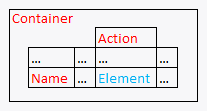
// with _in
_button("elementText", _in(_jvJPanel("Container")))
// index with 2 relational APIs, _rightOf and _under
_button(0, _rightOf(_jvJButton("Name")), _under(_jvJLabel("Action")))
// with regular expression and relations
_button("/elname/", _rightOf(_jvJButton("Name")), _under(_jvJLabel("Action")))
Relations Sample
Value

Text (this is the default attribute used in assertions etc.)

Actions

Default event recorded is _click

Example usage:

_click(_button("elementText"));
_click(_button("/Name/[1]", _rightOf(_jvJLabel("Name"))));
Assertions

Example assertions:

// Check if element exists
_assertExists(_button("button_id"));
// Check if element is visible
_assert(_isVisible(_button("button_id")));
Since
Desktop Engine 7.0.0
Note

You may use either _button or _jvJToggleButton

API

_button(identifier [, relation1 [, relation2 ...]])

Identifiers

Name, Text, Label, ToolTipText, Index

Valid Accessors and alternatives: (Assume this is the 6th button in the UI)

//Name
_button("button_name")
//Text
_button("elementText")
//Label
_button("elementLabel")
//Index
_button(5)
//multiple attributes as JSON
_button({name: "button_name", sahiIndex: 1})
//multiple attributes as JSON including regular expression
_button({name: "/button .*name/", sahiIndex: 1})
Relations

Relational APIs _in, _near, _leftOf, _rightOf, _under, _above can be used.

// with _in
_button("button_name", _in(_jvJPanel("Container")))
// index with 2 relational APIs, _rightOf and _under
_button(0, _rightOf(_jvJButton("Name")), _under(_jvJLabel("Action")))
// with regular expression and relations
_button("/elname/", _rightOf(_jvJButton("Name")), _under(_jvJLabel("Action")))
Relations Sample
Value

Text (this is the default attribute used in assertions etc.)

Actions

Default event recorded is _click

Example usage:

_click(_button("button_name"));
_click(_button("/Name/[1]", _rightOf(_jvJLabel("Name"))));
Assertions

Example assertions:

// Check if element exists
_assertExists(_button("button_id"));
// Check if element is visible
_assert(_isVisible(_button("button_id")));
Since
Desktop Engine 7.0.0
Note

You may use either _table or _jvJTable

API

_table(identifier [, relation1 [, relation2 ...]])

Identifiers

Name, ToolTipText, Index

Valid Accessors and alternatives: (Assume this is the 6th table in the UI)

//Name
_table("table_name")
//Index
_table(5)
//multiple attributes as JSON
_table({name: "table_name", sahiIndex: 1})
//multiple attributes as JSON including regular expression
_table({name: "/table .*name/", sahiIndex: 1})
Relations

Relational APIs _in, _near, _leftOf, _rightOf, _under, _above can be used.

// with _in
_table("table_name", _in(_jvJPanel("Container")))
// index with 2 relational APIs, _rightOf and _under
_table(0, _rightOf(_jvJButton("Name")), _under(_jvJLabel("Action")))
// with regular expression and relations
_table("/elname/", _rightOf(_jvJButton("Name")), _under(_jvJLabel("Action")))
Relations Sample
Value

ValueAt (this is the default attribute used in assertions etc.)

Actions

Default event recorded is _click

Example usage:

_click(_table("table_name"));
_click(_table("/Name/[1]", _rightOf(_jvJLabel("Name"))));
Assertions

Example assertions:

// Check if element exists
_assertExists(_table("table_id"));
// Check if element is visible
_assert(_isVisible(_table("table_id")));
Since
Desktop Engine 7.0.0
API

_jvJTableHeader(identifier [, relation1 [, relation2 ...]])

Identifiers

Name, ToolTipText, Index

Valid Accessors and alternatives: (Assume this is the 6th jvJTableHeader in the UI)

//Name
_jvJTableHeader("JTableHeader_name")
//Index
_jvJTableHeader(5)
//multiple attributes as JSON
_jvJTableHeader({name: "JTableHeader_name", sahiIndex: 1})
//multiple attributes as JSON including regular expression
_jvJTableHeader({name: "/JTableHeader .*name/", sahiIndex: 1})
Relations

Relational APIs _in, _near, _leftOf, _rightOf, _under, _above can be used.

// with _in
_jvJTableHeader("JTableHeader_name", _in(_jvJPanel("Container")))
// index with 2 relational APIs, _rightOf and _under
_jvJTableHeader(0, _rightOf(_jvJButton("Name")), _under(_jvJLabel("Action")))
// with regular expression and relations
_jvJTableHeader("/elname/", _rightOf(_jvJButton("Name")), _under(_jvJLabel("Action")))
Relations Sample
Value

Text (this is the default attribute used in assertions etc.)

Actions

Default event recorded is _click

Example usage:

_click(_jvJTableHeader("JTableHeader_name"));
_click(_jvJTableHeader("/Name/[1]", _rightOf(_jvJLabel("Name"))));
Assertions

Example assertions:

// Check if element exists
_assertExists(_jvJTableHeader("JTableHeader_id"));
// Check if element is visible
_assert(_isVisible(_jvJTableHeader("JTableHeader_id")));
Since
Desktop Engine 7.0.0
Note

You may use either _menu or _jvJMenu

API

_menu(identifier [, relation1 [, relation2 ...]])

Identifiers

Name, Text, Label, ToolTipText, Index

Valid Accessors and alternatives: (Assume this is the 6th menu in the UI)

//Name
_menu("menu_name")
//Text
_menu("elementText")
//Label
_menu("elementLabel")
//Index
_menu(5)
//multiple attributes as JSON
_menu({name: "menu_name", sahiIndex: 1})
//multiple attributes as JSON including regular expression
_menu({name: "/menu .*name/", sahiIndex: 1})
Relations

Relational APIs _in, _near, _leftOf, _rightOf, _under, _above can be used.

// with _in
_menu("menu_name", _in(_jvJPanel("Container")))
// index with 2 relational APIs, _rightOf and _under
_menu(0, _rightOf(_jvJButton("Name")), _under(_jvJLabel("Action")))
// with regular expression and relations
_menu("/elname/", _rightOf(_jvJButton("Name")), _under(_jvJLabel("Action")))
Relations Sample
Value

Text (this is the default attribute used in assertions etc.)

Actions

Default event recorded is _click

Example usage:

_click(_menu("menu_name"));
_click(_menu("/Name/[1]", _rightOf(_jvJLabel("Name"))));
Assertions

Example assertions:

// Check if element exists
_assertExists(_menu("menu_id"));
// Check if element is visible
_assert(_isVisible(_menu("menu_id")));
Since
Desktop Engine 7.0.0
API

_jvJMenuItem(identifier [, relation1 [, relation2 ...]])

Identifiers

Name, Text, Label, ToolTipText, Index

Valid Accessors and alternatives: (Assume this is the 6th jvJMenuItem in the UI)

//Name
_jvJMenuItem("JMenuItem_name")
//Text
_jvJMenuItem("elementText")
//Label
_jvJMenuItem("elementLabel")
//Index
_jvJMenuItem(5)
//multiple attributes as JSON
_jvJMenuItem({name: "JMenuItem_name", sahiIndex: 1})
//multiple attributes as JSON including regular expression
_jvJMenuItem({name: "/JMenuItem .*name/", sahiIndex: 1})
Relations

Relational APIs _in, _near, _leftOf, _rightOf, _under, _above can be used.

// with _in
_jvJMenuItem("JMenuItem_name", _in(_jvJPanel("Container")))
// index with 2 relational APIs, _rightOf and _under
_jvJMenuItem(0, _rightOf(_jvJButton("Name")), _under(_jvJLabel("Action")))
// with regular expression and relations
_jvJMenuItem("/elname/", _rightOf(_jvJButton("Name")), _under(_jvJLabel("Action")))
Relations Sample
Value

Text (this is the default attribute used in assertions etc.)

Actions

Default event recorded is _click

Example usage:

_click(_jvJMenuItem("JMenuItem_name"));
_click(_jvJMenuItem("/Name/[1]", _rightOf(_jvJLabel("Name"))));
Assertions

Example assertions:

// Check if element exists
_assertExists(_jvJMenuItem("JMenuItem_id"));
// Check if element is visible
_assert(_isVisible(_jvJMenuItem("JMenuItem_id")));
Since
Desktop Engine 7.0.0
API

_jvJPopupMenu(identifier [, relation1 [, relation2 ...]])

Identifiers

Name, Text, Label, ToolTipText, Index

Valid Accessors and alternatives: (Assume this is the 6th jvJPopupMenu in the UI)

//Name
_jvJPopupMenu("JPopupMenu_name")
//Text
_jvJPopupMenu("elementText")
//Label
_jvJPopupMenu("elementLabel")
//Index
_jvJPopupMenu(5)
//multiple attributes as JSON
_jvJPopupMenu({name: "JPopupMenu_name", sahiIndex: 1})
//multiple attributes as JSON including regular expression
_jvJPopupMenu({name: "/JPopupMenu .*name/", sahiIndex: 1})
Relations

Relational APIs _in, _near, _leftOf, _rightOf, _under, _above can be used.

// with _in
_jvJPopupMenu("JPopupMenu_name", _in(_jvJPanel("Container")))
// index with 2 relational APIs, _rightOf and _under
_jvJPopupMenu(0, _rightOf(_jvJButton("Name")), _under(_jvJLabel("Action")))
// with regular expression and relations
_jvJPopupMenu("/elname/", _rightOf(_jvJButton("Name")), _under(_jvJLabel("Action")))
Relations Sample
Value

Text (this is the default attribute used in assertions etc.)

Actions

Default event recorded is _click

Example usage:

_click(_jvJPopupMenu("JPopupMenu_name"));
_click(_jvJPopupMenu("/Name/[1]", _rightOf(_jvJLabel("Name"))));
Assertions

Example assertions:

// Check if element exists
_assertExists(_jvJPopupMenu("JPopupMenu_id"));
// Check if element is visible
_assert(_isVisible(_jvJPopupMenu("JPopupMenu_id")));
Since
Desktop Engine 7.0.0
API

_jvJCheckBoxMenuItem(identifier [, relation1 [, relation2 ...]])

Identifiers

Name, Text, Label, ToolTipText, Index

Valid Accessors and alternatives: (Assume this is the 6th jvJCheckBoxMenuItem in the UI)

//Name
_jvJCheckBoxMenuItem("JCheckBoxMenuItem_name")
//Text
_jvJCheckBoxMenuItem("elementText")
//Label
_jvJCheckBoxMenuItem("elementLabel")
//Index
_jvJCheckBoxMenuItem(5)
//multiple attributes as JSON
_jvJCheckBoxMenuItem({name: "JCheckBoxMenuItem_name", sahiIndex: 1})
//multiple attributes as JSON including regular expression
_jvJCheckBoxMenuItem({name: "/JCheckBoxMenuItem .*name/", sahiIndex: 1})
Relations

Relational APIs _in, _near, _leftOf, _rightOf, _under, _above can be used.

// with _in
_jvJCheckBoxMenuItem("JCheckBoxMenuItem_name", _in(_jvJPanel("Container")))
// index with 2 relational APIs, _rightOf and _under
_jvJCheckBoxMenuItem(0, _rightOf(_jvJButton("Name")), _under(_jvJLabel("Action")))
// with regular expression and relations
_jvJCheckBoxMenuItem("/elname/", _rightOf(_jvJButton("Name")), _under(_jvJLabel("Action")))
Relations Sample
Value

isSelected (this is the default attribute used in assertions etc.)

Actions

Default event recorded is _click

Example usage:

_click(_jvJCheckBoxMenuItem("JCheckBoxMenuItem_name"));
_click(_jvJCheckBoxMenuItem("/Name/[1]", _rightOf(_jvJLabel("Name"))));
Assertions

Example assertions:

// Check if element exists
_assertExists(_jvJCheckBoxMenuItem("JCheckBoxMenuItem_id"));
// Check if element is visible
_assert(_isVisible(_jvJCheckBoxMenuItem("JCheckBoxMenuItem_id")));
Since
Desktop Engine 7.0.0
API

_jvJRadioButtonMenuItem(identifier [, relation1 [, relation2 ...]])

Identifiers

Name, Text, Label, ToolTipText, Index

Valid Accessors and alternatives: (Assume this is the 6th jvJRadioButtonMenuItem in the UI)

//Name
_jvJRadioButtonMenuItem("JRadioButtonMenuItem_name")
//Text
_jvJRadioButtonMenuItem("elementText")
//Label
_jvJRadioButtonMenuItem("elementLabel")
//Index
_jvJRadioButtonMenuItem(5)
//multiple attributes as JSON
_jvJRadioButtonMenuItem({name: "JRadioButtonMenuItem_name", sahiIndex: 1})
//multiple attributes as JSON including regular expression
_jvJRadioButtonMenuItem({name: "/JRadioButtonMenuItem .*name/", sahiIndex: 1})
Relations

Relational APIs _in, _near, _leftOf, _rightOf, _under, _above can be used.

// with _in
_jvJRadioButtonMenuItem("JRadioButtonMenuItem_name", _in(_jvJPanel("Container")))
// index with 2 relational APIs, _rightOf and _under
_jvJRadioButtonMenuItem(0, _rightOf(_jvJButton("Name")), _under(_jvJLabel("Action")))
// with regular expression and relations
_jvJRadioButtonMenuItem("/elname/", _rightOf(_jvJButton("Name")), _under(_jvJLabel("Action")))
Relations Sample
Value

isSelected (this is the default attribute used in assertions etc.)

Actions

Default event recorded is _click

Example usage:

_click(_jvJRadioButtonMenuItem("JRadioButtonMenuItem_name"));
_click(_jvJRadioButtonMenuItem("/Name/[1]", _rightOf(_jvJLabel("Name"))));
Assertions

Example assertions:

// Check if element exists
_assertExists(_jvJRadioButtonMenuItem("JRadioButtonMenuItem_id"));
// Check if element is visible
_assert(_isVisible(_jvJRadioButtonMenuItem("JRadioButtonMenuItem_id")));
Since
Desktop Engine 7.0.0
Note

You may use either _checkbox or _jvJCheckBox

API

_checkbox(identifier [, relation1 [, relation2 ...]])

Identifiers

Name, Text, Label, ToolTipText, Index

Valid Accessors and alternatives: (Assume this is the 6th checkbox in the UI)

//Name
_checkbox("checkbox_name")
//Text
_checkbox("elementText")
//Label
_checkbox("elementLabel")
//Index
_checkbox(5)
//multiple attributes as JSON
_checkbox({name: "checkbox_name", sahiIndex: 1})
//multiple attributes as JSON including regular expression
_checkbox({name: "/checkbox .*name/", sahiIndex: 1})
Relations

Relational APIs _in, _near, _leftOf, _rightOf, _under, _above can be used.

// with _in
_checkbox("checkbox_name", _in(_jvJPanel("Container")))
// index with 2 relational APIs, _rightOf and _under
_checkbox(0, _rightOf(_jvJButton("Name")), _under(_jvJLabel("Action")))
// with regular expression and relations
_checkbox("/elname/", _rightOf(_jvJButton("Name")), _under(_jvJLabel("Action")))
Relations Sample
Value

Selected (this is the default attribute used in assertions etc.)

Actions

Default event recorded is _click

Example usage:

_click(_checkbox("checkbox_name"));
_click(_checkbox("/Name/[1]", _rightOf(_jvJLabel("Name"))));
// Check irrespective of whether it was checked or unchecked
_check(_checkbox("checkbox_name"));
// Uncheck irrespective of whether it was checked or unchecked
_uncheck(_checkbox("checkbox_name"));
Assertions

Example assertions:

// Check if element exists
_assertExists(_checkbox("checkbox_id"));
// Check if element is visible
_assert(_isVisible(_checkbox("checkbox_id")));
Since
Desktop Engine 7.0.0
Note

You may use either _radio or _jvJRadioButton

API

_radio(identifier [, relation1 [, relation2 ...]])

Identifiers

Name, Text, Label, ToolTipText, Index

Valid Accessors and alternatives: (Assume this is the 6th radio in the UI)

//Name
_radio("radio_name")
//Text
_radio("elementText")
//Label
_radio("elementLabel")
//Index
_radio(5)
//multiple attributes as JSON
_radio({name: "radio_name", sahiIndex: 1})
//multiple attributes as JSON including regular expression
_radio({name: "/radio .*name/", sahiIndex: 1})
Relations

Relational APIs _in, _near, _leftOf, _rightOf, _under, _above can be used.

// with _in
_radio("radio_name", _in(_jvJPanel("Container")))
// index with 2 relational APIs, _rightOf and _under
_radio(0, _rightOf(_jvJButton("Name")), _under(_jvJLabel("Action")))
// with regular expression and relations
_radio("/elname/", _rightOf(_jvJButton("Name")), _under(_jvJLabel("Action")))
Relations Sample
Value

Selected (this is the default attribute used in assertions etc.)

Actions

Default event recorded is _click

Example usage:

_click(_radio("radio_name"));
_click(_radio("/Name/[1]", _rightOf(_jvJLabel("Name"))));
// Check irrespective of whether it was checked or unchecked
_check(_radio("radio_name"));
Assertions

Example assertions:

// Check if element exists
_assertExists(_radio("radio_id"));
// Check if element is visible
_assert(_isVisible(_radio("radio_id")));
Since
Desktop Engine 7.0.0
Note

You may use either _textbox or _jvJTextField

API

_textbox(identifier [, relation1 [, relation2 ...]])

Identifiers

Name, ToolTipText, Index

Valid Accessors and alternatives: (Assume this is the 6th textbox in the UI)

//Name
_textbox("textbox_name")
//Index
_textbox(5)
//multiple attributes as JSON
_textbox({name: "textbox_name", sahiIndex: 1})
//multiple attributes as JSON including regular expression
_textbox({name: "/textbox .*name/", sahiIndex: 1})
Relations

Relational APIs _in, _near, _leftOf, _rightOf, _under, _above can be used.

// with _in
_textbox("textbox_name", _in(_jvJPanel("Container")))
// index with 2 relational APIs, _rightOf and _under
_textbox(0, _rightOf(_jvJButton("Name")), _under(_jvJLabel("Action")))
// with regular expression and relations
_textbox("/elname/", _rightOf(_jvJButton("Name")), _under(_jvJLabel("Action")))
Relations Sample
Value

Text (this is the default attribute used in assertions etc.)

Actions

Default event recorded is _setValue

Example usage:

_setValue(_textbox("textbox_name"), "elementText");
_setValue(_textbox("/Name/[1]", _rightOf(_jvJLabel("Name"))), "elementText");
Assertions

Example assertions:

// Check if element exists
_assertExists(_textbox("textbox_id"));
// Check if element is visible
_assert(_isVisible(_textbox("textbox_id")));
Since
Desktop Engine 7.0.0
Note

You may use either _textarea or _jvJTextArea

API

_textarea(identifier [, relation1 [, relation2 ...]])

Identifiers

Name, ToolTipText, Index

Valid Accessors and alternatives: (Assume this is the 6th textarea in the UI)

//Name
_textarea("textarea_name")
//Index
_textarea(5)
//multiple attributes as JSON
_textarea({name: "textarea_name", sahiIndex: 1})
//multiple attributes as JSON including regular expression
_textarea({name: "/textarea .*name/", sahiIndex: 1})
Relations

Relational APIs _in, _near, _leftOf, _rightOf, _under, _above can be used.

// with _in
_textarea("textarea_name", _in(_jvJPanel("Container")))
// index with 2 relational APIs, _rightOf and _under
_textarea(0, _rightOf(_jvJButton("Name")), _under(_jvJLabel("Action")))
// with regular expression and relations
_textarea("/elname/", _rightOf(_jvJButton("Name")), _under(_jvJLabel("Action")))
Relations Sample
Value

Text (this is the default attribute used in assertions etc.)

Actions

Default event recorded is _setValue

Example usage:

_setValue(_textarea("textarea_name"), "elementText");
_setValue(_textarea("/Name/[1]", _rightOf(_jvJLabel("Name"))), "elementText");
Assertions

Example assertions:

// Check if element exists
_assertExists(_textarea("textarea_id"));
// Check if element is visible
_assert(_isVisible(_textarea("textarea_id")));
Since
Desktop Engine 7.0.0
API

_jvJTextPane(identifier [, relation1 [, relation2 ...]])

Identifiers

Name, ToolTipText, Index

Valid Accessors and alternatives: (Assume this is the 6th jvJTextPane in the UI)

//Name
_jvJTextPane("JTextPane_name")
//Index
_jvJTextPane(5)
//multiple attributes as JSON
_jvJTextPane({name: "JTextPane_name", sahiIndex: 1})
//multiple attributes as JSON including regular expression
_jvJTextPane({name: "/JTextPane .*name/", sahiIndex: 1})
Relations

Relational APIs _in, _near, _leftOf, _rightOf, _under, _above can be used.

// with _in
_jvJTextPane("JTextPane_name", _in(_jvJPanel("Container")))
// index with 2 relational APIs, _rightOf and _under
_jvJTextPane(0, _rightOf(_jvJButton("Name")), _under(_jvJLabel("Action")))
// with regular expression and relations
_jvJTextPane("/elname/", _rightOf(_jvJButton("Name")), _under(_jvJLabel("Action")))
Relations Sample
Value

Text (this is the default attribute used in assertions etc.)

Actions

Default event recorded is _setValue

Example usage:

_setValue(_jvJTextPane("JTextPane_name"), "elementText");
_setValue(_jvJTextPane("/Name/[1]", _rightOf(_jvJLabel("Name"))), "elementText");
Assertions

Example assertions:

// Check if element exists
_assertExists(_jvJTextPane("JTextPane_id"));
// Check if element is visible
_assert(_isVisible(_jvJTextPane("JTextPane_id")));
Since
Desktop Engine 7.0.0
API

_jvJEditorPane(identifier [, relation1 [, relation2 ...]])

Identifiers

Name, ToolTipText, Index

Valid Accessors and alternatives: (Assume this is the 6th jvJEditorPane in the UI)

//Name
_jvJEditorPane("JEditorPane_name")
//Index
_jvJEditorPane(5)
//multiple attributes as JSON
_jvJEditorPane({name: "JEditorPane_name", sahiIndex: 1})
//multiple attributes as JSON including regular expression
_jvJEditorPane({name: "/JEditorPane .*name/", sahiIndex: 1})
Relations

Relational APIs _in, _near, _leftOf, _rightOf, _under, _above can be used.

// with _in
_jvJEditorPane("JEditorPane_name", _in(_jvJPanel("Container")))
// index with 2 relational APIs, _rightOf and _under
_jvJEditorPane(0, _rightOf(_jvJButton("Name")), _under(_jvJLabel("Action")))
// with regular expression and relations
_jvJEditorPane("/elname/", _rightOf(_jvJButton("Name")), _under(_jvJLabel("Action")))
Relations Sample
Value

Text (this is the default attribute used in assertions etc.)

Actions

Default event recorded is _setValue

Example usage:

_setValue(_jvJEditorPane("JEditorPane_name"), "elementText");
_setValue(_jvJEditorPane("/Name/[1]", _rightOf(_jvJLabel("Name"))), "elementText");
Assertions

Example assertions:

// Check if element exists
_assertExists(_jvJEditorPane("JEditorPane_id"));
// Check if element is visible
_assert(_isVisible(_jvJEditorPane("JEditorPane_id")));
Since
Desktop Engine 7.0.0
Note

You may use either _password or _jvJPasswordField

API

_password(identifier [, relation1 [, relation2 ...]])

Identifiers

Name, ToolTipText, Index

Valid Accessors and alternatives: (Assume this is the 6th password in the UI)

//Name
_password("password_name")
//Index
_password(5)
//multiple attributes as JSON
_password({name: "password_name", sahiIndex: 1})
//multiple attributes as JSON including regular expression
_password({name: "/password .*name/", sahiIndex: 1})
Relations

Relational APIs _in, _near, _leftOf, _rightOf, _under, _above can be used.

// with _in
_password("password_name", _in(_jvJPanel("Container")))
// index with 2 relational APIs, _rightOf and _under
_password(0, _rightOf(_jvJButton("Name")), _under(_jvJLabel("Action")))
// with regular expression and relations
_password("/elname/", _rightOf(_jvJButton("Name")), _under(_jvJLabel("Action")))
Relations Sample
Value

Text (this is the default attribute used in assertions etc.)

Actions

Default event recorded is _setValue

Example usage:

_setValue(_password("password_name"), "elementText");
_setValue(_password("/Name/[1]", _rightOf(_jvJLabel("Name"))), "elementText");
Assertions

Example assertions:

// Check if element exists
_assertExists(_password("password_id"));
// Check if element is visible
_assert(_isVisible(_password("password_id")));
Since
Desktop Engine 7.0.0
API

_jvJComboBox(identifier [, relation1 [, relation2 ...]])

Identifiers

Name, ToolTipText, Index

Valid Accessors and alternatives: (Assume this is the 6th jvJComboBox in the UI)

//Name
_jvJComboBox("JComboBox_name")
//Index
_jvJComboBox(5)
//multiple attributes as JSON
_jvJComboBox({name: "JComboBox_name", sahiIndex: 1})
//multiple attributes as JSON including regular expression
_jvJComboBox({name: "/JComboBox .*name/", sahiIndex: 1})
Relations

Relational APIs _in, _near, _leftOf, _rightOf, _under, _above can be used.

// with _in
_jvJComboBox("JComboBox_name", _in(_jvJPanel("Container")))
// index with 2 relational APIs, _rightOf and _under
_jvJComboBox(0, _rightOf(_jvJButton("Name")), _under(_jvJLabel("Action")))
// with regular expression and relations
_jvJComboBox("/elname/", _rightOf(_jvJButton("Name")), _under(_jvJLabel("Action")))
Relations Sample
Value

(this is the default attribute used in assertions etc.)

Actions

Default event recorded is _setSelected

Example usage:

_setSelected(_jvJComboBox("JComboBox_name"), null);
_setSelected(_jvJComboBox("/Name/[1]", _rightOf(_jvJLabel("Name"))), null);
Assertions

Example assertions:

// Check if element exists
_assertExists(_jvJComboBox("JComboBox_id"));
// Check if element is visible
_assert(_isVisible(_jvJComboBox("JComboBox_id")));
Since
Desktop Engine 7.0.0
API

_jvJTabbedPane(identifier [, relation1 [, relation2 ...]])

Identifiers

Name, ToolTipText, Index

Valid Accessors and alternatives: (Assume this is the 6th jvJTabbedPane in the UI)

//Name
_jvJTabbedPane("JTabbedPane_name")
//Index
_jvJTabbedPane(5)
//multiple attributes as JSON
_jvJTabbedPane({name: "JTabbedPane_name", sahiIndex: 1})
//multiple attributes as JSON including regular expression
_jvJTabbedPane({name: "/JTabbedPane .*name/", sahiIndex: 1})
Relations

Relational APIs _in, _near, _leftOf, _rightOf, _under, _above can be used.

// with _in
_jvJTabbedPane("JTabbedPane_name", _in(_jvJPanel("Container")))
// index with 2 relational APIs, _rightOf and _under
_jvJTabbedPane(0, _rightOf(_jvJButton("Name")), _under(_jvJLabel("Action")))
// with regular expression and relations
_jvJTabbedPane("/elname/", _rightOf(_jvJButton("Name")), _under(_jvJLabel("Action")))
Relations Sample
Value

(this is the default attribute used in assertions etc.)

Actions

Default event recorded is _setSelected

Example usage:

_setSelected(_jvJTabbedPane("JTabbedPane_name"), null);
_setSelected(_jvJTabbedPane("/Name/[1]", _rightOf(_jvJLabel("Name"))), null);
Assertions

Example assertions:

// Check if element exists
_assertExists(_jvJTabbedPane("JTabbedPane_id"));
// Check if element is visible
_assert(_isVisible(_jvJTabbedPane("JTabbedPane_id")));
Since
Desktop Engine 7.0.0
API

_jvJList(identifier [, relation1 [, relation2 ...]])

Identifiers

Name, ToolTipText, Index

Valid Accessors and alternatives: (Assume this is the 6th jvJList in the UI)

//Name
_jvJList("JList_name")
//Index
_jvJList(5)
//multiple attributes as JSON
_jvJList({name: "JList_name", sahiIndex: 1})
//multiple attributes as JSON including regular expression
_jvJList({name: "/JList .*name/", sahiIndex: 1})
Relations

Relational APIs _in, _near, _leftOf, _rightOf, _under, _above can be used.

// with _in
_jvJList("JList_name", _in(_jvJPanel("Container")))
// index with 2 relational APIs, _rightOf and _under
_jvJList(0, _rightOf(_jvJButton("Name")), _under(_jvJLabel("Action")))
// with regular expression and relations
_jvJList("/elname/", _rightOf(_jvJButton("Name")), _under(_jvJLabel("Action")))
Relations Sample
Value

(this is the default attribute used in assertions etc.)

Actions

Default event recorded is _setSelected

Example usage:

_setSelected(_jvJList("JList_name"), null);
_setSelected(_jvJList("/Name/[1]", _rightOf(_jvJLabel("Name"))), null);
Assertions

Example assertions:

// Check if element exists
_assertExists(_jvJList("JList_id"));
// Check if element is visible
_assert(_isVisible(_jvJList("JList_id")));
Since
Desktop Engine 7.0.0
API

_jvChoice(identifier [, relation1 [, relation2 ...]])

Identifiers

Name, ToolTipText, Index

Valid Accessors and alternatives: (Assume this is the 6th jvChoice in the UI)

//Name
_jvChoice("Choice_name")
//Index
_jvChoice(5)
//multiple attributes as JSON
_jvChoice({name: "Choice_name", sahiIndex: 1})
//multiple attributes as JSON including regular expression
_jvChoice({name: "/Choice .*name/", sahiIndex: 1})
Relations

Relational APIs _in, _near, _leftOf, _rightOf, _under, _above can be used.

// with _in
_jvChoice("Choice_name", _in(_jvJPanel("Container")))
// index with 2 relational APIs, _rightOf and _under
_jvChoice(0, _rightOf(_jvJButton("Name")), _under(_jvJLabel("Action")))
// with regular expression and relations
_jvChoice("/elname/", _rightOf(_jvJButton("Name")), _under(_jvJLabel("Action")))
Relations Sample
Value

(this is the default attribute used in assertions etc.)

Actions

Default event recorded is _setSelected

Example usage:

_setSelected(_jvChoice("Choice_name"), null);
_setSelected(_jvChoice("/Name/[1]", _rightOf(_jvJLabel("Name"))), null);
Assertions

Example assertions:

// Check if element exists
_assertExists(_jvChoice("Choice_id"));
// Check if element is visible
_assert(_isVisible(_jvChoice("Choice_id")));
Since
Desktop Engine 7.0.0
API

_jvList(identifier [, relation1 [, relation2 ...]])

Identifiers

Name, ToolTipText, Index

Valid Accessors and alternatives: (Assume this is the 6th jvList in the UI)

//Name
_jvList("List_name")
//Index
_jvList(5)
//multiple attributes as JSON
_jvList({name: "List_name", sahiIndex: 1})
//multiple attributes as JSON including regular expression
_jvList({name: "/List .*name/", sahiIndex: 1})
Relations

Relational APIs _in, _near, _leftOf, _rightOf, _under, _above can be used.

// with _in
_jvList("List_name", _in(_jvJPanel("Container")))
// index with 2 relational APIs, _rightOf and _under
_jvList(0, _rightOf(_jvJButton("Name")), _under(_jvJLabel("Action")))
// with regular expression and relations
_jvList("/elname/", _rightOf(_jvJButton("Name")), _under(_jvJLabel("Action")))
Relations Sample
Value

(this is the default attribute used in assertions etc.)

Actions

Default event recorded is _setSelected

Example usage:

_setSelected(_jvList("List_name"), null);
_setSelected(_jvList("/Name/[1]", _rightOf(_jvJLabel("Name"))), null);
Assertions

Example assertions:

// Check if element exists
_assertExists(_jvList("List_id"));
// Check if element is visible
_assert(_isVisible(_jvList("List_id")));
Since
Desktop Engine 7.0.0
Note

You may use either _label or _jvJLabel

API

_label(identifier [, relation1 [, relation2 ...]])

Identifiers

Name, Text, ToolTipText, Index

Valid Accessors and alternatives: (Assume this is the 6th label in the UI)

//Name
_label("label_name")
//Text
_label("elementText")
//Index
_label(5)
//multiple attributes as JSON
_label({name: "label_name", sahiIndex: 1})
//multiple attributes as JSON including regular expression
_label({name: "/label .*name/", sahiIndex: 1})
Relations

Relational APIs _in, _near, _leftOf, _rightOf, _under, _above can be used.

// with _in
_label("label_name", _in(_jvJPanel("Container")))
// index with 2 relational APIs, _rightOf and _under
_label(0, _rightOf(_jvJButton("Name")), _under(_jvJLabel("Action")))
// with regular expression and relations
_label("/elname/", _rightOf(_jvJButton("Name")), _under(_jvJLabel("Action")))
Relations Sample
Value

Text (this is the default attribute used in assertions etc.)

Actions

Default event recorded is _click

Example usage:

_click(_label("label_name"));
_click(_label("/Name/[1]", _rightOf(_jvJLabel("Name"))));
Assertions

Example assertions:

// Check if element exists
_assertExists(_label("label_id"));
// Check if element is visible
_assert(_isVisible(_label("label_id")));
Since
Desktop Engine 7.0.0
API

_jvJPanel(identifier [, relation1 [, relation2 ...]])

Identifiers

Name, Index, Label

Valid Accessors and alternatives: (Assume this is the 6th jvJPanel in the UI)

//Name
_jvJPanel("JPanel_name")
//Index
_jvJPanel(5)
//Label
_jvJPanel("elementLabel")
//multiple attributes as JSON
_jvJPanel({name: "JPanel_name", sahiIndex: 1})
//multiple attributes as JSON including regular expression
_jvJPanel({name: "/JPanel .*name/", sahiIndex: 1})
Relations

Relational APIs _in, _near, _leftOf, _rightOf, _under, _above can be used.

// with _in
_jvJPanel("JPanel_name", _in(_jvJPanel("Container")))
// index with 2 relational APIs, _rightOf and _under
_jvJPanel(0, _rightOf(_jvJButton("Name")), _under(_jvJLabel("Action")))
// with regular expression and relations
_jvJPanel("/elname/", _rightOf(_jvJButton("Name")), _under(_jvJLabel("Action")))
Relations Sample
Value

(this is the default attribute used in assertions etc.)

Actions

Default event recorded is _setSelected

Example usage:

_setSelected(_jvJPanel("JPanel_name"), null);
_setSelected(_jvJPanel("/Name/[1]", _rightOf(_jvJLabel("Name"))), null);
Assertions

Example assertions:

// Check if element exists
_assertExists(_jvJPanel("JPanel_id"));
// Check if element is visible
_assert(_isVisible(_jvJPanel("JPanel_id")));
Since
Desktop Engine 7.0.0
API

_jvJSlider(identifier [, relation1 [, relation2 ...]])

Identifiers

Name, ToolTipText, Index

Valid Accessors and alternatives: (Assume this is the 6th jvJSlider in the UI)

//Name
_jvJSlider("JSlider_name")
//Index
_jvJSlider(5)
//multiple attributes as JSON
_jvJSlider({name: "JSlider_name", sahiIndex: 1})
//multiple attributes as JSON including regular expression
_jvJSlider({name: "/JSlider .*name/", sahiIndex: 1})
Relations

Relational APIs _in, _near, _leftOf, _rightOf, _under, _above can be used.

// with _in
_jvJSlider("JSlider_name", _in(_jvJPanel("Container")))
// index with 2 relational APIs, _rightOf and _under
_jvJSlider(0, _rightOf(_jvJButton("Name")), _under(_jvJLabel("Action")))
// with regular expression and relations
_jvJSlider("/elname/", _rightOf(_jvJButton("Name")), _under(_jvJLabel("Action")))
Relations Sample
Value

Value (this is the default attribute used in assertions etc.)

Actions

Default event recorded is _setValue

Example usage:

_setValue(_jvJSlider("JSlider_name"), "apple");
_setValue(_jvJSlider("/Name/[1]", _rightOf(_jvJLabel("Name"))), "apple");
Assertions

Example assertions:

// Check if element exists
_assertExists(_jvJSlider("JSlider_id"));
// Check if element is visible
_assert(_isVisible(_jvJSlider("JSlider_id")));
Since
Desktop Engine 7.0.0
API

_jvScrollbar(identifier [, relation1 [, relation2 ...]])

Identifiers

ToolTipText, Index

Valid Accessors and alternatives: (Assume this is the 6th jvScrollbar in the UI)

//Index
_jvScrollbar(5)
//multiple attributes as JSON
_jvScrollbar({ToolTipText: "Scrollbar_ToolTipText", sahiIndex: 1})
//multiple attributes as JSON including regular expression
_jvScrollbar({ToolTipText: "/Scrollbar .*ToolTipText/", sahiIndex: 1})
Relations

Relational APIs _in, _near, _leftOf, _rightOf, _under, _above can be used.

// with _in
_jvScrollbar(, _in(_jvJPanel("Container")))
// index with 2 relational APIs, _rightOf and _under
_jvScrollbar(0, _rightOf(_jvJButton("Name")), _under(_jvJLabel("Action")))
// with regular expression and relations
_jvScrollbar("/elname/", _rightOf(_jvJButton("Name")), _under(_jvJLabel("Action")))
Relations Sample
Value

Value (this is the default attribute used in assertions etc.)

Actions

Default event recorded is _setValue

Example usage:

_setValue(_jvScrollbar(), "apple");
_setValue(_jvScrollbar("/Name/[1]", _rightOf(_jvJLabel("Name"))), "apple");
Assertions

Example assertions:

// Check if element exists
_assertExists(_jvScrollbar("Scrollbar_id"));
// Check if element is visible
_assert(_isVisible(_jvScrollbar("Scrollbar_id")));
Since
Desktop Engine 9.0.0
Note

You may use either _jvScrollbar or _jvJScrollbar

API

_jvScrollbar(identifier [, relation1 [, relation2 ...]])

Identifiers

ToolTipText, Index

Valid Accessors and alternatives: (Assume this is the 6th jvScrollbar in the UI)

//Index
_jvScrollbar(5)
//multiple attributes as JSON
_jvScrollbar({ToolTipText: "Scrollbar_ToolTipText", sahiIndex: 1})
//multiple attributes as JSON including regular expression
_jvScrollbar({ToolTipText: "/Scrollbar .*ToolTipText/", sahiIndex: 1})
Relations

Relational APIs _in, _near, _leftOf, _rightOf, _under, _above can be used.

// with _in
_jvScrollbar(, _in(_jvJPanel("Container")))
// index with 2 relational APIs, _rightOf and _under
_jvScrollbar(0, _rightOf(_jvJButton("Name")), _under(_jvJLabel("Action")))
// with regular expression and relations
_jvScrollbar("/elname/", _rightOf(_jvJButton("Name")), _under(_jvJLabel("Action")))
Relations Sample
Value

Value (this is the default attribute used in assertions etc.)

Actions

Default event recorded is _setValue

Example usage:

_setValue(_jvScrollbar(), "apple");
_setValue(_jvScrollbar("/Name/[1]", _rightOf(_jvJLabel("Name"))), "apple");
Assertions

Example assertions:

// Check if element exists
_assertExists(_jvScrollbar("Scrollbar_id"));
// Check if element is visible
_assert(_isVisible(_jvScrollbar("Scrollbar_id")));
Since
Desktop Engine 7.0.0
Note

You may use either _button or _jvButton

API

_button(identifier [, relation1 [, relation2 ...]])

Identifiers

Label, Name, Text, ToolTipText, Index

Valid Accessors and alternatives: (Assume this is the 6th button in the UI)

//Label
_button("elementLabel")
//Name
_button("button_name")
//Text
_button("elementText")
//Index
_button(5)
//multiple attributes as JSON
_button({name: "button_name", sahiIndex: 1})
//multiple attributes as JSON including regular expression
_button({name: "/button .*name/", sahiIndex: 1})
Relations

Relational APIs _in, _near, _leftOf, _rightOf, _under, _above can be used.

// with _in
_button("elementLabel", _in(_jvJPanel("Container")))
// index with 2 relational APIs, _rightOf and _under
_button(0, _rightOf(_jvJButton("Name")), _under(_jvJLabel("Action")))
// with regular expression and relations
_button("/elname/", _rightOf(_jvJButton("Name")), _under(_jvJLabel("Action")))
Relations Sample
Value

Label (this is the default attribute used in assertions etc.)

Actions

Default event recorded is _click

Example usage:

_click(_button("elementLabel"));
_click(_button("/Name/[1]", _rightOf(_jvJLabel("Name"))));
Assertions

Example assertions:

// Check if element exists
_assertExists(_button("button_id"));
// Check if element is visible
_assert(_isVisible(_button("button_id")));
Since
Desktop Engine 7.0.0
Note

You may use either _textbox or _jvTextField

API

_textbox(identifier [, relation1 [, relation2 ...]])

Identifiers

Name, Index

Valid Accessors and alternatives: (Assume this is the 6th textbox in the UI)

//Name
_textbox("textbox_name")
//Index
_textbox(5)
//multiple attributes as JSON
_textbox({name: "textbox_name", sahiIndex: 1})
//multiple attributes as JSON including regular expression
_textbox({name: "/textbox .*name/", sahiIndex: 1})
Relations

Relational APIs _in, _near, _leftOf, _rightOf, _under, _above can be used.

// with _in
_textbox("textbox_name", _in(_jvJPanel("Container")))
// index with 2 relational APIs, _rightOf and _under
_textbox(0, _rightOf(_jvJButton("Name")), _under(_jvJLabel("Action")))
// with regular expression and relations
_textbox("/elname/", _rightOf(_jvJButton("Name")), _under(_jvJLabel("Action")))
Relations Sample
Value

Text (this is the default attribute used in assertions etc.)

Actions

Default event recorded is _setValue

Example usage:

_setValue(_textbox("textbox_name"), "elementText");
_setValue(_textbox("/Name/[1]", _rightOf(_jvJLabel("Name"))), "elementText");
Assertions

Example assertions:

// Check if element exists
_assertExists(_textbox("textbox_id"));
// Check if element is visible
_assert(_isVisible(_textbox("textbox_id")));
Since
Desktop Engine 7.0.0
Note

You may use either _textarea or _jvTextArea

API

_textarea(identifier [, relation1 [, relation2 ...]])

Identifiers

Name, Index

Valid Accessors and alternatives: (Assume this is the 6th textarea in the UI)

//Name
_textarea("textarea_name")
//Index
_textarea(5)
//multiple attributes as JSON
_textarea({name: "textarea_name", sahiIndex: 1})
//multiple attributes as JSON including regular expression
_textarea({name: "/textarea .*name/", sahiIndex: 1})
Relations

Relational APIs _in, _near, _leftOf, _rightOf, _under, _above can be used.

// with _in
_textarea("textarea_name", _in(_jvJPanel("Container")))
// index with 2 relational APIs, _rightOf and _under
_textarea(0, _rightOf(_jvJButton("Name")), _under(_jvJLabel("Action")))
// with regular expression and relations
_textarea("/elname/", _rightOf(_jvJButton("Name")), _under(_jvJLabel("Action")))
Relations Sample
Value

Text (this is the default attribute used in assertions etc.)

Actions

Default event recorded is _setValue

Example usage:

_setValue(_textarea("textarea_name"), "elementText");
_setValue(_textarea("/Name/[1]", _rightOf(_jvJLabel("Name"))), "elementText");
Assertions

Example assertions:

// Check if element exists
_assertExists(_textarea("textarea_id"));
// Check if element is visible
_assert(_isVisible(_textarea("textarea_id")));
Since
Desktop Engine 7.0.0
Note

You may use either _checkbox or _jvCheckbox

API

_checkbox(identifier [, relation1 [, relation2 ...]])

Identifiers

Name, Label, Index

Valid Accessors and alternatives: (Assume this is the 6th checkbox in the UI)

//Name
_checkbox("checkbox_name")
//Label
_checkbox("elementLabel")
//Index
_checkbox(5)
//multiple attributes as JSON
_checkbox({name: "checkbox_name", sahiIndex: 1})
//multiple attributes as JSON including regular expression
_checkbox({name: "/checkbox .*name/", sahiIndex: 1})
Relations

Relational APIs _in, _near, _leftOf, _rightOf, _under, _above can be used.

// with _in
_checkbox("checkbox_name", _in(_jvJPanel("Container")))
// index with 2 relational APIs, _rightOf and _under
_checkbox(0, _rightOf(_jvJButton("Name")), _under(_jvJLabel("Action")))
// with regular expression and relations
_checkbox("/elname/", _rightOf(_jvJButton("Name")), _under(_jvJLabel("Action")))
Relations Sample
Value

State (this is the default attribute used in assertions etc.)

Actions

Default event recorded is _click

Example usage:

_click(_checkbox("checkbox_name"));
_click(_checkbox("/Name/[1]", _rightOf(_jvJLabel("Name"))));
// Check irrespective of whether it was checked or unchecked
_check(_checkbox("checkbox_name"));
// Uncheck irrespective of whether it was checked or unchecked
_uncheck(_checkbox("checkbox_name"));
Assertions

Example assertions:

// Check if element exists
_assertExists(_checkbox("checkbox_id"));
// Check if element is visible
_assert(_isVisible(_checkbox("checkbox_id")));
Since
Desktop Engine 7.0.0
Note

You may use either _label or _jvLabel

API

_label(identifier [, relation1 [, relation2 ...]])

Identifiers

Name, Text, ToolTipText, Index

Valid Accessors and alternatives: (Assume this is the 6th label in the UI)

//Name
_label("label_name")
//Text
_label("elementText")
//Index
_label(5)
//multiple attributes as JSON
_label({name: "label_name", sahiIndex: 1})
//multiple attributes as JSON including regular expression
_label({name: "/label .*name/", sahiIndex: 1})
Relations

Relational APIs _in, _near, _leftOf, _rightOf, _under, _above can be used.

// with _in
_label("label_name", _in(_jvJPanel("Container")))
// index with 2 relational APIs, _rightOf and _under
_label(0, _rightOf(_jvJButton("Name")), _under(_jvJLabel("Action")))
// with regular expression and relations
_label("/elname/", _rightOf(_jvJButton("Name")), _under(_jvJLabel("Action")))
Relations Sample
Value

Text (this is the default attribute used in assertions etc.)

Actions

Default event recorded is _setText

Example usage:

_setText(_label("label_name"), "elementText");
_setText(_label("/Name/[1]", _rightOf(_jvJLabel("Name"))), "elementText");
Assertions

Example assertions:

// Check if element exists
_assertExists(_label("label_id"));
// Check if element is visible
_assert(_isVisible(_label("label_id")));
Since
Desktop Engine 7.0.0
API

_jvJRootPane(identifier [, relation1 [, relation2 ...]])

Identifiers

Name, ToolTipText, Index

Valid Accessors and alternatives: (Assume this is the 6th jvJRootPane in the UI)

//Name
_jvJRootPane("JRootPane_name")
//Index
_jvJRootPane(5)
//multiple attributes as JSON
_jvJRootPane({name: "JRootPane_name", sahiIndex: 1})
//multiple attributes as JSON including regular expression
_jvJRootPane({name: "/JRootPane .*name/", sahiIndex: 1})
Relations

Relational APIs _in, _near, _leftOf, _rightOf, _under, _above can be used.

// with _in
_jvJRootPane("JRootPane_name", _in(_jvJPanel("Container")))
// index with 2 relational APIs, _rightOf and _under
_jvJRootPane(0, _rightOf(_jvJButton("Name")), _under(_jvJLabel("Action")))
// with regular expression and relations
_jvJRootPane("/elname/", _rightOf(_jvJButton("Name")), _under(_jvJLabel("Action")))
Relations Sample
Value

SelectedIndex (this is the default attribute used in assertions etc.)

Actions

Default event recorded is _setSelected

Example usage:

_setSelected(_jvJRootPane("JRootPane_name"), null);
_setSelected(_jvJRootPane("/Name/[1]", _rightOf(_jvJLabel("Name"))), null);
Assertions

Example assertions:

// Check if element exists
_assertExists(_jvJRootPane("JRootPane_id"));
// Check if element is visible
_assert(_isVisible(_jvJRootPane("JRootPane_id")));
Since
Desktop Engine 7.0.0
API

_jvJLayeredPane(identifier [, relation1 [, relation2 ...]])

Identifiers

Name, ToolTipText, Index

Valid Accessors and alternatives: (Assume this is the 6th jvJLayeredPane in the UI)

//Name
_jvJLayeredPane("JLayeredPane_name")
//Index
_jvJLayeredPane(5)
//multiple attributes as JSON
_jvJLayeredPane({name: "JLayeredPane_name", sahiIndex: 1})
//multiple attributes as JSON including regular expression
_jvJLayeredPane({name: "/JLayeredPane .*name/", sahiIndex: 1})
Relations

Relational APIs _in, _near, _leftOf, _rightOf, _under, _above can be used.

// with _in
_jvJLayeredPane("JLayeredPane_name", _in(_jvJPanel("Container")))
// index with 2 relational APIs, _rightOf and _under
_jvJLayeredPane(0, _rightOf(_jvJButton("Name")), _under(_jvJLabel("Action")))
// with regular expression and relations
_jvJLayeredPane("/elname/", _rightOf(_jvJButton("Name")), _under(_jvJLabel("Action")))
Relations Sample
Value

SelectedIndex (this is the default attribute used in assertions etc.)

Actions

Default event recorded is _setSelected

Example usage:

_setSelected(_jvJLayeredPane("JLayeredPane_name"), null);
_setSelected(_jvJLayeredPane("/Name/[1]", _rightOf(_jvJLabel("Name"))), null);
Assertions

Example assertions:

// Check if element exists
_assertExists(_jvJLayeredPane("JLayeredPane_id"));
// Check if element is visible
_assert(_isVisible(_jvJLayeredPane("JLayeredPane_id")));
Since
Desktop Engine 7.0.0
API

_jvJScrollPane(identifier [, relation1 [, relation2 ...]])

Identifiers

Name, ToolTipText, Index

Valid Accessors and alternatives: (Assume this is the 6th jvJScrollPane in the UI)

//Name
_jvJScrollPane("JScrollPane_name")
//Index
_jvJScrollPane(5)
//multiple attributes as JSON
_jvJScrollPane({name: "JScrollPane_name", sahiIndex: 1})
//multiple attributes as JSON including regular expression
_jvJScrollPane({name: "/JScrollPane .*name/", sahiIndex: 1})
Relations

Relational APIs _in, _near, _leftOf, _rightOf, _under, _above can be used.

// with _in
_jvJScrollPane("JScrollPane_name", _in(_jvJPanel("Container")))
// index with 2 relational APIs, _rightOf and _under
_jvJScrollPane(0, _rightOf(_jvJButton("Name")), _under(_jvJLabel("Action")))
// with regular expression and relations
_jvJScrollPane("/elname/", _rightOf(_jvJButton("Name")), _under(_jvJLabel("Action")))
Relations Sample
Value

SelectedIndex (this is the default attribute used in assertions etc.)

Actions

Default event recorded is _setSelected

Example usage:

_setSelected(_jvJScrollPane("JScrollPane_name"), null);
_setSelected(_jvJScrollPane("/Name/[1]", _rightOf(_jvJLabel("Name"))), null);
Assertions

Example assertions:

// Check if element exists
_assertExists(_jvJScrollPane("JScrollPane_id"));
// Check if element is visible
_assert(_isVisible(_jvJScrollPane("JScrollPane_id")));
Since
Desktop Engine 7.0.0
API

_jvJOptionPane(identifier [, relation1 [, relation2 ...]])

Identifiers

Name, ToolTipText, Index

Valid Accessors and alternatives: (Assume this is the 6th jvJOptionPane in the UI)

//Name
_jvJOptionPane("JOptionPane_name")
//Index
_jvJOptionPane(5)
//multiple attributes as JSON
_jvJOptionPane({name: "JOptionPane_name", sahiIndex: 1})
//multiple attributes as JSON including regular expression
_jvJOptionPane({name: "/JOptionPane .*name/", sahiIndex: 1})
Relations

Relational APIs _in, _near, _leftOf, _rightOf, _under, _above can be used.

// with _in
_jvJOptionPane("JOptionPane_name", _in(_jvJPanel("Container")))
// index with 2 relational APIs, _rightOf and _under
_jvJOptionPane(0, _rightOf(_jvJButton("Name")), _under(_jvJLabel("Action")))
// with regular expression and relations
_jvJOptionPane("/elname/", _rightOf(_jvJButton("Name")), _under(_jvJLabel("Action")))
Relations Sample
Value

SelectedIndex (this is the default attribute used in assertions etc.)

Actions

Default event recorded is _setSelected

Example usage:

_setSelected(_jvJOptionPane("JOptionPane_name"), null);
_setSelected(_jvJOptionPane("/Name/[1]", _rightOf(_jvJLabel("Name"))), null);
Assertions

Example assertions:

// Check if element exists
_assertExists(_jvJOptionPane("JOptionPane_id"));
// Check if element is visible
_assert(_isVisible(_jvJOptionPane("JOptionPane_id")));
Since
Desktop Engine 7.0.0
API

_jvJDialog(identifier [, relation1 [, relation2 ...]])

Identifiers

Name, ToolTipText, Index

Valid Accessors and alternatives: (Assume this is the 6th jvJDialog in the UI)

//Name
_jvJDialog("JDialog_name")
//Index
_jvJDialog(5)
//multiple attributes as JSON
_jvJDialog({name: "JDialog_name", sahiIndex: 1})
//multiple attributes as JSON including regular expression
_jvJDialog({name: "/JDialog .*name/", sahiIndex: 1})
Relations

Relational APIs _in, _near, _leftOf, _rightOf, _under, _above can be used.

// with _in
_jvJDialog("JDialog_name", _in(_jvJPanel("Container")))
// index with 2 relational APIs, _rightOf and _under
_jvJDialog(0, _rightOf(_jvJButton("Name")), _under(_jvJLabel("Action")))
// with regular expression and relations
_jvJDialog("/elname/", _rightOf(_jvJButton("Name")), _under(_jvJLabel("Action")))
Relations Sample
Value

SelectedIndex (this is the default attribute used in assertions etc.)

Actions

Default event recorded is _setSelected

Example usage:

_setSelected(_jvJDialog("JDialog_name"), null);
_setSelected(_jvJDialog("/Name/[1]", _rightOf(_jvJLabel("Name"))), null);
Assertions

Example assertions:

// Check if element exists
_assertExists(_jvJDialog("JDialog_id"));
// Check if element is visible
_assert(_isVisible(_jvJDialog("JDialog_id")));
Since
Desktop Engine 7.0.0
API

_jvJComponent(identifier [, relation1 [, relation2 ...]])

Identifiers

Name, ToolTipText, Index

Valid Accessors and alternatives: (Assume this is the 6th jvJComponent in the UI)

//Name
_jvJComponent("JComponent_name")
//Index
_jvJComponent(5)
//multiple attributes as JSON
_jvJComponent({name: "JComponent_name", sahiIndex: 1})
//multiple attributes as JSON including regular expression
_jvJComponent({name: "/JComponent .*name/", sahiIndex: 1})
Relations

Relational APIs _in, _near, _leftOf, _rightOf, _under, _above can be used.

// with _in
_jvJComponent("JComponent_name", _in(_jvJPanel("Container")))
// index with 2 relational APIs, _rightOf and _under
_jvJComponent(0, _rightOf(_jvJButton("Name")), _under(_jvJLabel("Action")))
// with regular expression and relations
_jvJComponent("/elname/", _rightOf(_jvJButton("Name")), _under(_jvJLabel("Action")))
Relations Sample
Value

SelectedIndex (this is the default attribute used in assertions etc.)

Actions

Default event recorded is _setSelected

Example usage:

_setSelected(_jvJComponent("JComponent_name"), null);
_setSelected(_jvJComponent("/Name/[1]", _rightOf(_jvJLabel("Name"))), null);
Assertions

Example assertions:

// Check if element exists
_assertExists(_jvJComponent("JComponent_id"));
// Check if element is visible
_assert(_isVisible(_jvJComponent("JComponent_id")));
Since
Desktop Engine 7.0.0
API

_jvJToolBar(identifier [, relation1 [, relation2 ...]])

Identifiers

Name, ToolTipText, Index

Valid Accessors and alternatives: (Assume this is the 6th jvJToolBar in the UI)

//Name
_jvJToolBar("JToolBar_name")
//Index
_jvJToolBar(5)
//multiple attributes as JSON
_jvJToolBar({name: "JToolBar_name", sahiIndex: 1})
//multiple attributes as JSON including regular expression
_jvJToolBar({name: "/JToolBar .*name/", sahiIndex: 1})
Relations

Relational APIs _in, _near, _leftOf, _rightOf, _under, _above can be used.

// with _in
_jvJToolBar("JToolBar_name", _in(_jvJPanel("Container")))
// index with 2 relational APIs, _rightOf and _under
_jvJToolBar(0, _rightOf(_jvJButton("Name")), _under(_jvJLabel("Action")))
// with regular expression and relations
_jvJToolBar("/elname/", _rightOf(_jvJButton("Name")), _under(_jvJLabel("Action")))
Relations Sample
Value

SelectedIndex (this is the default attribute used in assertions etc.)

Actions

Default event recorded is _setSelected

Example usage:

_setSelected(_jvJToolBar("JToolBar_name"), null);
_setSelected(_jvJToolBar("/Name/[1]", _rightOf(_jvJLabel("Name"))), null);
Assertions

Example assertions:

// Check if element exists
_assertExists(_jvJToolBar("JToolBar_id"));
// Check if element is visible
_assert(_isVisible(_jvJToolBar("JToolBar_id")));
Since
Desktop Engine 7.0.0
Note

You may use either _tree or _jvJTree

API

_tree(identifier [, relation1 [, relation2 ...]])

Identifiers

Name, ToolTipText, Index

Valid Accessors and alternatives: (Assume this is the 6th tree in the UI)

//Name
_tree("tree_name")
//Index
_tree(5)
//multiple attributes as JSON
_tree({name: "tree_name", sahiIndex: 1})
//multiple attributes as JSON including regular expression
_tree({name: "/tree .*name/", sahiIndex: 1})
Relations

Relational APIs _in, _near, _leftOf, _rightOf, _under, _above can be used.

// with _in
_tree("tree_name", _in(_jvJPanel("Container")))
// index with 2 relational APIs, _rightOf and _under
_tree(0, _rightOf(_jvJButton("Name")), _under(_jvJLabel("Action")))
// with regular expression and relations
_tree("/elname/", _rightOf(_jvJButton("Name")), _under(_jvJLabel("Action")))
Relations Sample
Value

(this is the default attribute used in assertions etc.)

Actions

Default event recorded is _setSelected

Example usage:

_setSelected(_tree("tree_name"), null);
_setSelected(_tree("/Name/[1]", _rightOf(_jvJLabel("Name"))), null);
Assertions

Example assertions:

// Check if element exists
_assertExists(_tree("tree_id"));
// Check if element is visible
_assert(_isVisible(_tree("tree_id")));
Since
Desktop Engine 7.0.0
API

_jvSynthInternalFrameTitlePane(identifier [, relation1 [, relation2 ...]])

Identifiers

Name, Text, ToolTipText, Index

Valid Accessors and alternatives: (Assume this is the 6th jvSynthInternalFrameTitlePane in the UI)

//Name
_jvSynthInternalFrameTitlePane("SynthInternalFrameTitlePane_name")
//Text
_jvSynthInternalFrameTitlePane("elementText")
//Index
_jvSynthInternalFrameTitlePane(5)
//multiple attributes as JSON
_jvSynthInternalFrameTitlePane({name: "SynthInternalFrameTitlePane_name", sahiIndex: 1})
//multiple attributes as JSON including regular expression
_jvSynthInternalFrameTitlePane({name: "/SynthInternalFrameTitlePane .*name/", sahiIndex: 1})
Relations

Relational APIs _in, _near, _leftOf, _rightOf, _under, _above can be used.

// with _in
_jvSynthInternalFrameTitlePane("SynthInternalFrameTitlePane_name", _in(_jvJPanel("Container")))
// index with 2 relational APIs, _rightOf and _under
_jvSynthInternalFrameTitlePane(0, _rightOf(_jvJButton("Name")), _under(_jvJLabel("Action")))
// with regular expression and relations
_jvSynthInternalFrameTitlePane("/elname/", _rightOf(_jvJButton("Name")), _under(_jvJLabel("Action")))
Relations Sample
Value

frame:field.getTitle() (this is the default attribute used in assertions etc.)

Actions

Default event recorded is _click

Example usage:

_click(_jvSynthInternalFrameTitlePane("SynthInternalFrameTitlePane_name"));
_click(_jvSynthInternalFrameTitlePane("/Name/[1]", _rightOf(_jvJLabel("Name"))));
Assertions

Example assertions:

// Check if element exists
_assertExists(_jvSynthInternalFrameTitlePane("SynthInternalFrameTitlePane_id"));
// Check if element is visible
_assert(_isVisible(_jvSynthInternalFrameTitlePane("SynthInternalFrameTitlePane_id")));
Since
Desktop Engine 7.0.0
API

_jvJProgressBar(identifier [, relation1 [, relation2 ...]])

Identifiers

Name, ToolTipText, String

Valid Accessors and alternatives: (Assume this is the 6th jvJProgressBar in the UI)

//Name
_jvJProgressBar("JProgressBar_name")
//multiple attributes as JSON
_jvJProgressBar({name: "JProgressBar_name", sahiIndex: 1})
//multiple attributes as JSON including regular expression
_jvJProgressBar({name: "/JProgressBar .*name/", sahiIndex: 1})
Relations

Relational APIs _in, _near, _leftOf, _rightOf, _under, _above can be used.

// with _in
_jvJProgressBar("JProgressBar_name", _in(_jvJPanel("Container")))
// index with 2 relational APIs, _rightOf and _under
_jvJProgressBar(0, _rightOf(_jvJButton("Name")), _under(_jvJLabel("Action")))
// with regular expression and relations
_jvJProgressBar("/elname/", _rightOf(_jvJButton("Name")), _under(_jvJLabel("Action")))
Relations Sample
Value

getValue (this is the default attribute used in assertions etc.)

Actions

Default event recorded is

Example usage:

_click(_jvJProgressBar("JProgressBar_name"));
_click(_jvJProgressBar("/Name/[1]", _rightOf(_jvJLabel("Name"))));
Assertions

Example assertions:

// Check if element exists
_assertExists(_jvJProgressBar("JProgressBar_id"));
// Check if element is visible
_assert(_isVisible(_jvJProgressBar("JProgressBar_id")));
Since
Desktop Engine 8.0.0
API

_jvTabDisplayer(identifier [, relation1 [, relation2 ...]])

Identifiers

Name, ToolTipText, Index

Valid Accessors and alternatives: (Assume this is the 6th jvTabDisplayer in the UI)

//Name
_jvTabDisplayer("TabDisplayer_name")
//Index
_jvTabDisplayer(5)
//multiple attributes as JSON
_jvTabDisplayer({name: "TabDisplayer_name", sahiIndex: 1})
//multiple attributes as JSON including regular expression
_jvTabDisplayer({name: "/TabDisplayer .*name/", sahiIndex: 1})
Relations

Relational APIs _in, _near, _leftOf, _rightOf, _under, _above can be used.

// with _in
_jvTabDisplayer("TabDisplayer_name", _in(_jvJPanel("Container")))
// index with 2 relational APIs, _rightOf and _under
_jvTabDisplayer(0, _rightOf(_jvJButton("Name")), _under(_jvJLabel("Action")))
// with regular expression and relations
_jvTabDisplayer("/elname/", _rightOf(_jvJButton("Name")), _under(_jvJLabel("Action")))
Relations Sample
Value

getSelectionModel().getSelectedIndex() (this is the default attribute used in assertions etc.)

Actions

Default event recorded is _setSelected

Example usage:

_setSelected(_jvTabDisplayer("TabDisplayer_name"), null);
_setSelected(_jvTabDisplayer("/Name/[1]", _rightOf(_jvJLabel("Name"))), null);
Assertions

Example assertions:

// Check if element exists
_assertExists(_jvTabDisplayer("TabDisplayer_id"));
// Check if element is visible
_assert(_isVisible(_jvTabDisplayer("TabDisplayer_id")));
Since
Desktop Engine 8.0.0
API

_jvAutoHideContainer(identifier [, relation1 [, relation2 ...]])

Identifiers

Name, ToolTipText, Index

Valid Accessors and alternatives: (Assume this is the 6th jvAutoHideContainer in the UI)

//Name
_jvAutoHideContainer("AutoHideContainer_name")
//Index
_jvAutoHideContainer(5)
//multiple attributes as JSON
_jvAutoHideContainer({name: "AutoHideContainer_name", sahiIndex: 1})
//multiple attributes as JSON including regular expression
_jvAutoHideContainer({name: "/AutoHideContainer .*name/", sahiIndex: 1})
Relations

Relational APIs _in, _near, _leftOf, _rightOf, _under, _above can be used.

// with _in
_jvAutoHideContainer("AutoHideContainer_name", _in(_jvJPanel("Container")))
// index with 2 relational APIs, _rightOf and _under
_jvAutoHideContainer(0, _rightOf(_jvJButton("Name")), _under(_jvJLabel("Action")))
// with regular expression and relations
_jvAutoHideContainer("/elname/", _rightOf(_jvJButton("Name")), _under(_jvJLabel("Action")))
Relations Sample
Value

(this is the default attribute used in assertions etc.)

Actions

Default event recorded is _setSelected

Example usage:

_setSelected(_jvAutoHideContainer("AutoHideContainer_name"), null);
_setSelected(_jvAutoHideContainer("/Name/[1]", _rightOf(_jvJLabel("Name"))), null);
Assertions

Example assertions:

// Check if element exists
_assertExists(_jvAutoHideContainer("AutoHideContainer_id"));
// Check if element is visible
_assert(_isVisible(_jvAutoHideContainer("AutoHideContainer_id")));
Since
Desktop Engine 8.0.0
API

_jvImageIcon(identifier [, relation1 [, relation2 ...]])

Identifiers

Name, ToolTipText, Text, Label, Index

Valid Accessors and alternatives: (Assume this is the 6th jvImageIcon in the UI)

//Name
_jvImageIcon("ImageIcon_name")
//Text
_jvImageIcon("elementText")
//Label
_jvImageIcon("elementLabel")
//Index
_jvImageIcon(5)
//multiple attributes as JSON
_jvImageIcon({name: "ImageIcon_name", sahiIndex: 1})
//multiple attributes as JSON including regular expression
_jvImageIcon({name: "/ImageIcon .*name/", sahiIndex: 1})
Relations

Relational APIs _in, _near, _leftOf, _rightOf, _under, _above can be used.

// with _in
_jvImageIcon("ImageIcon_name", _in(_jvJPanel("Container")))
// index with 2 relational APIs, _rightOf and _under
_jvImageIcon(0, _rightOf(_jvJButton("Name")), _under(_jvJLabel("Action")))
// with regular expression and relations
_jvImageIcon("/elname/", _rightOf(_jvJButton("Name")), _under(_jvJLabel("Action")))
Relations Sample
Value

toString() (this is the default attribute used in assertions etc.)

Actions

Default event recorded is _

Example usage:

_(_jvImageIcon("ImageIcon_name"), null);
_(_jvImageIcon("/Name/[1]", _rightOf(_jvJLabel("Name"))), null);
Assertions

Example assertions:

// Check if element exists
_assertExists(_jvImageIcon("ImageIcon_id"));
// Check if element is visible
_assert(_isVisible(_jvImageIcon("ImageIcon_id")));
Since
Desktop Engine 8.0.0
Note

You may use either _button or _jvCustomButton

API

_button(identifier [, relation1 [, relation2 ...]])

Identifiers

_sahi.customButtonValue(), Text, Name, Label, Index

Valid Accessors and alternatives: (Assume this is the 6th button in the UI)

//Text
_button("elementText")
//Name
_button("button_name")
//Label
_button("elementLabel")
//Index
_button(5)
//multiple attributes as JSON
_button({name: "button_name", sahiIndex: 1})
//multiple attributes as JSON including regular expression
_button({name: "/button .*name/", sahiIndex: 1})
Relations

Relational APIs _in, _near, _leftOf, _rightOf, _under, _above can be used.

// with _in
_button(, _in(_jvJPanel("Container")))
// index with 2 relational APIs, _rightOf and _under
_button(0, _rightOf(_jvJButton("Name")), _under(_jvJLabel("Action")))
// with regular expression and relations
_button("/elname/", _rightOf(_jvJButton("Name")), _under(_jvJLabel("Action")))
Relations Sample
Value

_sahi.customButtonValue() (this is the default attribute used in assertions etc.)

Actions

Default event recorded is _click

Example usage:

_click(_button());
_click(_button("/Name/[1]", _rightOf(_jvJLabel("Name"))));
Assertions

Example assertions:

// Check if element exists
_assertExists(_button("button_id"));
// Check if element is visible
_assert(_isVisible(_button("button_id")));
Since
Desktop Engine 10.0.0
API

_jvCanvas(identifier [, relation1 [, relation2 ...]])

Identifiers

Name, Text, ToolTipText, Index

Valid Accessors and alternatives: (Assume this is the 6th jvCanvas in the UI)

//Name
_jvCanvas("Canvas_name")
//Text
_jvCanvas("elementText")
//Index
_jvCanvas(5)
//multiple attributes as JSON
_jvCanvas({name: "Canvas_name", sahiIndex: 1})
//multiple attributes as JSON including regular expression
_jvCanvas({name: "/Canvas .*name/", sahiIndex: 1})
Relations

Relational APIs _in, _near, _leftOf, _rightOf, _under, _above can be used.

// with _in
_jvCanvas("Canvas_name", _in(_jvJPanel("Container")))
// index with 2 relational APIs, _rightOf and _under
_jvCanvas(0, _rightOf(_jvJButton("Name")), _under(_jvJLabel("Action")))
// with regular expression and relations
_jvCanvas("/elname/", _rightOf(_jvJButton("Name")), _under(_jvJLabel("Action")))
Relations Sample
Value

Text (this is the default attribute used in assertions etc.)

Actions

Default event recorded is _click

Example usage:

_click(_jvCanvas("Canvas_name"));
_click(_jvCanvas("/Name/[1]", _rightOf(_jvJLabel("Name"))));
Assertions

Example assertions:

// Check if element exists
_assertExists(_jvCanvas("Canvas_id"));
// Check if element is visible
_assert(_isVisible(_jvCanvas("Canvas_id")));
Since
Desktop Engine 11.0.0.8
API

_jfxButton(identifier [, relation1 [, relation2 ...]])

Identifiers

Id, Text, AccessibleText, Index

Valid Accessors and alternatives: (Assume this is the 6th jfxButton in the UI)

//Id
_jfxButton("jfxButton_id")
//Text
_jfxButton("elementText")
//Index
_jfxButton(5)
//multiple attributes as JSON
_jfxButton({name: "jfxButton_name", sahiIndex: 1})
//multiple attributes as JSON including regular expression
_jfxButton({name: "/jfxButton .*name/", sahiIndex: 1})
Relations

Relational APIs _in, _near, _leftOf, _rightOf, _under, _above can be used.

// with _in
_jfxButton("jfxButton_id", _in(_jvJPanel("Container")))
// index with 2 relational APIs, _rightOf and _under
_jfxButton(0, _rightOf(_jvJButton("Name")), _under(_jvJLabel("Action")))
// with regular expression and relations
_jfxButton("/elname/", _rightOf(_jvJButton("Name")), _under(_jvJLabel("Action")))
Relations Sample
Value

Text (this is the default attribute used in assertions etc.)

Actions

Default event recorded is _click

Example usage:

_click(_jfxButton("jfxButton_id"));
_click(_jfxButton("/Name/[1]", _rightOf(_jvJLabel("Name"))));
Assertions

Example assertions:

// Check if element exists
_assertExists(_jfxButton("jfxButton_id"));
// Check if element is visible
_assert(_isVisible(_jfxButton("jfxButton_id")));
Since
Desktop Engine 11.0.0.8
API

_jfxHyperlink(identifier [, relation1 [, relation2 ...]])

Identifiers

Id, Text, AccessibleText, Index

Valid Accessors and alternatives: (Assume this is the 6th jfxHyperlink in the UI)

//Id
_jfxHyperlink("jfxHyperlink_id")
//Text
_jfxHyperlink("elementText")
//Index
_jfxHyperlink(5)
//multiple attributes as JSON
_jfxHyperlink({name: "jfxHyperlink_name", sahiIndex: 1})
//multiple attributes as JSON including regular expression
_jfxHyperlink({name: "/jfxHyperlink .*name/", sahiIndex: 1})
Relations

Relational APIs _in, _near, _leftOf, _rightOf, _under, _above can be used.

// with _in
_jfxHyperlink("jfxHyperlink_id", _in(_jvJPanel("Container")))
// index with 2 relational APIs, _rightOf and _under
_jfxHyperlink(0, _rightOf(_jvJButton("Name")), _under(_jvJLabel("Action")))
// with regular expression and relations
_jfxHyperlink("/elname/", _rightOf(_jvJButton("Name")), _under(_jvJLabel("Action")))
Relations Sample
Value

Text (this is the default attribute used in assertions etc.)

Actions

Default event recorded is _click

Example usage:

_click(_jfxHyperlink("jfxHyperlink_id"));
_click(_jfxHyperlink("/Name/[1]", _rightOf(_jvJLabel("Name"))));
Assertions

Example assertions:

// Check if element exists
_assertExists(_jfxHyperlink("jfxHyperlink_id"));
// Check if element is visible
_assert(_isVisible(_jfxHyperlink("jfxHyperlink_id")));
Since
Desktop Engine 11.0.0.8
API

_jfxTextField(identifier [, relation1 [, relation2 ...]])

Identifiers

Id, PromptText, AccessibleText, Index, Text

Valid Accessors and alternatives: (Assume this is the 6th jfxTextField in the UI)

//Id
_jfxTextField("jfxTextField_id")
//Index
_jfxTextField(5)
//Text
_jfxTextField("elementText")
//multiple attributes as JSON
_jfxTextField({name: "jfxTextField_name", sahiIndex: 1})
//multiple attributes as JSON including regular expression
_jfxTextField({name: "/jfxTextField .*name/", sahiIndex: 1})
Relations

Relational APIs _in, _near, _leftOf, _rightOf, _under, _above can be used.

// with _in
_jfxTextField("jfxTextField_id", _in(_jvJPanel("Container")))
// index with 2 relational APIs, _rightOf and _under
_jfxTextField(0, _rightOf(_jvJButton("Name")), _under(_jvJLabel("Action")))
// with regular expression and relations
_jfxTextField("/elname/", _rightOf(_jvJButton("Name")), _under(_jvJLabel("Action")))
Relations Sample
Value

Text (this is the default attribute used in assertions etc.)

Actions

Default event recorded is _setValue

Example usage:

_setValue(_jfxTextField("jfxTextField_id"), "elementText");
_setValue(_jfxTextField("/Name/[1]", _rightOf(_jvJLabel("Name"))), "elementText");
Assertions

Example assertions:

// Check if element exists
_assertExists(_jfxTextField("jfxTextField_id"));
// Check if element is visible
_assert(_isVisible(_jfxTextField("jfxTextField_id")));
Since
Desktop Engine 11.0.0.8
API

_jfxTextArea(identifier [, relation1 [, relation2 ...]])

Identifiers

Id, PromptText, AccessibleText, Index, Text

Valid Accessors and alternatives: (Assume this is the 6th jfxTextArea in the UI)

//Id
_jfxTextArea("jfxTextArea_id")
//Index
_jfxTextArea(5)
//Text
_jfxTextArea("elementText")
//multiple attributes as JSON
_jfxTextArea({name: "jfxTextArea_name", sahiIndex: 1})
//multiple attributes as JSON including regular expression
_jfxTextArea({name: "/jfxTextArea .*name/", sahiIndex: 1})
Relations

Relational APIs _in, _near, _leftOf, _rightOf, _under, _above can be used.

// with _in
_jfxTextArea("jfxTextArea_id", _in(_jvJPanel("Container")))
// index with 2 relational APIs, _rightOf and _under
_jfxTextArea(0, _rightOf(_jvJButton("Name")), _under(_jvJLabel("Action")))
// with regular expression and relations
_jfxTextArea("/elname/", _rightOf(_jvJButton("Name")), _under(_jvJLabel("Action")))
Relations Sample
Value

Text (this is the default attribute used in assertions etc.)

Actions

Default event recorded is _setValue

Example usage:

_setValue(_jfxTextArea("jfxTextArea_id"), "elementText");
_setValue(_jfxTextArea("/Name/[1]", _rightOf(_jvJLabel("Name"))), "elementText");
Assertions

Example assertions:

// Check if element exists
_assertExists(_jfxTextArea("jfxTextArea_id"));
// Check if element is visible
_assert(_isVisible(_jfxTextArea("jfxTextArea_id")));
Since
Desktop Engine 11.0.0.8
API

_jfxPasswordField(identifier [, relation1 [, relation2 ...]])

Identifiers

Id, PromptText, Index, Text

Valid Accessors and alternatives: (Assume this is the 6th jfxPasswordField in the UI)

//Id
_jfxPasswordField("jfxPasswordField_id")
//Index
_jfxPasswordField(5)
//Text
_jfxPasswordField("elementText")
//multiple attributes as JSON
_jfxPasswordField({name: "jfxPasswordField_name", sahiIndex: 1})
//multiple attributes as JSON including regular expression
_jfxPasswordField({name: "/jfxPasswordField .*name/", sahiIndex: 1})
Relations

Relational APIs _in, _near, _leftOf, _rightOf, _under, _above can be used.

// with _in
_jfxPasswordField("jfxPasswordField_id", _in(_jvJPanel("Container")))
// index with 2 relational APIs, _rightOf and _under
_jfxPasswordField(0, _rightOf(_jvJButton("Name")), _under(_jvJLabel("Action")))
// with regular expression and relations
_jfxPasswordField("/elname/", _rightOf(_jvJButton("Name")), _under(_jvJLabel("Action")))
Relations Sample
Value

Text (this is the default attribute used in assertions etc.)

Actions

Default event recorded is _setValue

Example usage:

_setValue(_jfxPasswordField("jfxPasswordField_id"), "elementText");
_setValue(_jfxPasswordField("/Name/[1]", _rightOf(_jvJLabel("Name"))), "elementText");
Assertions

Example assertions:

// Check if element exists
_assertExists(_jfxPasswordField("jfxPasswordField_id"));
// Check if element is visible
_assert(_isVisible(_jfxPasswordField("jfxPasswordField_id")));
Since
Desktop Engine 11.0.0.8
API

_jfxComboBox(identifier [, relation1 [, relation2 ...]])

Identifiers

Id, PromptText, Index

Valid Accessors and alternatives: (Assume this is the 6th jfxComboBox in the UI)

//Id
_jfxComboBox("jfxComboBox_id")
//Index
_jfxComboBox(5)
//multiple attributes as JSON
_jfxComboBox({name: "jfxComboBox_name", sahiIndex: 1})
//multiple attributes as JSON including regular expression
_jfxComboBox({name: "/jfxComboBox .*name/", sahiIndex: 1})
Relations

Relational APIs _in, _near, _leftOf, _rightOf, _under, _above can be used.

// with _in
_jfxComboBox("jfxComboBox_id", _in(_jvJPanel("Container")))
// index with 2 relational APIs, _rightOf and _under
_jfxComboBox(0, _rightOf(_jvJButton("Name")), _under(_jvJLabel("Action")))
// with regular expression and relations
_jfxComboBox("/elname/", _rightOf(_jvJButton("Name")), _under(_jvJLabel("Action")))
Relations Sample
Value

(this is the default attribute used in assertions etc.)

Actions

Default event recorded is _setSelected

Example usage:

_setSelected(_jfxComboBox("jfxComboBox_id"), null);
_setSelected(_jfxComboBox("/Name/[1]", _rightOf(_jvJLabel("Name"))), null);
Assertions

Example assertions:

// Check if element exists
_assertExists(_jfxComboBox("jfxComboBox_id"));
// Check if element is visible
_assert(_isVisible(_jfxComboBox("jfxComboBox_id")));
Since
Desktop Engine 11.0.0.8
API

_jfxCheckbox(identifier [, relation1 [, relation2 ...]])

Identifiers

Id, Text, AccessibleText, Index

Valid Accessors and alternatives: (Assume this is the 6th jfxCheckbox in the UI)

//Id
_jfxCheckbox("jfxCheckbox_id")
//Text
_jfxCheckbox("elementText")
//Index
_jfxCheckbox(5)
//multiple attributes as JSON
_jfxCheckbox({name: "jfxCheckbox_name", sahiIndex: 1})
//multiple attributes as JSON including regular expression
_jfxCheckbox({name: "/jfxCheckbox .*name/", sahiIndex: 1})
Relations

Relational APIs _in, _near, _leftOf, _rightOf, _under, _above can be used.

// with _in
_jfxCheckbox("jfxCheckbox_id", _in(_jvJPanel("Container")))
// index with 2 relational APIs, _rightOf and _under
_jfxCheckbox(0, _rightOf(_jvJButton("Name")), _under(_jvJLabel("Action")))
// with regular expression and relations
_jfxCheckbox("/elname/", _rightOf(_jvJButton("Name")), _under(_jvJLabel("Action")))
Relations Sample
Value

Selected (this is the default attribute used in assertions etc.)

Actions

Default event recorded is _click

Example usage:

_click(_jfxCheckbox("jfxCheckbox_id"));
_click(_jfxCheckbox("/Name/[1]", _rightOf(_jvJLabel("Name"))));
Assertions

Example assertions:

// Check if element exists
_assertExists(_jfxCheckbox("jfxCheckbox_id"));
// Check if element is visible
_assert(_isVisible(_jfxCheckbox("jfxCheckbox_id")));
Since
Desktop Engine 11.0.0.8
API

_jfxRadioButton(identifier [, relation1 [, relation2 ...]])

Identifiers

Id, Text, AccessibleText, Index

Valid Accessors and alternatives: (Assume this is the 6th jfxRadioButton in the UI)

//Id
_jfxRadioButton("jfxRadioButton_id")
//Text
_jfxRadioButton("elementText")
//Index
_jfxRadioButton(5)
//multiple attributes as JSON
_jfxRadioButton({name: "jfxRadioButton_name", sahiIndex: 1})
//multiple attributes as JSON including regular expression
_jfxRadioButton({name: "/jfxRadioButton .*name/", sahiIndex: 1})
Relations

Relational APIs _in, _near, _leftOf, _rightOf, _under, _above can be used.

// with _in
_jfxRadioButton("jfxRadioButton_id", _in(_jvJPanel("Container")))
// index with 2 relational APIs, _rightOf and _under
_jfxRadioButton(0, _rightOf(_jvJButton("Name")), _under(_jvJLabel("Action")))
// with regular expression and relations
_jfxRadioButton("/elname/", _rightOf(_jvJButton("Name")), _under(_jvJLabel("Action")))
Relations Sample
Value

Selected (this is the default attribute used in assertions etc.)

Actions

Default event recorded is _click

Example usage:

_click(_jfxRadioButton("jfxRadioButton_id"));
_click(_jfxRadioButton("/Name/[1]", _rightOf(_jvJLabel("Name"))));
Assertions

Example assertions:

// Check if element exists
_assertExists(_jfxRadioButton("jfxRadioButton_id"));
// Check if element is visible
_assert(_isVisible(_jfxRadioButton("jfxRadioButton_id")));
Since
Desktop Engine 11.0.0.8
API

_jfxToggleButton(identifier [, relation1 [, relation2 ...]])

Identifiers

Id, Text, AccessibleText, Index

Valid Accessors and alternatives: (Assume this is the 6th jfxToggleButton in the UI)

//Id
_jfxToggleButton("jfxToggleButton_id")
//Text
_jfxToggleButton("elementText")
//Index
_jfxToggleButton(5)
//multiple attributes as JSON
_jfxToggleButton({name: "jfxToggleButton_name", sahiIndex: 1})
//multiple attributes as JSON including regular expression
_jfxToggleButton({name: "/jfxToggleButton .*name/", sahiIndex: 1})
Relations

Relational APIs _in, _near, _leftOf, _rightOf, _under, _above can be used.

// with _in
_jfxToggleButton("jfxToggleButton_id", _in(_jvJPanel("Container")))
// index with 2 relational APIs, _rightOf and _under
_jfxToggleButton(0, _rightOf(_jvJButton("Name")), _under(_jvJLabel("Action")))
// with regular expression and relations
_jfxToggleButton("/elname/", _rightOf(_jvJButton("Name")), _under(_jvJLabel("Action")))
Relations Sample
Value

Text (this is the default attribute used in assertions etc.)

Actions

Default event recorded is _click

Example usage:

_click(_jfxToggleButton("jfxToggleButton_id"));
_click(_jfxToggleButton("/Name/[1]", _rightOf(_jvJLabel("Name"))));
Assertions

Example assertions:

// Check if element exists
_assertExists(_jfxToggleButton("jfxToggleButton_id"));
// Check if element is visible
_assert(_isVisible(_jfxToggleButton("jfxToggleButton_id")));
Since
Desktop Engine 11.0.0.8
API

_jfxMenuBar(identifier [, relation1 [, relation2 ...]])

Identifiers

Id, AccessibleText, Index

Valid Accessors and alternatives: (Assume this is the 6th jfxMenuBar in the UI)

//Id
_jfxMenuBar("jfxMenuBar_id")
//Index
_jfxMenuBar(5)
//multiple attributes as JSON
_jfxMenuBar({name: "jfxMenuBar_name", sahiIndex: 1})
//multiple attributes as JSON including regular expression
_jfxMenuBar({name: "/jfxMenuBar .*name/", sahiIndex: 1})
Relations

Relational APIs _in, _near, _leftOf, _rightOf, _under, _above can be used.

// with _in
_jfxMenuBar("jfxMenuBar_id", _in(_jvJPanel("Container")))
// index with 2 relational APIs, _rightOf and _under
_jfxMenuBar(0, _rightOf(_jvJButton("Name")), _under(_jvJLabel("Action")))
// with regular expression and relations
_jfxMenuBar("/elname/", _rightOf(_jvJButton("Name")), _under(_jvJLabel("Action")))
Relations Sample
Value

(this is the default attribute used in assertions etc.)

Actions

Default event recorded is

Example usage:

_click(_jfxMenuBar("jfxMenuBar_id"));
_click(_jfxMenuBar("/Name/[1]", _rightOf(_jvJLabel("Name"))));
Assertions

Example assertions:

// Check if element exists
_assertExists(_jfxMenuBar("jfxMenuBar_id"));
// Check if element is visible
_assert(_isVisible(_jfxMenuBar("jfxMenuBar_id")));
Since
Desktop Engine 11.0.0.8
API

_jfxToolBar(identifier [, relation1 [, relation2 ...]])

Identifiers

Id, AccessibleText, Index

Valid Accessors and alternatives: (Assume this is the 6th jfxToolBar in the UI)

//Id
_jfxToolBar("jfxToolBar_id")
//Index
_jfxToolBar(5)
//multiple attributes as JSON
_jfxToolBar({name: "jfxToolBar_name", sahiIndex: 1})
//multiple attributes as JSON including regular expression
_jfxToolBar({name: "/jfxToolBar .*name/", sahiIndex: 1})
Relations

Relational APIs _in, _near, _leftOf, _rightOf, _under, _above can be used.

// with _in
_jfxToolBar("jfxToolBar_id", _in(_jvJPanel("Container")))
// index with 2 relational APIs, _rightOf and _under
_jfxToolBar(0, _rightOf(_jvJButton("Name")), _under(_jvJLabel("Action")))
// with regular expression and relations
_jfxToolBar("/elname/", _rightOf(_jvJButton("Name")), _under(_jvJLabel("Action")))
Relations Sample
Value

(this is the default attribute used in assertions etc.)

Actions

Default event recorded is

Example usage:

_click(_jfxToolBar("jfxToolBar_id"));
_click(_jfxToolBar("/Name/[1]", _rightOf(_jvJLabel("Name"))));
Assertions

Example assertions:

// Check if element exists
_assertExists(_jfxToolBar("jfxToolBar_id"));
// Check if element is visible
_assert(_isVisible(_jfxToolBar("jfxToolBar_id")));
Since
Desktop Engine 11.0.0.8
API

_jfxAnchorPane(identifier [, relation1 [, relation2 ...]])

Identifiers

Id, AccessibleText, Index

Valid Accessors and alternatives: (Assume this is the 6th jfxAnchorPane in the UI)

//Id
_jfxAnchorPane("jfxAnchorPane_id")
//Index
_jfxAnchorPane(5)
//multiple attributes as JSON
_jfxAnchorPane({name: "jfxAnchorPane_name", sahiIndex: 1})
//multiple attributes as JSON including regular expression
_jfxAnchorPane({name: "/jfxAnchorPane .*name/", sahiIndex: 1})
Relations

Relational APIs _in, _near, _leftOf, _rightOf, _under, _above can be used.

// with _in
_jfxAnchorPane("jfxAnchorPane_id", _in(_jvJPanel("Container")))
// index with 2 relational APIs, _rightOf and _under
_jfxAnchorPane(0, _rightOf(_jvJButton("Name")), _under(_jvJLabel("Action")))
// with regular expression and relations
_jfxAnchorPane("/elname/", _rightOf(_jvJButton("Name")), _under(_jvJLabel("Action")))
Relations Sample
Value

(this is the default attribute used in assertions etc.)

Actions

Default event recorded is

Example usage:

_click(_jfxAnchorPane("jfxAnchorPane_id"));
_click(_jfxAnchorPane("/Name/[1]", _rightOf(_jvJLabel("Name"))));
Assertions

Example assertions:

// Check if element exists
_assertExists(_jfxAnchorPane("jfxAnchorPane_id"));
// Check if element is visible
_assert(_isVisible(_jfxAnchorPane("jfxAnchorPane_id")));
Since
Desktop Engine 11.0.0.8
API

_jfxGridPane(identifier [, relation1 [, relation2 ...]])

Identifiers

Id, AccessibleText, Index

Valid Accessors and alternatives: (Assume this is the 6th jfxGridPane in the UI)

//Id
_jfxGridPane("jfxGridPane_id")
//Index
_jfxGridPane(5)
//multiple attributes as JSON
_jfxGridPane({name: "jfxGridPane_name", sahiIndex: 1})
//multiple attributes as JSON including regular expression
_jfxGridPane({name: "/jfxGridPane .*name/", sahiIndex: 1})
Relations

Relational APIs _in, _near, _leftOf, _rightOf, _under, _above can be used.

// with _in
_jfxGridPane("jfxGridPane_id", _in(_jvJPanel("Container")))
// index with 2 relational APIs, _rightOf and _under
_jfxGridPane(0, _rightOf(_jvJButton("Name")), _under(_jvJLabel("Action")))
// with regular expression and relations
_jfxGridPane("/elname/", _rightOf(_jvJButton("Name")), _under(_jvJLabel("Action")))
Relations Sample
Value

(this is the default attribute used in assertions etc.)

Actions

Default event recorded is

Example usage:

_click(_jfxGridPane("jfxGridPane_id"));
_click(_jfxGridPane("/Name/[1]", _rightOf(_jvJLabel("Name"))));
Assertions

Example assertions:

// Check if element exists
_assertExists(_jfxGridPane("jfxGridPane_id"));
// Check if element is visible
_assert(_isVisible(_jfxGridPane("jfxGridPane_id")));
Since
Desktop Engine 11.0.0.8
API

_jfxTilePane(identifier [, relation1 [, relation2 ...]])

Identifiers

Id, AccessibleText, Index

Valid Accessors and alternatives: (Assume this is the 6th jfxTilePane in the UI)

//Id
_jfxTilePane("jfxTilePane_id")
//Index
_jfxTilePane(5)
//multiple attributes as JSON
_jfxTilePane({name: "jfxTilePane_name", sahiIndex: 1})
//multiple attributes as JSON including regular expression
_jfxTilePane({name: "/jfxTilePane .*name/", sahiIndex: 1})
Relations

Relational APIs _in, _near, _leftOf, _rightOf, _under, _above can be used.

// with _in
_jfxTilePane("jfxTilePane_id", _in(_jvJPanel("Container")))
// index with 2 relational APIs, _rightOf and _under
_jfxTilePane(0, _rightOf(_jvJButton("Name")), _under(_jvJLabel("Action")))
// with regular expression and relations
_jfxTilePane("/elname/", _rightOf(_jvJButton("Name")), _under(_jvJLabel("Action")))
Relations Sample
Value

(this is the default attribute used in assertions etc.)

Actions

Default event recorded is

Example usage:

_click(_jfxTilePane("jfxTilePane_id"));
_click(_jfxTilePane("/Name/[1]", _rightOf(_jvJLabel("Name"))));
Assertions

Example assertions:

// Check if element exists
_assertExists(_jfxTilePane("jfxTilePane_id"));
// Check if element is visible
_assert(_isVisible(_jfxTilePane("jfxTilePane_id")));
Since
Desktop Engine 11.0.0.8
API

_jfxStackPane(identifier [, relation1 [, relation2 ...]])

Identifiers

Id, AccessibleText, Index

Valid Accessors and alternatives: (Assume this is the 6th jfxStackPane in the UI)

//Id
_jfxStackPane("jfxStackPane_id")
//Index
_jfxStackPane(5)
//multiple attributes as JSON
_jfxStackPane({name: "jfxStackPane_name", sahiIndex: 1})
//multiple attributes as JSON including regular expression
_jfxStackPane({name: "/jfxStackPane .*name/", sahiIndex: 1})
Relations

Relational APIs _in, _near, _leftOf, _rightOf, _under, _above can be used.

// with _in
_jfxStackPane("jfxStackPane_id", _in(_jvJPanel("Container")))
// index with 2 relational APIs, _rightOf and _under
_jfxStackPane(0, _rightOf(_jvJButton("Name")), _under(_jvJLabel("Action")))
// with regular expression and relations
_jfxStackPane("/elname/", _rightOf(_jvJButton("Name")), _under(_jvJLabel("Action")))
Relations Sample
Value

(this is the default attribute used in assertions etc.)

Actions

Default event recorded is

Example usage:

_click(_jfxStackPane("jfxStackPane_id"));
_click(_jfxStackPane("/Name/[1]", _rightOf(_jvJLabel("Name"))));
Assertions

Example assertions:

// Check if element exists
_assertExists(_jfxStackPane("jfxStackPane_id"));
// Check if element is visible
_assert(_isVisible(_jfxStackPane("jfxStackPane_id")));
Since
Desktop Engine 11.0.0.8
API

_jfxFlowPane(identifier [, relation1 [, relation2 ...]])

Identifiers

Id, AccessibleText, Index

Valid Accessors and alternatives: (Assume this is the 6th jfxFlowPane in the UI)

//Id
_jfxFlowPane("jfxFlowPane_id")
//Index
_jfxFlowPane(5)
//multiple attributes as JSON
_jfxFlowPane({name: "jfxFlowPane_name", sahiIndex: 1})
//multiple attributes as JSON including regular expression
_jfxFlowPane({name: "/jfxFlowPane .*name/", sahiIndex: 1})
Relations

Relational APIs _in, _near, _leftOf, _rightOf, _under, _above can be used.

// with _in
_jfxFlowPane("jfxFlowPane_id", _in(_jvJPanel("Container")))
// index with 2 relational APIs, _rightOf and _under
_jfxFlowPane(0, _rightOf(_jvJButton("Name")), _under(_jvJLabel("Action")))
// with regular expression and relations
_jfxFlowPane("/elname/", _rightOf(_jvJButton("Name")), _under(_jvJLabel("Action")))
Relations Sample
Value

(this is the default attribute used in assertions etc.)

Actions

Default event recorded is

Example usage:

_click(_jfxFlowPane("jfxFlowPane_id"));
_click(_jfxFlowPane("/Name/[1]", _rightOf(_jvJLabel("Name"))));
Assertions

Example assertions:

// Check if element exists
_assertExists(_jfxFlowPane("jfxFlowPane_id"));
// Check if element is visible
_assert(_isVisible(_jfxFlowPane("jfxFlowPane_id")));
Since
Desktop Engine 11.0.0.8
API

_jfxHBox(identifier [, relation1 [, relation2 ...]])

Identifiers

Id, AccessibleText, Index

Valid Accessors and alternatives: (Assume this is the 6th jfxHBox in the UI)

//Id
_jfxHBox("jfxHBox_id")
//Index
_jfxHBox(5)
//multiple attributes as JSON
_jfxHBox({name: "jfxHBox_name", sahiIndex: 1})
//multiple attributes as JSON including regular expression
_jfxHBox({name: "/jfxHBox .*name/", sahiIndex: 1})
Relations

Relational APIs _in, _near, _leftOf, _rightOf, _under, _above can be used.

// with _in
_jfxHBox("jfxHBox_id", _in(_jvJPanel("Container")))
// index with 2 relational APIs, _rightOf and _under
_jfxHBox(0, _rightOf(_jvJButton("Name")), _under(_jvJLabel("Action")))
// with regular expression and relations
_jfxHBox("/elname/", _rightOf(_jvJButton("Name")), _under(_jvJLabel("Action")))
Relations Sample
Value

(this is the default attribute used in assertions etc.)

Actions

Default event recorded is

Example usage:

_click(_jfxHBox("jfxHBox_id"));
_click(_jfxHBox("/Name/[1]", _rightOf(_jvJLabel("Name"))));
Assertions

Example assertions:

// Check if element exists
_assertExists(_jfxHBox("jfxHBox_id"));
// Check if element is visible
_assert(_isVisible(_jfxHBox("jfxHBox_id")));
Since
Desktop Engine 11.0.0.8
API

_jfxVBox(identifier [, relation1 [, relation2 ...]])

Identifiers

Id, AccessibleText, Index

Valid Accessors and alternatives: (Assume this is the 6th jfxVBox in the UI)

//Id
_jfxVBox("jfxVBox_id")
//Index
_jfxVBox(5)
//multiple attributes as JSON
_jfxVBox({name: "jfxVBox_name", sahiIndex: 1})
//multiple attributes as JSON including regular expression
_jfxVBox({name: "/jfxVBox .*name/", sahiIndex: 1})
Relations

Relational APIs _in, _near, _leftOf, _rightOf, _under, _above can be used.

// with _in
_jfxVBox("jfxVBox_id", _in(_jvJPanel("Container")))
// index with 2 relational APIs, _rightOf and _under
_jfxVBox(0, _rightOf(_jvJButton("Name")), _under(_jvJLabel("Action")))
// with regular expression and relations
_jfxVBox("/elname/", _rightOf(_jvJButton("Name")), _under(_jvJLabel("Action")))
Relations Sample
Value

(this is the default attribute used in assertions etc.)

Actions

Default event recorded is

Example usage:

_click(_jfxVBox("jfxVBox_id"));
_click(_jfxVBox("/Name/[1]", _rightOf(_jvJLabel("Name"))));
Assertions

Example assertions:

// Check if element exists
_assertExists(_jfxVBox("jfxVBox_id"));
// Check if element is visible
_assert(_isVisible(_jfxVBox("jfxVBox_id")));
Since
Desktop Engine 11.0.0.8
API

_jfxScrollPane(identifier [, relation1 [, relation2 ...]])

Identifiers

Id, AccessibleText, Index

Valid Accessors and alternatives: (Assume this is the 6th jfxScrollPane in the UI)

//Id
_jfxScrollPane("jfxScrollPane_id")
//Index
_jfxScrollPane(5)
//multiple attributes as JSON
_jfxScrollPane({name: "jfxScrollPane_name", sahiIndex: 1})
//multiple attributes as JSON including regular expression
_jfxScrollPane({name: "/jfxScrollPane .*name/", sahiIndex: 1})
Relations

Relational APIs _in, _near, _leftOf, _rightOf, _under, _above can be used.

// with _in
_jfxScrollPane("jfxScrollPane_id", _in(_jvJPanel("Container")))
// index with 2 relational APIs, _rightOf and _under
_jfxScrollPane(0, _rightOf(_jvJButton("Name")), _under(_jvJLabel("Action")))
// with regular expression and relations
_jfxScrollPane("/elname/", _rightOf(_jvJButton("Name")), _under(_jvJLabel("Action")))
Relations Sample
Value

(this is the default attribute used in assertions etc.)

Actions

Default event recorded is

Example usage:

_click(_jfxScrollPane("jfxScrollPane_id"));
_click(_jfxScrollPane("/Name/[1]", _rightOf(_jvJLabel("Name"))));
Assertions

Example assertions:

// Check if element exists
_assertExists(_jfxScrollPane("jfxScrollPane_id"));
// Check if element is visible
_assert(_isVisible(_jfxScrollPane("jfxScrollPane_id")));
Since
Desktop Engine 11.0.0.8
API

_jfxSplitPane(identifier [, relation1 [, relation2 ...]])

Identifiers

Id, AccessibleText, Index

Valid Accessors and alternatives: (Assume this is the 6th jfxSplitPane in the UI)

//Id
_jfxSplitPane("jfxSplitPane_id")
//Index
_jfxSplitPane(5)
//multiple attributes as JSON
_jfxSplitPane({name: "jfxSplitPane_name", sahiIndex: 1})
//multiple attributes as JSON including regular expression
_jfxSplitPane({name: "/jfxSplitPane .*name/", sahiIndex: 1})
Relations

Relational APIs _in, _near, _leftOf, _rightOf, _under, _above can be used.

// with _in
_jfxSplitPane("jfxSplitPane_id", _in(_jvJPanel("Container")))
// index with 2 relational APIs, _rightOf and _under
_jfxSplitPane(0, _rightOf(_jvJButton("Name")), _under(_jvJLabel("Action")))
// with regular expression and relations
_jfxSplitPane("/elname/", _rightOf(_jvJButton("Name")), _under(_jvJLabel("Action")))
Relations Sample
Value

(this is the default attribute used in assertions etc.)

Actions

Default event recorded is

Example usage:

_click(_jfxSplitPane("jfxSplitPane_id"));
_click(_jfxSplitPane("/Name/[1]", _rightOf(_jvJLabel("Name"))));
Assertions

Example assertions:

// Check if element exists
_assertExists(_jfxSplitPane("jfxSplitPane_id"));
// Check if element is visible
_assert(_isVisible(_jfxSplitPane("jfxSplitPane_id")));
Since
Desktop Engine 11.0.0.8
API

_jfxTabPane(identifier [, relation1 [, relation2 ...]])

Identifiers

Id, AccessibleText, Index

Valid Accessors and alternatives: (Assume this is the 6th jfxTabPane in the UI)

//Id
_jfxTabPane("jfxTabPane_id")
//Index
_jfxTabPane(5)
//multiple attributes as JSON
_jfxTabPane({name: "jfxTabPane_name", sahiIndex: 1})
//multiple attributes as JSON including regular expression
_jfxTabPane({name: "/jfxTabPane .*name/", sahiIndex: 1})
Relations

Relational APIs _in, _near, _leftOf, _rightOf, _under, _above can be used.

// with _in
_jfxTabPane("jfxTabPane_id", _in(_jvJPanel("Container")))
// index with 2 relational APIs, _rightOf and _under
_jfxTabPane(0, _rightOf(_jvJButton("Name")), _under(_jvJLabel("Action")))
// with regular expression and relations
_jfxTabPane("/elname/", _rightOf(_jvJButton("Name")), _under(_jvJLabel("Action")))
Relations Sample
Value

(this is the default attribute used in assertions etc.)

Actions

Default event recorded is

Example usage:

_click(_jfxTabPane("jfxTabPane_id"));
_click(_jfxTabPane("/Name/[1]", _rightOf(_jvJLabel("Name"))));
Assertions

Example assertions:

// Check if element exists
_assertExists(_jfxTabPane("jfxTabPane_id"));
// Check if element is visible
_assert(_isVisible(_jfxTabPane("jfxTabPane_id")));
Since
Desktop Engine 11.0.0.8
API

_jfxTitledPane(identifier [, relation1 [, relation2 ...]])

Identifiers

Id, AccessibleText, Index

Valid Accessors and alternatives: (Assume this is the 6th jfxTitledPane in the UI)

//Id
_jfxTitledPane("jfxTitledPane_id")
//Index
_jfxTitledPane(5)
//multiple attributes as JSON
_jfxTitledPane({name: "jfxTitledPane_name", sahiIndex: 1})
//multiple attributes as JSON including regular expression
_jfxTitledPane({name: "/jfxTitledPane .*name/", sahiIndex: 1})
Relations

Relational APIs _in, _near, _leftOf, _rightOf, _under, _above can be used.

// with _in
_jfxTitledPane("jfxTitledPane_id", _in(_jvJPanel("Container")))
// index with 2 relational APIs, _rightOf and _under
_jfxTitledPane(0, _rightOf(_jvJButton("Name")), _under(_jvJLabel("Action")))
// with regular expression and relations
_jfxTitledPane("/elname/", _rightOf(_jvJButton("Name")), _under(_jvJLabel("Action")))
Relations Sample
Value

(this is the default attribute used in assertions etc.)

Actions

Default event recorded is

Example usage:

_click(_jfxTitledPane("jfxTitledPane_id"));
_click(_jfxTitledPane("/Name/[1]", _rightOf(_jvJLabel("Name"))));
Assertions

Example assertions:

// Check if element exists
_assertExists(_jfxTitledPane("jfxTitledPane_id"));
// Check if element is visible
_assert(_isVisible(_jfxTitledPane("jfxTitledPane_id")));
Since
Desktop Engine 11.0.0.8
API

_jfxTextFlow(identifier [, relation1 [, relation2 ...]])

Identifiers

Id, AccessibleText, Index

Valid Accessors and alternatives: (Assume this is the 6th jfxTextFlow in the UI)

//Id
_jfxTextFlow("jfxTextFlow_id")
//Index
_jfxTextFlow(5)
//multiple attributes as JSON
_jfxTextFlow({name: "jfxTextFlow_name", sahiIndex: 1})
//multiple attributes as JSON including regular expression
_jfxTextFlow({name: "/jfxTextFlow .*name/", sahiIndex: 1})
Relations

Relational APIs _in, _near, _leftOf, _rightOf, _under, _above can be used.

// with _in
_jfxTextFlow("jfxTextFlow_id", _in(_jvJPanel("Container")))
// index with 2 relational APIs, _rightOf and _under
_jfxTextFlow(0, _rightOf(_jvJButton("Name")), _under(_jvJLabel("Action")))
// with regular expression and relations
_jfxTextFlow("/elname/", _rightOf(_jvJButton("Name")), _under(_jvJLabel("Action")))
Relations Sample
Value

(this is the default attribute used in assertions etc.)

Actions

Default event recorded is

Example usage:

_click(_jfxTextFlow("jfxTextFlow_id"));
_click(_jfxTextFlow("/Name/[1]", _rightOf(_jvJLabel("Name"))));
Assertions

Example assertions:

// Check if element exists
_assertExists(_jfxTextFlow("jfxTextFlow_id"));
// Check if element is visible
_assert(_isVisible(_jfxTextFlow("jfxTextFlow_id")));
Since
Desktop Engine 11.0.0.8
API

_jfxLabel(identifier [, relation1 [, relation2 ...]])

Identifiers

Id, Text, AccessibleText, Index

Valid Accessors and alternatives: (Assume this is the 6th jfxLabel in the UI)

//Id
_jfxLabel("jfxLabel_id")
//Text
_jfxLabel("elementText")
//Index
_jfxLabel(5)
//multiple attributes as JSON
_jfxLabel({name: "jfxLabel_name", sahiIndex: 1})
//multiple attributes as JSON including regular expression
_jfxLabel({name: "/jfxLabel .*name/", sahiIndex: 1})
Relations

Relational APIs _in, _near, _leftOf, _rightOf, _under, _above can be used.

// with _in
_jfxLabel("jfxLabel_id", _in(_jvJPanel("Container")))
// index with 2 relational APIs, _rightOf and _under
_jfxLabel(0, _rightOf(_jvJButton("Name")), _under(_jvJLabel("Action")))
// with regular expression and relations
_jfxLabel("/elname/", _rightOf(_jvJButton("Name")), _under(_jvJLabel("Action")))
Relations Sample
Value

Text (this is the default attribute used in assertions etc.)

Actions

Default event recorded is _click

Example usage:

_click(_jfxLabel("jfxLabel_id"));
_click(_jfxLabel("/Name/[1]", _rightOf(_jvJLabel("Name"))));
Assertions

Example assertions:

// Check if element exists
_assertExists(_jfxLabel("jfxLabel_id"));
// Check if element is visible
_assert(_isVisible(_jfxLabel("jfxLabel_id")));
Since
Desktop Engine 11.0.0.8
API

_jfxImageView(identifier [, relation1 [, relation2 ...]])

Identifiers

Id, AccessibleText, Index

Valid Accessors and alternatives: (Assume this is the 6th jfxImageView in the UI)

//Id
_jfxImageView("jfxImageView_id")
//Index
_jfxImageView(5)
//multiple attributes as JSON
_jfxImageView({name: "jfxImageView_name", sahiIndex: 1})
//multiple attributes as JSON including regular expression
_jfxImageView({name: "/jfxImageView .*name/", sahiIndex: 1})
Relations

Relational APIs _in, _near, _leftOf, _rightOf, _under, _above can be used.

// with _in
_jfxImageView("jfxImageView_id", _in(_jvJPanel("Container")))
// index with 2 relational APIs, _rightOf and _under
_jfxImageView(0, _rightOf(_jvJButton("Name")), _under(_jvJLabel("Action")))
// with regular expression and relations
_jfxImageView("/elname/", _rightOf(_jvJButton("Name")), _under(_jvJLabel("Action")))
Relations Sample
Value

(this is the default attribute used in assertions etc.)

Actions

Default event recorded is _

Example usage:

_(_jfxImageView("jfxImageView_id"), null);
_(_jfxImageView("/Name/[1]", _rightOf(_jvJLabel("Name"))), null);
Assertions

Example assertions:

// Check if element exists
_assertExists(_jfxImageView("jfxImageView_id"));
// Check if element is visible
_assert(_isVisible(_jfxImageView("jfxImageView_id")));
Since
Desktop Engine 11.0.0.8
API

_jfxChart(identifier [, relation1 [, relation2 ...]])

Identifiers

Id, AccessibleText, Title, Index

Valid Accessors and alternatives: (Assume this is the 6th jfxChart in the UI)

//Id
_jfxChart("jfxChart_id")
//Title
_jfxChart("elementTitle")
//Index
_jfxChart(5)
//multiple attributes as JSON
_jfxChart({name: "jfxChart_name", sahiIndex: 1})
//multiple attributes as JSON including regular expression
_jfxChart({name: "/jfxChart .*name/", sahiIndex: 1})
Relations

Relational APIs _in, _near, _leftOf, _rightOf, _under, _above can be used.

// with _in
_jfxChart("jfxChart_id", _in(_jvJPanel("Container")))
// index with 2 relational APIs, _rightOf and _under
_jfxChart(0, _rightOf(_jvJButton("Name")), _under(_jvJLabel("Action")))
// with regular expression and relations
_jfxChart("/elname/", _rightOf(_jvJButton("Name")), _under(_jvJLabel("Action")))
Relations Sample
Value

(this is the default attribute used in assertions etc.)

Actions

Default event recorded is

Example usage:

_click(_jfxChart("jfxChart_id"));
_click(_jfxChart("/Name/[1]", _rightOf(_jvJLabel("Name"))));
Assertions

Example assertions:

// Check if element exists
_assertExists(_jfxChart("jfxChart_id"));
// Check if element is visible
_assert(_isVisible(_jfxChart("jfxChart_id")));
Since
Desktop Engine 11.0.0.8
API

_jfxAxis(identifier [, relation1 [, relation2 ...]])

Identifiers

Id, AccessibleText, Label, Index

Valid Accessors and alternatives: (Assume this is the 6th jfxAxis in the UI)

//Id
_jfxAxis("jfxAxis_id")
//Label
_jfxAxis("elementLabel")
//Index
_jfxAxis(5)
//multiple attributes as JSON
_jfxAxis({name: "jfxAxis_name", sahiIndex: 1})
//multiple attributes as JSON including regular expression
_jfxAxis({name: "/jfxAxis .*name/", sahiIndex: 1})
Relations

Relational APIs _in, _near, _leftOf, _rightOf, _under, _above can be used.

// with _in
_jfxAxis("jfxAxis_id", _in(_jvJPanel("Container")))
// index with 2 relational APIs, _rightOf and _under
_jfxAxis(0, _rightOf(_jvJButton("Name")), _under(_jvJLabel("Action")))
// with regular expression and relations
_jfxAxis("/elname/", _rightOf(_jvJButton("Name")), _under(_jvJLabel("Action")))
Relations Sample
Value

(this is the default attribute used in assertions etc.)

Actions

Default event recorded is

Example usage:

_click(_jfxAxis("jfxAxis_id"));
_click(_jfxAxis("/Name/[1]", _rightOf(_jvJLabel("Name"))));
Assertions

Example assertions:

// Check if element exists
_assertExists(_jfxAxis("jfxAxis_id"));
// Check if element is visible
_assert(_isVisible(_jfxAxis("jfxAxis_id")));
Since
Desktop Engine 11.0.0.8
API

_jfxProgressBar(identifier [, relation1 [, relation2 ...]])

Identifiers

Id, AccessibleText, Index

Valid Accessors and alternatives: (Assume this is the 6th jfxProgressBar in the UI)

//Id
_jfxProgressBar("jfxProgressBar_id")
//Index
_jfxProgressBar(5)
//multiple attributes as JSON
_jfxProgressBar({name: "jfxProgressBar_name", sahiIndex: 1})
//multiple attributes as JSON including regular expression
_jfxProgressBar({name: "/jfxProgressBar .*name/", sahiIndex: 1})
Relations

Relational APIs _in, _near, _leftOf, _rightOf, _under, _above can be used.

// with _in
_jfxProgressBar("jfxProgressBar_id", _in(_jvJPanel("Container")))
// index with 2 relational APIs, _rightOf and _under
_jfxProgressBar(0, _rightOf(_jvJButton("Name")), _under(_jvJLabel("Action")))
// with regular expression and relations
_jfxProgressBar("/elname/", _rightOf(_jvJButton("Name")), _under(_jvJLabel("Action")))
Relations Sample
Value

getProgress().toString() (this is the default attribute used in assertions etc.)

Actions

Default event recorded is

Example usage:

_click(_jfxProgressBar("jfxProgressBar_id"));
_click(_jfxProgressBar("/Name/[1]", _rightOf(_jvJLabel("Name"))));
Assertions

Example assertions:

// Check if element exists
_assertExists(_jfxProgressBar("jfxProgressBar_id"));
// Check if element is visible
_assert(_isVisible(_jfxProgressBar("jfxProgressBar_id")));
Since
Desktop Engine 11.0.0.8
API

_jfxTableView(identifier [, relation1 [, relation2 ...]])

Identifiers

Id, AccessibleText, Index

Valid Accessors and alternatives: (Assume this is the 6th jfxTableView in the UI)

//Id
_jfxTableView("jfxTableView_id")
//Index
_jfxTableView(5)
//multiple attributes as JSON
_jfxTableView({name: "jfxTableView_name", sahiIndex: 1})
//multiple attributes as JSON including regular expression
_jfxTableView({name: "/jfxTableView .*name/", sahiIndex: 1})
Relations

Relational APIs _in, _near, _leftOf, _rightOf, _under, _above can be used.

// with _in
_jfxTableView("jfxTableView_id", _in(_jvJPanel("Container")))
// index with 2 relational APIs, _rightOf and _under
_jfxTableView(0, _rightOf(_jvJButton("Name")), _under(_jvJLabel("Action")))
// with regular expression and relations
_jfxTableView("/elname/", _rightOf(_jvJButton("Name")), _under(_jvJLabel("Action")))
Relations Sample
Value

(this is the default attribute used in assertions etc.)

Actions

Default event recorded is _click

Example usage:

_click(_jfxTableView("jfxTableView_id"));
_click(_jfxTableView("/Name/[1]", _rightOf(_jvJLabel("Name"))));
Assertions

Example assertions:

// Check if element exists
_assertExists(_jfxTableView("jfxTableView_id"));
// Check if element is visible
_assert(_isVisible(_jfxTableView("jfxTableView_id")));
Since
Desktop Engine 11.0.0.8
API

_jfxText(identifier [, relation1 [, relation2 ...]])

Identifiers

Id, AccessibleText, Text, Index

Valid Accessors and alternatives: (Assume this is the 6th jfxText in the UI)

//Id
_jfxText("jfxText_id")
//Text
_jfxText("elementText")
//Index
_jfxText(5)
//multiple attributes as JSON
_jfxText({name: "jfxText_name", sahiIndex: 1})
//multiple attributes as JSON including regular expression
_jfxText({name: "/jfxText .*name/", sahiIndex: 1})
Relations

Relational APIs _in, _near, _leftOf, _rightOf, _under, _above can be used.

// with _in
_jfxText("jfxText_id", _in(_jvJPanel("Container")))
// index with 2 relational APIs, _rightOf and _under
_jfxText(0, _rightOf(_jvJButton("Name")), _under(_jvJLabel("Action")))
// with regular expression and relations
_jfxText("/elname/", _rightOf(_jvJButton("Name")), _under(_jvJLabel("Action")))
Relations Sample
Value

Text (this is the default attribute used in assertions etc.)

Actions

Default event recorded is

Example usage:

_click(_jfxText("jfxText_id"));
_click(_jfxText("/Name/[1]", _rightOf(_jvJLabel("Name"))));
Assertions

Example assertions:

// Check if element exists
_assertExists(_jfxText("jfxText_id"));
// Check if element is visible
_assert(_isVisible(_jfxText("jfxText_id")));
Since
Desktop Engine 11.0.0.8
API

_jfxScrollbar(identifier [, relation1 [, relation2 ...]])

Identifiers

Id, AccessibleText, Index

Valid Accessors and alternatives: (Assume this is the 6th jfxScrollbar in the UI)

//Id
_jfxScrollbar("jfxScrollbar_id")
//Index
_jfxScrollbar(5)
//multiple attributes as JSON
_jfxScrollbar({ToolTipText: "jfxScrollbar_ToolTipText", sahiIndex: 1})
//multiple attributes as JSON including regular expression
_jfxScrollbar({ToolTipText: "/jfxScrollbar .*ToolTipText/", sahiIndex: 1})
Relations

Relational APIs _in, _near, _leftOf, _rightOf, _under, _above can be used.

// with _in
_jfxScrollbar("jfxScrollbar_id", _in(_jvJPanel("Container")))
// index with 2 relational APIs, _rightOf and _under
_jfxScrollbar(0, _rightOf(_jvJButton("Name")), _under(_jvJLabel("Action")))
// with regular expression and relations
_jfxScrollbar("/elname/", _rightOf(_jvJButton("Name")), _under(_jvJLabel("Action")))
Relations Sample
Value

getValue().toString() (this is the default attribute used in assertions etc.)

Actions

Default event recorded is _setValue

Example usage:

_setValue(_jfxScrollbar("jfxScrollbar_id"), null);
_setValue(_jfxScrollbar("/Name/[1]", _rightOf(_jvJLabel("Name"))), null);
Assertions

Example assertions:

// Check if element exists
_assertExists(_jfxScrollbar("jfxScrollbar_id"));
// Check if element is visible
_assert(_isVisible(_jfxScrollbar("jfxScrollbar_id")));
Since
Desktop Engine 7.0.0
API

_jvCell(identifier [, relation1 [, relation2 ...]])

Identifiers

Valid Accessors and alternatives: (Assume this is the 6th jvCell in the UI)

//multiple attributes as JSON
_jvCell({name: "Cell_name", sahiIndex: 1})
//multiple attributes as JSON including regular expression
_jvCell({name: "/Cell .*name/", sahiIndex: 1})
Relations

Relational APIs _in, _near, _leftOf, _rightOf, _under, _above can be used.

// with _in
_jvCell(, _in(_jvJPanel("Container")))
// index with 2 relational APIs, _rightOf and _under
_jvCell(0, _rightOf(_jvJButton("Name")), _under(_jvJLabel("Action")))
// with regular expression and relations
_jvCell("/elname/", _rightOf(_jvJButton("Name")), _under(_jvJLabel("Action")))
Relations Sample
Value

(this is the default attribute used in assertions etc.)

Actions

Default event recorded is

Example usage:

_click(_jvCell());
_click(_jvCell("/Name/[1]", _rightOf(_jvJLabel("Name"))));
Assertions

Example assertions:

// Check if element exists
_assertExists(_jvCell("Cell_id"));
// Check if element is visible
_assert(_isVisible(_jvCell("Cell_id")));
Since
Desktop Engine 7.0.0
API

_jvJListItem(identifier [, relation1 [, relation2 ...]])

Identifiers

Valid Accessors and alternatives: (Assume this is the 6th jvJListItem in the UI)

//multiple attributes as JSON
_jvJListItem({name: "JListItem_name", sahiIndex: 1})
//multiple attributes as JSON including regular expression
_jvJListItem({name: "/JListItem .*name/", sahiIndex: 1})
Relations

Relational APIs _in, _near, _leftOf, _rightOf, _under, _above can be used.

// with _in
_jvJListItem(, _in(_jvJPanel("Container")))
// index with 2 relational APIs, _rightOf and _under
_jvJListItem(0, _rightOf(_jvJButton("Name")), _under(_jvJLabel("Action")))
// with regular expression and relations
_jvJListItem("/elname/", _rightOf(_jvJButton("Name")), _under(_jvJLabel("Action")))
Relations Sample
Value

(this is the default attribute used in assertions etc.)

Actions

Default event recorded is

Example usage:

_click(_jvJListItem());
_click(_jvJListItem("/Name/[1]", _rightOf(_jvJLabel("Name"))));
Assertions

Example assertions:

// Check if element exists
_assertExists(_jvJListItem("JListItem_id"));
// Check if element is visible
_assert(_isVisible(_jvJListItem("JListItem_id")));
Since
Desktop Engine 7.0.0
API

_jvJTreeItem(identifier [, relation1 [, relation2 ...]])

Identifiers

Valid Accessors and alternatives: (Assume this is the 6th jvJTreeItem in the UI)

//multiple attributes as JSON
_jvJTreeItem({name: "JTreeItem_name", sahiIndex: 1})
//multiple attributes as JSON including regular expression
_jvJTreeItem({name: "/JTreeItem .*name/", sahiIndex: 1})
Relations

Relational APIs _in, _near, _leftOf, _rightOf, _under, _above can be used.

// with _in
_jvJTreeItem(, _in(_jvJPanel("Container")))
// index with 2 relational APIs, _rightOf and _under
_jvJTreeItem(0, _rightOf(_jvJButton("Name")), _under(_jvJLabel("Action")))
// with regular expression and relations
_jvJTreeItem("/elname/", _rightOf(_jvJButton("Name")), _under(_jvJLabel("Action")))
Relations Sample
Value

(this is the default attribute used in assertions etc.)

Actions

Default event recorded is

Example usage:

_click(_jvJTreeItem());
_click(_jvJTreeItem("/Name/[1]", _rightOf(_jvJLabel("Name"))));
Assertions

Example assertions:

// Check if element exists
_assertExists(_jvJTreeItem("JTreeItem_id"));
// Check if element is visible
_assert(_isVisible(_jvJTreeItem("JTreeItem_id")));
Since
Desktop Engine 8.0.0
API

_jvDiamondIcon(identifier [, relation1 [, relation2 ...]])

Identifiers

Name, ToolTipText, Text, Label, Index

Valid Accessors and alternatives: (Assume this is the 6th jvDiamondIcon in the UI)

//Name
_jvDiamondIcon("DiamondIcon_name")
//Text
_jvDiamondIcon("elementText")
//Label
_jvDiamondIcon("elementLabel")
//Index
_jvDiamondIcon(5)
//multiple attributes as JSON
_jvDiamondIcon({name: "DiamondIcon_name", sahiIndex: 1})
//multiple attributes as JSON including regular expression
_jvDiamondIcon({name: "/DiamondIcon .*name/", sahiIndex: 1})
Relations

Relational APIs _in, _near, _leftOf, _rightOf, _under, _above can be used.

// with _in
_jvDiamondIcon("DiamondIcon_name", _in(_jvJPanel("Container")))
// index with 2 relational APIs, _rightOf and _under
_jvDiamondIcon(0, _rightOf(_jvJButton("Name")), _under(_jvJLabel("Action")))
// with regular expression and relations
_jvDiamondIcon("/elname/", _rightOf(_jvJButton("Name")), _under(_jvJLabel("Action")))
Relations Sample
Value

getValue() (this is the default attribute used in assertions etc.)

Actions

Default event recorded is _

Example usage:

_(_jvDiamondIcon("DiamondIcon_name"), null);
_(_jvDiamondIcon("/Name/[1]", _rightOf(_jvJLabel("Name"))), null);
Assertions

Example assertions:

// Check if element exists
_assertExists(_jvDiamondIcon("DiamondIcon_id"));
// Check if element is visible
_assert(_isVisible(_jvDiamondIcon("DiamondIcon_id")));
Since
Desktop Engine 8.0.0
API

_jvCustomIcon(identifier [, relation1 [, relation2 ...]])

Identifiers

Name, ToolTipText, Text, Label, Index

Valid Accessors and alternatives: (Assume this is the 6th jvCustomIcon in the UI)

//Name
_jvCustomIcon("CustomIcon_name")
//Text
_jvCustomIcon("elementText")
//Label
_jvCustomIcon("elementLabel")
//Index
_jvCustomIcon(5)
//multiple attributes as JSON
_jvCustomIcon({name: "CustomIcon_name", sahiIndex: 1})
//multiple attributes as JSON including regular expression
_jvCustomIcon({name: "/CustomIcon .*name/", sahiIndex: 1})
Relations

Relational APIs _in, _near, _leftOf, _rightOf, _under, _above can be used.

// with _in
_jvCustomIcon("CustomIcon_name", _in(_jvJPanel("Container")))
// index with 2 relational APIs, _rightOf and _under
_jvCustomIcon(0, _rightOf(_jvJButton("Name")), _under(_jvJLabel("Action")))
// with regular expression and relations
_jvCustomIcon("/elname/", _rightOf(_jvJButton("Name")), _under(_jvJLabel("Action")))
Relations Sample
Value

toString() (this is the default attribute used in assertions etc.)

Actions

Default event recorded is _

Example usage:

_(_jvCustomIcon("CustomIcon_name"), null);
_(_jvCustomIcon("/Name/[1]", _rightOf(_jvJLabel("Name"))), null);
Assertions

Example assertions:

// Check if element exists
_assertExists(_jvCustomIcon("CustomIcon_id"));
// Check if element is visible
_assert(_isVisible(_jvCustomIcon("CustomIcon_id")));
Since
Desktop Engine 11.0.0.8
API

_jfxCell(identifier [, relation1 [, relation2 ...]])

Identifiers

Id, AccessibleText, Text, Index

Valid Accessors and alternatives: (Assume this is the 6th jfxCell in the UI)

//Id
_jfxCell("jfxCell_id")
//Text
_jfxCell("elementText")
//Index
_jfxCell(5)
//multiple attributes as JSON
_jfxCell({name: "jfxCell_name", sahiIndex: 1})
//multiple attributes as JSON including regular expression
_jfxCell({name: "/jfxCell .*name/", sahiIndex: 1})
Relations

Relational APIs _in, _near, _leftOf, _rightOf, _under, _above can be used.

// with _in
_jfxCell("jfxCell_id", _in(_jvJPanel("Container")))
// index with 2 relational APIs, _rightOf and _under
_jfxCell(0, _rightOf(_jvJButton("Name")), _under(_jvJLabel("Action")))
// with regular expression and relations
_jfxCell("/elname/", _rightOf(_jvJButton("Name")), _under(_jvJLabel("Action")))
Relations Sample
Value

(this is the default attribute used in assertions etc.)

Actions

Default event recorded is

Example usage:

_click(_jfxCell("jfxCell_id"));
_click(_jfxCell("/Name/[1]", _rightOf(_jvJLabel("Name"))));
Assertions

Example assertions:

// Check if element exists
_assertExists(_jfxCell("jfxCell_id"));
// Check if element is visible
_assert(_isVisible(_jfxCell("jfxCell_id")));