

Entity Attributes
Entity Attributes are simple but powerful. There are 3 kinds of Entity Attributes Data Attributes Constant Attributes State Attributes
Data Attributes
Section titled “Data Attributes”- Data Attributes look like
$user.firstName. - Data attributes are present only inside the Entities tab. They cannot be used in the flowchart Nodes.
- The Data Attribute stores and carries data in a test flow.
- Data Generators can be associated with Data Attributes.
- UI Elements, Positive Validations and Negative Validations are also associated with Data Attributes.
Constant Attributes
Section titled “Constant Attributes”- Constant Attributes look like
$coupon._enabled - They start with an underscore
_. - The value of Constant Attributes are fixed. They cannot be assigned.
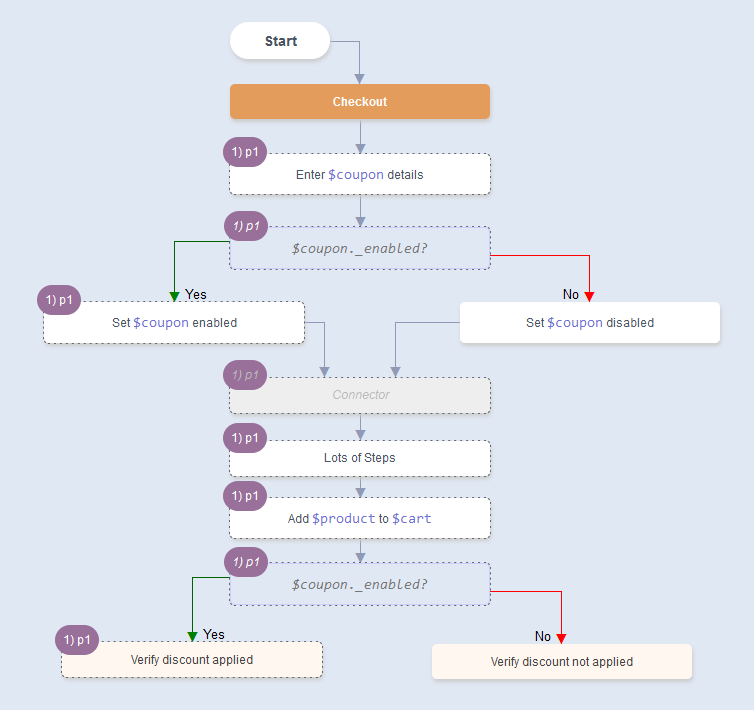
- Constant Attributes behave like Flags which guide the test flows along specific paths only. Constant Attributes are used in Condition nodes. Flowcharts will ensure that the conditions in a path’s nodes are consistent. If a path has conflicting conditions, that path will be considered invalid.
Branching
Section titled “Branching”In the example below, $coupon._enabled ensures that Verify discount applied is executed with Set $coupon enabled and NOT with Set $coupon disabled
State Attributes
Section titled “State Attributes”-
State Attributes look like
$user.existsor$user.registered. -
A State Attribute can change values in a test flow.
Eg.
AUser Registrationflow may start with$user.exists=falseand end with$user.exists=true
AnEnable Couponflow may start out with$coupon.enabled=falseand end with$coupon.enabled=true
And aDisable Couponflow may start out with$coupon.enabled=trueand end with$coupon.enabled=false -
The starting state of a State Attribute is enforced via a
Conditionnode. -
The ending state of a State Attribute is defined via an
Outcomenode.
State attributes are the basis for Precondition Matching in Flowcharts.
Next: Precondition Matching