

Test Suites
Group scenario files into a test suite (.dd.csv) to run them together, with tags, dependencies, values to pass, prerequisites and timeouts.
Running scenario files one at a time is slow, and it’s easy to forget one before a release. A test suite lists the scenario files to run together, so one run covers them all, in parallel or across machines.
A test suite is a .dd.csv file with one row for each scenario file.
Create a Test Suite
Section titled “Create a Test Suite”From the File menu:
- Choose File > New > Test Suite, or click + in the Navigator and choose Test Suite.
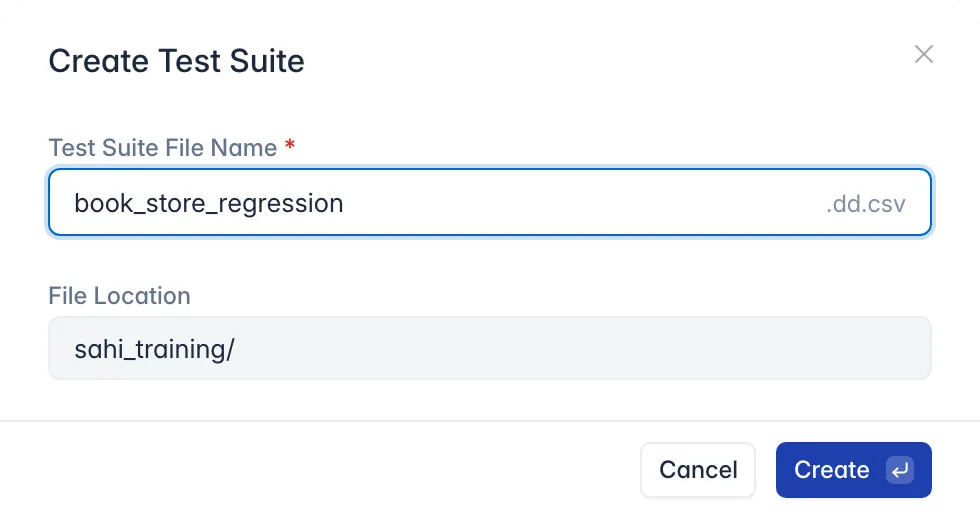
- Enter the Test Suite File Name, such as
book_store_regression, and click Create.
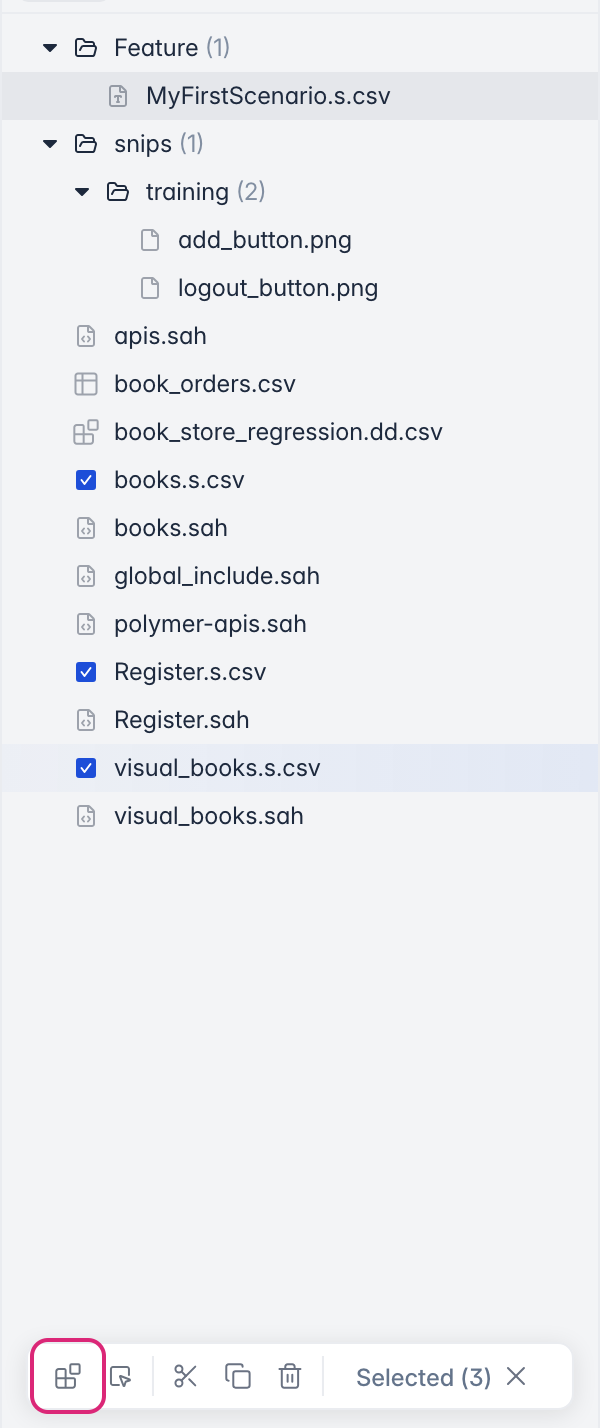
From scenario files you select: tick the scenario files in the Navigator, then click Test Suite in the bar that appears at the bottom. The new suite lists the files you ticked.
Add Scenario Files
Section titled “Add Scenario Files”The suite opens as a sheet. Its first row names the columns, and each row below it is a scenario file to run:
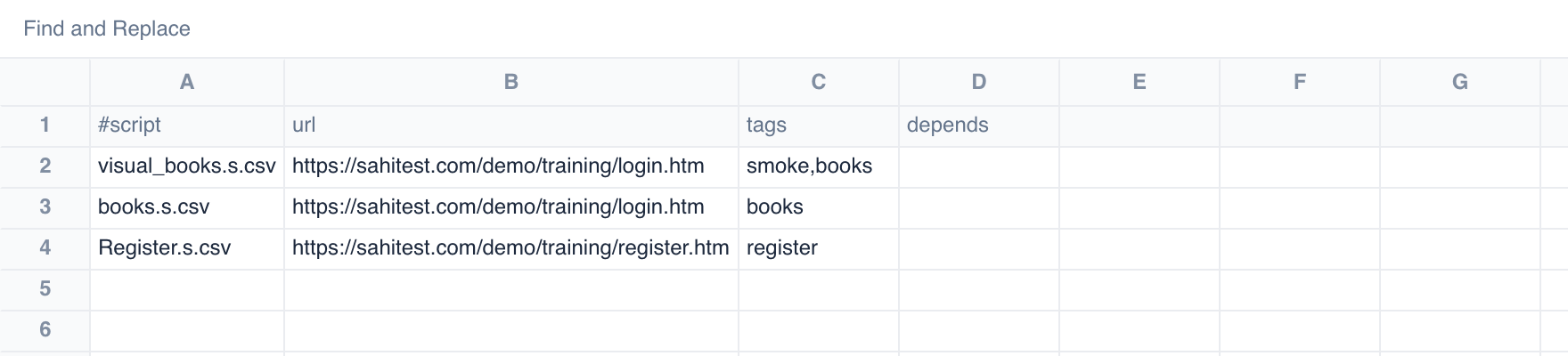
- #script: the scenario file, with its path from the suite’s folder.
- url: the page the scenario file starts on.
- tags: labels such as
smokeorbooks, separated by commas. In the Run Configuration, Filter by tags to run only some of the suite. - depends: a scenario file that has to pass before this one runs, such as
books.s.csv. Leave it empty if there’s none.
The sheet has the same toolbar and right-click options as a test data file. Save with Ctrl + S (⌘ + S on Mac), then select the suite and click Run (see Run Tests via Editor). For more columns, such as a timeout or values to pass to each scenario file, see Suite File Structure. For a walkthrough, see Run Tests in a Suite.
What a Suite Can Do
Section titled “What a Suite Can Do”A suite can:
- run scenario files, keyword files (
.sah), and other suites - pass values to each file it runs
- tag files, so a run can pick only the ones with some tags
- run a file only after others it depends on have finished, or passed
Suite File Structure
Section titled “Suite File Structure”| A | B | C | D | E | F | G | H | |
| 1 | #script | url | tags | depends | prerequisites | timeout_minutes | Argument1 | Argument2 |
| 2 | ScriptName.sah | StartURL | "tag1,tag2" | Browser | 5 | Argument1_Value | Argument2_Value | |
| 3 | ScriptName1.sah | StartURL | "tag1,tag2" | ScriptName.sah | Windows | 10 | Argument1_Value | Argument2_Value |
Structure Explained
Section titled “Structure Explained”ddcsv can be used to run the same script file with different sets of arguments. eg. invalidLogin.sah in the example above.
| A | B | C | D | E | F | G | H | |||
| 1 | #script | url | tags | depends | prerequisites | timeout_minutes | username | password | empId | Header Row |
| 2 | login.sah | http://sahi.co.in/demo/training/login.htm | user,high | Browser | 5 | test | secret | 12345 | ||
| 3 | invalidLogin.sah | http://sahi.co.in/demo/training/login.htm | user,medium | login.sah | Browser | 10 | test | s1234 | 46789 | |
| 4 | ||||||||||
| 5 | #script | url | tags | username | password | Header Row | ||||
| 6 | invalidLogin.sah | http://sahi.co.in/demo/training/login.htm | user,medium | aa | dd | |||||
| 7 | ||||||||||
| 8 | #script | Header Row | ||||||||
| 9 | scriptWithoutTags.sah | |||||||||
| 10 | ||||||||||
| 11 | #script | tags | depends | Header Row | ||||||
| 12 | parent.dd.csv | admin,high | ||||||||
| 13 | ddcsv.dd.csv | user | parent.dd.csv | |||||||
| 14 | suiteInsideddcsv.suite | admin,high | PREV |
-
Header Rows give Sahi an outline format about the coming rows. They start with #script. There are 4 predefined header values.
Header Meaning #script Signifies a new header row. The value under this column header is the name of the Sahi script to be run. url The start URL for the script tags Specifies the tags applicable to this script depends Specifies the scripts/suites/csv to which this scripts/suites/csv to be depended prerequisites Specifies the prerequisites required to run the script. Start mode is considered as one of the prerequisites for all the scripts specified in a suite. Any other values in a Header Row are considered data variable names. Eg. username, password and empId are considered variable names.
To explain line 2,
2 login.sah http://sahi.co.in/demo/training/login.htm user,high test secret 12345 login.sahwill be executed with start URLhttp://sahi.co.in/demo/training/login.htmwith variables$username = "test";$password = "secret";$empId = "12345"; -
For any script, if the argument name, number of arguments or the order of arguments needs to be changed, a new
#scriptrow needs to be added to specify the intended change to Sahi. This can be seen in line number 5, 8 and 11. eg. In line 3,A B C D E F G H 1 #script url tags depends prerequisites timeout_minutes username password empId Header Row 2 login.sah http://sahi.co.in/demo/training/login.htm user,high Browser 5 test secret 12345 3 invalidLogin.sah http://sahi.co.in/demo/training/login.htm user,medium login.sah Browser 10 test s1234 46789 4 5 #script url tags username password Header Row 6 invalidLogin.sah http://sahi.co.in/demo/training/login.htm user,medium aa dd invalidLogin.sah username, password and empId are needed where as empId is not passed in line 6. So we need to add line number 5 to inform Sahi regarding this change.
-
In line 9,
8 #script Header Row 9 scriptWithoutTags.sah we have simply passed a script file without any other information. In this case start url is the base url passed to this dd.csv file while running. The base URL is specified in testrunner.bat or drun.bat. Running dd.csv files has been covered in the next topic.
-
Suites, test_case csv, and other data driven suites can also be invoked from dd.csv file. This is shown in above table (rows 11-14).
11 #script tags depends Header Row 12 parent.dd.csv admin,high 13 ddcsv.dd.csv user parent.dd.csv:SUCCESS 14 suiteInsideddcsv.suite admin,high PREV:ANY -
tags,url,depends,prerequisitesand any variables passed to a ddcsv file get cascaded to all ddcsvs and scripts inside it. For example, all scripts/ddcsvs insideparent.dd.csvwill also be assignedadminandhightags -
dependsis used to specify the name of the scripts/suites/csv to which the current script/suite/csv is dependent and the status to which it needs to be depends. Eglogin.sah:SUCCESSThe current script/suite/csv will start executing only if all the dependent scripts/suites/csv have executed completely. The script can start to execute or be moved to SKIPPED status depending on what status it depends on. If the dependent status is SUCCESS and if any of the depended scripts/suites/csv is FAILED or ABORTED or SKIPPED the current script will be moved to SKIPPED status. If the dependent status is not specified, by default it depends on SUCCESS status.PREVcommand can be used instead of mentioning the immediate previous script/suite/csv name.script:ANYimplies the script will execute irrespective of the dependent status once the dependent execution is completed.Consider lines 12, 13 and 14, the parent.dd.csv:SUCCESS mentioned under depends column in line 13 indicate that the ddcsv.dd.csv is dependent on SUCCESS status of parent.dd.csv. So ddcsv.dd.csv will wait for the completion of parent.dd.csv and will start execution only if the status is SUCCESS. If any of the scripts inside parent.dd.csv is FAILED or ABORTED, ddcsv.dd.csv will not get executed and labeled as SKIPPED status. The
PREV:ANYcommand in the line 14 refers to ddcsv.dd.csv if the main suite executes with no tags. The suiteInsideddcsv.suite will start executing once ddcsv.dd.csv execution is completed irrespective of the status. If the main suite is executed with admin or high tag, thePREVcommand will be referred to parent.dd.csv as the ddcsv.dd.csv will not be considered for execution due to the tags mismatch. -
prerequisitesis used to specify the requirement of the script. In distributed suite runs, script will be run on that node only, which has all the specified capabilities to run the script.
Consider lines 2, login.sah requiresBROWSERandANDROIDmode to run the script.//Specify multiple modes for a particular script.//The script will run only on the node that has both Browser and Android automation enabled.Browser,Android15 #script tags prerequisites Header Row 16 login.sah admin,high Browser,Android //Specify multiple modes with the instances for a particular script.//The script will run only on the node with both Browser and Android automation enabled.//Here Android mode requires 2 device instances.Browser,Android:217 #script tags prerequisites Header Row 18 login.sah admin,high Browser,Android:2 //Specify multiple browsers with the instances for a particular script.//Here script requires 1 chrome instance and 2 firefox instances.//The script will be run on that node only, which has 1 chrome instance and 2 firefox instances capacity available to run the script.//The script execution will start with the default browser type.19 #script tags prerequisites Header Row 20 login.sah admin,high chrome:1,firefox:2 //specify the node tags.//here script will run only on the node with "windows10" tag.windows1021 #script tags prerequisites Header Row 22 login.sah admin,high windows10 -
timeout_minutesis used to specify the maximum duration the script/suite can run. Sahi aborts the script/suite once the time is up.
In the example, if login.sah did not finish in 5 minutes, Sahi will abort the script and mark it as ABORTED_TIMEOUT.Refer here to provide timeout for the whole suite execution.
Data Driven Suites with testcases
Section titled “Data Driven Suites with testcases”From Sahi Pro V6.2.0 onwards, along with three predefined header values (#script, url, tags) the testcases header is also recognized. Only those testcases which are specified in this column will run during the test run.
For example, test.dd.csv is a data driven suite.
| #script | url | tags | testcases |
|---|---|---|---|
| scenario.s.csv | https://sahitest.com/demo/ | auth | testLoginLogout |
| another.s.csv | https://sahitest.com/demo/ | admin |
Here’s how scenario.s.csv looks like.
| Comment | Tags | TestCase | Keyword | Argument1 | Argument2 | Argument3 |
|---|---|---|---|---|---|---|
| loadSahi | sample_lib.sah | |||||
| Simple test for adding books and verifying total | auth,bookspage | checkShoppingCartTotal | [Documentation] | Smoke test | ||
| login | test | secret | ||||
| addBooks | 3 | 2 | 1 | |||
| verifyTotal | 1650 | |||||
| logout | ||||||
| Test for login logout | auth | testLoginLogout | [Documentation] | Check Invalid | ||
| login | test | bad password | ||||
| logout |
Only testLoginLogout testcase will be run when the above test.dd.csv is executed. No other scripts or scenario files or testcases will be run.
Running Data Driven Suites
Section titled “Running Data Driven Suites”Data Driven Suites are run the same way as normal suites. They can be run from command prompt using testrunner or drun or ant the same way as .suite files are run. The steps to run a dd.csv file are mentioned below.
-
Open cmd prompt by clicking on the “bin” link on “Sahi Dashboard”.
-
Run the following cmd
testrunner sahitests/ddcsv/test.dd.csv http://sahi.co.in/demo/ ie "admin||medium"or for distributed run:
drun demo/ddcsv/test.dd.csv http://sahi.co.in/demo/ ie "admin||medium"The parameters passed in the above commands are explained below:
Parameter Description sahitests/ddcsv/test.dd.csv path and file name of Data Driven Suite http://sahi.co.in/demo/ Start URL ie browser on which the scripts will run “admin||medium” This specifies the tags and hence the scripts that need to be run. Here scipts on line 3,6,12,14 will run. Note: If the user specifies the last parameter as “admin&&medium” script files associated with BOTH the tags will run i.e. none of the scripts in the above example.
More information on suite execution via command line or through ant
Variable $isDataPassed and _isDataPassed()
Section titled “Variable $isDataPassed and _isDataPassed()”Along with user defined variables, Sahi passes a variable named $isDataPassed to the script with value true if user variables are passed to script.
$isDataPassed is useful during development of scripts which take arguments. When scripts are played back from Sahi Controller, arguments can not be passed to the script file. In such cases, default values of variables can be defined as given below.
if(typeof $isDataPassed == "undefined"){  // entered if executed from Controller  // NOT entered if run from dd.csv  $username = "default_name";  $password = "default_pwd";}
// or
if(!_isDataPassed()){  // entered if executed from Controller  // NOT entered if run from dd.csv  $username = "default_name";  $password = "default_pwd";}
A script with the above code behaves thus:
- if it is run from the Controller,
$isDataPassedwill beundefinedand_isDataPassed()will returnfalse. So theifblock will be executed and$usernameand$passwordwill be assigned"default_name"and"default_pwd"respectively. - if it is run from a
dd.csvfile,$isDataPassedand_isDataPassed()will betrue. So theifblock will not be executed.