

Run Tests via Maven
This section describes how to run tests from Apache Maven
Run Tests via Maven
Section titled “Run Tests via Maven”Pre-requisites
Section titled “Pre-requisites”Maven should be configured in your System Environment Variables, to verify type the following in a terminal or in a command prompt
mvn --version-
Create a new Maven project in Eclipse.
-
From the File menu, choose New, and then choose Project.
-
In the New Project window, choose Maven Project.
-
In the New Maven Project window, choose Create a simple project, and leave other default selections.
-
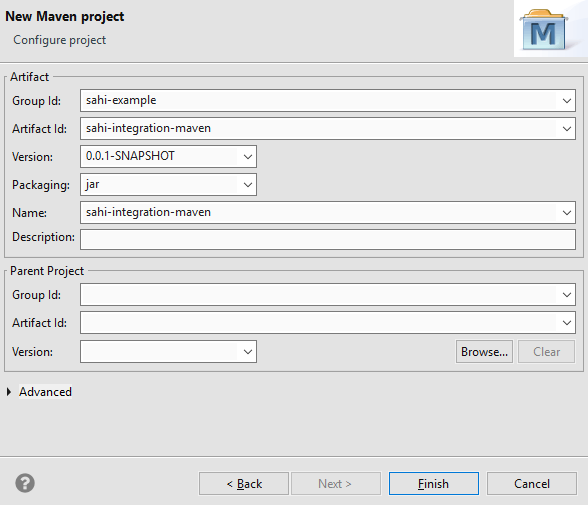
In the New Maven Project, Configure project windows, type the following Artifact information:
-
Group Id: sahi-example
-
Artifact Id: sahi-integration-maven
-
Version: 0.0.1-SNAPSHOT
-
Packaging: jar
-
Name: sahi-integration-maven
-
-
Click Finish
-
-
Add JDK to the project
-
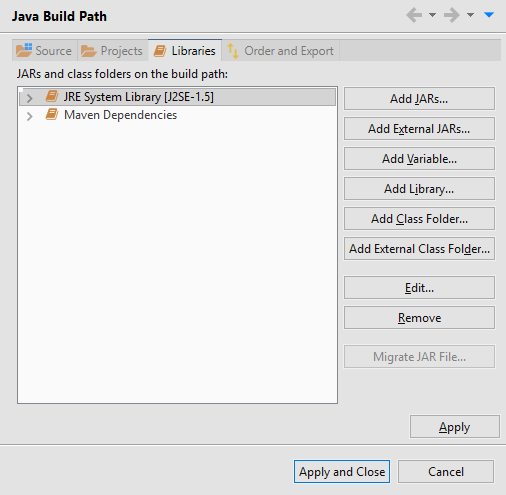
Open the context (right-click) menu for the Maven Project, choose Build Path, and then choose Configure Build Path.
-
In the Java Build Path windows, select JRE System Library under Libraries.
-
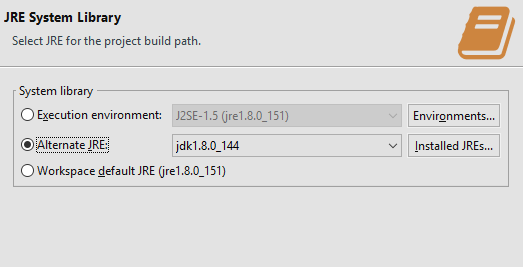
Click Edit then select Alternate JRE and browse JDK path installed in your System.
-
Click Finish
-
-
Edit the pom.xml from
<project xmlns="http://maven.apache.org/POM/4.0.0" xmlns:xsi="http://www.w3.org/2001/XMLSchema-instance"xsi:schemaLocation="http://maven.apache.org/POM/4.0.0 http://maven.apache.org/xsd/maven-4.0.0.xsd"><modelVersion>4.0.0</modelVersion><groupId>sahi-examples</groupId><artifactId>sahi-integration-example</artifactId><version>0.0.1-SNAPSHOT</version><name>sahi-integration-example</name></project>to
<project xmlns="http://maven.apache.org/POM/4.0.0" xmlns:xsi="http://www.w3.org/2001/XMLSchema-instance"xsi:schemaLocation="http://maven.apache.org/POM/4.0.0 http://maven.apache.org/xsd/maven-4.0.0.xsd"><modelVersion>4.0.0</modelVersion><groupId>sahi-examples</groupId><artifactId>sahi-integration-example</artifactId><version>0.0.1-SNAPSHOT</version><name>sahi-integration-example</name><build><plugins><plugin><artifactId>maven-antrun-plugin</artifactId><version>1.7</version><executions><execution><phase>generate-sources</phase><configuration><target name="target_to_be_executed"><ant dir="<SahiInstallationDir>" antfile="build.xml" /></target></configuration><goals><goal>run</goal></goals></execution></executions></plugin></plugins></build></project> -
Run : open the context (right-click) menu for the project, choose Run As, and then choose Maven generate-sources, Maven test etc.