

Restrict Remote Access to Sahi
Restrict which computers can use Sahi Pro as a master or node, change its settings or see its reports, by IP address and with a login.
Restrict Remote Access
Section titled “Restrict Remote Access”Configure IP addresses to Restrict Remote Access
Section titled “Configure IP addresses to Restrict Remote Access”Any computer on the network can reach a running Sahi Pro. To control which ones can use it, list IP addresses in allow and deny lists: sahi.xxx.remote_access.ip.allow and sahi.xxx.remote_access.ip.deny, in userdata/config/userdata_hidden.properties.
For all these properties
- Separate IPs with semi-colon.
- Wildcard * can be used for full ip address as well as each part(octet) of ip, * matches any sequence of number.
- square bracket can be used to match range for any part(octet) of IP.
e.g. 192.168.0.[0-255] matches any IP between 192.168.0.0 to 192.168.0.255 - PRIORITY: If same IP is entered in both “allow” and “deny” IP list, then priority will be given to “deny” IP list.
Follow the below instructions to use these properties.
-
sahi.master.remote_access.ip.allowandsahi.master.remote_access.ip.deny- Master: IPs specified here can access and use this machine as a Master.
- The master starts test runs on itself and on its nodes.
- The IP of the Initiator, or Jenkins machine should be in the allow list.
//Examples to allow the access//'*' remote master access is allowed for all IP address.sahi.master.remote_access.ip.allow=*;//'*' wildcard for last part (octet) of IP address is allowed for remote master access.sahi.master.remote_access.ip.allow=192.168.1.*;// remote master access is allowed only for 192.168.1.143.sahi.master.remote_access.ip.allow=192.168.1.143;// remote master access is allowed only for the range [0-255] of IP address.sahi.master.remote_access.ip.allow=192.168.1.[0-255];//Examples to deny the access//'*' all the Sahi is restricted for remote master access.sahi.master.remote_access.ip.deny=*;//'*' wildcard for last part (octet) of IP address is restricted for remote master access.sahi.master.remote_access.ip.deny=192.168.1.*;// restriction for remote master access is only for 192.168.1.143.sahi.master.remote_access.ip.deny=192.168.1.143;// restriction for remote master access is only for the range [0-255] of IP address.sahi.master.remote_access.ip.deny=192.168.1.[0-255]; -
sahi.slave.remote_access.ip.allowandsahi.slave.remote_access.ip.deny- Node: IPs specified here can use this machine as a node in distributed suite runs.
- The IP of the Master should be in the allow list.
//Examples to allow the access//'*' remote slave access is allowed for all IP address.sahi.slave.remote_access.ip.allow=*;//'*' wildcard for last part (octet) of IP address is allowed for remote slave access.sahi.slave.remote_access.ip.allow=192.168.1.*;// remote slave access is allowed only for 192.168.1.143.sahi.slave.remote_access.ip.allow=192.168.1.143;// remote slave access is allowed only for the range [0-255] of IP address.sahi.slave.remote_access.ip.allow=192.168.1.[0-255];//Examples to deny the access//'*' all the Sahi is restricted for remote slave access.sahi.slave.remote_access.ip.deny=*;//'*' wildcard for last part (octet) of IP address is restricted for remote slave access.sahi.slave.remote_access.ip.deny=192.168.1.*;// restriction for remote slave access is only for 192.168.1.143.sahi.slave.remote_access.ip.deny=192.168.1.143;// restriction for remote slave access is only for the range [0-255] of IP address.sahi.slave.remote_access.ip.deny=192.168.1.[0-255]; -
sahi.configuration.remote_access.ip.allowandsahi.configuration.remote_access.ip.deny- Configuration: IPs specified here can change configurations of Sahi on this machine.
- The IP of Manager or Master should be in the allow list.
//Examples to allow the access//'*' remote configuration access is allowed for all IP address.sahi.configuration.remote_access.ip.allow=*;//'*' wildcard for last part (octet) of IP address is allowed for remote configuration access.sahi.configuration.remote_access.ip.allow=192.168.1.*;// remote configuration access is allowed only for 192.168.1.143.sahi.configuration.remote_access.ip.allow=192.168.1.143;// remote configuration access is allowed only for the range [0-255] of IP address.sahi.configuration.remote_access.ip.allow=192.168.1.[0-255];//Examples to deny the access//'*' all the Sahi is restricted for remote configuration access.sahi.configuration.remote_access.ip.deny=*;//'*' wildcard for last part (octet) of IP address is restricted for remote configuration access.sahi.configuration.remote_access.ip.deny=192.168.1.*;// restriction for remote configuration access is only for 192.168.1.143.sahi.configuration.remote_access.ip.deny=192.168.1.143;// restriction for remote configuration access is only for the range [0-255] of IP address.sahi.configuration.remote_access.ip.deny=192.168.1.[0-255]; -
sahi.reports.remote_access.ip.allowandsahi.reports.remote_access.ip.deny- Reports: IPs specified here can access reports on this machine. This is needed on the machine which is configured as Central DB.
- IPs/IP ranges of machines of various business stake holders (developer, tester, manager etc.) can be added
- Reports profile does not impact on Reports syncing feature.
//Examples to allow the access//'*' remote reports access is allowed for all IP address.sahi.reports.remote_access.ip.allow=*;//'*' wildcard for last part (octet) of IP address is allowed for remote reports access.sahi.reports.remote_access.ip.allow=192.168.1.*;// remote reports access is allowed only for 192.168.1.143.sahi.reports.remote_access.ip.allow=192.168.1.143;// remote reports access is allowed only for the range [0-255] of IP address.sahi.reports.remote_access.ip.allow=192.168.1.[0-255];//Examples to deny the access//'*' all the Sahi is restricted for remote reports access.sahi.reports.remote_access.ip.deny=*;//'*' wildcard for last part (octet) of IP address is restricted for remote reports access.sahi.reports.remote_access.ip.deny=192.168.1.*;// restriction for remote reports access is only for 192.168.1.143.sahi.reports.remote_access.ip.deny=192.168.1.143;// restriction for remote reports access is only for the range [0-255] of IP address.sahi.reports.remote_access.ip.deny=192.168.1.[0-255]; -
sahi.reports_sync.remote_access.ip.allowandsahi.reports_sync.remote_access.ip.deny- Reports Sync: IPs specified here can sync their reports to this machine.
- This is needed on the machine which is configured as Central DB.
- The IP of Master should be in the allow list.
//Examples to allow the access//'*' All IP address can sync their reports to this machine.sahi.reports_sync.remote_access.ip.allow=*;//'*' wildcard for last part (octet) of IP address is allowed to sync their reports.sahi.reports_sync.remote_access.ip.allow=192.168.1.*;// Only 192.168.1.143 can sync its reports to this machine..sahi.reports_sync.remote_access.ip.allow=192.168.1.143;// All IPs address between 192.168.1.0 to 192.168.1.255 can sync their reports to this machine.sahi.reports_sync.remote_access.ip.allow=192.168.1.[0-255];//Examples to deny the access//'*' No IP address can sync their reports to this machine.sahi.reports_sync.remote_access.ip.deny=*;//'*' wildcard for last part (octet) of IP address is restricted to sync their reports.sahi.reports_sync.remote_access.ip.deny=192.168.1.*;// 192.168.1.143 can not sync its reports to this machine.sahi.reports_sync.remote_access.ip.deny=192.168.1.143;// All IPs address between 192.168.1.0 to 192.168.1.255 can not sync their reports to this machine.sahi.reports_sync.remote_access.ip.deny=192.168.1.[0-255]; -
sahi.mobile_execution.remote_access.ip.allowandsahi.mobile_execution.remote_access.ip.deny- Mobile Execution: IPs of Mobile Devices specified here can use this machine as their Sahi proxy.
- This is needed for Mobile Web automation on Mobile device.
//Examples to allow the access//'*' IPs of all Mobile Devices can use this machine as their Sahi proxy.sahi.mobile_execution.remote_access.ip.allow=*;//'*' wildcard for last part (octet) of IP address is allowed for remote proxy access.sahi.mobile_execution.remote_access.ip.allow=192.168.1.*;// remote proxy access is allowed only for 192.168.1.143.sahi.mobile_execution.remote_access.ip.allow=192.168.1.143;// remote proxy access is allowed only for the range [0-255] of IP address.sahi.mobile_execution.remote_access.ip.allow=192.168.1.[0-255];//Examples to deny the access//'*' IPs of any Mobile Devices can not use this machine as their Sahi proxy.sahi.mobile_execution.remote_access.ip.deny=*;//'*' wildcard for last part (octet) of IP address is restricted for remote proxy access.sahi.mobile_execution.remote_access.ip.deny=192.168.1.*;// restriction for remote proxy access is only for 192.168.1.143.sahi.mobile_execution.remote_access.ip.deny=192.168.1.143;//restriction for remote proxy access is only for the range [0-255] of IP address.sahi.mobile_execution.remote_access.ip.deny=192.168.1.[0-255]; -
sahi.remote_access.ip- Full Remote Access: This property will make all the Sahi features (master, node, configuration, reports and mobile execution etc.) available to given IPs. This overrides all other settings for the specified IPs.
- Do not put the IPs here for which any/ some of the Sahi features needs to be denied.
Require a Login
Section titled “Require a Login”Anyone who can reach Sahi Pro from another computer could change its settings or read its reports. A login stops that. It doesn’t affect distributed suite runs.
-
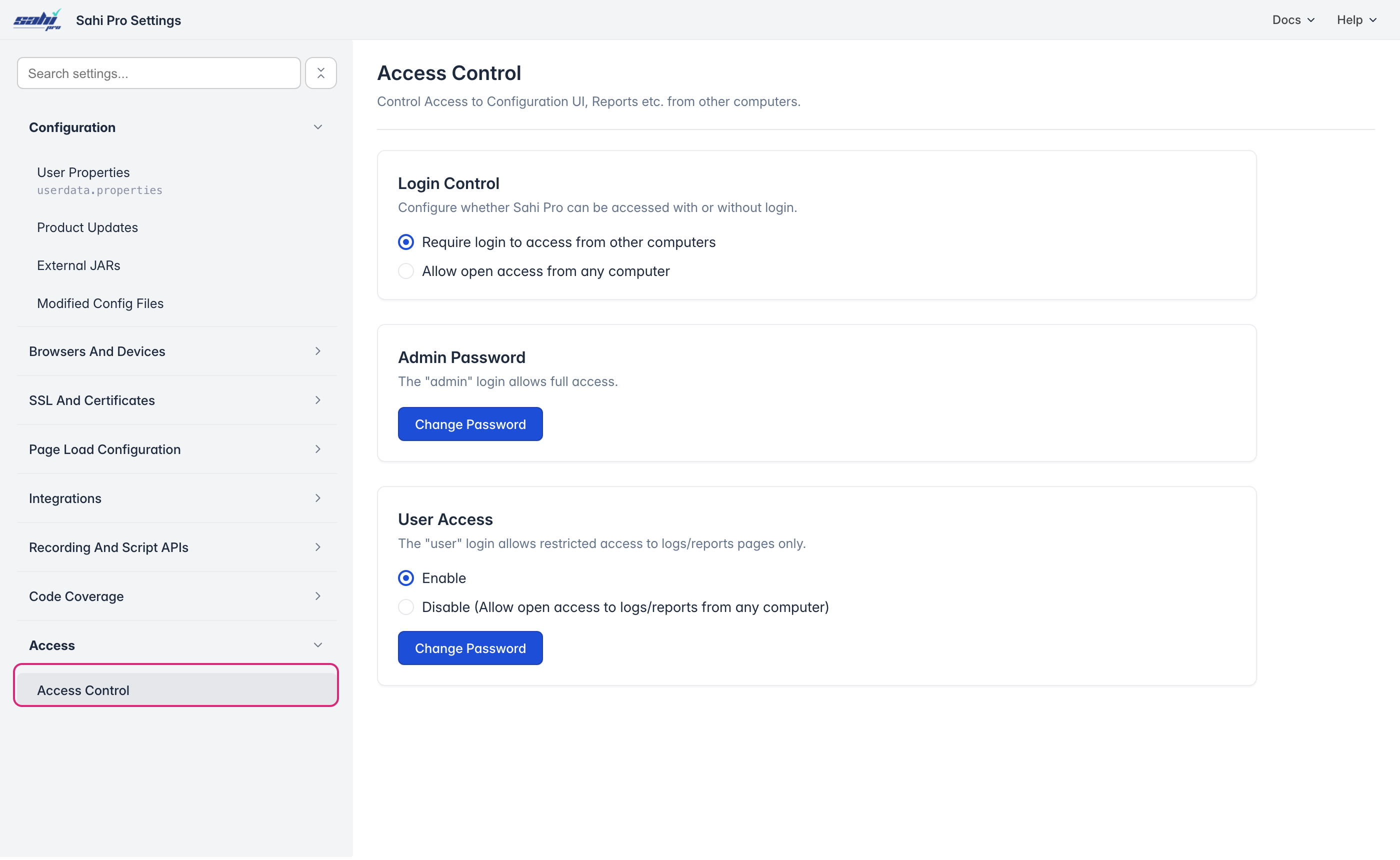
On the Dashboard, click All Settings › Sahi Pro Settings, then Access › Access Control.
-
Under Login Control, choose Require login to access from other computers.
-
Under Admin Password, click Change Password. The admin login has full access: it can change settings, and sync and delete reports.
-
Under User Access, choose Enable to let the user login see reports only, or Disable to let any computer open reports without a login. Click Change Password to set its password.
The default passwords are admin for admin and password for user. Change them.
Sign In from Another Computer
Section titled “Sign In from Another Computer”When someone opens a restricted page of Sahi Pro from another computer, Sahi Pro asks them to sign in with the admin or user login. They have to sign in again after Sahi Pro restarts on the host machine.