





Playback via Gradle
abstract
This section describes playing back Sahi scripts via Gradle build tool.
Playback on a single machine
One can now use the Editor Playback UI to generate the Gradle script automatically. Refer here for details on the UI.- Choose the
Run in paralleloption. - Click the
Create Gradle Script (Groovy)orCreate Gradle Script (Kotlin)button
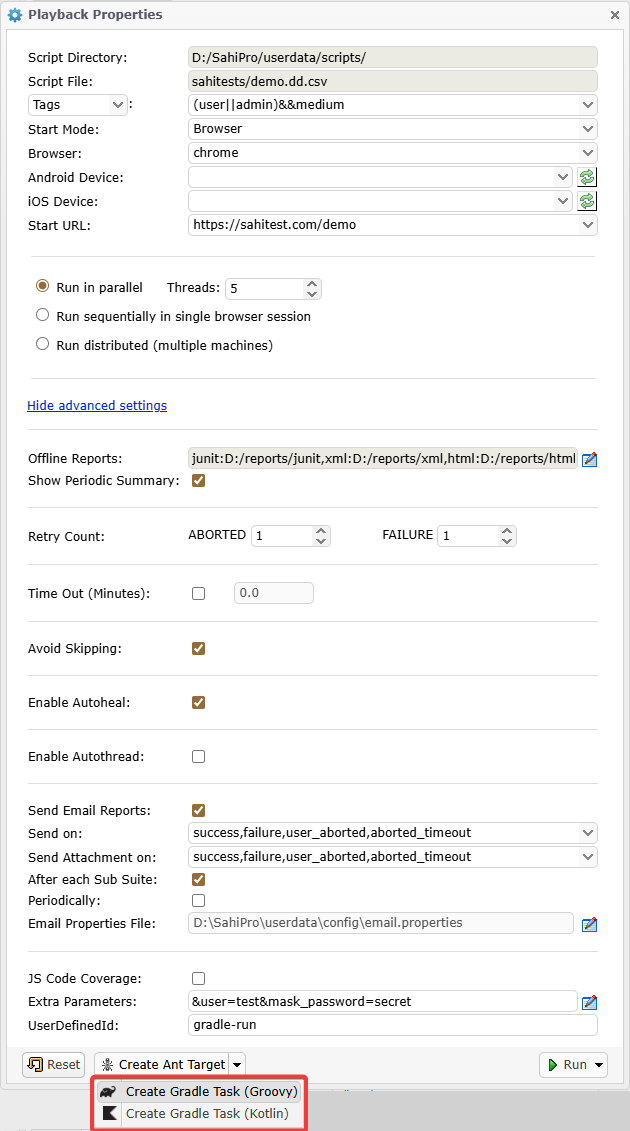 This will generate the contents of a Gradle script file. If you wish to add a Retry task as well, click on the
 Add Retry Task button on the next window.
Once the Gradle script content is generated, copy the content to an empty file.
If groovy was selected for gradle script, save the file as build.gradle, and for Kotlin, save the file as build.gradle.kts in your
<SAHI_INSTALLATION_FOLDER>.
You can now run the default task in the gradle script file as
gradleinfo
By default Gradle suppresses the info logs generated by Sahi.
To view these logs execute the script using
gradle --info or,
create a file named gradle.properties alongside build.gradle and add this line:
org.gradle.logging.level=infoinfo
When running large suites, you may face heap overflow issues gradle. This can be resolved by increasing the heap size of gradle.
eg., to set heap size to 2048MB
NOTE: The main target - run gradle with
gradle -Dorg.gradle.jvmargs=-Xmx2048m - create a file named
gradle.propertiesalongsidebuild.gradleand add this line:org.gradle.jvmargs=-Xmx2048m
runsahitests is the default target, so you do not need to specify the target when running the xml.
The above UI would generate a gradle script that looks like the following.
# groovy
apply plugin: 'base'
apply plugin: 'java'

buildscript {
    repositories {
        flatDir name: 'localRepository', dirs: 'lib'
    }
    dependencies {
        classpath ':ant-sahi'
    }
}

import net.sf.sahi.util.BuildUtils
import java.text.DateFormat
import java.text.SimpleDateFormat

static def getFormattedDateTime() {
    DateFormat df = new SimpleDateFormat("yyyy_MM_dd__HH_mm_ss", new Locale("en", "IN"))
    return df.format(new Date())
}

tasks.register("set_timestamp") {
    group = "Sahi"
    description = "Set timestamp"

    extensions.add("timestamp", getFormattedDateTime())
}

tasks.register("setpropertieschrome") {
    group = "Sahi"
    description = "Initialize properties for run"
    dependsOn "set_timestamp"

    def ts = tasks.named("set_timestamp").get().timestamp
    def browser = "chrome"
    def scriptDir = "D:/SahiPro/userdata/scripts/"

    def props = [

		threads: "5",
		abortedRetryCount: "1",
		failureRetryCount: "2",
		isAvoidSkipping: "true",
		isAutohealEnabled: "true",
		suiteTimeOut: "0.0",
		failedSuiteName: "demo_failed_${browser}.dd.csv",
		browser: "chrome",
		baseurl: "https://sahitest.com/demo",
		jsCodeCoverage: "false",
		autoThread: "false",
		scriptDir: "${scriptDir}",
		scriptsPathMaster: "${scriptDir}",
		suite: "sahitests/demo.dd.csv",
		sendemailForSubSuite: "true",
		sendemailperiodically: "false",
		sendemailperiodicallytime: "",
		port: "9999",
		extraParam: "user=test;mask_password=secret;",
		host: "localhost",
		sendemail: "true",
		emailtrigger: "",
		emailattachment: "",
		emailproperties: "D:\\SahiPro\\userdata\\config\\email.properties",
		emailPasswordHidden: "true",
		tags: "(user||admin)&&medium",
		testcases: "",
		userDefinedId: "gradle-run",
		reports: "junit,xml:D:/reports/xml,html:D:/reports/html",
		singlesession: "false",
		showPeriodicSummary: "true",
		failedSuite: "sahitests/demo_failed_${browser}.dd.csv",
		failedSuiteName: "demo_failed_${browser}.dd.csv",
		startWith: "BROWSER",
		testcaseFailureRetryCount: "0",
		testcaseAbortedRetryCount: "0"
    ]

    project.ext.propschrome = props
}

def buildUtils_chrome = new BuildUtils()
tasks.register("runtestschrome") {
    group = "Sahi"
    description = "Run tests on chrome browser"
    dependsOn "setpropertieschrome"

    def props_chrome_provider = project.provider {project.ext.propschrome}

    doLast {
        def properties = props_chrome_provider.get() as HashMap

        def argsMap = [:]

        properties.each {key,value ->
            argsMap.put(key as String, value as String)
        }
        argsMap.put("reports", "junit,xml:D:/reports/xml,html:D:/reports/html")

        def status = buildUtils_chrome.execute(argsMap , true)

        println "runtestschrome STATUS: ${status}"

        runtestschrome.ext.status = status
    }
    finalizedBy "retrytestschrome"
}

tasks.register("retrytestschrome") {
    group = "Sahi"
    description = "Retry failed scripts on chrome Browser"
    dependsOn "setpropertieschrome"

    onlyIf {
        runtestschrome.ext.status != "SUCCESS"
    }

    def props_chrome_provider = project.provider {project.ext.propschrome}

    doLast {
        def properties = props_chrome_provider.get() as HashMap

        def argsMap = [:]

        properties.each {key,value ->
            argsMap.put(key as String, value as String)
        }
        argsMap.put("reports", "junit,xml:D:/reports/xml/retry,html:D:/reports/html/retry")

        def status = buildUtils_chrome.retry(argsMap)

        println "retrytestschrome STATUS: ${status}"

        if (!"SUCCESS".equalsIgnoreCase(status)) {
            throw new GradleException("sahi retry tests failed on browser ${properties.browser} with status ${status}")
        }
    }
}

tasks.register("runsahitests") {
    group = "Sahi"
    description = "Run all tests"
    dependsOn "runtestschrome"
}

defaultTasks 'runsahitests'
# kotlin
import net.sf.sahi.util.BuildUtils
import java.text.DateFormat
import java.text.SimpleDateFormat
import java.util.Locale
import java.util.Date
plugins {
id ("base")
id("java")
}
buildscript {
dependencies {
classpath(files("lib/ant-sahi.jar"))
}
}
fun getFormattedDateTime(): String {
val df = SimpleDateFormat("yyyy_MM_dd__HH_mm_ss", Locale.of("en", "IN"))
return df.format(Date())
}
tasks.register("settimestamp") {
group = "Sahi"
description = "Set timestamp"
extensions.add("timestamp", getFormattedDateTime())
}
val propschrome: MapProperty<String, String> = project.objects.mapProperty(String::class.java, String::class.java)
tasks.register("setpropertieschrome") {
group = "Sahi"
description = "Initialize properties for run"
dependsOn("settimestamp")
val ts = tasks.named("settimestamp").get().extensions.findByName("timestamp")
val browser = "chrome"
val scriptDir = "D:/SahiPro/userdata/scripts/"
val props = mutableMapOf(
"threads" to "5",
"abortedRetryCount" to "1",
"failureRetryCount" to "2",
"isAvoidSkipping" to "true",
"isAutohealEnabled" to "true",
"suiteTimeOut" to "0.0",
"failedSuiteName" to "demo_failed_${browser}.dd.csv",
"browser" to "chrome",
"baseurl" to "https://sahitest.com/demo",
"jsCodeCoverage" to "false",
"autoThread" to "false",
"scriptDir" to "${scriptDir}",
"scriptsPathMaster" to "${scriptDir}",
"suite" to "sahitests/demo.dd.csv",
"sendemailForSubSuite" to "true",
"sendemailperiodically" to "false",
"sendemailperiodicallytime" to "",
"port" to "9999",
"extraParam" to "user=test;mask_password=secret;",
"host" to "localhost",
"sendemail" to "true",
"emailtrigger" to "",
"emailattachment" to "",
"emailproperties" to "D:\\SahiPro\\userdata\\config\\email.properties",
"emailPasswordHidden" to "true",
"tags" to "(user||admin)&&medium",
"testcases" to "",
"userDefinedId" to "gradle-run",
"reports" to "junit,xml:D:/reports/xml,html:D:/reports/html",
"singlesession" to "false",
"showPeriodicSummary" to "true",
"failedSuite" to "sahitests/demo_failed_${browser}.dd.csv",
"failedSuiteName" to "demo_failed_${browser}.dd.csv",
"startWith" to "BROWSER",
"testcaseFailureRetryCount" to "0",
"testcaseAbortedRetryCount" to "0"
)
propschrome.set(props)
}
val buildUtils_chrome = BuildUtils()
tasks.register("runtestschrome") {
group = "Sahi"
description = "Run tests on chrome browser"
dependsOn("setpropertieschrome")
doLast {
val properties = propschrome.get()
val argsMap = mutableMapOf<String, String>()
properties.forEach { (key: String, value: String) ->
argsMap.put(key, value)
}
argsMap.put("reports", "junit,xml:D:/reports/xml,html:D:/reports/html")
val status = buildUtils_chrome.execute(argsMap , true)
println("runtestschrome STATUS: ${status}")
project.extra.set("runtestschromestatus", status)
}
finalizedBy("retrytestschrome")
}
tasks.register("retrytestschrome") {
group="Sahi"
description="Retry failed scripts on chrome browser"
dependsOn("setpropertieschrome")
onlyIf {
!(project.extra.get("runtestschromestatus") as String).equals("SUCCESS", ignoreCase=true)
}
doLast {
val properties = propschrome.get()
val argsMap = mutableMapOf<String, String>()
properties.forEach { (key: String, value: String) ->
argsMap.put(key as String, value as String)
}
argsMap["suite"] = argsMap["failedSuite"] ?: ""
argsMap.put("reports", "junit,xml:D:/reports/xml/retry,html:D:/reports/html/retry")
val status = buildUtils_chrome.retry(argsMap)
println("retrytestschrome STATUS: ${status}")
if (!"SUCCESS".equals(status, ignoreCase = true)) {
throw GradleException("sahi retry tests failed on browser ${properties.get("browser")} with status ${status}")
}
}
}
tasks.register("runsahitests") {
group = "Sahi"
description = "run all tests"
dependsOn("runtestschrome")
}
defaultTasks("runsahitests")info
If you choose the
Run sequentially in single browser session option, singlesession attribute would be set to true. Everything else remains the same.
danger
NOTE:
The above Gradle script is for illustration purposes only. Use the Editor UI to generate the gradle script content and save it to a file in your
Let us look at the important attributes used in the gradle task (specified in bold above).
<SAHI_INSTALLATION_FOLDER>.
Attributes and their description
info
gradle classpath is relative to where gradle is invoked from.
| scriptDir | Specifies the path to the scripts folder. Can be the absolute path or a path relative to the userdata folder |
| scriptName | Relative path to the script/suite/data driven suite. It is relative to scriptDir. |
| browser | The browser on which the suite file plays back |
| baseurl | Specifies URL which is the starting URL for all the scripts in the suite |
| host | Hostname of the server where Sahi is running (Can be IP as well) |
| port | Port on which Sahi is running |
| threads | Number of simultaneous browser instances on which sahi tests will be run. |
| singlesession | Since this is a parallel run, it will be "false". If "true", runs all scripts in a single browser without closing it between scripts. |
| showPeriodicSummary | Takes "true" or "false". If "true", a periodic summary of script status is logged in the Gradle Console. |
| isAutohealEnabled | Takes "true" or "false". If "true", allows scripts to pick element using Sahi auto intelligence when element provided in script is not found. Refer Autoheal section for more details. |
| sendemail | Takes "true" or "false". If "true", Sahi sends an email summarizing the playback. |
| emailtrigger | Takes "success" or "failure" or "success,failure". Triggers email in case of SUCCESS, FAILURE and both cases respectively. |
| emailproperties | Path to the properties file that contains details about the mail viz. information about the sender, receiver, host, port, subject, content etc. Path can be the absolute path or relative to where this gradle task is run from. |
| sendemailperiodically | Takes "true" or "false". If "true", Sahi will send emails periodically till the suite run is complete. |
| sendemailperiodicallytime | Specifies the interval in minutes at which periodic emails are to be sent. |
| failedSuiteName | Name of the failed suite. It is of the form <suitename>_failed_<browser>.suite. |
| failedsuite | Relative path to the failed suite. It is relative to scriptDir. |
| tags | Tags should be specified only for dd.csv and .csv suites. Tags are specified so that it is easy to choose which scripts/testcases to run. eg. in the target above, all the scripts which have 'medium' tag and 'admin' or 'user' (or both) tag will be run. |
| userdefinedid | The unique id that the user can pass to differentiate a suite from others. This is an optional attribute. |
| extraParam | Custom fields can be passed to the scripts using the extraParam attribute. More than one custom field can be passed, by specifying additional customfield entries. Replace the custom field keys and values as appropriate. This is an optional attribute. |
| reports | Sahi can set offline logs to be generated in xml, html, junit, pdf and excel types. The default type is html. Add separate entries for each report type as required. This is an optional attribute. |
gradleDistributed playback via Gradle
Distributed playback can be achieved through Gradle script as well.These targets can be used from Jenkins to distribute the scripts of a suite on multiple machines.
The machine which distributes the scripts and manages the distributed run is referred to as the
Master. All logs are visible from the Master. The other machines are called Slaves. Any machine in the distributed environment can serve as the Master. The machine which launches the distributed run is referred to as the Initiator.
Distributed run on the same Master
Use the Editor Playback UI to generate the Gradle script content.In the Editor Playback UI,
- Choose
Run distributed (multiple machines)option. - Leave the
Use Different Mastercheckbox unchecked. - Click the
Create Gradle Script (Groovy)orCreate Gradle Script (Kotlin)button
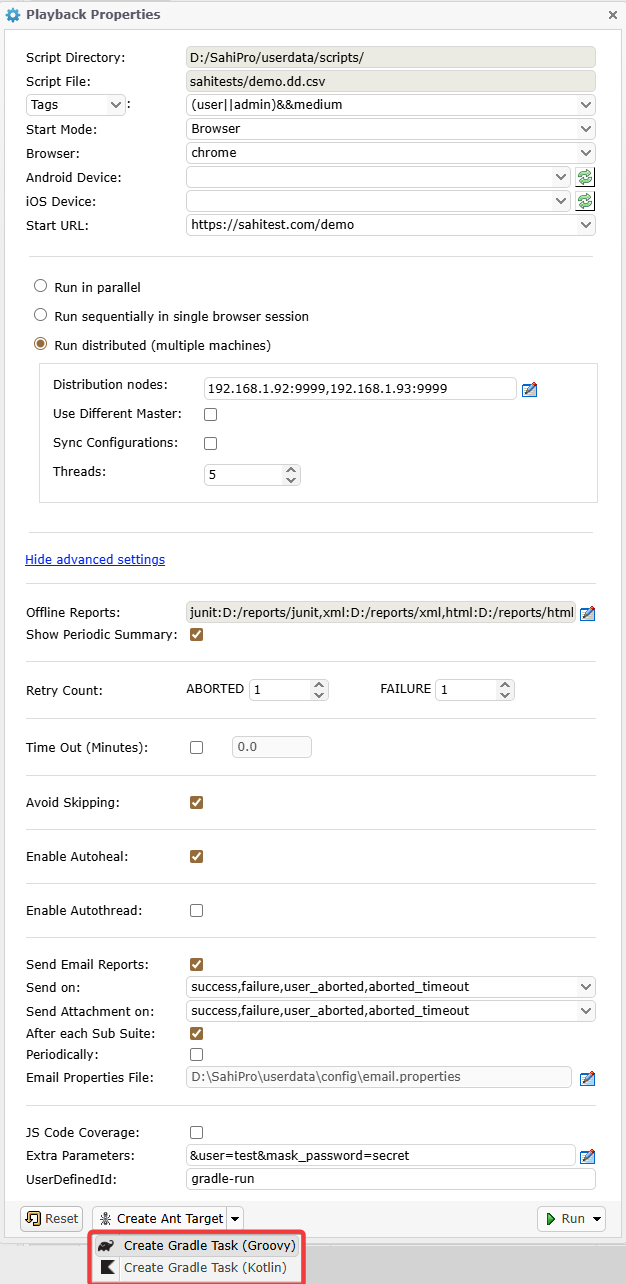 This will generate the contents of a Gradle script file. If you wish to add a Retry task as well, click on the
 Add Retry Task button on the next window.
Once the gradle script is generated, copy the content to an empty file and save it to a file in your
<SAHI_INSTALLATION_FOLDER>.
You can now run the default task in the gradle script as
gradleNOTE: The main task is the default task, so you do not need to specify the task when running the xml.
The above UI would generate a gradle script that looks like the following.
#groovy

apply plugin: 'base'
apply plugin: 'java'

buildscript {
    repositories {
        flatDir name: 'localRepository', dirs: 'lib'
    }
    dependencies {
        classpath ':ant-sahi'
    }
}

import net.sf.sahi.util.BuildUtils
import java.text.DateFormat
import java.text.SimpleDateFormat

static def getFormattedDateTime() {
    DateFormat df = new SimpleDateFormat("yyyy_MM_dd__HH_mm_ss", new Locale("en", "IN"))
    return df.format(new Date())
}

tasks.register("set_timestamp") {
    group = "Sahi"
    description = "Set timestamp"

    extensions.add("timestamp", getFormattedDateTime())
}

tasks.register("setpropertieschrome") {
    group = "Sahi"
    description = "Initialize properties for run"
    dependsOn "set_timestamp"

    def ts = tasks.named("set_timestamp").get().timestamp
    def browser = "chrome"
    def scriptDir = "D:/SahiPro/userdata/scripts/"

    def props = [

		isDRun: "true",
		threads: "5",
		abortedRetryCount: "1",
		failureRetryCount: "2",
		isAvoidSkipping: "true",
		isAutoHealEnabled: "true",
		suiteTimeOut: "0.0",
		failedSuiteName: "demo_failed_${browser}.dd.csv",
		browser: "chrome",
		baseurl: "https://sahitest.com/demo",
		jsCodeCoverage: "false",
		autoThread: "false",
		scriptDir: "${scriptDir}",
		scriptsPathMaster: "${scriptDir}",
		suite: "sahitests/demo.dd.csv",
		thresendemailForSubSuiteads: "true",
		sendemailperiodically: "false",
		sendemailperiodicallytime: "",
		port: "9999",
		extraParam: "user=test;mask_password=secret;",
		host: "localhost",
		sendemail: "true",
		emailtrigger: "",
		emailattachment: "",
		emailproperties: "D:\\SahiPro\\userdata\\config\\email.properties",
		emailPasswordHidden: "true",
		tags: "(user||admin)&&medium",
		testcases: "",
		userDefinedId: "gradle-run",
		reports: "junit,xml:D:/reports/xml,html:D:/reports/html",
		singlesession: "false",
		showPeriodicSummary: "true",
		tfailedSuitehreads: "sahitests/demo_failed_${browser}.dd.csv",
		failedSuiteName: "demo_failed_${browser}.dd.csv",
		startWith: "BROWSER",
		testcaseFailureRetryCount: "0",
		testcaseAbortedRetryCount: "0",
		nodes: "192.168.1.92:9999,192.168.1.93:9999"
    ]

    project.ext.propschrome = props
}

def buildUtils_chrome = new BuildUtils()
tasks.register("runtestschrome") {
    group = "Sahi"
    description = "Run tests on chrome browser"
    dependsOn "setpropertieschrome"

    def props_chrome_provider = project.provider {project.ext.propschrome}

    doLast {
        def properties = props_chrome_provider.get() as HashMap

        def argsMap = [:]

        properties.each {key,value ->
            argsMap.put(key as String, value as String)
        }
        argsMap.put("reports", "junit,xml:D:/reports/xml,html:D:/reports/html")

        def status = buildUtils_chrome.execute(argsMap , true)
        println "runtestschrome STATUS: ${status}"
        runtestschrome.ext.status = status
    }

    finalizedBy "retrytestschrome"
}

tasks.register("retrytestschrome") {
    group = "Sahi"
    description = "Retry failed scripts on chrome Browser"
    dependsOn "setpropertieschrome"

    onlyIf {
        runtestschrome.ext.status != "SUCCESS"
    }

    def props_chrome_provider = project.provider {project.ext.propschrome}

    doLast {
        def properties = props_chrome_provider.get() as HashMap

        def argsMap = [:]

        properties.each {key,value ->
            argsMap.put(key as String, value as String)
        }

        argsMap["suite"] = argsMap["failedSuite"]
        argsMap.put("reports", "junit,xml:D:/reports/xml/retry,html:D:/reports/html/retry")

        def status = buildUtils_chrome.retry(argsMap)

        println "retrytestschrome STATUS: ${status}"

        if (!"SUCCESS".equalsIgnoreCase(status)) {
            throw new GradleException("sahi retry tests failed on browser ${properties.browser} with status ${status}")
        }
    }
}

tasks.register("runsahitests") {
    group = "Sahi"
    description = "Run all tests"
    dependsOn "runtestschrome"
}

defaultTasks 'runsahitests'
# Kotlin
import net.sf.sahi.util.BuildUtils
import java.text.DateFormat
import java.text.SimpleDateFormat
import java.util.Locale
import java.util.Date
plugins {
id ("base")
id("java")
}
buildscript {
dependencies {
classpath(files("lib/ant-sahi.jar"))
}
}
fun getFormattedDateTime(): String {
val df = SimpleDateFormat("yyyy_MM_dd__HH_mm_ss", Locale.of("en", "IN"))
return df.format(Date())
}
tasks.register("settimestamp") {
group = "Sahi"
description = "Set timestamp"
extensions.add("timestamp", getFormattedDateTime())
}
val propschrome: MapProperty<String, String> = project.objects.mapProperty(String::class.java, String::class.java)
tasks.register("setpropertieschrome") {
group = "Sahi"
description = "Initialize properties for run"
dependsOn("settimestamp")
val ts = tasks.named("settimestamp").get().extensions.findByName("timestamp")
val browser = "chrome"
val scriptDir = "D:/SahiPro/userdata/scripts/"
val props = mutableMapOf(
"isDRun" to "true",
"threads" to "5",
"abortedRetryCount" to "1",
"failureRetryCount" to "2",
"isAvoidSkipping" to "true",
"isAutoHealEnabled" to "true",
"suiteTimeOut" to "0.0",
"failedSuiteName" to "demo_failed_${browser}.dd.csv",
"browser" to "chrome",
"baseurl" to "https://sahitest.com/demo",
"jsCodeCoverage" to "false",
"autoThread" to "false",
"scriptDir" to "${scriptDir}",
"scriptsPathMaster" to "${scriptDir}",
"suite" to "sahitests/demo.dd.csv",
"thresendemailForSubSuiteads" to "true",
"sendemailperiodically" to "false",
"sendemailperiodicallytime" to "",
"port" to "9999",
"extraParam" to "user=test;mask_password=secret;",
"host" to "localhost",
"sendemail" to "true",
"emailtrigger" to "",
"emailattachment" to "",
"emailproperties" to "D:\\SahiPro\\userdata\\config\\email.properties",
"emailPasswordHidden" to "true",
"tags" to "(user||admin)&&medium",
"testcases" to "",
"userDefinedId" to "gradle-run",
"reports" to "junit,xml:D:/reports/xml,html:D:/reports/html",
"singlesession" to "false",
"showPeriodicSummary" to "true",
"tfailedSuitehreads" to "sahitests/demo_failed_${browser}.dd.csv",
"failedSuiteName" to "demo_failed_${browser}.dd.csv",
"startWith" to "BROWSER",
"testcaseFailureRetryCount" to "0",
"testcaseAbortedRetryCount" to "0",
"nodes" to "192.168.1.92:9999,192.168.1.93:9999"
)
propschrome.set(props)
}
val buildUtils_chrome = BuildUtils()
tasks.register("runtestschrome") {
group = "Sahi"
description = "Run tests on chrome browser"
dependsOn("setpropertieschrome")
doLast {
val properties = propschrome.get()
val argsMap = mutableMapOf<String, String>()
properties.forEach { (key: String, value: String) ->
argsMap.put(key, value)
}
argsMap.put("reports", "junit,xml:D:/reports/xml,html:D:/reports/html")
val status = buildUtils_chrome.execute(argsMap , true)
println("runtestschrome STATUS: ${status}")
project.extra.set("runtestschromestatus", status)
}
finalizedBy("retrytestschrome")
}
tasks.register("retrytestschrome") {
group="Sahi"
description="Retry failed scripts on chrome browser"
dependsOn("setpropertieschrome")
onlyIf {
!(project.extra.get("runtestschromestatus") as String).equals("SUCCESS", ignoreCase=true)
}
doLast {
val properties = propschrome.get()
val argsMap = mutableMapOf<String, String>()
properties.forEach { (key: String, value: String) ->
argsMap.put(key as String, value as String)
}
argsMap["suite"] = argsMap["failedSuite"] ?: ""
argsMap.put("reports", "junit,xml:D:/reports/xml/retry,html:D:/reports/html/retry")
val status = buildUtils_chrome.retry(argsMap)
println("retrytestschrome STATUS: ${status}")
if (!"SUCCESS".equals(status, ignoreCase = true)) {
throw GradleException("sahi retry tests failed on browser ${properties.get("browser")} with status ${status}")
}
}
}
tasks.register("runsahitests") {
group = "Sahi"
description = "run all tests"
dependsOn("runtestschrome")
}
defaultTasks("runsahitests")danger
NOTE:
The above Gradle Script is for illustration purposes only. Use the Editor UI to generate the Gradle script content and save it to a file in your
Let us look at the important attributes used in the Gradle task (specified in bold above).
<SAHI_INSTALLATION_FOLDER>.
Attributes and their description
info
Gradle script classpath is relative to where gradle is invoked from.
| scriptDir | Specifies the path to the scripts folder. Can be the absolute path or a path relative to the userdata folder |
| host | Hostname of the server where Sahi is running (Can be IP as well). Leave this as localhost |
| port | Port on which Sahi is running |
| scriptName | Relative path to the script/suite/data driven suite. It is relative to scriptDir. |
| browser | The browser on which the suite file plays back |
| threads | Number of simultaneous browser instances on which sahi tests will be run. |
| showPeriodicSummary | Takes "true" or "false". If "true", a periodic summary of script status is logged in the Gradle Console. |
| isAutohealEnabled | Takes "true" or "false". If "true", allows scripts to pick element using Sahi auto intelligence when element provided in script is not found. Refer Autoheal section for more details. |
| baseurl | Specifies URL which is the starting URL for all the scripts in the suite |
| sendemail | Takes "true" or "false". If "true", Sahi sends an email summarizing the playback. |
| emailtrigger | Takes "success" or "failure" or "success,failure". Triggers email in case of SUCCESS, FAILURE and both cases respectively. |
| emailproperties | Path to the properties file that contains details about the mail viz. information about the sender, receiver, host, port, subject, content etc. Path can be the absolute path or relative to where this gradle task is run from. |
| sendemailperiodically | Takes "true" or "false". If "true", Sahi will send emails periodically till the suite run is complete. |
| sendemailperiodicallytime | Specifies the interval in minutes at which periodic emails are to be sent. |
| failedSuiteName | Name of the failed suite. It is of the form <suitename>_failed_<browser>.suite. |
| failedsuite | Relative path to the failed suite. It is relative to scriptDir. |
| tags | Tags should be specified only for dd.csv and .csv suites. Tags are specified so that it is easy to choose which scripts/testcases to run. eg. in the target above, all the scripts which have 'medium' tag and 'admin' or 'user' (or both) tag will be run. |
| userdefinedid | The unique id that the user can pass to differentiate a suite from others. This is an optional attribute. |
| nodes | nodes specify the machines on which the tests should run. Add as many node entries as there are machines to run. The nodes may or may not include the Master machine (localhost). If the Master machine is not included, scripts will not be run on the Master. There can be 1 or more nodes.
|
| extraParam | Custom fields can be passed to the scripts using the extraParam attribute. More than one custom field can be passed, by specifying additional customfield entries. Replace the custom field keys and values as appropriate. This is an optional attribute. |
| reports | Sahi can set offline logs to be generated in xml, html, junit, tm6 and excel types. The default type is html. Add separate entries for each report type as required. This is an optional attribute. |
gradleDistributed run on a different Master
Use the Editor Playback UI to generate the gradle script.In the Editor Playback UI,
- Choose
Run distributed (multiple machines)option. - Check the
Use Different Mastercheckbox and choose the Master details. - Click the
Create Gradle Script (Groovy)orCreate Gradle Script (Kotlin)button.
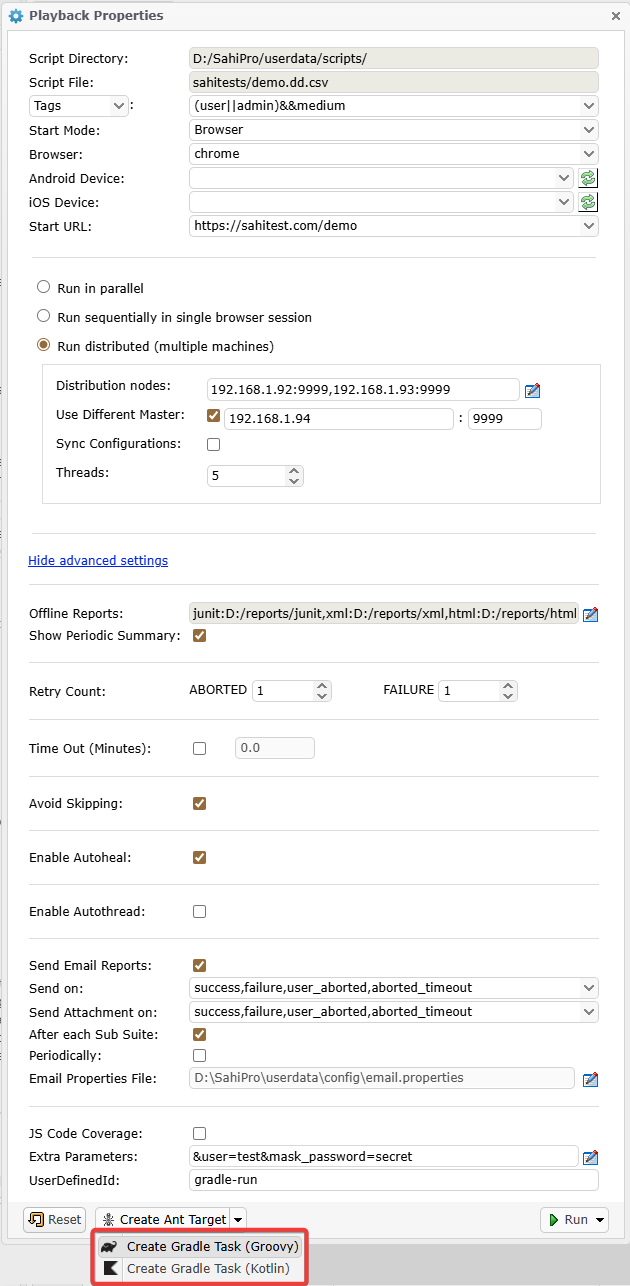 This will generate the contents of a gradle script. If you wish to add a Retry task as well, click on the
 Add Retry Task button on the next window.
Once the gradle script is generated, copy the content to an empty file and save the file in your
<SAHI_INSTALLATION_FOLDER>.
You can now run the default task in the gradle script as
gradleNOTE: The main task is the default task, so you do not need to specify the task when running the gradle script.
The above UI would generate a gradle script that looks like the following.
# groovy

apply plugin: 'base'
apply plugin: 'java'

buildscript {
    repositories {
        flatDir name: 'localRepository', dirs: 'lib'
    }
    dependencies {
        classpath ':ant-sahi'
    }
}

import net.sf.sahi.util.BuildUtils
import java.text.DateFormat
import java.text.SimpleDateFormat

static def getFormattedDateTime() {
    DateFormat df = new SimpleDateFormat("yyyy_MM_dd__HH_mm_ss", new Locale("en", "IN"))
    return df.format(new Date())
}

tasks.register("set_timestamp") {
    group = "Sahi"
    description = "Set timestamp"

    extensions.add("timestamp", getFormattedDateTime())
}

tasks.register("setpropertieschrome") {
    group = "Sahi"
    description = "Initialize properties for run"
    dependsOn "set_timestamp"

    def ts = tasks.named("set_timestamp").get().timestamp
    def browser = "chrome"
    def scriptDir = "D:/SahiPro/userdata/scripts/"

    def props = [

		isDRun: "true",
		isDifferentMaster: "true",
		threads: "5",
		abortedRetryCount: "1",
		failureRetryCount: "2",
		isAvoidSkipping: "true",
		isAutoHealEnabled: "true",
		suiteTimeOut: "0.0",
		failedSuiteName: "demo_failed_${browser}.dd.csv",
		browser: "chrome",
		baseurl: "https://sahitest.com/demo",
		jsCodeCoverage: "false",
		autoThread: "false",
		scriptDir: "${scriptDir}",
		scriptsPathInitiator: "${scriptDir}",
		scriptsPathMaster: "temp/scripts/staging/${ts}_${browser}",
		suite: "sahitests/demo.dd.csv",
		sendemailForSubSuite: "true",
		sendemailperiodically: "false",
		sendemailperiodicallytime: "",
		extraParam: "user=test;mask_password=secret;",
		sahiport: "9999",
		sahihost: "192.168.1.94",
		sendemail: "true",
		emailtrigger: "",
		emailattachment: "",
		emailproperties: "D:\\SahiPro\\userdata\\config\\email.properties",
		emailPasswordHidden: "true",
		tags: "(user||admin)&&medium",
		testcases: "",
		userDefinedId: "gradle-run",
		reports: "",
		singlesession: "false",
		showPeriodicSummary: "true",
		failedSuite: "sahitests/demo_failed_${browser}.dd.csv",
		failedSuiteName: "demo_failed_${browser}.dd.csv",
		startWith: "BROWSER",
		testcaseFailureRetryCount: "0",
		testcaseAbortedRetryCount: "0",
		nodes: "192.168.1.92:9999,192.168.1.93:9999"
    ]

    project.ext.propschrome = props
}

def buildUtils_chrome = new BuildUtils()
tasks.register("runtestschrome") {
    group = "Sahi"
    description = "Run tests on chrome browser"
    dependsOn "setpropertieschrome"

    def props_chrome_provider = project.provider {project.ext.propschrome}

    doLast {
        def ts = tasks.named("set_timestamp").get().timestamp
        def properties = props_chrome_provider.get() as HashMap

        def argsMap = [:]

        properties.each {key,value ->
            argsMap.put(key as String, value as String)
        }
        argsMap.put("reports", "junit:logs/temp/junit/${ts},xml:logs/temp/xml/${ts},html:logs/temp/html/${ts}".toString())

        def syncParams = [
            originFolder: argsMap.scriptsPathInitiator,
            destFolder: argsMap.scriptsPathMaster,
            ignorePattern: argsMap.ignorePattern,
            suitePath: argsMap.scriptsPathInitiator + "/" + argsMap.suite,
            csvSeparator: ",",
            scriptExtensions: "sah;sahi;js;ar.csv",
            scenarioExtensions: ".s.csv;xls;xlsx",
            javaDir: "java",
            exposedJavaClasses: "exposed_classes.txt",
            isSyncConfig: argsMap.isSyncConfig,
            configPath: argsMap.configPath,
            isAutohealEnabled: argsMap.isAutohealEnabled
        ]
        BuildUtils.syncSuiteToMaster(false, argsMap.sahihost, argsMap.sahiport, syncParams);

        def status = buildUtils_chrome.execute(argsMap , true)
        println "runtestschrome STATUS: ${status}"

        def deleteParams = [
            scriptDir: argsMap.scriptsPathInitiator,
            filePath: argsMap.scriptsPathMaster,
            isAutohealEnabled: argsMap.isAutohealEnabled,
            isSyncConfig: argsMap.isSyncConfig
        ]
        BuildUtils.deleteSuiteFromMasterStaging(argsMap.sahihost, argsMap.sahiport, deleteParams)
        def logs = [
            file("logs/junit").absolutePath, "D:/reports/xml", "D:/reports/html"
        ]
        BuildUtils.pullOfflineLogsFromMaster(argsMap.sahihost, argsMap.sahiport, argsMap.ignorePattern, logs, argsMap.reports)

        runtestschrome.ext.status = status
    }

    finalizedBy "retrytestschrome"
}

tasks.register("retrytestschrome") {
    group = "Sahi"
    description = "Retry failed scripts on chrome Browser"
    dependsOn "setpropertieschrome"

    onlyIf {
        runtestschrome.ext.status != "SUCCESS"
    }

    def props_chrome_provider = project.provider {project.ext.propschrome}

    doLast {
        def ts = tasks.named("set_timestamp").get().timestamp
        def properties = props_chrome_provider.get() as HashMap

        def argsMap = [:]

        properties.each {key,value ->
            argsMap.put(key as String, value as String)
        }

        argsMap["scriptsPathMaster"] = "${argsMap["scriptsPathMaster"]}_retry".toString()
        argsMap["suite"] = argsMap["failedSuite"]
        argsMap.put("reports", "junit:logs/temp/junit/${ts}/retry,xml:logs/temp/xml/${ts}/retry,html:logs/temp/html/${ts}/retry".toString())

        def syncParams = [
            originFolder: argsMap.scriptsPathInitiator,
            destFolder: argsMap.scriptsPathMaster,
            ignorePattern: argsMap.ignorePattern,
            suitePath: argsMap.scriptsPathInitiator + "/" + argsMap.suite,
            csvSeparator: ",",
            scriptExtensions: "sah;sahi;js;ar.csv",
            scenarioExtensions: ".s.csv;xls;xlsx",
            javaDir: "java",
            exposedJavaClasses: "exposed_classes.txt",
            isSyncConfig: argsMap.isSyncConfig,
            configPath: argsMap.configPath,
            isAutohealEnabled: argsMap.isAutohealEnabled
        ]
        BuildUtils.syncSuiteToMaster(false, argsMap.sahihost, argsMap.sahiport, syncParams);

        def status = buildUtils_chrome.retry(argsMap)
        println "retrytestschrome STATUS: ${status}"

        def deleteParams = [
            scriptDir: argsMap.scriptsPathInitiator,
            filePath: argsMap.scriptsPathMaster,
            isAutohealEnabled: argsMap.isAutohealEnabled,
            isSyncConfig: argsMap.isSyncConfig
        ]
        BuildUtils.deleteSuiteFromMasterStaging(argsMap.sahihost, argsMap.sahiport, deleteParams)
        def logs = [
            file("logs/junit/retry").absolutePath, "D:/reports/xml/retry", "D:/reports/html/retry"
        ]
        BuildUtils.pullOfflineLogsFromMaster(argsMap.sahihost, argsMap.sahiport, argsMap.ignorePattern, logs, argsMap.reports)

        if (!"SUCCESS".equalsIgnoreCase(status)) {
            throw new GradleException("sahi retry tests failed on browser ${properties.browser} with status ${status}")
        }
    }
}

tasks.register("runsahitests") {
    group = "Sahi"
    description = "Run all tests"
    dependsOn "runtestschrome"
}

defaultTasks 'runsahitests'
# kotlin
import net.sf.sahi.util.BuildUtils
import java.text.DateFormat
import java.text.SimpleDateFormat
import java.util.Locale
import java.util.Date
plugins {
id ("base")
id("java")
}
buildscript {
dependencies {
classpath(files("lib/ant-sahi.jar"))
}
}
fun getFormattedDateTime(): String {
val df = SimpleDateFormat("yyyy_MM_dd__HH_mm_ss", Locale.of("en", "IN"))
return df.format(Date())
}
tasks.register("settimestamp") {
group = "Sahi"
description = "Set timestamp"
extensions.add("timestamp", getFormattedDateTime())
}
val propschrome: MapProperty<String, String> = project.objects.mapProperty(String::class.java, String::class.java)
tasks.register("setpropertieschrome") {
group = "Sahi"
description = "Initialize properties for run"
dependsOn("settimestamp")
val ts = tasks.named("settimestamp").get().extensions.findByName("timestamp")
val browser = "chrome"
val scriptDir = "D:/SahiPro/userdata/scripts/"
val props = mutableMapOf(
"isDRun" to "true",
"isDifferentMaster" to "true",
"threads" to "5",
"abortedRetryCount" to "1",
"failureRetryCount" to "2",
"isAvoidSkipping" to "true",
"isAutoHealEnabled" to "true",
"suiteTimeOut" to "0.0",
"failedSuiteName" to "demo_failed_${browser}.dd.csv",
"browser" to "chrome",
"baseurl" to "https://sahitest.com/demo",
"jsCodeCoverage" to "false",
"autoThread" to "false",
"scriptDir" to "${scriptDir}",
"scriptsPathInitiator" to "${scriptDir}",
"scriptsPathMaster" to "temp/scripts/staging/${ts}_${browser}",
"suite" to "sahitests/demo.dd.csv",
"sendemailForSubSuite" to "true",
"sendemailperiodically" to "false",
"sendemailperiodicallytime" to "",
"extraParam" to "user=test;mask_password=secret;",
"sahiport" to "9999",
"sahihost" to "192.168.1.94",
"sendemail" to "true",
"emailtrigger" to "",
"emailattachment" to "",
"emailproperties" to "D:\\SahiPro\\userdata\\config\\email.properties",
"emailPasswordHidden" to "true",
"tags" to "(user||admin)&&medium",
"testcases" to "",
"userDefinedId" to "gradle-run",
"reports" to "",
"singlesession" to "false",
"showPeriodicSummary" to "true",
"failedSuite" to "sahitests/demo_failed_${browser}.dd.csv",
"failedSuiteName" to "demo_failed_${browser}.dd.csv",
"startWith" to "BROWSER",
"testcaseFailureRetryCount" to "0",
"testcaseAbortedRetryCount" to "0",
"nodes" to "192.168.1.92:9999,192.168.1.93:9999"
)
propschrome.set(props)
}
val buildUtils_chrome = BuildUtils()
tasks.register("runtestschrome") {
group = "Sahi"
description = "Run tests on chrome browser"
dependsOn("setpropertieschrome")
doLast {
val ts = tasks.named("settimestamp").get().extensions.findByName("timestamp")
val properties = propschrome.get()
val argsMap = mutableMapOf<String, String>()
properties.forEach { (key: String, value: String) ->
argsMap.put(key, value)
}
argsMap.put("reports", "junit:logs/temp/junit/${ts},xml:logs/temp/xml/${ts},html:logs/temp/html/${ts}".toString())
val syncParams = mutableMapOf(
"originFolder" to "${argsMap["scriptsPathInitiator"]}",
"destFolder" to "${argsMap["scriptsPathMaster"]}",
"ignorePattern" to "${argsMap["ignorePattern"]}",
"suitePath" to "${argsMap["scriptsPathInitiator"]}/${argsMap["suite"]}",
"csvSeparator" to ",",
"scriptExtensions" to "sah;sahi;js;ar.csv",
"scenarioExtensions" to ".s.csv;xls;xlsx",
"javaDir" to "java",
"exposedJavaClasses" to "exposed_classes.txt",
"isSyncConfig" to "${argsMap["isSyncConfig"]}",
"configPath" to "${argsMap["configPath"]}",
"isAutohealEnabled" to "${argsMap["isAutohealEnabled"]}"
)
BuildUtils.syncSuiteToMaster(false, argsMap["sahihost"], argsMap["sahiport"], syncParams);
val status = buildUtils_chrome.execute(argsMap , true)
println("runtestschrome STATUS: ${status}")
val deleteParams = mutableMapOf(
"scriptDir" to "${argsMap["scriptsPathInitiator"]}",
"filePath" to "${argsMap["scriptsPathMaster"]}",
"isAutohealEnabled" to "${argsMap["isAutohealEnabled"]}",
"isSyncConfig" to "${argsMap["isSyncConfig"]}"
)
BuildUtils.deleteSuiteFromMasterStaging(argsMap["sahihost"], argsMap["sahiport"], deleteParams)
val logs = arrayOf(
file("logs/junit").absolutePath, "D:/reports/xml", "D:/reports/html"
).toMutableList()
BuildUtils.pullOfflineLogsFromMaster(argsMap["sahihost"], argsMap["sahiport"], argsMap["ignorePattern"], logs, argsMap["reports"])
project.extra.set("runtestschromestatus", status)
}
finalizedBy("retrytestschrome")
}
tasks.register("retrytestschrome") {
group="Sahi"
description="Retry failed scripts on chrome browser"
dependsOn("setpropertieschrome")
onlyIf {
!(project.extra.get("runtestschromestatus") as String).equals("SUCCESS", ignoreCase=true)
}
doLast {
val ts = tasks.named("settimestamp").get().extensions.findByName("timestamp")
val properties = propschrome.get()
val argsMap = mutableMapOf<String, String>()
properties.forEach { (key: String, value: String) ->
argsMap.put(key as String, value as String)
}
argsMap["scriptsPathMaster"] = "${argsMap["scriptsPathMaster"]}_retry".toString()
argsMap["suite"] = argsMap["failedSuite"] ?: ""
argsMap.put("reports", "junit:logs/temp/junit/${ts}/retry,xml:logs/temp/xml/${ts}/retry,html:logs/temp/html/${ts}/retry".toString())
val syncParams = mutableMapOf(
"originFolder" to "${argsMap["scriptsPathInitiator"]}",
"destFolder" to "${argsMap["scriptsPathMaster"]}",
"ignorePattern" to "${argsMap["ignorePattern"]}",
"suitePath" to "${argsMap["scriptsPathInitiator"]}/${argsMap["suite"]}",
"csvSeparator" to ",",
"scriptExtensions" to "sah;sahi;js;ar.csv",
"scenarioExtensions" to ".s.csv;xls;xlsx",
"javaDir" to "java",
"exposedJavaClasses" to "exposed_classes.txt",
"isSyncConfig" to "${argsMap["isSyncConfig"]}",
"configPath" to "${argsMap["configPath"]}",
"isAutohealEnabled" to "${argsMap["isAutohealEnabled"]}"
)
BuildUtils.syncSuiteToMaster(false, argsMap["sahihost"], argsMap["sahiport"], syncParams);
val status = buildUtils_chrome.retry(argsMap)
println("retrytestschrome STATUS: ${status}")
val deleteParams = mutableMapOf(
"scriptDir" to "${argsMap["scriptsPathInitiator"]}",
"filePath" to "${argsMap["scriptsPathMaster"]}",
"isAutohealEnabled" to "${argsMap["isAutohealEnabled"]}",
"isSyncConfig" to "${argsMap["isSyncConfig"]}"
)
BuildUtils.deleteSuiteFromMasterStaging(argsMap["sahihost"], argsMap["sahiport"], deleteParams)
val logs = arrayOf(
file("logs/junit/retry").absolutePath, "D:/reports/xml/retry", "D:/reports/html/retry"
).toMutableList()
BuildUtils.pullOfflineLogsFromMaster(argsMap["sahihost"], argsMap["sahiport"], argsMap["ignorePattern"], logs, argsMap["reports"])
if (!"SUCCESS".equals(status, ignoreCase = true)) {
throw GradleException("sahi retry tests failed on browser ${properties.get("browser")} with status ${status}")
}
}
}
tasks.register("runsahitests") {
group = "Sahi"
description = "run all tests"
dependsOn("runtestschrome")
}
defaultTasks("runsahitests")danger
NOTE:
The above Gradle script is for illustration purposes only. Use the Editor UI to generate the gradle script and save it to a file.
Let us look at the important attributes used in the gradle task (specified in bold above).
Attributes and their description
info
Gradle script classpath is relative to where gradle is invoked from.
| scriptDir | Specifies the path to the scripts folder on the Initiator machine. This can be an absolute path or a path relative to where Gradle is run from |
| sahihost | Hostname of the different Master server where Sahi is running (Can be IP as well) |
| sahiport | Port on which Sahi is running |
| scriptName | Relative path to the script/suite/data driven suite. It is relative to scriptDir. |
| browser | The browser on which the suite file plays back |
| baseurl | Specifies URL which is the starting URL for all the scripts in the suite |
| threads | Number of simultaneous browser instances on which sahi tests will be run. |
| showPeriodicSummary | Takes "true" or "false". If "true", a periodic summary of script status is logged in the Gradle Console. |
| isAutohealEnabled | Takes "true" or "false". If "true", allows scripts to pick element using Sahi auto intelligence when element provided in script is not found. Refer Autoheal section for more details. |
| sendemail | Takes "true" or "false". If "true", Sahi sends an email summarizing the playback. |
| emailtrigger | Takes "success" or "failure" or "success,failure". Triggers email in case of SUCCESS, FAILURE and both cases respectively. |
| emailproperties | Path to the properties file that contains details about the mail viz. information about the sender, receiver, host, port, subject, content etc. Path can be the absolute path or relative to where this gradle task is run from. |
| sendemailperiodically | Takes "true" or "false". If "true", Sahi will send emails periodically till the suite run is complete. |
| sendemailperiodicallytime | Specifies the interval in minutes at which periodic emails are to be sent. |
| failedSuiteName | Name of the failed suite. It is of the form <suitename>_failed_<browser>.suite. |
| failedsuite | Relative path to the failed suite. It is relative to scriptDir. |
| tags | Tags should be specified only for dd.csv and .csv suites. Tags are specified so that it is easy to choose which scripts/testcases to run. eg. in the target above, all the scripts which have 'medium' tag and 'admin' or 'user' (or both) tag will be run. |
| userdefinedid | The unique id that the user can pass to differentiate a suite from others. This is an optional attribute. |
| nodes | nodes attribute specify the machines on which the tests should run. Add as many node entries as there are machines to run. The nodes may or may not include the Master machine. If the Master machine is not included, scripts will not be run on the Master. There can be 1 or more nodes.
|
| extraParam | Custom fields can be passed to the scripts using the extraParam attribute. More than one custom field can be passed, by specifying additional customfield entries. Replace the custom field keys and values as appropriate. This is an optional attribute. |
| reports | Sahi can set offline logs to be generated in xml, html, junit, tm6 and excel types. The default type is html. Add separate entries for each report type as required. This is an optional attribute. |
gradleAbility to register Nodes externally (from Sahi Pro V6.1.0)
It is now possible to register a new Node for a currently running distributed run.Using registerNodes.bat/registerNodes.sh
- Open a command prompt and cd to sahi/userdata/bin (or click on the "Bin" link on the Sahi Dashboard)
- Run register_nodes.bat to see the syntax
D:\sahi_pro\userdata\bin>register_nodes.bat -- Usage: register_nodes.bat <extnodes> <userDefinedId> <suiteId> - extnodes is a comma separated string of host:port combos, example: "machine1:9999,machine2:9999". If multiple nodes are specified, enclose them in double quotes. - userDefinedId is the User defined Id specified while running the original suite - suiteId is the SuiteId of the running suite, and can be found from Suite Info section in the Suite Report log - NOTE: Only one of suiteId or userDefinedId is required. If both suiteId and userDefinedId are passed, suiteId will be used to identify the running suite. -- Example: 1. Registering one machine using userDefinedId (say abc1234). register_nodes.bat machine1:9999 abc1234 2. Registering more than one machine using userDefinedId. register_nodes.bat "machine1:9999,machine2:9999" abc1234 3. Registering one machine using suiteId (say sahi_a0ba301605a8f04cb10881e0ddcd96f9dfbd). NOTE: Some value HAS to be passed for the second parameter - userDefinedId. Pass "". register_nodes.bat machine1:9999 "" sahi_a0ba301605a8f04cb10881e0ddcd96f9dfbd 4. Registering more than one machine using suiteId. NOTE: Some value HAS to be passed for the second parameter - userDefinedId. Pass "". register_nodes.bat "machine1:9999,machine2:9999" "" sahi_a0ba301605a8f04cb10881e0ddcd96f9dfbd -- D:\sahi_pro\userdata\bin>
-
Nodes can be registered for a currently running suite. The suite can be specified either using userDefinedId or suiteId. If both are specified, suiteId will be used. suiteId for the current run can be found from the
Suite Infosection of the Suite report logs.-
To register using userDefinedId, use something like the following
register_nodes.bat "192.168.1.100:9999,192.168.1.101:9999" myUserDefinedIdinfo Multiple nodes can be specified using comma separator. If more than one node is specified, use double quotes for the nodes.Note that these values are indicative. Please use your own values. -
To register using suiteId, use something like the following
register_nodes.bat "192.168.1.100:9999,192.168.1.101:9999" "" sahi_a0ba301605a8f04cb10881e0ddcd96f9dfbdinfoNote that these values are indicative. Please use your own values.- Pass "" as the second parameter for userDefinedId.
- Multiple nodes can be specified using comma separator. If more than one node is specified, use double quotes for the nodes.
-
To register using userDefinedId, use something like the following
gradle registernodes -Phost=<mastername> -Pport=<masterport> -PsuiteId=<suiteId> -PuserDefinedId=<userDefinedId> -Pnodes="<nodes>"Parameters and their description
| host | Hostname of the Master where Sahi is running (Can be IP as well). |
| port | Port on which Sahi is running |
| userDefinedId | UserDefinedId specified while running the original suite |
| suiteId | SuiteId of the running suite. Get this value from the Suite Info section of the Suite Report logs |
| nodes | Comma-separated list of host:node combos. Specify one entry each for every node that you want to register. |
info
Specify either userDefinedId or suiteId. If both are specified, suiteId will be used.
info
This task is only avaiable in Gradle scripts for drun and drun with different master
Killing a running script/suite
warning
WARNING: Killing a suite (or all running suites) in the middle of a run is not a routine task. You would kill a suite only if something went wrong and you wish to stop the suite execution.
Stop All from the Editor can be used to kill all running scripts/suites.
This is possible through Gradle task as well.
This Gradle task gives the ability to kill a specific running suite or kill all the running suites.
gradle kill -Phost=<masterhost> -Pport=<masterport> -PsuiteId=<suiteId> -PuserDefinedId=<userDefinedId>Parameters and their description
| sahihost | Hostname of the Master where Sahi is running (Can be IP as well). |
| sahiport | Port on which Sahi is running |
| userDefinedId | UserDefinedId specified while running the original suite |
| suiteId | SuiteId of the running suite. Get this value from the Suite Info section of the Suite Report logs |
info
- If neither suiteId nor userDefinedId is specified, all running suites on this Master will be killed.
- If you wish to kill a specific suite, use suiteId or userDefinedId. If both are specified, suiteId would be used.